
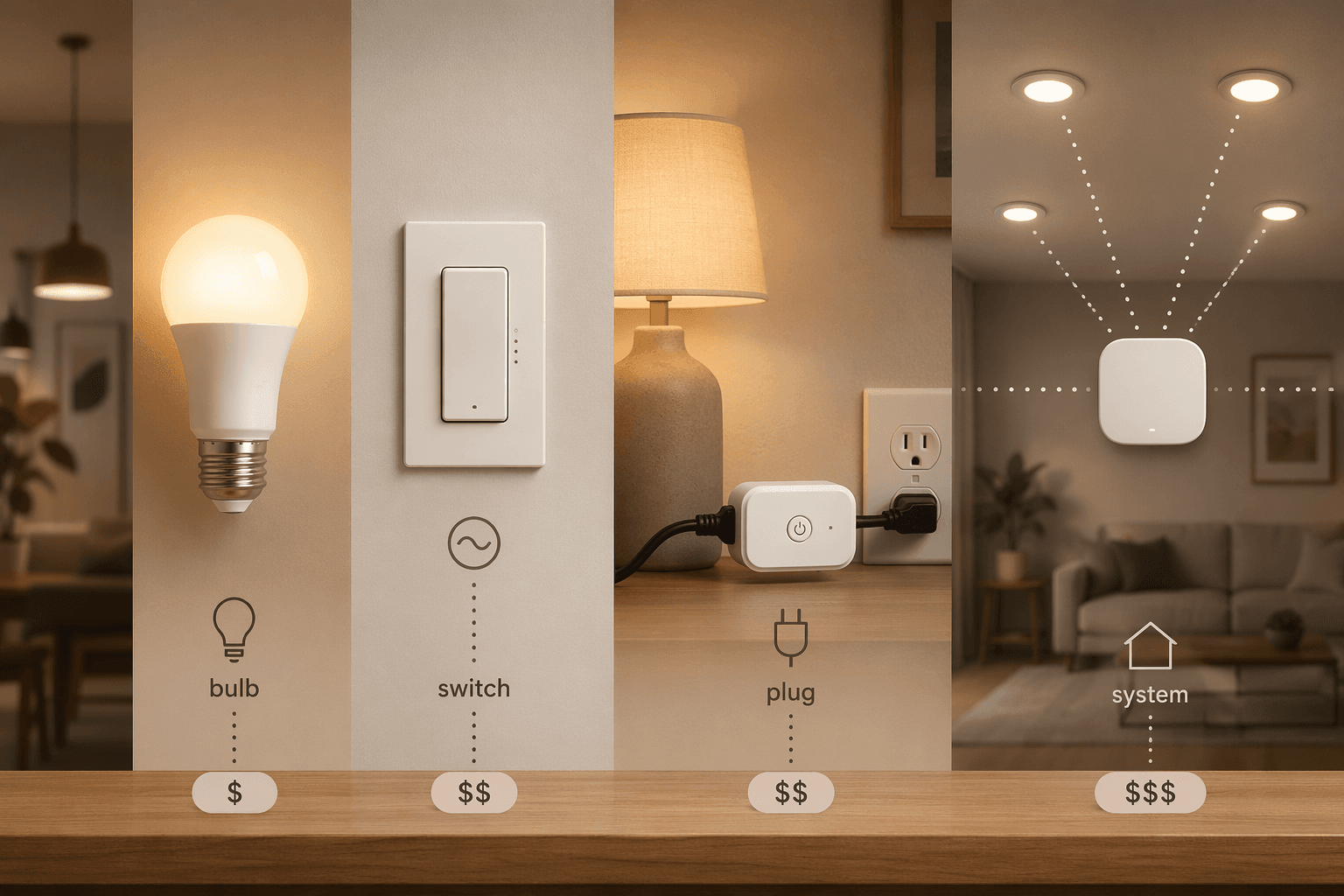
Before you shop for a smart home lighting control system, decide what part of the home should become smart. A bulb makes the lamp or fixture smart. A plug makes the outlet controllable. A switch makes the circuit smart. A whole-home system makes lighting part of the house infrastructure. Those are not four versions of the same purchase; they leave you with different wiring requirements, costs, failure points, and escape routes.
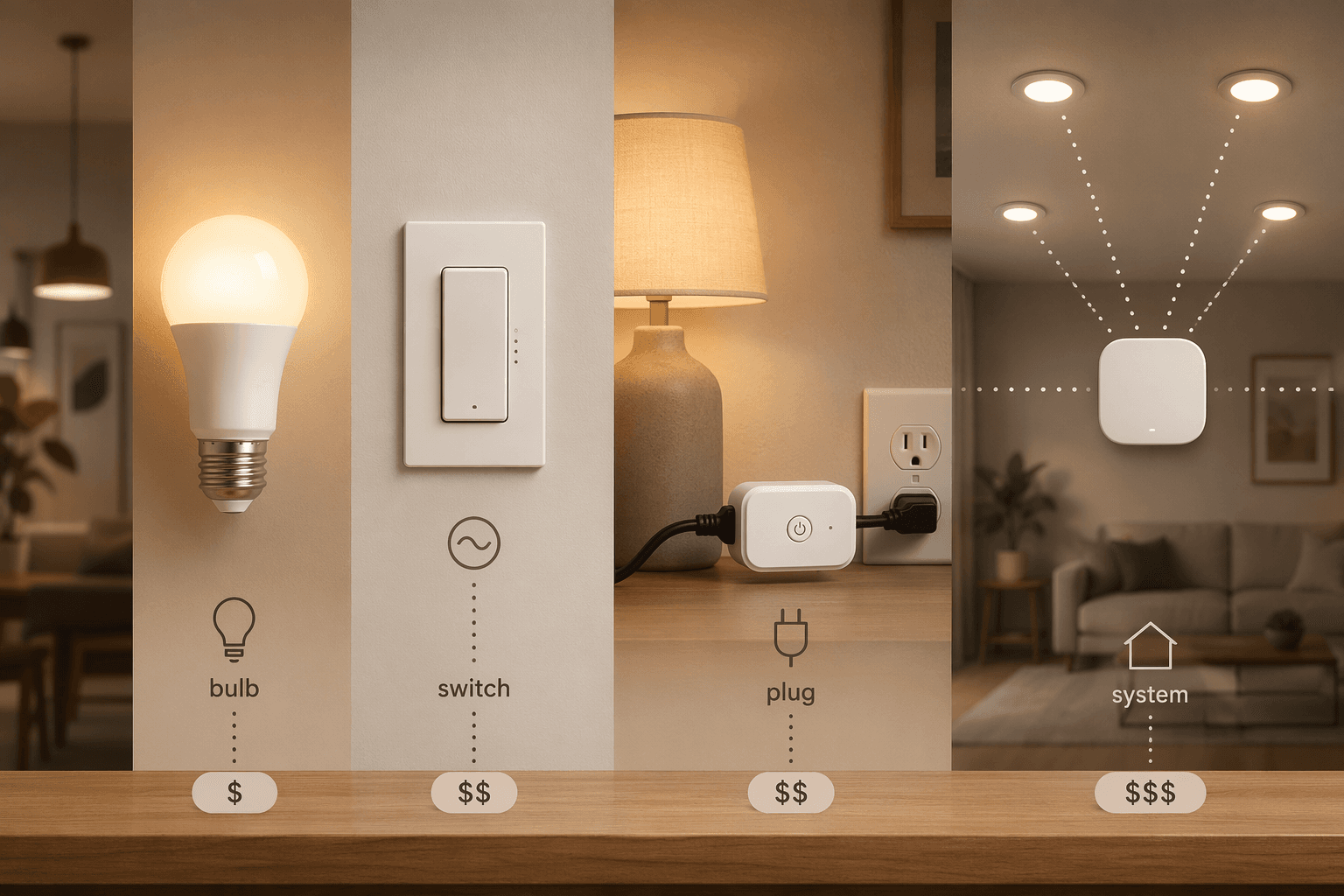
The cleanest way to start is not by asking which app looks nicer. Start with five dull but decisive questions: do you rent or own, are you controlling a lamp or a hardwired fixture, do your switch boxes have neutral wires, how many rooms are involved, and are you willing to bring in a professional installer?
| Approach | Typical cost | Best fit | Main catch |
|---|---|---|---|
| Smart bulbs | $15–$45 per bulb | Renters, lamps, color accents, small rooms | Wall switches can cut power and make the bulb unreachable |
| Smart plugs | $10–$25 per plug | Table lamps and simple on/off control | No built-in dimming or color control |
| Smart switches and dimmers | $35–$60 per circuit | Homeowners controlling fixtures, recessed lights, chandeliers, and rooms used by everyone | Many models require neutral wires and electrical installation |
| Whole-home systems | Often from about $1,250 into $12,500+ projects | Large homes, remodels, premium dimming, zonal scenes, and professionally commissioned systems | Professional installation, higher cost, and long-term ecosystem commitment |
Those price bands explain why the wrong architecture stings. A $25 bulb mistake is annoying. Replacing every bulb in a multi-fixture room, then discovering the wall switch keeps killing power, is a pattern. A $45 switch can be a bargain if it controls six recessed cans, but not if the wall box lacks the wiring the switch expects. Per-component market guides commonly place smart bulbs around $15–$45, smart switches around $35–$60 per circuit, and smart plugs around $10–$25.[1]
Smart bulbs are easy until the wall switch gets involved
Smart bulbs are the friendliest starting point because they avoid electrical work. Screw in the bulb, connect it to an app or hub, and you can usually get dimming, schedules, color temperature changes, or full-color scenes without touching the wall box. For renters, dorm rooms, bedside lamps, and accent lighting, that reversibility matters more than almost any spec sheet.
They are also the easiest way to make lighting feel different. A warm evening scene, a dim nursery lamp, a colored strip behind a media cabinet, or a daylight-tuned desk lamp can change a room without asking permission from a landlord. Smart LED lifespan is commonly cited in the 15,000–25,000 hour range, so the appeal is not just novelty; these are still long-life LED lamps with extra controls layered on top.[1]
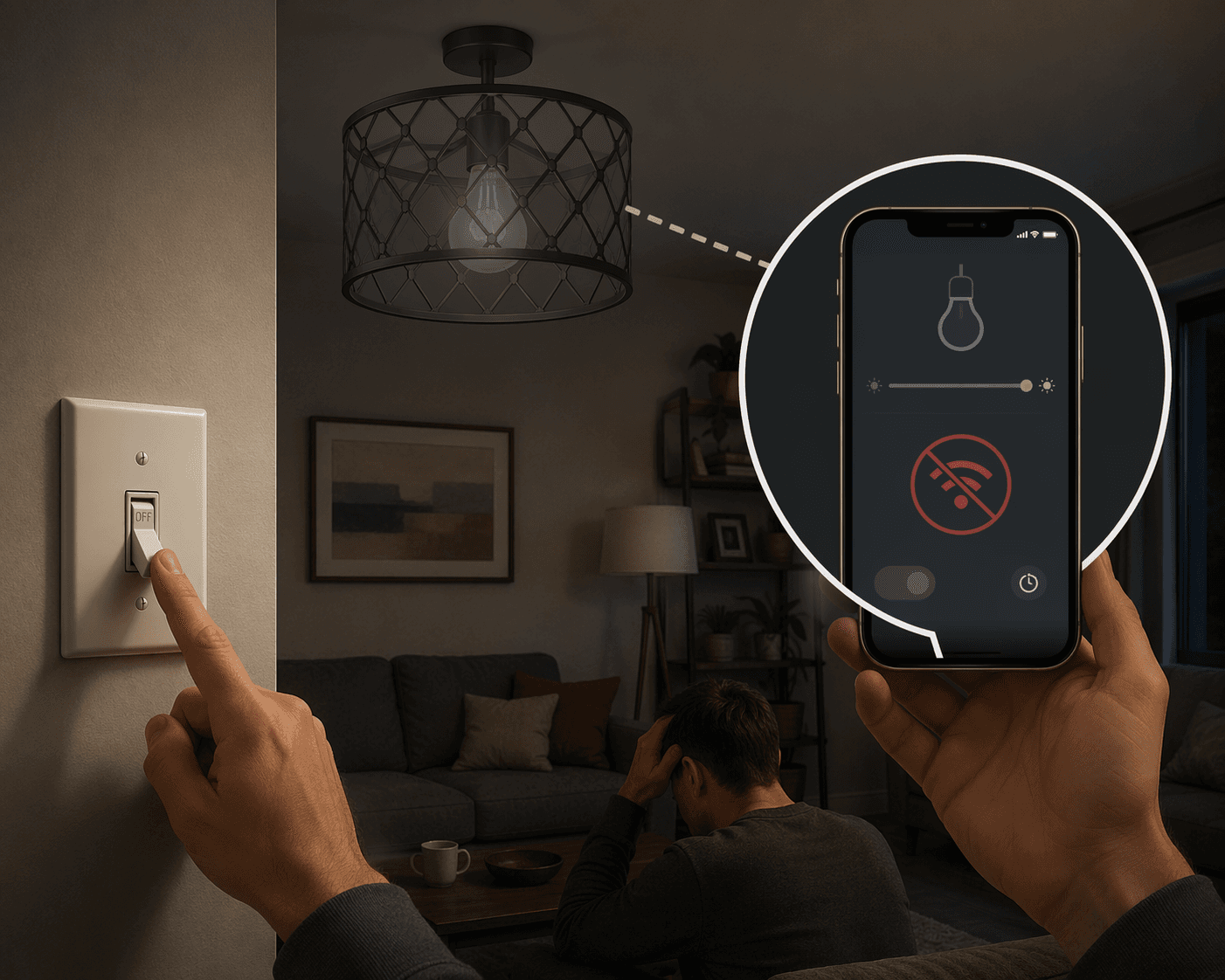
The daily-use problem is simple: a smart bulb needs constant power. If someone flips the old wall switch off, the bulb is no longer available to the app, voice assistant, automation, or schedule. Crutchfield’s smart lighting guidance calls out this real-world “dead switch” issue, and it is the kind of small household friction that makes a technically successful setup feel broken.[2]
There are ways to manage it: switch guards, smart buttons, scene remotes, or household agreements that nobody touches the old switch. Those can work in a bedroom or a lamp-heavy apartment. They are less charming in a kitchen, hallway, or shared living room where guests and roommates will reasonably expect the wall switch to behave like a wall switch.
Scale changes the bulb decision too. Hub-free Wi-Fi bulbs are convenient for a few fixtures, but larger Wi-Fi bulb deployments can become a router burden once the home has dozens of connected devices; the buying guide material flags congestion concerns beyond roughly 20–30 devices.[1] A hub-based system can reduce that load. The Philips Hue Bridge is commonly described as supporting up to 50 lights, and Crutchfield gives a real setup example of a Hue Bridge managing 36 lights at once.[2]
If your bulb plan is growing from “two lamps” to “most of the downstairs,” pause and read about the Philips Hue Bridge Pro vs Bridge before buying another handful of bulbs. The hub decision is not glamorous, but it affects reliability and network load.
Smart switches preserve normal behavior, if the wall box cooperates
A smart switch or dimmer controls the circuit, not the individual bulb. That makes it the more natural choice for ceiling fixtures, chandeliers, recessed cans, bathroom vanities, exterior lights, and rooms where people already use the switch by muscle memory. The app gets control, automations get control, and the wall still works.
The cost math often improves when one switch controls several lights. A room with six recessed cans does not need six smart bulbs if one compatible smart dimmer can control the whole circuit. Market pricing commonly puts smart switches and dimmers around $35–$60 per circuit, which can be cheaper than smart bulbs once a fixture has multiple lamps.[1]
The catch is wiring. Many smart switches require a neutral wire to power the switch’s radio and electronics while the light is off. Homes built before the 1980s commonly lack neutral wires in some switch boxes, which can turn a quick shopping decision into an electrical diagnosis.[1] If you open the wall box and do not know what you are looking at, stop there; guessing inside a switch box is not a smart-home skill.
No-neutral options exist, and some systems solve the problem with companion hubs, special dimmers, or load requirements. They are not universal replacements for checking the wiring. If your older home is the blocker, start with how to install smart light switches in older homes without a neutral wire before buying a cart full of switches.
Switches are also less reversible than bulbs. A homeowner may be comfortable replacing a dimmer and keeping the old device in a drawer. A renter usually should not alter hardwired controls without explicit permission. That is why the same product can be a tidy solution in one house and a lease problem in another.
Smart plugs are useful, but narrow
Smart plugs deserve a short, honest lane. They are inexpensive, often around $10–$25, and they work well for lamps where on/off control is enough.[1] A plug can put a holiday lamp, reading lamp, or hard-to-reach floor lamp on a schedule without changing the bulb or the switch.
They usually do not give you color control, and a basic plug does not dim the lamp. If someone turns the lamp’s own knob off, the plug can still be “on” while the lamp stays dark. For remote on/off control, though, plugs are often the cheapest correct answer. If that is the job, compare smart plug remote methods rather than overbuilding the lighting system.
The whole-home threshold is not a bigger starter kit
Whole-home lighting systems belong in a different decision category. They make sense when the project needs coordinated zones, reliable scenes across many rooms, refined dimming behavior, keypads, occupancy logic, shade integration, professional documentation, and someone accountable for commissioning the system. That is a different job from making three lamps voice-controlled.
CEDIA’s cost framing places structured smart-home lighting in tiers: budget projects around $60–$1,250, mid-range systems around $1,250–$6,250, and premium projects around $6,250–$12,500, with professional wiring installation often cited around $200–$500 per room.[3] Those are not product-ranking numbers; they are a warning that the scope has changed.
Luxury-system comparisons also describe premium platforms such as Lutron HomeWorks, Crestron, Savant, and Control4 as professionally installed systems, with claims such as 1,024-level dimming precision appearing in that category.[4] Treat those as system-positioning claims from secondary market coverage, not as proof that every home needs that level of dimming resolution.
The upside is real when the home calls for it. A multi-floor house can have a “goodnight” scene that shuts down common areas, dims a hallway path, turns off exterior accent zones later, and leaves selected safety lighting active. A professionally commissioned system can make that behavior predictable instead of stitched together through a dozen disconnected automations.
The tradeoff is also real: professional installation, higher upfront cost, and long-term ecosystem commitment. Once keypads, processors, dimming modules, programming, and installer relationships are part of the home, switching platforms is not like replacing a bulb. If you are in this tier, read Whole-Home Smart Lighting Installation: From Wiring to Automation before treating the quote as just a bundle of devices.
There is a middle ground between DIY switches and estate-scale lighting control. Systems around products such as the Lutron Caséta Smart Hub can sit closer to the homeowner-friendly end, while fully commissioned platforms sit at the infrastructure end. The useful question is not whether a brand is premium; it is whether your project needs centrally planned lighting behavior.
Energy savings are a bonus, not the whole case
Smart lighting can help reduce waste by turning lights off automatically, dimming where appropriate, and moving households toward efficient LED lamps. ENERGY STAR’s smart lighting guidance is the best authority to lean on here because it separates active power, standby power, and lighting efficiency rather than treating every automation as guaranteed savings.[5]
Be careful with sweeping percentage claims. The research material includes savings ranges such as 35–70%, 40–60%, and 65–75% from different sources and methodologies, with residential and commercial contexts mixed in ways that should not be flattened into one promise.[4][5] For many homes, the stronger value case is convenience, longer-life LED hardware, security automation, and avoiding an architecture you later have to undo.
A practical way to choose
If you rent, start with bulbs and plugs. Use bulbs where dimming, color, or color temperature matters. Use plugs where simple on/off control is enough. Keep the setup reversible, and do not build a daily routine that depends on nobody touching a wall switch.
If you own the home and want normal switch behavior, look at smart switches and dimmers first. Check the wall box before choosing models, especially in older homes. Count circuits, not just bulbs, because one well-placed smart dimmer may control a whole group of fixtures.
If the project covers many rooms, shared scenes, premium dimming, or a remodel, price it as a system rather than a pile of devices. A companion read on smart home lighting tiers can help separate casual upgrades from infrastructure projects.
The final choice is not a brand verdict. Choose bulbs for renter-friendly control and accent lighting. Choose plugs for cheap on/off lamp automation. Choose switches when you own the wiring, want the wall control to stay useful, and have compatible boxes. Choose a whole-home system when the house genuinely needs professional design, higher reliability, and a long-term platform commitment.
Once that architecture is clear, product reviews become much more useful. If lighting is only one part of the plan, the broader next step is learning how to build a smart home automation system that works together.
References
- FlyAchilles Buying Guide, FlyAchilles
- Crutchfield Smart Lighting Guide, Crutchfield
- CEDIA Cost Tiers, CEDIA
- Repenic luxury systems comparison, Repenic
- ENERGY STAR Smart Lighting page, ENERGY STAR
Reader Feedback
Share your purchase experience, flag outdated picks, or ask clarifying questions about the checklist items.
Comments
Join the discussion with an anonymous comment.