
Why There Is No Single Best Smart Thermostat
Every major review site publishes a ranked list. Wirecutter has a top pick. CNET has a top pick. PCMag has a top pick. They are rarely the same device, and none of them is the right thermostat for every reader.
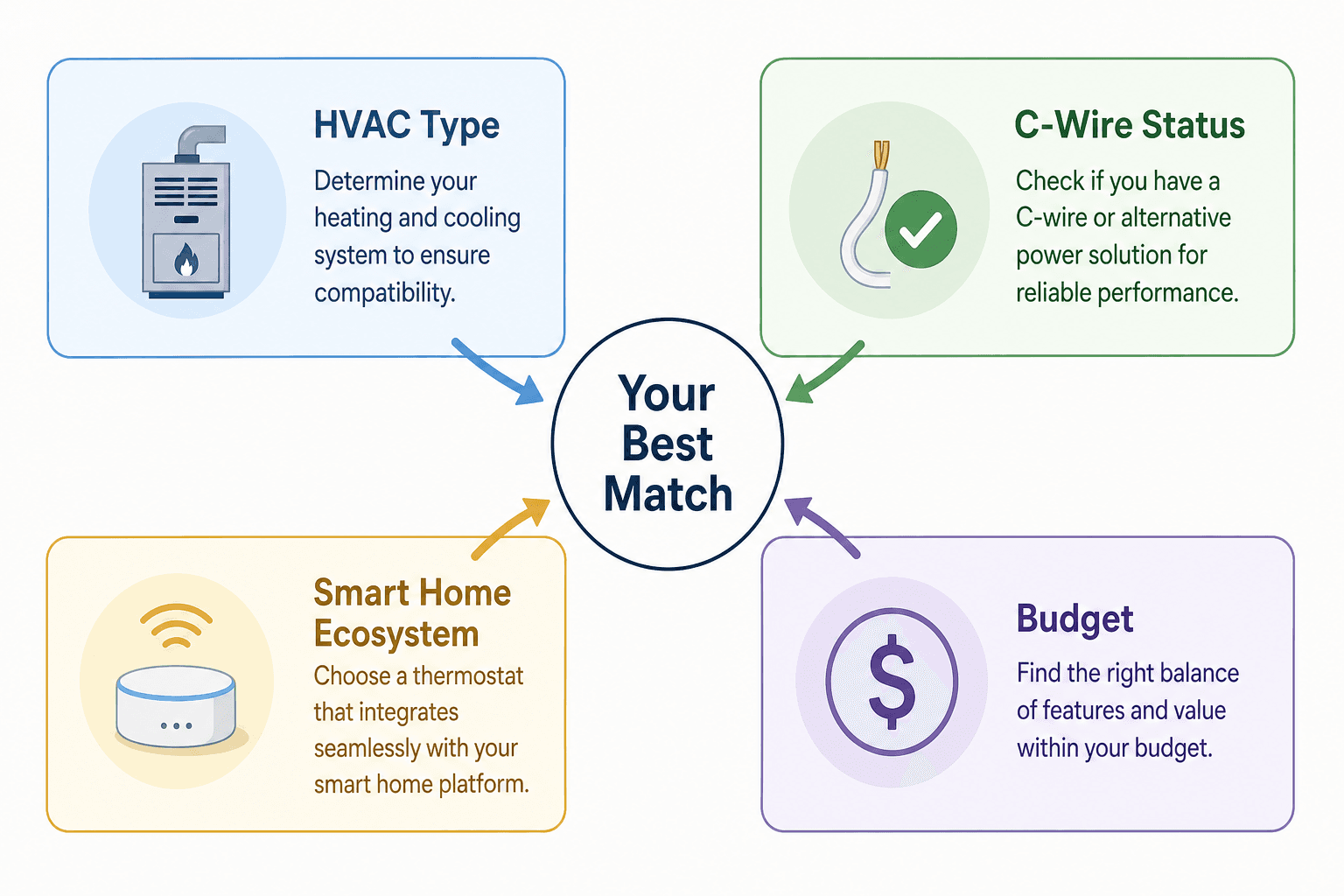
That is not because the reviews are wrong. It is because smart thermostat compatibility is determined by four variables that vary from home to home, and a device that scores perfectly for one buyer can fail to install — or fail to integrate — for another.
- C-wire availability — the single most common cause of installation failure
- HVAC system type — standard 24V, heat pump, line-voltage, or multi-stage
- Smart home ecosystem — Alexa, Google Home, HomeKit, SmartThings, or none
- Budget — ranging from under $80 to over $250
This guide is structured around those four variables. The pre-purchase checklist comes first, because buying the wrong thermostat for your wiring or HVAC type means returning it. The picks come after, organized by buyer situation rather than a flat ranking. If you already know your C-wire status and HVAC type, you can skip directly to the picks section.
Pre-Purchase Checklist: Four Things to Verify Before You Buy
Skipping this checklist is the fastest way to buy a thermostat you cannot install. Work through each item before you look at a single product page.
1. Check for a C-Wire
The C-wire (common wire) provides continuous 24V power to a smart thermostat. Without it, most smart thermostats cannot function — or resort to power-borrowing workarounds that carry their own risks.
According to Eco Temp HVAC's compatibility guide, fewer than 20% of U.S. homes currently have a C-wire installed. That means the majority of buyers need to check before assuming they can install any thermostat they find.
To check: turn off your HVAC system at the breaker, remove your current thermostat from the wall (do not disconnect any wires), and look at the wiring terminal block. If there is a wire connected to the terminal labeled C, you have a C-wire. The wire is often blue or black, but color coding is not consistent across installations — the label on the terminal is what matters.
2. Identify Your HVAC System Type
Most US homes use a standard 24V low-voltage forced-air system — a furnace, central air conditioner, or both. These are broadly compatible with smart thermostats.
Three system types require extra verification before buying:
- Heat pumps — require a thermostat with O/B wire support (the reversing valve terminal) and, if your system has auxiliary heat, a W2/AUX terminal. Buying a thermostat that does not support these terminals can cause your auxiliary heat to run constantly, significantly increasing energy costs.
- Line-voltage systems (120V/240V electric baseboard heat) — incompatible with standard smart thermostats, which are designed for 24V low-voltage systems. These require a line-voltage smart thermostat, a different product category entirely.
- Millivolt systems (older gas fireplaces and radiant systems) — also incompatible with standard smart thermostats.
3. Know Your Smart Home Ecosystem
If you already use Alexa, Google Home, HomeKit, or SmartThings, you want a thermostat that integrates natively — not through a workaround. Check the compatible platforms list for any device you consider, not just the marketing headline.
If you do not have an existing ecosystem, this is the moment to choose one. The thermostat you buy now will influence which platform you build around.
4. Set Your Budget Range
Smart thermostats span from under $80 to over $250 at retail. The price difference reflects remote sensor inclusion, display quality, air quality monitoring, and built-in voice assistant hardware — not necessarily better HVAC control. A $100 thermostat and a $250 thermostat both schedule and respond to your phone. What you pay more for is the extras.
Key Features Explained: What the Specs Actually Mean
Smart thermostat marketing uses several terms that sound impressive but carry important nuances. Here is what each one actually means before you evaluate a pick.
- AI and schedule learning — Both Ecobee and Nest claim their thermostats learn your schedule and adjust automatically. In practice, this works well for households with consistent routines. Wirecutter's long-term testing found that the Nest's AI can go haywire for some users, requiring manual corrections multiple times per day. Ecobee's Eco+ mode is the most underutilized feature — most owners never configure it. Treat learning as a useful supplement to manual scheduling, not a replacement for it.
- Remote sensors — These are temperature sensors placed in rooms away from the thermostat. Most systems operate in either averaging mode (averaging all sensor readings) or following mode (prioritizing the room where activity is detected). Ecobee's SmartSensor includes presence detection, meaning the thermostat can prioritize occupied rooms. The Nest remote sensor does not include presence detection — it reports temperature only.
- Geofencing — Uses your phone's location to detect when you leave or return home and adjusts the temperature accordingly. Useful for households with irregular schedules. Requires the app to run in the background and location permissions to be granted. The Sensi ST55, for example, sets back three degrees when you leave a three-mile radius.
- Air quality monitoring — Some premium models (Ecobee Premium, Honeywell Home X8S) include sensors that detect VOCs, humidity, and particulates. This is a comfort and health feature, not an HVAC control feature — the thermostat will not automatically run the system differently based on air quality unless you configure specific automations.
- Matter protocol support — Matter is a cross-platform smart home standard that allows devices to work across ecosystems without relying on individual cloud integrations. Among mainstream 2026 picks, the Google Nest Learning Thermostat 4th Gen is the only model with native Matter certification. Ecobee does not currently support Matter natively, but its direct integrations with Alexa, HomeKit, Google Home, and SmartThings cover most household ecosystems without it.
2026 Smart Thermostat Comparison: Top Models at a Glance
| Model | C-Wire Required | Matter Support | Compatible Ecosystems | Remote Sensor Included | Air Quality Monitoring | Approx. Price |
|---|---|---|---|---|---|---|
| Ecobee Smart Thermostat Premium | Yes (adapter included) | No | Alexa, Google Home, HomeKit, SmartThings | Yes (with presence detection) | Yes | $220–$250 |
| Google Nest Learning Thermostat 4th Gen | No (power borrowing) | Yes | Alexa, Google Home, HomeKit (via Matter) | Yes (no presence detection) | No | $200–$230 |
| Amazon Smart Thermostat | Yes | No | Alexa | No (Echo Dot can serve as sensor) | No | $70–$80 |
| Ecobee Smart Thermostat Essential | Yes | No | Alexa, Google Home, HomeKit, SmartThings | No (sold separately) | No | $130–$140 |
| Honeywell Home X8S | Yes | No | Alexa, Google Home, HomeKit | Yes (with presence detector) | Yes | $200–$230 |
| Sensi Smart Thermostat ST55 | Yes | No | Alexa, Google Home, HomeKit, SmartThings, Wink | No | No | $85–$90 |
Best Smart Thermostat Picks by Use Case
These picks are organized around buyer situations, not a flat ranking. Find the scenario that matches your setup, then read the trade-offs before deciding.
Best Overall: Ecobee Smart Thermostat Premium
The Ecobee Premium is the consensus top pick across Wirecutter, CNET, and PCMag for buyers who have a C-wire and want the deepest feature set available in 2026. It includes a SmartSensor with presence detection (not just temperature), a built-in Alexa speaker with Siri AirPlay support, air quality and humidity monitoring, and Eco+ mode — which uses indoor humidity data to adjust set points and reduce HVAC run time.
Platform support is the broadest of any pick on this list: Alexa, Google Home, Apple HomeKit, and Samsung SmartThings all work natively. The absence of Matter support is a trade-off, but for most buyers in 2026, the direct integrations cover every realistic use case.
- Who should buy it: Buyers with a C-wire, a multi-room home, or existing Ecobee sensors; anyone who wants the most complete feature set without choosing a single ecosystem.
- Who should skip it: Buyers without a C-wire who cannot run a new wire; buyers who need native Matter support; budget buyers.
Best No-C-Wire Option: Google Nest Learning Thermostat 4th Gen
The Nest 4th Gen is the only mainstream smart thermostat that can operate without a C-wire, using a power-borrowing approach from the furnace control circuit. It also carries the only native Matter certification among 2026 picks, which means it works across Alexa, Google Home, and HomeKit through a single standard rather than separate integrations.
The included remote sensor reports temperature but does not detect presence — a meaningful distinction from the Ecobee SmartSensor for buyers who want room prioritization based on occupancy.
- Who should buy it: Buyers with no C-wire who cannot run a new wire; Matter-first households; renters in compatible setups.
- Who should skip it: Buyers who want presence-detecting remote sensors; buyers with older HVAC systems where power borrowing carries more risk.
Best Budget Under $100: Amazon Smart Thermostat
At approximately $70–$80, the Amazon Smart Thermostat is the lowest-cost ENERGY STAR-certified pick on this list. It is made by Resideo (the company behind Honeywell Home thermostats) and delivers reliable scheduling, remote control, and Alexa voice control at a price point that is hard to argue with for Alexa-centric households.
It requires a C-wire and does not support remote sensors natively. An Echo Dot (4th or 5th Gen) placed in another room can serve as a temperature-sensing reference point if you use Alexa Routines, but this is a workaround, not a built-in multi-room feature.
- Who should buy it: Alexa households with a C-wire looking for the lowest-cost ENERGY STAR-certified option.
- Who should skip it: Buyers who use Google Home or HomeKit; anyone who needs remote sensors; buyers without a C-wire.
Best Affordable Mid-Range: Ecobee Smart Thermostat Essential
The Ecobee Essential sits at approximately $130–$140 and delivers most of what the Premium offers — broad platform support across Alexa, Google Home, HomeKit, and SmartThings, plus compatibility with Ecobee's SmartSensor ecosystem — without the built-in Alexa speaker or air quality monitoring.
If you want Ecobee's multi-platform reach and room sensor support but do not need the speaker hardware or air quality data, the Essential is the more efficient spend. Remote sensors are sold separately.
- Who should buy it: Buyers who want Ecobee's ecosystem compatibility without paying for the Premium's hardware extras; buyers planning to add room sensors later.
- Who should skip it: Buyers who want air quality monitoring or a built-in speaker; buyers without a C-wire.
Best for Large Homes and Room Monitoring: Honeywell Home X8S
The Honeywell Home X8S is the major 2026 new entrant in this category. Its standout features are a 5-inch touchscreen display, a bundled room sensor with presence detection, air quality and humidity monitoring, and integration with Ring video doorbells — allowing you to see and speak through your Ring doorbell directly from the thermostat.
- Who should buy it: Ring ecosystem households; buyers who want a large display; large-home buyers who want bundled room sensing with presence detection.
- Who should skip it: Buyers who prioritize long-term reliability data; buyers without Ring doorbells who do not need the display size.
Best for HomeKit and Apple Ecosystem: Ecobee Premium or Sensi ST55
If HomeKit is your primary ecosystem, two picks stand out at different price points.
The Ecobee Premium delivers the most capable HomeKit experience with Siri AirPlay, presence-detecting sensors, and air quality monitoring — but at a premium price and with a C-wire requirement.
The Sensi Smart Thermostat ST55 is PCMag's pick for best affordable HomeKit thermostat. It supports Alexa, Google Home, HomeKit, SmartThings, and Wink, includes geofencing (setting back three degrees when you leave a three-mile radius), and retails for approximately $85–$90. It does not include remote sensors, but for buyers who want HomeKit without spending $200+, it is a strong value.
- Who should buy the ST55: HomeKit households on a budget; buyers who want geofencing and broad platform support at under $90.
- Who should buy the Ecobee Premium instead: HomeKit households who also want room sensors, air quality monitoring, or the built-in Alexa speaker.
Best for Heat Pumps: Nest 4th Gen or Ecobee Premium
Heat pump compatibility requires explicit verification regardless of which thermostat you choose. The two picks that handle heat pump configurations most reliably in 2026 are the Nest 4th Gen (which supports up to three heating stages and two cooling stages) and the Ecobee Premium (which works with heat pumps, humidifiers, and dehumidifiers).
Energy Savings and ENERGY STAR Certification Explained
Every smart thermostat manufacturer claims energy savings. The number worth anchoring to comes from the EPA's own certification data.
According to the ENERGY STAR smart thermostat FAQ, ENERGY STAR-certified thermostats deliver an average of approximately 8% reduction in heating and cooling run time, translating to roughly $50 per year in savings. This figure is derived from real-world field data collected from a large national sample — not from laboratory testing.
Premium models with remote sensors and geofencing — particularly the Ecobee Premium with Eco+ mode — claim savings of up to 26% under specific conditions. That figure applies to households where the thermostat can actively respond to occupancy patterns, humidity, and room-by-room temperature variation. It is not a baseline expectation for all users.
ENERGY STAR certification requires independent third-party verification of real-world field data, not just manufacturer claims. All picks in this guide that carry the ENERGY STAR label have met that threshold.
Utility Rebates: How to Find What You Qualify For
Many US utilities offer rebates for ENERGY STAR-certified smart thermostats, which can meaningfully reduce the effective purchase price. The amounts and eligibility requirements vary by state and utility provider — there is no single national rebate program.
The ENERGY STAR Rebate Finder currently lists 209 active smart thermostat rebate records from utility and program partners across the country. The tool requires your zip code to display local offers and links directly to the utility or program running each rebate.
Typical rebate amounts from US utilities range from $50 to $100, but this varies. Some programs offer instant rebates at point of sale through participating retailers; others require a mail-in or online application after purchase. Check the tool with your zip code before buying — the rebate may influence which ENERGY STAR-certified model makes the most financial sense for your situation.
DIY vs. Professional Installation: When to Call an HVAC Tech
Most smart thermostat installations are DIY-friendly when the conditions are right. The question is whether your specific situation qualifies.
| Situation | DIY Feasibility | Estimated Time | Notes |
|---|---|---|---|
| Standard 24V system, C-wire present, simple swap | Yes | 30–45 minutes | Straightforward for most buyers; follow the app's wiring guide |
| Standard 24V system, no C-wire, using Nest power borrowing | Yes, with caution | 30–45 minutes | Some HVAC professionals advise against this on older systems |
| Standard 24V system, no C-wire, installing add-a-wire adapter | Yes, with moderate skill | 45–75 minutes | Requires accessing the furnace control board; follow adapter instructions carefully |
| Heat pump system with O/B wire and AUX heat | Consult a technician first | Varies | Incorrect wiring can cause aux heat to run continuously |
| Dual-fuel system (heat pump + gas furnace) | Professional recommended | Varies | Complex wiring; improper setup risks equipment damage |
| Multi-stage or zoned system | Professional recommended | Varies | Requires system-specific configuration beyond standard thermostat setup |
| Line-voltage system (120V/240V baseboard heat) | Not compatible | N/A | Standard smart thermostats are incompatible; different product category required |
Frequently Asked Questions
What if I have no C-wire and cannot run a new wire?
You have two practical options. The first is the Google Nest Learning Thermostat 4th Gen, which uses power borrowing from the furnace control circuit to operate without a C-wire. This works reliably for most standard 24V systems, though some HVAC professionals advise caution on older equipment. The second option is a third-party add-a-wire adapter, which adds a C-wire connection at the furnace control board without running new wire through the wall — this makes any C-wire-requiring thermostat installable. Ecobee also ships a power adapter kit with the Premium and Essential models that accomplishes a similar result.
Is my heat pump compatible with a smart thermostat?
Most heat pumps are compatible with smart thermostats, but you need to verify two things. First, confirm the thermostat supports the O/B terminal (the reversing valve that switches the heat pump between heating and cooling mode). Second, if your system has auxiliary or emergency heat, confirm the thermostat supports the W2 or AUX terminal. The Nest 4th Gen and Ecobee Premium both support these configurations. If you see a W2 or OB wire behind your current thermostat, use the manufacturer's compatibility checker before purchasing.
Can renters install a smart thermostat?
In most cases, yes — with landlord permission. Smart thermostat installation is reversible: you remove the device, reconnect the original thermostat's wires, and leave no permanent changes to the property. The practical barriers for renters are the same as for homeowners: C-wire availability and HVAC system type. The Nest 4th Gen's no-C-wire capability makes it the most renter-friendly option where the original thermostat can be reinstalled at move-out. Always get written permission from your landlord before modifying any electrical or HVAC system.
What does Matter actually mean for thermostat buyers?
Matter is a smart home connectivity standard developed by the Connectivity Standards Alliance (CSA) that allows devices to work across different platforms — Alexa, Google Home, HomeKit, SmartThings — through a single local protocol rather than separate cloud integrations. For thermostat buyers, Matter means a device can be controlled by multiple ecosystems simultaneously without requiring separate app setups for each platform.
In practice, the Google Nest 4th Gen's Matter support means it connects to Alexa, Google Home, and HomeKit through the Matter standard rather than through Google-specific or Apple-specific integrations. This also provides some future-proofing: as more platforms adopt Matter, a Matter-certified device is more likely to remain compatible.
For buyers who are firmly committed to a single ecosystem and have no plans to change, Matter support is a nice-to-have rather than a necessity. For buyers who use multiple platforms or anticipate switching ecosystems, it is worth factoring into the decision.
Reader Feedback
Share your purchase experience, flag outdated picks, or ask clarifying questions about the checklist items.
Comments
Join the discussion with an anonymous comment.