
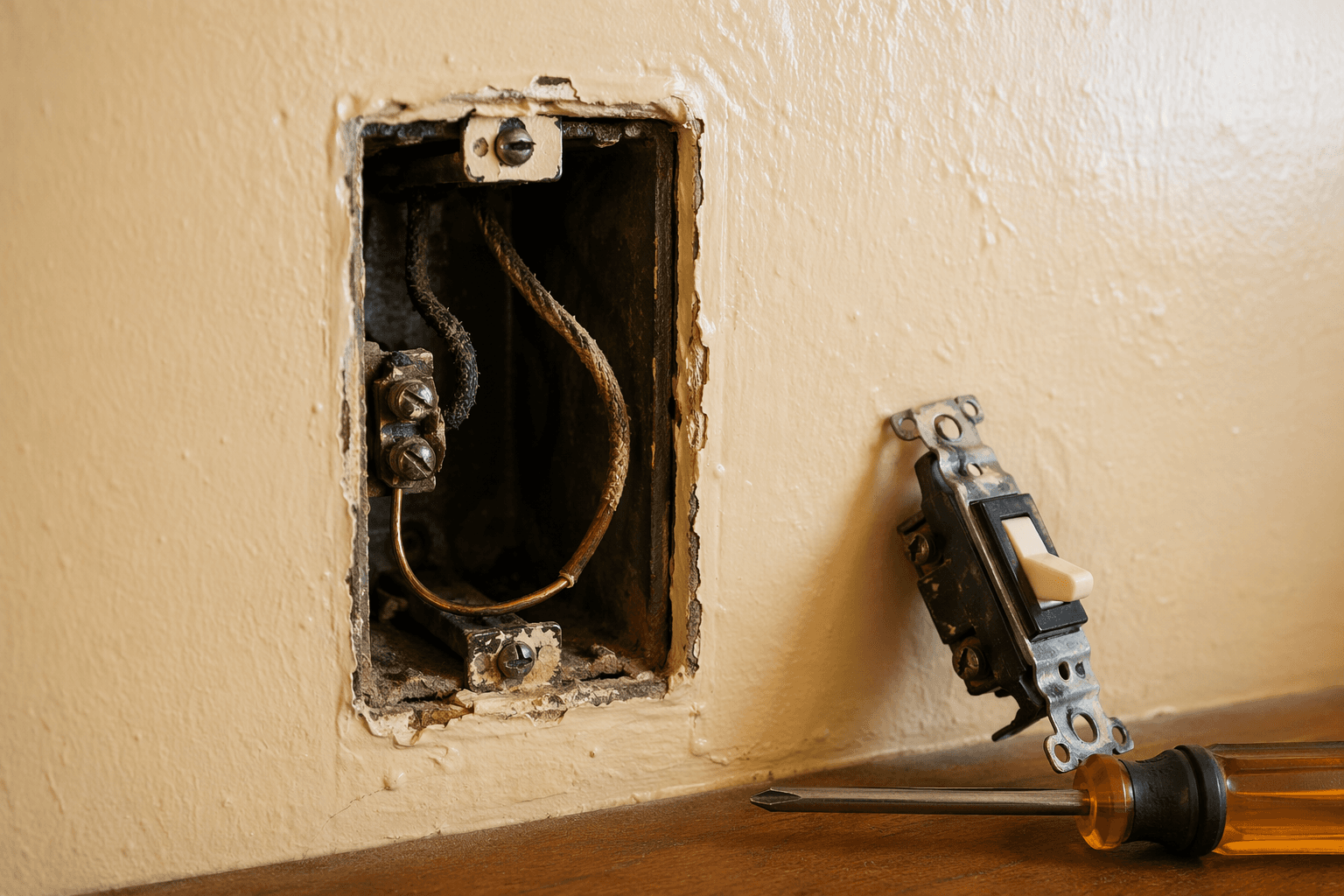
You are not stuck just because there is no neutral bundle in the switch box. A smart light switch can still be installed in many older homes without a neutral wire, either by using a no-neutral switch designed for that job or by choosing a workaround such as a smart bulb, a wireless remote, or a relay module installed where the wiring is more suitable. Wirecutter’s 2026 testing, for example, names the Leviton Decora Smart DN6HD as its no-neutral smart dimmer pick, with the switch listed around $40 and a required Wi-Fi bridge around $14 that supports up to 25 devices; those prices should be checked before buying because they are current only to that guide’s publication window. [1]
Before anything else: turn off the breaker, verify the power is off with a proper tester, and do not treat wire color alone as proof of what a conductor does. If the box contains brittle insulation, unexplained splices, aluminum wiring, knob-and-tube wiring, or anything you cannot positively identify, stop and bring in a licensed electrician. A no-neutral switch is a product choice; guessing inside an old electrical box is not.
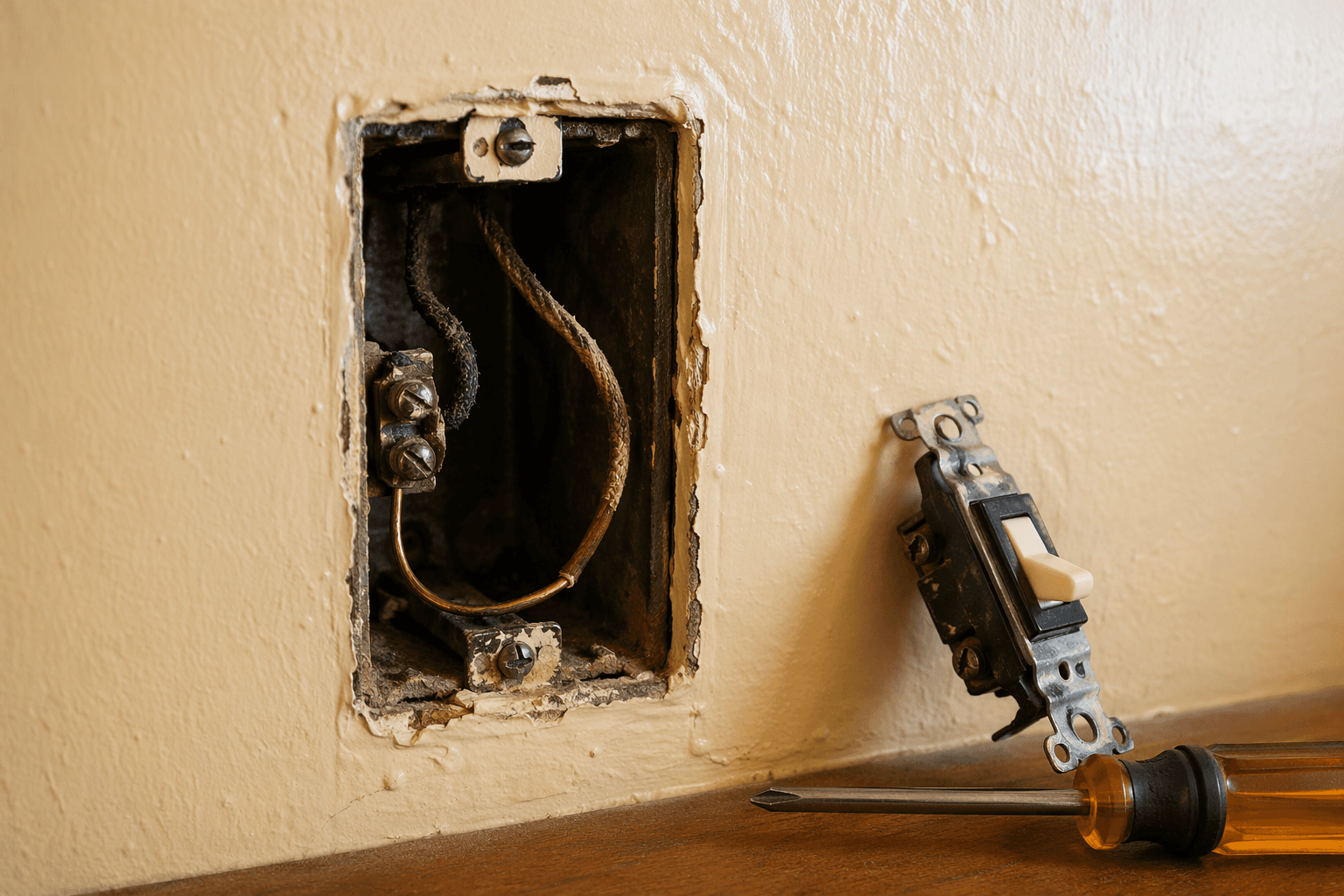
First, make sure you are really missing a neutral
In a modern switch box, the neutral is usually a group of white wires tied together in the back of the box, not connected to the old toggle switch. The switch itself often has a line hot, a switched hot going to the light, and a ground. In many older switch loops, only the always-hot conductor and the switched leg were brought down to the wall switch; the neutral stayed up at the light fixture. SONOFF’s neutral-wire explainer describes the neutral as the return path that lets a smart switch power its electronics continuously, even when the light is off. [2]
That last part matters because a smart switch is never just a switch. It has a radio, a small processor, memory, sometimes LEDs, sometimes a dimming circuit, and it needs power all the time so it can hear commands from an app, hub, voice assistant, or automation. A plain mechanical switch can go completely dead when it opens the circuit. A smart switch cannot.
Do not assume the white wire, if you see one, is definitely neutral. Older switch loops sometimes used a white conductor as a hot leg, and not every box was re-marked clearly. Confirm the wiring layout, not just the insulation color.
Why no-neutral smart switches behave differently
A no-neutral smart switch gets around the missing return path by drawing a tiny continuous current through the lighting load. In plain English, the switch borrows a little power through the bulb so its internal electronics stay awake. SmartHomeScene’s no-neutral analysis identifies that trickle-current design as the root of the common annoyances: LED flicker, faint glow when off, humming, minimum-load requirements, bypass capacitor use, and some feature limitations. [3]
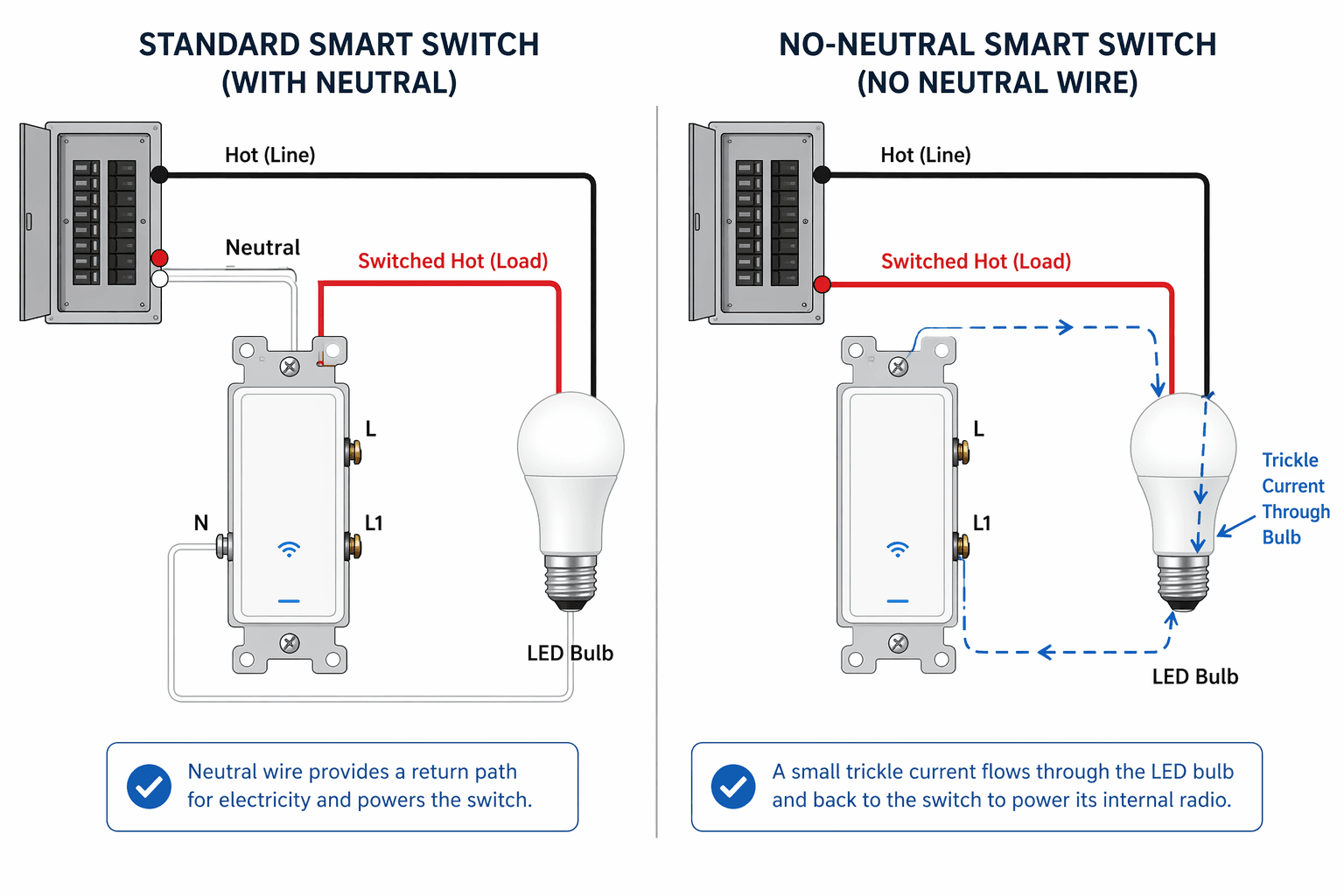
This is the detail product pages tend to soften. “No neutral required” does not mean “electrically identical to a neutral-wired switch.” It means the switch was engineered to survive without the conductor it would normally use. Some circuits handle that neatly. Some LED bulbs object immediately. Some seem fine until the light is dimmed low, the bulb is changed, or the switch starts dropping off the network.
| What you see | Likely no-neutral cause | What to check |
|---|---|---|
| LED flickers when off or at low dim levels | The switch’s trickle current is interacting badly with the LED driver | Bulb compatibility list, minimum load, dimmer calibration, or bypass requirement |
| Bulb glows faintly at night | A small current is passing through the lamp even when the switch is logically off | Different LED bulb, bypass capacitor, or a different switch class |
| Buzzing or humming | Dimmer electronics, bypass capacitor, or LED driver may be mismatched | Load type, bulb model, dimmer mode, and whether the manufacturer requires a bypass |
| Switch will not stay online | The load may not provide enough stable power for the switch electronics | Minimum wattage, bulb count, and whether the device needs a bridge or hub nearby |
| Zigbee or Z-Wave mesh does not improve | Many no-neutral Zigbee/Z-Wave switches behave as end devices, not repeaters | Network role in the product documentation before relying on it for mesh coverage |
The tradeoffs that actually matter in an older house
LED bulbs may flicker, glow, or hum
Incandescent bulbs were forgiving loads because they needed enough current to heat a filament before producing visible light. LEDs use driver electronics, and those drivers can react to tiny currents in strange ways. That is why one LED bulb may work quietly on a no-neutral dimmer while another bulb in the same fixture flickers or stays faintly lit after shutoff.
Bypass capacitors are often presented as the fix. They are installed at the light fixture so the trickle current has a path that does not disturb the bulb as much. They can help, but they also add another part inside the circuit. SmartHomeScene specifically notes that bypass capacitors can be required and can still be associated with humming or flickering depending on the installation and load. [3]
Minimum load is not a fine-print detail
A no-neutral switch may need the connected light to draw enough power for the switch electronics to stay stable. SmartHomeScene reports that the Aqara H2 requires a 5W minimum load when wired without a neutral, which is exactly the kind of threshold that can trip up a single low-wattage LED fixture; because that figure comes from a third-party review rather than the official Aqara datasheet in the supplied materials, it should be verified against the manufacturer’s current specifications before purchase. [3]
The practical lesson is simple: count the actual bulbs on the circuit, check their wattage, and compare that against the switch’s no-neutral requirements. A hallway sconce with one efficient LED is a more delicate candidate than a multi-bulb ceiling fixture.
No-neutral Zigbee and Z-Wave devices may not strengthen your mesh
A neutral-wired Zigbee or Z-Wave smart switch is usually powered continuously enough to act as a router or repeater in the mesh. SmartHomeScene notes that no-neutral Zigbee and Z-Wave switches commonly act as end devices only, meaning they can join the network but do not extend it for other devices. [3]
That may not matter in a small apartment with a hub nearby. It matters a lot in a plaster-walled older home where you were counting on each hardwired switch to make the next room’s sensors more reliable. If mesh strength is part of your plan, verify the device role before buying, not after pairing.
Some advanced features get weaker without neutral
Energy monitoring, very smooth dimming, and scheduling reliability can be more constrained when the switch is scavenging power through the load. SmartHomeScene flags energy monitoring on the Aqara H2 as one feature affected in no-neutral operation, and MOES’s neutral-versus-non-neutral comparison frames neutral switches as the more stable and fully featured option while positioning no-neutral models as the retrofit-friendly compromise. [3][4]
That does not make no-neutral switches bad. It means the right expectation is closer to “make this older switch location smart without opening walls” than “get every feature of a modern neutral-wired installation.”
Choose the product class before choosing the product
Once you know there is no neutral in the box, do not start with the prettiest switch or the cheapest two-pack. Start with the kind of system you are willing to live with. The four realistic paths are these:
| Path | Best fit | Watch closely |
|---|---|---|
| No-neutral wall dimmer, such as Leviton DN6HD | You want the existing wall control to become smart without rewiring | Bridge requirement, bulb compatibility, dimming behavior, current pricing |
| Lutron Caséta | You want a premium, boringly reliable lighting system and accept a hub | Higher ecosystem commitment and device compatibility boundaries |
| Compact in-wall or ceiling module, such as Sonoff-style modules | You have room and suitable wiring at the fixture or box | Load rating, enclosure space, heat, code-compliant placement |
| Smart bulbs plus wireless or battery switches | The wiring is questionable, the load is tiny, or you rent | Wall switch discipline, battery replacement, guest usability |
A tested no-neutral dimmer: Leviton Decora Smart DN6HD
The Leviton Decora Smart DN6HD is the most defensible first stop if you want a conventional-looking smart light switch and do not have a neutral. Wirecutter’s recommendation matters here because no-neutral products are exactly where independent testing is more useful than a spec sheet. Their 2026 guide lists the DN6HD at about $40 and the required Wi-Fi bridge at about $14, with the bridge supporting up to 25 devices. [1]
The bridge requirement is not automatically a downside. A bridge can make the system less dependent on each individual device maintaining a perfect direct Wi-Fi connection. The real question is whether you are comfortable adding that small ecosystem layer. If you only need one switch, it feels like overhead. If you expect to add several Leviton devices, it becomes less annoying.
A premium hub route: Lutron Caséta
Lutron Caséta is the route for people who care less about avoiding a hub and more about lights responding every time. Wirecutter describes Caséta as using Lutron’s own Clear Connect wireless protocol and requiring the Lutron hub. [1]
That is a trade: you buy into a more premium lighting ecosystem, but you get a system built around lighting rather than a bargain switch trying to be everything. In an older home with thick walls, odd boxes, and circuits that already have enough personality, that kind of boring reliability can be worth paying for.
A compact module: useful, but respect the load rating
A compact relay module can sometimes avoid the missing-neutral problem at the wall switch by going somewhere else in the circuit, such as the light fixture box, where a neutral may be present. SONOFF’s explanation of neutral and no-neutral switching is useful for understanding why module placement changes what the device can access electrically. [2]
This is not a license to stuff electronics into any cavity that happens to fit. The module has to be inside an approved enclosure, rated for the load, and wired according to its instructions. SmartHomeScene notes that the Sonoff ZBMINIL2 has a relay rated around 6A in no-neutral use, which limits the loads it should control. [3]
For a simple LED lighting circuit, that may be plenty. For mixed loads, fans, transformers, or anything you cannot identify cleanly, it is not the place to improvise.
Smart bulbs and wireless switches: the non-hardwired escape hatch
Sometimes the best smart light switch is not a hardwired switch at all. A smart bulb paired with a wireless wall remote or battery-powered switch can give you app control, routines, and a familiar wall control without opening the electrical circuit again. This is especially attractive when the existing wiring is fragile, the box is too shallow, or the fixture uses a very low-wattage LED that may not satisfy a no-neutral switch.
The compromise is household behavior. If someone turns off the old wall switch, the smart bulb loses power. Some people solve that with a switch guard or by replacing the wall control with a wireless scene controller. It is less elegant than a properly installed smart switch, but it can be safer and more reliable than forcing a no-neutral device into a poor circuit.
A practical install decision path
Use this order. It is slower than clicking “buy now,” but it saves return labels, buzzing fixtures, and late-night glow from the hallway light.
- Turn off the breaker and verify the box is dead with a tester.
- Identify line, load, ground, and whether a neutral bundle is actually present.
- If there is no neutral, choose a no-neutral switch, a hub-based lighting system, a module installed at a suitable location, or a smart-bulb-and-wireless-control workaround.
- Check the switch’s supported load type: dimmable LED, incandescent, halogen, fixture-only, fan, or mixed load.
- Check minimum load requirements and compare them with the actual bulbs on the circuit.
- Check whether a bypass capacitor is required, optional, or discouraged for your fixture.
- Check network behavior: Wi-Fi bridge, Lutron hub, Zigbee end device, Z-Wave end device, or router-capable neutral model.
- Install only within the manufacturer’s wiring diagram and local code limits.
- After pairing, test on, off, low dim, high dim, scheduled operation, physical control, app control, and behavior after a breaker reset.
That last test is worth doing while the tools are still out. A no-neutral switch that turns on from the app once is not necessarily done. Let the light sit off in a dark room and look for ghost glow. Dim it to the lowest usable setting and wait for flicker. Listen for hum at the switch and at the fixture. If the device uses Zigbee or Z-Wave, check whether nearby devices actually became more reliable or whether the switch joined only as an end device.
What “compatible” should mean before you buy
Compatibility is not just whether the app works with Alexa, Google Home, Apple Home, SmartThings, or Home Assistant. For an older no-neutral switch box, compatibility has four layers:
- Wiring compatibility: the device is explicitly rated for no-neutral installation in the exact configuration you have.
- Load compatibility: the connected light type and wattage fall inside the product’s supported range.
- Bulb compatibility: the LED driver behaves well with that dimmer or relay, especially at low brightness.
- Network compatibility: the switch joins the system you are actually building and plays the role you expect.
A product can pass the app layer and fail the electrical layer. That is the mistake to avoid. If the switch requires a bridge, count that cost. If the no-neutral mode disables energy monitoring or limits dimming behavior, decide whether that matters before the faceplate goes back on. If the product needs a bypass, confirm you have access to the fixture box and enough room to install it correctly.
Once the switch is stable, then it makes sense to fold it into a broader automation plan. A beginner home automation setup guide is useful at that stage; automation recipes are useful after that. But neither will fix an electrical mismatch hiding behind the wall.
When to stop and choose another route
Skip the hardwired no-neutral smart switch if the wiring is brittle or unidentified, if the box is overcrowded, if the fixture load is below the switch’s stated minimum, if the manufacturer requires a bypass you cannot install properly, or if the switch would control a non-lighting load it is not rated for.
Also pause if your real goal is mesh coverage. A no-neutral Zigbee or Z-Wave switch that joins only as an end device may control its own light perfectly while doing nothing to help the weak sensor two rooms away. In that case, a neutral-wired device elsewhere, a dedicated repeater, or a different lighting system may solve the actual problem better.
No-neutral retrofits are often a good, realistic upgrade for older homes. They are not magic. The dependable installations come from matching the switch to the wiring, the bulb, the load, and the network—then testing the boring details before declaring the job finished.
References
- The Best In-Wall Smart Light Switch and Dimmer, Wirecutter, https://www.nytimes.com/wirecutter/reviews/best-in-wall-wireless-light-switch-and-dimmer/
- Smart Switches & Neutral Wires Explained: Do You Really Need One?, SONOFF, https://sonoff.tech/en-us/blogs/news/smart-switches-neutral-wires-explained-do-you-really-need-one
- The Pros and Cons of No-Neutral Smart Switches, SmartHomeScene, https://smarthomescene.com/blog/the-pros-and-cons-of-no-neutral-smart-switches/
- Neutral vs Non-Neutral Smart Switches, MOES, https://moeshouse.com/blogs/news/neutral-vs-non-neutral-smart-switches
Community Tips
Share platform-specific variations, steps that have changed after app updates, or tips that helped your installation succeed.
Comments
Join the discussion with an anonymous comment.