
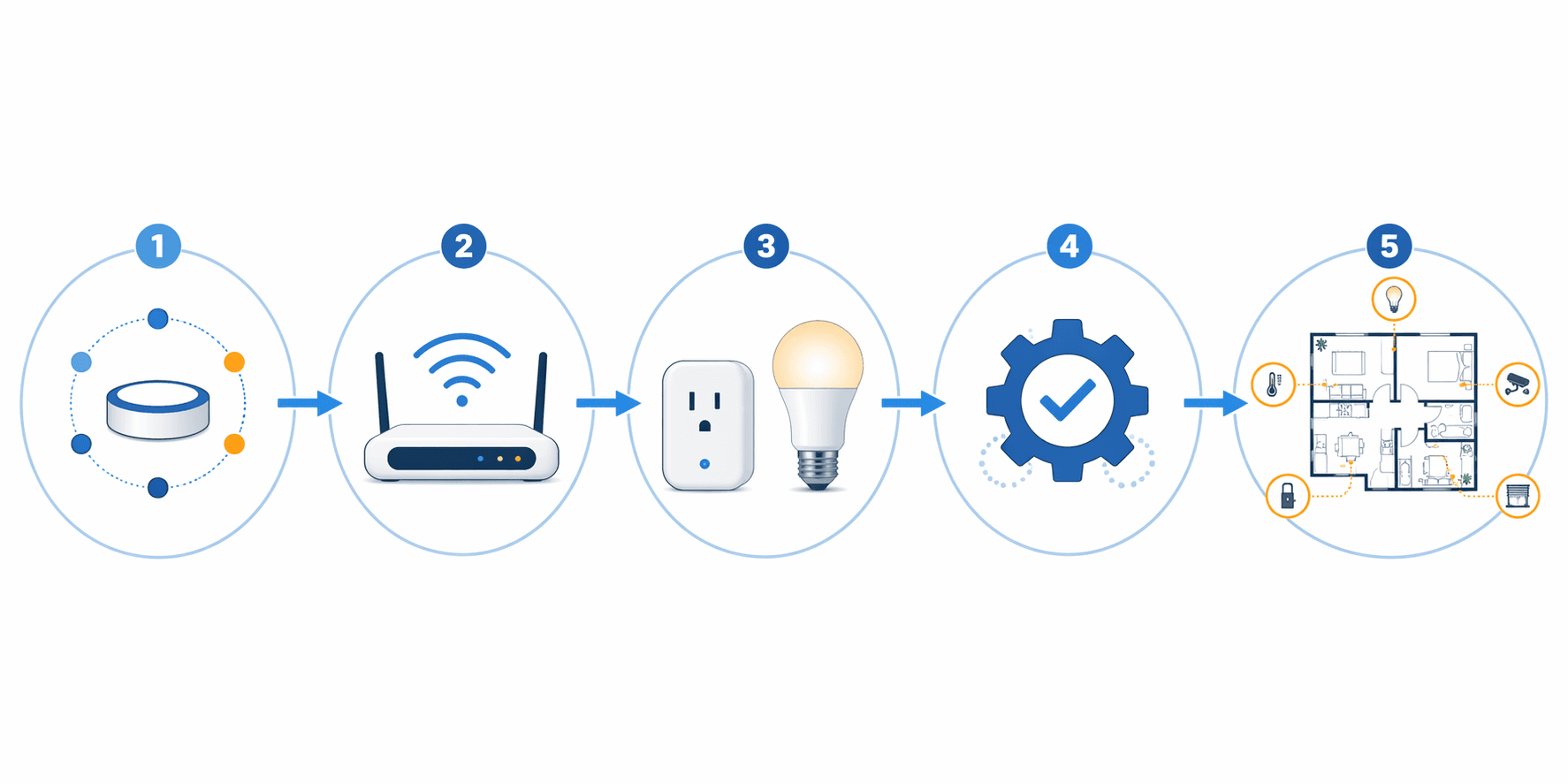
The awkward first question with home automation systems is not “Which gadget is best?” It is “What should I buy first so I do not paint myself into a corner?” In 2026, the safest answer is still pleasantly boring: choose the ecosystem, check the network, start with two or three useful devices, test a few routines, then expand one room at a time.
That order matters. A discounted bulb is only a bargain if it works with the app, speaker, hub, Wi-Fi, routines, and people already in the house. A smart lock is only convenient if everyone can still get in when the battery runs low or the internet misbehaves. The first weekend should give the household one or two small improvements, not a drawer full of incompatible hardware.
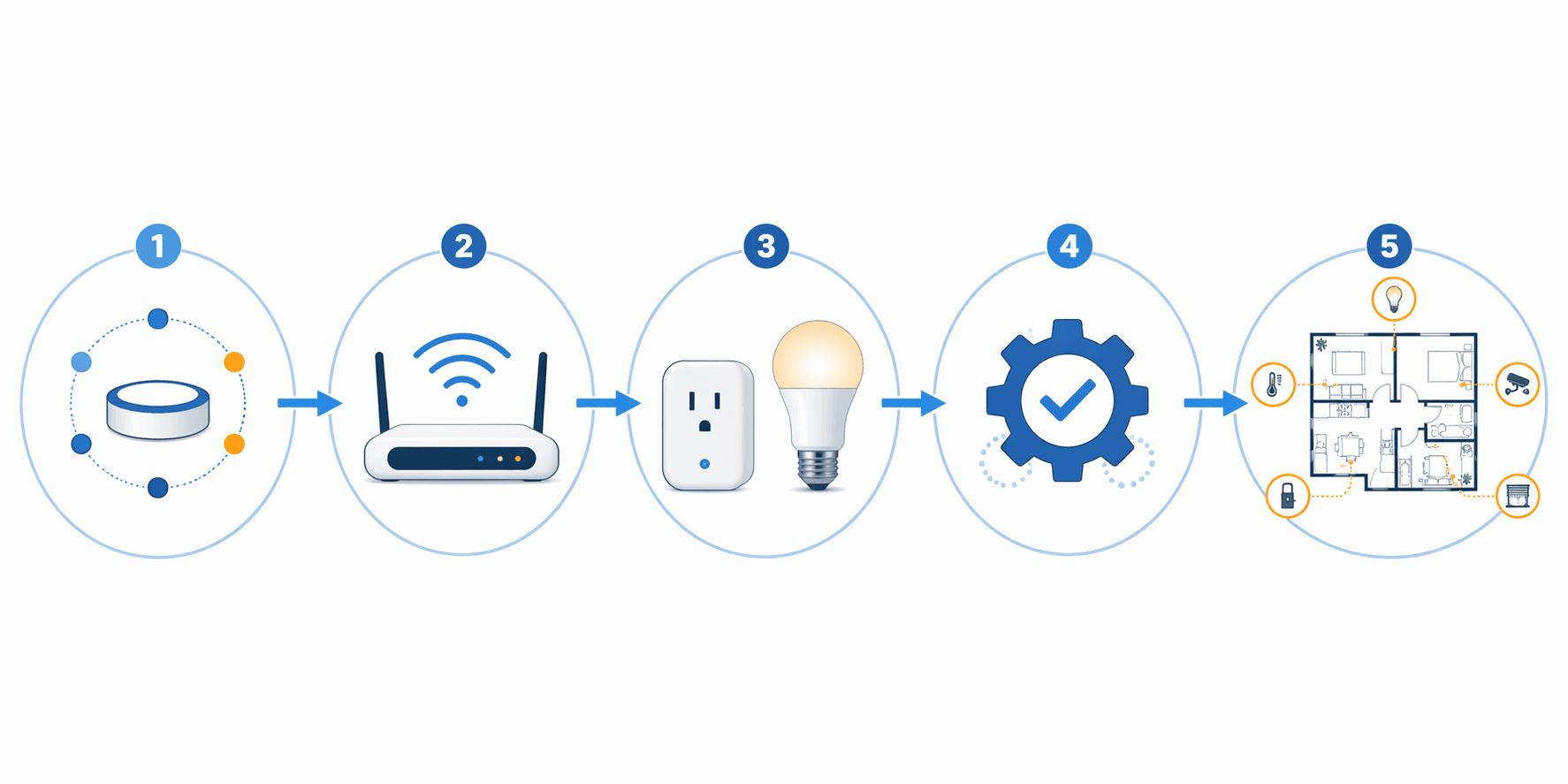
| Phase | What to decide | What to buy or do |
|---|---|---|
| 1. Pick an ecosystem | Alexa, Apple Home, Google Home, Samsung SmartThings, or a more advanced Home Assistant path | Usually nothing yet; confirm what your phones, speakers, and household already use |
| 2. Check the network | Whether Wi-Fi coverage is stable where devices will live | Fix router placement, dead zones, or overloaded Wi-Fi before adding more devices |
| 3. Start with foundations | Which two or three devices solve a real daily problem | A smart plug, bulb, speaker/display, thermostat, or another low-risk starter device |
| 4. Test routines | Whether automations are reliable and understandable | Create simple routines such as sunset lights, away mode, or bedtime shutoff |
| 5. Expand by room | Which room or use case has earned more investment | Add sensors, locks, cameras, hubs, or additional lighting only after the basics behave |
For budgeting, treat the early build as a range, not a promise. A basic starter setup is often estimated around $200–$500, while a fuller starter package can land closer to $900 depending on device choices, installation, region, and timing.[1][2] If you need a hub, many consumer hubs sit roughly in the $50–$200 range, though the right answer depends on the devices and protocols you choose.[3] Those numbers are planning anchors. Sales, bundles, subscriptions, and professional installation can move the total quickly.
Start With The Ecosystem, Not The Device
The ecosystem is the control layer: the app, voice assistant, automation engine, and account structure that tie the house together. Most beginners are choosing among Amazon Alexa, Apple Home, Google Home, Samsung SmartThings, or a more DIY platform such as Home Assistant. The best choice is usually the one your household will actually use without being coached every time a lamp fails to respond.
Start with what is already present. If everyone carries iPhones and uses Apple services, Apple Home may reduce friction. If Echo speakers are already in the kitchen and bedrooms, Alexa may be the shortest path to useful voice control. If Android phones, Nest devices, and Google services are already part of daily life, Google Home deserves a close look. SmartThings remains relevant when you expect to use a broader mix of device types and hub-connected gear.
Matter helps, but it does not make this choice disappear. Matter-compatible devices are designed to work across major ecosystems, which reduces the old problem of buying a bulb that only behaves in one brand’s world.[4][5] The practical benefit is real: you can shop with less fear of permanent lock-in. The limit is just as real: each ecosystem still has different app design, automation depth, device support, voice behavior, and subscription strategy. A Matter logo is a compatibility clue, not a guarantee that every feature will appear identically everywhere.
If you want a deeper comparison before choosing, use The Smart Home Ecosystem Trap: Which Platform to Buy Into in 2026 as the decision point. For the Matter side of the question, The Best Smart Home System in 2026: Why Matter Makes Ecosystem Lock-In a Thing of the Past is the better detour. Do this before filling a cart. Ten minutes here can prevent months of tiny annoyances.
A quick ecosystem test
- Which phones do the decision-makers in the house use every day?
- Which voice assistant, if any, is already trusted enough to sit in a common room?
- Who will add devices, fix routines, and reset things when they stop responding?
- Can a guest, child, partner, or house sitter operate the basics without your phone?
- Are the devices you are considering clearly labeled for that ecosystem, Matter, or both?
That last question is where many first builds go sideways. People buy for the device feature and only later discover the app, hub, or voice assistant does not support the feature they cared about. Compatibility should be checked at the feature level, not just the brand level.
Make The Wi-Fi Boring Before The House Gets Clever
Network stability is the least glamorous part of home automation and the one most likely to decide whether the system feels dependable. Smart bulbs, plugs, cameras, speakers, displays, thermostats, and hubs all depend on some combination of local network access, cloud service access, Bluetooth, Thread, Zigbee, Z-Wave, or Wi-Fi. The beginner mistake is assuming that because a laptop works on the couch, the garage camera, porch lock, basement sensor, and far-bedroom plug will behave too.
Before buying devices, walk the home with the phone connected to Wi-Fi. Stand where the first devices will actually live: beside the porch outlet, near the thermostat, by the garage entry, in the bedroom corner where the lamp plugs in. If the signal is weak, slow, or inconsistent in those places, adding automation will not make it better. It will simply give the weak spot a blinking status light.
This is especially important for cameras and video doorbells because they create more network demand than a plug that only turns a lamp on and off. It also matters for voice assistants. A speaker that hears the command but cannot reach the service reliably is not charming; it is a new way to make turning on a light take longer.
- Update the router firmware before adding a stack of devices.
- Move the router out of cabinets, corners, and utility closets when possible.
- Check coverage in device locations, not just where people sit with phones.
- Avoid installing several cameras before confirming upload performance and coverage.
- Write down the Wi-Fi name, ecosystem account, and device locations so someone else can help later.
If your smart home already breaks in strange ways, read Why Your Smart Home Keeps Breaking: The Network Is Usually the Problem before buying more devices. If you are still planning the whole system, Smart Home in 2026: A Complete Buyer's Guide to Ecosystems, Networks, and Devices is the broader companion guide.
Do you need a hub?
Maybe. That is the honest answer. Many Wi-Fi and Matter-over-Wi-Fi devices can work without a separate hub. Other setups benefit from a hub because it can connect Zigbee, Z-Wave, Thread, or specific ecosystem devices, reduce dependence on crowded Wi-Fi, and keep certain automations more organized. A hub is not a badge of seriousness; it is a tool for a particular device mix.
Do not buy a hub first just because a diagram looks tidier with one in the middle. Buy one when the devices you want require it, when you are intentionally choosing hub-based protocols, or when your ecosystem plan points that way. For the deeper decision tree, use Hub or No Hub: When You Actually Need a Smart Home Hub in 2026. If you are comparing Samsung SmartThings-compatible hardware, Aeotec Smart Home Hub V3 vs V4 is the more specific path.
Buy Two Or Three Devices That Prove The System
Once the ecosystem and network are settled, the first devices should be simple, visible, and reversible. That usually means smart plugs, smart bulbs, a smart speaker or display, and sometimes a thermostat if the wiring is compatible and the household is ready for it. The goal is not to automate everything. The goal is to learn how the system behaves when real people use it for a week.
A smart plug is often the cleanest first device because it does not require wiring, it can be moved, and it makes the benefit obvious. Put one on a lamp, fan, holiday light, or coffee station only if the appliance is safe to switch from the outlet. A plug also teaches the rhythm of setup: add the device to the manufacturer app if required, connect it to the ecosystem, name it clearly, place it in the right room, and test manual control before making routines.
Smart bulbs are nearly as approachable, but they need a small household rule: the wall switch has to stay on if the bulb expects constant power. If someone keeps using the switch out of habit, the app will report the bulb as unavailable. In rooms where people will always slap the wall switch, a smart switch may eventually be better than a smart bulb, but that moves into wiring and permission territory.
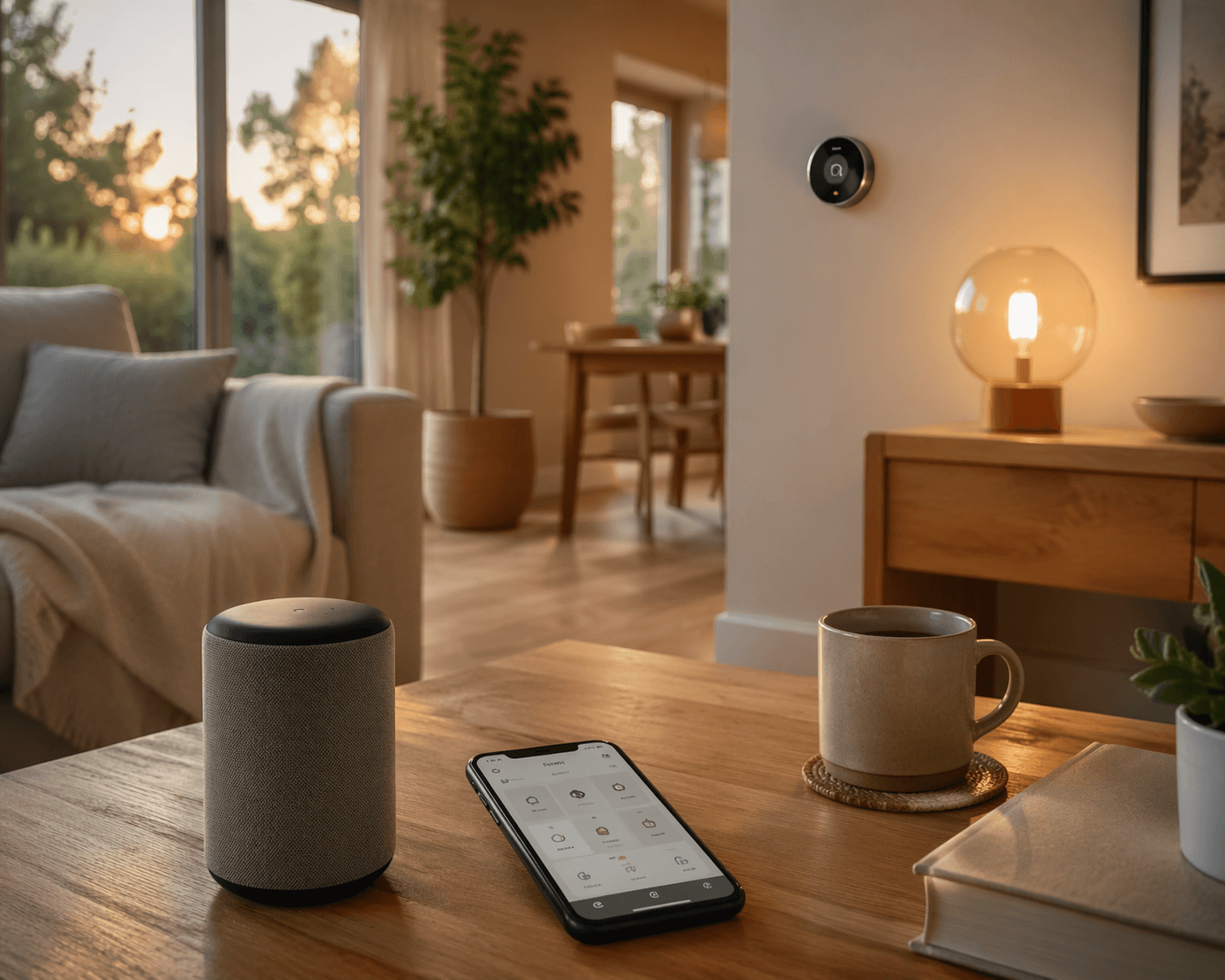
A smart speaker or display can be useful as the shared control point. It gives the system a voice interface and, in some ecosystems, helps with device control or home presence features. Put the first one in a common area, not a private room, so everyone can test whether voice control is helpful or irritating.
A smart thermostat can be a strong early upgrade when the wiring, HVAC system, and household schedule fit. It is less casual than a plug because comfort, heating, cooling, and sometimes utility programs are involved. If thermostat savings are the reason you are considering one, read Smart Thermostat Savings in 2026 before treating the purchase as automatic.
| Starter device | Good first use | Watch before buying |
|---|---|---|
| Smart plug | Lamp, fan, seasonal lights, simple appliance control | Do not use with unsafe loads or devices that should not restart unattended |
| Smart bulb | Dimming, color scenes, sunset lights | Wall switches must usually remain on |
| Smart speaker or display | Shared voice control and routine testing | Privacy comfort and account access matter |
| Smart thermostat | Scheduling, away settings, comfort automation | HVAC compatibility and wiring must be checked first |
| Camera or video doorbell | Entry monitoring and alerts | Wi-Fi coverage, storage plans, mounting, and privacy expectations |
| Smart lock | Keyless entry and access codes | Door alignment, battery maintenance, backup access, and installation skill |
DIY is usually reasonable for plugs, bulbs, and speakers. Cameras and smart locks deserve more caution, and some buyers benefit from professional installation for those categories, especially when mounting, door alignment, wiring, or security expectations are involved.[1] Renters should pause before anything hardwired, drilled, or lock-related unless the landlord has approved it. Portable plugs and bulbs are much easier to take with you.
For plug shopping, Best Smart Plugs for Alexa is useful if your chosen ecosystem is Amazon-centered. For locks, use Kwikset Smart Lock Complete Buyer's Guide when the project has moved from convenience lighting into entry security.
Name Things As If Someone Else Has To Fix Them
Device names become the language of the house. “Lamp 3” feels harmless during setup and becomes nonsense later. Use names that match how people speak: “Living Room Lamp,” “Porch Light,” “Bedroom Fan,” “Hall Thermostat.” Put devices in the correct room inside the app. If the ecosystem allows favorites or dashboard tiles, keep the everyday controls visible and bury the experiments.
The same rule applies to routines. A first routine should be easy to understand and easy to disable. Good early examples include porch lights at sunset, living room lamps off at bedtime, thermostat setback when nobody is home, or a single “Movie” scene that dims a lamp. Avoid building a chain of conditions that only makes sense to the person who created it.
- Test manual control first: app, voice, physical switch, and any backup method.
- Then test one routine at a time for several days.
- Check what happens when Wi-Fi is slow, a phone is away, or someone uses the wall switch.
- Show another person how to turn the device on, off, and disable the routine.
- Keep a short note of device names, apps, and batteries so maintenance is not a scavenger hunt.
This is where a small system becomes trustworthy. If the first routine annoys people, fix that before adding six more. If a device drops offline twice in a week, solve the network or placement problem before buying matching devices for every room.
Expand Room By Room, Not Sale By Sale
After the first devices behave, choose the next room by usefulness. The kitchen may need voice timers and a lamp routine. The entry may need a porch light, lock, or camera. The bedroom may need gentler lighting and a bedtime scene. The best next purchase is the one that removes a repeated annoyance, not the one with the largest discount badge.
Security devices need a slower pace. Cameras raise placement, recording, notification, privacy, and subscription questions. Smart locks raise access, batteries, physical key backup, door fit, guest codes, and landlord permission questions. These are not reasons to avoid them. They are reasons not to install them at 10 p.m. because a box arrived.
Subscription plans also deserve a quiet line in the budget. Newer services such as Alexa+ and Google Home Premium are part of the 2026 landscape, with reported pricing around $20 per month or included with Prime for Alexa+ and $10–$20 per month for Google Home Premium, but these plans are new enough that features and packaging may shift.[6][7] Treat subscription-dependent features as optional until you know which alerts, recordings, automations, or AI features your household actually values.
A useful expansion rule is simple: add one room or one use case, then wait. If the entry works reliably for a few weeks, move to the bedroom. If the bedroom routine gets used every night, consider adding sensors or switches. If nobody uses the voice scene you thought would be delightful, delete it without ceremony.
When the advanced path makes sense
Some households eventually outgrow the default apps. Home Assistant, often run on hardware such as a Raspberry Pi, can give advanced users more local control and deeper automation. It is not the easiest first weekend for most beginners. It becomes interesting when you already know what you want to automate, you are comfortable maintaining the system, and you prefer flexibility over hand-holding. If that sounds like the direction you are heading, start with Raspberry Pi Home Automation: Pi 5 vs Pi 4 Buying Guide before buying parts.
A First Weekend Build That Usually Makes Sense
For a beginner who wants a practical starting point, a sensible first weekend might look like this: choose the ecosystem, confirm Wi-Fi in the target areas, install one smart speaker or display if you do not already have one, add one smart plug to a lamp, add one smart bulb or second plug in a room people use daily, then create one routine. Stop there long enough to see what happens.
The routine can be modest. Porch light on at sunset. Living room lamp off at 11 p.m. Bedroom lamp dimmed in the evening. Thermostat adjusted when the house is empty, if you have already installed a compatible thermostat. A small routine that works every day is worth more than an elaborate one that fails twice and gets abandoned.
- Pick the ecosystem based on the household’s phones, speakers, comfort level, and device plans.
- Check Wi-Fi where the devices will live, and fix weak spots before adding cameras or outdoor gear.
- Buy two or three starter devices that solve a visible daily problem.
- Name devices clearly and place them in the right rooms inside the app.
- Create one routine, test it manually, and make sure someone else can override it.
- Expand only after the first setup has behaved under normal household conditions.
That sequence leaves room for delight. A light that turns on at sunset still feels good. A thermostat that backs off when nobody is home can be genuinely useful. The difference is that those little conveniences are sitting on decisions that can survive the next purchase, the next room, and the next person who needs to use the house without asking which app controls the lamp.
References
- Smart Home Installation Cost, Vivint
- Smart Home Starter Setup Cost, ZDNET
- Hub Cost Estimates, Consumer smart home market guidance
- Matter Compatibility Guidance, Lifehacker
- Matter Smart Home Coverage, WIRED
- Alexa+ Pricing, Amazon
- Google Home Premium Pricing, Google Home
Community Tips
Share platform-specific variations, steps that have changed after app updates, or tips that helped your installation succeed.
Comments
Join the discussion with an anonymous comment.