
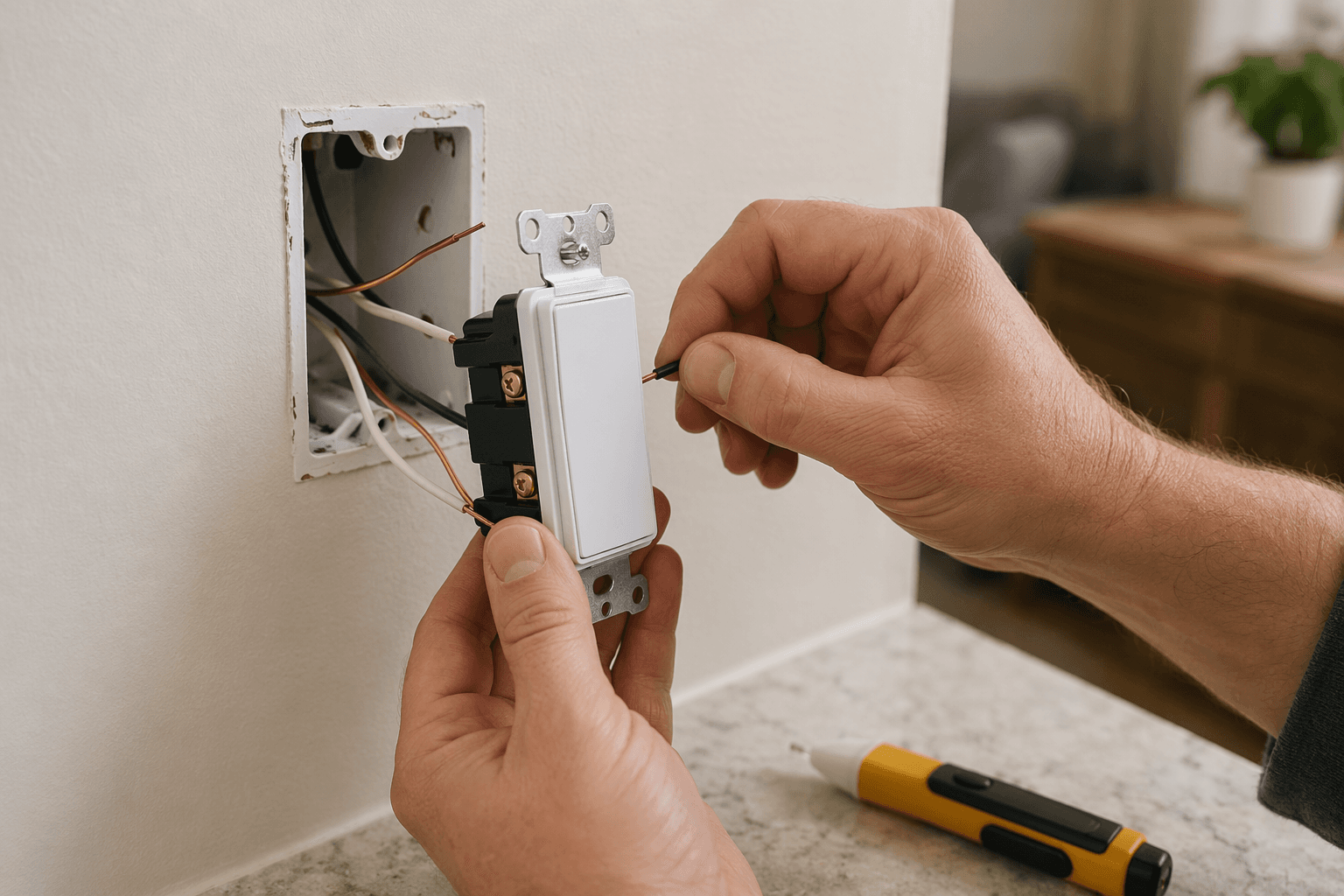
Yes, many homeowners can install a smart light switch themselves. The part to settle before buying anything is not the app, the voice assistant, or the automation routine. It is the wall box. Before you order a switch, check three things: whether the box has a neutral wire, whether the existing switch is single-pole or part of a 3-way circuit, and whether the box has enough room for the deeper smart switch body.
If those three checks come out clean, replacing a standard switch is often a 15–30 minute project for a first-timer, with the usual warning that older wiring, tight boxes, multi-gang plates, and 3-way circuits can stretch that estimate quickly.[1] If the neutral wire is missing, the job changes. You may need a no-neutral smart switch, often with a hub, or you may be better off using smart bulbs instead.
Before You Buy, Open the Box
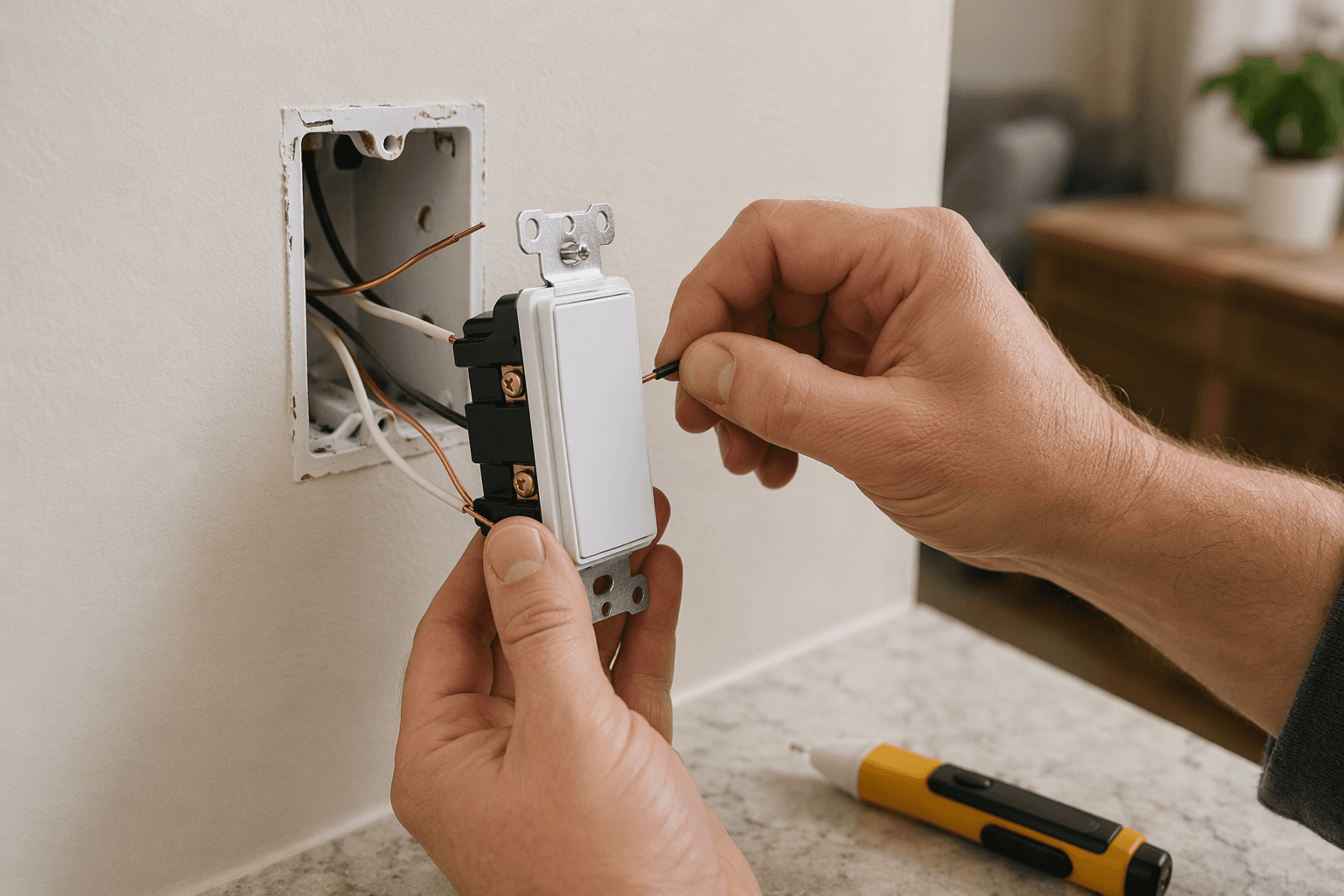
Do this inspection during daylight, with a flashlight handy, before the new switch is sitting on your counter. You are not rewiring anything yet. You are checking whether the switch you plan to buy matches the wiring that is actually in the wall.
- Turn off the breaker for the switch you want to replace.
- Flip the wall switch to confirm the light no longer turns on.
- Use a non-contact voltage tester at the switch before touching any conductor.
- Remove the wall plate and gently pull the old switch forward without disconnecting wires.
- Look for the neutral bundle, the switch type, and the amount of empty space in the box.
The fast neutral-wire clue is a bundle of white insulated wires capped together in the back of the box, usually not attached to the old dumb switch. Tom’s Guide describes that white bundle behind the switch as the quickest visual sign that a neutral is present, while still warning that you should verify with a voltage tester before handling anything.[2]
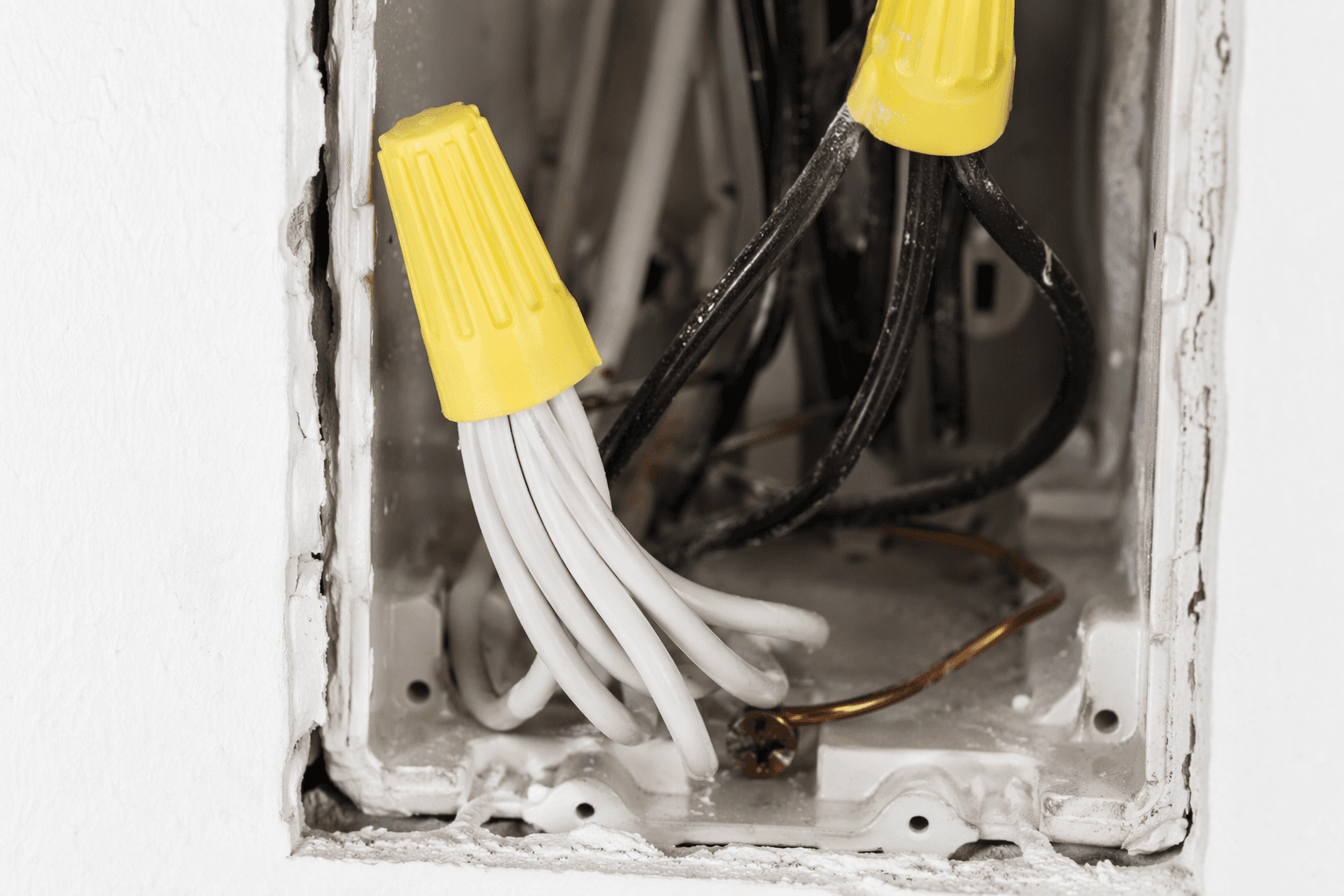
Do not rely only on the age of the house. A useful rule of thumb is that homes built after about 1990 are more likely to have neutral wires in switch boxes, while many pre-1980 homes do not, but local code timing and past renovations make that a clue, not permission to assume.[2] The box in front of you wins.
What You Are Looking At
A typical smart light switch needs four wiring roles. The colors help, but they are not a contract. Old houses, reused cables, paint, tape, and previous repairs can make colors misleading.
| Wire role | Common clue | What it does |
|---|---|---|
| Line | Often black; may be on the common screw of the old switch | Brings power from the breaker into the box |
| Load | Often black or red; leaves the switch toward the light fixture | Carries switched power to the light |
| Neutral | Often white wires capped together in the back of the box | Completes the circuit so the smart switch can stay powered |
| Ground | Bare copper or green | Provides a safety path and connects to the green screw or ground lead |
Most smart switches need neutral because the switch itself needs a tiny amount of constant power for its radio, processor, status light, and relay. A traditional switch can simply interrupt power to the light. A smart switch has to stay awake even when the light is off.
If there is no capped white bundle, stop the standard-switch plan. Do not borrow a white wire from another cable because it “looks neutral,” and do not connect neutral to ground. At this point your choices are narrower: buy a no-neutral smart switch, use smart bulbs, or have an electrician add the wiring needed for the switch you wanted.
Choose the Right Path From the Inspection
| What you find | Likely next move | Do not miss |
|---|---|---|
| Neutral bundle present, single switch controls one light | Buy a standard neutral-required smart switch | Check box depth and bulb compatibility |
| No neutral bundle | Consider a no-neutral model or smart bulbs | No-neutral switches can cost more and may require a hub |
| Two switches control the same light | Buy a 3-way-compatible smart switch and required companion switch | Do not assume one smart switch plus one old switch will work |
| Several switches share one wall plate | Check device width, heat/load rules, and plate fit | Smart switches are deeper than standard switches |
| Wires are unlabeled, brittle, crowded, or confusing | Pause and call an electrician | Guessing is not troubleshooting |
No-neutral options exist in 2026, including models such as Leviton DN6HD, Lutron Caséta, Inovelli Blue Series, and SONOFF ZBMINIL2, but they are not all drop-in equivalents for every house. Wirecutter notes that some no-neutral systems, including Lutron Caséta, use a hub, and 3-way setups may require companion switches or specific model pairings.[3] If you are comparing models after this wiring check, use a smart light switch comparison guide with your actual wiring notes in hand.
Smart bulbs are not a consolation prize when the wiring is wrong for a switch. They can be the cleaner choice for lamps, rentals, old switch loops, or fixtures where color control matters more than keeping a familiar wall switch. The tradeoff is that someone can still cut power at the wall, which makes the bulb unavailable to the app until the switch is turned back on. Wirecutter’s switch-versus-bulb guidance makes that distinction plainly: switches preserve normal wall control, while bulbs make sense when fixture-level color or simpler installation matters more.[4]
Tools and Setup
Once the wiring check says the project is reasonable, gather everything before the breaker goes off. The room will be darker, the switch box may be cramped, and this is not the moment to search for the right screwdriver.
- Smart light switch matched to your wiring: neutral, no-neutral, single-pole, dimmer, or 3-way as needed
- Non-contact voltage tester
- Flathead and Phillips screwdrivers
- Wire stripper or cutter, if the switch instructions require fresh wire ends
- Wire connectors approved for the wire size and count
- Painter’s tape or labels and a phone for photos
- Flashlight or work light powered from another circuit
Installation guides from smart-switch makers and smart-home brands commonly put the same safety items at the top: shut off power, verify the circuit is dead, identify wires before disconnecting them, and follow the device wiring diagram rather than a generic color assumption.[5] That order matters.
Install the Smart Light Switch
The steps below describe a common neutral-required single-pole smart switch. If your device is a no-neutral model, a dimmer with a required bypass, or a 3-way kit, follow the manufacturer’s wiring diagram for that exact model. The sequence is still useful, but the terminal names and companion-switch wiring may differ.
1. Turn Off Power and Prove It Is Off
Turn off the breaker. If the panel is poorly labeled, take the extra minute to find the right circuit and label it now. Then return to the switch and try the light. Use the voltage tester on the wires in the box before touching or loosening anything. A light that does not turn on is not the same as verified dead wiring.
2. Photograph and Label the Existing Switch
Take clear photos before moving wires. Get one photo straight on, one from the side showing screw colors, and one showing the cable groups entering the box. If one wire is on a darker common screw or a terminal marked “line,” label it before disconnecting. If two black wires look identical after removal, you have created a small mystery that did not need to exist.
For a single-pole switch, you usually need to identify line and load. For a 3-way switch, you may also see traveler wires. That is where many simple guides get too cheerful. If your new switch instructions do not exactly match the old 3-way wiring, stop and confirm the correct companion switch or add-on kit before continuing.
3. Remove the Old Switch
Unscrew the old switch from the box and pull it forward gently. Loosen the terminal screws or release the backstab connections according to the old device. If the wire ends are nicked, short, or brittle, do not keep trimming until there is barely anything left to work with. That is a good place to pause.
Keep the neutral bundle together unless the smart switch instructions tell you to add the switch’s neutral lead into that bundle. Do not separate a group of white wires and guess which one is “the” neutral for the switch. The bundle works as a group.
4. Connect Ground, Neutral, Line, and Load
Follow the labels printed on the new switch and the diagram in its manual. A common order is ground first, neutral next, then line and load. Some smart switches use screw terminals. Others use pigtail wires that join to the house wiring with wire connectors.
- Ground: connect the bare copper or green ground wire to the green terminal or green pigtail.
- Neutral: add the switch neutral lead to the existing neutral bundle, if the model requires it.
- Line: connect the always-hot feed to the switch terminal marked line.
- Load: connect the wire going to the light fixture to the terminal marked load.
Line and load matter. Some switches will not power up if they are reversed. Some may power up but fail to control the light correctly. If your old switch did not identify them clearly, use the device instructions and proper testing methods rather than guessing while the circuit is energized.
5. Tuck the Wires Back Without Forcing the Switch
Smart switches are deeper than old toggle switches, and that extra depth is where a neat job can turn ugly. Tom’s Guide specifically warns that junction-box space can be a constraint when replacing a standard switch with a smart one.[2] Fold wires carefully into the back of the box, keeping connectors secure and avoiding sharp bends at the terminals.
If the switch only fits when you crush the wires behind it, stop. A box extender or larger electrical box may be needed, and that may be electrician territory depending on your wall, box type, and local rules. A smart switch should sit flush because the wiring is arranged correctly, not because the mounting screws are being used as clamps.
6. Secure the Switch and Restore Power
Mount the switch to the box, attach the wall plate, and then turn the breaker back on. Test the switch manually before opening the app. The light should turn on and off from the wall. If it is a dimmer, test low and high brightness with the bulbs you actually plan to use.
If the switch does not power on, the light does not respond, or the breaker trips, turn the breaker off again. Do not keep cycling the breaker while hoping the electronics “wake up.” Go to the troubleshooting section or call an electrician if anything looks or smells wrong.
Pair the Switch With the App
Only after the switch works by hand should you treat it like a smart device. Install the manufacturer’s app, create or sign in to the account if required, and put the switch into pairing mode according to its instructions. Many models use a blinking status light or a long press on the paddle or reset button.
Most Wi-Fi smart switches pair on 2.4 GHz Wi-Fi, not 5 GHz. MOES states this plainly in its installation guidance, and it is one of the most common reasons a new switch looks defective when the wiring is fine.[5] If your phone is on a combined network name, stand near the router, temporarily separate the 2.4 GHz and 5 GHz bands if your router allows it, or follow the router maker’s instructions for connecting 2.4 GHz smart-home devices.
Matter support can reduce platform friction, but it does not remove the electrical requirements in the wall. In 2026, Matter-over-Thread switches such as Inovelli Blue Series options and Matter-over-Wi-Fi switches such as Eve options are available, and Matter is intended to support cross-platform control without relying on a separate brand-specific app for every routine.[6] You still need the correct wiring, box space, compatible bulbs, and any required border router or hub for the protocol you choose.
If you are adding more than one switch, name this one carefully now: “Kitchen Sink,” “Hall Stairs,” or “Porch Light” beats “Switch 1.” A precise name saves time later when voice assistants, automations, and household members all start referring to the same device.
Quick Troubleshooting Before You Escalate
The first troubleshooting rule is boring and useful: separate electrical problems from network problems. If the wall switch cannot control the light manually, stay at the wiring and device-compatibility level. If the wall switch works but the app cannot find it, move to Wi-Fi, pairing mode, account, and hub checks.
| Problem | Likely checks | When to stop |
|---|---|---|
| Switch will not power on | Breaker off, loose neutral, line/load reversed, no neutral on a neutral-required switch | Stop if wiring is unclear or the breaker trips |
| Light flickers or buzzes | Bulb not dimmer-compatible, load too low, dimmer setting wrong, no-neutral bypass required | Stop if flicker continues after bulb and settings checks |
| App cannot find the switch | Switch not in pairing mode, phone on wrong network, app permissions blocked | Stop if manual control also fails |
| Wi-Fi pairing fails | Use 2.4 GHz Wi-Fi, check signal strength, disable VPN temporarily, confirm password | Stop if the switch repeatedly drops after setup |
| Switch is too deep for the box | Rearrange wires carefully, verify connectors are compact and secure | Stop if the device only fits under force |
| 3-way circuit behaves incorrectly | Wrong traveler/common identification, missing companion switch, incompatible model | Stop before experimenting with live wiring |
| No neutral discovered midstream | Reinstall the old switch or switch to a no-neutral model or smart bulbs | Stop the standard smart-switch installation |
For flickering LEDs, buzzing, dimmer problems, or switches that work briefly and then fail, move to a dedicated smart light switch troubleshooting guide rather than stacking random fixes. For switches that pair and then keep falling offline, the home network is often the part worth inspecting next; a separate guide to smart-home network reliability is a better next read than another factory reset.
If a no-neutral model requires a hub, account for that before buying the second and third switch. A hub is not automatically bad; it can make larger systems more stable and support devices that Wi-Fi alone does not. It is still a real part, a real cost, and one more thing that needs placement and power. If you are unsure whether your setup needs one, read a hub versus no-hub smart-home guide before committing to a product family.
When This Stops Being a DIY Job
The safe stopping points are not failures. They are how you keep a small upgrade from becoming a wall repair or an electrical hazard.
- The breaker trips after the switch is installed.
- The voltage tester gives results you do not understand.
- The box has no clear neutral and your switch requires one.
- The old switch has more wires than the new diagram accounts for.
- The box is overcrowded or the smart switch cannot sit flush without force.
- The lights flicker, buzz, or behave unpredictably after the basic bulb and setting checks.
At those points, the next step is a licensed electrician, not another improvised connection. A good smart light switch install ends with the wall control working, the app connected, the plate sitting flat, and no mystery wires left behind.
References
- How to Install Smart Light Switch: 2026 New Guide, Reolink
- DIY smart home: What's a neutral wire and what to do if you don't have one, Tom's Guide
- The 4 Best In-Wall Smart Light Switches and Dimmers of 2026, Wirecutter
- Seeing the Light: When to Use a Smart Bulb, Switch or Plug, Wirecutter
- 2026 Ultimate Guide: How to Install a Smart Light Switch, MOES
- Best Matter Smart Light Switches 2026, MatterCatalog
Community Tips
Share platform-specific variations, steps that have changed after app updates, or tips that helped your installation succeed.
Comments
Join the discussion with an anonymous comment.