
Hub or No Hub: When You Actually Need a Smart Home Hub in 2026
Wondering if you need a dedicated smart home hub or if Wi-Fi and Matter are enough? This guide breaks down the device-count threshold, protocol mix, and automation needs that decide the question — with concrete numbers and real-world trade-offs.
Last updated
Do You Need a Smart Home Hub? The Real Threshold
I started with three Wi-Fi plugs and a smart speaker, no hub. It worked. Then I added a door sensor, a lock, and another plug, and the experience fell apart. Devices would show as offline in the app but still respond to voice commands. Batteries died every three weeks. A routine to turn off lights at sunset sometimes ran, sometimes didn’t. I blamed the devices, then the Wi-Fi, then the cloud. What was actually failing was the architecture.
This article gives you a concrete threshold to decide for yourself: device count, protocol mix, and automation needs. I will tell you the number I have landed on after testing both paths, and I will tell you exactly where the evidence is solid and where it is still fuzzy. (If you need the basics first, read about what a smart home hub is.)
When Hubless Actually Works (and When It Doesn’t)
Let me state the positive case clearly, because if I only tell you to buy a hub you will rightly suspect I am just selling hardware. Hubless works when three conditions are all true:
- You have one or two devices, both Wi‑Fi, from the same brand (e.g., two TP‑Link Kasa plugs).
- You are comfortable with cloud‑only control — your app talks to a server, the server talks to the device. If your internet goes down, you get no lights, no locks, no routines.
- You do not have any battery‑powered sensors (motion, contact, temperature).
PCWorld puts it plainly: “Strictly speaking, you don’t need a smart home hub if all your smart home devices operate over Wi‑Fi.” That is true as far as it goes. For one or two plugs, the load on your router is negligible, batteries aren’t an issue because plugs are wired, and cloud latency is a few hundred milliseconds — you barely notice.
I have seen this work well for a single smart bulb and a voice speaker in a rental apartment. If that is your situation, skip the hub. The convenience is real, and the cost is zero.
What Happens When You Push Past Five Devices
Now let’s look at what happens when you add a few more devices. I use the number five as a practical ceiling. It is not a hard line — your router quality matters, and the exact device types matter — but it is the point where I have seen failures become frequent.
Here is what starts to go wrong:
- Wi‑Fi congestion. Every smart device that polls the network adds traffic. Forbes describes what many of us have felt: “overcrowded networks, flaky connections, and devices that randomly ghost you.” SafeWise confirms: “Having too many Wi‑Fi devices can also drag down your network speed.” Your streaming video does not suffer first — your budget IoT chips do, because they have weak antennas and no buffering.
- Battery drain. Wi‑Fi is a power‑hungry protocol. SafeWise again: “it quickly drains the batteries of wireless devices like a security sensor or a smart lock.” A Wi‑Fi motion sensor might need new batteries every month. A Zigbee or Thread sensor on the same workload lasts a year or more.
- Cloud latency. Every command goes from the app to the cloud and back. That round trip can be 200–800 ms. That is fine for a light switch. It is annoying for a door lock when you are standing in the rain. It breaks time‑sensitive automations altogether.
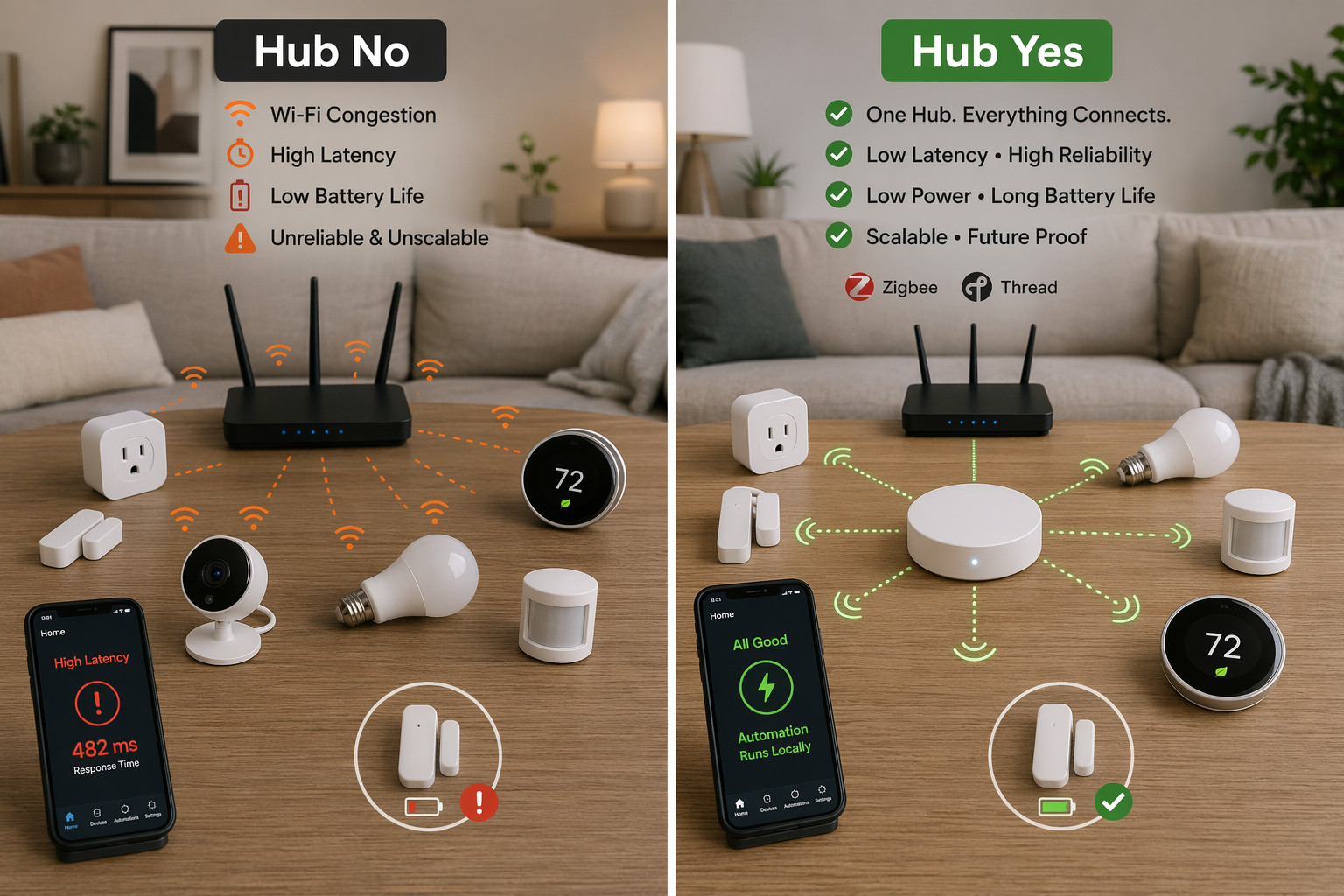
I have seen a six‑device setup with four Wi‑Fi bulbs and two battery sensors work acceptably for a month, then degrade to the point where the owner stopped using the automations altogether. The hub is not a luxury at that point — it is the fix for a broken experience.
The Matter Myth and the Local vs. Cloud Trap
The most common pushback I hear is: “But I will use Matter and Thread, so I do not need a hub.” That is half true. Thread is genuinely more reliable and power‑efficient — The Gadgeteer reports that “Thread is the radio that makes battery sensors last two years on a coin cell.” But Thread still needs a Thread Border Router — a device that bridges Thread to your home network. That Border Router is a hub by another name. It can be a smart speaker like the HomePod mini or a dedicated hub like the Aqara M3, but it is not “no hub.”
The bigger gap: Matter does not support Z‑Wave or Zigbee natively. The Verge states it plainly: “Matter uses Thread and Wi‑Fi/ethernet; it doesn’t directly support Z‑Wave or Zigbee, so you still need a hub or bridge to use these devices with Matter.” A huge number of sensors, locks, and lighting controllers still run Zigbee or Z‑Wave. They are not going away — in fact, Forbes notes that “Zigbee and Z‑Wave are still essential ingredients of a stable smart home for 2026.” If you want a Z‑Wave lock or a Zigbee motion sensor, you need a hub that speaks that protocol.
Even if you accept that you need a hub, not all hubs are equal on reliability. The critical difference is whether automations run locally or in the cloud. I have seen people buy a SmartThings hub expecting local control, only to discover that some automations still require a cloud round trip. The Gadgeteer points out that “the Aqara Hub M3, HomePod mini, and Home Assistant Yellow all run automations locally, while the Echo Hub and SmartThings v3 still rely on cloud round trips for some automations.”
That cloud dependency means your automations pause or slow down when your internet goes down. Forbes puts it bluntly: “In 2026, going local is the single best upgrade you can make.”
I have a detailed comparison of local vs. cloud automation here, but the short version is: if reliability matters to you — if you want your lights to turn on at sunset even when Comcast goes down — choose a hub that processes automations locally. That usually means a hub with a Zigbee or Thread radio and on‑device processing, like the Aqara M3, Home Assistant Yellow, or a HomePod mini for Thread devices.
The Decision Framework
Here is the framework that has held up after several rounds of testing and dozens of reader reports. It has three inputs and one output.
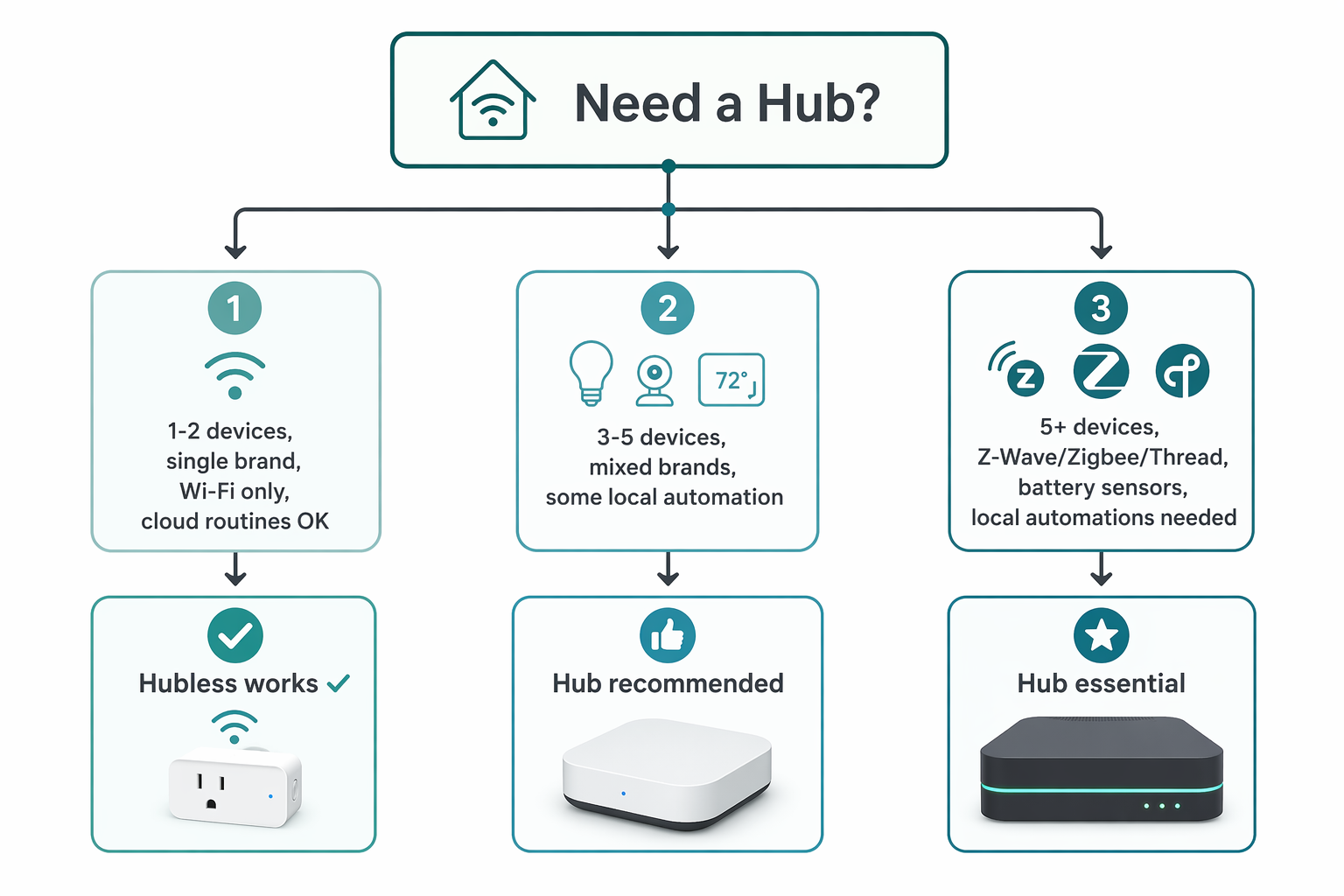
| Scenario | What to do |
|---|---|
| 1–2 Wi‑Fi devices, single brand, cloud‑only routines | Skip the hub. Works fine. |
| 3–5 Wi‑Fi devices, multiple brands, simple schedules | Hub recommended for reliability. Battery devices will still suffer on Wi‑Fi. |
| 5+ devices, any mix of protocols, local automations desired | Hub essential. Choose one with Zigbee/Thread/Z‑Wave radios and local processing. |
| Any number of battery sensors (motion, contact, temp) | Hub essential. Wi‑Fi will drain batteries in weeks; Zigbee or Thread will last a year+. |
I have pushed a five‑device Wi‑Fi setup to six and seven with a good router and it kind of worked. But it was fragile. A firmware update on one device caused the whole mesh to wobble. Adding a Zigbee hub and moving the battery sensors to it fixed the experience entirely. That is the pattern I see over and over: you can get away without a hub for a while, but once you hit the pain, a dedicated hub is the cheapest fix.
So, Hub or No Hub?
For a starter setup of one or two Wi‑Fi plugs from the same brand, no, you probably do not need a dedicated smart home hub. Just use the app and enjoy the simplicity.
For anything beyond that — three devices, five devices, mixed brands, battery sensors, local automations — a dedicated hub is the single biggest upgrade you can make. It offloads your Wi‑Fi, extends battery life by months or years, and makes your automations survive an internet outage.
Once you decide you do need a hub, the next question is which one. I have a full comparison of the top hubs here, covering protocol support, local processing, and price. But the hard decision — hub or no hub — is now behind you.
Known issues with this device / protocol
Spec-version history
For active regressions on this protocol, see Update Watch.
No linked Update Watch entries yet.