
What Is a Smart Home Controller? A Buyer's Guide for 2026
This buyer's guide cuts through the terminology confusion to explain what a smart home controller (hub) is, when you need one, and how to choose the right model in 2026 based on your existing devices, protocol requirements, and preferences for local control.
Last updated
The first annoying thing about buying a smart home controller is that the industry cannot agree on what to call it. Controller, hub, bridge, gateway, Matter controller, Thread border router — these labels often get thrown into the same product page as if they mean the same job. Sometimes they do. Sometimes they absolutely do not.
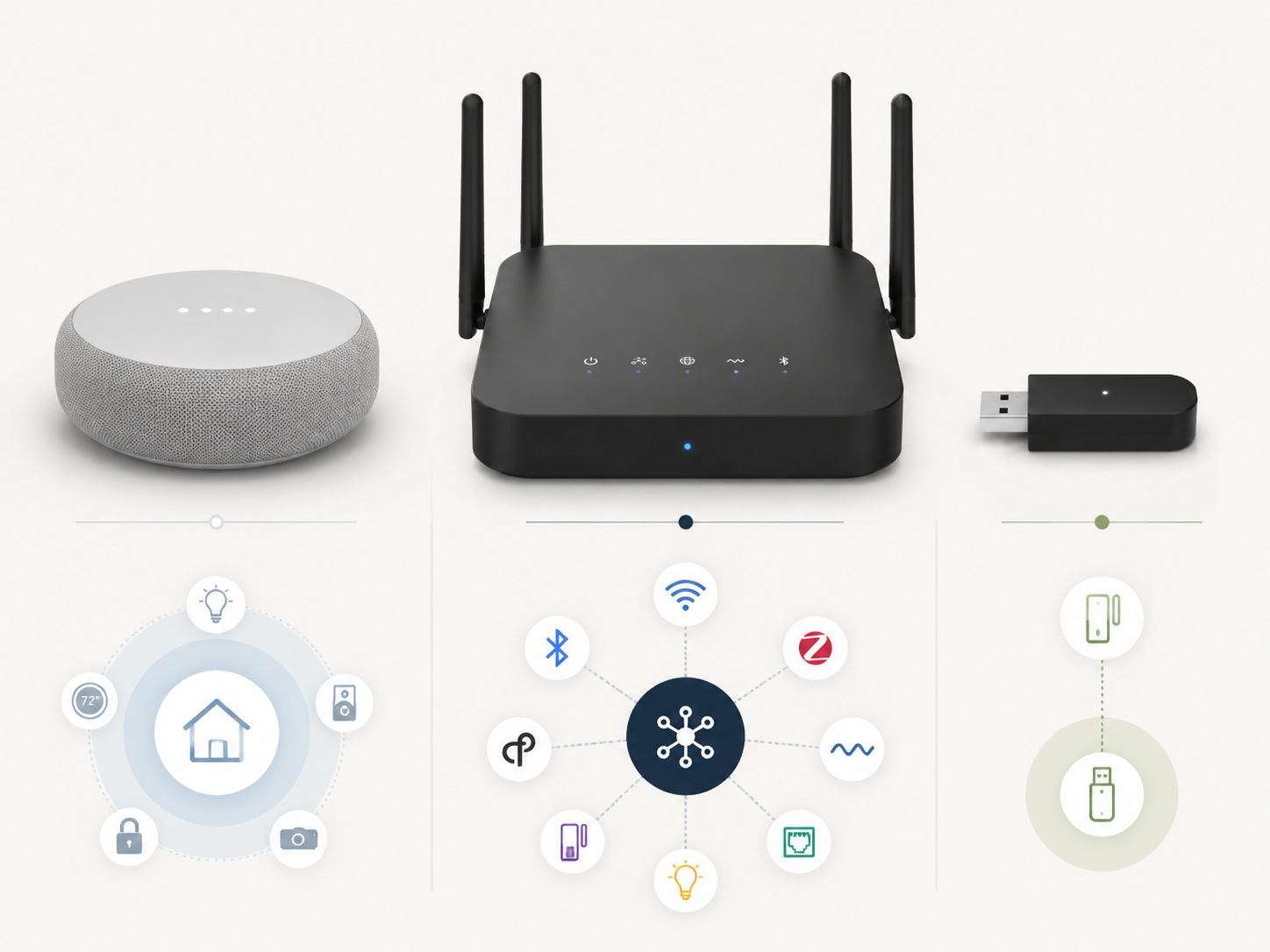
The useful starting point is simple: Vesternet notes that “smart home controller” and “hub” are commonly used interchangeably, so you do not need to treat those as two separate mysteries.[1] The harder part is figuring out what kind of hub you are looking at. In 2026, that choice usually falls into three practical buckets: a multi-protocol hub, an ecosystem hub, or a single-protocol bridge.[2]
The three boxes buyers keep mixing up
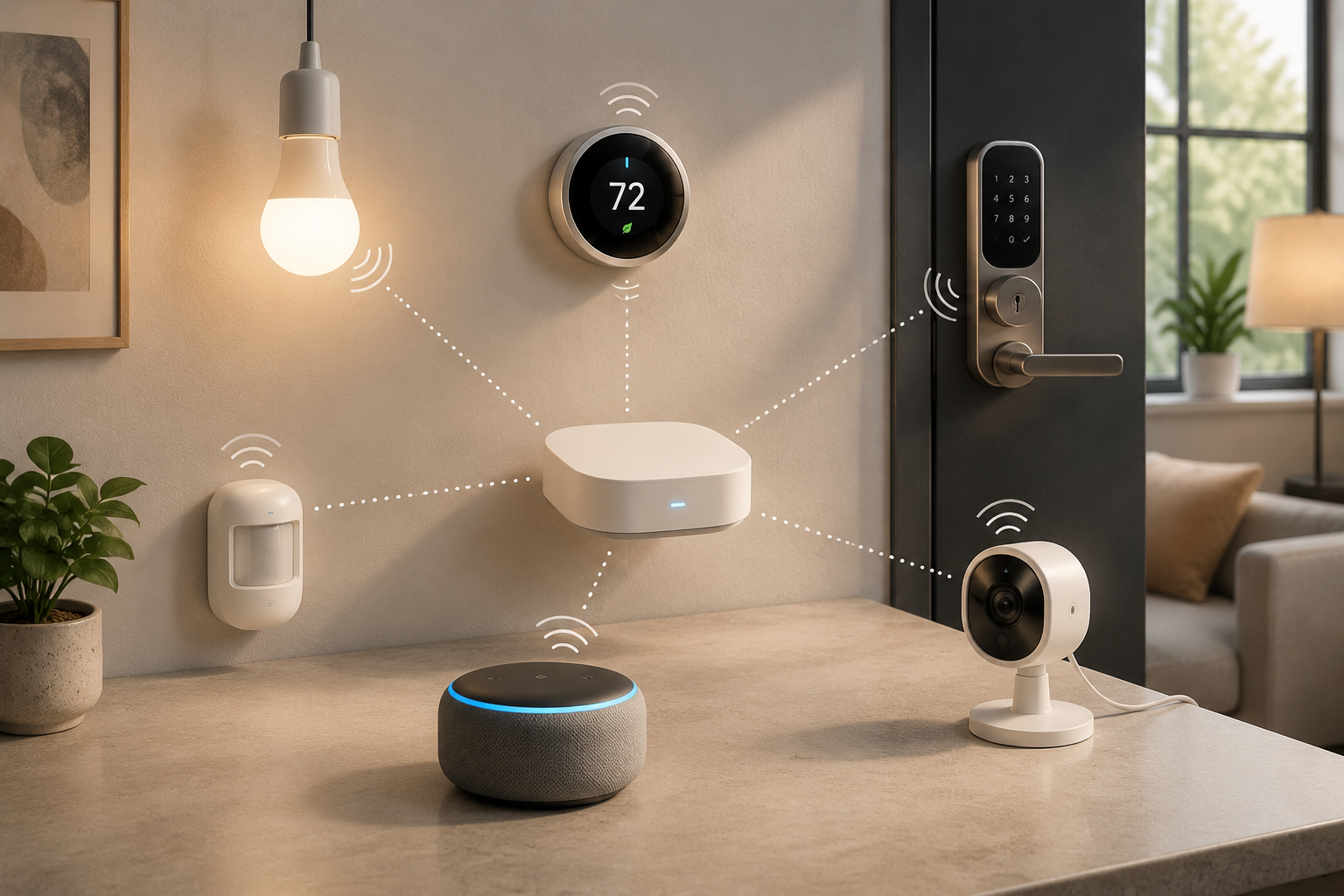
A smart home controller is the device or platform that coordinates smart devices so they can be controlled together and used in automations. That may mean turning on hallway lights when a motion sensor fires, locking a door at night, or letting a thermostat react to a presence sensor. The controller matters most when those devices do not all come from the same brand or use the same wireless protocol.
| Category | What it is | Best fit | Typical 2026 price anchor |
|---|---|---|---|
| Multi-protocol hub | A controller built to talk to several smart-home protocols and brands | Mixed-brand homes, Z-Wave devices, local automations, more complex setups | Hubitat C-8 Pro around $200; Homey Pro around $400 |
| Ecosystem hub | A speaker, display, or hub tied closely to Apple, Google, or Alexa | Homes staying mostly inside one voice-assistant ecosystem | Echo Hub, Echo Dot Max, or Nest Hub around $100; HomePod around $300 |
| Single-protocol bridge | A brand or protocol helper that connects one device family to your network | A specific product line such as Philips Hue or IKEA smart lighting | Varies by brand |
Those price anchors are not a ranking. They are a sanity check. A roughly $100 ecosystem device is not trying to solve the same problem as a $400 multi-protocol controller, and comparing them as if they were interchangeable is how people end up either overbuying or painting themselves into a corner.[2][3]
When you do not need a smart home controller
If your home is just a few Wi-Fi bulbs, a smart plug, and a voice assistant, you may not need a separate controller yet. Many Wi-Fi devices connect directly to your router and can be managed through their own apps or through Alexa, Google Home, or Apple Home. That can be perfectly fine for a small setup.
The catch is maintenance. A home with three separate lighting apps, a thermostat app, a lock app, and a voice assistant may still “work,” but the person living with it has to remember which app owns which routine. If the only automation you care about is “turn on the living room lamp,” keep it simple. If you are starting to combine sensors, locks, lights, and schedules, a controller becomes less of a gadget and more of a traffic manager.
For a narrower beginner primer, see What Is a Smart Home Hub and Do You Need One?.
When an ecosystem hub is enough
An ecosystem hub is the easy answer when your household already thinks in Apple, Google, or Alexa. If everyone asks Alexa to turn off the lights, or if your family already uses Google displays in the kitchen and bedroom, choosing the matching hub reduces friction. The point is not that voice control is magical. It is that the app, speaker, routines, and household permissions are already where people expect them to be.
This is where a Nest Hub, Echo Hub, Echo speaker, Apple HomePod, Apple TV, or similar device can make sense. The Verge’s smart-home hub framework groups these separately from multi-protocol hubs because they are built around the major platforms rather than around broad device tinkering.[2] PCWorld also frames smart-home systems around user profiles, separating entry-level and ecosystem-friendly choices from more powerful systems.[3]
The tradeoff is that ecosystem comfort can hide protocol limits. A household that buys only Matter-compatible bulbs, plugs, and sensors may be fine. A household with existing Z-Wave switches, older Zigbee devices, or a plan to build more advanced local automations should slow down before treating a smart speaker as the whole system.
A bridge is not the same promise
A bridge usually exists to help one device family or one protocol connect to the rest of your home. Philips Hue Bridge and IKEA Dirigera are the familiar examples in this category.[2] They can be useful, and sometimes they are the cleanest way to keep a lighting system reliable. But a bridge is not automatically a general-purpose smart home controller.
That distinction matters when you are shopping. A bridge may make one brand’s bulbs show up in Apple Home, Google Home, Alexa, or another controller. It does not mean it will coordinate your locks, sensors, thermostats, leak detectors, and mixed-brand switches with the same freedom as a true multi-protocol hub.
For Apple-specific confusion, the difference between a HomeKit hub and a bridge is worth separating before you buy another small white box. See hub vs bridge for Apple users.
The protocol question changes the answer
This is the part to check before you fall in love with a product page. A smart home controller is only useful if it speaks the languages your devices use. The big names in 2026 are Wi-Fi, Bluetooth, Zigbee, Thread, Matter, and Z-Wave. They do not all mean the same thing.
Matter is the compatibility standard meant to make devices work across major platforms. Thread is a low-power mesh networking technology used by many newer Matter devices. A Matter-over-Thread device needs a Thread border router to connect that Thread network to the rest of your home network; Matter-Smarthome describes the Thread border router as the link between the Thread mesh and IP networks such as Wi-Fi or Ethernet.[4]
That is why the 2026 baseline has moved. The Verge’s buying advice is blunt: “You should only consider a hub that is a Matter controller and a Thread border router.”[2] For a new buyer, that does not mean every device must be Matter or Thread. It means the central device you buy should not already be missing the support that new devices increasingly expect.
Z-Wave is the important exception. Matter does not cover Z-Wave, so a home with Z-Wave locks, sensors, switches, or outlets needs a controller that supports Z-Wave directly or through a compatible setup. Gabellioni puts the practical version sharply: “If you have Z-Wave devices… you need Hubitat — there is no other option.”[5] The broader takeaway is not that every Z-Wave owner must buy one exact box forever. It is that an Apple, Google, or Alexa ecosystem hub should not be assumed to rescue a Z-Wave home.
For a deeper device-by-device breakdown, use a protocol-first guide such as Best Home Automation Hub for Your Devices: Protocol Compatibility in 2026.
Matter helps, but it does not erase setup reality
Matter is genuinely useful, especially for avoiding old-style platform lock-in. But the word “standard” can make setup sound more finished than it is. Terry White’s 2026 account is a useful warning from the real-home side: he reports that Matter over Thread often breaks down when a home has Thread border routers from different brands.[6]
That is not proof that every mixed-brand Thread setup will fail. It is a current caveat, not a universal law. Still, it is enough reason to avoid buying the cheapest possible “Matter-ready” device without checking whether it is also a Thread border router, which ecosystem it belongs to, and how it will coexist with the routers already in your home.
Local control is mostly a reliability decision
Local control gets discussed like a philosophy debate. For most buyers, it is more concrete than that: do your automations still run when the internet drops? If a motion sensor turns on a stair light at night, or a leak sensor triggers a shutoff routine, waiting on a cloud service is not a charming quirk.
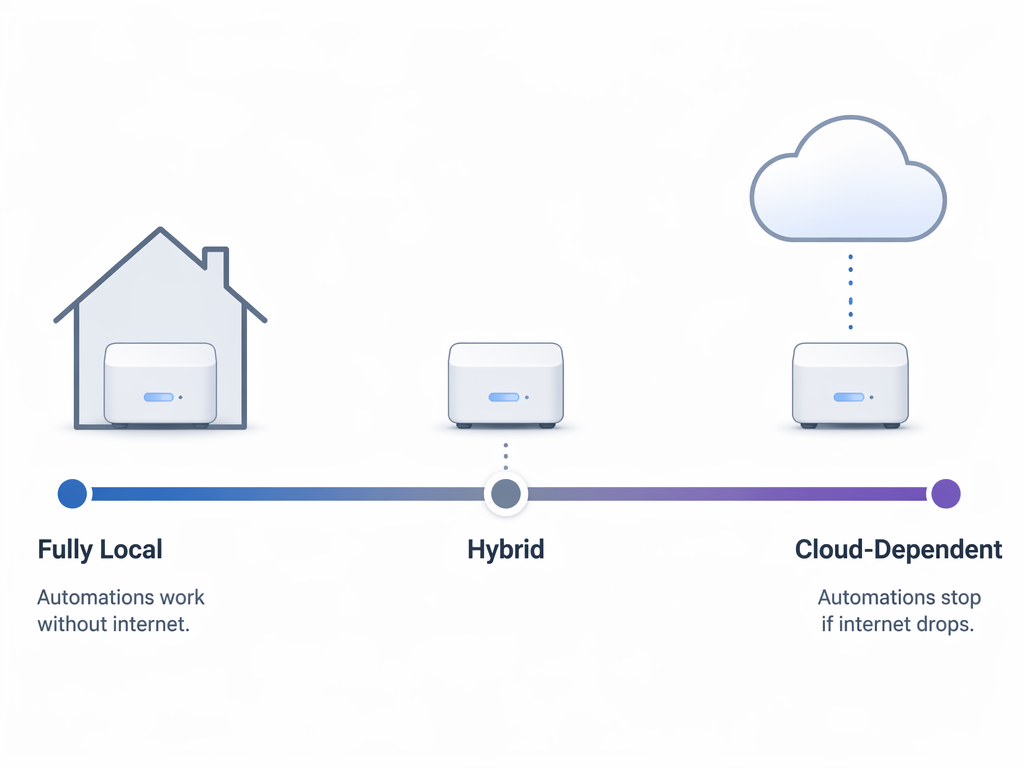
The categories are a spectrum. Vesternet’s comparison places Hubitat and Fibaro on the fully local end, Homey Pro as local with cloud optional, SmartThings or Aeotec as hybrid, and Echo or Nest as more cloud-dependent.[1] The Verge also notes that SmartThings Edge moved some automation processing locally, which is exactly why blanket statements like “SmartThings is cloud-only” are too crude.[2]
Hubitat and Home Assistant appeal to buyers who want automations to keep running inside the home. They also ask more from the person setting them up. Home Assistant in particular can be extremely capable, but capability is not the same as beginner-friendliness. If nobody in the house wants to maintain the system, a technically elegant setup can become its own appliance to babysit.
Homey Pro sits in a different place: broader consumer polish, broad compatibility ambitions, and a much higher price anchor around $400.[2][3] That may be reasonable if you want one central controller for many brands and protocols without living inside a more hands-on platform. It is harder to justify if your whole smart home is five Matter plugs and a voice assistant.
For buyers specifically weighing Matter and Home Assistant, see Matter + Home Assistant recommendations.
Watch the subscription line
A hub is not only a purchase price. Some systems attach cloud backup, advanced features, or device limits to subscriptions. Vesternet notes that Homey Bridge supports up to five devices for free before requiring a subscription, and that Hubitat’s Hub Protect cloud backup costs $4 per month.[1] PCWorld also notes that SmartThings offers enhanced features through subscription tiers.[3]
Subscriptions are not automatically bad. Cloud backup can be worth paying for if a failed hub would take down a carefully built system. The problem is surprise. A “cheap” bridge or hub is not cheap in the same way if the setup you actually want requires a monthly fee.
A practical buying path
Start with the devices you already own, not with the controller brand. Make a quick list: bulbs, plugs, switches, locks, sensors, cameras, thermostats, speakers, and any bridges already plugged into your router. Then write down the protocol for each device if you can find it. The answer is often printed in the app, on the product page, or in the manual.
- Choose an ecosystem hub if your devices are mostly Wi-Fi, Matter, or first-party ecosystem devices and your household already uses Apple Home, Google Home, or Alexa.
- Choose Hubitat, Home Assistant, or a similar local-first controller if Z-Wave devices, offline automations, or more advanced rules matter.
- Consider a Homey Pro-style multi-protocol hub if broad compatibility and a polished central experience are worth the higher upfront price.
- Keep a brand bridge when a specific product family works best through it, but do not confuse that bridge with a whole-home controller.
- Avoid any new central hub that lacks both Matter controller and Thread border router support unless you have a very specific reason.
This is also the moment to be honest about future plans. If you only want lights and a thermostat, do not buy a $400 controller just to feel prepared. If you know you will add door locks, motion sensors, leak sensors, and wall switches, do not save $100 now by buying something that cannot speak to the devices you are likely to install next.
Where the common products fit
| Product style | Good reason to buy | Reason to pause |
|---|---|---|
| Echo, Nest, or HomePod-style ecosystem hub | You want simple control inside one major ecosystem | You have Z-Wave devices or need strong local automation behavior |
| Hubitat C-8 Pro-style controller | You need Z-Wave, local processing, and serious automation control | You want the lowest-friction beginner interface |
| Homey Pro-style controller | You want broad multi-protocol compatibility in a more consumer-friendly package | The roughly $400 price is hard to justify for a small setup |
| Home Assistant setup | You want maximum flexibility and local control | You do not want to maintain a more technical system |
| Hue Bridge, Dirigera, or similar bridge | You need reliable support for one device family | You expect it to replace a general-purpose controller |
If you are still choosing between Apple, Google, Alexa, SmartThings, Home Assistant, Hubitat, and Homey, a platform-level comparison is the better next read than another product spec sheet. See smart home platforms compared.
The buying judgment
A smart home controller becomes necessary when your home stops being a handful of isolated Wi-Fi gadgets and starts becoming a system. The right one is not the most powerful model on paper. It is the controller that matches your protocols, your platform habits, and your tolerance for maintenance.
For a single Apple, Google, or Alexa household, an ecosystem hub is usually the cleanest first buy. For Z-Wave or local reliability, look at Hubitat, Home Assistant, or a similar controller before buying another speaker. For broad mixed-brand control, a Homey Pro-style hub may earn its higher price. For one lighting family, keep the bridge if it is doing a specific job well.
Once the controller is chosen, the more interesting work is building automations that are useful rather than theatrical. For that, move on to starter automation ideas for a 2026 smart home.
References
- Best Smart Home Controllers 2025: How to Choose the Right Hub, Vesternet
- Smart home hubs: what they are and why you need one, The Verge
- Best smart home systems 2026: From entry-level to all-powerful, PCWorld
- What is a Thread Border Router?, Matter-Smarthome
- Best Smart Home Hub to Buy in 2026: Complete Buyer's Guide, Gabellioni
- Why Matter Still Sucks in 2026!, Terry White's Tech Blog
Known issues with this device / protocol
Spec-version history
For active regressions on this protocol, see Update Watch.
No linked Update Watch entries yet.