
What Is a Smart Home Hub and Do You Need One?
Wondering whether a smart home hub is necessary for your setup? This beginner's guide explains what a hub does and provides a clear decision framework based on your device count, protocols, automation goals, and cloud-dependency tolerance.
Last updated
You do not automatically need a smart home hub just because you bought a smart plug, a voice-assistant speaker, or a bulb. If your setup is small, Wi-Fi-only, and you are comfortable controlling devices through their apps or one cloud-connected voice platform, you can usually skip a dedicated hub for now.
The answer changes the moment one of your devices speaks a different wireless language. A Zigbee sensor, a Z-Wave lock, or a Thread-based device cannot be treated like an ordinary Wi-Fi plug. It needs the right kind of coordinator: a compatible hub, bridge, or Thread Border Router. That is why “do I need a smart home hub?” is less about how many gadgets you own and more about whether those gadgets can actually talk to the same system.
For scale, the average U.S. smart-home household had 6.2 connected devices in Parks Associates Q2 2025 data cited by SQ Magazine, down from a pandemic peak of 8.[1] That should lower the pressure a bit. Most beginners are not secretly running a complicated house. They are trying to make a few devices behave predictably.
What a Smart Home Hub Actually Does
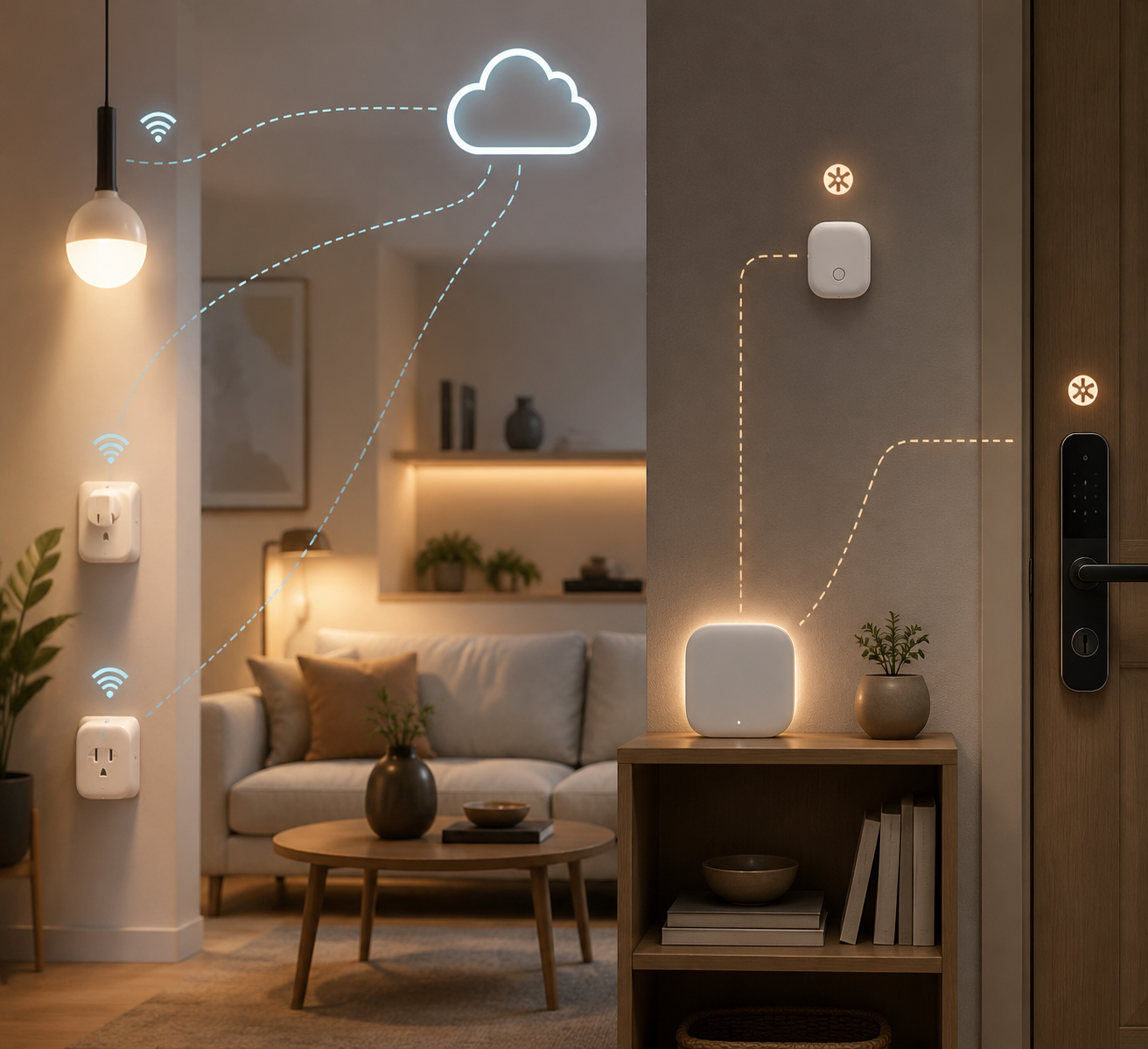
A smart home hub is the coordinator that sits between devices and the app, platform, or automation system you use to control them. In a simple setup, that job may be invisible: your Wi-Fi plug connects to your router, its cloud service talks to your phone, and your voice assistant sends commands through the internet. Nothing on your shelf looks like a hub.
In a mixed-protocol setup, the hub becomes much more obvious. It may translate Zigbee or Z-Wave radio signals, keep device states in sync, run automations, or give one app a way to control products from several brands. CNET describes the hub trade-off in that practical sense: hubs can reduce fragmentation and improve automation reliability, but they also add another device to buy, configure, and maintain.[2]
The confusing part is that a hub is not always a little square box labeled “hub.” Some speakers, displays, routers, and ecosystem devices can act as Matter controllers, Thread Border Routers, Zigbee bridges, or HomeKit hubs. So the real choice is not simply “hub or no hub.” It is whether something in your home already provides the coordination your devices require.
Start With the Wireless Language, Not the Device Count
Device count still matters, but it is a weak first question. Ten Wi-Fi plugs from one ecosystem may be less complicated than three devices using Wi-Fi, Zigbee, and Thread. Before buying anything, check the product pages, boxes, or app setup screens for the words Wi-Fi, Zigbee, Z-Wave, Thread, Matter, Bluetooth, bridge, hub required, or Thread Border Router required.
| If your device uses | What usually has to exist in the home | What that means for a beginner |
|---|---|---|
| Wi-Fi | A router, the device app, and often a cloud account | You may not need a dedicated hub for basic control |
| Zigbee | A compatible Zigbee hub or bridge | Do not assume your speaker can pair it unless Zigbee support is listed |
| Z-Wave | A compatible Z-Wave hub | Common for locks, sensors, and security-style devices; check regional compatibility |
| Thread | A Thread Border Router | A Matter label alone is not enough if the device uses Thread |
| Matter over Wi-Fi or Ethernet | A Matter controller on your chosen platform | May work without a dedicated hub, depending on your platform |
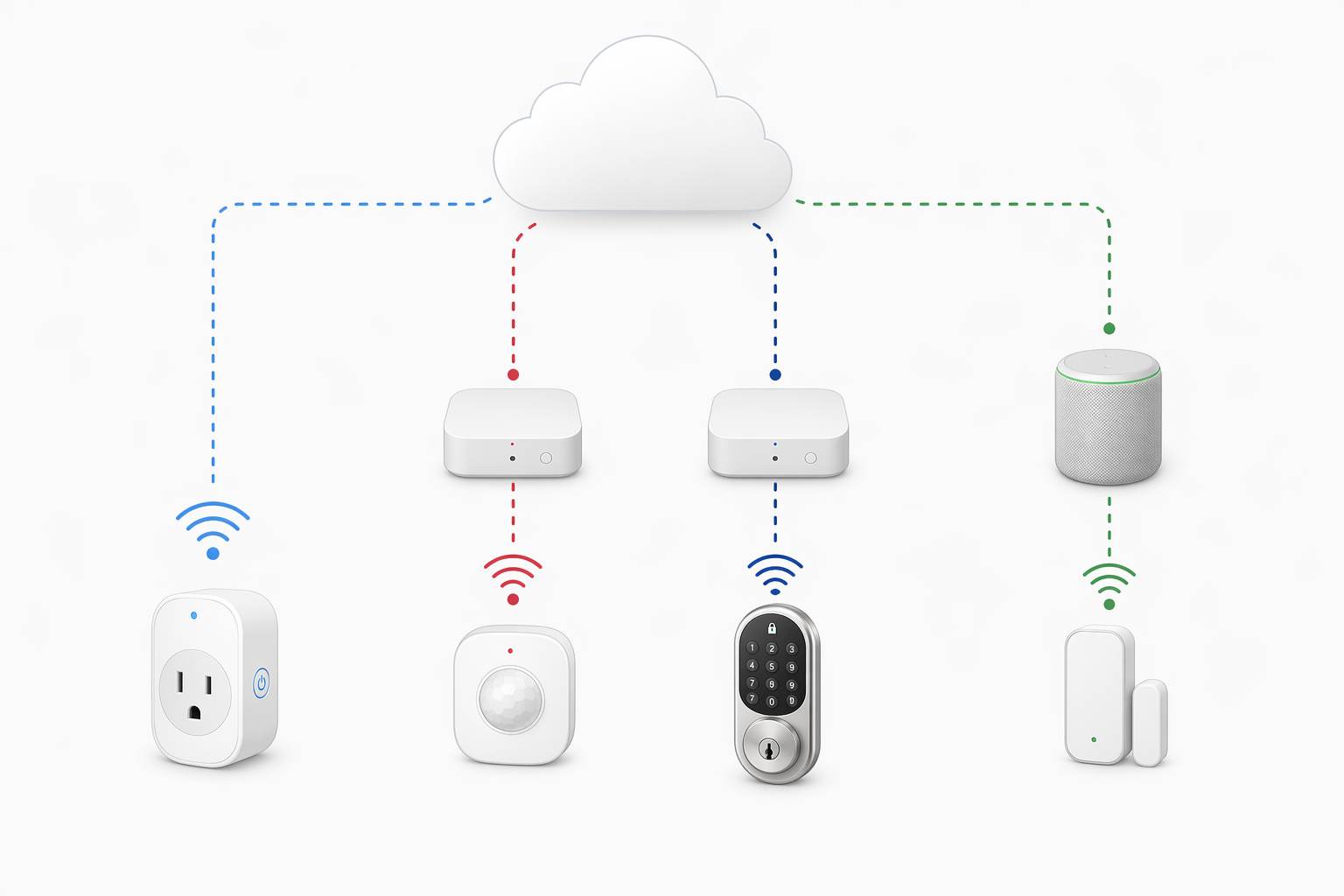
Wi-Fi devices are the easiest to understand because they use the network you already have. That is why many beginner setups work fine with plugs, bulbs, cameras, or small appliances controlled through their own apps or through a voice assistant. The compromise is that many Wi-Fi devices lean on cloud services. If your internet goes down, app control and automations may become limited or stop working, depending on the device and platform.
Zigbee and Z-Wave are different. They are low-power wireless protocols often used by sensors, switches, bulbs, and locks. Zigbee commonly runs on 2.4 GHz mesh networks and is used across brands such as Aqara, Philips Hue, IKEA, Innr, and SONOFF, while Z-Wave uses sub-GHz radio frequencies such as 908.42 MHz in the U.S. and is controlled by Silicon Labs.[3][4] The practical point is simpler than the radio chart: if the device says Zigbee or Z-Wave, plan for compatible hub support.
Thread is where many 2026 buyers get tripped up. Thread is an IPv6-based mesh protocol designed for low-power smart-home devices, but a Thread device still needs a Thread Border Router to connect that mesh to the rest of your home network.[4] If you buy a Matter-over-Thread sensor and have no Thread Border Router, the Matter badge will not magically make it pair.
Matter Helps, but It Does Not Erase the Hub Question
Matter is worth caring about because it reduces some of the old platform lock-in. A Matter device can be designed to work across major ecosystems more cleanly than many older smart-home products. Matter 1.0 launched in October 2022; later updates expanded the standard, with Matter 1.5 adding cameras and energy management in November 2025 and Matter 1.6 extending support into more appliance categories in June 2026, according to SQ Magazine and the Connectivity Standards Alliance.[1][5]
That progress does not mean every old hub is obsolete. Matter is an application layer. It can run over Thread, Wi-Fi, or Ethernet, and the transport still matters. A Matter-over-Wi-Fi plug and a Matter-over-Thread motion sensor do not place the same requirement on your home. The plug may only need your Wi-Fi network and a Matter controller. The Thread sensor needs a Thread Border Router.
There is also a large installed base of devices that still use Zigbee or Z-Wave. A bridge may expose some of those devices into a Matter-compatible ecosystem, but the bridge has not disappeared; it has just become part of the plumbing. The Gadgeteer’s June 2026 smart-home hub roundup treats built-in Thread as a notable differentiator in newer hubs, which is useful context precisely because many older hubs do not include it.[6]
The “No Hub Required” Middle Ground
A lot of homes now live in the middle ground. They do not have a dedicated smart home hub, but they do have a speaker, display, TV box, or ecosystem device that quietly performs hub-like work. That may be enough.
Some voice-assistant speakers can act as Matter controllers, Thread Border Routers, or Zigbee hubs, depending on the model. Gabellioni’s buyer guide, for example, describes an Echo Dot Max at $99.99 with built-in Zigbee hub support, Thread Border Router capability, and Matter controller support, and reports pairing Innr bulbs and a SONOFF sensor in under two minutes in its test.[7] That is a useful example of the category, not a reason to buy that exact speaker.
Apple homes have a similar concept: devices such as HomePod mini can serve as Home hubs and provide Thread support for compatible accessories. For an Apple-centered household, that may be the practical hub even if nobody calls it one. If you are comparing ecosystems rather than hardware boxes, a guide to smart home platforms is a better next stop than a list of generic hubs.
The catch is that “my speaker is my hub” only works if the speaker supports the protocol you need. A speaker that controls Wi-Fi bulbs through the cloud may not pair a Zigbee sensor. A Matter controller may not be a Thread Border Router. A Thread Border Router may not support Z-Wave. The label on the device matters less than the exact roles it can play.
A Practical Decision Flow
Use this in the order shown. It prevents the usual mistake: buying a hub because the house feels “smart,” or skipping one because the box says “works with” your favorite platform.
- List every device you own or plan to buy soon, including sensors, locks, switches, bulbs, plugs, cameras, speakers, and displays.
- Write down each device’s protocol: Wi-Fi, Zigbee, Z-Wave, Thread, Matter over Wi-Fi, Matter over Thread, Bluetooth, or unknown.
- Check whether something you already own can act as the required controller, bridge, hub, or Thread Border Router.
- Decide how much you care about local automations when the internet is down.
- Choose the lightest setup that supports the protocols and automations you actually need.
For a renter with two Wi-Fi plugs, one Wi-Fi bulb, and a voice assistant, the lightest setup is probably no dedicated hub. Keep the devices inside one ecosystem if possible, avoid buying mystery-protocol sensors on sale, and accept that cloud outages may affect control.
For someone adding a Zigbee motion sensor to trigger hallway lights, the answer changes. The sensor needs Zigbee support somewhere. That could be a dedicated hub, a compatible speaker with a built-in Zigbee radio, or a brand bridge. If you want a deeper protocol check before buying, use a home hub compatibility map rather than relying on the front of the box.
For a homeowner adding locks, contact sensors, leak sensors, and lighting automations across brands, a hub becomes less optional. At that point, the problem is not only pairing. It is whether the lock state, door sensor, schedule, and light scene are coordinated in one place, and whether the routine still runs when the internet is unreliable.
When You Can Skip a Dedicated Hub
Skipping a dedicated smart home hub is reasonable when all or nearly all of these are true: your devices are Wi-Fi-based, you control them through one main platform, your routines are simple, and you are not upset if some features depend on the internet. This is the common starter-home pattern: plugs, bulbs, a smart speaker, maybe a camera, and a few schedules.
The best version of a hub-free setup is deliberately boring. Buy devices that clearly support your chosen ecosystem. Avoid mixing several apps unless you have a reason. Before buying a sensor or lock, check whether it requires a bridge. If it does, count that bridge as part of the real price.
This is also where device count can be a useful warning light. Gabellioni and SmartThings community guidance both treat small, single-ecosystem, mostly Wi-Fi homes as less likely to need a hub, while larger cross-brand homes tend to benefit from one.[7] But “fewer than 10 devices” should not be treated as a law. A five-device setup with a Z-Wave lock still needs Z-Wave support.
When a Hub, Bridge, or Border Router Becomes Essential
Treat coordination hardware as essential when the product itself requires it. That includes Zigbee devices that need a Zigbee hub or bridge, Z-Wave devices that need a Z-Wave controller, and Thread devices that need a Thread Border Router. This is not an advanced-user preference. It is how those devices join the home.
A hub also becomes more attractive when automations matter more than remote control. Turning a lamp on from your phone is one thing. Having a door sensor trigger lights, a thermostat mode, and a security routine every evening is another. The more one device’s state has to affect another device’s behavior, the more you should care about where that logic runs and whether it survives a cloud or internet problem.
Cross-brand control is the other pressure point. If every device lives comfortably inside one platform, you may be fine. If you are stitching together a Hue bridge, a few Matter plugs, a Z-Wave lock, an Apple speaker, and a voice assistant in another ecosystem, you are no longer solving a gadget problem. You are solving a coordination problem.
Choose the Kind of Coordinator Before Choosing a Product
Once you know you need coordination, there are several routes. A speaker with hub features can be enough for a beginner if it supports the exact radios and platform roles required. A dedicated hub makes more sense when you need broader protocol support, more local automation, or a cleaner place to manage a larger setup. A DIY option can be powerful, but it belongs to people who are willing to maintain the system they build.
That last point matters. A hub should reduce household friction, not create a second hobby for someone who only wanted the hallway lights to turn on. If you are curious about the DIY path, compare Raspberry Pi and commercial smart home hubs before assuming the cheaper board is the cheaper life.
For beginners planning a first system from scratch, the cleanest move is to choose the ecosystem and protocol mix before buying devices. A broader 2026 smart home buyer’s guide can help with that planning step. If you already own devices and are trying to make them work together, start with the labels and requirements you have, not the ecosystem you wish you had bought.
The Clean Decision Rule
Skip a dedicated smart home hub if your home is simple, Wi-Fi-only, mostly inside one ecosystem, and you are comfortable with cloud-dependent control. Let your app, router, and voice assistant do the work until you have a real reason to add hardware.
Treat a hub, bridge, or Thread Border Router as required the moment your devices require Zigbee, Z-Wave, or Thread; when you want reliable local automations; or when serious cross-brand coordination matters. The right question is not “how many smart devices do I have?” It is “what has to translate, coordinate, and keep working when the easy cloud path is not enough?”
References
- Smart Home Statistics 2026, SQ Magazine
- The pros and cons of a smart home hub, CNET
- Protocol Guide, Aqara
- Matter, Thread, Zigbee, and Z-Wave Protocol Guide, Matter Alpha
- Matter 1.6 Specification, Connectivity Standards Alliance, June 2026
- Smart Home Hub Roundup, The Gadgeteer, June 2026
- Smart Home Hub Buyer’s Guide, Gabellioni
Known issues with this device / protocol
Spec-version history
For active regressions on this protocol, see Update Watch.
No linked Update Watch entries yet.