
The first useful question in buying smart switches for home automation is not whether you prefer Alexa, Apple Home, Google Home, Matter, or a certain app icon. It is whether the switch box has a neutral wire. That one check decides whether you can shop most of the market or whether you are working from a much shorter list of switches designed to survive without a neutral.
Turn off the breaker, verify the circuit is dead with a proper tester, and pull the existing switch forward far enough to see the conductors. In many U.S. homes, the neutral is a bundle of white wires tucked in the back of the box, not attached to the old toggle switch. If there is no neutral bundle, do not assume the smartest-looking switch on the shelf will work. The National Electrical Code only began requiring neutrals at many switch locations in 2011, and homes built before the mid-1980s commonly lack them at the switch box, which is why this check comes before brand, price, or protocol preference.[1]
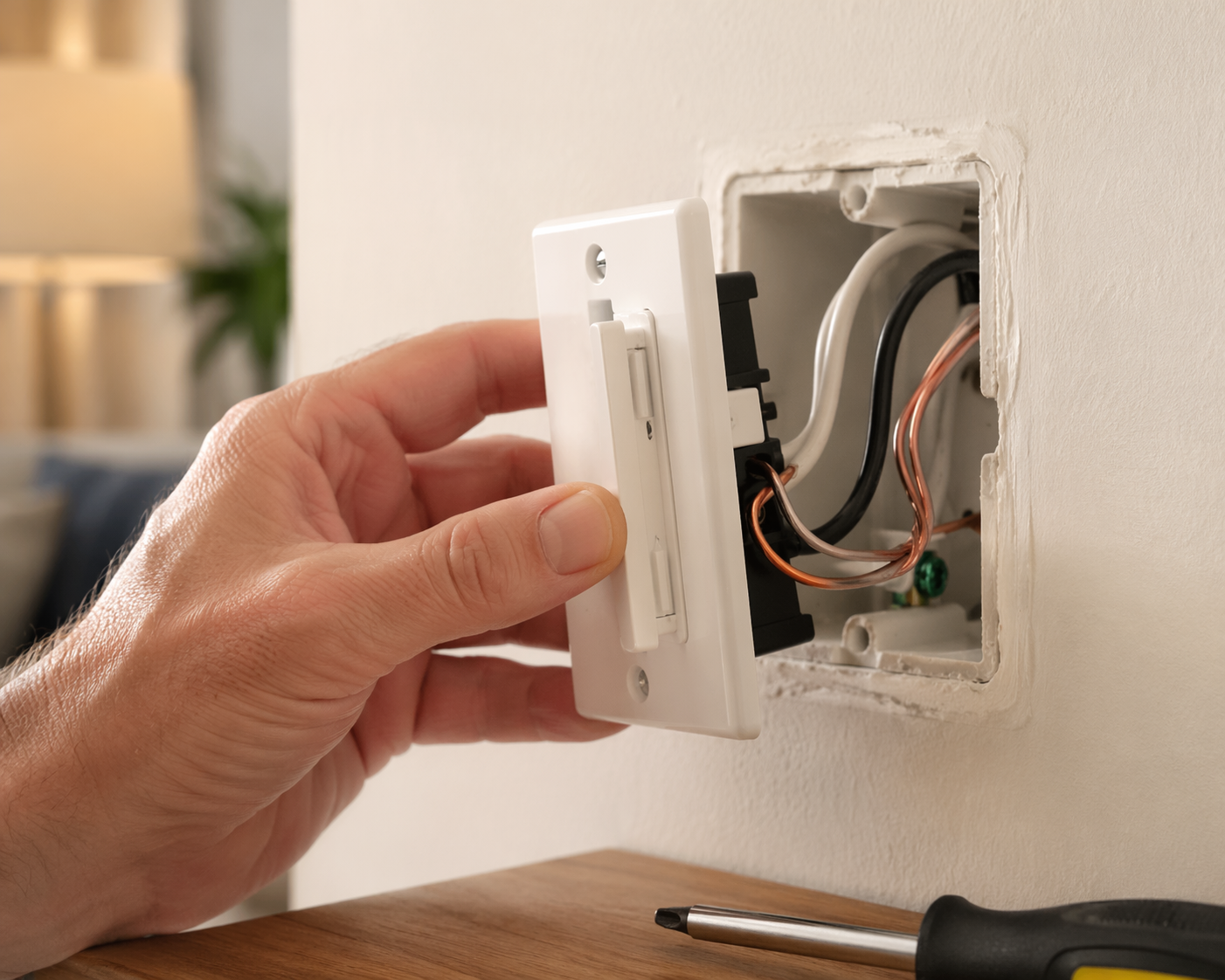
The category is growing fast enough that every hardware aisle and online search page now looks crowded. Verified Market Reports valued the global smart switches market at $6.86 billion in 2025 and projected it to reach $18.26 billion by 2033, a 13.1% compound annual growth rate.[2] That says the category is expanding. It does not say the switch in your cart belongs in your wall.
Start With the Box, Then Narrow the Shelf
A smart switch needs power for its own radio, processor, and status LED even when the light is off. A neutral wire gives that electronics package a clean return path. Without one, the switch has to borrow tiny amounts of current through the lighting load, use a bridge or companion module, require a specific ground arrangement, or rely on a design that is much less forgiving about bulbs and fixtures.
Before shopping, identify four things in the box: neutral, line/load, ground, and whether the circuit is single-pole or 3-way. A single-pole switch controls one fixture from one location. A 3-way circuit controls the same fixture from two locations. Multi-location lighting can be made smart, but the switch model and companion accessory matter. This is where a cheap purchase can turn into a second order, a return, or a call to an electrician.
If you are unsure what you are looking at, stop at identification rather than installation. For the wiring steps themselves, use a resource such as this smart light switch installation guide before you buy hardware for a box you have not mapped.
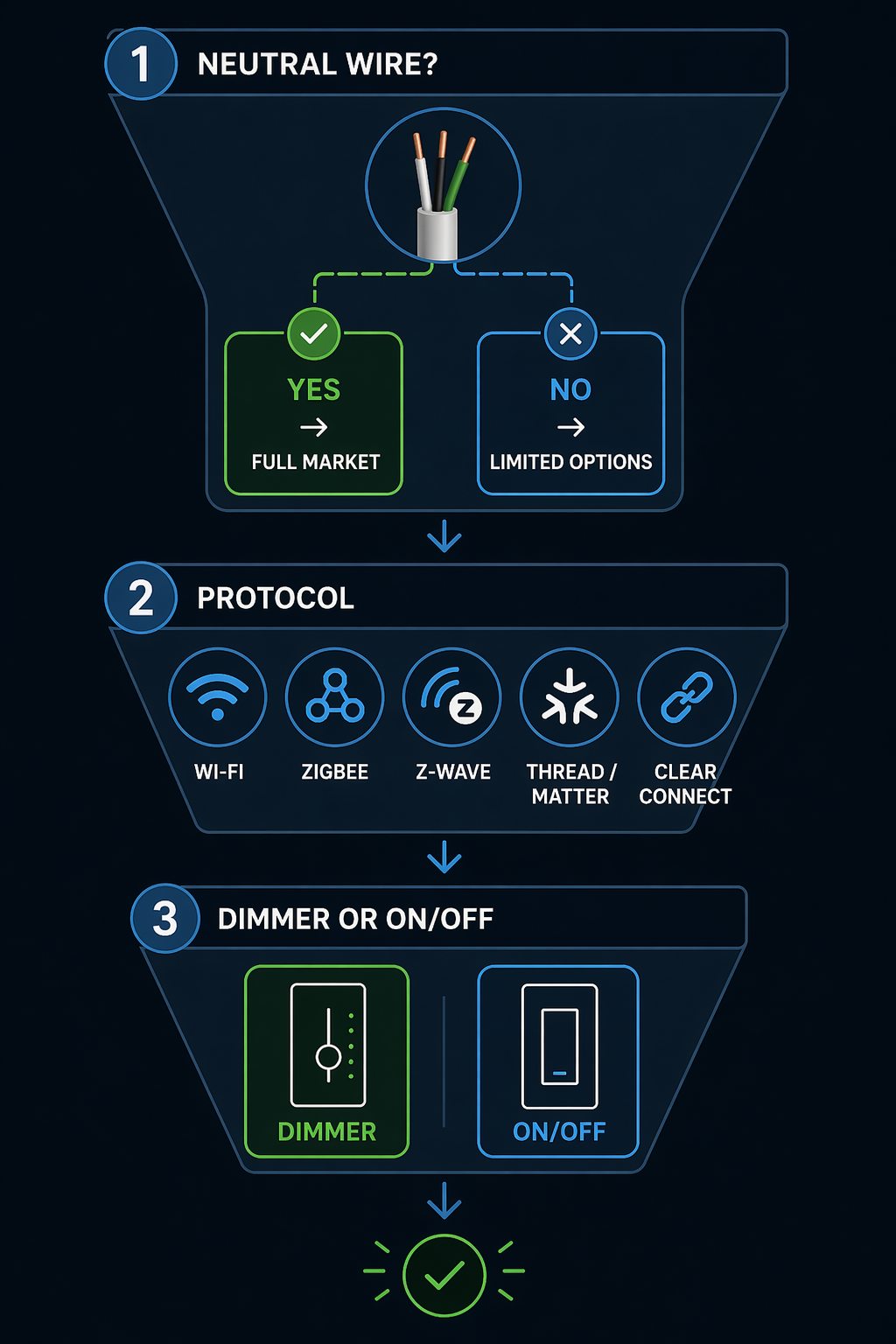
| Check | What It Decides | Buying Consequence |
|---|---|---|
| Neutral wire present | Whether most smart switches are available | Yes: full market. No: limited no-neutral models. |
| Protocol and ecosystem | How the switch talks to your home automation system | Wi-Fi, Zigbee, Z-Wave, Thread/Matter, or Lutron Clear Connect. |
| Dimmer or on/off | Whether the fixture needs brightness control | Requires compatible bulbs, fixture load, and switch type. |
| Single-pole or 3-way | How many wall controls operate the light | May require companion switches or specific wiring support. |
If You Have a Neutral Wire, the Market Opens Up
With a neutral in the box, you can consider the broad smart switch market: low-cost Wi-Fi switches, Zigbee and Z-Wave models for hub-based systems, newer Thread/Matter options, and premium dimmers. This does not mean every switch is a good match. It means the wall is no longer the main obstacle.
For a neutral-equipped home, the sensible path is to choose the communication protocol before choosing the brand. A $20-ish Wi-Fi/Matter switch and a $70–80 hub-based dimmer may both turn on a hallway light, but they place very different demands on your network and your future setup. MatterCatalog listed the TP-Link Kasa KS225 Matter-compatible switch at $19.99 in 2026, which makes it interesting for neutral-equipped homes that want a low entry price and do not mind adding another Wi-Fi device.[6]
The cheaper switch is not automatically the worse switch. It is just carrying its costs differently: more dependence on Wi-Fi coverage, more devices on the router, and less of the purpose-built lighting-control behavior that hub systems often handle well. If you only want two switches in a small home with good Wi-Fi, that trade can be perfectly reasonable. If you are replacing a dozen switches, the network math starts to matter.
If You Do Not Have a Neutral, Shop the Short List First
No-neutral smart switches are not simply normal switches with one wire left unused. They are a separate lane. The reliable shortlist is narrower, and it is worth accepting that constraint early instead of trying to force a neutral-required switch into a box that cannot support it.
Lutron Caséta and Diva are the safest starting point for many no-neutral homes. The reason is not that Lutron wins every feature checklist. It is that mainstream reviews repeatedly recommend Caséta-style lighting controls for reliability, and the system’s Clear Connect radio avoids the crowded 2.4 GHz band used by Wi-Fi and Zigbee.[3][4][5] In a wall box that already limits your choices, boring reliability is not a small feature.
The trade-off is that Lutron is its own ecosystem. For many Caséta setups, the bridge is part of the value rather than a nuisance, especially when it reduces strange connectivity problems. If that is the route you are considering, compare the bridge options in a dedicated Lutron Caséta hub guide before assuming every Caséta package is equivalent.
There are other no-neutral choices. Leviton Decora No-Neutral uses a Wi-Fi bridge. GE Cync no-neutral products can be attractive where the required wiring conditions are met, including ground-wire requirements noted in no-neutral buyer resources. Inovelli Blue Series belongs in the conversation for people building around Zigbee, Thread, or Matter, though no-neutral product details should be checked carefully against the exact model and load. LinkdHOME’s 2026 no-neutral roundup treats these as distinct options rather than interchangeable substitutes, which is the right way to read the category.[7]
One warning deserves to sit near the top of the no-neutral discussion: no-neutral Zigbee switches generally act as end devices, not mesh routers, so they do not strengthen the Zigbee mesh the way many mains-powered Zigbee devices do.[1] That contradicts a common smart home assumption. If your plan depends on each wall switch improving the mesh, confirm the device behavior before buying.
Protocol Is Not Just a Logo on the Box
Once the wiring path is clear, protocol becomes the second filter. The labels are easy to blur together because the app experience often looks similar after setup. Inside the home, they behave differently.
| Protocol | Best Fit | Main Trade-Off |
|---|---|---|
| Wi-Fi | Small installs, no separate hub, simple app control | Adds devices to the home network and uses more standby power. |
| Zigbee | Hub-based ecosystems with many compatible devices | Mesh behavior depends on router-capable mains devices. |
| Z-Wave | Hub-based automation with sub-GHz radio advantages | Requires a Z-Wave hub or controller. |
| Thread/Matter | Cross-platform setups using newer Apple, Google, Amazon, or SmartThings infrastructure | Requires the right border router and still needs model-by-model checking. |
| Lutron Clear Connect | Lighting-first reliability, especially Caséta homes | Requires commitment to Lutron’s bridge and product lane. |
Wi-Fi is the most familiar path. It avoids a separate hub, which is useful if you are adding one or two switches and already have strong coverage. The cost shows up in the router and power profile. Research cited by iotics and PCWorld puts Wi-Fi smart-device standby draw around 1.6 watts per device and roughly 4–10 times higher than Zigbee or Z-Wave alternatives.[4] One switch is not a crisis. A house full of always-on Wi-Fi devices is a design choice.
Zigbee and Z-Wave make more sense when the home already has a hub or when you want local-style automations that are not dependent on every device maintaining a strong direct Wi-Fi connection. Mains-powered Zigbee and Z-Wave devices can strengthen their respective meshes, with the no-neutral Zigbee caveat already noted. Z-Wave also operates around 908.42 MHz in the U.S., a sub-GHz band that avoids much of the 2.4 GHz crowding affecting Wi-Fi and Zigbee.[4]
Matter needs especially careful wording. Matter is not a radio protocol by itself; it runs over networks such as Wi-Fi and Thread.[6] A Matter logo may improve cross-platform setup and control, but it does not erase the need for a Thread border router, a Wi-Fi network, a compatible hub, or a switch that matches your wiring. Matter is promising; it is not a substitute for opening the wall box.
If your home automation system is already built around a hub, start with that hub’s supported radios and device list. If you are still choosing a platform, use a broader Matter, Zigbee, and Z-Wave comparison before committing every wall switch to one lane.
Dimmer or On/Off Is the Third Purchase Gate
After wiring and protocol, decide whether the fixture should dim. This sounds like a feature preference, but it is also a compatibility check. A smart dimmer must match the bulb type, fixture load, and wiring arrangement. LED bulbs need to be labeled dimmable, and even then, some bulb-and-dimmer combinations flicker, buzz, glow faintly when off, or bottom out at an awkward brightness.
Dimming can reduce energy use, but the clean arithmetic is messier with LEDs than with old incandescent loads. Brilliant frames a 50% dimming level as roughly a 50% energy reduction under basic dimming principles, while actual LED performance depends on the driver and fixture behavior.[8] ENERGY STAR also treats smart lighting controls, scheduling, and occupancy-based behavior as practical energy-saving tools, especially when they prevent lights from staying on unnecessarily.[9]
Do not buy a dimmer just because it is the premium version of the switch. Buy it where the room actually benefits from variable brightness: dining rooms, bedrooms, media rooms, nurseries, hallways at night, and open living spaces. For closets, garages, utility rooms, and exterior floods, a simple on/off smart switch is often cleaner.
A Conditional Shortlist, Not a Universal Best Switch
A useful smart switch shortlist starts with conditions, not trophies. The right choice for a neutral-equipped kitchen may be the wrong choice for a 1960s hallway with no neutral and a 3-way circuit.
- No neutral, reliability first: Start with Lutron Caséta or Diva, then confirm bridge needs, load type, wall-plate style, and 3-way support.
- No neutral, non-Lutron ecosystem: Compare Leviton Decora No-Neutral, GE Cync, and Inovelli Blue by exact wiring requirements, bridge requirements, and bulb compatibility.
- Neutral present, low-cost Wi-Fi/Matter: Consider options such as the Kasa KS225 if your Wi-Fi network can absorb more devices and the switch matches the circuit.
- Neutral present, hub-based home: Choose Zigbee or Z-Wave models that are known to work well with your hub, automations, and mesh layout.
- Lighting-first whole-home system: Consider Lutron if stable lighting control matters more than collecting the newest protocol logo.
- Any dimming setup: Verify dimmable LED bulbs, minimum load, maximum load, and 3-way compatibility before ordering.
For readers who want a deeper product-by-product comparison after these filters, use a dedicated smart switch device guide or a protocol-specific resource such as a Z-Wave smart switch comparison. Product rankings become much more useful after the wiring and protocol lanes are already known.
The Purchase Rule That Prevents Most Returns
Open the box first. If there is no neutral, shop the small reliable no-neutral set before looking at anything else. If there is a neutral, choose the protocol that fits your ecosystem and your tolerance for Wi-Fi load, hubs, bridges, and mesh behavior. If the light should dim, confirm bulb and dimmer compatibility before buying.
After installation, troubleshooting belongs in a different stage. Flicker, pairing failures, ghost voltage, weak mesh coverage, and 3-way confusion are real issues, but they are easier to solve when the switch was bought for the right wiring lane in the first place. If problems show up after the correct purchase, move to a smart light switch troubleshooting guide instead of treating the next random switch as the fix.
References
- The Pros and Cons of No-Neutral Smart Switches — SmartHomeScene.
- Global Smart Switches Market Size... — Verified Market Reports.
- The 4 Best In-Wall Smart Light Switches and Dimmers of 2026 — Wirecutter.
- Best smart dimmers & switches 2026: Reviews & buying advice — PCWorld.
- 7 Best Smart Light Switches of 2026 — Reviewed.
- Best Matter Smart Light Switches 2026 — Expert Picks — MatterCatalog.
- Best No Neutral Smart Switches (2026 Update) — LinkdHOME.
- How Smart Switches Save Money for Homeowners — Brilliant.
- Smart Home Tips for Saving Energy — ENERGY STAR.
Reader Feedback
Share your purchase experience, flag outdated picks, or ask clarifying questions about the checklist items.
Comments
Join the discussion with an anonymous comment.