
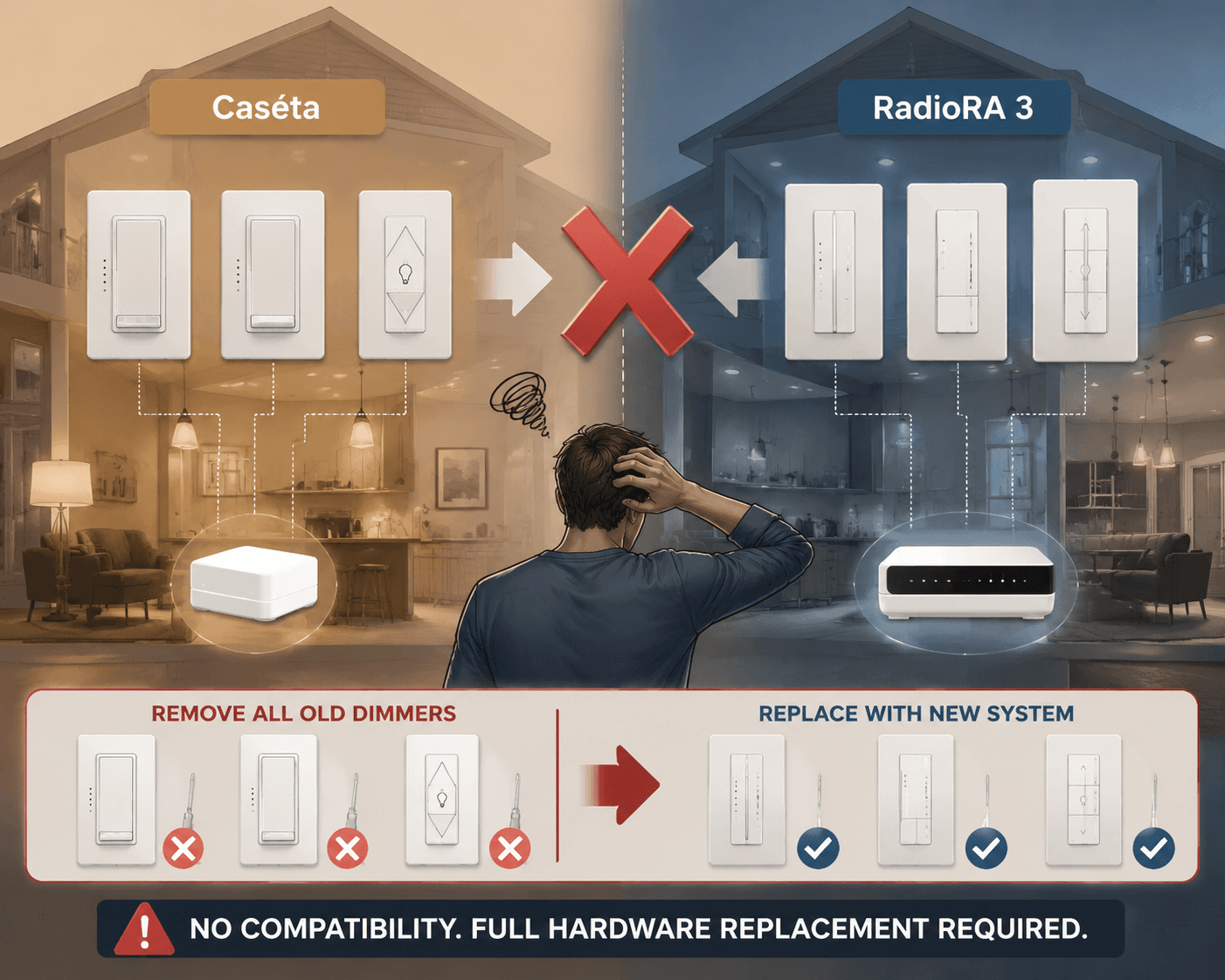
The expensive mistake in a smart home lighting control system usually does not look expensive at checkout. It looks like a sensible $60 dimmer, repeated room by room, until the house has 40 switches, a few shades, several Pico remotes, and a homeowner who has started thinking about whole-home scenes. That is where Lutron Caséta can move from perfect middle-tier choice to retrofit trap: Caséta is capped at 75 devices, while RadioRA 3 supports up to 200 devices across 100 areas, and moving from Caséta to RadioRA 3 means replacing the hub and every dimmer rather than upgrading in place.[1]
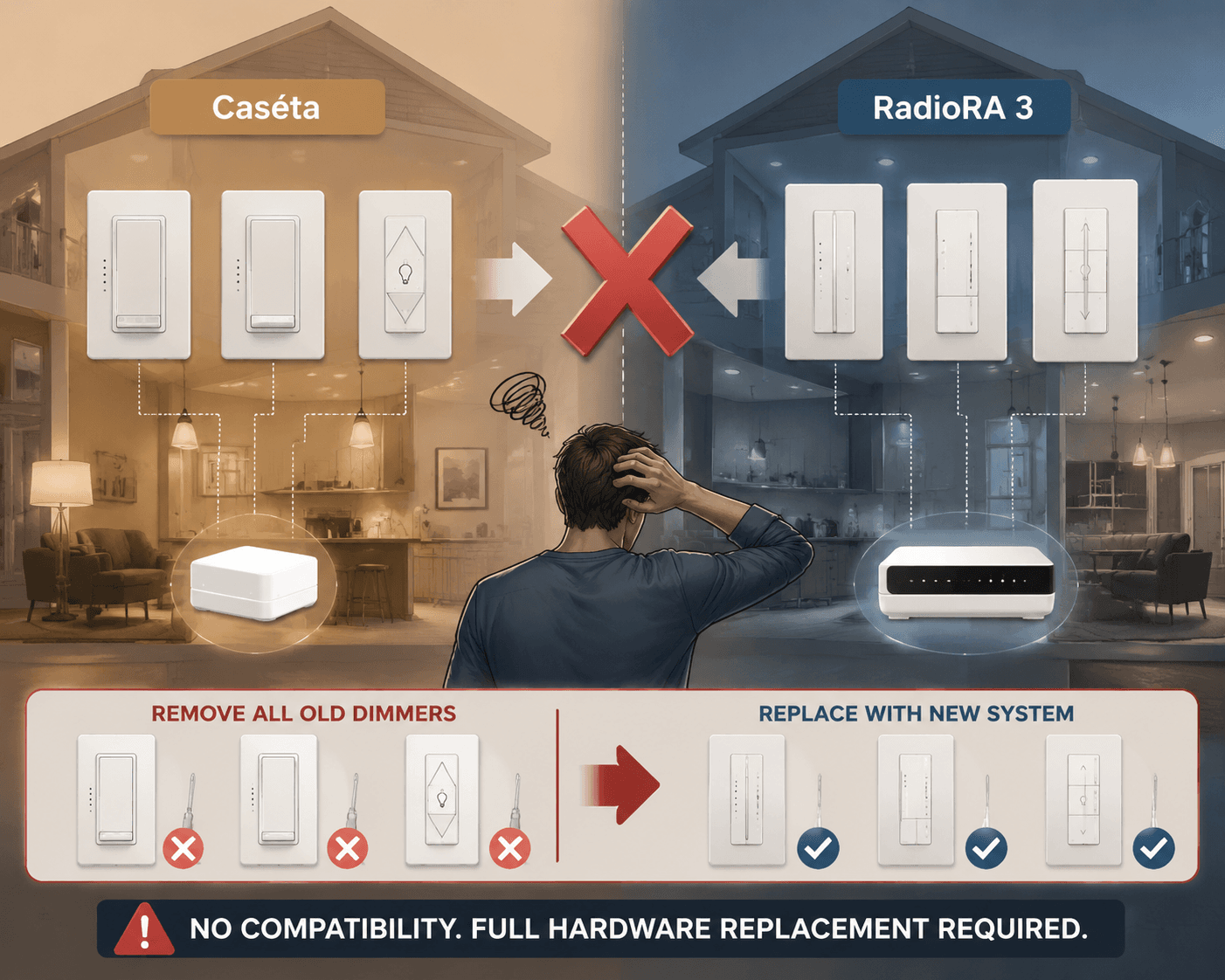
That one gotcha changes the buying question. The first question is not whether Lutron, Philips Hue, SmartThings, Apple Home, Alexa, Google Home, or Home Assistant is “best.” The better question is how large this lighting system is likely to become in the next three to five years, and how much complexity the household will tolerate after the exciting setup weekend is over.
A small apartment with six lamps and a patient Wi-Fi router does not need a professional lighting panel. A 3,000-square-foot house with thirty-plus wall switches probably should not be built entirely on individual Wi-Fi bulbs. A new-build or large remodel with walls open, outdoor zones, keypads, scenes, and future shades should be planned like infrastructure, because changing course later means paying for the same switches twice.
Start with the size of the system, not the brand
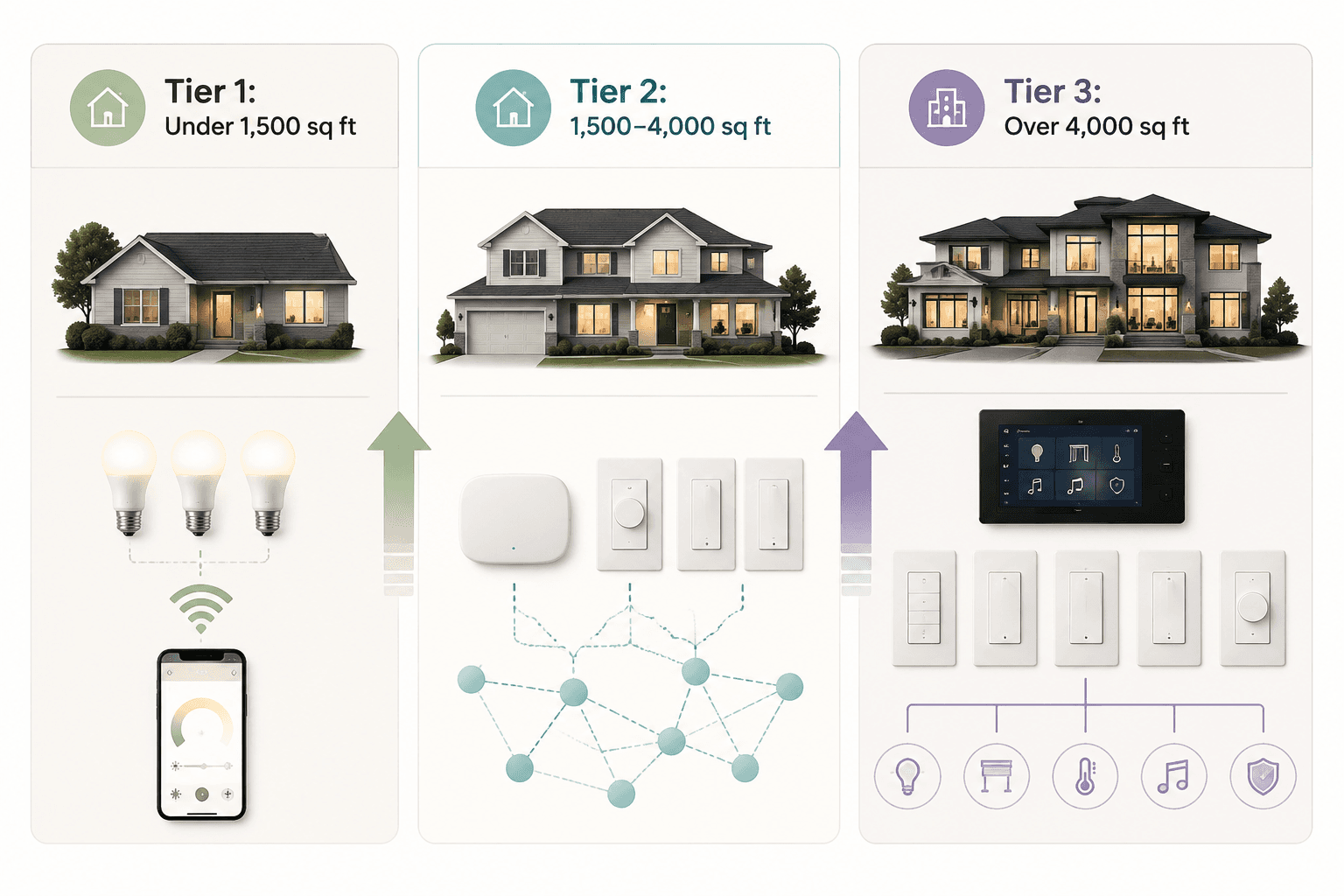
Square footage is not a perfect measurement, because a compact house can still have many lighting loads. But it is a useful first filter. Bigger homes usually mean more switches, more multi-way circuits, more outdoor zones, more family members touching wall controls, and more pressure on the network. The tier map below is not a law; it is a way to avoid buying a starter system for a house that is clearly heading toward whole-home control.
| Home situation | Likely best tier | Typical cost anchor | Main reason |
|---|---|---|---|
| Under 1,500 sq ft, apartment, rental, or a few rooms | DIY Wi-Fi bulbs, smart plugs, or Matter-over-Wi-Fi lights | $50–$300 total | Low device count keeps setup simple |
| 1,500–4,000 sq ft, suburban house, many wall switches | Hub-based Zigbee, Thread, Caséta, SmartThings, or Home Assistant | Caséta dimmers around $60–$80 each | Dedicated hubs and meshes reduce Wi-Fi strain |
| Over 4,000 sq ft, new-build, major remodel, or whole-home scenes | RadioRA 3, Control4, or professionally designed lighting | RadioRA 3 dimmers around $110–$160 each; professional systems starting around $5,000 | Higher device ceilings and planned installation reduce retrofit risk |
The cost difference becomes clearer when the system is counted by switch, not by room. Caséta dimmers are commonly cited around $60–$80 each, while RadioRA 3 dimmers are commonly cited around $110–$160 each.[1] For a 40-switch home, that puts RadioRA 3 roughly $2,000–$4,000 higher in hardware before labor and design choices. That premium is real. It is also smaller than buying 40 Caséta controls, outgrowing the ceiling, and then replacing the whole control layer.
Professional systems push the budget into another category. A 2026 smart-home installation guide places professional-grade systems at roughly $5,000 and up, depending on home size, wiring, controls, programming, and labor.[2] That number should not scare a small-home buyer into overbuilding. It should scare a large-home renovator into doing the switch count before drywall goes back up.
Under 1,500 square feet: keep it boring on purpose
For a renter, condo owner, or small-home buyer controlling a handful of lamps, the least regrettable answer is often the simplest one: Wi-Fi bulbs, smart plugs, or Matter-over-Wi-Fi lights. A $50–$300 setup can cover a living room, bedroom, entry, and a few lamps without opening a wall or choosing a permanent electrical standard.
This is where DIY smart lighting is genuinely neat. A Matter bulb can join Apple Home, Google Home, Alexa, or SmartThings more cleanly than older single-ecosystem devices, and renters can take most of the hardware with them. For a few rooms, the owner is usually managing names, automations, and voice assistant quirks rather than electrical infrastructure.
The weak point is the wall switch. If someone turns off the physical switch, a smart bulb loses power and stops being smart. That is tolerable in a bedside lamp. It is annoying in a kitchen. It becomes family-hostile in hallways, bathrooms, and guest rooms where people expect switches to behave normally. For those loads, a smart switch or dimmer usually ages better than a smart bulb.
The other limit is Wi-Fi. A few bulbs are fine. Once the lighting plan starts drifting past roughly 15–20 Wi-Fi devices, the network itself becomes part of the lighting system, and that is rarely what homeowners intended. At that point, a dedicated lighting hub, Zigbee mesh, Thread mesh, or Lutron bridge starts to look less like gadget clutter and more like good housekeeping.
1,500 to 4,000 square feet: the middle tier is where the decision matters
Most expensive smart-lighting mistakes happen in this middle band. A three-bedroom suburban home may not feel like a “whole-home automation” project, but count the actual controls: kitchen cans, island pendants, dining chandelier, porch, garage entry, hallway, stair lights, bedrooms, bathrooms, closets, patio, landscape lights, and a few plug-in lamps. It is easy to reach 25 to 50 lighting devices before shades, sensors, remotes, or keypad-style controls enter the conversation.
This is where hub-based systems earn their keep. Lutron Caséta works well for owners who want reliable wall dimmers, normal switch behavior, strong mainstream ecosystem support, and no appetite for maintaining a hobbyist server. SmartThings suits buyers who want broader device mixing across brands and protocols. Home Assistant is powerful for owners who like local control and deep customization, but it asks for more technical patience than most families want from their light switches.
Caséta’s ceiling is the number to respect. Seventy-five devices sounds generous when the first order contains four dimmers and a bridge. It sounds less generous after a homeowner adds remotes, plug-in lamp modules, fan controls, outdoor lighting, and a few rooms that were “phase two.” The system can still be the right answer; it just should not be chosen by someone already imagining keypads, scenes across every floor, and integrated shades.
The practical middle-tier choice comes down to three questions:
- How many controlled loads will exist after the project is complete, including outdoor lights, lamps, remotes, sensors, and future rooms?
- Does the household need wall switches to work normally for guests, children, and anyone who refuses to use an app?
- Is the owner comfortable maintaining a flexible platform, or would they rather pay for a narrower system that behaves predictably?
A homeowner who wants 20 to 40 reliable dimmers, basic scenes, voice control, and app access can make a strong case for Caséta. A homeowner who wants mixed sensors, locks, thermostats, and automations across many brands may prefer SmartThings or Home Assistant. A homeowner already sketching whole-floor scenes, keypad locations, and future expansion should pause before installing dozens of middle-tier dimmers just because the first batch is cheaper.
Over 4,000 square feet or whole-home ambition: design it before you buy parts
Large homes punish casual lighting decisions. The issue is not only device count. It is distance, outdoor coverage, layered lighting, multi-way switching, panel locations, scene design, guest usability, and who gets called when a dining-room keypad does not trigger the right fixtures.
RadioRA 3 is the obvious Lutron step above Caséta because it raises the ceiling to 200 devices across 100 areas and is designed for more ambitious homes.[1] Control4 and similar professional systems belong in the same buying conversation when lighting is only one part of a larger automation plan involving audio, video, security, shades, climate, and centralized control.
The annoying part is that the better long-term choice can feel wasteful on day one. Paying $110–$160 per dimmer instead of $60–$80 per dimmer is hard to love when the rooms are still studs and dust.[1] But if the realistic plan includes a large number of lighting zones, professional scene programming, and future expansion, the higher tier is not luxury decoration. It is insurance against ripping out a working system because it was sized for the first year instead of the fifth.
This is especially true during remodels. Open walls are a one-time discount. If an electrician is already touching boxes, neutrals, travelers, load locations, and low-voltage planning, the lighting control decision should be made alongside the electrical plan, not after the paint schedule. The cheapest visible switch can become the most expensive hidden decision.
Matter, Thread, Zigbee, Z-Wave, and Wi-Fi only matter if they change the tier
Protocol names can make smart lighting feel more complicated than it is. For buying purposes, the question is simple: are the lights a few independent devices, a growing mesh, or a house-scale control system that should not depend on a crowded 2.4 GHz Wi-Fi network?
Matter is useful because it reduces the old fear that a device will be trapped in one app forever. Matter 1.6, released in June 2026, adds NFC commissioning and Joint Fabric features meant to make multi-ecosystem setups smoother.[3] That is progress, especially for households split across Apple Home, Google Home, Alexa, and SmartThings. It does not mean every Matter device behaves identically in every platform.
As of 2026 status reviews, ecosystem support remains uneven: SmartThings is described as faster-moving on Matter support, Apple Home as more polished in daily experience, and Google Home as lagging in some switch-support areas.[3][4] That matters more for the small and middle tiers than for professional systems. If the house depends on Apple Home, buy devices that are known to behave well in Apple Home, not just devices with a Matter logo on the box.
Thread is promising for newer low-power mesh devices, and Thread 1.4 addresses a real annoyance by improving credential sharing across border routers, so an Amazon Echo and an Apple HomePod can participate in one Thread mesh rather than creating isolated islands.[5] That makes Thread more attractive for a growing home, but support is still rolling through products and platforms. It is not a reason to rebuild a stable lighting plan by itself.
Zigbee remains relevant because it is mature, widely used in smart lighting, and still compares favorably on battery life in current-generation devices, with cited figures around three years for Zigbee versus around two years for Thread.[3] Z-Wave has a different appeal: its sub-GHz band avoids 2.4 GHz congestion, which can matter in larger properties and outdoor zones.[4] Wi-Fi is still the simplest path for a few bulbs, but it is the least elegant way to build a large lighting system.
Match the platform to the person who will maintain it
A smart lighting system has two owners: the person who installs it and the person who has to live with it on a Tuesday night. Sometimes that is the same person. Often it is not. The platform choice should respect the least technical regular user in the home, especially for lights that people touch every day.
| Platform tendency | Best fit | Watch-out |
|---|---|---|
| Apple Home | Households that value polish, iPhone integration, and simpler daily control | Confirm support for the exact switch, dimmer, or bridge before buying |
| Google Home | Homes already built around Nest speakers and Google Assistant | Matter support is improving, but switch support can be uneven |
| Alexa | Voice-heavy households and broad device shopping | Large lighting plans still need careful hub and protocol choices |
| SmartThings | Cross-brand homes that need broad device flexibility | More flexibility means more setup decisions |
| Home Assistant | Owners who want deep automation, local control, and tinkering room | Powerful, but not the lowest-maintenance family lighting system |
| Lutron ecosystem | Homes where wall dimmer reliability matters more than gadget variety | Choose Caséta or RadioRA 3 based on future scale, not just today’s price |
The household test is simple. If someone visiting the house cannot turn on the kitchen lights without instructions, the system is not finished. Voice control and app scenes are convenient extras; wall behavior is the baseline. That is why dimmers, switches, keypads, and physical controls deserve more attention than color effects in most permanent installations.
Where energy savings belong in the decision
Energy savings can help justify smart lighting, but they should not be the whole sales pitch. Philips Hue reported up to 37% real-world energy savings in a study of more than 1 million connected bulbs compared with non-connected bulbs.[6] Broader smart-lighting guidance also cites 35–70% reductions when sensors and schedules are used well.[7]
Those numbers deserve careful handling. The Hue figure comes from a manufacturer-commissioned study, and real savings depend on behavior, room use, daylight, climate, bulb type, and whether automations actually turn lights off when people forget. Occupancy sensors in closets, garages, bathrooms, and utility rooms are more believable savings tools than a color bulb that gets left on in a decorative lamp.
For most buyers, the stronger financial argument is not monthly utility savings. It is avoiding replacement waste. A lighting system that fits the home’s realistic scale prevents the homeowner from buying one tier now and paying to remove it later.
A practical buying rule
Before buying anything, count controlled loads rather than rooms. Include ceiling lights, sconces, under-cabinet lighting, exterior lights, landscape zones, lamps, fan controls, remotes, sensors, and likely future additions. Then place the project in the lowest tier that still leaves enough room for the next three to five years.
- Choose Wi-Fi bulbs or Matter-over-Wi-Fi lights when the system is small, movable, and low-stakes.
- Choose Caséta, Zigbee, Thread, SmartThings, or Home Assistant when the home needs reliable multi-room control without professional whole-home design.
- Choose RadioRA 3, Control4, or another professional system when the home is large, the walls are open, or the owner already wants whole-home scenes and expansion.
- Do not buy a 75-device system for a plan that is already trying to become a 120-device system.
The best smart home lighting control system is the simplest tier that can survive the home’s realistic future. Small homes should not pay for professional complexity. Large homes should not pretend forty cheap decisions are still cheap after the upgrade path closes.
References
- Lutron Caséta vs RadioRA 3 comparison, Global Wave Integration
- 2026 smart home installation guide, Camio Automations, 2026
- Matter 2026 status review, matter-smarthome.de, 2026
- Matter and smart home platform support review, Data Wire Solutions
- Thread 1.4 smart home connectivity overview, Aqara
- Connected Consumption whitepaper, Philips Hue
- Smart lighting energy savings guidance, GDS Lighting
Reader Feedback
Share your purchase experience, flag outdated picks, or ask clarifying questions about the checklist items.
Comments
Join the discussion with an anonymous comment.