
The One Question That Makes or Breaks Your Smart Thermostat Purchase
A few years ago a neighbor called me after installing a brand-new Nest on his electric baseboard heater. He had watched the setup video, followed every step, and the thermostat powered up fine. But within minutes the unit started humming loudly, then tripped the breaker. He was lucky nothing caught fire.
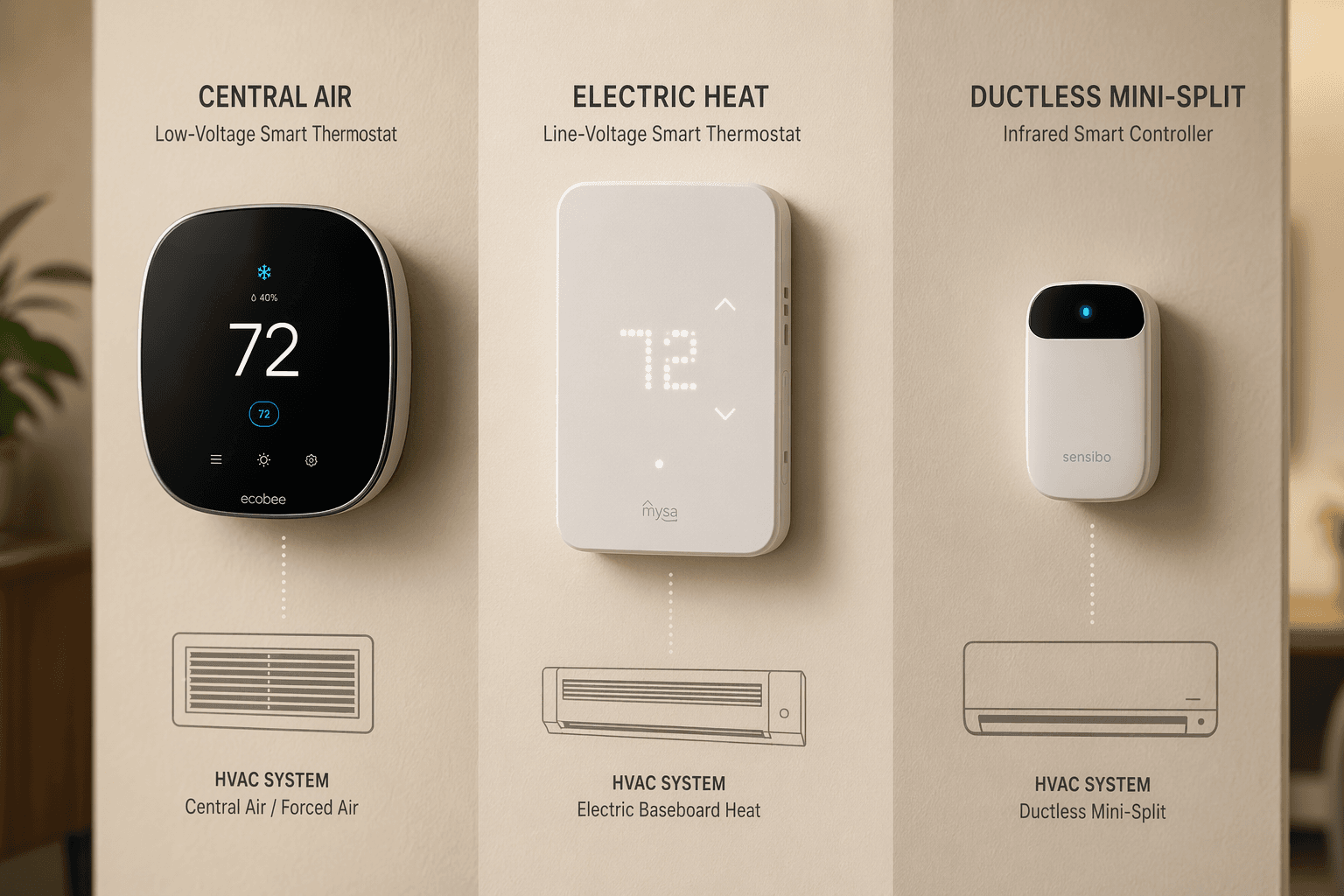
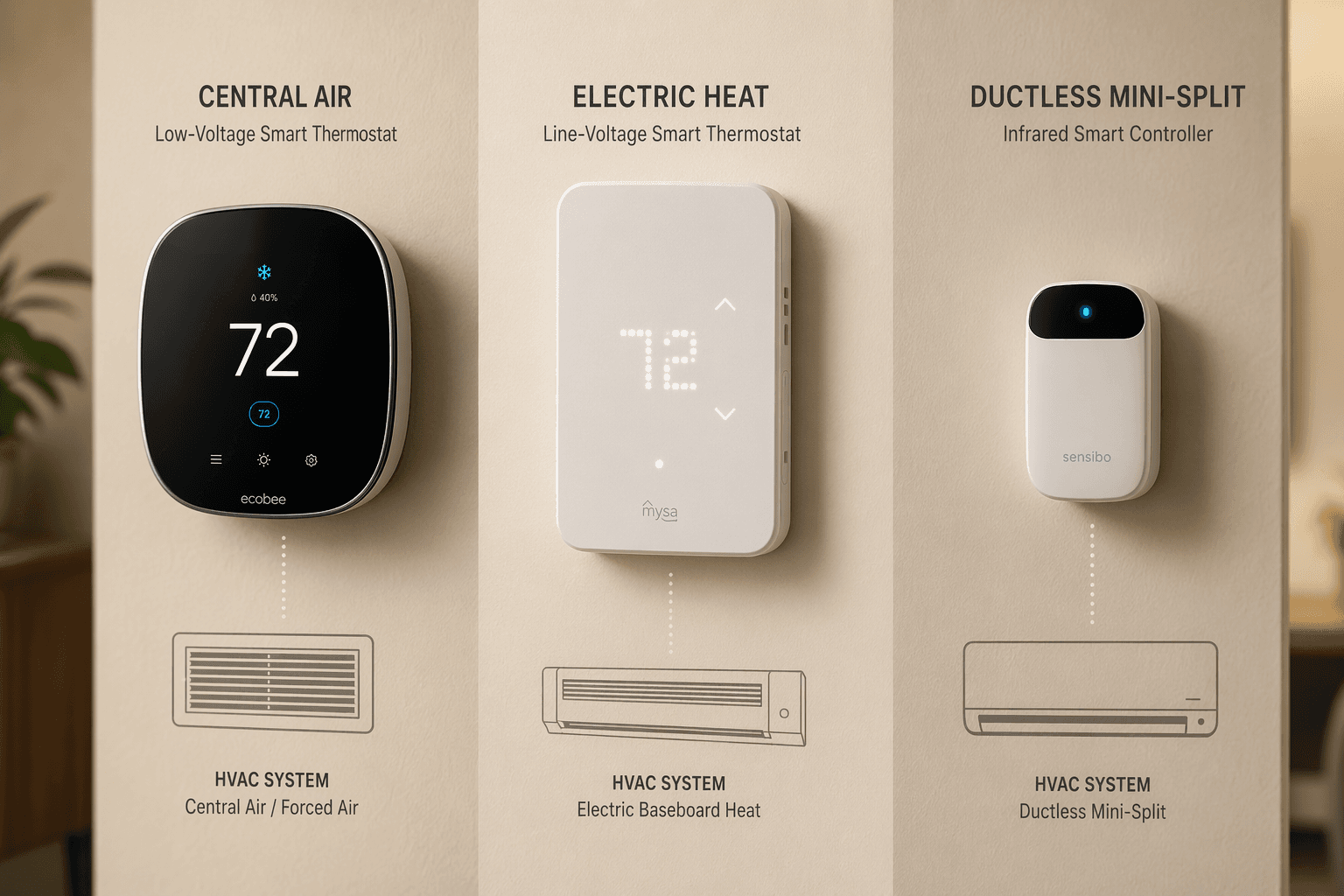
The Nest was a low-voltage thermostat designed for 24V central HVAC. His baseboard heater ran on 240V line voltage. The mismatch is not just a compatibility annoyance — it can destroy the thermostat, damage the heating system, and create an electrical hazard. Most smart thermostats work with standard 24V systems, but that is far from universal. If you have electric baseboard, a mini-split, a boiler, or an older 2-wire heat-only system, the general advice does not apply. The single most important buying decision is not brand or price — it is whether the thermostat matches your HVAC system's voltage and control type.
Check Your System's Voltage in 30 Seconds
Before you look at any product, find out whether your system runs on low voltage (24V) or line voltage (120V or 240V). Pull your existing thermostat gently off the wall plate — you do not need to disconnect wires. On the back of the thermostat or on the base plate, look for a printed label or stamp. It will say something like "24V AC" or "120V AC" or "240V AC". That tells you the voltage.
If you cannot find a label, look at the wires. Low-voltage systems use thin, solid wires, about the diameter of a paperclip — typically 18–22 AWG. Line-voltage systems use thicker stranded wires, more like a lamp cord, often 14–12 AWG. Also, low-voltage thermostats are usually plastic and lightweight; line-voltage thermostats tend to be larger and heavier because they contain relays that handle the full current.
- Check the existing thermostat for a voltage rating on its label.
- Observe the wire thickness: thin solid wires = low voltage; thick stranded wires = line voltage.
- If you still aren't sure, call a local HVAC contractor — a quick visit is cheaper than buying the wrong thermostat.
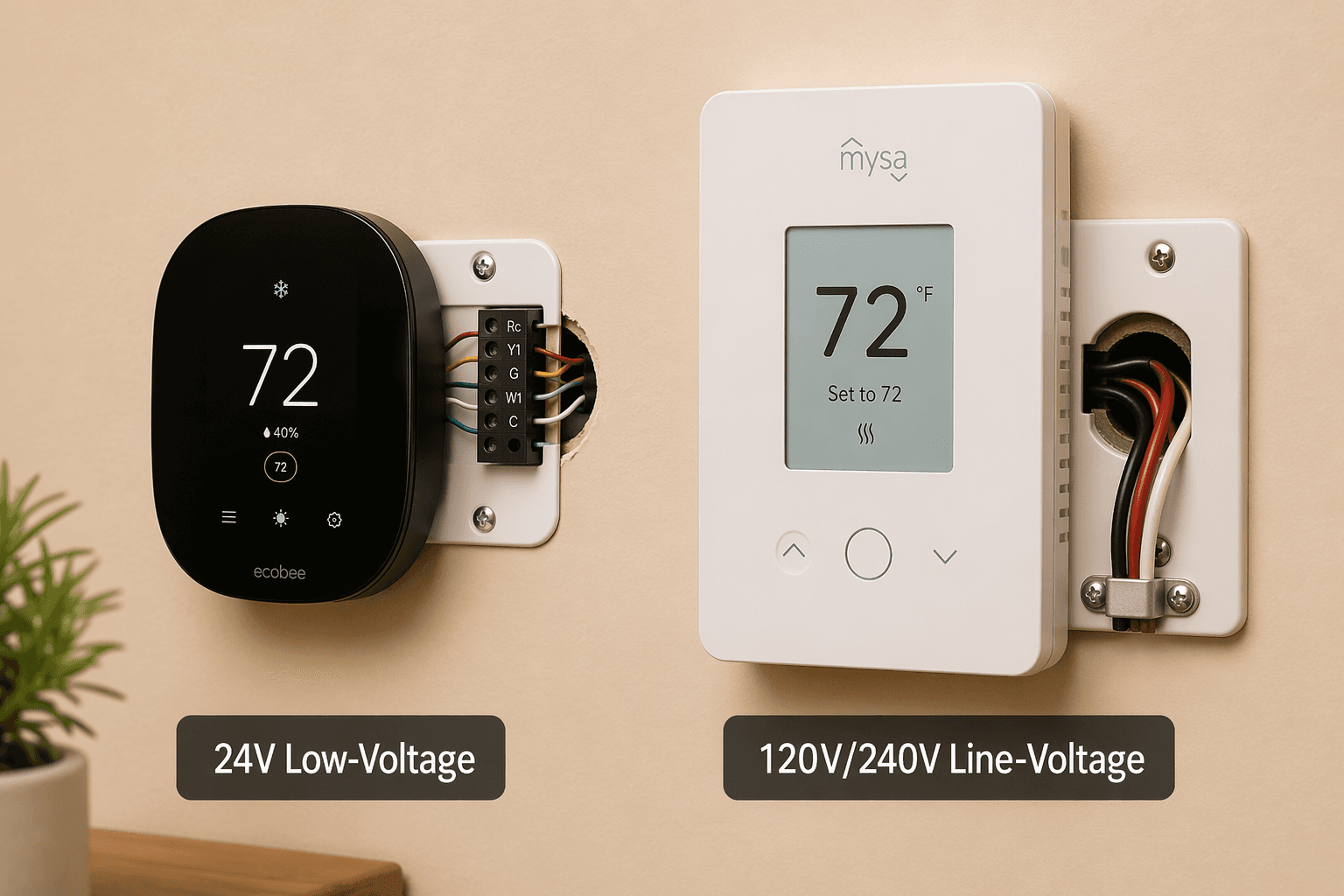
Once you know your voltage, the rest of this guide will lead you to the right products. Each section below is written for a specific HVAC type — if your system does not match that section, skip ahead.
Low-Voltage (24V) Systems: Your Widest Selection
If you found 24V on that label, you are in luck. This is the standard for central forced air, gas furnaces, air conditioners, and most heat pumps. You have the broadest range of choices, from premium models to budget options.
The Ecobee Smart Thermostat Premium works with most 24V HVAC equipment — gas and oil furnaces, air conditioning, heat pumps, boilers, humidifiers, and ventilators. It has a built-in air quality monitor, radar-based occupancy sensor, and voice control with Alexa or Siri. Wirecutter found it kept a 1,500-square-foot, three-level house more consistently comfortable than any other model they tested. It includes one wireless remote sensor and supports up to 32 sensors total (though that figure appears in some older reviews, not current PCMag — stick with the Honeywell or Sensi if you need more than 20).
The Google Nest Learning Thermostat (4th gen) does not require a C-wire for installation in most cases, but Wirecutter cautions that skipping the C-wire may risk damaging sensitive modern HVAC systems. I have seen enough failed installations from power stealing to recommend you run a C-wire or use a power extender kit. The thermostat comes with a satellite room sensor and uses AI to learn your schedule.
Other strong options for 24V systems:
- Honeywell Home T9 Smart Thermostat — supports up to 20 remote room sensors (one included) and is excellent for multi-zone homes where one thermostat controls a whole floor.
- Sensi Touch 2 Smart Thermostat — up to 15 room sensors, large touchscreen, works with most platforms.
- Amazon Smart Thermostat — under $100, built on Honeywell technology, but requires a C-wire (or power adapter kit) and works only with Alexa.
- Meross MTS300 — fully Matter-certified at $49.99, the cheapest Matter thermostat for 24V systems.
If you have a heat pump, also check the section on multi-stage compatibility later in this guide. Most 24V thermostats handle heat pumps, but you want to verify that the model supports auxiliary heat staging if you live in a cold climate.
Electric Baseboard and Radiant Heat: The High-Voltage Danger Zone
This is the section I hope you skip — because if you have electric baseboard or in-floor radiant heating, you are already in the line-voltage camp. Standard low-voltage thermostats will not work with these systems. Do not attempt to connect a Nest or Ecobee — you will damage the device and possibly create a fire hazard.
Instead, you need a line-voltage smart thermostat. The best-known is the Mysa Smart Thermostat (v2) at around $199. It works with 120V and 240V electric baseboard, radiant floor, and fan-forced heaters. Mysa claims up to 26% savings on annual heating bills through scheduling, geofencing, and Eco mode — that is a manufacturer claim best treated as a realistic upper bound rather than a guaranteed return. It has a dot-matrix LED display, humidity sensor, and works with Alexa, Google Home, and Apple Home.
For a more affordable option, the Meross MTS215 ($39.99) is designed specifically for electric baseboard and radiant floor heating. It supports Matter, so it can join any modern smart home platform. The catch: it is Wi-Fi only, but for a thermostat that communicates only a few times per hour, Wi-Fi latency is a non-issue.
Mini-Splits and Ductless: The Remote Control Solution
Mini-splits and ductless heat pump systems do not have thermostat wiring. They use infrared (IR) communication, just like a TV remote. That means you cannot replace the wall unit's thermostat. Instead, you buy a smart IR controller that sits on a shelf and talks to the mini-split's receiver.
Consumer Reports added mini-split thermostat testing in 2026 and evaluated the Boldr Klima, Cielo Breez Max, Mysa Smart (also available as an IR controller), and Sensibo Air. These devices do not require wiring — you mount them within sight of the indoor unit, and they transmit IR codes to change temperature, fan speed, and mode.
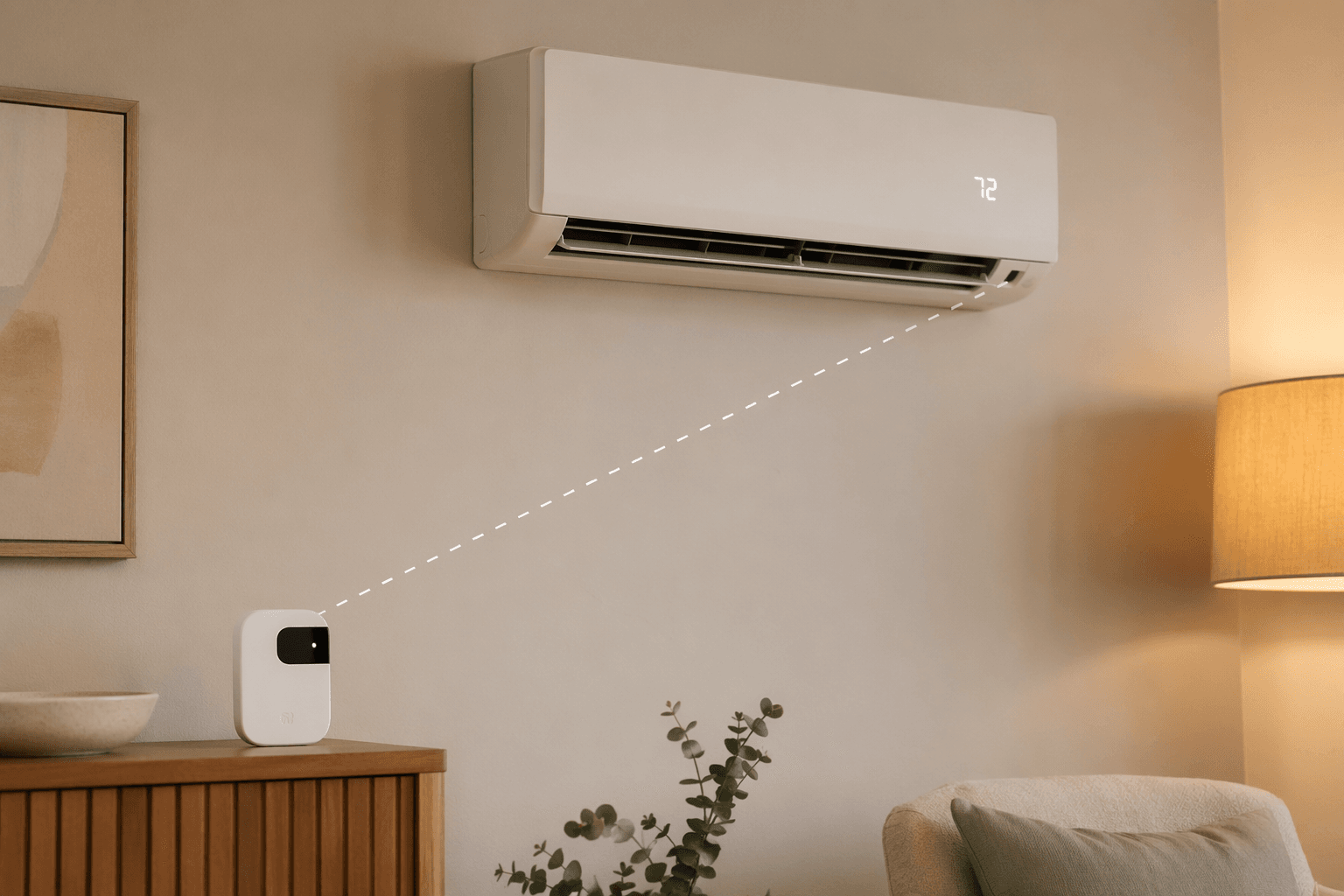
The Sensibo Air has no physical controls — it relies entirely on the app or voice commands. It includes a humidity sensor, geofencing, and works with Alexa, Apple Home, Google Home, and SmartThings. The Cielo Breez Max adds a built-in display and local control. Mysa's IR controller is the same brand as its line-voltage thermostat, offering a consistent experience if you have both electric baseboard and a mini-split in the same home.
Boilers and Hydronic Heat: What Actually Works
Boilers can be a mixed bag. Many traditional gas or oil boilers operate on 24V, which means a standard thermostat like the Ecobee or Nest will work fine. But hydronic systems with radiator valves or in-floor heating loops often run on line voltage or require specialized control hardware.
If you have a boiler/hydronic system, look at the Meross MTS215B ($44.99), purpose-built for boiler/hydronic systems and fully Matter-compatible. For radiator valves, the Eve Thermostat ($129.95, Matter over Thread) functions as a radiator valve thermostat and operates entirely without a cloud subscription. It requires a Thread border router (Apple TV or HomePod) for remote access. Note: the Eve Thermostat was announced at CES in January 2026 and began shipping in Q1 2026. As of June 2026 it should be available — but verify availability with your retailer before relying on it.
Multi-Zone and Heat Pump: Extra Requirements to Check
Multi-zone homes — where a single thermostat controls a large open floor plan or multiple rooms — benefit from thermostats that support many remote sensors. The Honeywell Home T9 supports up to 20 remote room sensors (one included). The Sensi Touch 2 supports up to 15. But more sensors are not always better — placement matters. You want sensors in the rooms you use most, not every bedroom. The T9 and Sensi allow you to choose which sensors inform the temperature setpoint, which gives you fine-grained control without overcomplicating the system.
For heat pump owners, the critical spec is multi-stage and auxiliary heat staging. Most smart thermostats are compatible with multi-stage heating and cooling systems, but you should check the thermostat's spec sheet for "heat pump compatible" and the number of stages it supports. If you have a dual-fuel system (heat pump plus gas furnace backup), confirm the thermostat can manage the changeover temperature.
Older 2-Wire Heat-Only Systems: Battery and Power Extender Fixes
Many older homes have a single pair of wires running to the thermostat — no C-wire, no separate fan control. You can still use a smart thermostat, but your options narrow. The Nest Learning Thermostat (4th gen) can work without a C-wire in most cases, but it relies on power stealing — which may cause problems with sensitive modern HVAC systems. If you have a newer boiler or furnace, a dedicated C-wire or a power extender kit is safer.
The Amazon Smart Thermostat requires a C-wire or the included power adapter kit. Hiring a professional to run a C-wire typically costs around $150 — often still cheaper than buying a new thermostat that skips the C-wire and then replacing it later.
If you have a 2-wire system, also check our Smart Thermostat Compatibility Guide for a detailed breakdown of C-wire solutions and power-extender kits.
Start With Your System's Voltage, Then Choose Your Smart Thermostat
By now you should know your voltage and your HVAC type. Here is the decision framework in three steps:
- Identify your system voltage (24V or line voltage) using the label on your existing thermostat.
- Match your HVAC type to the section above — central forced air, electric baseboard, mini-split, boiler, multi-zone, heat pump, or 2-wire heat-only.
- Choose from the product recommendations in that section. If your system fits multiple categories (e.g., heat pump and multi-zone), prioritize the compartment that matters most — sensor count for zones, staging support for heat pumps.
If you also want to weigh budget, ecosystem preference, and other features, read our Smart Thermostat Buying Guide 2026. But start here: know your voltage, buy for your system, and you will avoid the most common and most dangerous mistakes.
Reader Feedback
Share your purchase experience, flag outdated picks, or ask clarifying questions about the checklist items.
Comments
Join the discussion with an anonymous comment.