
A “Matter app smart home” search sounds as if there should be one clean answer: install the app that supports Matter, pair the device, and stop worrying about ecosystems. In mid-2026, that is still too neat. The better question is which app supports the Matter device categories and setup workflows your home will actually use.
The short version: use Apple Home if you want the most polished mainstream experience, SmartThings if you care most about current Matter specification coverage, Google Home if your house already runs on Google or Nest and you can live with known category gaps, Alexa if voice control matters more than broad native device support, and Home Assistant if you want maximum control badly enough to accept more setup work.
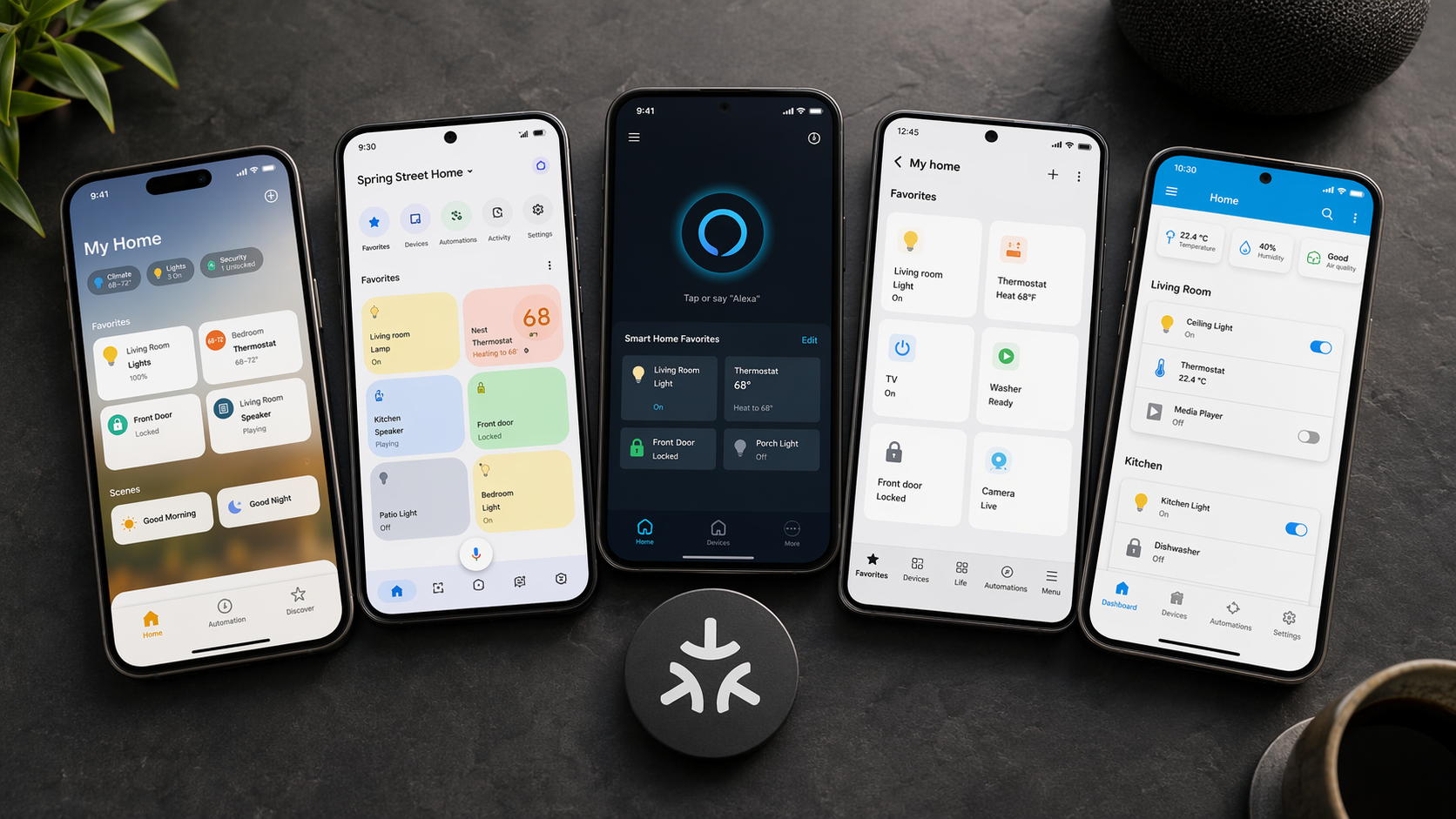
The Mid-2026 Verdict
| Best primary app if... | Choose | Why it wins | Watch for |
|---|---|---|---|
| You want the smoothest mainstream setup | Apple Home | Strong consumer polish and a clean app experience | Apple does not publish a specific Matter version number; support level is inferred from testing and observation |
| You want the strongest current Matter spec coverage | SmartThings | Reported as the first platform to fully support Matter 1.5 | “Full support” can depend on whether a source means certification, app exposure, or real end-user behavior |
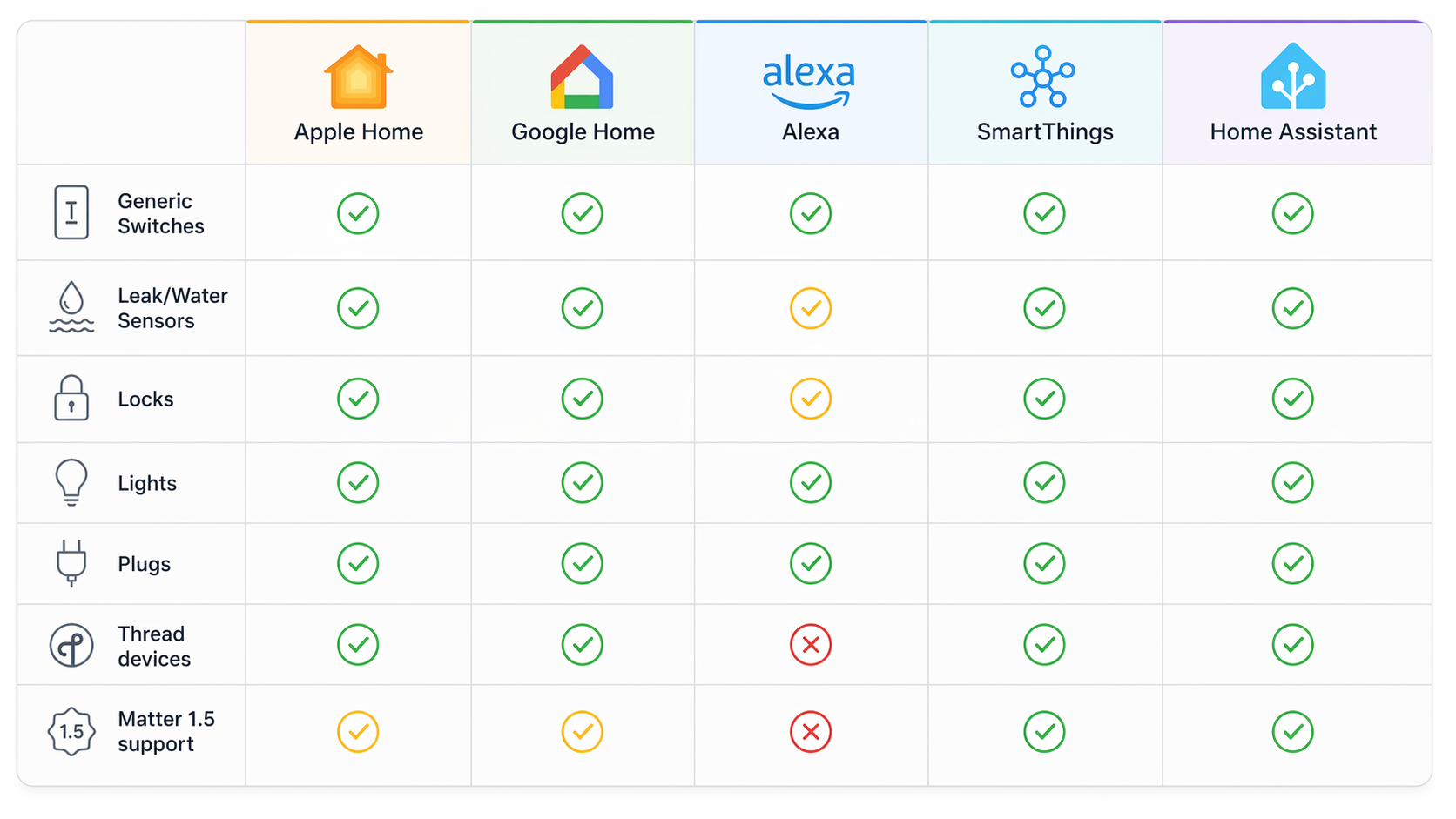
| You already live in Google/Nest | Google Home | Good fit for Google households and Assistant routines | Generic switches remain a documented gap as of mid-2026 |
| You are voice-first and mostly use lights, plugs, and simple controls | Alexa | Convenient for Echo-heavy homes | No native leak/water sensor support |
| You want the most control and can tolerate complexity | Home Assistant | Flexible, local-first-leaning control with rapid software movement | Certified at Matter 1.3, while newer behavior depends on updates such as matter.js |
That table is intentionally opinionated, but it is not trying to crown a universal winner. SmartThings gets real credit for moving quickly: a 2026 status review describes it as the first platform to fully support Matter 1.5, only weeks after the specification release.[1] Apple Home gets real credit for feeling less like a standards demo and more like a consumer product, though Apple’s exact Matter version support is not published.[2] Those are different kinds of strength.
Why “Supports Matter” Is Too Small a Label
Matter is the shared application layer that lets compatible smart home devices work across ecosystems. It is not the same thing as Thread, Wi-Fi, Zigbee, or the app you tap on your phone. If you need the protocol primer, start with Matter Protocol vs Zigbee vs Thread; the decision here is narrower and more annoying: which controller app should own your home day to day?
The problem is that Matter support arrives in layers. An app can support pairing a Matter plug and still fail to expose a generic switch. It can work beautifully with a lock and still be the wrong place to add a water leak sensor. It can control basic functions of a newer device without exposing every newer Matter feature. The logo on the box tells you less than the device category, the controller app, and the version path behind that app.
Where the Big Five Matter Apps Differ
Apple Home: the safest mainstream recommendation, with one important blank
Apple Home is the app I would hand to a household that wants setup to feel finished. It is not because Apple has the longest public Matter checklist. It is because the app, HomePod and Apple TV controller story, iPhone setup flow, automations, and household permissions tend to make sense to people who do not want to spend a Saturday comparing cluster support.
The constraint is visibility. Apple does not publish a specific Matter version number for Apple Home, so claims about exact support have to come from third-party testing and observed behavior rather than a clean Apple support matrix.[2][3] That does not make Apple Home weak. It makes it harder to recommend when your priority is buying into the newest Matter categories as soon as the spec allows them.
Choose Apple Home first if your home is mostly iPhones, HomePods, Apple TVs, lights, plugs, locks, and mainstream sensors. If you are comparing broader voice assistant ecosystems as much as Matter support, the separate Alexa, Google Home, and Apple Home comparison is the more useful next read.
SmartThings: the spec-coverage pick
SmartThings deserves a serious look in 2026 because its Matter story is concrete. The clearest current data point is that it was reported as the first platform to fully support Matter 1.5, arriving weeks after the Matter 1.5 spec release.[1] For someone buying across categories instead of just adding another plug, that matters.
This is the app I would shortlist for a mixed household planning to keep expanding: switches, sensors, plugs, locks, and devices that may depend on newer Matter categories. The caution is that “full support” is not always a household-level promise. Certification, back-end support, app UI exposure, and automations can land at different speeds. SmartThings still has to be judged by whether the exact device you buy appears with the controls you expect.
Google Home: good for Google homes, awkward for generic switches
Google Home remains a sensible primary app if your house already revolves around Nest speakers, Nest displays, Android phones, and Google Assistant routines. The app is familiar, voice control is convenient, and for common lights, plugs, and locks it may be the least disruptive choice.
The category gap is hard to ignore: as of mid-2026, Google Home still does not expose generic switches, even though generic switches are a Matter 1.0 category.[1] That is exactly the kind of limitation buyers discover too late, after the product page says Matter and the app does not show the device in a useful way.
If you are adding simple lights or plugs to a Google/Nest home, Google Home can still be the right answer. If you are buying switches specifically, check current device-category behavior before purchase, and keep Matter Device Not Showing in Google Home? close for troubleshooting. This is also the gap most likely to age badly in a published guide, because Google could close it with a software update.
Alexa: convenient voice control, but not the leak-sensor app
Alexa’s Matter appeal is obvious in homes full of Echo speakers: voice control is already where people expect it, and basic smart home commands are easy for guests and family members to understand. For lights, plugs, and voice-first scenes, that convenience counts.
But Alexa is not the app I would choose as the primary controller for a Matter safety-sensor setup. A 2026 platform review says Alexa does not support leak or water sensors natively.[1] If the whole point of the device is catching a washing-machine leak while someone is away, native app support is not a decorative feature. It is the workflow.
That does not make Alexa a bad Matter companion. It makes it a weaker Matter primary controller for homes where sensors, alerts, and device-category breadth matter more than voice convenience.
Home Assistant: the control pick, not the easiest first pick
Home Assistant earns respect because it gives skilled users room to build the smart home they actually want. It is the best fit here for people who care about local control, complex automations, dashboards, and the ability to bridge devices into a system that is not limited by one consumer ecosystem’s priorities.
The tradeoff is not theoretical. Home Assistant is described as Matter-certified at 1.3, while newer Matter behavior has continued arriving through software updates; Matter Server 9.0, released in June 2026, replaced the previous Python/C++ stack with matter.js.[2] Certification lag does not mean Home Assistant cannot control newer Matter devices for basic functions. It does mean newer categories and UI exposure may depend on the current Matter Server and integration state rather than a simple app-store promise.
Choose Home Assistant if flexibility is the point. Do not choose it just because you heard it is powerful and you want your first Matter plug to turn on a lamp. For that, the extra control surface is often extra responsibility. If this is your lane, use a dedicated setup guide such as Set Up Home Assistant as a Matter Controller in 2026 rather than treating it like a drop-in replacement for Apple Home or Google Home.
Pick by Device Type Before You Pick by Brand
The fastest way to make a good Matter app decision is to start with the next device you plan to buy. A household with three smart locks has a different risk profile from a household adding leak sensors under sinks. A renter adding two plugs does not need the same controller strategy as someone replacing every wall switch.
| Device plan | Best starting point | Reason |
|---|---|---|
| Lights and plugs | Apple Home, Google Home, Alexa, or SmartThings | These are the least controversial Matter categories for mainstream use; choose the app that matches your phones and speakers |
| Locks | Apple Home or SmartThings | Both are stronger primary-controller candidates when household access and app reliability matter; confirm the exact lock features before buying |
| Generic switches | SmartThings, Apple Home, or Home Assistant | Avoid assuming Google Home will expose the device properly until its generic switch gap is resolved |
| Leak or water sensors | Apple Home, SmartThings, or Home Assistant | Avoid Alexa as the native primary app for this category because leak/water sensors are not natively supported |
| Mixed Thread setup | Apple Home, SmartThings, or Home Assistant | Look beyond Matter support and check Thread border router availability, credential sharing, and network stability |
| Advanced automations across many brands | Home Assistant | Flexibility matters more than first-run simplicity |
Locks are where app polish starts to matter more than spec bragging. A lock is shared with family, guests, cleaners, pet sitters, and sometimes people who are not comfortable troubleshooting smart homes. If the setup flow is clear and household access is obvious, that has value beyond a version number. For lock-specific buying tradeoffs, see Matter Smart Locks Explained for Buyers.
Switches are where the hidden category gaps become irritating. A switch may look boring, but it is often installed in a wall, used by everyone, and expected to behave instantly. If you are planning a switch project, do not buy solely from a Matter badge; compare whether the app exposes the exact switch type and whether the device uses Wi-Fi or Thread. The practical radio choice is covered separately in Should Your Next Matter Light Switch Use Wi-Fi or Thread?.
Leak sensors deserve the least romantic recommendation: choose the app that will actually show the device, alert reliably, and be maintained by the person who gets the notification. Alexa’s lack of native leak/water sensor support makes it a poor primary controller for that job in mid-2026.[1]
Thread adds one more layer. Thread 1.4 improves credential sharing, but the surrounding home network still matters; one 2026 explainer notes that Thread credential sharing and Apple’s exact Matter support level remain part of the practical compatibility picture rather than a solved footnote.[3] Network behavior can also interfere with Matter discovery: IPv6 multicast filtering is called out in 2026 switching guidance as one reason devices may fail to appear even when the app and device are technically compatible.[6]
Multi-Admin Is Useful, but It Does Not Remove the Primary-App Decision
Matter’s multi-admin feature is one of the best ideas in the standard: pair a device once, then share it into another ecosystem. In real homes, that can mean a lock lives in Apple Home for iPhone users while also appearing in Google Home for a Nest display, or a plug is controlled by SmartThings automations and Alexa voice commands.
Use it deliberately. Sharing applies to Matter end devices such as lamps, plugs, sensors, and locks, not to Matter controllers or hubs themselves.[4] That distinction matters when someone expects to “share the home” and instead finds they are sharing individual devices.
| Platform | Multi-admin wording to look for |
|---|---|
| Apple Home | Turn on Pairing Mode |
| Google Home | Link other services |
| SmartThings | Share with other services |
Those labels are not self-explanatory, and hands-on Matter testing has shown how multi-admin can become clumsy in ordinary use, including device name issues and cases where a second phone is needed to complete setup across ecosystems.[5] This is where the standards promise meets the kitchen-counter reality: the person doing setup may understand what multi-admin is, but the app does not always say it in plain language.
There is also a possible battery cost. A 2026 Matter status review warns that Thread devices may drain faster when multiple ecosystems poll them independently.[1] Treat that as a risk to watch rather than a universal rule; battery life will vary by device, firmware, mesh quality, and how each ecosystem talks to the device.
The practical rule is simple: choose one primary controller for setup, naming, rooms, and the automations you care about most. Then add multi-admin only where a second ecosystem solves a real problem, such as voice access in another room or a display your family already uses.
The Primary Controller I’d Choose by Priority
- Choose Apple Home if your household is mostly iPhone-based and you want the least fussy mainstream experience for lights, plugs, locks, and everyday automations.
- Choose SmartThings if you want the strongest current Matter specification coverage and expect to keep adding newer device categories.
- Choose Google Home if your home already depends on Nest speakers, displays, and Google Assistant, but verify category support before buying switches.
- Choose Alexa if your smart home is voice-first and centered on simple controls, not if leak or water sensors are a core part of the plan.
- Choose Home Assistant if flexibility, local control, and advanced automation are worth more to you than a gentle first setup.
If you are buying your first Matter device and do not have a strong ecosystem preference, Apple Home and SmartThings are the cleanest starting points for different reasons: Apple for polish, SmartThings for spec coverage. If you already have a house full of Nest or Echo hardware, switching everything just for Matter may be overkill, but you should buy around the known gaps instead of pretending they do not exist.
The best Matter app for a smart home in 2026 is the one whose tradeoff you can live with: polish, spec coverage, or flexibility. Pick that tradeoff before you pair the first device, because the person maintaining the home later is the one who pays for the vague promise on the box.
References
- The Matter Standard in 2026 – A Status Review, matter-smarthome.de
- 5 Best Smart Home Hubs in 2026, The-Gadgeteer, June 13, 2026
- Matter and Thread Explained: What Works in 2026, Data Wire Solutions
- How to Set Up a Smart Home with Matter – Step by Step, matter-smarthome.de
- Here’s what it’s like to use the first Matter devices in the real world, The Verge
- Should you switch from Zigbee to Matter in 2026?, Howmation
Updates & Corrections
Protocol specifications and platform features change rapidly — especially with Matter version evolution. Report version changes, certification count updates, or platform policy changes that have occurred since the last editorial review.
Comments
Join the discussion with an anonymous comment.