
Home Assistant can be the Matter controller in your smart home. As of 2025, that is not just a community workaround: Home Assistant is a CSA-certified Matter controller, able to commission and manage Matter devices locally through its Matter integration.[1][2] The catch is that the Home Assistant server is only one part of the pairing path. For the first setup of many devices, your phone, your network, and sometimes a Thread border router matter just as much as the box running Home Assistant.
That distinction prevents a lot of standing-next-to-a-blinking-bulb troubleshooting. A Raspberry Pi, mini PC, or NUC running Home Assistant may be ready to control a Matter device after it is commissioned, but it does not replace the phone’s Bluetooth role during commissioning, and it does not magically become a Thread border router unless you add the right Thread radio and software.
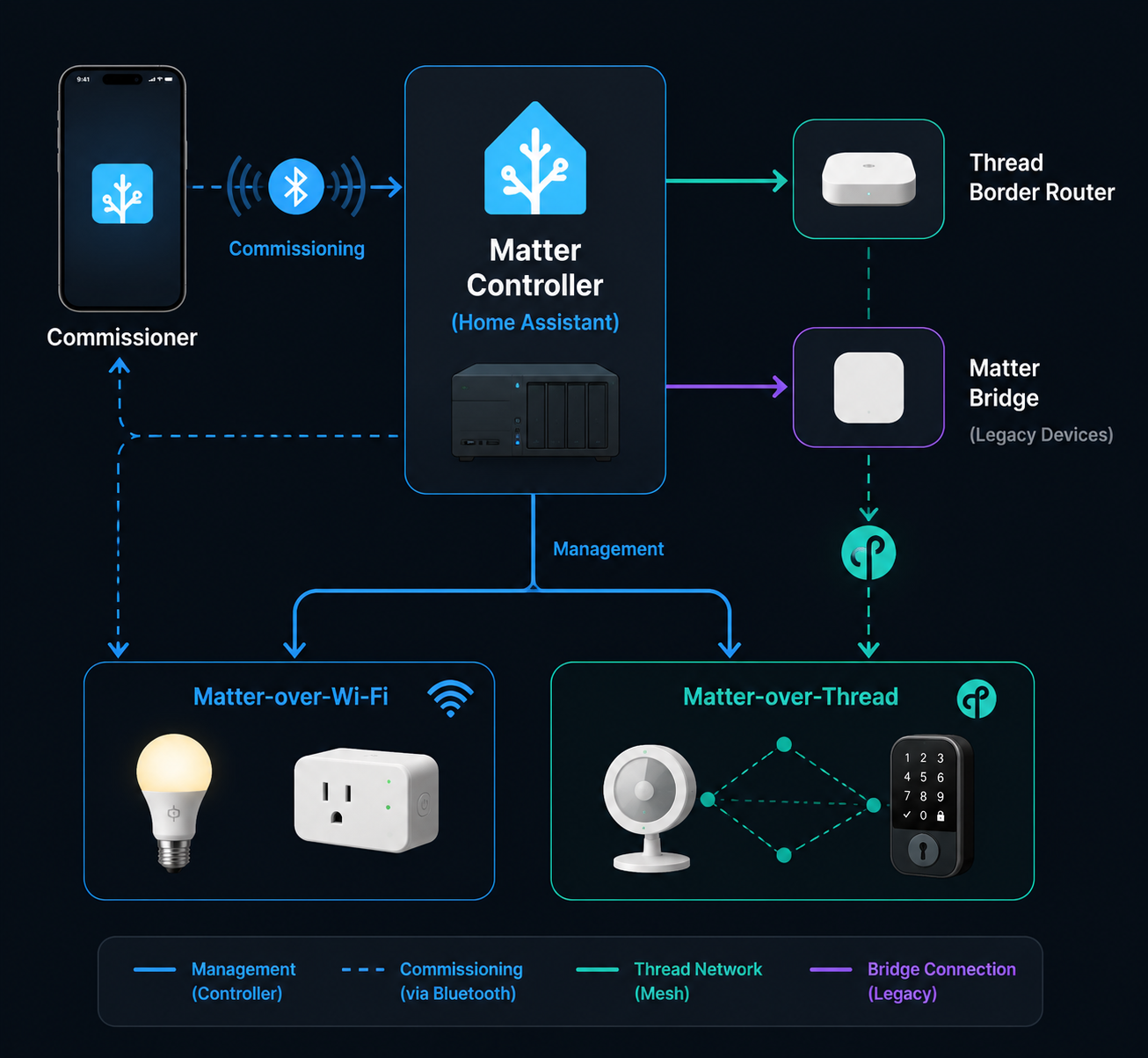
What Home Assistant Does as a Matter Controller
In Matter language, a controller is the system that adds, configures, and controls Matter devices. In a Home Assistant setup, that means Home Assistant can become the place where Matter lights, plugs, locks, sensors, and other supported devices appear as entities and automations.
The controller role is easy to overstate, so it helps to separate the jobs before buying hardware or opening a setup screen.
| Role | What it does | Common wrong assumption |
|---|---|---|
| Home Assistant Matter controller | Manages commissioned Matter devices and exposes them as Home Assistant entities. | If Home Assistant is the controller, the server alone can pair every Matter device. |
| Phone commissioner | Uses the Home Assistant Companion App and the phone’s Bluetooth to perform initial commissioning. | The Bluetooth adapter on the Home Assistant host handles commissioning. |
| Matter-over-Wi-Fi device | Joins the local Wi-Fi network and talks Matter over IP. | Any Wi-Fi IoT network segmentation is fine as long as the internet works. |
| Matter-over-Thread device | Uses Thread radio networking and reaches Home Assistant through a Thread border router. | Matter support in Home Assistant means Thread support is automatically present. |
| Thread border router | Connects the Thread mesh to the IP network. | A Matter controller and a Thread border router are the same role. |
| Matter bridge or Matterbridge | Exposes non-Matter devices into a Matter ecosystem. | It is required for normal native Matter devices. |
Matter is also no longer a tiny niche inside Home Assistant. Home Assistant analytics listed Matter as the 12th most popular integration with 38.8% adoption at the time checked for this guide.[3] That number says the integration is widely used; it does not say your first device will pair cleanly if IPv6, mDNS, phone commissioning, or Thread routing is wrong.
The 2026 Foundation Is Better, but the Physical Pieces Still Matter
Two changes make 2026 a better time to start than the early Matter years. First, Home Assistant announced CSA Matter controller certification in March 2025, which matters because it moves Home Assistant from “works with Matter” in a practical sense to an officially certified controller position.[2] Second, Home Assistant rebuilt Matter Server on matter.js and released Matter Server 9.0 as a drop-in migration path in June 2026, after 10 months of development and 4 months of beta testing.[4]
The matter.js rebuild is not just a change in programming language. Home Assistant’s announcement says the new server supports Matter 1.5.1, improves startup speed, adds network visualization, strengthens security, supports Thread 1.4 border routers, and automatically migrates existing Matter Server data on first start.[4] Those are the kinds of changes that make day-two ownership less fragile, especially once a home has more than one device and more than one radio path.
Still, none of that removes the basic setup dependencies. Matter is local IP-based control, so the local network has to allow the discovery and addressing Matter expects. If the network is designed to stop devices from finding each other, Matter commissioning can fail while everything else in the house appears normal.
Minimum Requirements Before You Pair the First Device
Start with the boring checklist, because the boring checklist is where many “Matter is broken” stories begin.
- Home Assistant with the Matter integration installed and running.
- A Home Assistant host with IPv6 enabled, because Matter uses IPv6 on the local network.[1]
- A phone running the Home Assistant Companion App: Android 8.1 or later, or iOS 16 or later, with Bluetooth available for commissioning.[1]
- A network that allows mDNS discovery and does not block required local multicast traffic.[1]
- For Matter-over-Thread devices, a Thread border router such as a Home Assistant Connect ZBT-1/ZBT-2 or SkyConnect running the OpenThread Border Router setup, or another compatible border router.[5]
The most easily missed point is the phone. Home Assistant’s Matter documentation is explicit that commissioning uses the Companion App on a phone with Bluetooth; the Home Assistant server’s own Bluetooth adapter is not used for Matter commissioning.[1] If your Home Assistant box has Bluetooth, that may be useful for other integrations, but it is not the thing talking to the new Matter device during the initial pairing window.
The second easily missed point is IPv6. Matter devices communicate locally over IPv6, so disabling IPv6 on the Home Assistant host, router, or relevant network segment is not a harmless optimization. It can make discovery or control fail in ways that look unrelated to IPv6 from the app screen.
Network Segmentation Can Be the Problem
Matter setup is happiest when the phone, Home Assistant, and the device being commissioned can see each other on the same local network path. VLANs, isolated IoT SSIDs, multicast filtering, aggressive IGMP snooping, and firewall rules that suppress mDNS can break that path. This is especially frustrating because normal internet access still works, so a phone can browse the web, Home Assistant can update integrations, and the new device can blink hopefully while discovery fails.
A flat home network is not a moral requirement, and some households cannot change an ISP router or managed network policy. But for first commissioning, the practical requirement is simple: keep the phone, Home Assistant, and Matter-over-Wi-Fi device on a network where IPv6 and mDNS work end to end. If you later move devices behind stricter segmentation, test one change at a time rather than pairing and redesigning the network in the same afternoon.
Commission a Matter-over-Wi-Fi Device
Matter-over-Wi-Fi is the simpler path because it does not require a Thread border router. The device joins your Wi-Fi network and Home Assistant controls it over the local IP network. The commissioning moment still runs through the phone.
- Install or confirm the Matter integration in Home Assistant.
- Open the Home Assistant Companion App on a Bluetooth-capable phone connected to the same local network path as Home Assistant.
- Put the Matter device into pairing mode and keep its setup code or QR code nearby.
- In the Companion App, start adding a Matter device and scan the QR code or enter the setup code.
- Let the phone complete Bluetooth commissioning, pass the network information, and hand the device into Home Assistant’s Matter fabric.
- Name the device, assign its area, and confirm the entities appear in Home Assistant.
If Android shows “Matter is currently unavailable,” do not immediately factory-reset everything. A real-world account from Grant McLravy describes this as a delay while Google Play Services downloads the needed Matter modules, commonly resolving within 24 hours.[6] That is not satisfying when you are standing there with the device in pairing mode, but it is better than rebuilding a working Home Assistant installation because a phone-side component was not ready yet.
If pairing starts and then times out, check the physical path before chasing exotic explanations: the phone’s Bluetooth is on, the device is still in pairing mode, the phone is on the expected Wi-Fi, Home Assistant has IPv6, and no router feature is blocking mDNS between the participants. In a split SSID home, “same Wi-Fi name” is less important than whether traffic can actually pass between the phone, Home Assistant, and device.
Commission a Matter-over-Thread Device
Matter-over-Thread adds one real dependency: a Thread border router. The Matter controller is not the same thing as the Thread border router. Home Assistant can be the Matter controller while a separate Apple TV, HomePod, Google Nest device, Eero router, or Home Assistant-connected Thread radio acts as the border router. Or Home Assistant can run its own Thread border router using supported hardware such as Connect ZBT-1/ZBT-2 or SkyConnect with the OpenThread Border Router software path.[5]
If you have not chosen that hardware yet, compare current options before buying; regional availability changes, and Thread border router choice affects maintenance more than the Matter logo on the device box. A dedicated overview such as Best Thread Border Router for Your Smart Home Platform in 2026 is the better place for model-by-model tradeoffs.
The commissioning flow looks similar to Wi-Fi from the phone, but the network handoff is different.
- Confirm that Home Assistant’s Matter integration is running.
- Confirm that a Thread border router exists and that Home Assistant can use the relevant Thread credentials.
- Open the Home Assistant Companion App on the phone used for commissioning.
- Put the Thread Matter device into pairing mode and scan its QR code or enter its setup code.
- Let the phone perform Bluetooth commissioning and provide the Thread network information.
- Wait for the device to join the Thread mesh, then confirm it appears in Home Assistant.
Credential sync is where Thread setup can become opaque. Home Assistant’s Thread documentation covers how its Thread integration, the OpenThread Border Router add-on, and supported radios fit together, including Connect ZBT-1/ZBT-2 and SkyConnect paths.[5] If you are building the Thread side inside Home Assistant rather than relying on an existing ecosystem border router, follow a dedicated OTBR walkthrough such as How to Set Up a Thread Border Router in Home Assistant before trying to commission several end devices.
There is one Apple-specific limitation worth knowing early. Home Assistant’s Matter documentation notes that Apple Thread border routers such as HomePod and Apple TV do not forward the mDNS packets needed for Home Assistant-originated OTA updates.[1] That does not mean an Apple border router can never help a device join Thread, but it does affect what Home Assistant can do later when it is the system expected to maintain devices.
Multiple border routers can make Thread more resilient, but only when they share the right network state. If adding a second border router makes sensors intermittent instead of better, treat it as a Thread mesh problem rather than a Matter controller problem. For that scenario, use a focused troubleshooting guide such as Fix Unstable Thread Mesh with Multiple Border Routers.
Using Home Assistant Alongside Apple Home, Google Home, or Another Controller
Matter devices can belong to more than one fabric. They can support up to 5 simultaneous fabrics, which allows a device to be controlled by Home Assistant, Apple Home, Google Home, and other ecosystems at the same time when the device and platforms support that sharing model. This is useful if Home Assistant runs automations while another household member prefers a voice assistant or native phone app.
In practice, do not confuse multi-fabric with “pair it from scratch again.” Usually, you add the device to one fabric first, then use that controller’s sharing flow to generate a new setup code for the next controller. If the device is already working in Apple Home or Google Home, look for a share or pairing-code flow there rather than factory-resetting the device and erasing the working setup.
Grant McLravy’s commissioning account is useful here because it shows how failures can come from platform-side readiness and credential sync rather than from the Matter device itself.[6] When a device refuses to join Home Assistant as a second controller, the failing piece may be the existing ecosystem app, the phone’s Matter services, stale Thread credentials, or local discovery—not necessarily Home Assistant’s controller logic.
Where Matterbridge Fits, and Where It Does Not
A native Home Assistant Matter controller is for adding Matter devices into Home Assistant. A Matter bridge, including community projects often discussed under the Matterbridge label, is for exposing non-Matter devices outward to a Matter ecosystem. Those are opposite directions.
If you bought a Matter-over-Wi-Fi plug or a Matter-over-Thread sensor and want it inside Home Assistant, use the native Matter controller path. If you already have Zigbee, Z-Wave, MQTT, or vendor-integrated devices in Home Assistant and want another ecosystem to see them as Matter accessories, then bridging enters the conversation. The bridge is not a shortcut around the phone commissioning flow for a real Matter device.
Matter 1.5.1, 1.6, and Device Category Caveats
Home Assistant’s June 2026 Matter Server upgrade says the rebuilt server supports Matter 1.5.1, including categories such as cameras, doorbells, and closures as part of the newer Matter surface area.[4] That does not mean every camera or doorbell on a shelf will behave identically in every controller app. Matter version support, device firmware, platform app support, and manufacturer implementation still meet one another in the actual home.
Matter 1.6 has been released, with ecosystem adoption still catching up according to a 2026 status review.[7] Features such as Joint Fabric or NFC commissioning may be interesting, but they should not be the reason you assume today’s Home Assistant, phone, and device combination will expose every new feature immediately.
For a first device, choose something boring and well-supported: a plug, bulb, or sensor from a vendor with current firmware and clear reset instructions. If you are still deciding what to buy, a purchasing guide such as Which Matter Smart Bulb Should You Buy? is more useful after the controller and network roles are clear.
A Practical First-Pairing Plan
For the first Home Assistant Matter device, reduce variables. Pair one device before changing router rules, adding a second Thread border router, or migrating old automations. A simple first run looks like this:
- Update Home Assistant and confirm the Matter integration is installed.
- Confirm IPv6 is enabled on the Home Assistant host and the relevant network.
- Use the Home Assistant Companion App on a supported phone with Bluetooth enabled.
- For a Wi-Fi Matter device, keep the phone, Home Assistant, and device on a network where mDNS works.
- For a Thread Matter device, set up and verify the Thread border router before opening the device’s pairing window.
- Only after the device appears in Home Assistant, assign areas, rename entities, and build automations.
This is the point where Home Assistant as a Matter controller becomes a reasonable 2026 choice rather than a science project. Certification answers the support question. The matter.js rebuild improves the server foundation. But reliable setup still depends on matching the controller, phone commissioner, IPv6/mDNS network, and Thread border router roles before pairing begins.
References
- Matter, Home Assistant
- Home Assistant is now a certified Matter controller, Home Assistant, March 10, 2025
- Home Assistant Analytics, Home Assistant
- The Matter upgrade you’ve been waiting for, Home Assistant, June 23, 2026
- Thread, Home Assistant
- Home Assistant Matter: setup, commissioning, and troubleshooting, Grant McLravy, November 11, 2025
- The Matter Standard in 2026 Status Review, matter-smarthome.de
Updates & Corrections
Protocol specifications and platform features change rapidly — especially with Matter version evolution. Report version changes, certification count updates, or platform policy changes that have occurred since the last editorial review.
Comments
Join the discussion with an anonymous comment.