
A Matter-enabled smart lock does not magically remove every hub from your home. It changes who the lock can talk to, how it joins your smart home, and how Apple Home, Google Home, Alexa, SmartThings, or Home Assistant can share control of the same device.
That distinction matters at the front door, where the marketing phrase “works with Matter” often meets a buyer holding three things at once: a lock, a phone app, and some familiar little speaker or display that may or may not be the right kind of hub. The useful question is not “Does this lock have the logo?” It is “Do I already own the hardware that lets this lock run the way Matter promises?”

What Matter Changes in a Smart Lock
Matter is the common control language. A Matter smart lock can be commissioned and managed by a Matter-compatible controller instead of being trapped inside one brand’s app or one platform’s ecosystem. In practical terms, that means a lock can be added to Apple Home and later shared with Google Home, Alexa, SmartThings, or Home Assistant when the household changes phones, voice assistants, or routines. [1]
The controller is the part many buyers miss. A Matter lock does not simply talk to every phone in the house on its own. It is commissioned by a Matter controller, which keeps the device in the smart home fabric, handles local control, and lets platforms manage it. If the lock uses Thread, there is one more job: something in the home must also act as a Thread border router, bridging the Thread mesh used by the lock to the rest of the home network. What Your Matter Hub Actually Does is the deeper version of that hub explanation, but the short version is this: controller and border router are roles, not always separate boxes.
A HomePod mini, a second-generation Nest Hub, or a fourth-generation Echo can be the kind of familiar device that fills these roles, depending on the platform and lock involved. That is why two buyers can both say “I have a hub” and only one of them is ready for a Thread lock. One may have a Matter controller but no Thread border router. Another may have both in the same device. [2]
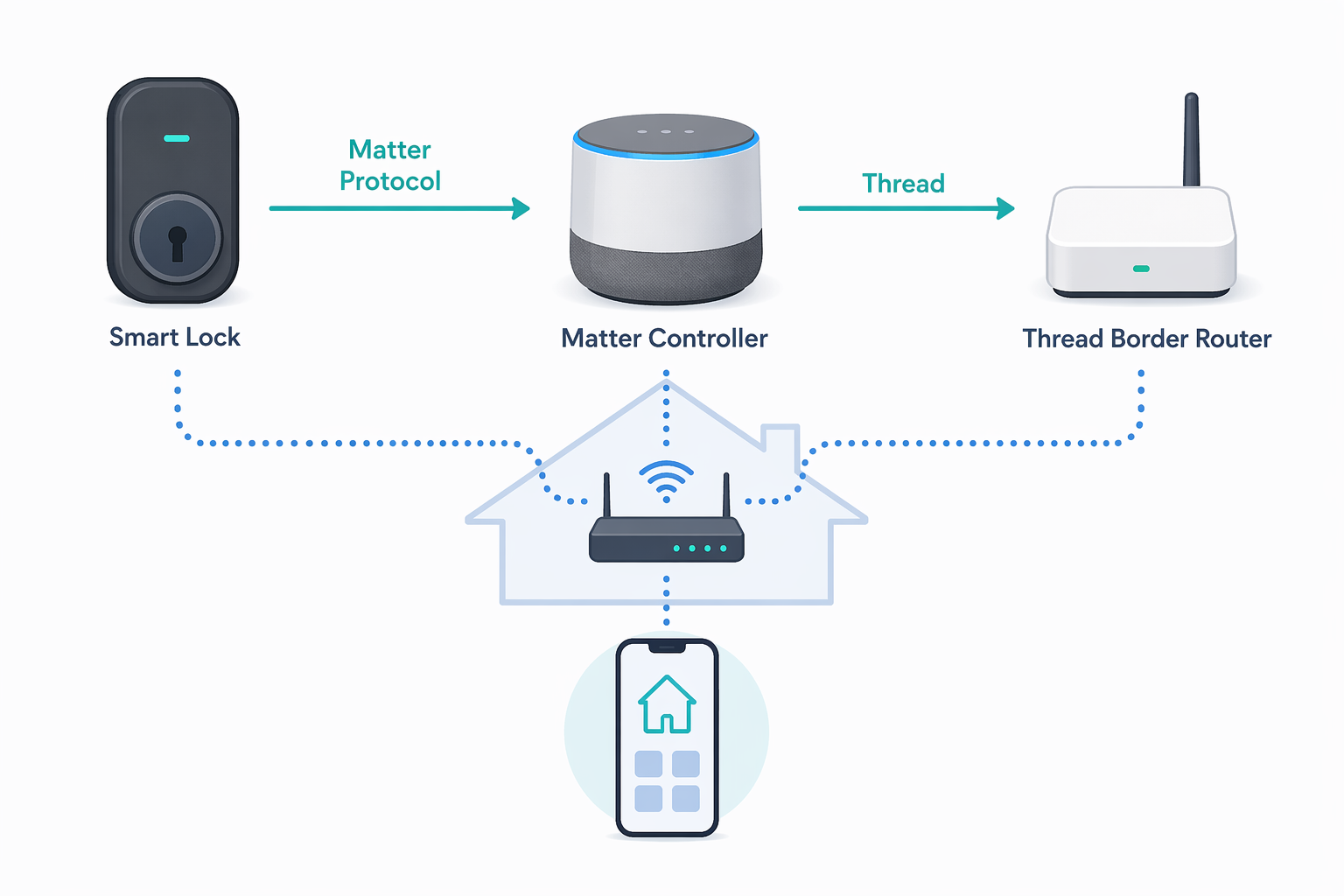
From Logo to Working Lock
The cleanest way to shop for a Matter-enabled smart lock is to read the box backward from the network it needs, not forward from the badge on the front. The logo tells you the lock supports Matter. It does not tell you whether your home is ready for that particular lock.
| Question to answer | Why it matters |
|---|---|
| Does the lock use Matter over Thread or Matter over Wi-Fi? | That determines whether you need a Thread border router and sets the rough battery-life expectation. |
| Do you already have a Matter controller? | Without one, you cannot commission and manage the lock through Matter. |
| If it is Thread, do you have a compatible Thread border router? | A Thread lock needs a path from the low-power Thread network into your home network. |
| Which platform will set it up first? | That platform becomes the first admin and starts the sharing flow for other platforms. |
| What features disappear in Matter mode? | Some locks trade native app features for cross-platform Matter control. |
Start with the radio. If the lock says Matter over Thread, plan on a Thread border router. If the lock says Matter over Wi-Fi, you usually avoid that Thread-specific requirement, but the lock is talking over a more power-hungry radio. This is where “no extra hub” can become a half-truth. A Wi-Fi lock may not need a Thread border router, but it still needs a Matter controller for Matter control. A Thread lock may use a controller and border router that are already sitting in your living room, but only if the device actually supports the right role.
Then check the first platform you intend to use. If your household is mostly Apple Home, the first setup may happen there. If the lock is going into a Google-heavy home, the Nest Hub or another compatible Google device may be doing more of the work. For SmartThings or Alexa homes, the same logic applies: the first controller has to be real, powered, online, and compatible with that Matter lock.
Only after that should you care about the prettiest feature grid. A lock that cannot be commissioned cleanly is not a smart-home upgrade; it is a metal puzzle on the door. If the phrase “Thread border router” is still fuzzy, pause at What Is a Matter Border Router and Do You Already Have One? before picking a Thread model.
Thread Versus Wi-Fi Is Mostly a Battery Decision
Thread sounds more technical than Wi-Fi, so beginners often assume Wi-Fi is the safer choice. For a lock, that can be exactly backward. Door locks live on batteries, sit at the edge of the home, and wake up many times a day for keypads, auto-locks, status checks, automations, and app requests. A radio that is convenient for setup can become annoying six months later if it drains batteries faster than expected.
Matter-over-Thread locks such as Aqara U400, Yale Smart Lock with Matter, Level Lock Pro, and Kwikset Halo Select are commonly positioned around 6–12 months of battery life, while Wi-Fi-based Matter locks such as Schlage Sense Pro and Eufy FamiLock S3 Max are commonly positioned around 3–6 months. [3]
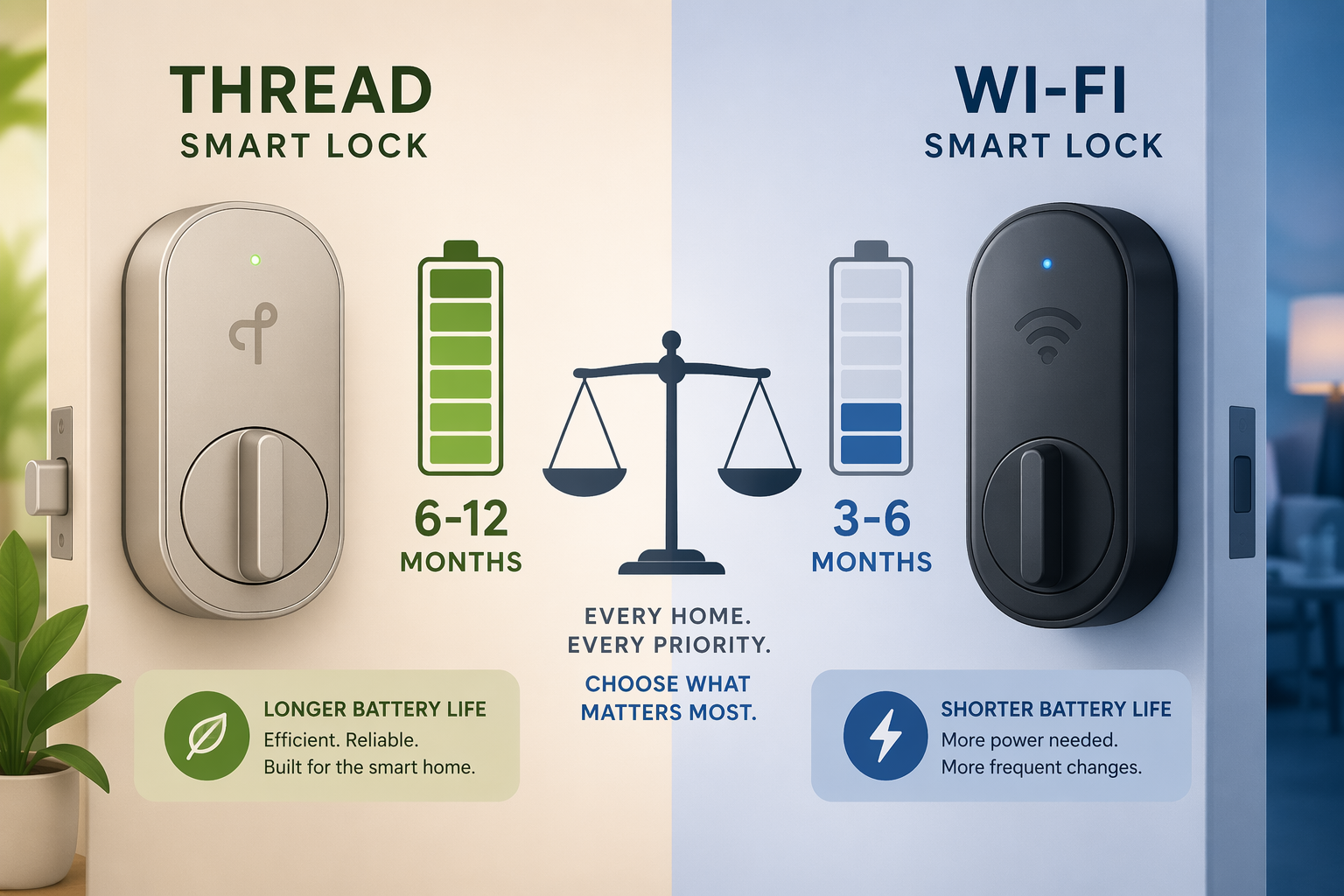
Treat those ranges as manufacturer-style expectations, not promises. Real battery life depends on how often the door is used, how cold the entryway gets, how far the lock sits from reliable network coverage, and how chatty the lock becomes inside a platform. A front door used by a family, dog walker, cleaner, delivery routine, and evening auto-lock schedule is not the same workload as a side door opened twice a day.
This is why Thread earns its fussiness. The setup checklist is less intuitive because you have to confirm the border router. The payoff is that the lock can use a low-power mesh instead of leaning on Wi-Fi directly. For buyers who already have a capable HomePod mini, Nest Hub, Echo, or another compatible border router, Thread is often the calmer long-term choice.
Wi-Fi Matter locks still make sense in some homes. If the buyer has strong Wi-Fi at the door, does not own a Thread border router, and values fewer compatibility questions during setup, Wi-Fi is a defensible convenience tradeoff. Just do not buy it under the impression that Matter made the battery chemistry more generous. It did not.
For a broader radio-by-radio comparison, Should Your Matter Accessories Use Thread or Wi-Fi? is the more general version of this decision. With locks, though, the argument is unusually concrete: batteries are not a line item. They are the thing someone has to replace when the keypad starts complaining.
Multi-Admin Is the Part Matter Gets Right
The most useful emotional payoff of Matter is not the setup animation. It is the moment a household stops organizing itself around one company’s app. One person can keep using Apple Home, another can use Google Home, someone else can rely on Alexa routines, and the lock can still be the same lock.
Matter’s multi-admin feature allows a device to be shared across multiple ecosystems rather than reset and re-paired from scratch. Yale’s support flow for its Matter lock shows the practical version: after the first platform adds the lock, a secondary platform can be added using a new 11-digit code or QR code generated for that pairing session, with a limited pairing window of 3–15 minutes. [4]
Matter documentation and coverage describe multi-admin as supporting simultaneous pairing with up to five ecosystems. [5]
That limited window is a small nuisance and a useful security boundary. It means the second platform is not casually discovering the lock forever. It also means the person doing setup should have both apps ready, know which platform is already the first admin, and avoid starting the process while standing outside in the rain with one phone at 6 percent battery.
The Feature Tradeoff Is Where Buyers Get Surprised
Matter control does not automatically expose every clever feature a lock maker built into its own app. This is the part that causes the most reasonable frustration, because the box can be telling the truth and still leave the buyer disappointed.
Kwikset’s Halo Select is the cleanest warning sign. In Matter mode, it loses native features including auto-unlock and intrusion detection. [6] That does not make the lock useless. It does mean the buyer is choosing between cross-platform Matter control and some of the richer features available through the manufacturer’s own app.
Aqara’s U100 has also been documented appearing twice in Apple Home after Matter-related setup, which is the sort of duplication that makes a standards pitch feel less tidy in a real home. [6] That kind of behavior should not be stretched into a claim that all Matter locks behave badly. It is better read as a reminder that Matter certification, platform interpretation, and brand implementation all meet in the same app screen.
Some missing features are limitations of what the current Matter lock specification exposes. Some are choices the manufacturer made when deciding what to support in Matter mode. Some are platform-side rough edges. For the buyer, the consequence is the same: check the lock’s Matter-mode feature list, not just the lock’s general feature list.
This is especially important for features that feel central to daily use: auto-unlock, fingerprint unlock, door position sensing, intrusion alerts, guest code management, access logs, geofencing, and advanced notifications. A lock may support them somewhere, but not necessarily through Matter in every platform. If a feature is the reason you are buying that model, verify whether it survives after Matter is turned on.
The Matter logo still has value. It tells you the device passed a common compatibility path. It does not guarantee that every native feature becomes a universal feature. What the Matter Certification Logo Actually Guarantees is worth reading before treating certification as a blank check.
The Market Is Big; Your Door Is Specific
Smart locks are no longer a niche curiosity. Mordor Intelligence estimates the U.S. smart lock market at $3.88 billion in 2026, while Fortune Business Insights places the global smart lock market at $4.22 billion. [7][8]
Those two numbers should not be mashed together as if they measure the same thing. One is a U.S. estimate and the other is global, with different scopes and methodologies. Their useful message is narrower: the category is large enough that platform support, firmware updates, and buyer confusion are worth taking seriously. They do not tell you whether your front door has a strong Wi-Fi signal, whether your family will tolerate battery changes every few months, or whether your preferred unlock method works in Matter mode.
Where Aliro Fits
Aliro belongs in this conversation, but not as a replacement for Matter. Matter is the control layer: lock, unlock, status, platform integration, automations. Aliro is aimed at credential-style unlocking, including approaches such as tap-to-unlock using NFC or UWB. [9]
In plainer language: Matter helps the smart home platforms agree on how to control the lock. Aliro is meant to help phones, watches, and locks agree on how a person proves they are allowed through the door. They can complement each other. If that split sounds like standards committee wordplay, Are Matter and Aliro Competing Smart Lock Standards? covers the distinction in more detail.
So, Should You Buy a Matter Smart Lock?
Buy a Matter smart lock if cross-platform control and future flexibility matter more than squeezing every native app feature out of the lock. Matter is especially attractive in homes split across Apple Home, Google Home, Alexa, SmartThings, or Home Assistant, and in homes where the buyer does not want to replace a working lock just because the preferred smart-home platform changes later.
Prefer Thread when the home already has, or can easily add, the right Thread border router. The extra hardware check is annoying, but the battery expectations are usually kinder. Choose Wi-Fi Matter when you want the simpler network story and accept that battery life may be shorter, especially at a busy or poorly covered door.
Before moving to model-level shopping, confirm five things in this order: you have a Matter controller; a Thread lock has a compatible Thread border router; the published battery range matches your tolerance for maintenance; the features you care about still work in Matter mode; and the lock can be added to the platforms your household actually uses. After that, model comparisons become useful instead of distracting. For specific lock options, start with Matter Smart Locks Work Everywhere — Here's the Catch or the broader Best Smart Locks for Home in 2026.
References
- These Smart Locks Support the Matter Standard — matter-smarthome.de
- Guide to Matter-Enabled Smart Locks — Level
- The best Matter-compatible smart door locks — Matter Alpha
- Yale Smart Lock with Matter — How to Set Up — Yale Support
- Benefits of Matter #5: Multi-Admin Mode — matter-smarthome.de
- I just connected my first Matter-compatible smart locks — Matter Alpha
- United States Smart Lock Market — Mordor Intelligence
- Smart Lock Market Size, Share & Industry Analysis — Fortune Business Insights
- Aliro — matter-smarthome.de
Updates & Corrections
Protocol specifications and platform features change rapidly — especially with Matter version evolution. Report version changes, certification count updates, or platform policy changes that have occurred since the last editorial review.
Comments
Join the discussion with an anonymous comment.