
If you are checking whether an Apple TV can work as a Matter hub, the name on the box is not enough. The important checks are the Apple TV generation, whether the 2022 Apple TV 4K has Ethernet, and whether you need Thread-based Matter accessories to join without another device.
The shortest version: Apple TV 4K models can act as Matter controllers when running tvOS 16.1 or later, but only some Apple TV models also act as Thread border routers. The easy-to-miss trap is the Apple TV 4K 3rd generation Wi-Fi-only model: it is a Matter controller, but it is not a Thread border router.[1][2]
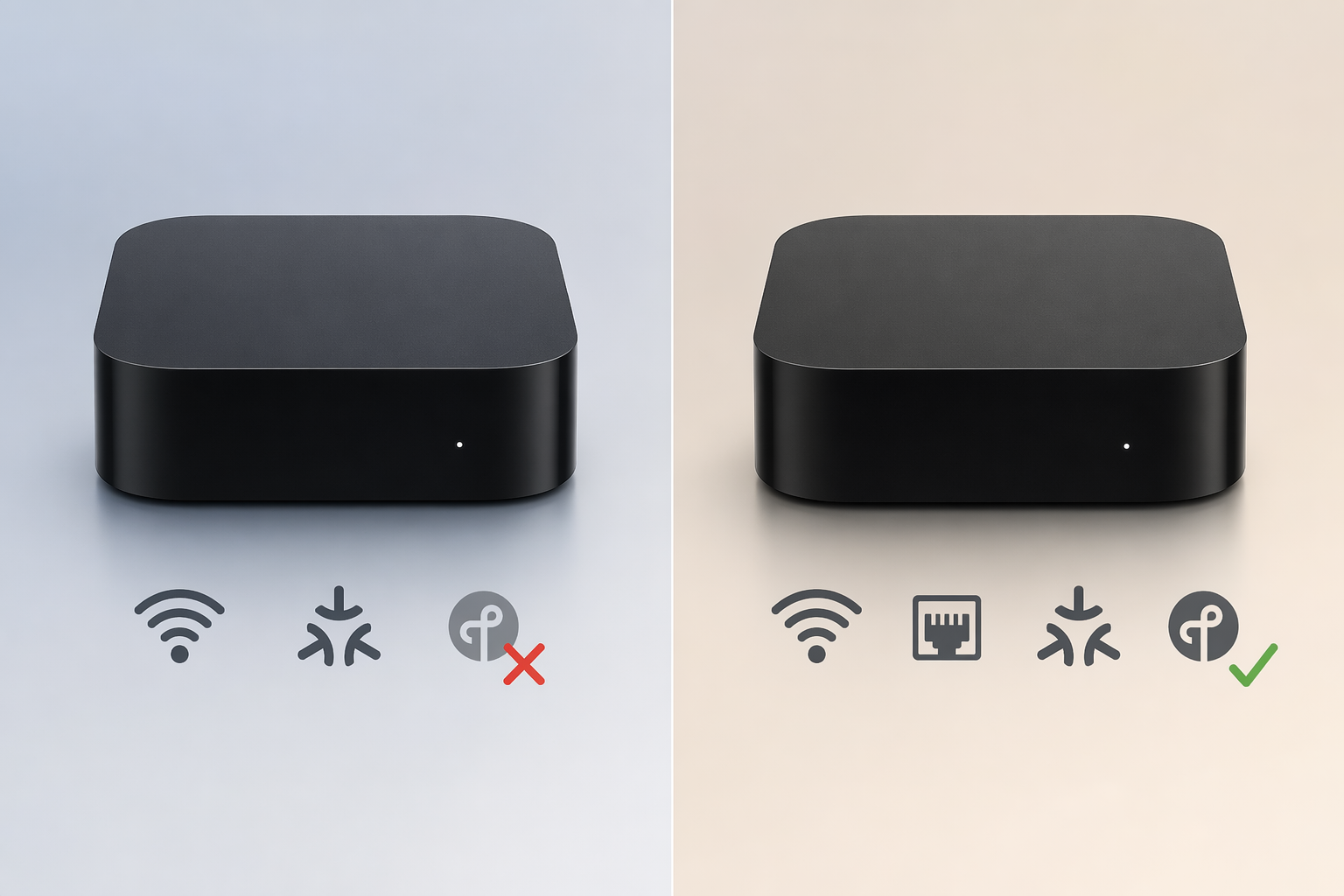
Apple TV Matter and Thread support by model
Use this table before buying a used Apple TV, choosing between current Apple TV 4K listings, or troubleshooting a Matter accessory that refuses to pair. The two jobs are separated on purpose: Matter controller support and Thread border router support are not the same thing.
| Apple TV model | Matter controller? | Thread border router? | What it means in practice |
|---|---|---|---|
| Apple TV HD, 4th generation | Yes, as a home hub with supported software | No | Can help run Apple Home and Matter control, but cannot provide Thread networking for Thread accessories. |
| Apple TV 4K, 1st generation, 2017 | Yes, with tvOS 16.1 or later | No | Can be a Matter controller, but Thread devices still need another Thread border router. |
| Apple TV 4K, 2nd generation, 2021 | Yes, with tvOS 16.1 or later | Yes | Can handle both Matter controller duties and Thread border router duties. |
| Apple TV 4K, 3rd generation, Wi-Fi only, 2022 | Yes, with tvOS 16.1 or later | No | The gotcha model: it can control Matter devices, but Thread-based Matter accessories need another Thread border router. |
| Apple TV 4K, 3rd generation, Wi-Fi + Ethernet, 2022 | Yes, with tvOS 16.1 or later | Yes | The safest Apple TV pick if you want one box with Ethernet and Thread. |
Apple’s own support material separates the 2022 Apple TV 4K models by port configuration: the Wi-Fi + Ethernet version includes Thread border router support, while the Wi-Fi-only version does not.[1][3] That is the hardware detail that gets lost when a listing simply says “Apple TV 4K.”
For current owners, the back of the unit and the original product listing matter more than the Home app label. If the 3rd generation Apple TV 4K has an Ethernet port, it is the Wi-Fi + Ethernet model and includes Thread. If it has no Ethernet port, it is the Wi-Fi-only model and does not include Thread border router support.[1][3]
There is no Apple-published maximum Matter device count per Apple TV in the available support material. If you see a precise ceiling repeated without an Apple source, treat it as a planning guess rather than a spec.
Why Matter controller and Thread border router are separate jobs
A Matter controller is the part of the system that can add, manage, and control Matter accessories. In Apple Home, an Apple TV home hub can hold device credentials, process commands, and support remote access and automations for the home.[2]
A Thread border router does a different job. It connects low-power Thread accessories to the rest of your home network. That matters when the accessory you are adding is a Matter-over-Thread device rather than a Matter-over-Wi-Fi device. For a deeper protocol explainer, see what a Matter border router does.
That is why a Wi-Fi-only 3rd generation Apple TV 4K can still be useful in a Matter home. It can act as a Matter controller. It just cannot create the Thread network path that a Thread accessory needs.
When Apple Home shows a “Thread Border Router Required” or “Needs Thread Network” alert, the fix is not to keep retrying the same QR code. Apple says those alerts mean the accessory needs a Thread border router, such as an Apple TV 4K 2nd generation, an Apple TV 4K 3rd generation Wi-Fi + Ethernet model, or a HomePod mini. If the only Apple TV in the home is the 3rd generation Wi-Fi-only Apple TV 4K, you need another compatible Thread border router for that Thread device.[3]
How to verify your Apple TV is actually working as a home hub
Do the hardware check first, then verify the Apple TV is assigned to the home and visible as a hub. A correct model sitting in the wrong room setting is still a bad Saturday morning.
- On Apple TV, open Settings, then go to General, then AirPlay and Apple Home.
- Assign the Apple TV to the correct room in your home.
- On iPhone or iPad, open the Home app.
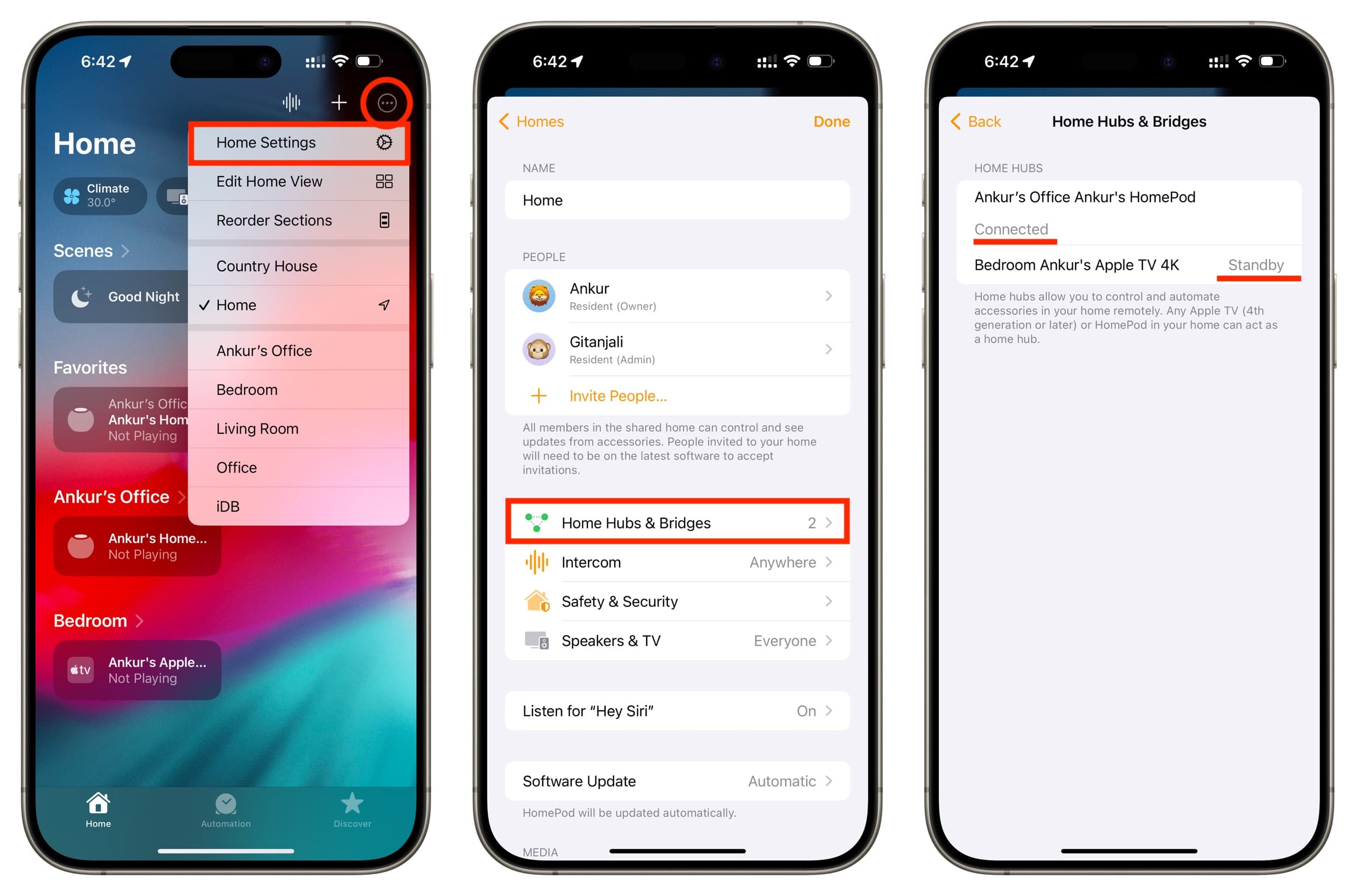
- Go to Home Settings, then Home Hubs & Bridges.
- Confirm whether the Apple TV appears as Connected or Standby.
Apple documents this room assignment and Home Hubs & Bridges check as the way to set up and confirm an Apple TV home hub.[1] The screen is also where many households first discover they have several possible hubs competing for the active role.
If your Home app supports manual hub selection, use it. Apple’s current home hub support page includes a preferred home hub control, added in late 2025, so you can choose a preferred Apple TV instead of relying only on automatic hub selection.[1] That is especially useful when the home contains both a Thread-capable Apple TV and a non-Thread Apple TV.
Before blaming the Apple TV, also check the setup blockers Apple calls out for Matter accessories: the Apple account needs two-factor authentication, iCloud Keychain needs to be turned on, and Matter accessories require a 2.4 GHz Wi-Fi network during setup.[2] Those requirements can produce the same feeling as a hub problem even when the Apple TV model is correct.
What to do if you see “Thread Border Router Required”
That alert is the cleanest signal that the accessory is asking for Thread infrastructure, not merely a generic Apple Home hub. The response depends on which Apple TV you have.
| Your setup | Likely next move |
|---|---|
| Apple TV 4K 2nd generation | Keep setup focused on account, room assignment, network, and Home app hub status because this model includes Thread. |
| Apple TV 4K 3rd generation Wi-Fi + Ethernet | Use this as the preferred hub if available; it includes Thread and can be hardwired. |
| Apple TV 4K 3rd generation Wi-Fi only | Add a compatible Thread border router, such as a HomePod mini or a Thread-capable Apple TV model. |
| Apple TV HD or Apple TV 4K 1st generation | Use it as a Matter-capable Apple home hub where supported, but do not expect it to satisfy Thread accessories. |
If you are deciding whether the problem is the accessory or the network, separate the question into two checks. First, is the accessory a Thread device? Second, is there a Thread border router in the home? A Wi-Fi Matter plug and a Thread Matter sensor can both carry the Matter logo, but they do not place the same demand on the Apple TV.
For a broader platform comparison, the useful next read is the best Thread border router options for 2026. For this Apple TV decision, the key is simpler: no Thread radio, no Thread border router.
Which Apple TV should you buy for Matter?
If you are buying an Apple TV now and want the model that covers the most Matter cases, choose the Apple TV 4K 3rd generation Wi-Fi + Ethernet model. It has the Ethernet port, acts as a Matter controller, and includes Thread border router support.[1][3][4]
The Wi-Fi-only Apple TV 4K 3rd generation can still make sense if you only need a streaming box and already have another Thread border router in the home. It is also still a Matter controller. It is just the wrong Apple TV to buy if your goal is one Apple box that removes the need for another Thread device.
The Apple TV 4K 2nd generation remains a strong used or existing-home option because it includes Thread. The Apple TV HD and Apple TV 4K 1st generation are less attractive as Matter hub purchases because they do not provide Thread border router support, even though they can still participate as Apple home hubs under supported software conditions.[1]
The practical buying rule is blunt: if the listing says Apple TV 4K 3rd generation, confirm whether it has Ethernet before treating it as a Thread-capable Matter hub. If the listing does not show the port configuration, ask. The price difference is not the only difference.
References
- Set up your HomePod, HomePod mini, or Apple TV as a home hub — Apple Support
- Pair and manage your Matter accessories — Apple Support
- If you see a 'Thread Border Router Required' or 'Needs Thread Network' alert — Apple Support
- HomePod vs Apple TV for Matter & Thread (2026) — DataWire Solutions
Updates & Corrections
Protocol specifications and platform features change rapidly — especially with Matter version evolution. Report version changes, certification count updates, or platform policy changes that have occurred since the last editorial review.
Comments
Join the discussion with an anonymous comment.