
A smart home air quality monitor for wildfire smoke earns its place when a number turns into an action. If indoor PM2.5 crosses 35 µg/m³, start purification. If it reaches 55 µg/m³, escalate: run stronger filtration or HVAC recirculation if your system supports it, and send a phone alert to the people who will otherwise discover the problem by coughing, checking an app, or walking into a hazy room at 2 a.m. Those two trigger points line up with EPA breakpoints for “unhealthy for sensitive groups” and “unhealthy,” but they are starting points for automation, not personalized medical advice.[1]
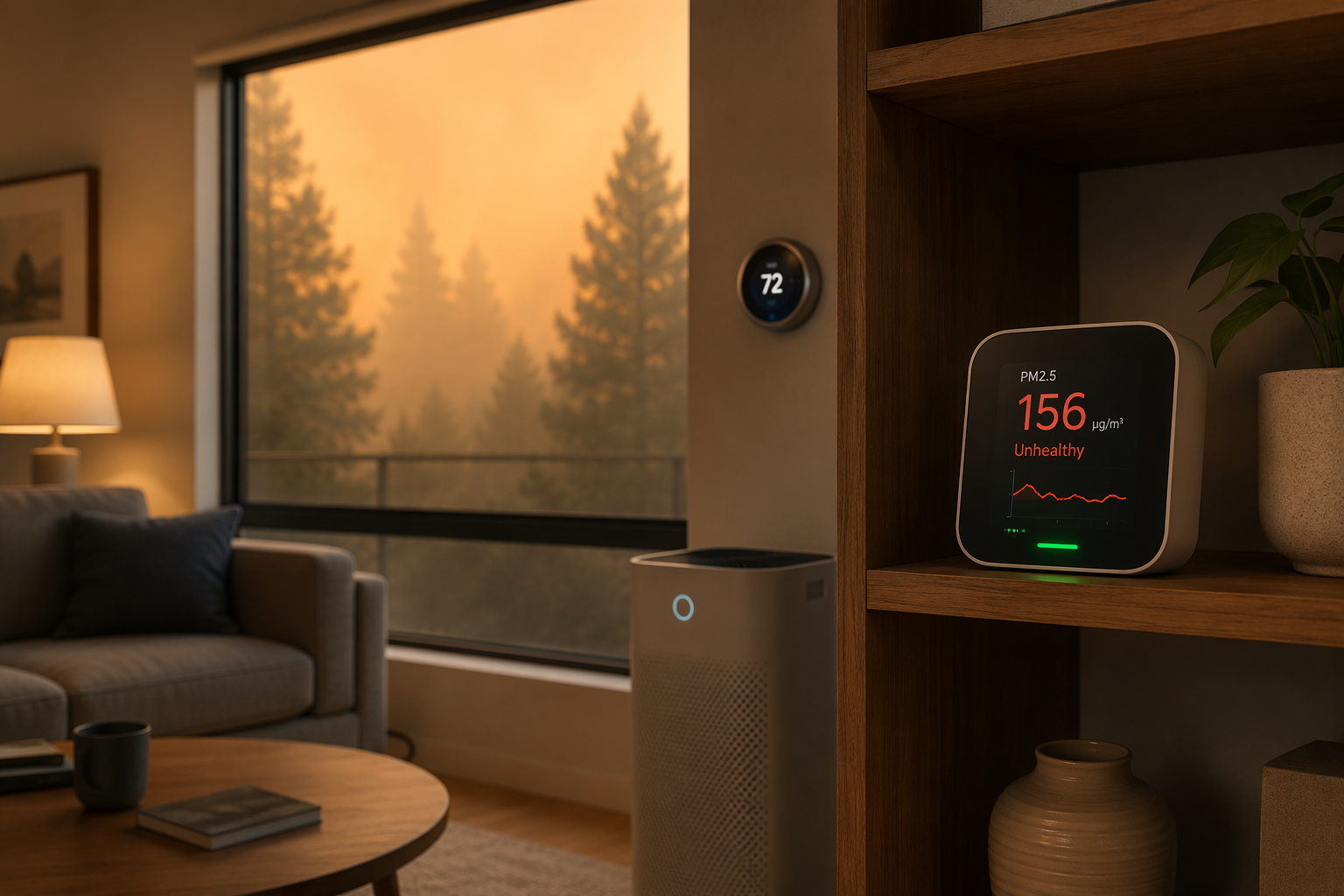
The monitor you buy decides whether that sequence is easy, fragile, or not really possible. A clean app screen is useful for checking conditions, but smoke season is a bad time to rely on somebody noticing a notification, finding the purifier remote, and remembering which doors are open. The useful question is simpler: can your smart home platform consume the PM2.5 value and trigger something else?
The Smoke-Season Automation Flow
Start with one working flow before trying to make the whole house clever. The flow below is conservative enough to test, clear enough to explain to another household member, and specific enough that you can tell whether it actually ran.
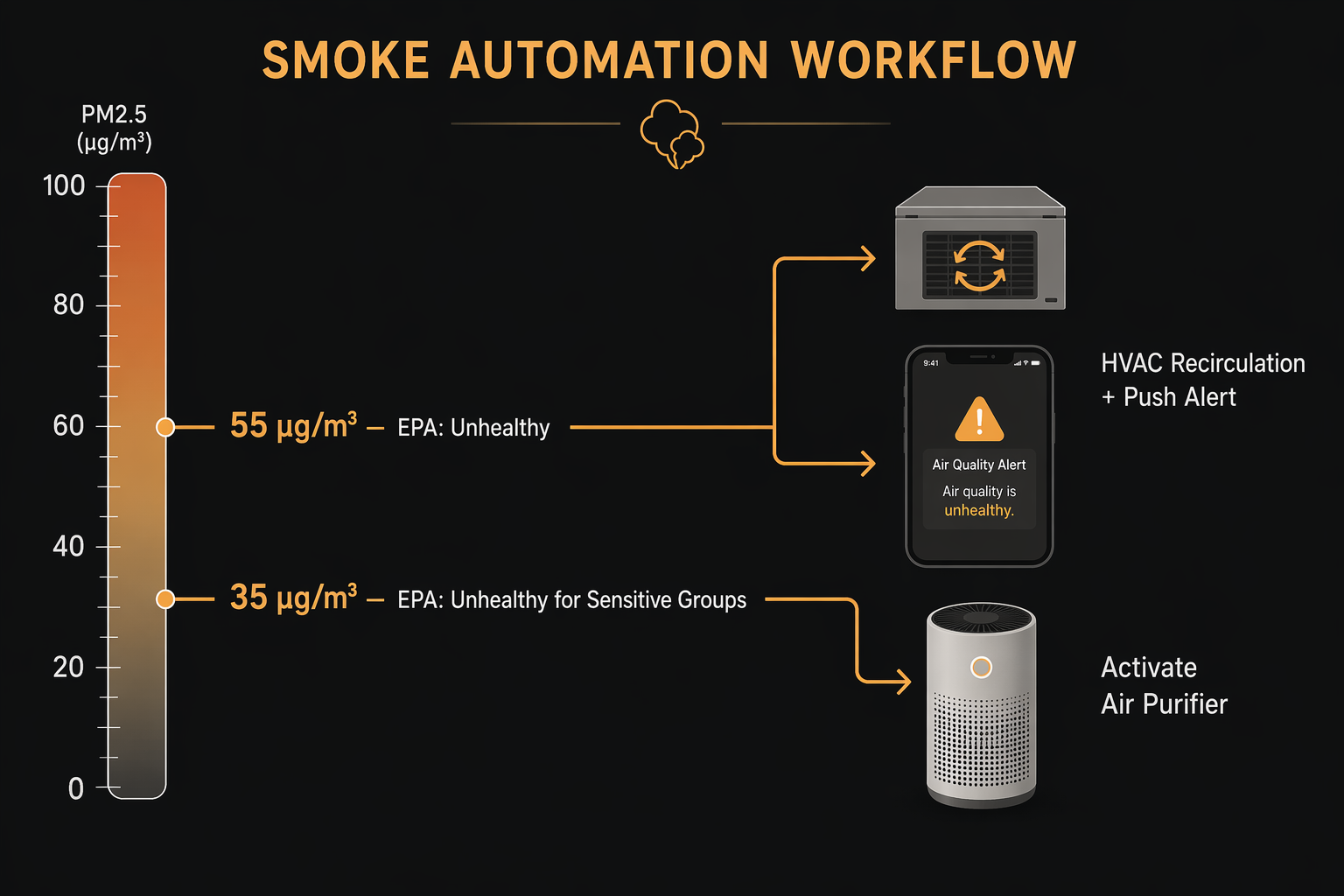
- Monitor indoor PM2.5 from a fixed location that represents the room you are trying to protect.
- At 35 µg/m³, turn on the air purifier or increase its fan speed.[1]
- At 55 µg/m³, send a push alert and, if your thermostat and HVAC setup support it, switch to recirculation or fan-only filtration.[1]
- During multi-day closed-window periods, watch CO2 so the house does not become stale while everyone is focused only on particles.
- After every trigger, verify the physical response: purifier fan changed, HVAC fan ran, alert arrived, and the monitor reading moved in the expected direction.
That last step is where many dashboards quietly fail. If the purifier is already on but the monitor is sitting beside the purifier exhaust, the reading may fall while the rest of the room is still smoky. If the monitor is near a kitchen, a cooking spike can start a smoke routine that has nothing to do with outdoor air. Automation does not remove the need for judgment; it moves the repetitive work to machines once the judgment has been encoded carefully.
Choose the Monitor by the Platform That Can Use Its PM2.5 Reading
For wildfire automation, the product category splits less by sensor display and more by integration path. Wirecutter’s 2026 review and HouseFresh’s monitor testing both treat platform support as a practical difference between devices, not just a convenience feature.[2][3] The dividing line is whether the reading is available locally, available only through a cloud platform, or available only through an API that you have to wire up yourself.
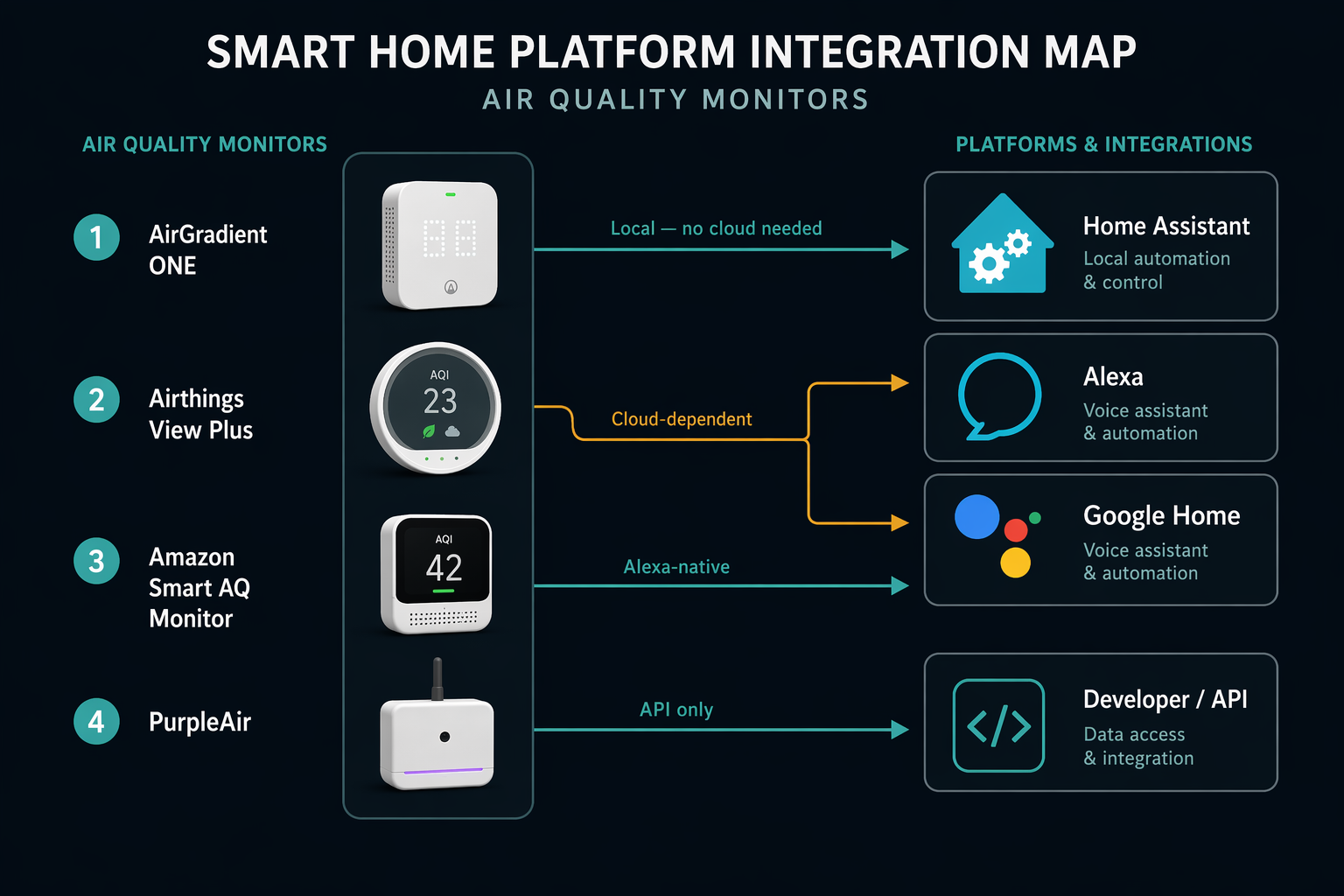
| Monitor | Best fit | Automation path | Smoke-season limitation |
|---|---|---|---|
| AirGradient ONE | Home Assistant households | Native local Home Assistant integration | Most useful if you are comfortable maintaining Home Assistant |
| Airthings View Plus | Alexa, Google Home, and IFTTT users | Cloud-dependent platform integrations | Routines depend on internet and vendor cloud availability |
| Amazon Smart Air Quality Monitor | Alexa-native homes | Alexa routines | Best inside Amazon’s ecosystem; less flexible outside it |
| PurpleAir Zen | API-capable users and outdoor/indoor data projects | API-based workflows | No mainstream native smart home routine path |
| Temtop M2000 | People who mainly want app alerts | App notification rather than smart home control | Limited for purifier, thermostat, or multi-device automations |
AirGradient ONE is the cleanest fit for a local Home Assistant smoke setup because the PM2.5 and CO2 readings can be used locally, without waiting for a vendor cloud to relay the condition.[4] That matters most on the bad days: the house is sealed, the internet is flaky, the power is on a backup circuit, and nobody wants to debug a cloud routine before bed. AirGradient’s own comparison materials also claim a Plantower PMS5003 particle sensor lifespan of 30,000 hours versus 20,000 hours for the Cubic PM2105L used in the compared Airthings device, but that is a manufacturer comparison and should be treated with more caution than independent testing.[4]
Airthings View Plus is still a sensible option when the household already runs Alexa, Google Home, or IFTTT automations and wants a polished consumer monitor. The tradeoff is dependency: if the automation has to leave the house, reach a cloud service, and come back before the purifier responds, it is convenience-grade rather than emergency-grade. Amazon’s Smart Air Quality Monitor is similar in spirit for Alexa homes: easier to fold into Alexa routines, less attractive if the rest of the house runs somewhere else.
PurpleAir belongs in a different mental bucket. PurpleAir’s own wildfire smoke guidance emphasizes monitor use and data access, but the practical smart home path is API work rather than a native Alexa, Google, HomeKit, or Home Assistant consumer routine.[5] That can be powerful for a technically inclined user. It is not the device to hand to a renter or parent who wants “turn on the bedroom purifier when PM2.5 gets bad” by tonight.
If you have not chosen a device yet, use this article for the automation logic and the separate wildfire smoke monitor buyer guide for product selection. The important part here is not finding the monitor with the nicest screen; it is matching the monitor to the platform that will be responsible when the air gets worse.
Home Assistant: The Most Reliable Version of the Routine
Home Assistant is where this setup becomes a real smoke-season system instead of a collection of app alerts. With a local monitor such as AirGradient ONE, the PM2.5 value can trigger a purifier, smart plug, thermostat mode, lights, speakers, or phone notification without depending on a cloud round trip. A real-world Home Assistant deployment walkthrough by Jim Angel shows the practical shape of this kind of air monitor integration: entities appear in Home Assistant, automations consume those entities, and the house can respond from local state rather than a dashboard someone has to watch.[6]
The basic Home Assistant structure is three automations, not one overstuffed rule. Keep them separate so you can test each trigger and avoid hiding a broken thermostat action behind a working purifier action.
- Purifier start: when indoor PM2.5 rises above 35 µg/m³ for several minutes, turn on the purifier or smart plug.
- Escalation: when indoor PM2.5 rises above 55 µg/m³ for several minutes, send a mobile notification and run HVAC fan or recirculation if available.
- Recovery: when PM2.5 stays below your chosen lower threshold for a sustained period, return purifier and HVAC behavior to normal.
Use a delay or “for” condition on the trigger. Wildfire smoke is not usually a one-second event indoors, and a delay helps filter out a kitchen burst, someone vacuuming, or a person opening a door briefly. The exact delay is a household choice; the key is to avoid building a hair-trigger system that trains everyone to ignore it.
alias: Smoke - Start purifier at PM2.5 35
trigger:
  - platform: numeric_state
    entity_id: sensor.living_room_pm25
    above: 35
    for: "00:05:00"
action:
  - service: switch.turn_on
    target:
      entity_id: switch.living_room_purifier
mode: single
alias: Smoke - Escalate at PM2.5 55
trigger:
- platform: numeric_state
entity_id: sensor.living_room_pm25
above: 55
for: "00:05:00"
action:
- service: notify.mobile_app_phone
data:
title: "Indoor smoke level is high"
message: "PM2.5 is above 55 µg/m³. Check doors, purifier, and HVAC fan."
- service: climate.set_fan_mode
target:
entity_id: climate.home_thermostat
data:
fan_mode: "on"
mode: singleThe thermostat line is the part to verify carefully. HVAC systems vary: some thermostats expose fan-only control, some expose circulate, and some do not let Home Assistant safely command the behavior you want. If HVAC recirculation is central to your plan, check compatible hardware before smoke season; the Home Assistant thermostat guide is the place to sort out platform support before writing the automation.
A dumb purifier can still participate if it returns to its previous state after power is restored and can be controlled safely through a smart plug. Many button-only purifiers do not behave that way. Test by turning the purifier on, unplugging it, plugging it back in, and seeing whether it resumes. If it stays off, a smart plug will not make it smoke-ready. For purifier features that matter in this exact use case, use the wildfire smoke purifier feature guide before buying around an automation plan.
Add CO2 Without Turning It Into a Smoke Trigger
CO2 is not a wildfire smoke measurement, but it becomes relevant when windows stay closed for days. AirGradient ONE and Airthings View Plus include CO2 sensing, which lets you notice when a sealed house is getting stale while the purifier is doing its job on particles.[2][4] Treat CO2 as a ventilation prompt, not a reason to open windows blindly during a smoke plume.
A practical Home Assistant approach is to notify rather than automate a window decision. For example: if CO2 stays high while PM2.5 is low, send a message to consider brief ventilation or mechanical fresh-air options. If CO2 is high and PM2.5 is also high, the alert should say the tradeoff plainly so a person can decide. That is not as satisfying as a fully automatic routine, but it matches the real problem better.
Alexa: Useful, Cloud-Dependent, and Best Kept Simple
Alexa is the most approachable path for households already built around Echo devices, especially with Amazon’s own Smart Air Quality Monitor or a compatible cloud-connected monitor. The routine should mirror the same 35/55 logic, but with fewer assumptions about recovery behavior and HVAC control.
- Create a routine using the monitor’s PM2.5 or air quality condition as the trigger, if the device exposes that condition to Alexa.
- At the lower trigger, turn on a compatible smart purifier or a tested smart plug controlling a compatible purifier.
- At the higher trigger, send an Alexa announcement or mobile notification and turn on any compatible fan or purifier boost mode.
- Test with a manual trigger before smoke season; do not assume the displayed monitor value is available as an automation condition.
The limitation is not that Alexa is unserious. It is that most Alexa routines are cloud routines. If your internet connection drops, the monitor may still measure the room and the purifier may still be physically capable of running, but the automation path between them can disappear. That is acceptable for convenience. It is not the same as a local Home Assistant automation running on hardware in the house.
Google Home and IFTTT: Good Enough for Alerts, Less Convincing for Critical Control
Google Home and IFTTT can be useful when a monitor such as Airthings View Plus exposes conditions through supported cloud integrations.[2] For many households, that is enough to turn on a connected purifier, send a notification, or make the smoke status visible alongside the rest of the home.
Keep these routines boring. A cloud-connected monitor can trigger “turn on purifier” and “notify me when the air gets worse.” It is a weaker foundation for layered emergency logic, room-by-room fallback behavior, or actions that must still run during an internet outage. If you want a broader platform comparison before deciding where to build the routine, the 2026 smart home platform comparison is more useful than trying to stretch one air monitor into every ecosystem.
What About HomeKit?
Do not assume HomeKit can use the PM2.5 value from your monitor just because the device has an app or works with another platform. Based on the integration paths covered here, HomeKit is not the strongest route for this wildfire smoke workflow. If you are a HomeKit household, verify the exact sensor characteristics exposed to Apple Home before buying, not after the first smoke day. In many cases, a Home Assistant bridge or a different monitor-platform pairing will be more practical than trying to force a native HomeKit routine.
Placement Can Break a Perfect Automation
A monitor used for automation needs a boring, representative location. Put it in the room you are trying to protect, away from windows and doors that create short spikes, away from kitchens that create non-wildfire particle bursts, and away from the direct exhaust of a HEPA purifier. A monitor sitting in clean purifier exhaust can tell the smart home that the room is safe while the far side of the room is still not.
- Good placement: breathing-height shelf, several feet from purifier exhaust, not beside a cooking area, not in direct sun.
- Bad placement: on top of the purifier, beside a patio door, in a kitchen, in an HVAC supply stream, or tucked inside a cabinet.
- Good validation: open the app or dashboard after the automation runs and confirm PM2.5 trends down gradually rather than dropping suspiciously fast.
- Bad validation: assuming the routine works because a notification appeared once.
If the monitor keeps triggering at odd times, troubleshoot the physical situation before rewriting the automation. Cooking, candles, vacuuming, open doors, and purifier exhaust can all explain readings that look like platform bugs. The smoke detection troubleshooting guide is the better next stop when the number seems wrong.
Test the Whole Chain Before the Sky Turns Orange
A smoke automation is only working when every link in the chain has been proven: the monitor reports PM2.5 to the platform, the platform sees the threshold crossing, the purifier or plug changes state, the thermostat does only what you expect, and the alert reaches the person responsible for acting. Test with temporary lower thresholds on a normal day, then restore the 35 and 55 µg/m³ triggers when you are done.
Also test the failure mode you are depending on. If the setup is cloud-based, disconnect the internet briefly and see what still works locally. If the setup is local Home Assistant, confirm the hub, Wi-Fi, monitor, purifier, and any network gear you expect to survive an outage are actually on backup power. “Local” does not help if the router and smart plug are dark.
For severe smoke episodes beyond this moderate-threshold routine, use a separate emergency plan rather than endlessly raising the same automation. The deeper guide to automating hazardous air quality conditions covers higher-risk scenarios where alerts, room selection, and manual decisions matter more.
The finished setup is not complicated: one correctly placed monitor, a purifier action at 35 µg/m³, an escalation and alert at 55 µg/m³, CO2 watched during sealed-house days, and a clear understanding of whether the routine is local or cloud-dependent. That is the difference between owning an air quality display and having the house respond when the smoke arrives.
Reader Feedback
Share your purchase experience, flag outdated picks, or ask clarifying questions about the checklist items.
Comments
Join the discussion with an anonymous comment.