
What DIY Home Security Means in 2026
A DIY home security system in 2026 is one you purchase, install, and manage yourself — no technician visit, no 36-to-60-month service contract, and no obligation to pay a monitoring company indefinitely. You buy a base station and sensors, follow an app-guided setup, and choose whether to self-monitor (free, push notifications only) or add professional monitoring on a month-to-month basis. The equipment is yours. You can move it, expand it, or cancel monitoring at any time.
This guide assumes you've already decided to go DIY. The question it answers is which system fits your specific situation — not whether DIY is valid. The five variables below determine that answer more reliably than any ranked product list.
The 5-Variable Decision Framework
Most buyers research brand names first and discover deal-breaking problems after purchase: a system that doesn't work with their existing smart home platform, a monitoring plan that locks them in longer than expected, or equipment that can't be removed from a rental without violating the lease. Evaluating the five variables below — in order — prevents those outcomes.
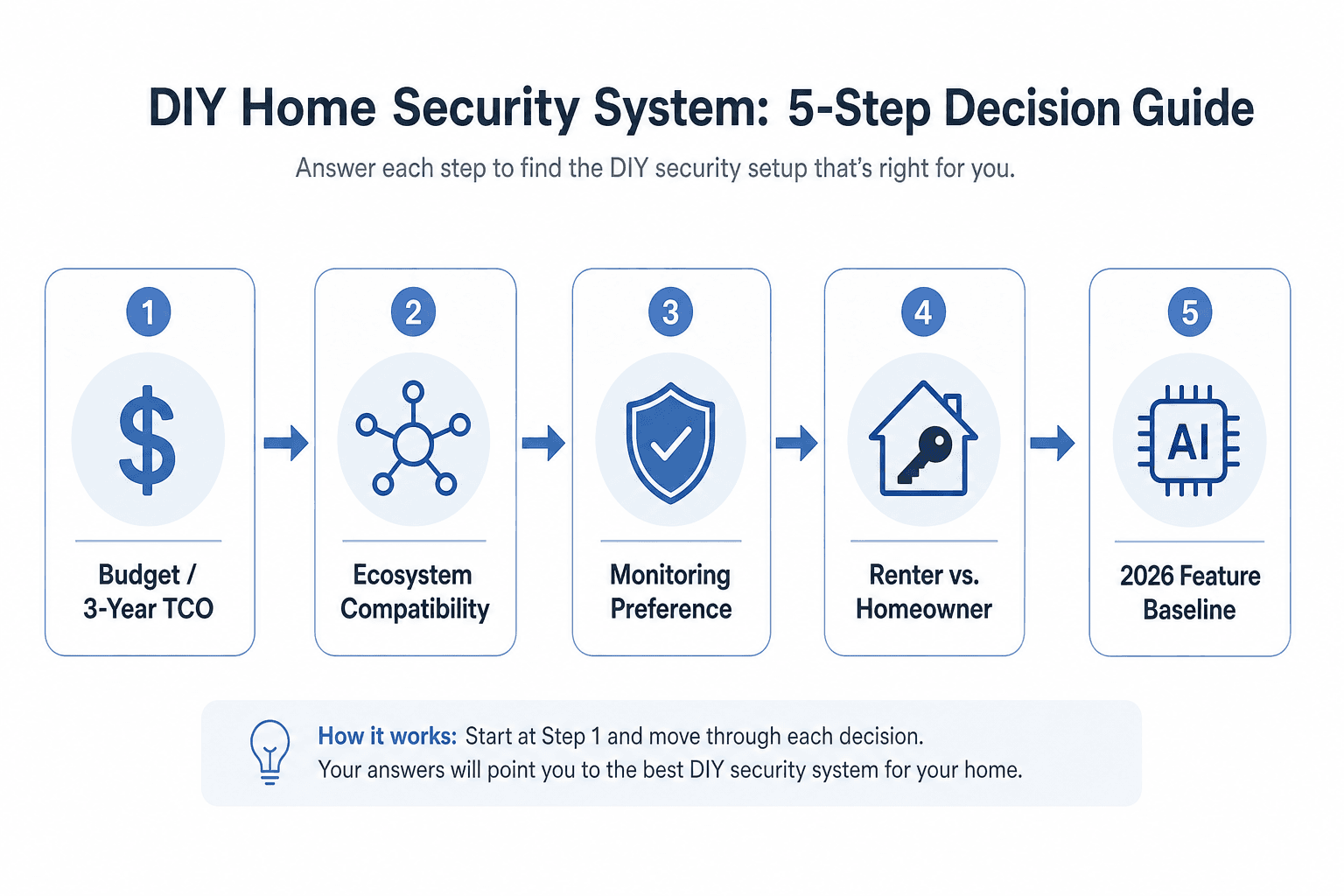
- Budget and 3-year total cost of ownership — upfront equipment plus ongoing monitoring and storage costs over a realistic ownership period
- Smart home ecosystem compatibility — whether the system works with Alexa, Google Home, HomeKit, or SmartThings, and which protocols it supports
- Monitoring preference — self-monitored, on-demand, or full professional monitoring, and what each tier actually costs per month
- Renter vs. homeowner installation constraints — whether the system needs to be no-drill, portable, and contract-free, or whether deeper integration is feasible
- 2026 feature baseline — AI-based detection, cellular backup, and local storage as non-negotiable capabilities
Variable 1: Budget and 3-Year Total Cost of Ownership
The sticker price on a security system starter kit is the least useful number for making a purchase decision. What matters is the total you'll spend over three years — equipment, monitoring, cellular backup, and camera cloud storage combined. That figure varies dramatically depending on whether you self-monitor or add professional monitoring, and it's the sharpest line between DIY and professionally installed systems.
The national average upfront cost for a home security system sits at approximately $600–$747, though most DIY starter kits fall in the $200–$600 range depending on sensor count. Monthly monitoring fees run from $0 for self-monitoring to roughly $20–$25 per month for no-contract professional monitoring on DIY systems, and up to $45 or more on contracted professional installations.
The table below uses published 3-year TCO figures to make the comparison concrete. The Abode-sourced figures reflect their own pricing and should be cross-referenced with current plan pages, but the relative order of magnitude is consistent with third-party pricing data.
| System / Scenario | Upfront Equipment | Monthly Monitoring | 3-Year TCO (est.) | Contract Risk |
|---|---|---|---|---|
| Abode (self-monitored) | ~$199 | $0 | ~$199 | None |
| Abode (Connect plan, ~$6/mo) | ~$199 | ~$6 | ~$415 | None — month-to-month |
| Ring Alarm Pro | ~$299.99 | ~$19.99 (Protect Plus) | ~$1,020 | None — month-to-month |
| SimpliSafe (Standard monitoring) | from $250.96 | ~$31.99 | ~$897 | None — month-to-month |
| Vivint (professional install) | $0–$200 (financed) | $45+ | $1,620–$2,220+ | 60-month contract; 75–100% of remaining balance on cancellation |
| ADT (professional install) | from $269 | $45+ | $1,800+ | 36-month contract; similar cancellation exposure |
Two additional TCO line items that don't appear in starter kit pricing: camera cloud storage and cellular backup. If your system includes cameras, cloud storage subscriptions add $10–$20 per month depending on the platform and camera count. For a detailed breakdown of camera-specific subscription tiers across Ring, Arlo, and Google, see the Ring, Arlo, and Google Home Premium subscription cost comparison rather than treating those tiers as part of this guide's scope.
One legitimate cost offset: professionally monitored systems can reduce homeowners insurance premiums by up to 20%, generating annual savings of roughly $63–$190. Most insurers require proof of professional monitoring to qualify — self-monitored setups typically don't qualify for this discount.
Variable 2: Smart Home Ecosystem and Protocol Compatibility
If you already have smart home devices — lights, locks, a thermostat — your security system needs to work within the same ecosystem. A system that conflicts with your existing platform creates two separate apps, two voice assistants that can't share automations, and sensors that can't trigger your lights or locks. Verifying compatibility before purchase is the single most important step most buyers skip.
The four major platforms are Amazon Alexa, Google Home, Apple HomeKit, and Samsung SmartThings. If you're undecided on which platform to build around, the Alexa vs. Google Home vs. Apple HomeKit platform comparison covers that decision in full. For security system selection, what matters is which platforms each system actually supports.
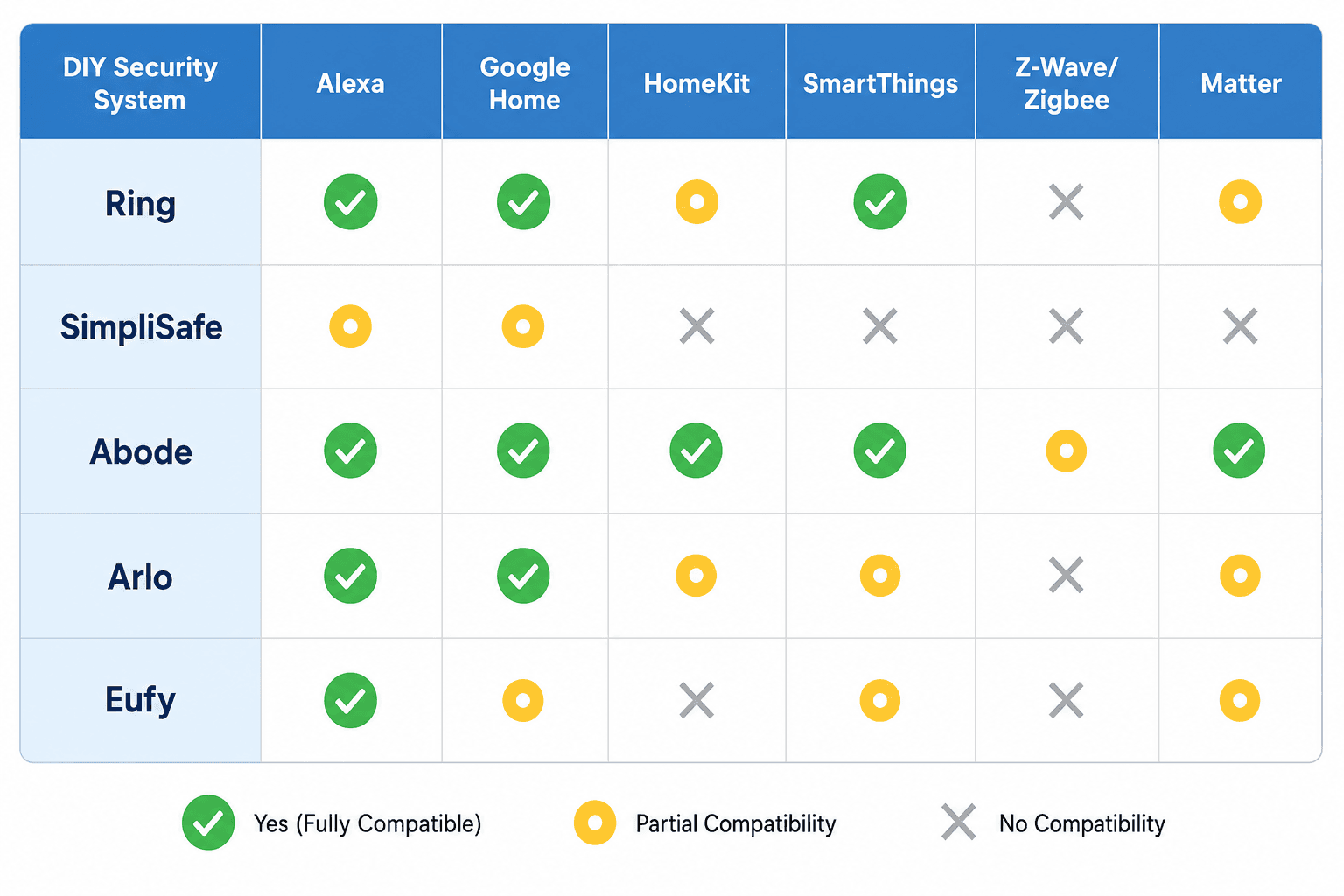
| System | Alexa | Google Home | HomeKit | SmartThings | Z-Wave | Zigbee | Matter |
|---|---|---|---|---|---|---|---|
| Abode | ✓ | ✓ | ✓ (native) | ✗ | ✓ | ✓ | Planned |
| Ring Alarm / Pro | ✓ (deep) | ✗ | ✗ | ✗ | ✓ | ✗ | Planned |
| SimpliSafe | ✓ (limited) | ✓ (limited) | ✗ | ✗ | ✗ | ✗ | ✗ |
| Arlo | ✓ | ✓ | ✓ (cameras only) | ✓ | ✗ | ✗ | ✗ |
| Eufy | ✓ | ✓ | ✓ (cameras only) | ✗ | ✗ | ✗ | ✗ |
Three compatibility facts that determine which systems are off the table for certain buyers:
- Abode is the only DIY security system with native Apple HomeKit support and dual Z-Wave/Zigbee radios. It also works with Alexa, Google Assistant, and IFTTT simultaneously — making it the most versatile option for mixed smart home setups. For HomeKit-specific context, see the Apple HomeKit platform overview.
- Ring locks into Amazon's ecosystem. Integration with Google Assistant is not supported. If your household uses Google Home as its primary voice platform, Ring Alarm is a poor fit regardless of its other features.
- SimpliSafe has minimal third-party integration. It supports basic Alexa and Google Assistant voice commands but does not integrate with smart locks, Zigbee sensors, or Z-Wave devices. It functions as a standalone security system, not a smart home hub.
On the protocol layer: Z-Wave and Zigbee are the two mesh protocols used for door/window sensors, motion detectors, and smart locks in security-integrated setups. Abode supports both; Ring supports Z-Wave only; SimpliSafe supports neither. If you plan to integrate a smart lock into your security system, the hub's protocol support determines which locks are compatible. The Zigbee protocol explainer covers the technical differences if you need that background.
Matter 1.5 expanded camera interoperability in 2026 — adding live streaming, two-way audio, motion detection, and event history to the Matter spec. However, most established DIY security systems have not fully adopted it yet. SimpliSafe shows no Matter support on its current roadmap; Ring and Abode both list it as planned. Matter is worth tracking for future compatibility but should not be the deciding factor in a 2026 purchase.
Variable 3: Monitoring Preference and What Each Tier Actually Costs
DIY systems offer three monitoring tiers. The right choice depends on how often you're away from home, how quickly you need dispatch coordination, and whether your municipality requires verified response before sending police.
| Monitoring Tier | Cost (2026) | What It Includes | Best For |
|---|---|---|---|
| Self-monitored | $0/month | App push alerts, no dispatch coordination | Renters, frequent home presence, budget-first |
| Basic / on-demand | ~$9.99–$10/month | Limited professional features, some video history | Occasional travelers, light coverage needs |
| Professional (no-contract DIY) | $19.99–$31.99/month | 24/7 dispatch coordination, cellular backup activation, verified response | Frequent travelers, homeowners with complex setups |
| Professional (contracted install) | $45+/month | Full professional monitoring + installation | Not DIY — listed for TCO contrast only |
Self-monitoring is a legitimate choice for most renters and for homeowners who are regularly present. Push notifications reach you in seconds, and you can call emergency services directly. What professional monitoring adds is 24/7 dispatch coordination when you're unreachable — on an overnight flight, in a meeting, or in an area without cell service — plus cellular backup activation if your internet goes down.
One additional consideration: an increasing number of municipalities now require verified alarm response — video or audio confirmation of an actual intrusion — before dispatching police. AI-based detection (covered in Variable 5) feeds directly into this requirement. A system that floods the monitoring center with motion-triggered false alerts from passing cars will eventually be deprioritized by local dispatch.
Variable 4: Renter vs. Homeowner Installation Constraints
Installation constraints separate two genuinely different decision paths. Getting this wrong means either buying equipment you can't legally install in your rental, or under-investing in a homeowner setup that could support deeper integration.
If You Rent
- No-drill installation is non-negotiable. Contact sensors, motion detectors, and base stations must all mount without permanent modifications to walls or door frames.
- Equipment must be portable. You're not leaving a $400 base station behind when you move. Every component should be designed to be removed cleanly and reinstalled in a new space.
- No long-term contract. Month-to-month monitoring only — or self-monitoring. A lease end date is unpredictable enough without a 36-month security contract on top of it.
- Self-monitoring must be viable. If your landlord or HOA restricts exterior modifications, a wired video doorbell may not be an option, and you need a system that works fully on app-based self-monitoring.
- Best fits: SimpliSafe (straightforward, no ecosystem dependencies, portable) and Arlo (camera-focused, no-drill mounting, self-monitoring capable).
If You Own Your Home
- Wired video doorbells are an option. A wired doorbell provides more reliable power than battery-operated alternatives and supports continuous recording without battery management.
- Smart lock integration is feasible. If you want your security system to arm automatically when you lock the door — or lock automatically when you arm the system — you need a hub that supports Z-Wave or Zigbee and a compatible smart lock. See the smart lock buyer guide for lock selection by protocol and installation type.
- A broader protocol stack pays off over time. Abode's dual Z-Wave/Zigbee support means you can add third-party sensors, locks, and lighting over time without replacing the hub. This flexibility is wasted on renters who need to keep things simple and portable.
- Best fits: Abode (deepest smart home integration, HomeKit support, dual protocol stack) and Ring Alarm Pro (if a Wi-Fi 6 network upgrade is also on the list — it includes a built-in eero 6 router and 24-hour battery backup).
Variable 5: The 2026 Feature Baseline Every System Should Meet
Three capabilities now separate a security system that earns daily trust from one that generates enough nuisance alerts to be ignored within a month.
- AI-based person, vehicle, package, and animal detection. This is no longer a premium feature — it's the baseline expectation. Systems that can only detect motion without classifying what caused it will alert you every time a car drives past, a squirrel crosses the yard, or a delivery arrives. The practical result is alert fatigue: you stop checking notifications, which defeats the purpose of the system. Verify that AI detection is included in the base plan or in a reasonably priced tier before purchasing.
- Cellular backup. If your internet goes down — during a power outage, after a router failure, or because someone cuts your cable line — a Wi-Fi-only system goes dark. Cellular backup keeps the alarm communicating with the monitoring center or your phone regardless of local network status. Ring Alarm Pro includes a cellular radio and 24-hour battery backup. Abode offers cellular backup as an add-on. SimpliSafe includes it on most monitoring plans. Verify the specific terms for your chosen plan.
- Local processing or local storage. Cloud-only systems stop recording if your internet is down or if the manufacturer's servers have an outage. Local storage (on an SD card or local NVR) keeps footage available even when the cloud is inaccessible. Local processing means the system can continue to detect and respond to events without a cloud round-trip. Eufy's strength is specifically here — local storage with no mandatory subscription. Abode also supports local operation during internet outages.
For deeper guidance on camera selection as a component of your system — including AI detection tiers by brand, field of view, and storage options — see the smart security camera buyer guide. Camera selection is its own decision within the larger system purchase.
Use-Case System Picks: Matching the Right System to Your Situation
These recommendations are outputs of the five-variable framework above — not affiliate rankings. Each pick states the condition that makes it the right choice, the system, and the primary reason in plain terms.
- Best for Apple/HomeKit users → Abode. Abode is the only DIY security system with native HomeKit support. It also supports Alexa, Google Assistant, Z-Wave, Zigbee, and IFTTT simultaneously. If your home runs on HomeKit and you want your security system to participate in the same automations as your lights and locks, Abode is the only option. Its CUE automation engine supports geofencing arm/disarm — pair it with the away mode geofencing automation recipe for a complete departure routine.
- Best for Amazon/Alexa ecosystem → Ring Alarm or Ring Alarm Pro. Ring integrates deeply with Amazon devices and Alexa routines. Choose Ring Alarm Pro specifically if you also need a Wi-Fi 6 network upgrade — it includes a built-in eero 6 router and 24-hour battery backup, which is a meaningful value combination. Note that Ring does not support Google Assistant and has no HomeKit compatibility. Before committing, review Ring's data practices — the Ring camera privacy and data retention guide covers the specifics of what Ring collects and how it's shared.
- Best for simple DIY with no smart home integration → SimpliSafe. If you want reliable security coverage without ecosystem dependencies, hub pairing, or protocol management, SimpliSafe delivers. Starter kits begin at roughly $250, optional monitoring starts at $10/month, no contract required. It supports basic Alexa and Google voice commands. What it doesn't do is integrate with smart locks, Zigbee sensors, or HomeKit — which is fine if you don't need those things.
- Best for renters and apartments → SimpliSafe or Arlo. Both offer no-drill mounting, portable equipment, month-to-month or no-contract options, and viable self-monitoring. SimpliSafe is the better fit if you want a complete alarm system with sensors. Arlo is the better fit if cameras are your primary concern and you're comfortable with a lighter sensor setup.
- Best for no-subscription / budget-first → Eufy. Eufy stores footage locally with no mandatory subscription. Starter kits begin at around $130. Professional monitoring is available via Eufy Plus at $9.99/month if you want it, but the system functions fully without it. The trade-off is a more limited ecosystem integration compared to Abode or Ring.
- Best for deep smart home integration → Abode. Abode's combination of Z-Wave, Zigbee, Wi-Fi, HomeKit, Alexa, Google Assistant, and IFTTT support makes it the only DIY security system that functions as a genuine smart home hub. If you want your security system to trigger lights, lock doors, adjust your thermostat, and report status through multiple voice assistants, Abode is the only system that handles all of those simultaneously.
Buyer Checklist: 9 Things to Verify Before You Purchase
- Confirm your existing smart home platform (Alexa, Google Home, HomeKit, SmartThings) and verify the system you're considering has documented, current support for it — not just a press release from two years ago.
- Calculate your 3-year TCO: add upfront equipment cost, monthly monitoring fee × 36, and estimated camera cloud storage costs. Compare at least two systems before deciding.
- Check your lease or HOA rules for restrictions on drilling, exterior mounting, or video surveillance equipment. No-drill mounting is available on all major DIY systems, but verify before you buy.
- Verify that cellular backup is included in your chosen plan or available as an add-on. Confirm whether it activates automatically or requires manual configuration.
- Confirm that AI-based person, vehicle, package, and animal detection is included in the base plan or in a monitoring tier you're actually willing to pay for — not locked behind the most expensive plan.
- Check whether the system supports local storage or requires cloud-only recording. If cloud-only, understand what happens to your footage if your internet goes down or the company's servers have an outage.
- Read the cancellation terms carefully. DIY systems should have no cancellation penalty on monitoring. If any contract language mentions a percentage of remaining balance, treat that as a red flag.
- If you plan to integrate smart locks or third-party sensors, confirm the hub supports the required protocol — Z-Wave for most smart locks, Zigbee for many sensors. SimpliSafe supports neither; Abode supports both.
- If you rent, confirm every component in the kit can be removed without permanent damage. Check that the base station, sensors, and any cameras use adhesive or tension mounting rather than screws.
Frequently Asked Questions
Can I use a DIY security system without any monthly fee?
Yes. Eufy, SimpliSafe, Ring, and Abode all support self-monitoring with no monthly fee. You receive push notifications when sensors trigger, and you contact emergency services yourself. Eufy is the strongest no-subscription option because it includes local storage at no extra cost — other systems may limit video history or features without a paid plan.
Will my DIY system work if the internet goes down?
It depends on the system and plan. Wi-Fi-only systems go offline with your internet connection. Ring Alarm Pro includes a cellular radio and 24-hour battery backup that keep it connected during outages. Abode supports local operation for basic alarm functions during internet outages, with cellular backup available on paid plans. SimpliSafe includes cellular backup on most monitoring tiers. Eufy with local storage continues recording even without internet, though remote access requires connectivity.
Does professional monitoring qualify me for a homeowners insurance discount?
Potentially yes — professionally monitored systems can reduce homeowners insurance premiums by up to 20%, generating annual savings of roughly $63–$190. Most insurers require proof of professional monitoring to qualify. Self-monitored setups typically do not qualify. Contact your insurer before purchasing to confirm their specific requirements and discount amounts.
Can I take my system with me when I move?
All major DIY systems are designed to be portable. SimpliSafe, Ring, Abode, Arlo, and Eufy equipment can be removed and reinstalled in a new location. The base station and sensors are yours — there's no lease-back or equipment ownership dispute as there can be with some professionally installed systems. If you're renting, confirm that all mounting methods are non-destructive before installation, not after.
Is Matter support important for a security system purchase in 2026?
Not as a deciding factor today. Matter 1.5 expanded the spec to include camera interoperability, but most established DIY security systems haven't shipped full Matter support yet. Ring and Abode list it as planned; SimpliSafe shows no Matter roadmap. If cross-platform interoperability is a priority for you, Abode's existing support for HomeKit, Alexa, Google, Z-Wave, and Zigbee already delivers that without waiting for Matter to roll out.
What's the difference between Ring Alarm and Ring Alarm Pro?
Ring Alarm Pro adds three capabilities the standard Ring Alarm lacks: a built-in eero 6 Wi-Fi 6 mesh router, a cellular radio for internet backup, and a 24-hour auxiliary battery for continuous operation during power outages. The Pro starts at approximately $299.99 vs. $199.99 for the standard kit. If you don't need a router upgrade and your existing internet connection is reliable, the standard Ring Alarm is the more cost-efficient choice. If you need both a security system and a network upgrade, the Pro's combined value proposition is meaningful.
Reader Feedback
Share your purchase experience, flag outdated picks, or ask clarifying questions about the checklist items.
Comments
Join the discussion with an anonymous comment.