
Why Choosing a Security Camera in 2026 Is Harder Than It Looks
The smart security camera market has never had more options — or more ways to get the decision wrong. In 2026, buyers face a market fragmented across subscription models, AI processing architectures, ecosystem silos, and power configurations that each carry real trade-offs.
A camera that looks like a great deal at $49 can end up costing over $200 per year once you factor in the subscription required to unlock event recording and AI detection. A camera that claims to work with your smart home ecosystem may only support live view — not automations, not voice announcements, not smart display streaming.
The core problem is that feature lists are misleading without a decision framework. A camera spec sheet that says "2K, AI detection, works with Alexa and Google Home" tells you almost nothing about whether that camera will actually serve your home, your power situation, your privacy preferences, or your budget over two years.
How to Use This Guide: Find Your Buyer Scenario
Rather than reading every section, identify which buyer profile fits your situation and jump to the sections most relevant to you. The guide is structured so each section builds toward the scenario-based picks at the end.
- Renter or no-drill buyer: Focus on Power Options (wired vs. battery vs. solar) and the Top Picks section for renter-friendly cameras. Battery and solar cameras require no permanent installation.
- Apple ecosystem user: Read the Ecosystem Compatibility section carefully. HomeKit Secure Video offers end-to-end encryption but requires iCloud+ and limits your brand choices.
- Alexa household: The Ecosystem Compatibility section covers which brands offer deep Alexa integration beyond live view — including Echo Show streaming and routine triggers.
- No-subscription buyer: The AI Detection and Subscription Cost sections explain which brands offer meaningful free functionality. Eufy, TP-Link Tapo, and Google Nest are the primary options worth evaluating.
- Multi-camera homeowner: The Subscription Cost section includes 2-year total cost of ownership estimates. At scale, subscription costs can easily exceed hardware costs — brand choice matters more than it appears upfront.
Camera Placement Types: Indoor, Outdoor, and Video Doorbell
Before evaluating brands or features, identify which camera type your home actually needs. Indoor, outdoor, and video doorbell cameras are designed for distinct use cases with different technical requirements — buying the wrong type means compromising on coverage regardless of how good the camera is.
- Indoor cameras are typically compact, lower-cost, and optimized for wide-angle coverage of a single room. They do not need weather resistance ratings. Common use cases include monitoring entryways from inside, watching over children or pets, or covering a home office. Field of view (FOV) of 110–130° is standard; some models offer pan-and-tilt for broader room coverage.
- Outdoor cameras require weather resistance. Look for IP65 (dust-tight, water-jet resistant) as the minimum for most climates; IP67 offers submersion protection for areas with heavy rain or flooding risk. Outdoor cameras typically need wider FOV (up to 160°) to cover driveways, yards, or building perimeters. Night vision range matters more outdoors — 20–30 feet is a practical baseline.
- Video doorbells are purpose-built for the front door. They use a taller aspect ratio (typically 3:4 or 1:1) to capture both faces and packages left on the ground. Two-way audio and quick-response times are critical features. Installation requires either an existing doorbell wiring setup or a battery-powered model. Wired doorbells offer continuous recording capability; battery models rely on motion triggers.
Power Options: Wired, Battery, and Solar
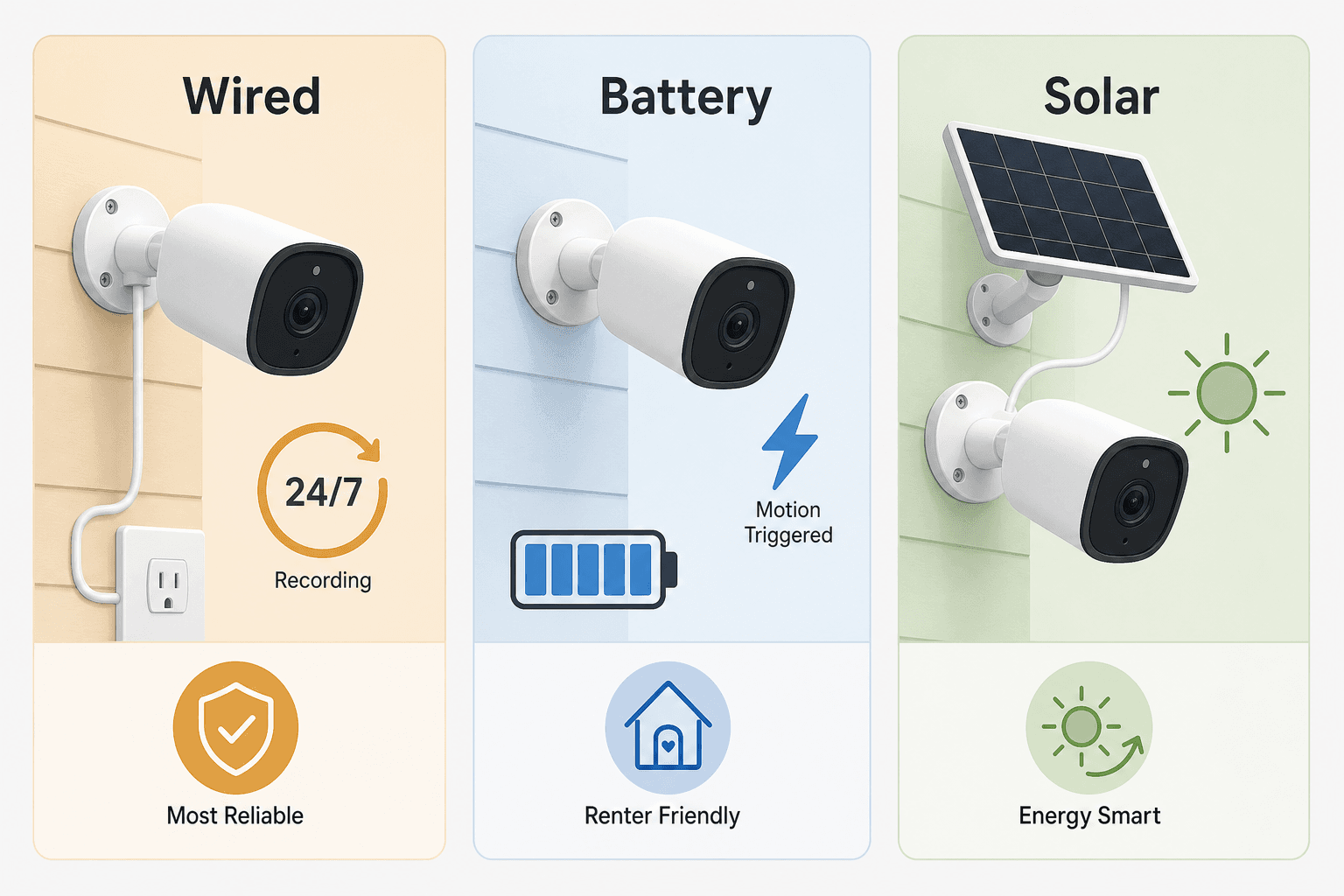
Power source is one of the most consequential decisions in camera selection — it determines where you can place the camera, whether you get continuous or motion-triggered recording, and how much ongoing maintenance the camera requires.
| Power Type | Continuous Recording | Installation | Renter-Friendly | Ongoing Maintenance | Best For |
|---|---|---|---|---|---|
| Wired (AC outlet) | Yes — 24/7 capable | Requires outlet access near mount point | Limited — needs outlet placement | None | Fixed positions near power; garages, covered porches |
| Hardwired (in-wall) | Yes — 24/7 capable | Requires electrical access; often professional install | No — permanent modification | None | Permanent installs; replacing existing wired cameras |
| Battery | No — motion-triggered only | No drilling required in most cases | Yes — fully removable | Recharge every 1–6 months depending on activity | Renters; flexible placement; locations without power access |
| Solar | No — motion-triggered only | Requires sun exposure at mount point | Partially — panel needs mounting | Minimal if panel gets adequate sun | Outdoor locations with consistent sun; reduces recharge frequency |
The terminology around wireless cameras can be confusing. "Wireless" means it connects to your network over Wi-Fi, but the camera may still require a power cable plugged into an AC outlet. "Wire-free" means the camera runs entirely on battery with no cables at all. Always check the power method in the product specs, not just the wireless connectivity claim.
Resolution: 1080p vs. 2K vs. 4K — What You Actually Get
Resolution determines how much useful detail you can extract from recorded footage — particularly for identifying faces, reading license plates, or distinguishing a person from a shadow at night. But higher resolution has real costs in storage usage and bandwidth consumption, and the benefit curve flattens quickly for typical residential use.
| Resolution | Pixels | Face / Plate ID | Storage Impact | Bandwidth Use | Best For |
|---|---|---|---|---|---|
| 1080p HD | 1920×1080 | Possible at close range; limited at distance | Low | Low | Minimum acceptable baseline; tight budgets; indoor use |
| 2K (QHD) | 2560×1440 | Good at typical residential distances | Moderate | Moderate | Most homes — the practical sweet spot for clarity vs. cost |
| 4K (UHD) | 3840×2160 | Excellent; useful at greater distances | High — roughly 4× 1080p | High | Large properties; wide driveways; areas needing zoomed-in detail |
4K cameras make the most sense for large outdoor areas — a wide driveway, a long fence line, or a property perimeter where you need to zoom in digitally without losing detail. For a typical front door, side yard, or living room, 4K adds cost and storage requirements without a proportional benefit in day-to-day usability.
AI Detection: Cloud AI vs. On-Device AI — Speed, Privacy, and Subscription Implications
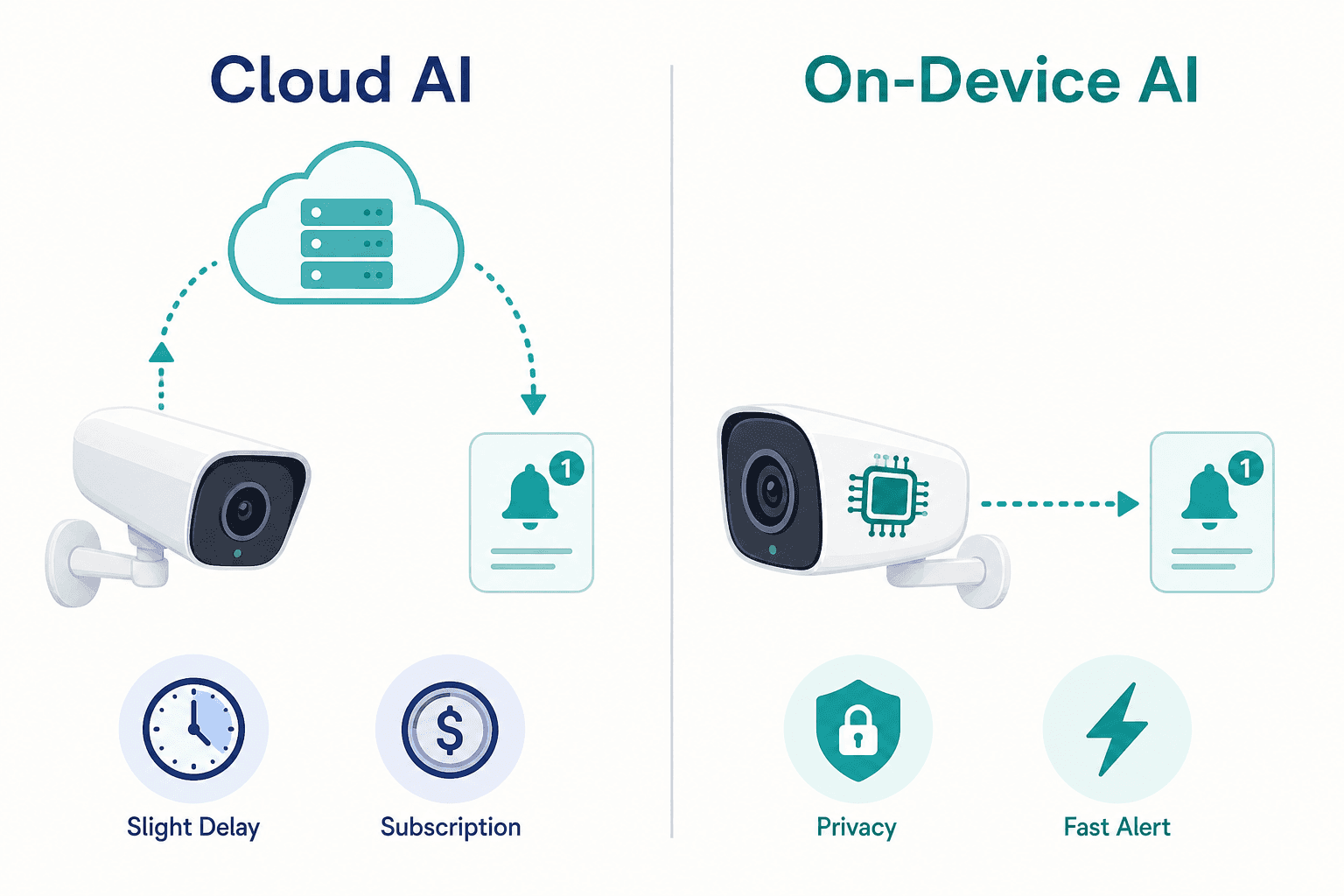
AI-based object detection is now a standard expectation for smart security cameras — the ability to distinguish a person from a car from a dog, rather than triggering an alert every time a tree branch moves. But how that AI runs has significant implications for your privacy, alert speed, and subscription costs.
Cloud AI
Cloud AI sends video footage or still frames to the manufacturer's servers for analysis, then returns a classification and alert. The advantages are deeper pattern recognition — cloud systems can be trained on larger datasets and updated continuously without changing the camera hardware. The drawbacks are meaningful:
- Your footage travels to and is processed on a third-party server — creating a privacy exposure point.
- Most brands gate cloud AI detection history behind a paid subscription. Without a plan, you may get a motion alert but no AI classification and no saved clip.
- Alert speed depends on your upload bandwidth and the manufacturer's server load — typically adding 5–15 seconds of latency compared to on-device processing.
- Law enforcement agencies can, in some jurisdictions, request footage directly from cloud storage providers without your knowledge.
On-Device (Edge) AI
On-device AI processes video directly on the camera's onboard chip or a local hub, without sending footage to external servers. Eufy's HomeBase 3, for example, uses a dedicated AI processor to analyze facial geometry locally — the face data is never transmitted to a remote server. TP-Link Tapo cameras perform person, pet, and vehicle detection on the camera itself.
- Faster alerts — processing happens locally, typically within 1–3 seconds of motion.
- Stronger privacy — footage stays on your network and your local storage device.
- No subscription dependency for AI detection — the core detection capability is built into the hardware.
- Pattern recognition depth is currently more limited than leading cloud AI systems, though the gap is narrowing.
The Google Nest Exception
Google Nest stands out as the only major brand offering meaningful AI detection — person, vehicle, animal, and package recognition — without a required subscription. Newer Nest camera models process detection on-device, while older models use Google's cloud infrastructure. Either way, Google provides up to six hours of free event video previews depending on the model generation, making it the most capable free-tier option among cloud-dependent brands.
Subscription Costs and 2-Year Total Cost of Ownership by Brand
The hardware price is only the starting cost for most smart security cameras. For the majority of brands, the features that make a camera genuinely useful — event recording, AI detection history, multi-day video storage — are gated behind a paid subscription plan. Understanding the real 2-year cost is essential before committing to a brand.
| Brand | Free Tier (No Sub) | Entry Plan | Unlimited Cameras Plan | 2-Year TCO (3 cameras, entry plan) | Key Limitation Without Sub |
|---|---|---|---|---|---|
| Arlo | Live view only — no saved clips | $9.99/mo per camera | $19.99/mo unlimited | ~$960 (sub only) | No event recordings saved at all |
| Ring | Live view only | $5/mo (1 cam, 180-day storage) | $10/mo all cameras | ~$240 (all-cam plan) | No event history; no AI detection |
| Google Nest | Up to 6 hrs free event previews; on-device AI detection | $10/mo (30-day history, all devices) | $20/mo (60-day + 24/7 recording) | ~$240 (standard plan) | Limited event history duration without plan |
| Eufy | Full AI detection + local storage included | No required subscription | No required subscription | ~$0 (sub); hardware only | Cloud backup requires optional paid plan |
| Blink | Clip sharing only; no cloud storage | $3.99/mo per camera | $12/mo unlimited | ~$288 (unlimited plan) | No cloud storage without plan |
| TP-Link Tapo | On-device AI detection; microSD local storage | $3.49/mo or $34.99/yr (up to 10 cameras) | Included in Tapocare plan | ~$70/yr (Tapocare) | Cloud history requires plan; local storage is free |
| Wyze | Free Cam Plus Lite (pay-what-you-want) with basic detection | $9.99/mo unlimited | Included in unlimited plan | ~$240 (unlimited plan) | Free tier has limited AI features; prior security incident history (see note below) |
For buyers deploying three or more cameras, Eufy and TP-Link Tapo offer the lowest total cost of ownership. Eufy's subscription-free model means all AI detection and local storage features are included in the hardware price. Tapo's Tapocare plan covers up to 10 cameras for approximately $35 per year — a fraction of what Arlo or Ring charge for the same number of devices.
For Arlo cameras specifically, a subscription is practically required for meaningful functionality. Without a plan, Arlo cameras in 2026 provide only a live view — no event recordings are saved to the cloud. Ring operates similarly: the Ring Protect subscription is effectively necessary to get event history and AI detection. Both brands' hardware pricing should be evaluated with their subscription costs included from day one.
Smart Home Ecosystem Compatibility: Alexa, Google Home, HomeKit, SmartThings, and Matter
Ecosystem compatibility for security cameras is not a binary yes/no. A camera that "works with Alexa" might support live view on Echo Show devices but not routine triggers or two-way audio through Alexa. A camera listed as "Google Home compatible" might only offer basic controls in the Google Home app without the full AI detection integration. Verify the specific features supported on your platform before purchasing.
| Brand / Camera | Alexa | Google Home | Apple HomeKit | SmartThings | Notes |
|---|---|---|---|---|---|
| Arlo Pro 5S / 6 | Live view, routines, Echo Show streaming | Live view, Google Home app | Native HomeKit support | Yes (API) | Strong multi-platform support; Arlo Pro series has rock-solid HomeKit integration |
| Ring (all models) | Full integration — live view, Alexa routines, Echo Show | Not supported | Not supported | Limited | Ring supports only Amazon Alexa for smart home integration — no Google Home or HomeKit |
| Google Nest (all models) | Limited — basic controls only | Full integration — live view, Nest Hub, AI detection | Not supported | No | Nest cameras are designed for the Google ecosystem; Alexa integration is minimal |
| Eufy (2K models) | Live view, basic controls | Live view, basic controls | Supported on select 2K models | No | HomeKit support is fragmented — primarily older 2K models; flagship 4K models (S330) often lack HomeKit support |
| Blink | Full integration — Alexa routines, Echo Show | Not supported | Not supported | No | Amazon-owned brand; Alexa-only ecosystem; no Google or Apple integration |
| TP-Link Tapo | Live view, basic controls | Live view, basic controls | Not supported | No | Broad compatibility for basic controls; no deep ecosystem integration on any platform |
| Wyze | Live view, Alexa routines | Live view | Not supported | No | Basic compatibility across Alexa and Google; no HomeKit support |
For Apple ecosystem users, HomeKit Secure Video is the standout feature — end-to-end encrypted cloud storage that only you can access, integrated directly into the Apple Home app. It requires an iCloud+ subscription (starting at $0.99/month for 50GB) and is supported by a narrower set of camera brands, with Arlo offering the most reliable native HomeKit implementation among major brands.
Top Picks by Buyer Scenario
Rather than a ranked list, these picks are organized by the situation they best address. Each recommendation reflects the decision framework covered in this guide — power source, subscription cost, ecosystem fit, and AI capability — not just the most impressive spec sheet.
- Best for renters and no-drill buyers: Eufy EufyCam E40 or similar battery-powered Eufy model. Fully wire-free, no subscription required for AI detection or local storage, and removable without leaving permanent marks. Trade-off: motion-triggered recording only, no continuous 24/7.
- Best no-subscription outdoor camera: TP-Link Tapo C120 (2K, under $30, person/pet/vehicle detection free, microSD local storage, works with Alexa and Google Home). For buyers who want solid AI detection without any monthly cost, Tapo delivers the best value at this price point. Tapocare is optional, not required.
- Best for an Alexa household: Blink Outdoor 4 (Amazon-owned, deep Alexa integration, Echo Show streaming, affordable hardware) or Ring Video Doorbell for the front door. Ring's Alexa integration is the deepest available — but budget for the Ring Protect subscription from day one, as event recording requires it.
- Best for an Apple HomeKit home: Arlo Pro 5S with HomeKit Secure Video. Arlo offers native, reliable HomeKit support with end-to-end encrypted iCloud storage. Requires an iCloud+ plan and an Arlo Secure subscription for full functionality — but for Apple users who prioritize privacy, this combination provides the strongest available protection.
- Best budget pick: TP-Link Tapo C120 for outdoor or Wyze Cam v4 for indoor (2.5K, free object detection, microSD local storage). Wyze's prior security incidents have been addressed and select models have returned to review site recommendations as of 2026 — but verify the specific model has a current clean track record before purchasing.
- Best outdoor camera with continuous recording: Google Nest Cam (wired). Wired power enables 24/7 continuous recording capability with a Google Home Premium subscription. Google also provides on-device AI detection and free event previews without a plan — the best free-tier value among cloud-dependent brands.
Pre-Purchase Checklist: What to Verify Before You Buy
Use this checklist to confirm you have answered the key decision questions before committing to a camera. Each item maps to a section of this guide.
- Placement type confirmed: Have you identified whether you need an indoor camera, outdoor camera, video doorbell, or a combination? Outdoor cameras must have at minimum IP65 weather resistance.
- Power source verified: Is there a power outlet accessible at your intended mount location? If not, battery or solar is your option — and you accept motion-triggered recording, not continuous 24/7.
- Renter restriction checked: If you rent, confirm whether your lease permits permanent wall mounting. Battery-powered, wire-free cameras avoid this issue entirely.
- Ecosystem compatibility verified at the feature level: Does the camera support the specific features you need on your platform — not just basic compatibility? Check for live view on smart displays, routine triggers, and voice announcements separately.
- Matter status acknowledged: Matter does not support video devices in 2026. Do not rely on Matter for cross-platform camera compatibility.
- Subscription budget calculated: Add the subscription cost to your hardware cost and calculate the 2-year total. For Arlo and Ring, include the subscription from day one — these cameras have very limited free-tier functionality.
- Storage preference decided: Do you prefer cloud storage, local storage (microSD or hub), or both? If privacy is a priority, consider on-device AI with local storage (Eufy, Tapo) or HomeKit Secure Video (Apple users with iCloud+).
- AI detection needs identified: Do you need person, vehicle, animal, and package detection? Confirm whether the camera provides this free (Eufy, Tapo, Google Nest) or only with a subscription (Arlo, Ring, Blink).
- Resolution matched to use case: For most homes, 2K is the practical sweet spot. Choose 4K only if you have a large property or need to zoom into footage at distance. Confirm your router and storage can handle the additional bandwidth and file sizes.
- Current pricing confirmed directly with the brand: Subscription plans and hardware prices change. Verify the current plan structure at the manufacturer's website before purchasing — particularly for Ring, which restructured its Home plans in 2025.
Reader Feedback
Share your purchase experience, flag outdated picks, or ask clarifying questions about the checklist items.
Comments
Join the discussion with an anonymous comment.