
What Changed in Smart Locks for 2026
The smart lock market in 2026 looks meaningfully different from even eighteen months ago. Four shifts are worth understanding before you evaluate any specific product.
- Matter is now mainstream, not a promise. Locks from Yale, Schlage, Aqara, and others ship with Matter certification, meaning a single device can work natively with Apple Home, Google Home, Amazon Alexa, and SmartThings without bridges or workarounds.
- Aliro launched in Q1 2026. The Connectivity Standards Alliance (CSA) — the same body behind Matter — published the Aliro standard for digital access credentials. Aliro uses NFC, Bluetooth LE, and UWB to create a cross-platform digital key that works on both iPhone and Android. Shipping locks with Aliro certification are still limited; the Aqara U400 is the primary confirmed device at the time of this writing. Treat Aliro as an emerging standard, not a widely available feature.
- UWB precision unlocking is a real differentiator. Ultra-wideband provides centimeter-level location accuracy, allowing a lock to distinguish between a phone approaching the door versus sitting on a couch inside. This eliminates the relay-attack vulnerability that affects Bluetooth geofencing auto-unlock.
- No-subscription pricing has become the norm. Fingerprint access, keypad codes, local event logs, and app control are now standard free features across most mid-range and premium locks. Subscriptions, where they still exist, are primarily for video storage or advanced remote monitoring.
- Video smart locks are a distinct category. Devices like the Eufy FamiLock S3 Max and Lockin Veno Pro combine a deadbolt with a 2K video doorbell camera and local storage. For buyers without a separate doorbell camera, this is a meaningful option rather than a novelty.
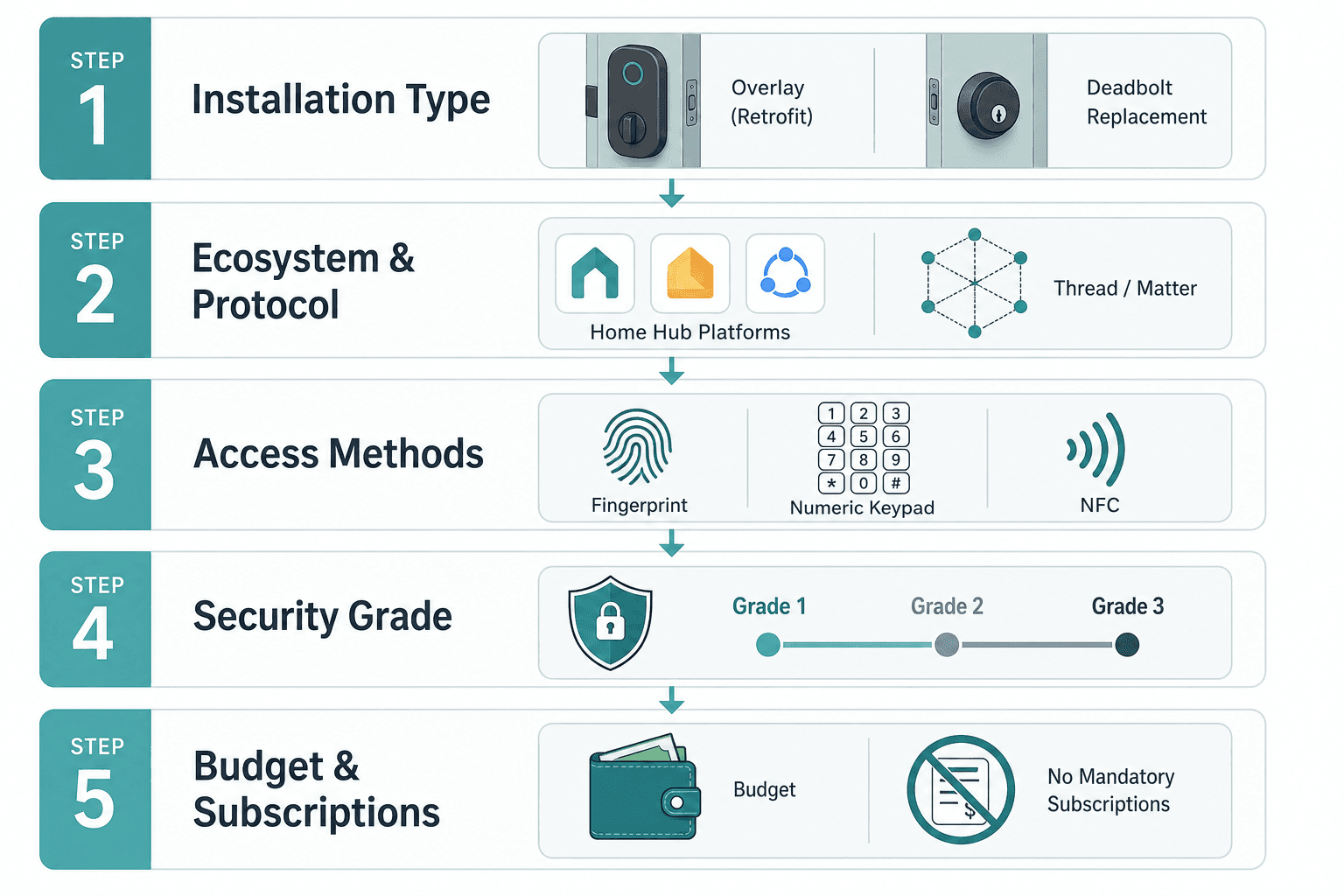
This guide structures the buying decision across five steps before recommending specific models. If you already know your ecosystem and installation situation, you can skip to the Top Picks or Comparison Table sections.
Step 1 — Can You Replace the Hardware? Renter vs. Homeowner Installation
The most important question is not which brand to buy — it is whether you are allowed to replace your deadbolt at all. This single variable determines which half of the market is available to you.
Retrofit locks (also called smart lock adapters or overlays) replace only the interior thumb turn of your existing deadbolt. The exterior hardware, the keyway, and the deadbolt mechanism itself stay in place. August Wi-Fi and Yale Approach are the primary examples. Because you are not replacing the deadbolt, most landlords permit these. Installation takes under fifteen minutes and requires no tools beyond a screwdriver.
Full deadbolt replacements require removing the existing lock cylinder and installing a new deadbolt body. This is the homeowner category. It gives you access to better security grades, more access method options, and the full range of Matter/Aliro-certified locks.
| Installation Type | Who It's For | Deadbolt Changed? | ANSI Grade Possible | Examples |
|---|---|---|---|---|
| Retrofit overlay | Renters, temporary installs | No | Grade 3 only | August Wi-Fi, Yale Approach |
| Full deadbolt replacement | Homeowners, long-term installs | Yes | Grade 1, 2, or 3 | Yale Assure Lock 2, Schlage Arrive, Aqara U100 |
One practical check before buying a retrofit lock: confirm your existing deadbolt is a standard single-cylinder deadbolt with a thumb turn on the interior side. Some older or specialty deadbolts have non-standard thumb turn geometry that retrofit adapters cannot fit.
Step 2 — Choose Your Ecosystem and Protocol Before Choosing a Brand
Buying a lock that lacks native support for your chosen platform is the most common smart lock mistake. A lock that requires a workaround — a third-party bridge, a cloud integration, or a hub you do not own — will be less reliable and harder to automate than one with direct native support.
The protocol a lock uses determines which ecosystems it can join natively, whether it needs a hub, and whether it operates locally or depends on a cloud connection.
| Protocol | Hub Required? | Local or Cloud? | Primary Ecosystems | Notes |
|---|---|---|---|---|
| Wi-Fi | No | Cloud (remote access requires internet) | Alexa, Google Home, SmartThings, HomeKit (via bridge on some models) | Easiest setup; remote access works without a hub but depends on cloud availability |
| Z-Wave | Yes (Z-Wave hub) | Local | SmartThings, Home Assistant, Hubitat | Strong local control; best for Home Assistant users; verify current lock availability before purchasing |
| Zigbee | Yes (Zigbee hub) | Local | SmartThings, Home Assistant, Amazon Echo (built-in Zigbee) | Similar local-control benefits to Z-Wave; fewer lock options than Z-Wave |
| Matter over Thread | Yes (Thread Border Router) | Local-first | Apple Home, Google Home, Alexa, SmartThings | Thread Border Router is built into Apple TV 4K, HomePod mini, Eero routers — check what you already own |
| Matter over Wi-Fi | No | Local-first (with Matter controller) | Apple Home, Google Home, Alexa, SmartThings | Simpler than Thread; still gets Matter's local-first benefits with a compatible controller |
| Aliro | No (uses phone as key) | Local (NFC/BLE/UWB) | Apple (via Wallet), Android (via Wallet-equivalent) | Emerging standard; very few shipping locks as of mid-2026; forward-looking choice |
If your household is Apple-first, prioritize locks with native HomeKit or Apple Home Key support. If you are on Google Home, look for Matter-certified locks with confirmed Google Home compatibility. If you use Home Assistant or SmartThings and want local control without cloud dependency, Z-Wave remains a strong and well-supported choice — but verify that specific lock models are currently available and that Home Assistant integration is confirmed before purchasing.
Step 3 — Access Methods: Keypad, Fingerprint, NFC, Face Recognition, and UWB
Access methods are the day-to-day user experience of a smart lock. Most buyers want at least two: a physical keypad as the baseline, and one additional method for convenience.
- Keypad (PIN code). Standard on virtually every smart lock. Look for a backlit keypad that works in the dark, and confirm whether the lock supports temporary or time-limited codes for guests and service providers.
- Fingerprint. Now available without a subscription on most mid-range and premium locks. Useful for household members who frequently forget codes. Fingerprint readers vary in speed and wet-finger performance — check reviews for real-world reliability rather than spec-sheet claims.
- NFC (Apple Home Key / Aliro). Tap your iPhone or Apple Watch to unlock — no app required, works even in low-power mode. Apple Home Key is available on a small but growing set of certified locks. Aliro extends this concept cross-platform to Android, but Aliro-certified locks are still limited as of mid-2026.
- UWB (Ultra-wideband hands-free unlocking). Requires a UWB-capable smartphone: iPhone 11 or later, or select Android flagship devices. UWB detects your phone's precise location — the lock knows you are at the door, not just nearby. This eliminates the relay-attack risk of Bluetooth geofencing, where an attacker with two radios can extend your phone's Bluetooth range to unlock the door from a distance.
- Face recognition. Available on a small number of premium locks. Convenient but adds cost and raises legitimate privacy questions about on-device vs. cloud face data storage. Verify where face data is processed and stored before purchasing.
- Physical key backup. Most smart locks retain a physical key cylinder. This is a practical requirement, not a security weakness — you need a fallback when the battery dies.
Step 4 — Security Grade: What ANSI/BHMA Ratings Actually Mean
The ANSI/BHMA grading scale rates deadbolt physical security through standardized cycle testing, attack resistance, and finish durability. The scale runs from Grade 1 (highest) to Grade 3 (lowest). Smart lock marketing rarely emphasizes this — but it matters for physical security.
| Grade | Classification | Cycle Rating | Practical Meaning | Typical Use |
|---|---|---|---|---|
| Grade 1 | Commercial / High Security | 250,000 cycles | Highest attack resistance; tested against kick-in, drilling, and picking | Exterior residential doors where physical security is a priority; Schlage Arrive |
| Grade 2 | Heavy Residential | 150,000 cycles | Solid for most residential exterior doors; standard for quality smart deadbolts | Main entry doors in most homes; Yale Assure Lock 2, Aqara U100 |
| Grade 3 | Residential / Light Duty | 75,000 cycles | Minimum acceptable for interior doors; the ceiling for retrofit overlays | Retrofit smart locks (August, Yale Approach); secondary or interior doors |
For most homeowners replacing a front door deadbolt, Grade 2 is the practical floor and Grade 1 is worth the modest price premium if physical security is a concern. Grade 3 is acceptable for retrofit installs where you are adding smart capability to an existing Grade 2 deadbolt — the underlying deadbolt's grade still applies to kick-in resistance.
Step 5 — Budget Tiers and Subscription Transparency
Smart lock prices are volatile. Discounts of 20–50% off MSRP are common, particularly on Amazon. The prices below are approximate MSRP and should be verified before purchase.
| Tier | Approx. Price Range (MSRP) | What You Get | Subscription Situation |
|---|---|---|---|
| Budget | $80–$130 | Keypad, app control, basic auto-lock, Wi-Fi or Bluetooth; may lack fingerprint or Matter | No subscription required for core features on most models in this tier |
| Mid-Range | $130–$220 | Keypad + fingerprint, Matter or HomeKit support, local event log, guest codes, better build quality | No subscription for fingerprint, keypad, logs, and app control; subscriptions optional for video storage if applicable |
| Premium | $220–$350+ | Fingerprint + UWB or face recognition, Aliro/Home Key, Grade 1 security, video integration, premium finish | No subscription for access features; video storage subscription may apply on video lock models |
Top Picks by Buyer Segment
These recommendations follow from the decision framework above. No single lock is best for every buyer — the right model depends on your installation situation, ecosystem, and access method priorities.
Best Overall — Yale Assure Lock 2
The Yale Assure Lock 2 ships in multiple protocol variants — Wi-Fi, Z-Wave, and Matter — making it the most flexible choice for buyers across different ecosystems. The Matter variant works natively with Apple Home, Google Home, Alexa, and SmartThings. It carries ANSI Grade 2, includes a backlit keypad, and requires no subscription for any core feature. The modular design means you can add a module later if your ecosystem needs change. It is not the highest-security option and lacks fingerprint, but for most homeowners who want broad compatibility without complexity, it earns the overall recommendation.
Best Security and Durability — Schlage Encode Plus (or Arrive)
Schlage's residential locks are the benchmark for physical security in the smart lock category. The Encode Plus carries ANSI Grade 1 — the highest available — and includes Apple Home Key support via NFC. Built-in Wi-Fi means no hub required. If your primary concern is that the deadbolt itself is as resistant to physical attack as possible, Schlage is the answer. The Arrive variant adds Matter support. Neither requires a subscription for keypad or app access.
Best for Apple Home Key — Aqara U100 or Lockly Visage
Apple Home Key (NFC tap-to-unlock via iPhone or Apple Watch) is available on a limited set of certified locks. The Aqara U100 supports HomeKit natively, includes a fingerprint reader, and offers Home Key — all without a subscription. The Lockly Visage adds face recognition for households that want it. Both require the Aqara hub for full HomeKit functionality. If you are in an Apple household and want the tap-to-unlock experience, these are the primary options.
Best for Google Home and Matter — Yale Smart Lock with Matter
Google Home's Matter support is solid, and Matter-certified locks work reliably within the Google Home ecosystem for automation and voice control. The Yale Assure Lock 2 (Matter variant) is the practical recommendation here. It pairs directly with a Google Nest Hub or any Thread Border Router you already own, and it works without a hub on the Wi-Fi variant. Confirm your specific Yale model's Matter implementation (Thread vs. Wi-Fi) against your existing setup.
Best Budget No-Subscription — Eufy Security Smart Lock C34 or Wyze Lock Bolt v2
Both the Eufy C34 and Wyze Lock Bolt v2 offer fingerprint access, keypad codes, and app control under $130 MSRP with no subscription required for any of those features. Neither supports Matter or HomeKit natively, which is the tradeoff at this price point. If your ecosystem is Alexa or Google Home via cloud integration, and you want fingerprint access without a monthly fee, these are the practical budget picks.
Best Retrofit for Renters — August Wi-Fi Smart Lock or Yale Approach
Retrofit locks are the only renter-viable category. The August Wi-Fi Smart Lock is the most widely compatible retrofit option — it works with Alexa, Google Home, HomeKit, and SmartThings without a hub, and it fits most standard deadbolts. The Yale Approach is a newer alternative with a cleaner design. Both carry ANSI Grade 3 (they are overlays, not deadbolts) and require no landlord permission in most lease agreements. Confirm your deadbolt's thumb turn geometry before ordering.
Best Aliro and UWB Forward-Looking Pick — Aqara U400
The Aqara U400 is the primary confirmed Aliro-certified lock available as of mid-2026. It supports NFC, Bluetooth LE, and UWB — the full Aliro credential stack — meaning it works as a cross-platform digital key for both iPhone and Android. UWB hands-free unlocking requires an iPhone 11 or later or a compatible Android flagship. If you want a lock that is positioned for the Aliro ecosystem as it matures, the U400 is the forward-looking choice. Understand that Aliro's cross-platform digital key infrastructure is still developing — the full ecosystem benefit will increase as more devices and platforms adopt the standard.
Best Video Lock — Eufy FamiLock S3 Max or Lockin Veno Pro
Video smart locks combine a deadbolt with a 2K or higher doorbell camera and local storage. The Eufy FamiLock S3 Max stores video locally on the lock itself, avoiding a cloud storage subscription. The Lockin Veno Pro is a comparable option with a similar local-storage approach. These make sense for buyers who do not have a separate doorbell camera and want to consolidate two devices. Verify local storage capacity and whether remote viewing requires a subscription before purchasing.
Full Comparison Table: 2026 Smart Lock Shortlist
| Model | Approx. Price (MSRP) | Hub Required? | Subscription Required? | ANSI Grade | Protocols | Compatible Platforms | Installation Type |
|---|---|---|---|---|---|---|---|
| Yale Assure Lock 2 (Matter) | ~$180–$200 | Thread Border Router (optional for Wi-Fi variant) | No | Grade 2 | Matter (Thread or Wi-Fi) | Apple Home, Google Home, Alexa, SmartThings | Full deadbolt replacement |
| Schlage Encode Plus | ~$230–$250 | No (built-in Wi-Fi) | No | Grade 1 | Wi-Fi, Apple Home Key (NFC) | HomeKit, Alexa, Google Home | Full deadbolt replacement |
| Schlage Arrive (Matter) | ~$250–$280 | Thread Border Router | No | Grade 1 | Matter over Thread | Apple Home, Google Home, Alexa, SmartThings | Full deadbolt replacement |
| Aqara U100 | ~$170–$200 | Yes (Aqara Hub M2) | No | Grade 2 | Zigbee, HomeKit, NFC (Home Key) | Apple HomeKit | Full deadbolt replacement |
| Aqara U400 (Aliro) | ~$250–$300 | No | No | Grade 2 | Aliro (NFC, BLE, UWB), Matter | Apple Home, Google Home (via Matter) | Full deadbolt replacement |
| Eufy Security C34 | ~$100–$130 | No (Wi-Fi) | No | Grade 2 | Wi-Fi, Bluetooth | Alexa, Google Home | Full deadbolt replacement |
| Wyze Lock Bolt v2 | ~$80–$110 | No (Bluetooth + gateway) | No | Grade 2 | Bluetooth (gateway for remote access) | Alexa, Google Home | Full deadbolt replacement |
| August Wi-Fi Smart Lock | ~$150–$180 | No (built-in Wi-Fi) | No | Grade 3 (retrofit) | Wi-Fi, Bluetooth | Alexa, Google Home, HomeKit, SmartThings | Retrofit overlay (renter-friendly) |
| Yale Approach | ~$130–$160 | No (Wi-Fi) | No | Grade 3 (retrofit) | Wi-Fi, Bluetooth | Alexa, Google Home | Retrofit overlay (renter-friendly) |
| Eufy FamiLock S3 Max | ~$280–$320 | No (Wi-Fi) | No (local video storage) | Grade 2 | Wi-Fi, Bluetooth | Alexa, Google Home | Full deadbolt replacement (video lock) |
| Lockin Veno Pro | ~$260–$300 | No (Wi-Fi) | No (local video storage) | Grade 2 | Wi-Fi, Bluetooth | Alexa, Google Home | Full deadbolt replacement (video lock) |
Pre-Purchase Checklist
Before ordering, confirm each of the following for your specific situation:
- Door prep compatibility. Confirm your door has a standard 2-1/8" (54mm) cross-bore and a standard 1" backset or 2-3/8" backset. Most US residential doors are standard, but measure before ordering.
- Existing deadbolt type. For retrofit locks: confirm your existing deadbolt has a standard thumb turn on the interior side. For full replacements: confirm door thickness (typically 1-3/8" to 1-3/4") is within the lock's specification.
- Hub ownership. If you are buying a Matter over Thread lock, confirm you have a Thread Border Router (Apple TV 4K, HomePod mini, or compatible Eero router). If you are buying a Z-Wave lock, confirm your hub model and Z-Wave version compatibility.
- UWB device compatibility. If you are selecting a lock based on UWB hands-free unlocking or Aliro, confirm every household member who will use this feature has an iPhone 11 or later, or a confirmed UWB-capable Android device.
- Renter permission. If you rent, confirm with your landlord before installing any smart lock — even a retrofit model. Some leases prohibit modifications to door hardware regardless of reversibility.
- Battery backup plan. Confirm the lock's battery type (most use AA or AAA batteries), check the manufacturer's stated battery life, and verify whether the lock has a 9V terminal for emergency external power if the battery dies completely.
- Guest access method. Confirm the lock supports time-limited or temporary PIN codes if you need to provide access to guests, cleaners, or service providers. Verify whether this requires an app or can be done locally on the keypad.
- Platform native support. Check the lock manufacturer's compatibility page — not just the product description — to confirm native support for your specific platform and app version.
Frequently Asked Questions
How secure are smart locks compared to traditional deadbolts?
A smart lock's physical security is determined by its ANSI/BHMA grade, not by its smart features. A Grade 1 smart deadbolt (Schlage Encode Plus, Schlage Arrive) is physically more secure than most traditional Grade 2 deadbolts. The smart functionality adds a different attack surface — the software and network — but does not reduce the physical security of a well-graded deadbolt. The practical risk for most homeowners is not sophisticated network attacks; it is choosing a lock with a lower physical security grade than their existing deadbolt.
Do I need a hub?
It depends on the protocol. Wi-Fi locks connect directly to your router — no hub required. Matter over Thread locks require a Thread Border Router, which may already be in your home (Apple TV 4K, HomePod mini, or Eero routers include one). Z-Wave and Zigbee locks require a compatible hub. Retrofit locks like August Wi-Fi connect directly via Wi-Fi. Before buying, confirm whether you already own the required hub or Border Router.
What happens when the battery dies?
Most smart locks provide low-battery warnings via the app and the lock itself (flashing LED, audible beep) well before the battery is depleted. If the battery does die completely, most locks include a physical key cylinder as a backup. Many also have a 9V terminal on the exterior — touching a 9V battery to the terminal provides enough power to enter a PIN code and unlock the door. Check your specific lock's emergency power method before installation.
Can smart locks be hacked?
Like any networked device, smart locks have a software attack surface that traditional locks do not. Reputable manufacturers use encrypted communications and receive regular firmware updates. The practical risk for most homeowners is not targeted network attacks — it is weak PIN codes, shared credentials, or outdated firmware. Keep the lock's firmware updated, use strong unique PIN codes, and revoke guest codes when they are no longer needed. Locks with local-first operation (Matter over Thread, Z-Wave) reduce cloud dependency and the attack surface that comes with it.
How do I manage guest access?
Most smart locks support temporary or time-limited PIN codes — you create a code that works only during a specified window (e.g., a cleaner's weekly visit, a guest's stay). This is managed through the lock's app. Some locks allow you to set codes directly on the keypad without an app. Confirm the specific guest access method before purchasing, and verify whether you can revoke codes remotely if needed. Locks with local-first operation can manage guest codes even without an internet connection.
Reader Feedback
Share your purchase experience, flag outdated picks, or ask clarifying questions about the checklist items.
Comments
Join the discussion with an anonymous comment.