
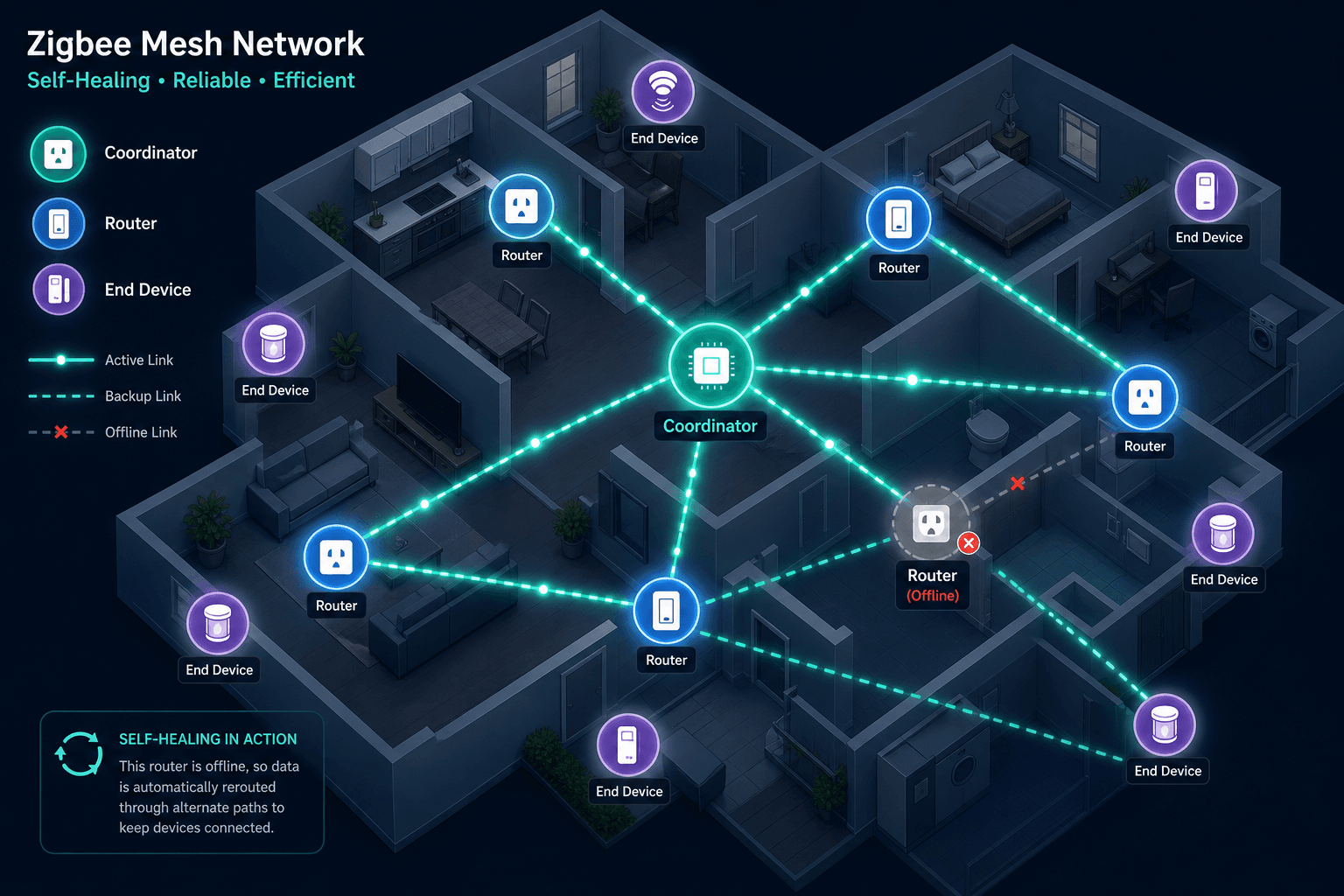
What Is Zigbee? A Plain-English Definition
Zigbee is a wireless communication protocol designed specifically for smart home devices. Its job is to let sensors, lights, locks, plugs, and other devices talk to each other and to a central hub — reliably, cheaply, and without draining batteries.
The protocol was built around a simple insight: most smart home devices don't need to stream video or transfer large files. They need to send small messages — "motion detected," "door opened," "temperature is 68°F" — and they need to do it thousands of times a year without running out of power. Wi-Fi is overkill for that job. Zigbee was engineered to do it better.
In 2026, Zigbee remains one of the most widely deployed smart home protocols in the world, with over 3,500 certified products and more than one billion devices already installed globally. The release of Zigbee 4.0 in November 2025 and the introduction of the new Suzi sub-GHz variant have strengthened its position further. Zigbee is not a legacy technology being displaced by Matter — it is a proven, purpose-built protocol that solves a different problem than Matter does, and understanding that distinction is the key to making smart hardware decisions in 2026.
How Zigbee Works: Mesh Topology and the Three Device Roles
Zigbee operates on the 2.4 GHz frequency band using the IEEE 802.15.4 radio standard. Rather than every device connecting directly to a central hub the way Wi-Fi devices do, Zigbee builds a mesh network where devices relay messages for each other. A signal from a door sensor at the far end of your house can hop through a smart plug in the hallway and a light switch in the living room before reaching the hub — automatically, without any configuration.
This mesh topology is what makes Zigbee both resilient and scalable. As you add more mains-powered devices, the network gains more routing paths. If one device goes offline, the mesh reroutes traffic around it. The network heals itself.
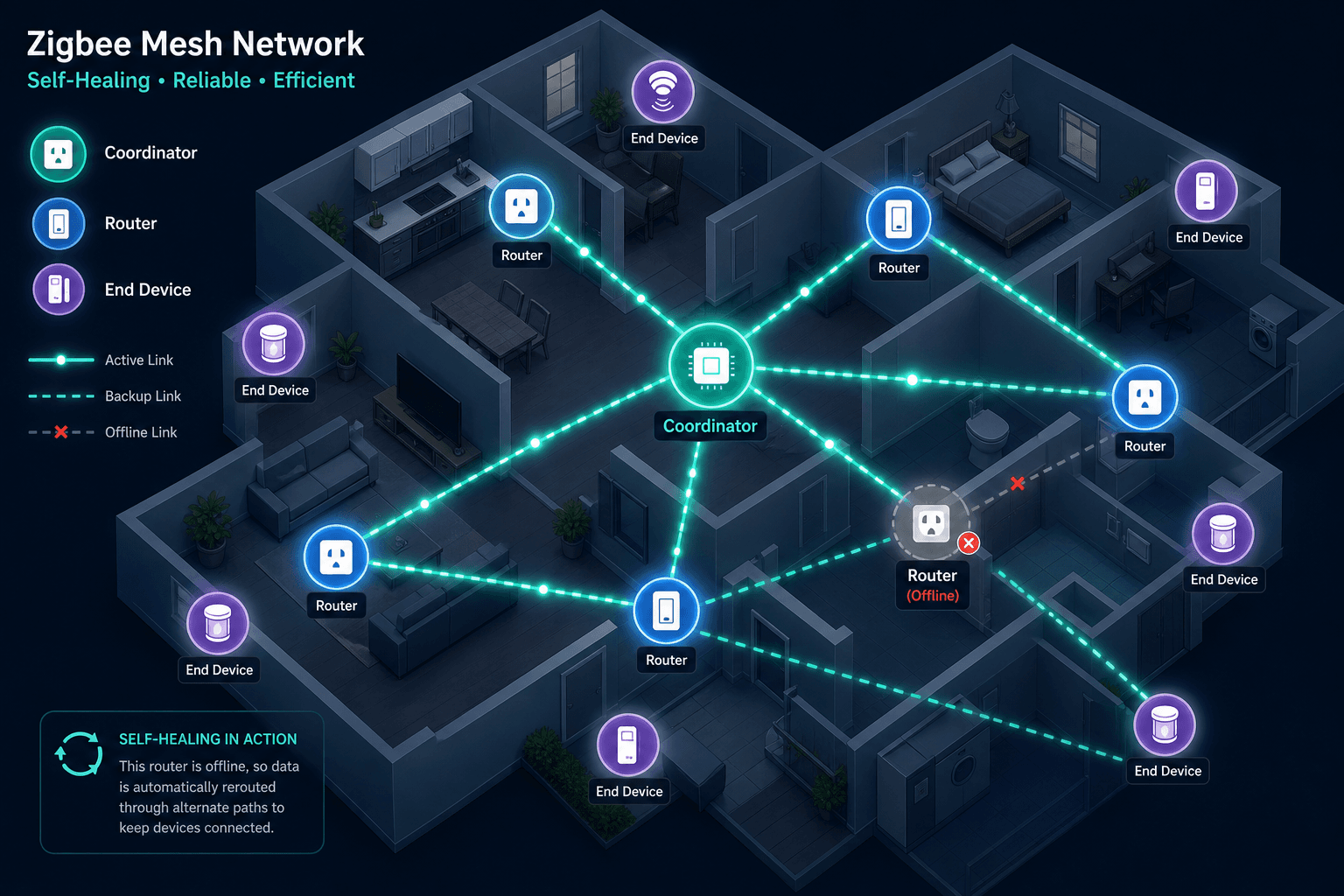
Every Zigbee network is made up of three distinct device roles, and understanding them matters for both setup and troubleshooting.
- Coordinator — There is exactly one coordinator per Zigbee network. It establishes the network, manages security keys, and controls which devices are allowed to join. The coordinator must be mains-powered and always on. This is typically your hub or smart speaker. If it goes offline, the entire Zigbee network stops functioning.
- Router — Routers are mains-powered devices — smart plugs, in-wall switches, smart bulbs — that stay on continuously and relay messages between other devices. They form the backbone of the mesh. The more routers you have, the more routing paths exist and the more resilient the network becomes.
- End Device — End devices are typically battery-powered sensors: door contacts, motion detectors, temperature sensors, buttons. They can only send and receive data — they cannot relay messages for other devices. To conserve power, they spend most of their time in a deep sleep state, waking only to transmit or receive.
All Zigbee communication is encrypted using AES-128 encryption, the same standard used in banking and government systems. Devices authenticate with the network through the coordinator's Trust Center before they can exchange any data.
| Device Role | Power Source | Relays Messages? | Typical Examples |
|---|---|---|---|
| Coordinator | Mains (required) | Yes — manages the network | Hub, smart speaker with Zigbee |
| Router | Mains (required) | Yes — extends the mesh | Smart plugs, in-wall switches, smart bulbs |
| End Device | Battery (typical) | No — sends/receives only | Door sensors, motion detectors, buttons |
Core Strengths: Why Zigbee Competes on Battery Life, Cost, and Scale
Zigbee's design priorities — low power consumption, low cost, and reliable mesh operation — give it a set of practical advantages that no other mainstream smart home protocol fully matches in 2026.
- Battery life that lasts years, not months. Because end devices sleep almost continuously, a typical Zigbee door sensor runs for two to three years on a single battery. Some low-traffic devices can reach up to ten years. Wi-Fi devices, which must maintain a constant radio connection, cannot come close to this.
- Over 3,500 certified products. The Zigbee device catalog is the largest of any dedicated smart home mesh protocol — covering sensors, lights, locks, plugs, thermostats, blinds, and dozens of niche device types.
- Low device cost. Because the Zigbee radio is simple and well-established, manufacturers can build Zigbee into devices affordably. Many Zigbee sensors cost under $15.
- No subscription fees. Zigbee is built into the devices. There is no cloud service to pay for, no monthly plan required for local operation.
- Self-healing mesh that grows stronger over time. Every mains-powered Zigbee device you add becomes a router, creating new routing paths and making the network more resilient. A home with ten smart plugs has a fundamentally more reliable Zigbee network than one with two.
- Theoretical scale up to 65,000 devices per network. In practice, most consumer hubs handle 50 to 100 devices comfortably, but the protocol architecture itself is not the constraint.
| Protocol | Typical Battery Life (Door Sensor) | Device Catalog Size | Requires Hub? | Subscription Fees? |
|---|---|---|---|---|
| Zigbee | 2–3 years (up to 10 years some devices) | 3,500+ certified products | Yes — coordinator required | None |
| Wi-Fi | Weeks to months (always-on radio) | Very large (general purpose) | No (uses home router) | Varies by platform |
| Matter over Thread | ~2 years (same hardware as Zigbee) | ~750–1,100 certified products (early 2026) | Thread Border Router required | None |
| Z-Wave | 1–2 years typical | ~3,000+ products | Yes — controller required | None |
Zigbee 4.0: What Changed in November 2025
The Connectivity Standards Alliance (CSA) released the Zigbee 4.0 specification on November 18, 2025. It is the most significant update to the standard in years, addressing three areas that have been consistent pain points for smart home builders: security, commissioning complexity, and battery efficiency.
The security improvements are substantial. Dynamic Link Keys (DLK) replace the static keys used in earlier versions with secure key negotiation during device onboarding — protecting the network from passive attacks and enabling key rotation after firmware upgrades. A new Device Interview process allows the Trust Center to examine a device's capabilities before granting network access, making it significantly harder for a rogue device to join. Restricted Mode ensures only the Trust Center can change a device's operational state. APS frame-counter synchronization prevents replay attacks. Trust Center Swap-Out allows the primary controller to be replaced without forcing every connected device to be re-paired — a practical improvement for anyone who has ever had to rebuild a network after a hub failure.
On the commissioning side, Zigbee 4.0 introduces two features that reduce setup friction significantly. Zigbee Direct allows devices to be onboarded via Bluetooth Low Energy, meaning you can add a device to your Zigbee network without a hub present during the pairing step. Batch Commissioning enables multiple devices to be added to the network simultaneously rather than one at a time — useful when setting up a large installation.
For battery life, the key addition is Coordinated Sample Listening (CSL). This allows sleepy end devices — motion sensors, door contacts, temperature probes — to sleep for longer intervals without losing synchronization reliability. The result is further extension of battery life beyond what Zigbee 3.0 already achieved.
- Dynamic Link Keys — secure key negotiation during onboarding, replaces static keys
- Device Interview — Trust Center vets devices before granting network access
- Restricted Mode — only Trust Center can alter a device's operational state
- Trust Center Swap-Out — replace the hub without re-pairing all devices
- APS frame-counter synchronization — prevents replay attacks
- Zigbee Direct — BLE-based onboarding without a hub present
- Batch Commissioning — add multiple devices simultaneously
- CSL (Coordinated Sample Listening) — sleepy end devices sleep longer, extending battery life
Suzi: The New Sub-GHz Zigbee Variant for Long-Range Coverage
Alongside Zigbee 4.0, the CSA introduced Suzi — a new sub-GHz brand built on the proven Zigbee network layer. Where standard Zigbee operates at 2.4 GHz, Suzi uses 800 MHz in Europe and 900 MHz in North America. Lower frequencies travel farther and penetrate walls and building materials more effectively.
The target use cases are situations where 2.4 GHz Zigbee struggles: large homes, outbuildings, warehouses, outdoor spaces, and environments with thick concrete or masonry walls. Suzi brings Z-Wave Long Range-level coverage to the Zigbee ecosystem while retaining the multi-vendor interoperability and low-power mesh architecture that Zigbee is known for.
Zigbee vs. Matter and Thread in 2026: Different Layers, Not Direct Rivals
The most common misconception about Zigbee in 2026 is that Matter replaces it. It does not. Matter and Zigbee solve fundamentally different problems at different layers of the protocol stack, and understanding this distinction is more useful than any side-by-side feature comparison.
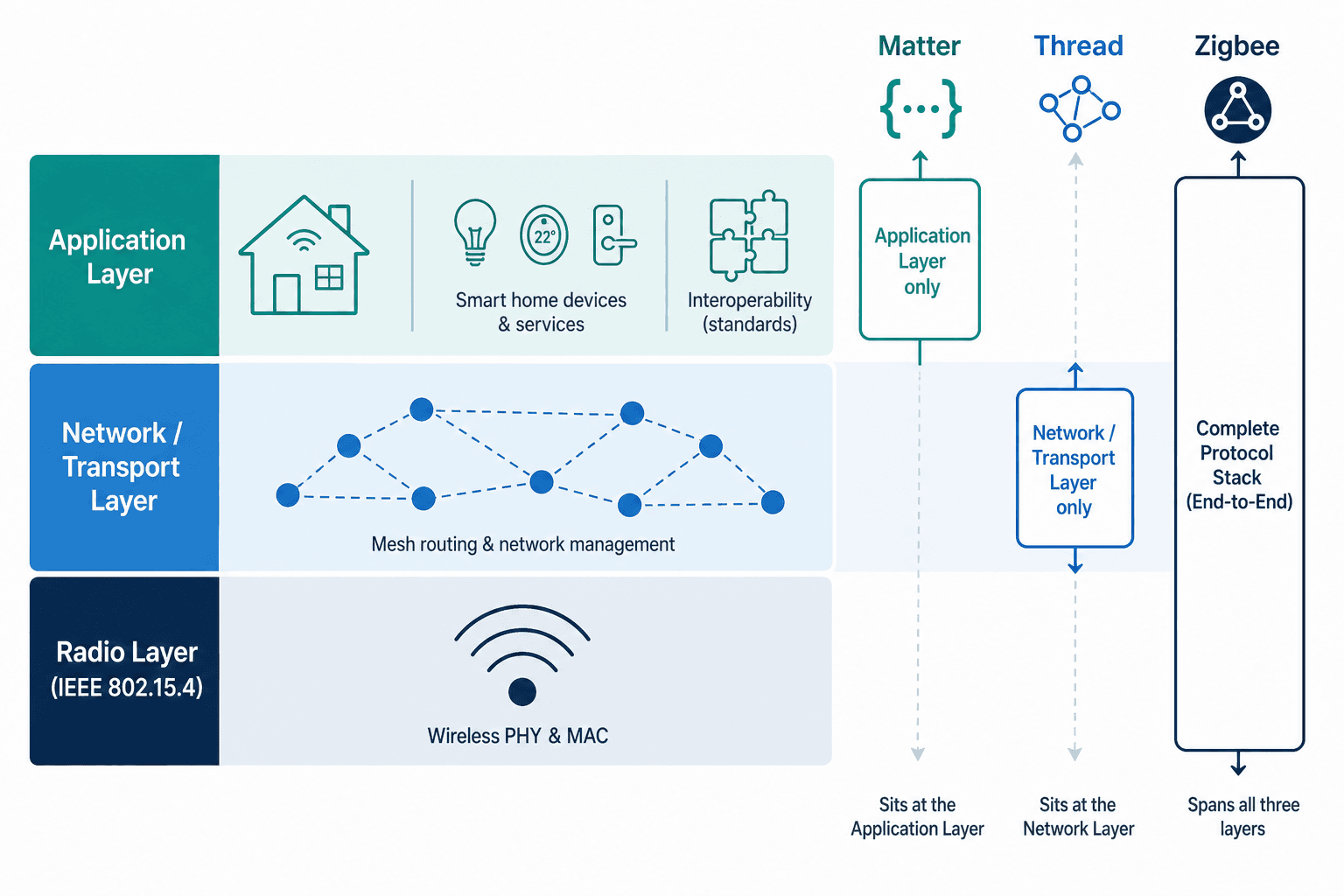
- Matter is an application-layer compatibility standard. It defines how devices pair, identify themselves, and communicate across different ecosystems — Apple Home, Google Home, Amazon Alexa, SmartThings — from a single device. It does not define the radio technology.
- Thread is a mesh network transport layer. It uses IPv6 over the IEEE 802.15.4 radio — the same radio hardware Zigbee uses — but communicates in a completely different way. Thread and Zigbee are not interchangeable; they are different network stacks that happen to share the same physical radio.
- Zigbee is a complete protocol stack covering the radio, network, and application layers. It handles everything from how the radio transmits to how a light switch command is formatted.
In practical terms, this means a Zigbee device cannot natively become a Matter device — you need a Matter bridge or a multi-protocol hub to expose Zigbee devices to Matter controllers. But it also means the two can coexist in the same home without one displacing the other.
| Factor | Zigbee Advantage | Matter Advantage |
|---|---|---|
| Battery life | ~3 years typical (Zigbee FP300) — 20+ years of sleep-cycle optimization, no IPv6 overhead | ~2 years on same hardware (Thread) — IPv6 stack adds overhead |
| Device catalog | 3,500+ certified products — covers niche sensors, older device types | ~750–1,100 certified products as of early 2026 — growing but not yet comparable |
| Group lighting sync | Simultaneous — no "popcorn effect" in native Zigbee groups | Sequential firing in some implementations — visible delay across bulbs |
| Cross-ecosystem pairing | Requires a bridge or hub per ecosystem | Single device pairs to Apple Home, Google Home, Alexa, SmartThings simultaneously |
| Setup simplicity | Requires hub configuration, channel selection | QR-code pairing, simpler onboarding in supported apps |
| IP addressing | Not IP-native — operates at a lower layer | Native IPv6 — integrates with IP networks directly |
Hub and Coordinator Options: What You Need to Run Zigbee in 2026
Every Zigbee network requires exactly one coordinator. In a consumer smart home, the coordinator is almost always built into a hub or smart speaker. The right choice depends on which ecosystem you use, whether you need local processing, and whether you want to run Matter and Thread alongside Zigbee.
| Hub | Approx. Price (Feb 2026) | Zigbee | Matter | Thread Border Router | Z-Wave | Platform | Notes |
|---|---|---|---|---|---|---|---|
| Amazon Echo Dot Max | ~$80–$100 | Yes | Yes | Yes | No | Alexa | Built-in coordinator; good entry point for Alexa households |
| Amazon Echo Hub | ~$150–$180 | Yes | Yes | Yes | No | Alexa | Adds 8-inch touchscreen; same protocol coverage as Echo Dot Max |
| Philips Hue Bridge | ~$35–$65 | Hue only | No | No | No | Hue app | Pairs Hue ecosystem devices only — not a general Zigbee coordinator |
| Philips Hue Bridge Pro | ~$99 | Hue only | No | No | No | Hue app | Adds Wi-Fi, supports 150+ lights; still Hue-ecosystem-only |
| Aeotec Smart Home Hub 2/V4 | ~$130 | Yes | Yes | Yes | No | SmartThings | Drops Z-Wave vs. older Aeotec hubs; solid SmartThings option |
| Hubitat C-8 Pro | ~$200 | Yes | No (bridge) | No | Yes | Hubitat | 100% local processing; external antennas for range; no Thread Border Router |
| Home Assistant + USB dongle | Dongle ~$20–$40 | Yes | Yes (with add-on) | Yes (with add-on) | Yes (separate dongle) | Home Assistant | Maximum flexibility; requires self-hosting; best for advanced users |
A few points worth noting about this list. The Philips Hue Bridge is not a general-purpose Zigbee coordinator — it only pairs Hue-branded devices and will not add third-party Zigbee sensors or plugs to your network. If you want to run a broader Zigbee ecosystem, you need one of the other options.
Most consumer hubs handle 50 to 100 Zigbee devices comfortably. Beyond that range, real-world performance depends heavily on mesh health — specifically how many mains-powered router devices are distributed through the space and how well they cover the areas where end devices are located.
Practical Tips: Interference, Mesh Density, and Coordinator Resilience
Understanding how Zigbee works technically translates directly into better setup decisions. Three issues cause the majority of Zigbee reliability problems in real homes.
Wi-Fi Channel Interference
Both Zigbee and Wi-Fi operate at 2.4 GHz, and their channels overlap. Wi-Fi channel 1 overlaps with Zigbee channels 11–13; Wi-Fi channel 6 with channels 14–20; Wi-Fi channel 11 with channels 21–24. If your Zigbee network is assigned to one of these channels and your Wi-Fi router is broadcasting on the overlapping Wi-Fi channel, you will see degraded Zigbee performance — dropped messages, slow response times, and devices falling offline.
The fix is straightforward: configure your Zigbee coordinator to use channel 25 or 26. These channels sit outside the overlap zone for all three common Wi-Fi channels. Most hubs allow you to set the Zigbee channel in their settings menu.
Building Mesh Density Before Adding End Devices
A common setup mistake is adding battery-powered sensors before establishing a solid mesh of mains-powered router devices. If your only Zigbee router is the hub itself, every end device in your home must communicate directly with the hub. Range is limited, walls attenuate the signal, and reliability suffers.
The better approach is to add a few smart plugs or in-wall switches first — distributed across the spaces where you plan to place sensors — and let the mesh establish itself before adding battery-powered end devices. Each mains-powered device you add creates a new routing path and extends the effective range of the network.
The Coordinator Is a Single Point of Failure
Unlike a Wi-Fi access point, which can be swapped and have devices reconnect automatically, the Zigbee coordinator is the single point of failure for the entire network. If it goes offline — power outage, hardware failure, software crash — every Zigbee device on the network stops responding until the coordinator comes back online.
More critically: if the coordinator fails permanently and you replace it with a new hub, you cannot simply restore the network. You must re-pair every device from scratch. This is a meaningful operational risk for large Zigbee deployments and is worth accounting for when choosing your hub — particularly if you are considering a platform that might be discontinued or a hub that might not be available for replacement in a few years.
Who Should Use Zigbee in 2026? A Decision Summary
Zigbee is the right choice for most buyers in 2026 who are building a sensor-heavy smart home, working within an established ecosystem like Home Assistant, SmartThings, or Philips Hue, or prioritizing battery life and device cost over cross-ecosystem flexibility.
- Choose Zigbee if: you are building a sensor network (door contacts, motion detectors, temperature sensors), you want the widest device selection, you are already invested in a Zigbee-compatible hub, you want local control without cloud dependency, or you are working with a tight budget on individual devices.
- Choose Matter if: you are starting fresh with no existing Zigbee devices, cross-ecosystem interoperability from day one is your top priority (you want the same device to work natively with Apple Home, Google Home, and Alexa simultaneously), or you are primarily buying lights and plugs rather than sensors.
- Consider a hybrid setup if: you already have a Zigbee device base and want to add new Matter-native devices going forward. Use a multi-protocol hub (such as the Amazon Echo Hub, Aeotec Smart Home Hub 2, or Home Assistant) that handles both protocols from a single coordinator. Accept that both meshes will be thinner than a consolidated single-protocol network — this is a real trade-off, not just a theoretical one.
On the question of whether to wait for Zigbee 4.0 hardware: do not wait. Current Zigbee 3.0 devices are fully compatible with Zigbee 4.0 networks and will continue to be supported. The new security and commissioning features in Zigbee 4.0 are meaningful, but they do not make existing devices obsolete. Buy the Zigbee 3.0 devices available today and benefit from Zigbee 4.0 improvements as hardware rolls out over the next 12 to 18 months.
Updates & Corrections
Protocol specifications and platform features change rapidly — especially with Matter version evolution. Report version changes, certification count updates, or platform policy changes that have occurred since the last editorial review.
Comments
Join the discussion with an anonymous comment.