How to Fix a Verizon Fios Internet Outage at Home
Learn how to diagnose a Verizon Fios fiber internet outage at home by reading your ONT and router status lights, then follow the right fix for each symptom—whether it's a fiber cut, router fault, or area outage.
- Symptom
- Fios internet outage
- Affected ecosystem
- All
- Status
- Confirmed
- Difficulty
- Easy
- Last verified
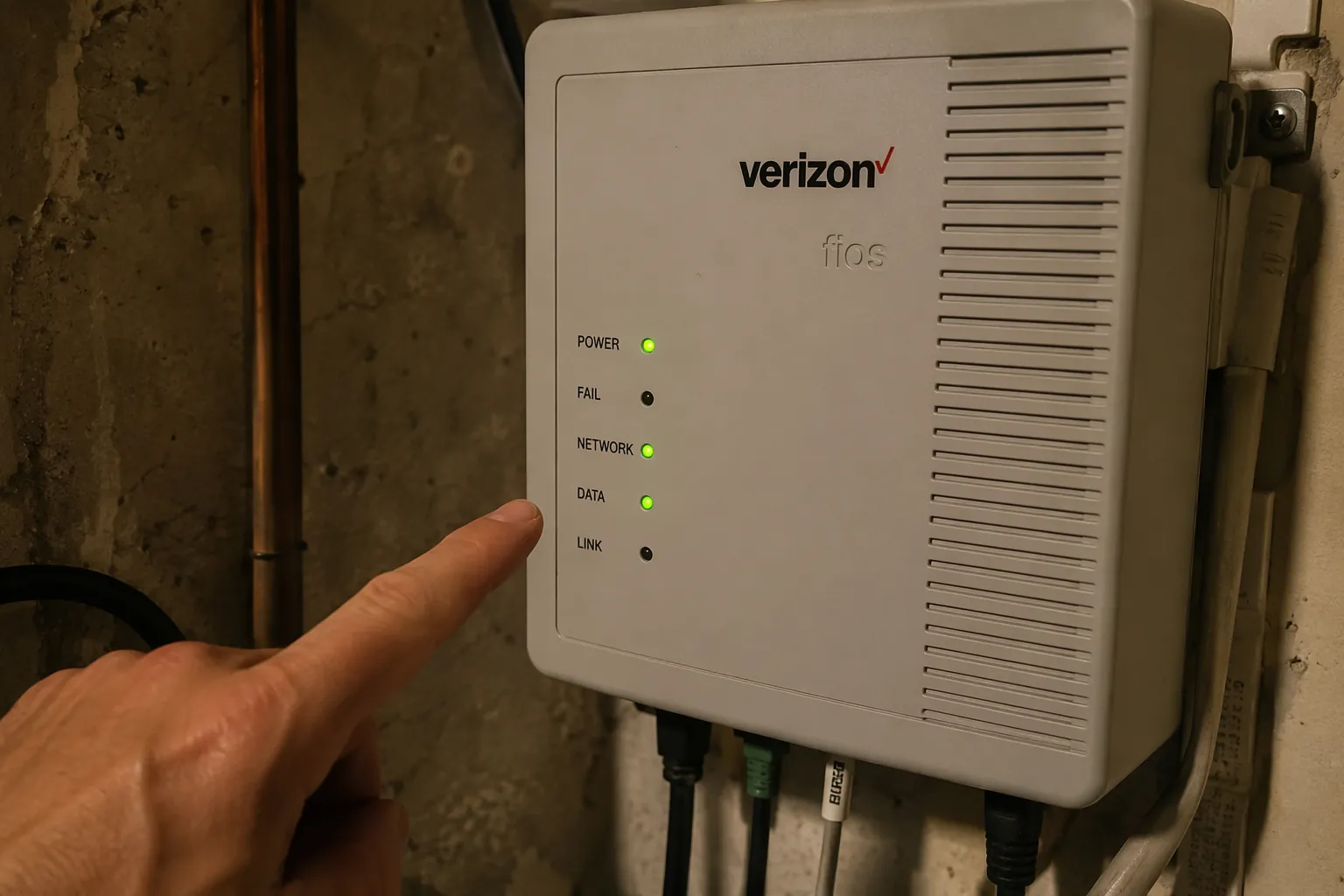
If your Verizon Fios internet is out right now, do not start by rebooting every box in the house. First split the problem: one device, the whole home, the ONT, or the router. The ONT is the fiber handoff box, usually in a basement, garage, utility closet, or outside enclosure. Its lights tell you whether Verizon’s fiber signal is reaching the house. The router’s LED tells you what is happening after that.
Use this fast path before unplugging anything:
- Test more than one device. If only one phone, laptop, TV, or console is offline, this is not a home Fios outage.
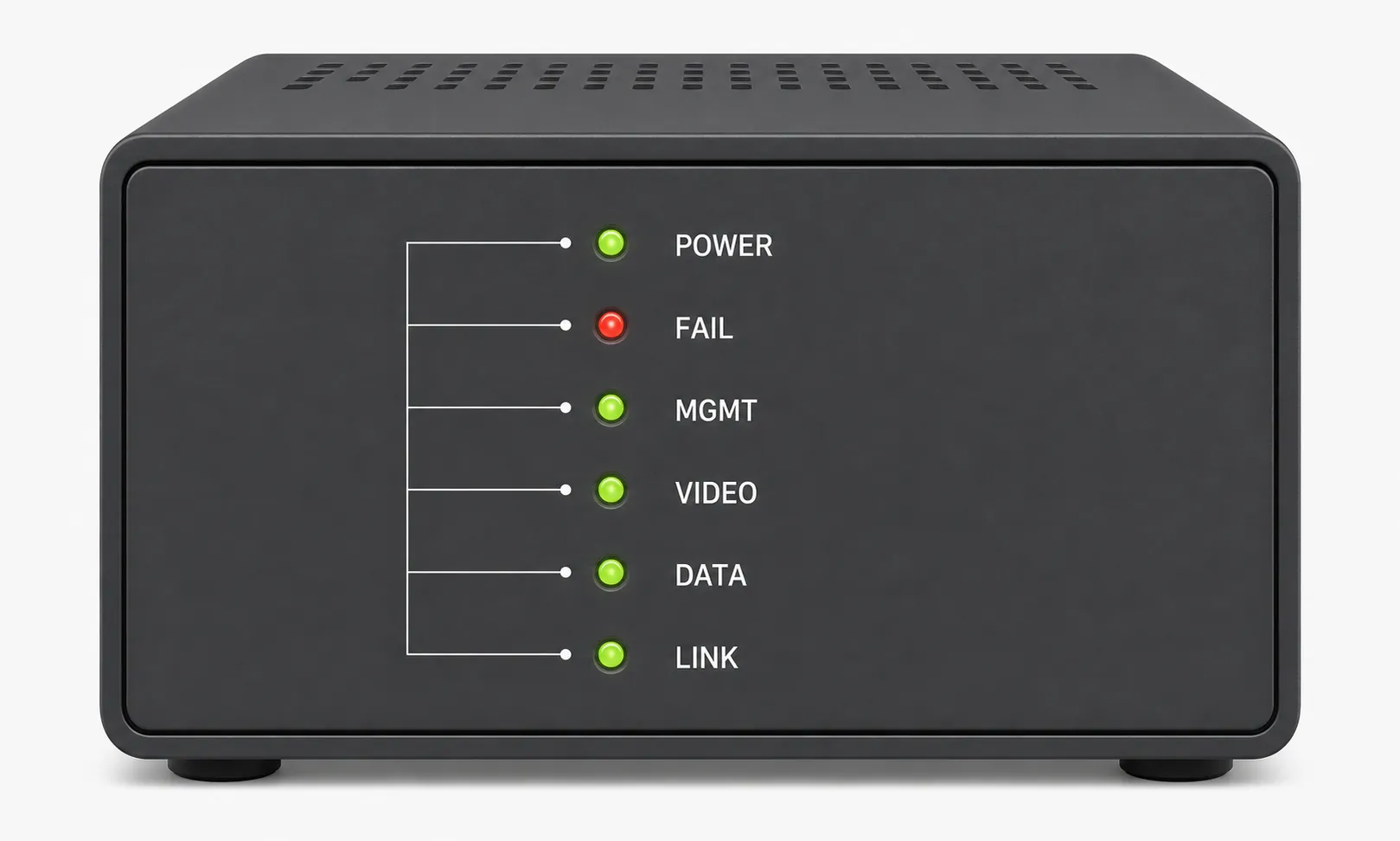
- Look at the ONT lights: POWER, FAIL, NETWORK or DATA, LINK, and BATTERY if present.
- Look at the Verizon router LED. Solid white usually means the router thinks it is operating normally; amber or red points toward a WAN or router-side fault.
- If the ONT shows a red FAIL light, stop treating this like a Wi-Fi issue. Try one proper ONT power cycle, then plan on Verizon escalation.
- If the ONT looks normal but the router does not, work the router/WAN path before booking a technician.
- If neighbors or Verizon’s outage page show an area outage, stop burning time on home resets.
First: Is It One Device or the Whole Home?
Check two different kinds of devices before touching the ONT. A phone on Wi-Fi and a wired desktop are a better pair than two phones sitting on the same couch. If one device fails while the others work, troubleshoot that device, its Wi-Fi connection, VPN, browser, or DNS settings. A single misbehaving laptop is not evidence of a Verizon fiber outage.
If every device is down, include at least one wired test if you can. Plug a computer into the router with Ethernet, turn off Wi-Fi on that computer, and try a plain website. If wired works but Wi-Fi does not, the fiber service is alive and the fight has moved to Wi-Fi coverage, congestion, or the router’s wireless radios. If the home feels “down” mostly because dozens of devices are slow or dropping, the next useful read is Connected Devices Slowing Wi-Fi? Here's the Fix.
If wired and wireless devices are both offline, go to the ONT. The router may be the visible box in the living room, but the ONT is the line between “problem inside the home network” and “fiber signal or Verizon-side problem.”
Read the ONT Before You Reset It
A Fios ONT can have slightly different labels depending on model, but the decision points are consistent enough for home triage. Verizon identifies the ONT as the equipment that connects the fiber service to the home, and third-party ONT light references align with Verizon community reports on the key failure pattern: POWER should be on, and a red FAIL light means the fiber signal is absent or too weak for normal service.[1][2]
| What you see on the ONT | What it usually means | What to do next |
|---|---|---|
| POWER solid green, no FAIL light, DATA or NETWORK active | ONT has power and no obvious fiber failure | Move to router LED and WAN troubleshooting |
| FAIL solid red | Fiber signal is missing, too weak, or not being accepted by the ONT | Do one full ONT power cycle; if FAIL returns, contact Verizon for repair |
| POWER off | ONT is not getting usable power | Check outlet, power supply, breaker, and battery backup wiring |
| BATTERY light or battery alarm after a power event | Backup battery or power unit may be involved | Power-cycle the ONT correctly, including battery leads if present |
| LINK or DATA off while router is connected | ONT may not see the Ethernet connection to the router | Check Ethernet cable, router WAN port, and router power |
The red FAIL light is the one to respect. It is not a “try changing the Wi-Fi password” situation. In Verizon Community discussions, users with a red FAIL light are pointed toward a line or ONT-side signal problem, not a normal local Wi-Fi fix.[2] You can still perform one clean ONT reset because electronics do occasionally wedge themselves into a bad state. But if FAIL comes back, the useful work from home is mostly over.
How to Power-Cycle a Verizon Fios ONT Properly
A proper ONT reset is different from yanking the router plug. Many Fios installs have a battery backup unit or power reserve wiring. If you unplug only the AC cord, the ONT may stay partially powered and never actually restart.
- Tell anyone working, gaming, streaming, or using smart home gear that the fiber box is being reset.
- Find the ONT power supply or battery backup unit. It may be near the ONT, not inside the router.
- Unplug the ONT AC power from the wall or power supply.
- If a battery backup is connected, disconnect the battery leads or battery connector as well.
- Wait at least 30 to 60 seconds.
- Reconnect the battery leads first if you disconnected them, then restore AC power.
- Give the ONT and router several minutes to settle before judging the result.
If POWER comes back green, FAIL stays off, and DATA or NETWORK activity returns, move to the router and test service. If FAIL returns red after a clean power cycle, take a photo of the ONT lights and contact Verizon. The photo saves you from having to describe “the red one near the top” while everyone in the house asks when the TV is coming back.
If the ONT Looks Normal, Work the Router Side
An all-green ONT with no red FAIL light usually means the fiber signal has reached the home. At that point, the question becomes whether the router has a usable WAN connection and is handing out working network settings to your devices.
| Router behavior | Likely bucket | Next action |
|---|---|---|
| Solid white LED | Router believes it is operating normally | Test wired Ethernet, then Wi-Fi; check DNS or device-side issues |
| Amber or red LED | Router does not have a usable WAN connection or is in a fault state | Power-cycle router, then check WAN Ethernet from ONT |
| Blinking during startup | Router is booting, updating, pairing, or reconnecting depending on model | Wait a few minutes before resetting again |
| Wi-Fi name appears, devices connect, but pages do not load | Local Wi-Fi may be up while internet routing is broken | Release/renew WAN lease, try DNS change, then test IPv6 toggle |
Start simple on the router side. Power the router off for 30 seconds and turn it back on. Check that the Ethernet cable from the ONT is firmly seated in the router’s WAN port, not a LAN port. If the ONT has a LINK or DATA light that changes when the router is unplugged and replugged, that tells you the physical Ethernet handoff is at least being detected.
When Wi-Fi connects but the internet does not work, Verizon Community troubleshooting has included WAN lease renewal, DNS changes, and IPv6 toggling as router-side steps for this symptom.[3] These are not magic buttons; they are targeted attempts to fix a router that has Wi-Fi clients attached but is failing at routing, name resolution, or WAN negotiation.
Router Steps Worth Trying Before a Factory Reset
- Reboot only the router first if the ONT lights are normal. Do not keep resetting the ONT if it already looks healthy.
- Renew the router’s WAN DHCP lease from the router admin interface if you can still reach it.
- Try a known public DNS resolver on the router or on one test device, then test websites by name and by IP if you know how.
- Temporarily toggle IPv6 off or on if your router interface exposes the setting and the symptom is “connected, no internet.”
- Test one wired device again after each major change so you are not confusing Wi-Fi instability with internet restoration.
Do not factory-reset the router casually during an outage window. A reset can wipe Wi-Fi names, custom DNS, port forwards, reserved IPs, parental controls, and smart home assumptions. It is reasonable only when the evidence points at the router and you are ready to rebuild or restore the configuration.
The CR1000A/CR1000B Two-Hour Drop Pattern
There is a narrow factory-reset scenario worth calling out because it is easy to misdiagnose as an area outage. In a January 2025 Verizon Community thread, users reported recurring disconnections around a roughly two-hour pattern, with logs showing entries such as “Reboot by Power Cycle/Software Fault induced.” A factory reset resolved the pattern in that thread.[4]
That is useful, limited evidence. It does not prove every CR1000A or CR1000B drop is the same bug, and it does not justify resetting a router just because Netflix buffered once. The pattern matters when the ONT stays healthy, the router reboots or drops predictably, and the logs match the reported fault language.
Check for an Area Outage Before You Keep Crawling Around
A confirmed neighborhood or regional Fios outage changes the job. You can tidy your own cables later; you cannot fix a damaged feeder fiber from the utility closet.
Use Verizon’s residential service outage page first because it is the account-connected source for home service status and credit rules.[5] Downdetector is useful as a second signal because it shows user reports and timing patterns, but it does not prove that your specific Fios circuit is down.[6]
- Check Verizon’s outage page from a phone on cellular data, not your dead home Wi-Fi.
- Ask one nearby Fios neighbor if their wired internet is also down.
- Look for construction, storm damage, or utility work only as context, not as proof.
- Avoid mixing Verizon Wireless reports with Fios fiber reports unless the source clearly says home internet is affected.
That last point matters. Verizon’s January 14, 2026 nationwide outage was reported as a mobile-network incident tied to a software issue, not a Fios fiber failure in the home.[7][8][9][10] Seeing “Verizon outage” trend online does not automatically explain a red FAIL light on your ONT, and a mobile outage map can send Fios troubleshooting in the wrong direction.
Fiber cuts do happen, and when they do, the fix is outside the customer’s hands. Verizon Community reports from July 2026 described a fiber cut on Great Neck Road in Virginia Beach affecting multiple ZIP codes, with resolution taking more than 12 hours.[11] That kind of event is the reason an area-outage branch belongs early, not after an hour of router rituals.
When to Stop Troubleshooting and Call Verizon
Call or schedule Verizon support when the evidence has crossed out the things you can safely fix. The cleanest escalation cases are visible, repeatable, and short to explain.
- Red FAIL light returns after a full ONT power cycle.
- ONT POWER will not stay on after checking outlet, breaker, and power supply.
- ONT lights indicate no fiber or no network handoff, and neighbors report the same outage.
- Router WAN remains down with a normal ONT, known-good Ethernet cable, and a direct wired test.
- Service drops repeatedly on a pattern and router logs show fault or reboot entries you can quote.
Before contacting support, write down the ONT light state, router LED color, whether wired Ethernet works, the outage start time, and whether neighbors are affected. If you have a red FAIL light or power fault, take a photo. Support calls get much shorter when the first sentence is “The ONT has POWER green and FAIL red after a full AC and battery disconnect reset,” not “the internet is broken.”
After Service Comes Back
Once Fios returns, resist the urge to keep changing settings. Confirm the router LED is normal, test one wired device, test one phone on Wi-Fi, then check the devices the household actually depends on: work laptop, streaming box, thermostat, doorbell, cameras, and hubs.
Smart home gear is often the last thing to recover because many devices retry poorly after an outage. If lights, plugs, cameras, or speakers stay offline after the router is stable, use a device-by-device reconnection path rather than resetting the whole house. This smart home Wi-Fi reconnection guide is the better next step after the internet itself is back.
If the outage followed a storm or power event, the lesson may be less about Verizon and more about backup power, surge protection, and how your devices behave when the router disappears. For that situation, see Smart Home Storm Preparation Tips for Every Protocol. Satellite internet users dealing with a different kind of outage can use the similar recovery logic in How a Satellite Outage Breaks Your Smart Home.
About Outage Credits
Outage credits are worth checking only after you know the downtime was Verizon’s fault and long enough to qualify. Verizon’s residential outage information says credit eligibility requires at least 24 consecutive hours of service interruption caused by Verizon, and the request must be made within 180 days.[5] Keep the outage date, start and restoration times, ticket number, and any Verizon confirmation.
If reliability has become the larger issue, compare alternatives with the same discipline: separate mobile-network reputation from fixed-home service behavior, and judge by what works at your address. For a backup or replacement discussion, Which 5G Carrier Delivers the Best Smart Home Internet in 2026? is a practical comparison point.
The 10-Minute Classification
Most home Fios outages can be sorted quickly if you let the equipment speak first. One device down is a device problem. Every device down with a red ONT FAIL light is likely a fiber signal problem after one proper ONT reset. All-green ONT with a bad router LED is a router or WAN handoff problem. Normal ONT and normal router with slow or flaky wireless points away from the fiber line and toward Wi-Fi.
That is enough to choose the next move: fixed by power cycle, continue router-side remediation, wait out a confirmed area outage, or schedule Verizon repair.
References
- Verizon FiOS ONT Normal Status Lights, StatusLights
- Red light fail on ONT Box, Verizon Community
- Wi-Fi connects to network, but no internet access, Verizon Community
- CR1000A recurring disconnects, Verizon Community, Jan. 2025
- Verizon Service Outage Information, Verizon
- Downdetector Verizon, Downdetector
- Verizon Says Network Restored After Nationwide Outage, Broadband Breakfast, Jan. 2026
- Verizon outage affected customers across the US, USA TODAY, Jan. 2026
- Verizon says service restored after nationwide outage, NPR, Jan. 2026
- Update on network outage, Verizon, Jan. 2026
- Virginia Beach fiber cut community reports, Verizon Community, July 2026
Did this fix work for you?
Report whether this fix resolved your case, or flag a correction if firmware or app behavior has since changed.