Troubleshooting
How a Satellite Outage Breaks Your Smart Home (and How to Fix It)
Satellite internet outages can leave smart home devices offline even after the connection restores. This article provides a proven boot sequence to recover without re-pairing, covering Starlink, HughesNet, and Viasat.
- Symptom record
- Symptom
- How a Satellite Outage Breaks Your Smart Home (and How to Fix It)
- Solution status
- Workaround
- Protocol
- Wi-Fi
- Difficulty
- Beginner
Root cause
Not yet established — this entry documents the fix without asserting an unverified technical cause.
Solution status: verified July 20, 2026. Applies to Starlink, HughesNet, and Viasat homes where the satellite service is back online but Google Home, Alexa, Ring, smart lights, cameras, or hubs still show offline. Do not factory-reset or re-pair devices yet unless your WiFi network name or password has actually changed.
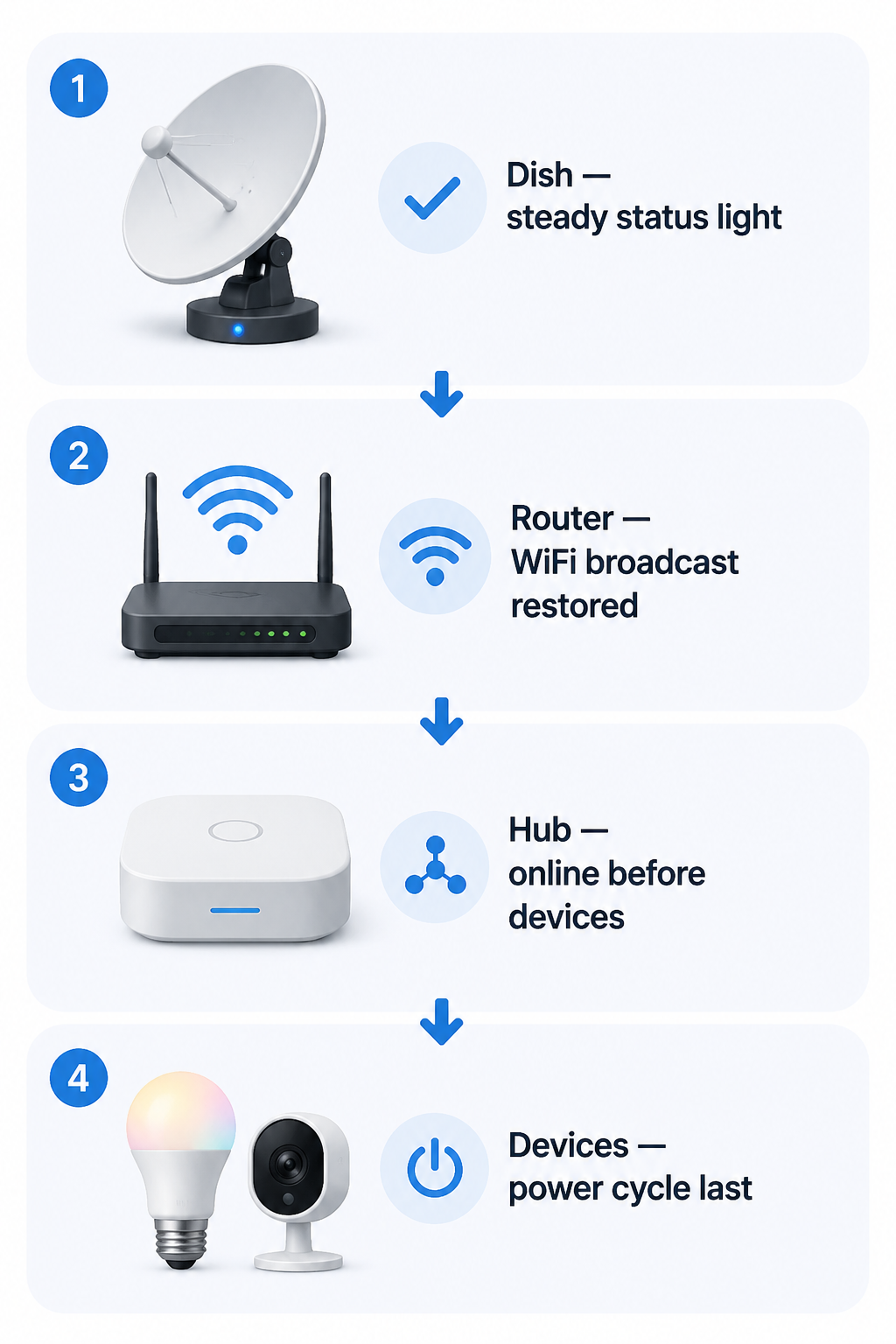
The fix is usually not a deeper reset. It is a controlled restart order: satellite terminal first, router second, hubs third, individual smart devices last. HighSpeedInternet.com’s Starlink troubleshooting guidance describes the same staged recovery and reports that this sequence resolves more than 90% of post-outage offline states, with the dish allowed up to 5 minutes to stabilize and the router about 2 minutes to resume WiFi broadcasting.[1]
| Check | What You Should See | What To Do Next |
|---|---|---|
| Dish or satellite modem | Stable connection in the provider app or normal status light | Wait before touching the router |
| Router WiFi | Your usual WiFi name appears and phones can join it | Leave smart devices alone until WiFi is stable |
| Smart hubs and controllers | Google Nest Hub, SmartThings, Echo, bridge, or base station comes online | Restore hubs before bulbs, plugs, cameras, and sensors |
| Individual devices | Offline devices begin reconnecting after power cycling | Power-cycle only the devices still offline |
The Recovery Order That Avoids Re-Pairing
Start with the satellite connection, not the light bulb that is annoying you. Open the Starlink, HughesNet, or Viasat app if you use one, or check the modem/router status indicators. The point is to confirm that the outside link is no longer negotiating, searching, or reporting an outage. If the satellite side is still unstable, every smart-home restart after that is just making more devices fail their next cloud check-in.
For Starlink, let the dish reach a normal connected state before restarting anything downstream. HighSpeedInternet.com’s Starlink guidance says the dish can take up to 5 minutes to reach steady status after a restart or outage recovery.[1] During that window, do not unplug the router, do not re-add devices in Google Home, and do not press reset buttons on cameras or bulbs. Waiting here feels passive, but it prevents the house from rebuilding itself against a half-restored internet path.
Once the satellite side is stable, restart or power-cycle the router if WiFi has not returned on its own. Then give the router about 2 minutes to broadcast WiFi again.[1] Check this with a phone or laptop: can it see your normal WiFi name, join it, and load a simple webpage? If the phone is still falling back to cellular, the smart lights are not the problem yet.
Now bring back the controllers. That means Google Nest Hub, Amazon Echo, SmartThings hub, Philips Hue Bridge, Ring Alarm base station, Eero or mesh nodes if they sit behind the satellite router, and any other device that other devices depend on. Plug them in, wait for their apps to show them online, and resist the temptation to start deleting offline bulbs while the hub is still booting.
Only after the hub layer is online should you power-cycle individual devices that still show offline. Pull power from a smart plug, bulb fixture, camera, or display for about 30 seconds, then restore it. Battery devices may need their usual wake action instead of a power pull. Work room by room or category by category so you can see what actually recovers instead of creating a second outage inside the house.
- Confirm the dish, satellite modem, or terminal is stable.
- Wait for the router to broadcast the same WiFi name as before.
- Bring hubs, bridges, mesh nodes, and voice displays online.
- Power-cycle only the individual devices still offline.
- Re-pair only if the WiFi SSID or password was lost or changed.
Why the Internet Can Be Back While the House Still Acts Broken
After a satellite outage, smart-home connectivity is rarely limited to one broken link. The terminal has to reconnect to the satellite network. The router has to rebuild WiFi and upstream access. Cloud-tied devices have to check in with Google, Amazon, Ring, Samsung, or another platform. Hubs then have to resume local control for the devices attached to them. When those layers come back in the wrong order, the app may still say “offline” even though the internet bill, provider app, and laptop all say the connection is back.
Starlink adds one more wrinkle: Carrier-Grade NAT. Starlink uses CGNAT, which means customers do not typically receive a unique public IPv4 address; they share public addressing through the provider network. After an outage, the visible public path can change. Google Nest and Google Home users have documented cases where devices remained on the same local WiFi but showed offline until each device was manually power-cycled, consistent with a cached trust state or cloud session that did not cleanly survive the address change.[2]
That does not mean every offline smart bulb understands CGNAT. It means the app, the hub, and the device may disagree about which session is still valid. A router restart alone can restore internet access for phones while leaving a camera or voice display stuck with an old cloud handshake. The device power-cycle is what forces that endpoint to ask for a fresh session instead of waiting indefinitely on the stale one.
Cloud dependency is the other half of the mess. Smart-home devices often use outside cloud services for authentication, app status, notifications, routines, and voice control. How-To Geek’s coverage of an AWS outage described the same basic failure pattern: devices physically inside the home can become hard to control when the cloud service they depend on is unreachable.[3] A satellite outage creates a local version of that experience, then leaves devices to re-establish their cloud trust one by one when service returns.
The July 2025 Starlink Outage Showed the Gap
The clearest recent example was the July 2025 Starlink outage. Newsweek reported a Starlink outage across the U.S. as users described total blackout conditions, and PCMag reported that SpaceX’s Starlink was hit by a major outage affecting more than 60,000 users.[4][5] CNET later reported that Starlink acknowledged a software failure behind the outage.[6]
For many homes, the interesting part came after the headline outage ended. Google Home and Ring users reported devices staying offline in their apps after broader connectivity had returned.[2] That is exactly the failure state this procedure is meant for: not “the satellite network is still down,” but “the internet is back and the house has not rebuilt its relationships yet.”
This is not a reason to treat Starlink as generally unreliable. HighSpeedInternet.com’s 2025 customer satisfaction survey found that 73% of Starlink customers said they rarely or never experience outages, compared with 59% of all U.S. internet customers.[1] The practical lesson is narrower: when a satellite outage does happen, smart-home recovery can lag behind service recovery because several layers have to reconnect in order.
Starlink, HughesNet, and Viasat: Same Order, Different Traps
For Starlink, use the app first if you can. The Starlink app can remotely reboot equipment, and Gen 3 router lights give useful clues: white indicates normal operation, red indicates no connection, and violet indicates factory reset mode.[1] If the router is red, do not troubleshoot the Google Home app yet. If it is violet, stop and check whether the router has lost its WiFi settings.
That violet-light situation matters because of a serious user-reported caveat. Across Reddit Starlink discussions and Google Nest Community reports, users have described power flickers during satellite outages that appeared to leave a Starlink Gen 3 router factory-reset, wiping the WiFi SSID and password.[2] As of July 20, 2026, this should be treated as user-reported rather than officially documented Starlink behavior. The consequence, however, is real enough to check: if the WiFi name or password changed, your devices are not merely waiting on a cloud handshake. They are looking for a network identity that no longer exists.
For HughesNet, confirm that you are dealing with an outage and not a data-throttling condition. SatelliteInternet.com’s HughesNet troubleshooting guidance notes that exhausted data can reduce speeds enough to make normal internet use feel broken.[7] Smart-home apps may then time out, cameras may fail to load live view, and voice assistants may seem offline even though the modem still has service. If your plan data is exhausted, power-cycling every device in the house will not fix the underlying speed constraint.
For Viasat, the same staged restart still applies: confirm the satellite modem is online, wait for router WiFi, restore hubs, then power-cycle endpoint devices. The public outage-frequency data for Viasat and HughesNet is thinner than for Starlink, so it is better to avoid pretending there is a universal outage pattern. The recovery logic is still useful because the smart-home side has the same dependency chain once the connection comes back.
When the Main Fix Does Not Clear It
If the dish is stable, WiFi is back, hubs are online, and a device still refuses to return after a power-cycle, check whether you changed the network without noticing. A restored router using a default SSID, a new password, or a different security mode is a different problem. Smart bulbs, cameras, displays, and plugs generally remember a network identity, not your intention. If that identity is gone, re-pairing may be necessary.
If you use Starlink bypass mode, a third-party router, mesh WiFi, or a separate firewall, the recovery order still starts at the satellite terminal, but the router step belongs to your actual router. In bypass mode, the Starlink router is not the WiFi controller. Restart the third-party router after the Starlink terminal is stable, then wait for mesh nodes and hubs before touching endpoint devices. This is also where double-NAT can get in the way: two routers assigning private networks can make device discovery unreliable after an upstream address change, especially when apps are trying to find hubs or cameras across the wrong segment.
If only cameras remain offline, give them extra time after power returns. Cameras often need cloud authentication, local WiFi, video service availability, and sometimes a base station or chime bridge. Ring and similar camera systems can look more broken than lights because live view and alerts depend on more than basic WiFi association.
If only voice control is broken, test the device from its native app before rebuilding routines. A light that works in the manufacturer’s app but not through Google Home or Alexa is probably not offline at the device level. The voice platform may still be rebuilding account authorization, room membership, or routine state. Re-linking an account is less destructive than factory-resetting every device, but it should come after the network and hub checks.
What Not To Reset Too Early
Do not factory-reset smart bulbs, plugs, cameras, displays, or hubs as the first response to a satellite outage. A factory reset deletes pairing information that may still be valid. It turns a connection recovery problem into a setup project, and it often does that before the router has even finished broadcasting a stable WiFi network.
- Do not re-pair devices while the satellite app still shows reconnecting or degraded service.
- Do not delete devices from Google Home, Alexa, Ring, or SmartThings just because they show offline immediately after service returns.
- Do not restart hubs before the router WiFi is visible and usable.
- Do not assume a HughesNet slowdown is an outage until you check plan data and throttling status.
- Do not ignore a changed SSID or password; that is the point where re-pairing may become unavoidable.
The line is simple enough to save an evening: if the dish is stable, the router is broadcasting the same WiFi, hubs have come back, and endpoint devices are power-cycled in that order, most post-outage offline states should clear without re-pairing. If the network name or password changed, stop treating it as a cloud handshake problem. The devices have lost the network they were built to find.
References
- Is Starlink Internet Down?, HighSpeedInternet.com
- Google Nest Community and Reddit r/Starlink, r/googlehome user reports, Google Nest Community
- Why Your Smart Home Went Dumb Last Night: How the AWS Outage Broke the Internet of Things, How-To Geek
- Starlink Outage Across US as Some Users Report Total Blackout Today, Newsweek
- SpaceX's Starlink Hit by Major Outage, PCMag
- Starlink Acknowledges Software Failure Behind Outage, CNET
- Troubleshooting Your Satellite Internet Connection, SatelliteInternet.com
Did this fix work for you?
Your signal helps keep the status label honest. This is recorded for internal review, not published automatically.