
Claude update broke HA automations? Fix it in 7 checks
MCP server disconnected, empty tool list, or automations behave wrong after Claude update
Last updated
Status as of 2026-07-31
Scope first: here, “Claude” means Anthropic Claude connected to Home Assistant through MCP, ha-mcp, mcp-proxy, Claude Desktop, or Claude Code. It does not mean a smart-home device or hub named Claude.
Before changing anything, separate two failure families. If Claude still has Home Assistant tools and can call them, but it now picks the wrong entity, ignores instructions, or behaves forgetfully, you are probably looking at a Claude Code quality-regression class of problem. Anthropic published an April 23, 2026 postmortem on recent Claude Code quality reports, and the incident material supplied for this article marks that family resolved as of April 20, 2026 with Claude Code v2.1.116; the practical fix is to update Claude Code and retest the same automations, not to rebuild your MCP bridge [1].
If the symptom is “Server disconnected,” “Couldn’t reach the MCP server,” an empty tool list, connector errors, or Claude cannot see Home Assistant tools at all, stay here. That is a connection problem until proven otherwise.

| What broke after the update | What it usually looks like | Where this article sends you |
|---|---|---|
| Behavior quality | Tools still exist, calls still run, but Claude chooses wrong entities, forgets context, or ignores rules | Update Claude Code, retest, and compare against the April 2026 Claude Code quality-regression material [1] |
| Connection path | Server disconnected, empty tool list, connector error, MCP server cannot be reached | Run the seven checks below, ordered by cost of attempt, not by claimed frequency |
The 7-check reconnect ladder
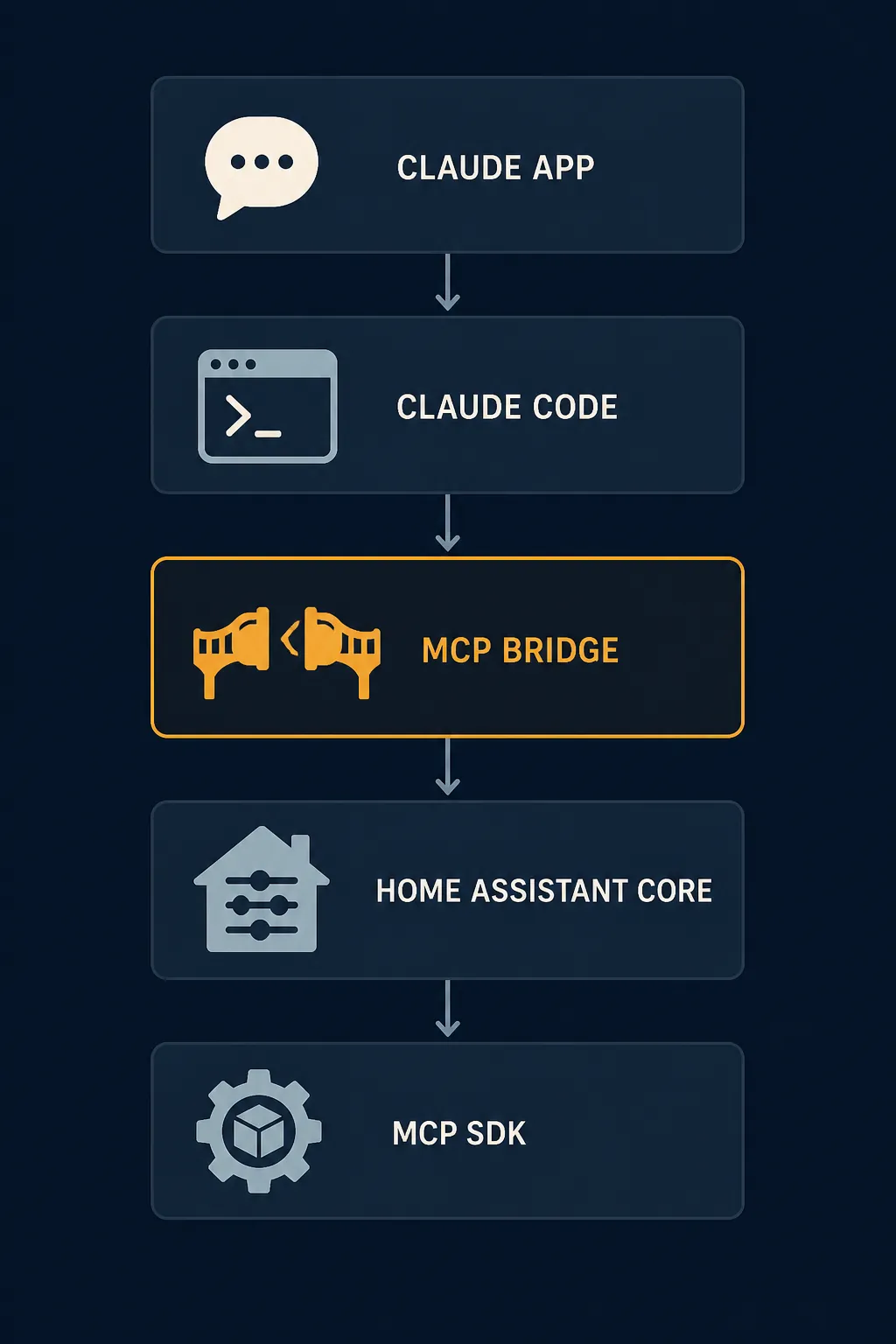
Do not start by reinstalling Claude. The path has several independently breakable layers: Claude Desktop or Claude Code, ha-mcp or mcp-proxy, Home Assistant core, and the MCP SDK. Work downward from the least destructive check to the one that changes the installation shape.

| Order | Check | Layer being tested | Status | Fixed looks like |
|---|---|---|---|---|
| 1 | Restart in a clean order and make sure only one ha-mcp instance is pointed at Home Assistant | Process state / duplicate bridge | Confirmed for the dual-instance wedge documented by ha-mcp; otherwise a low-cost isolation step [2] | Claude repopulates the Home Assistant tool list after one bridge starts cleanly |
| 2 | If you use mcp-proxy, pin the MCP SDK below 2.0.0 | MCP SDK / mcp-proxy | Confirmed [2] | The ImportError or “Server disconnected” path disappears and tools load again |
| 3 | Fix the uvx / uv launcher: absolute path, Python 3.13+, and stale cache cleanup | Claude-spawned subprocess | Confirmed [2] | Claude can actually start the same command that works in your terminal |
| 4 | On macOS Sequoia 15+, check Local Network permission or tunnel to localhost | macOS privacy boundary | Confirmed [2] | The spawned bridge reaches your local Home Assistant IP again |
| 5 | Regenerate the Home Assistant long-lived access token and remove quote mistakes | Home Assistant auth | Confirmed [2] | The bridge authenticates and tool calls stop failing at auth |
| 6 | On Windows, handle a pywin32 cache-lock only if your error matches it | Windows Python / uv cache | Workaround; single community case [3] | The locked pywin32 cache path no longer blocks startup |
| 7 | Only then reinstall or change bridge architecture | Installation shape | Last resort | A fresh, single, documented path starts and survives a restart |
A Home Assistant core update may have happened the same day. A Claude app update may also have happened. That timestamp is not enough. Use the checks to find the process that actually fails to start, connect, authenticate, or expose tools.
1. Restart one path, not two
Layer tested: process state and duplicate bridge ownership.
Symptom that points here: the setup worked before the update, Claude now says the server is disconnected, and you have both a local uvx stdio entry and an app or custom-component ha-mcp instance aimed at the same Home Assistant. The ha-mcp FAQ documents that running two ha-mcp instances against the same Home Assistant can wedge the connection until a restart [2].
- Quit Claude Desktop or Claude Code completely.
- Stop the extra ha-mcp path. Leave only the path you intend Claude to use.
- Restart Home Assistant if the bridge was embedded there; otherwise restart the external bridge process.
- Start Claude again and open the MCP tool list.
Status: Confirmed for the documented dual-instance wedge. For ordinary restart ordering, treat it as a cheap isolation step, not a proven root cause.
Fixed looks like this: one Home Assistant MCP server appears in Claude, the tool list is no longer empty, and a harmless read-only tool call returns data. If you still have no tools, keep the same config file open and move to the SDK boundary before changing tokens or reinstalling anything.
2. If mcp-proxy is in the command, pin the MCP SDK below 2.0.0
Layer tested: MCP SDK compatibility between Claude’s launched bridge and Home Assistant.
This is the cleanest documented break in the current pile. The ha-mcp FAQ says MCP SDK 2.0.0 removed request_ctx and broke uvx mcp-proxy bridges for Claude Desktop, producing ImportError or “Server disconnected.” The same FAQ gives the fix: add --with mcp<2.0.0 to the client config args. It also notes that ha-mcp pins the SDK itself, so local stdio ha-mcp installs were unaffected by that specific SDK break [2].
Do this only if your Claude config actually launches mcp-proxy. If your command is a direct ha-mcp command and not mcp-proxy, this exact pin may be the wrong repair.
{
  "mcpServers": {
    "home-assistant": {
      "command": "/absolute/path/to/uvx",
      "args": [
        "--with",
        "mcp<2.0.0",
        "mcp-proxy"
      ]
    }
  }
}
That snippet is intentionally partial. Keep your existing server URL, headers, token environment, and any other working args. The important part is the version boundary in the args for the mcp-proxy launch.
Status: Confirmed as documented by ha-mcp for the SDK 2.0.0 / mcp-proxy break. Fixed looks like this: Claude starts the MCP server without the request_ctx ImportError, the disconnected banner clears, and Home Assistant tools reappear.
3. Fix the uvx layer Claude actually runs
Layer tested: the subprocess Claude launches, not the one your interactive shell launches.
This is where a lot of “but it works in Terminal” reports die. The ha-mcp FAQ says Claude Desktop does not inherit the shell PATH, so “uvx not found” after an update is fixed by using an absolute path in the config. The same FAQ states that ha-mcp requires Python 3.13 or newer, and that stale uvx caches can cause known bugs, including read-only filesystem errors [2].
{
  "mcpServers": {
    "home-assistant": {
      "command": "/full/path/to/uvx",
      "args": ["ha-mcp"]
    }
  }
}
Replace /full/path/to/uvx with the real path from your machine. Do not assume Claude can see the same PATH your terminal profile sets.
uv cache cleanThen confirm the Python boundary for the environment Claude is using, not merely the newest Python installed somewhere on the system. A Home Assistant OS or Container user can have Home Assistant itself perfectly healthy while the local Claude-side Python launcher is the failing component.
Status: Confirmed for the uvx PATH, Python 3.13+, and stale-cache guidance documented by ha-mcp. Fixed looks like this: Claude no longer fails at process startup, and the same MCP server command that was invisible to Claude now starts from the app.
4. On macOS Sequoia, check Local Network before blaming Home Assistant
Layer tested: macOS privacy control between the Claude-spawned process and your LAN.
On macOS Sequoia 15 and newer, the ha-mcp FAQ documents that Local Network privacy can silently block the spawned uvx subprocess from reaching local-network IPs. The documented fixes are to allow access in System Settings → Privacy & Security → Local Network, or to use an SSH localhost tunnel [2].
- If your Home Assistant URL is a local IP or .local name, this check is relevant.
- If the same config works when tunneled through localhost, the bridge was not necessarily broken; the network permission boundary was.
- If Claude Desktop recently updated, macOS may present the process differently enough that old assumptions about permission are no longer useful.
Status: Confirmed as a ha-mcp-documented macOS Sequoia 15+ issue. Fixed looks like this: the subprocess can reach Home Assistant again, and connector errors disappear without changing your Home Assistant core version.
5. Regenerate the token, and check the boring quote mistake
Layer tested: Home Assistant authentication.
If the bridge starts but tool calls fail when they touch Home Assistant, regenerate the long-lived access token and update the Claude-side config. The ha-mcp FAQ specifically calls out token validity and says not to put quotes around the token in config [2].
This is not the first check because a bad token usually does not explain uvx not found, request_ctx ImportError, or a macOS LAN block. But once the process starts and networking is plausible, auth is cheap to prove.
Status: Confirmed for token regeneration and no-quotes guidance documented by ha-mcp. Fixed looks like this: the tool list loads, authenticated Home Assistant calls succeed, and the error moves out of the auth layer.
6. Use the Windows pywin32 path only when the error matches
Layer tested: Windows Python package cache and uv startup.
There is a useful Stack Overflow case from April 2026 for “pywin32-311.data locked” while connecting Claude Desktop MCP to Home Assistant. The community workaround was to run uv cache clean, install ha-mcp directly, and call ha-mcp as the command instead of uvx [3].
uv cache clean{
"mcpServers": {
"home-assistant": {
"command": "ha-mcp"
}
}
}Status: Workaround, not Confirmed. It is a single community case, useful when the text of your error matches the pywin32 cache-lock path. It is not evidence that every Windows Claude/Home Assistant disconnect should bypass uvx.
7. Reinstall only after you know what you are replacing
Layer tested: installation shape and accumulated local state.
Reinstalling is sometimes faster than archaeology, but only after the earlier checks have told you whether the failing thing is mcp-proxy, uvx, ha-mcp, Local Network permission, or auth. Otherwise you can rebuild the same broken path with a cleaner folder name.
- Back up the current Claude MCP config before editing it.
- Remove duplicate Home Assistant MCP server entries.
- Choose one bridge path: direct ha-mcp, mcp-proxy with the required SDK pin, the Home Assistant-side integration, or the connector route you can actually verify.
- Start Claude fresh and test one read-only Home Assistant tool before asking it to run household automations again.
If you are using an OAuth connector path and a documented issue-specific workaround applies to your exact version, treat it as Workaround until the project documents a general fix. Do not promote it to a universal Claude/Home Assistant repair because it happened to clear one connector error.
What not to over-claim
A report that “the Home Assistant update broke Claude” is still only a report until logs show the Home Assistant side failing. A report that “fast-mcp broke the connector” is also only a lead unless the readable material ties that update to a reproducible failure and fix. The unread Reddit-sourced signals supplied for this piece, including a Home Assistant 2026.3.2 health-check thread and a fast-mcp connector post, are lead-only here because they could not be read in full. They should not outrank the documented SDK, uvx, macOS, token, or duplicate-instance checks.
The same discipline applies across smart-home update regressions. NestGrid’s Alexa+ July 2026 regression watch and HomeKit no-response fix ladder use the same habit: name the layer before changing the setup. If your next step is wiring more AI into Home Assistant, the same caution applies to DeepSeek V4 Flash in Home Assistant. For readers whose automations need to survive outages as well as model updates, the power-outage smart-home automation recipe is the more relevant next build.
Where the diagnosis should land
If the connection comes back after the SDK pin, absolute uvx path, Python/cache cleanup, macOS Local Network permission change, token regeneration, or single-instance restart, then “Claude update broke my automations” was really a layer-specific bridge failure. The fix belongs to that layer.
If the connection never failed and only behavior degraded, keep it in the Claude Code quality-regression family and retest on the resolved Claude Code version path instead of tearing down Home Assistant.
All statuses above are version-scoped as of 2026-07-31. Re-verify on the same Claude app or Claude Code version, the same ha-mcp or mcp-proxy path, the same Home Assistant setup, and the same MCP SDK boundary before treating any fix as broader than the label given here.
References
- An update on recent Claude Code quality reports — Anthropic — April 23, 2026
- FAQ & Troubleshooting — ha-mcp
- Trying to connect Claude Desktop MCP to Home Assistant — Error: pywin32-311.data locked — Stack Overflow — April 2026
Corroborating context
For protocol background on why this failure happens, see Compatibility & Protocols.
Not currently linked to a known regression. Background on the underlying protocol lives in Compatibility & Protocols.