
Smart Home Devices to Lower Your Electric Bill After a Rate Hike
After a rate increase, every kilowatt-hour saved is worth more. This tiered guide walks you through three levels of smart home automations — from $30 smart plugs to a full Home Assistant setup — with concrete savings data to help you pick the right devices and see how fast they pay for themselves at today's higher rates.
A rate increase changes the math on every smart home device you already considered and didn’t buy. The plug that saved $60 a year before the increase now saves a little more. The thermostat schedule that used to feel marginal pays back sooner. The circuit monitor that looked excessive may become reasonable if it finds one large load running at the wrong time.
The quick payback formula is boring, which is why it is useful: device cost ÷ annual dollar savings = payback period. After a rate hike, the same avoided kilowatt-hours are worth more. U.S. residential electricity rates rose 13% from 2022 to 2025, with another 5.3% year-over-year increase as of May 2026, so a device that saved $100 per year before the latest increase is closer to $105 per year now on national-average math, before local differences are considered.[1]
That does not mean every smart gadget is suddenly a financial instrument. It means the useful ones deserve a second look, especially if they attack one of three repeat offenders: standby load that runs all night, HVAC schedules that ignore whether anyone is home, and time-of-use plans that charge more when your appliances happen to run.
Pick the Cheapest Tier That Matches the Waste
Start with the load, not the device. A smart plug is excellent if a TV console, desktop setup, printer, speaker, or countertop appliance sits half-awake for 20 hours a day. It is pointless if you put it on a lamp that already uses a tiny LED bulb for an hour each night.
| Tier | Best fit | Typical setup | Time and budget | Savings evidence to use carefully |
|---|---|---|---|---|
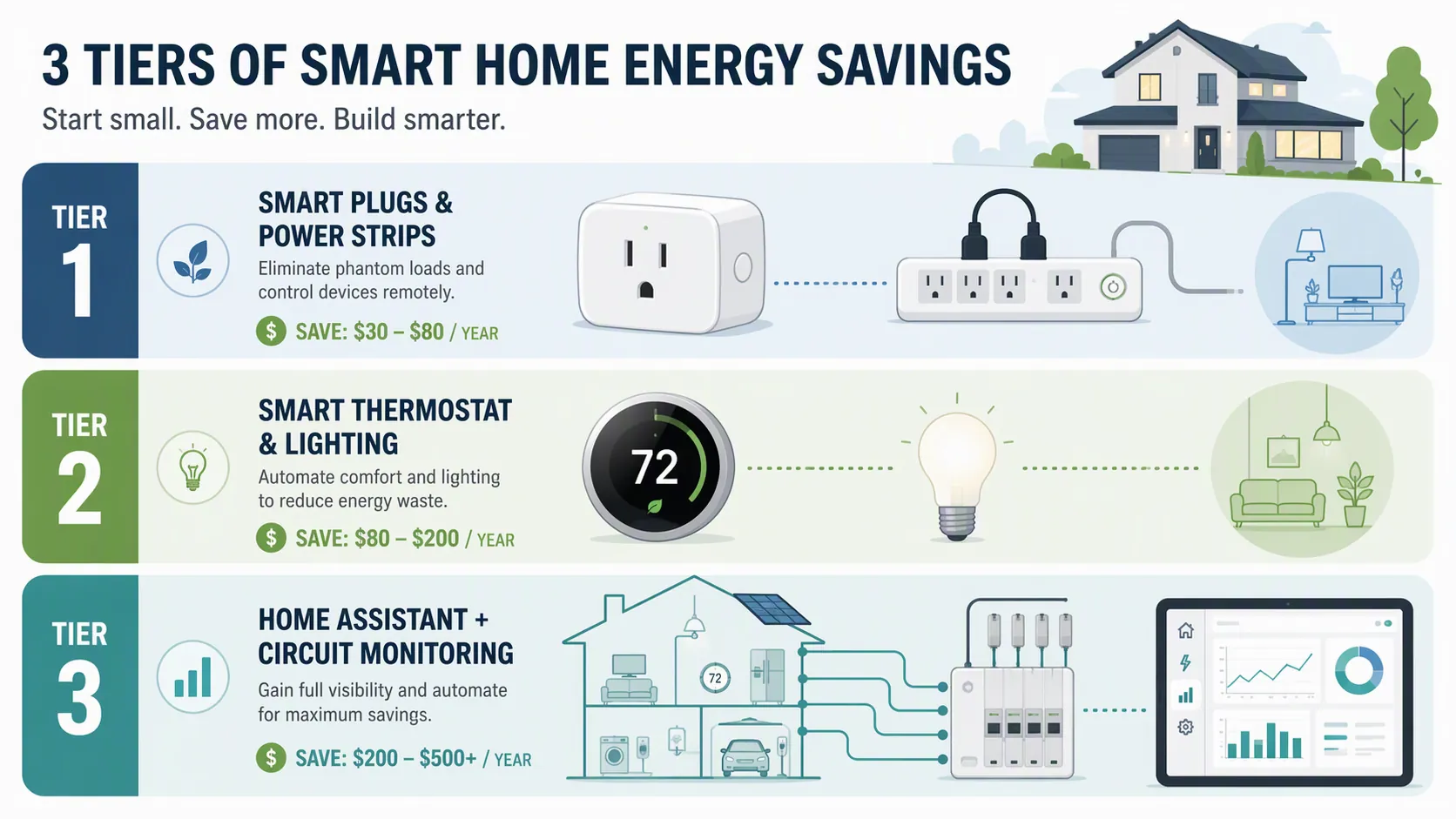
| Tier 1: Smart plugs and power strips | Visible standby loads, entertainment centers, home office gear, kitchen counters | Schedule power off during sleep, work, and travel windows | $0-$100; about 30 minutes | $50-$150/year when enough phantom load is controlled; DOE estimates standby load at 5-10% of household electricity |
| Tier 2: Thermostat and lighting schedules | HVAC runtime creep, inconsistent setbacks, older bulbs still in daily use | Geofencing, setback schedules, smart LEDs, occupancy routines | $150-$400; about 2 hours | 8-14% HVAC reduction from ENERGY STAR/ESI smart thermostat analysis; $25-$75/year lighting estimate |
| Tier 3: Home Assistant plus circuit monitoring | Large unknown loads, pool pumps, multiple computers, mini-splits, time-of-use plans | Emporia Vue 3, Home Assistant Energy Dashboard, load-specific automations | $400-$800; weekend project | $100-$1,331/year potential, with the high end coming from one specific Home Assistant case |
This is the same basic ROI-first logic behind smart home automation ideas that pay for themselves, but a rate increase makes the sorting stricter. If the automation does not remove a recurring human chore or shut down a recurring waste pattern, it probably belongs in the closet with the unused plugs.
Tier 1: Smart Plugs That Kill Standby Load Without Becoming a Hobby
Tier 1 is the place to start if you want smart home devices to lower your electric bill after a rate increase without buying a hub, learning YAML, or explaining to the rest of the house why the dishwasher now has a dashboard. The target is phantom load: electricity used by devices that appear off but keep power supplies, displays, network chips, chargers, or standby modes alive.
The Department of Energy places standby power at 5-10% of household electricity use, which is enough to matter but not enough to justify buying twenty smart plugs blindly.[2] The practical move is to control clusters: one plug or smart power strip for the entertainment center, one for the home office, one for a printer or craft-room setup, and maybe one for a kitchen counter group if the devices tolerate being fully shut off.
Copy These Schedules First
- Entertainment center: off from 12:30 a.m. to 6:00 a.m.; stay on during normal evening hours so nobody has to wait for the TV to reboot.
- Home office: off from 10:30 p.m. to 6:30 a.m.; add a weekend schedule if monitors, speakers, docks, and chargers sit idle for long blocks.
- Printer and paper shredder area: off all week except a short daily window or voice/app override; many homes use these devices rarely.
- Guest room or spare-room electronics: off by default; turn on manually before guests arrive.
- Countertop appliances: only automate devices that safely resume from power loss and do not need clocks, memory, refrigeration, or safety standby.
A $50-$150 annual savings range is plausible when the plug controls enough always-on equipment, because it is shaving part of that 5-10% standby slice instead of trying to make a single phone charger perform miracles.[2] For plug-level math and the cases where smart plugs disappoint, the deeper standby-load breakdown in Do Smart Plugs Actually Reduce Phantom Energy Costs? is worth reading before buying in bulk.
The easiest mistake is overbuying. If a plug costs $10-$15 and controls a load that only wastes a few dollars a year, the rate hike does not rescue the payback. Use the first two or three plugs as scouts. If the app shows meaningful consumption, keep going. If the numbers are tiny, move up to HVAC or monitoring instead of decorating the house with little white bricks.
Tier 2: Thermostat and Lighting Automations, Kept in Their Lane
A smart thermostat can save more than a smart plug because HVAC is usually a larger load. It can also save nothing if it copies the same wasteful schedule you already had. The useful part is not the touchscreen; it is consistent setbacks, geofencing that actually matches household behavior, and recovery timing that does not make the system fight itself.
ENERGY STAR says certified smart thermostats save energy by maintaining comfort while using less heating and cooling, and a 2026 Energy Solutions Intelligence analysis places median HVAC savings at 8-14%, with a $70-$130 annual savings range in cold climates.[3][4] Treat that as an HVAC-specific estimate, not a whole-home guarantee. If your HVAC use is already disciplined, the gain will be smaller. If the house is empty during long weekday stretches and the system currently holds a comfort setpoint all day, the opportunity is better.
- Use away setbacks only as far as the household will tolerate; a schedule that gets manually overridden every day is not a schedule.
- Use geofencing when arrival times vary, but keep a backup time schedule so the house does not depend on one phone battery.
- Pre-cool or pre-heat carefully if your utility has expensive peak hours; comfort should move earlier, not disappear.
- Replace high-use incandescent or halogen bulbs first; smart LEDs in rarely used closets are a long payback with an app attached.
Lighting is the smaller and simpler side of Tier 2. Smart LED schedules and occupancy routines can remove the “someone left the basement lights on” problem, with a $25-$75 annual estimate when older or frequently used bulbs are involved. If the home is already all LED and people usually turn lights off, do not expect a dramatic bill change from lighting alone.
For summer-specific HVAC routines, especially pre-cooling and safety cutoffs, the tiered ideas in three smart home heat wave automations are a better place to go deeper than turning this into another thermostat explainer.
Tier 3: Measure the Circuits, Then Automate the Offenders
Tier 3 is for the house where the bill is too high and the obvious fixes are already done. At this point, guessing gets expensive. Circuit-level monitoring shows which loads actually move the meter, and Home Assistant gives you a place to turn those measurements into automations that run without a daily dashboard ritual.
The best-known recent example is The Hook Up’s August 2025 Home Assistant and Emporia Vue 3 project. In that Florida home, daily consumption fell from 99.27 kWh to 77.94 kWh, which the author calculated as $3.65 per day or $1,331 per year. The savings came from targeted changes: computer hibernate automation, garage mini-split scheduling, and pool pump RPM optimization, while maintaining comfort.[5]
That $1,331 number should not be pasted into a shopping cart justification without the footnotes. It was one household with two subpanels, three desktops, a pool, a garage mini-split, rooftop solar context, and enough complexity for monitoring to find large controllable loads.[5] The transferable lesson is not “Home Assistant saves everyone $1,331.” It is “measured waste plus automatic correction can save serious money when the house has serious waste.”
A Practical Home Assistant and Emporia Vue Setup
- Install the circuit monitor correctly. The Emporia Vue 3 setup belongs in the electrical panel, so many homeowners should budget for an electrician instead of treating this as a casual plug-in project.
- Label circuits in plain language. “Garage mini-split,” “office outlets,” and “pool pump” are useful. “Breaker 14” is how good data becomes another chore.
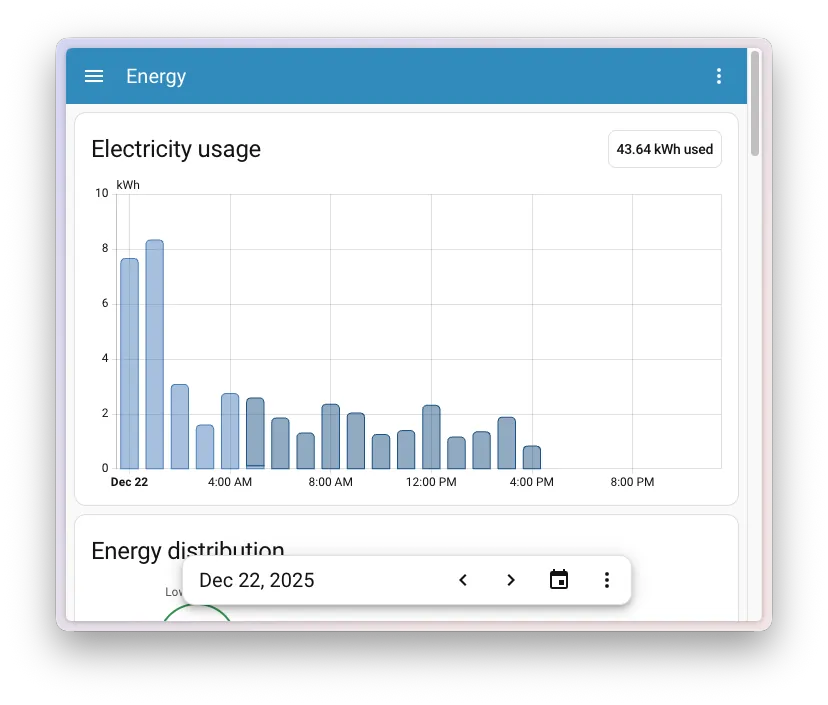
- Connect the monitor to Home Assistant and open the Energy Dashboard. The first job is not automation; it is seeing daily and hourly patterns clearly enough to pick a target.
- Watch for repeatable waste over at least several normal days. One weird laundry day is not a rule. A desktop circuit drawing power every night is a rule.
- Automate only the load you can explain. Hibernate computers, schedule a mini-split, adjust a pool pump, or shift an appliance window. Do not build a whole-house “energy mode” that nobody understands.
The Home Assistant Energy Dashboard is valuable because it keeps the energy question tied to time. If the graph shows the house idling high after midnight, a plug schedule or computer hibernate rule may be enough. If the spike is afternoon HVAC, Tier 2 setpoints or pre-cooling matter more. If the pool pump is the mountain in the chart, no amount of lamp automation is going to be satisfying.
Emporia says Vue customers save 10% or more on average, but that is a vendor-reported claim, not the same kind of evidence as an independent field study.[6] It is still directionally useful if you treat the monitor as a diagnostic tool. The monitor does not save money by existing. It saves money when it points to a load you can schedule, reduce, or shut off automatically.
The Automations Worth Building First
Computer hibernate is a clean first target in homes with desktops, gaming PCs, media servers, or workstations that stay awake for convenience. A Home Assistant rule can watch smart plug power, network presence, time of day, or a manual “do not sleep” helper, then send a hibernate command or cut accessory power after a safe shutdown window. This is exactly the sort of automation that earns its keep: it removes a repeated human failure without asking anyone to study a chart every night.
Mini-split scheduling is another good candidate when a garage, office, guest suite, or workshop gets conditioned as if someone lives there all day. The rule can be simple: comfort setpoint during known use windows, wider setpoint outside them, and a manual override that expires automatically. The expiration matters. Permanent overrides are where energy automations go to die quietly.
Pool pump optimization can be bigger, but only for homes with pools and controllable pump speeds. The useful change is not merely turning the pump off; it is matching runtime and RPM to the pool’s actual needs, utility schedule, and equipment constraints. If you do not have a pool, this part of The Hook Up result does not transfer to your house. That is not a weakness in the case. It is the reason the case worked so well for that house.
Use Time-of-Use Rates Only When Your Utility Makes Them Painful
Time-of-use automation deserves attention after a rate hike, but only if your utility’s spread is large enough. In 2026, Consumers Energy’s summer time-of-use plan lists peak energy at $0.245/kWh and off-peak at $0.104/kWh, a 2.35x difference. Colorado regulators have reported peak rates at 2.7x off-peak.[7] Those are real spreads, but they are not universal. Your utility tariff decides whether shifting loads is worth the trouble.
Good candidates are flexible loads: EV charging, battery charging, some water heating, pool pumping, dishwasher cycles, laundry, and pre-cooling before expensive afternoon hours. Bad candidates are loads that create comfort fights, food-safety risks, or noise at ridiculous times. If shifting a dishwasher saves a few dollars but wakes someone at midnight, the spreadsheet lost.
If your utility also offers demand response enrollment, compatible thermostats, EV chargers, and batteries may add another path. The device-compatibility angle is covered separately in which smart home devices work with your utility demand response. For deeper dynamic-pricing automations, use the dedicated guide to automating your home for dynamic electricity pricing instead of trying to make this tier do every possible rate trick.
Monitoring Helps, but Automation Keeps the Savings From Fading
Energy feedback can be powerful when people act on it. A January 2025 MIT-reported Amsterdam study found that households receiving energy monitoring plus coaching reduced electricity use by 33%, gas use by 42%, and total bills by 53%.[8] That is a large result, and it belongs in the right box: monitoring plus coaching, not a guarantee that installing a monitor alone will keep saving money after the novelty wears off.
The same study context also matters because device-only engagement faded after 3-4 weeks.[8] That is the familiar smart-home graveyard pattern: a dashboard is fascinating for a month, then life wins. The better recipe is to use monitoring briefly and intensely, identify repeatable waste, then turn that finding into a schedule, setback, hibernate rule, or load-shift automation that no one has to babysit.
Do the Payback Math Before Moving Up a Tier
Use your actual electric rate, not a national average and not an “up to” claim from a box. If a smart plug schedule saves 20 kWh per month and your all-in electricity rate is $0.22/kWh, that is $4.40 per month or $52.80 per year. A $30 setup pays back in a little under seven months. If your rate is $0.12/kWh, the same avoided energy saves $28.80 per year and the payback is slower.
| If you see this | Start here | Move up only if |
|---|---|---|
| TVs, consoles, speakers, printers, chargers, and office gear idle for long stretches | Tier 1 smart plugs or smart power strips | Plug data shows small savings but the whole bill remains high |
| HVAC runs hard when nobody is home or setpoints change randomly | Tier 2 smart thermostat schedule and geofencing | Bills still show large seasonal swings you cannot explain |
| The bill is high but no single appliance looks guilty | Tier 3 circuit monitoring before buying more controls | Monitoring identifies a repeatable load that can be automated |
| Peak electricity costs 2-3x off-peak | Tier 3 time-of-use automations for flexible loads | The shifted load is large enough and does not create household friction |
The right answer after a rate increase is usually the cheapest tier that matches the waste pattern in front of you. Start with plugs if standby load is obvious. Use the thermostat if HVAC is the leak. Add Home Assistant and circuit monitoring when the bill is large enough, the loads are unclear, or the house has equipment worth controlling precisely. Move up a tier when the numbers show a larger controllable load, not because the next dashboard looks more serious.
References
- Electric Power Monthly, U.S. Energy Information Administration, https://www.eia.gov
- Standby Power, U.S. Department of Energy, https://www.energy.gov
- Smart Thermostat FAQ, ENERGY STAR, https://www.energystar.gov/products/heating_cooling/smart_thermostats/smart_thermostat_faq
- Smart Thermostats ROI: Do They Really Save 15%?, Energy Solutions Intelligence, 2026, https://energy-solutions.co/articles/sub/smart-thermostats-roi-save-15-percent
- I Cut My Electric Bill by $1,331/year with Home Assistant Automation, The Hook Up, August 2025, https://www.thesmarthomehookup.com/i-cut-my-electric-bill-by-1331-year-with-home-assistant-automation/
- How Much Can You Save with an Energy Monitor?, Emporia Energy, https://www.emporiaenergy.com/blog/how-much-can-you-save-with-an-energy-monitor/
- Summer Time-of-Use Rate, Consumers Energy, https://www.consumersenergy.com/residential/account-and-billing/rates/electric-rates-and-programs/summer-time-of-use-rate
- Study shows how households can cut energy costs, MIT News, January 13, 2025, https://news.mit.edu/2025/study-shows-how-households-can-cut-energy-costs-0113