
Set Up Heat Safety Automations for Elderly, Infants, and Pets
This recipe shows how to configure smart temperature sensors, presence detection, and automated cooling to protect elderly family members, infants, and pets from indoor heat. You'll get copyable automation logic for color-coded alerts and fan or AC activation tailored to each occupant type, with thresholds drawn from the Ethos trial for elderly and extrapolated from general guidelines for infants and pets.
During extreme heat, the useful question is not whether the forecast looks ugly. It is whether the room where the older adult is sitting, the baby is sleeping, or the dog is crated has crossed a line that should make something happen.
That is where smart home devices for extreme heat safety are most valuable: not as a clever dashboard, but as a room-level early warning layer. A temperature and humidity sensor watches the actual space. Presence detection keeps the automation from cooling an empty room or missing an occupied one. A smart plug, smart thermostat, or IR controller can start a fan or AC when it is safe to do so. Alerts escalate from yellow to red so the person receiving them knows whether to check in soon or act now.
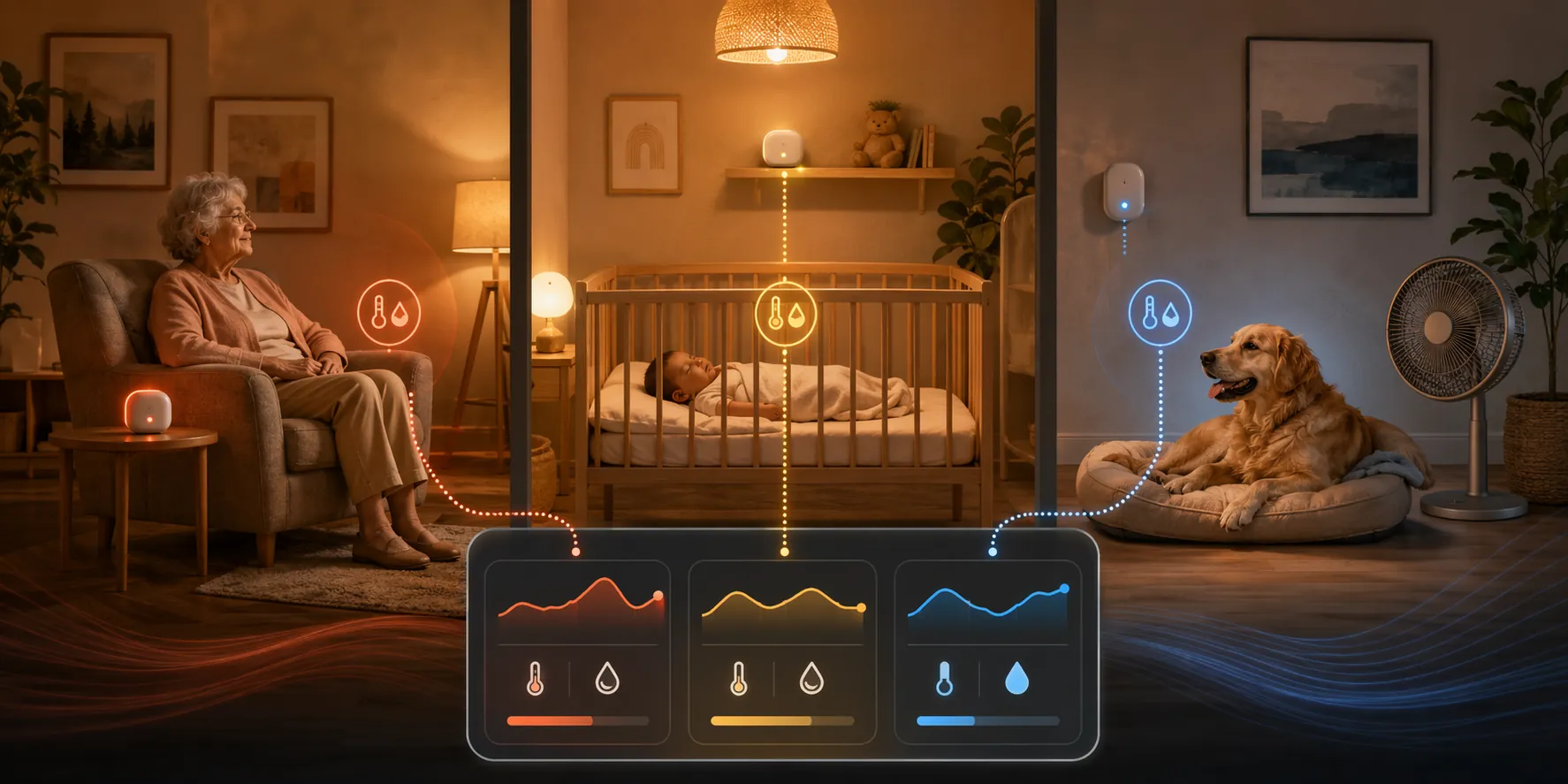
The strongest evidence for this kind of setup comes from older-adult heat monitoring, not from infant nurseries or pet rooms. In the Ethos proof-of-concept study, 78 older adults in Queensland, Australia used a digital heat early warning system during the 2023-24 summer; participants acted on 90% of yellow alerts and 94% of red alerts, heat preparedness increased 3.4x, and the system scored 78 on the System Usability Scale.[1] That matters because an alert that nobody understands, trusts, or acts on is just another notification.
The same study also keeps the recipe honest. It was built for adults 65 and older, in one subtropical Australian setting, with a modest sample. It does not establish baby-safe or pet-safe temperature thresholds. For infants and pets, the automation pattern can still be useful, but the thresholds need to be set conservatively from general pediatric or veterinary guidance, household knowledge, and professional advice when risk is high.
The Heat Safety Flow
Build the automation around states, not gadgets. The exact platform can be Home Assistant, Apple Home, Google Home, Alexa, or another hub. The logic is the part that should survive a device swap.
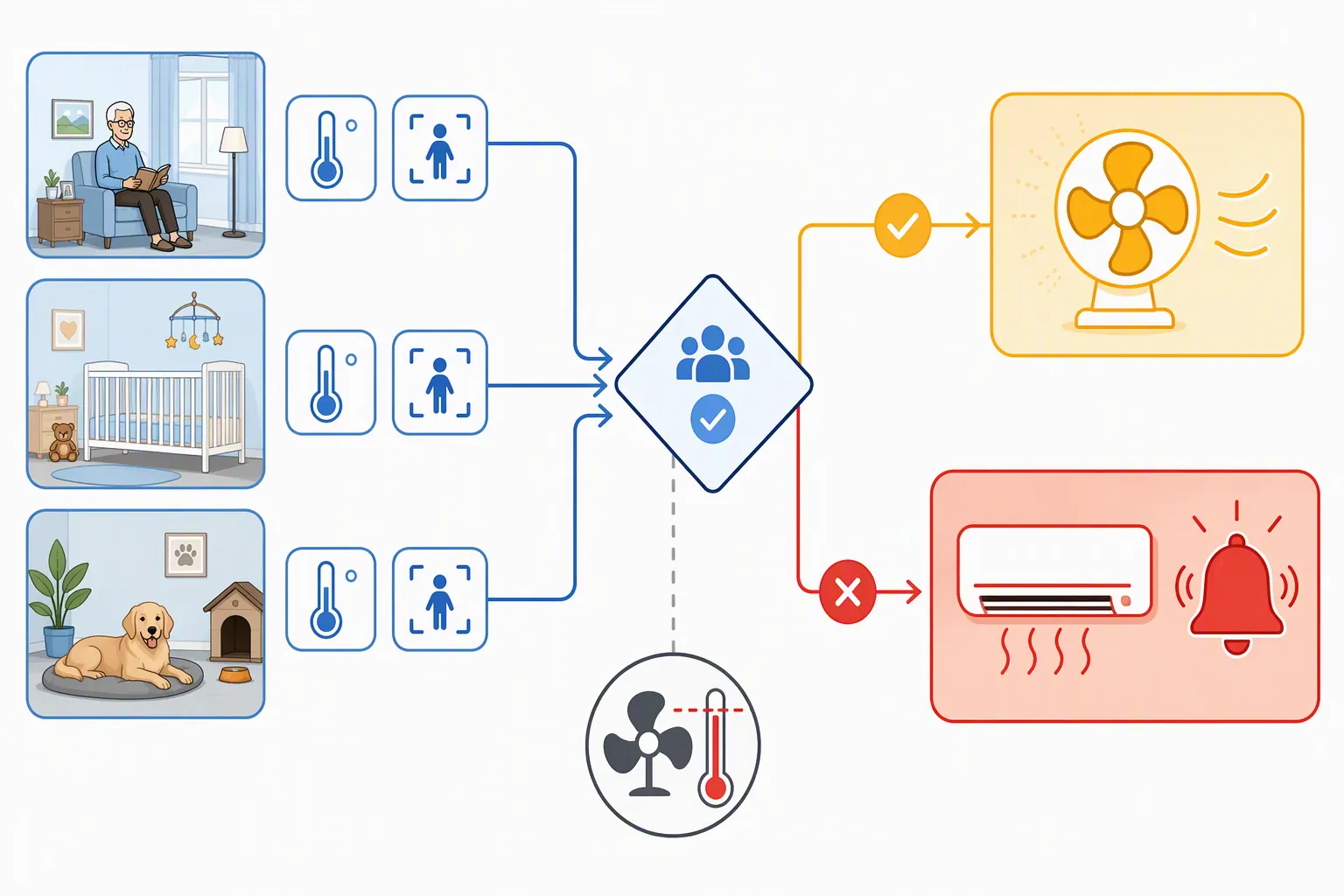
| State | Condition | Automation behavior | Human responsibility |
|---|---|---|---|
| Normal | Room is within the occupant-specific safe range, or occupancy is not confirmed | Keep logging temperature and humidity; do not trigger cooling just because the house is warm somewhere else | Check sensor placement and battery status during routine maintenance |
| Yellow | Occupied vulnerable room crosses the first heat threshold | Send a color-coded alert; recommend low-risk cooling actions; optionally start AC or a fan if the device is safe for that occupant | Someone verifies the room and the occupant, especially for infants, frail older adults, and confined pets |
| Red | Occupied vulnerable room crosses the higher heat threshold, continues rising, or remains hot after yellow actions | Send urgent alerts to the primary caregiver and backup contact; trigger AC if available; avoid unsafe fan behavior | A responsible person checks the occupant directly or arranges an immediate local check |
| Fan cutoff | Room reaches 104°F / 40°C or higher | Turn fan-only cooling off or prevent it from starting; prefer AC, relocation, or direct human intervention | Treat this as a situation requiring active response, not comfort tuning |
The fan cutoff is not optional decoration. WHO guidance says fans can help below 40°C / 104°F but can heat the body above that threshold, so a smart fan rule needs a hard stop rather than a simple “hotter room equals more fan” curve.[2]
Why the Room Matters More Than the Weather App
Outdoor warnings are still useful, but they are too blunt for vulnerable-room automation. A shaded downstairs bedroom, a west-facing nursery, and a pet room with the door closed can behave like three different houses. The automation should care about the room where the person or animal actually is.
That focus is especially important for older adults. The Ethos literature review notes that older adults spend up to 90% of their time indoors and that most heat fatalities occur in the home.[1] WHO also reports that heat-related mortality among people older than 65 increased by about 85% between 2000-2004 and 2017-2021, with an estimated 489,000 heat-related deaths annually worldwide.[2] For a household automation recipe, those facts point to one practical decision: measure the occupied room, not just the ZIP code.
If you already use NestGrid-style presence automations for elder care, the same basic idea applies here: occupancy has to be confirmed before the system decides what state the room is in. A motion sensor may miss someone asleep in a chair. A door sensor may know the nursery is closed but not whether the baby is in the crib. mmWave or bed/chair presence sensors can help in some rooms, and the elder-care presence approach in smart home elderly fall detection is relevant because heat safety depends on knowing whether someone is actually there.
Devices to Use, Without Turning This Into a Shopping Project
You need four device roles. Brand matters less than whether each role is reliable in the vulnerable room.
- Temperature and humidity sensor: place it near the occupant’s real breathing zone, away from direct sun, AC vents, radiators, humidifiers, and electronics that run hot.
- Presence signal: use room motion, mmWave, bed or chair occupancy, crib routine, door state, camera-based pet detection, or a manual “occupied” toggle when automation-grade sensing is not trustworthy.
- Cooling control: use a smart thermostat, IR controller for a mini-split or portable AC, smart plug for approved fans, or a smart relay only when the appliance is safe to automate.
- Alert channel: send yellow and red alerts to the person who can act, not just to the person who owns the hub.
Do not put a fan, portable AC, or smart plug into an automation until the appliance itself is safe for unattended use. A plug can remove power; it cannot make a cheap fan mechanically safe, keep a cord away from a crib, or guarantee that a portable AC drains correctly.
Copyable Platform-Agnostic Logic
Use variables instead of hard-coded universal temperatures. The Ethos study supports the older-adult alert model, but it does not provide one universal yellow or red temperature to copy into every home. For infants and pets, the numbers should be chosen even more carefully because this evidence comes from general care guidance, not a smart-home trial.
INPUTS
  room_temperature
  room_humidity
  room_occupied
  occupant_type = elderly | infant | pet
  cooling_available = ac | fan | both | none
  fan_safe_for_room = true | false
  caregiver_primary
  caregiver_backup

THRESHOLDS
  yellow_temp = occupant_specific_yellow_temperature
  red_temp = occupant_specific_red_temperature
  red_duration = occupant_specific_time_limit
  fan_cutoff = 104°F / 40°C

NORMAL MONITORING
  IF room_occupied is false:
    keep monitoring
    do not start cooling unless this room must be pre-cooled by schedule

YELLOW STATE
  IF room_occupied is true
  AND room_temperature >= yellow_temp
  AND room_temperature < red_temp:
    send yellow alert to caregiver_primary
    include room name, current temperature, humidity, and occupant type
    recommend immediate low-risk actions
    IF AC is available:
      start AC or lower setpoint within the household's safe range
    ELSE IF fan is available
      AND fan_safe_for_room is true
      AND room_temperature < fan_cutoff:
        start fan

RED STATE
  IF room_occupied is true
  AND (room_temperature >= red_temp OR yellow state lasts longer than red_duration):
    send red alert to caregiver_primary
    send red alert to caregiver_backup
    IF AC is available:
      start AC or set stronger cooling mode
    IF fan is running
      AND room_temperature >= fan_cutoff:
        turn fan off
    require human check-in or confirmed relocation

FAN CUTOFF
  IF room_temperature >= fan_cutoff:
    prevent fan-only cooling
    turn off automated fan rules
    send alert that fan-only cooling is unsafe at this room temperature
In Home Assistant, this becomes helpers, template sensors, automations, and notify actions. In Apple Home, Google Home, or Alexa, it becomes routines with temperature triggers, presence conditions where available, smart plug or thermostat actions, and notification steps. If your platform cannot express “occupied and hot for more than a set duration,” keep the alerting logic in the platform that can, then let the voice assistant handle the visible notification or appliance action.
For more appliance-specific examples, NestGrid’s smart fan automation recipe and Home Assistant heat-wave YAML recipes are better places to copy platform syntax. This recipe is the safety logic those automations should respect.
Elderly Rooms: Use the Evidence-Backed Pattern
For older adults, the Ethos trial gives this recipe its best footing. Participants were not just shown data; they received yellow and red warnings and acted on them at high rates.[1] The most-used cooling strategies were drinking more water, turning on a fan, using a hand bath, turning on AC, and removing clothing.[1] Those are exactly the kinds of actions an alert should suggest because they are familiar, concrete, and possible without turning the home into a laboratory.
| Automation piece | Elderly-room setting |
|---|---|
| Occupancy | Confirm with chair, bed, room presence, motion plus recent activity, or a caregiver-set occupied mode. Do not assume the whole home is occupied because one sensor fired. |
| Yellow alert | Send a calm warning with room name, temperature, humidity, and suggested actions such as drink water, reduce clothing layers, close blinds, start approved fan below the cutoff, or start AC. |
| Red alert | Notify the primary and backup caregiver. Require acknowledgement or a direct check. Start AC where available. |
| Fan logic | Allow fan automation only below 104°F / 40°C and only when the fan is safe for the room. |
| Escalation | If the older adult does not acknowledge the alert, send it to the caregiver who can call, visit, or ask a neighbor to check. |
Privacy deserves a small but real note here. In the Ethos design, no participant data was sent via Wi-Fi; the transmitted sensor metadata was limited to sensor ID, room name, temperature, and humidity over WPA2/HTTPS.[1] A home recipe does not need to copy that architecture exactly, but it should copy the restraint. For heat alerts, the caregiver usually needs room, temperature, humidity, alert level, and acknowledgement status. They do not need a constant feed of private activity unless the care plan explicitly requires it.
If you are configuring heat alerts for someone living separately, pair this recipe with a remote-caregiver path such as heat alerts for elderly caregivers or the troubleshooting playbook for elderly heat dome automations. The alert is only useful if it reaches someone who can intervene.
Infant Rooms: Treat Thresholds as Conservative Household Rules
The infant version should borrow the room-monitoring pattern, not the older-adult evidence. The Ethos study does not tell us what nursery threshold is safe for a baby under 12 months. Set yellow and red values from pediatric guidance you already follow, your clinician’s advice when relevant, and the specific room’s behavior during heat events.
A nursery automation should be more cautious about unattended appliance control than an adult bedroom automation. A fan may be useful in some rooms, but the automation still has to respect cord placement, tip-over risk, airflow direction, noise, and whether the device is approved for use around a crib. If there is any doubt, make the yellow state alert-only and reserve automated cooling for a central AC, mini-split, or other appliance already considered safe for that nursery.
| Nursery rule | Recommended behavior |
|---|---|
| Occupancy | Use a manual sleep-mode toggle, crib routine, nursery door state, or caregiver confirmation. Do not rely on ordinary motion alone for a sleeping infant. |
| Yellow | Alert the caregiver that the nursery has exceeded the household’s infant heat threshold. Include current temperature and humidity, but avoid alarm wording unless the red rule is met. |
| Cooling | Prefer safe whole-room cooling. If using a fan, require fan-safe-for-nursery = true and keep the 104°F / 40°C cutoff. |
| Red | Notify all on-duty caregivers and require a direct room check. If the nursery keeps warming after cooling starts, the automation should not quietly retry forever. |
| Recovery | Send a resolved notification only after the room returns below the yellow threshold for a short stability period, so caregivers know the room actually recovered. |
For a practical setup, place one sensor near the crib’s general sleep zone but out of reach, then compare it against the thermostat reading during a hot afternoon and an overnight period. Nurseries often surprise people because the room can lag behind the hallway thermostat or heat up after the rest of the house feels comfortable.
Pet Rooms: Occupancy and Appliance Safety Matter More Than Elegance
Pet automations need their own rules because a pet-safe automation is not just a comfort automation with a lower threshold. A dog in a crate, a cat in a sun-facing room, or an older pet confined while recovering from surgery cannot open a door, move to the basement, refill water, or tell you the room is wrong.
Again, the Ethos study does not establish pet thresholds. Treat pet yellow and red values as veterinarian-informed household rules, and set them more conservatively for short-nosed breeds, older animals, overweight pets, animals with heart or respiratory disease, very young animals, and pets confined to crates or small rooms.
| Pet-room rule | Recommended behavior |
|---|---|
| Occupancy | Use a pet camera, room motion pattern, crate-area sensor, door state, or manual away-mode toggle. If the pet is known to be confined, treat the room as occupied. |
| Yellow | Send an alert with the room name and pet type. Start approved cooling only if the appliance cannot be knocked over, chewed, blocked, or trapped against the animal. |
| Water reminder | Include a reminder to verify water availability. A smart bowl can help, but a heat alert should still assume a human may need to check. |
| Red | Notify the owner and backup contact. If nobody can respond remotely, the alert should name the local person who can enter the home. |
| Fan cutoff | Use the same 104°F / 40°C fan-only cutoff. Above that point, the automation should not pretend air movement is adequate cooling. |
The common failure is assuming that a fan automation is harmless because the pet likes the fan on normal days. During extreme heat, the automation needs to know whether the fan is helping, whether AC is available, and whether the room has crossed the fan cutoff. If the house has no safe automated cooling, the red state should be an urgent human-response alert, not a loop that keeps toggling a plug.
Set the Yellow and Red Thresholds
Because there are no universal numeric room thresholds for each occupant type, the safest copyable pattern is to define the thresholds deliberately instead of pretending one chart fits every home.
| Occupant | Yellow should mean | Red should mean | Evidence status |
|---|---|---|---|
| Older adult | The occupied room is hot enough that the person should take heat-preparedness actions and the caregiver may need to check in | The occupied room is hot enough, or has stayed hot long enough, that direct action or caregiver escalation is required | Alert model supported by the Ethos older-adult study; local threshold values still need household and climate tuning |
| Infant under 12 months | The nursery is outside the caregiver’s pediatric-guidance comfort range and needs prompt attention | The nursery remains too hot, rises further, or does not recover after safe cooling starts | Extrapolated from general infant heat-safety guidance, not established by Ethos |
| Pet | The pet’s occupied or confined room is warmer than the veterinarian-informed household limit | The room is unsafe for continued confinement without direct check, relocation, or stronger cooling | Extrapolated from general veterinary heat-risk guidance, not established by Ethos |
Do not make yellow and red too close together if that causes alert fatigue. Do not make them so far apart that yellow becomes decorative. A useful yellow alert gives a tired caregiver time to act before the room becomes urgent. A useful red alert is rare enough to be taken seriously and specific enough to say what happens next.
Humidity belongs in the notification even when your first version triggers only on temperature. It changes how the room feels and helps the caregiver judge whether a fan, AC, dehumidification, relocation, or direct check is the next sensible move. If your platform supports combined heat rules, test them carefully; if it does not, keep humidity visible in the alert rather than hiding it in a dashboard nobody opens at 2 a.m.
Escalation Rules That Someone Can Actually Follow
The automation should never end with “notification sent” if nobody is responsible for the next move. Yellow can go to the on-duty caregiver. Red should go to the on-duty caregiver and a backup. If the vulnerable person lives alone, the backup should be someone local enough to check the room or arrange help.
ALERT MESSAGE TEMPLATE

YELLOW:
  Heat safety yellow alert: {room_name} is {temperature} with {humidity} humidity.
  Occupant: {occupant_type}.
  Suggested next step: check room, start safe cooling, offer water if appropriate, or relocate if needed.

RED:
  Heat safety red alert: {room_name} is {temperature} with {humidity} humidity.
  Occupant: {occupant_type}. Occupancy is confirmed.
  Action required: direct check or confirmed relocation. AC command sent: {yes/no}. Fan disabled by cutoff: {yes/no}.
For older adults, include a gentle acknowledgement path when possible: “I am cooling the room,” “I am drinking water,” or “Please call me.” In Ethos, older adults acted on alerts at high rates, which is one reason this kind of system feels practical rather than speculative.[1] For infants and pets, acknowledgement comes from the caregiver, not the occupant.
Test It Before the Heat Event
Testing is where many smart-home safety automations either become useful or become theater. Run the recipe with temporary low thresholds on a normal day so you can see every state without waiting for dangerous heat.
- Trigger yellow and confirm the right person receives the alert with room name, temperature, humidity, and occupant type.
- Trigger red and confirm the backup contact receives it without depending on the primary caregiver’s phone being awake.
- Verify that AC starts when commanded and that the room temperature actually begins to fall.
- Verify that fan-only cooling is blocked at 104°F / 40°C and above.
- Turn off Wi-Fi or unplug the hub briefly and check what failure alert, if any, reaches the caregiver.
- Replace any “assumed occupied” rule that creates false confidence with a manual toggle or better sensor.
If you already use a broader heat playbook such as extreme heat safety automations or extreme heat watch vs warning automation, keep this vulnerable-room recipe separate. Weather-triggered pre-cooling is useful, but the room-level yellow/red system should still be able to fire when the forecast missed the problem or one room behaves badly.
What to Build Today
Pick the vulnerable rooms first: the recliner or bedroom used by an older adult, the nursery, the pet room, the crate area, or the room that always runs hotter than the thermostat claims. Put the sensor where the occupant spends time. Add an occupancy signal you trust. Define yellow and red thresholds separately for elderly, infant, and pet spaces. Add the fan cutoff. Send alerts to people who can act. Then test the whole path while the stakes are low.
A smart home is not a medical device and it cannot replace caregiver checks. It can, however, stop treating heat as a whole-house average and start watching the rooms where vulnerable people and animals actually are.
References
- A digital heat early warning system for older adults, npj Digital Medicine, 2025.
- Climate change: Heat and health, World Health Organization.