
Set Up a DeepSeek V4 Coding Agent for Home Assistant YAML
Run DeepSeek V4 as a Home Assistant coding agent through OpenCode or Claude Code: it drafts against a staged config, validates every change with `hass --script check_config`, then deploys with a git rollback path — so a hallucinated automation never reaches your live instance. The trust sits in that validation loop, not in the model.
The failure to design around is not dramatic. It is an automation that looks right at 11:40 p.m., gets pasted into a live Home Assistant config, reloads cleanly enough to seem harmless, and then forgets one condition that kept a lock, light, charger, or load-shedding routine from doing something stupid. A DeepSeek V4 coding agent home automation setup can help draft the YAML, chase entity names through a large config, and explain why an automation is malformed. It should not be allowed to operate on the live house.
The workable version is narrower and much safer: connect DeepSeek V4 to OpenCode or Claude Code, point the agent at a staged copy of the Home Assistant configuration, make it edit only that copy, run hass --script check_config after every change, inspect the git diff, then deploy only when there is a rollback path. The model is the YAML copilot. The loop around it is the safety system.
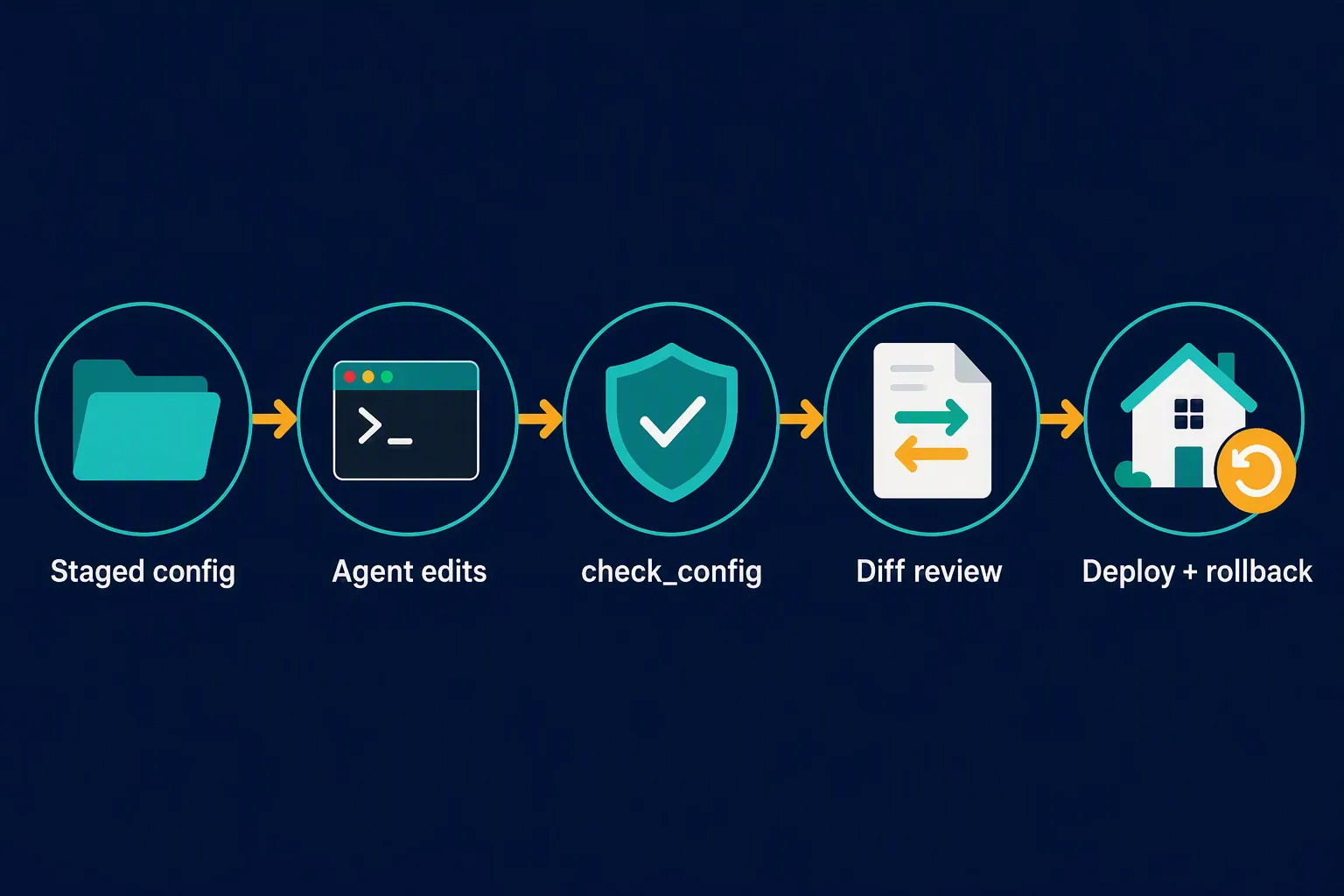
Connect DeepSeek V4 as the terminal agent
There are two official API-side paths worth using here. The OpenCode path is the simpler one if you already use OpenCode: run /connect, choose the DeepSeek provider, enter the API key, and select V4-Pro; DeepSeek recommends OpenCode v1.14.24 or later for this integration. The Claude Code path uses DeepSeek’s Anthropic-compatible endpoint, with V4-Pro as the main model and V4-Flash for the smaller/Haiku-style role. [1][2]
# Claude Code route using DeepSeek's Anthropic-compatible endpoint
export ANTHROPIC_BASE_URL=https://api.deepseek.com/anthropic
export ANTHROPIC_AUTH_TOKEN=<your_deepseek_api_key>
export ANTHROPIC_MODEL=deepseek-v4-pro[1m]
export ANTHROPIC_SMALL_FAST_MODEL=deepseek-v4-flash
export CLAUDE_CODE_EFFORT_LEVEL=max

claude
For Home Assistant work, V4-Pro is the default choice for config-wide edits because the task usually involves reading existing automations, helpers, scripts, scenes, dashboards, and naming conventions before writing anything. V4-Flash is useful for cheaper subagent work, quick file lookup, and smaller refactors. Either way, this recipe uses the hosted DeepSeek API route. It is not a local Home Assistant deployment recipe.
Put a staging directory between the agent and the house
The agent should work in a directory that can be deleted, reset, and compared. That directory can be a git checkout, a synced copy from the Home Assistant host, or a local folder produced by your own backup process. It should contain enough context for the model to make good edits: configuration.yaml, included YAML files, automations, scripts, scenes, packages if you use them, and the relevant entity registry snapshot. It should not contain credentials the agent does not need.
# Example staging copy. Adjust host, path, and excludes for your install.
mkdir -p ~/ha-v4-staging
rsync -az --delete \
  --exclude='.storage/auth*' \
  --exclude='secrets.yaml' \
  homeassistant:/config/ ~/ha-v4-staging/

cd ~/ha-v4-staging
git status
That staging boundary is the difference between “the model made a bad suggestion” and “the house just accepted a bad suggestion.” Oakley Hall’s published Home Assistant AI workflow uses the same production-scale shape: sync configuration over SSH, give the agent an instruction file, keep version-controlled snapshots for rollback, then push/reload only after review. [3]
If you already use an AI assistant only as a planning coach, the boundary is similar to the one in NestGrid’s Gemini Gem Home Assistant automation coach approach: the assistant may draft and explain, but it does not get the authority to change the live system.
Give the agent rules before it sees the files
An instruction file is not decoration. It is where you make the working boundary explicit. Put it in the staging directory before starting OpenCode or Claude Code, then make the agent read it first.
# AGENTS.md

You are editing a staged copy of a Home Assistant configuration.

Hard rules:
- Do not write to the live Home Assistant host.
- Do not assume entity IDs. Search the staged files first.
- Prefer minimal YAML changes over broad rewrites.
- After every proposed edit, tell me which files changed and why.
- Do not deploy. Do not reload Home Assistant. Do not call services.
- The change is not accepted until `hass --script check_config` passes and I review the git diff.

Home Assistant conventions in this repo:
- Keep automations in `automations.yaml` unless an existing package owns the feature.
- Preserve existing aliases, IDs, and comments unless the change requires otherwise.
- If an entity is missing or ambiguous, stop and ask instead of inventing one.
The long context window is useful only if the agent is reading the right material. A single pasted automation request encourages guessing. A staged config with entity names, existing automation style, helper naming, and package structure lets V4 search before it writes. That does not make it correct; it reduces the number of places where it has to invent.
Make check_config the hard gate
Home Assistant provides hass --script check_config to validate configuration.yaml without restarting Home Assistant. The same tool supports --json output and --fail-on-warnings for stricter runs. [4]
# Run from the staged config directory, or pass the staged config path explicitly.
hass --script check_config --config .

# Stricter machine-readable run for agent loops or CI-style checks.
hass --script check_config --config . --json --fail-on-warnings
Do not save this for the end of the session. Run it after each proposed change while the diff is still small. If the agent edits one automation and the config check fails, the search area is one change. If it edits automations, scripts, helpers, packages, and dashboard YAML before the first validation run, the human becomes the recovery tool.
A passing config check is not proof that the automation expresses the household rule correctly. It is a hard syntax and configuration gate. It can catch broken YAML, invalid integration configuration, missing structure, and warnings if you choose to fail on them. It cannot know that “after sunset” should have been “after civil dusk,” or that a battery routine should skip during a storm watch. That judgment stays with the person reviewing the diff.
Review the diff like the agent is talented and tired
After the check passes, the next command is not deploy. It is git diff.
git diff -- configuration.yaml automations.yaml scripts.yaml scenes.yaml packages/

git status --short
The review is where you look for the mistakes a validator will not classify as mistakes: a changed entity ID that belongs to the wrong room, a trigger that fires too often, a missing household exception, an automation ID rewritten without need, a broad refactor hiding inside a small request, or a service call that affects more devices than the request intended.
For recipes with real consequences, use the diff to walk the chain in plain language: what starts it, what conditions stop it, what action runs, what device or helper changes, and what restores the normal state. This matters most in automations like power outage routines, grid emergency load shedding, and other YAML that can affect comfort, safety, or energy costs.
Deploy only when rollback is already boring
Before copying anything back to Home Assistant, commit the known-good staged state. A bad automation should be a reversible git event, not a scavenger hunt through last night’s terminal scrollback.
# In the staging directory, after check_config and diff review pass.
git add configuration.yaml automations.yaml scripts.yaml scenes.yaml packages/
git commit -m "Add evening garage light automation"

# Deploy with your normal copy/sync process only after the commit exists.
# Example shape; adjust paths and exclusions for your setup.
rsync -az --delete ~/ha-v4-staging/ homeassistant:/config/
The rollback command should be known before the deploy command is run. That may mean reverting the commit in staging and syncing again, restoring a Home Assistant backup, or using whatever version-controlled snapshot process already fits the install. The important part is that rollback is not invented while someone else is asking why the lights are stuck on.
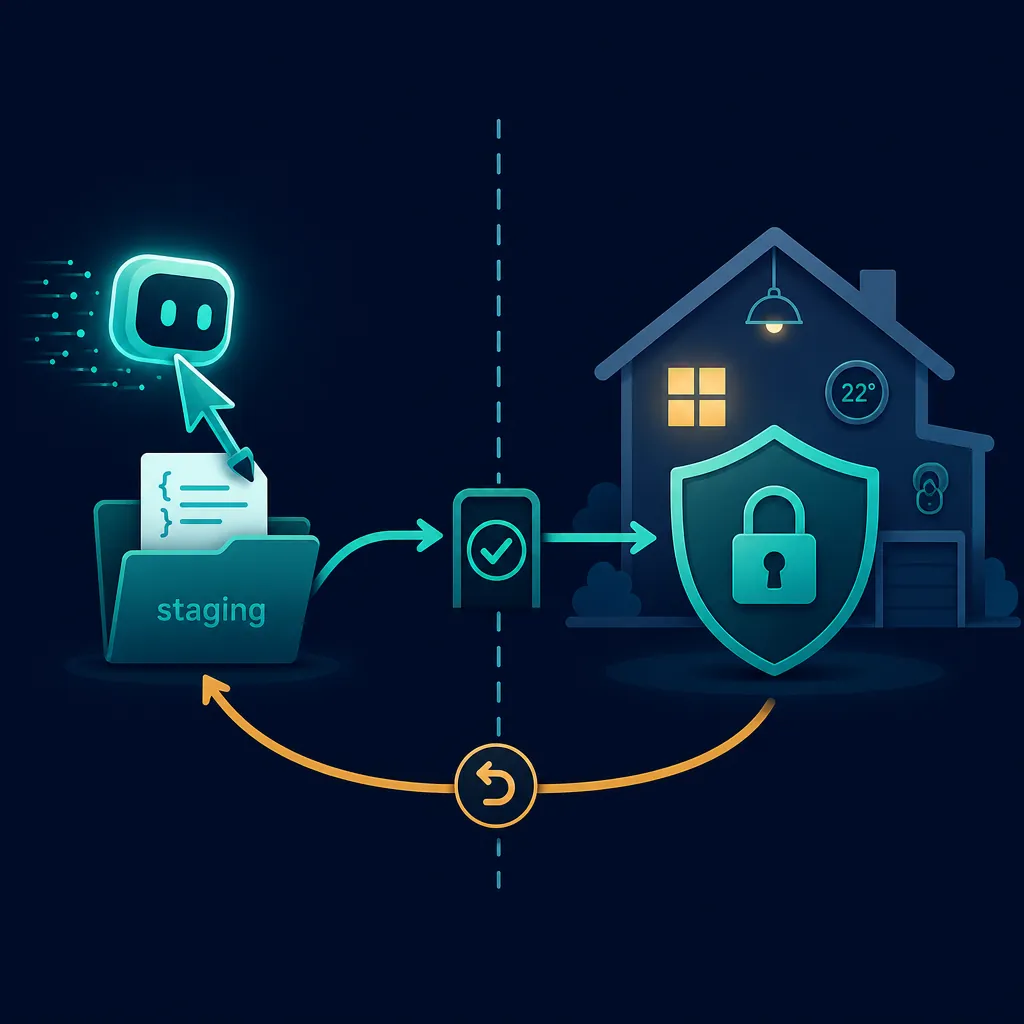
The verification status of each layer
| Layer | Status | How to treat it |
|---|---|---|
| DeepSeek through OpenCode or Claude Code | Confirmed | Use the official provider flow or Anthropic-compatible environment variables; re-check model IDs before relying on an old shell profile. |
| Staged config plus AGENTS.md constraints | Workaround | A practical safety pattern, not a Home Assistant permission system. It works because the agent is kept away from the live directory. |
| hass --script check_config | Confirmed | Make it mandatory after every edit. Use --json and --fail-on-warnings when you want stricter, repeatable checks. |
| Model quality and benchmark claims | Investigating | Useful directional evidence, not permission to skip validation. |
| Deploy and rollback | Workaround | Use git, backups, or your existing snapshot process so a bad change can be reversed quickly. |
Why DeepSeek V4 is worth considering at all
The practical appeal is not a vague “AI smart home” promise. It is context and price. DeepSeek’s official pricing page, checked on 2026-08-01, lists both V4-Flash and V4-Pro with a 1M-token context window and 384K maximum output. Official list pricing is $0.28 per 1M output tokens for V4-Flash and $0.87 per 1M output tokens for V4-Pro, with lower cached-input rates than cache-miss input rates. [5]
| Model | Best fit in this workflow | Official list pricing checked 2026-08-01 |
|---|---|---|
| deepseek-v4-pro[1m] | Main Home Assistant coding agent for config-wide reading and edits | $0.435/1M input cache miss, $0.003625/1M input cache hit, $0.87/1M output; 1M context, 384K max output, 500 concurrency |
| deepseek-v4-flash | Cheaper small-model/subagent work and quick lookups | $0.14/1M input cache miss, $0.0028/1M input cache hit, $0.28/1M output; 1M context, 384K max output, 2500 concurrency |
That pricing changes the feel of terminal-agent work for ordinary Home Assistant power users. A large staged config can be read without treating every prompt like an expensive event. The cost risk does not disappear, especially if the agent loops or writes verbose reasoning, but the bigger risk in this use case is still a bad change reaching the live system.
Use DeepSeek’s official page as the price source for this setup. Other providers and reviews quote different rates, and API pricing changes quickly. If the exact monthly cost matters, re-check the provider you will actually use before wiring it into a long-running workflow.
What the benchmarks do and do not change
The dated quality evidence is good enough to justify trying V4 in a guarded workflow, not good enough to remove the guard. Thomas Wiegold’s DeepSeek V4 review describes V4-Pro as “competent on everything, outstanding on nothing,” notes hallucination when uncertain, and reports that it can burn 4–5x median output tokens on agentic work. The same review discusses an AA-Omniscience uncertainty result around 94%, which is exactly the kind of finding that should make a Home Assistant workflow tighter rather than more trusting. [6]
The benchmark picture is also directional, not a house rule. Wiegold and Ollama’s V4-Pro page put V4-Pro near Claude Opus 4.6 on SWE-bench Verified, with figures of 80.6% versus 80.8%, while trailing on SWE-bench Pro at about 55% versus 64.3%. [6][7]
Those numbers may matter if you are choosing a coding-agent model. They do not tell you whether a new garage-light automation respects the people who live in the house. For that, the model has to write into staging, the config has to validate, and the diff has to survive a human reading.
A compact runbook
- Create or refresh a staged copy of the Home Assistant configuration. Include the YAML and entity context the agent needs; exclude credentials it does not need.
- Start OpenCode with the DeepSeek provider or Claude Code with the DeepSeek Anthropic-compatible environment variables.
- Place AGENTS.md in the staged directory and require the agent to follow it before editing.
- Ask for one bounded change at a time: a new automation, a refactor of one package, or a fix for one validation error.
- Run hass --script check_config --config . after every proposed edit; add --json and --fail-on-warnings when you want stricter checks.
- Inspect git diff before deploy. Look for entity assumptions, broadened triggers, missing conditions, and unnecessary rewrites.
- Commit the accepted staged state before copying it back to Home Assistant.
- Deploy only when rollback is already tested or at least clearly documented.
Under those conditions, DeepSeek V4 is a useful Home Assistant YAML copilot. If it writes only to staging, every change passes check_config, the diff is reviewed, and git can put the files back, the model’s mistakes become ordinary review work. Without that loop, it is just a confident text generator sitting too close to a live house.
References
- Integrate with AI Tools, DeepSeek API Docs
- OpenCode integration, DeepSeek API Docs
- Using AI to Configure Home Assistant, Medium, 2025-12-26
- check_config, Home Assistant Docs
- Models & Pricing, DeepSeek API Docs
- DeepSeek V4 Review, Thomas Wiegold
- deepseek-v4-pro, Ollama