
Automate Power Outage Load Shedding with Home Assistant
A copyable Home Assistant automation blueprint that detects grid emergencies via utility meter, UPS, or mains-loss sensors and automatically sheds non-critical loads to extend essential device runtime. Includes recovery automation with staggered reconnection delays to prevent inrush surges.
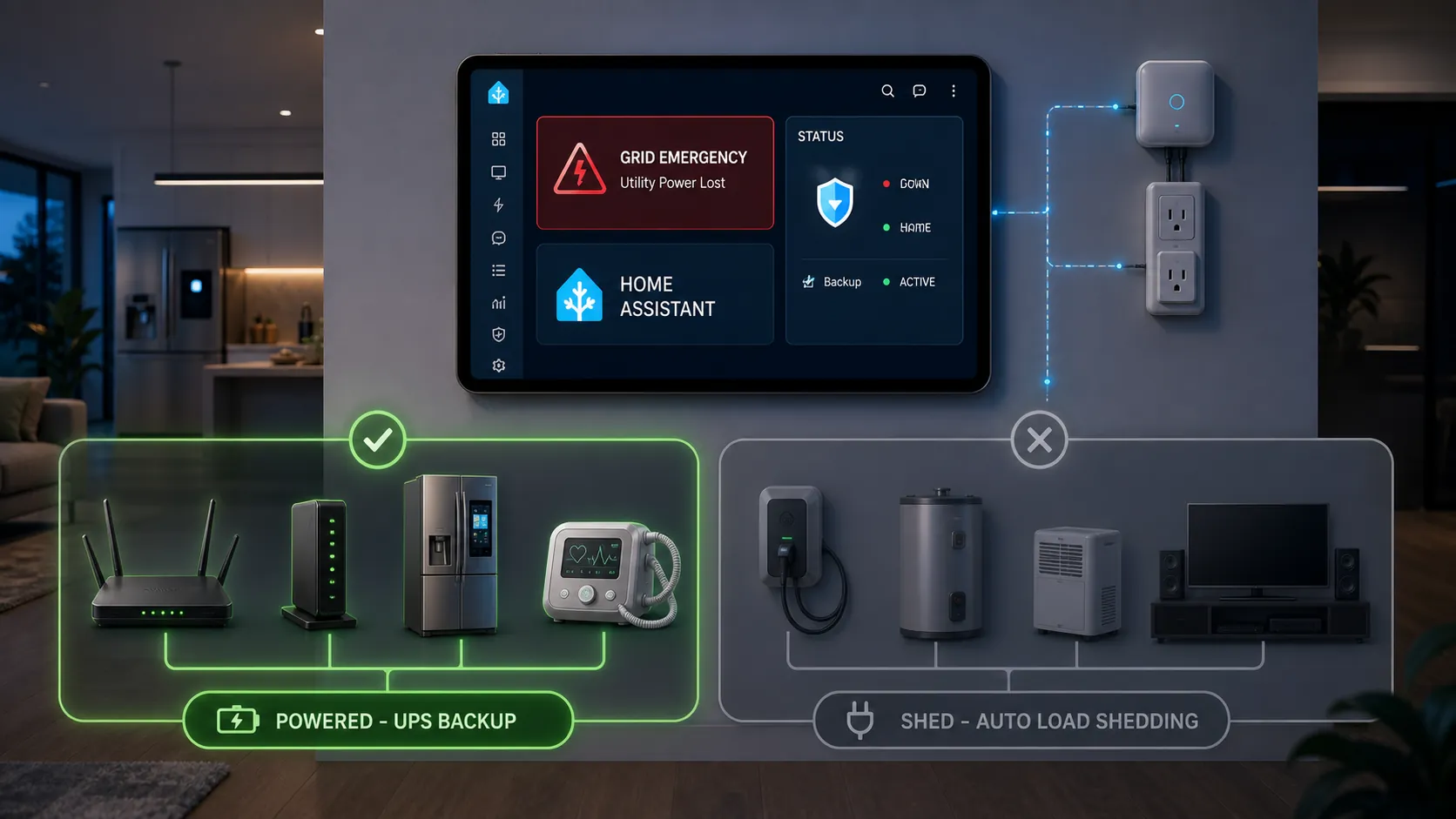
Smart home energy management during a power grid emergency only matters if the house can still make decisions after utility power gets ugly. The Home Assistant box, router, modem, Zigbee or Z-Wave coordinator, and the sensor that notices the outage need to be on a UPS. If those devices die first, the automation becomes a neat YAML file that never runs.
The current grid context is not hypothetical. During the July 2026 heat-wave emergency window, PJM was reported with a 166 GW peak forecast and emergency Section 202(c) actions in the mix; because those orders are time-sensitive, verify the live DOE order page before publishing or acting on the specific regulatory details.[1][2] The practical household question is narrower: when the grid drops or your UPS reports battery discharge, which relay turns off, which device stays alive, and how does the house recover without all the loads slamming back on together?
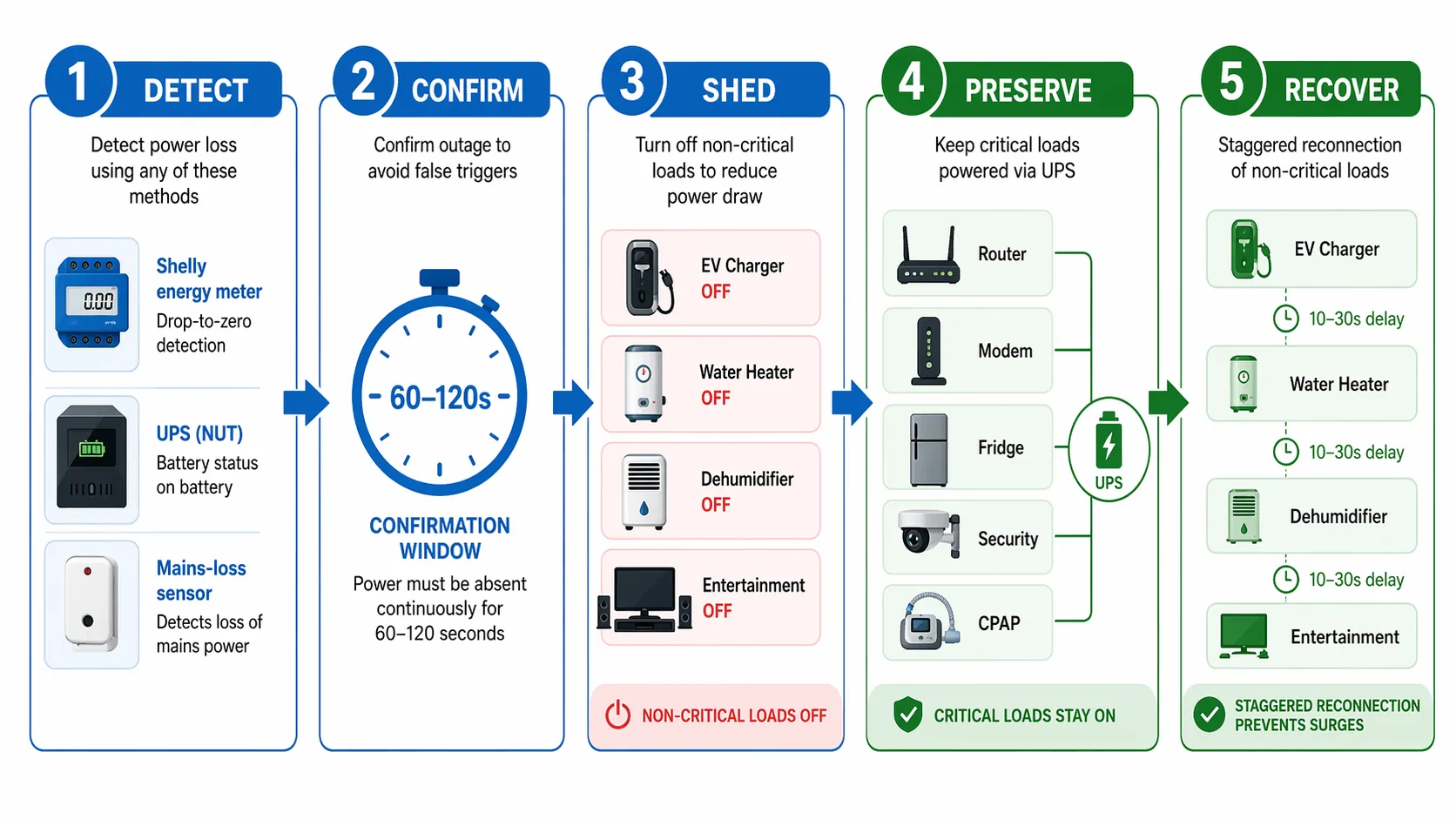
The operating model: detect, confirm, shed, preserve, recover
This recipe is for an intermediate Home Assistant setup with smart relays or smart plugs already assigned to known loads. It does not automate unlabeled circuits. It does not guess whether an outlet is safe to turn off. It assumes you have already walked the house, labeled plugs, and separated essential equipment from convenience equipment.
| Tier | Examples | Automation rule |
|---|---|---|
| Must-run | Home Assistant host, router, modem, network switch, Zigbee/Z-Wave coordinator, security hub, refrigerator, CPAP or medical devices | Do not include these in any shed target. Keep the controller and network on UPS. |
| Deferred | EV charger, water heater, dehumidifier, pool pump, non-urgent laundry circuits | Turn these off first when grid loss is confirmed. Restore only if you are comfortable with automatic restart. |
| Comfort-only | Entertainment zone, ambient lighting, game console, non-essential office outlets | Turn these off during the event. Restore later, staggered, or leave manual. |
The 40–60% runtime-extension claim only makes sense when it is tied to that table. If a UPS-backed or critical-power budget is carrying non-critical draw, shedding that draw extends runtime. The arithmetic is simple: runtime improvement is roughly old load divided by new load, minus one. A 40–60% improvement means the shed loads were a meaningful share of the original protected draw. It is not a promise that every home gets that gain by installing one smart plug.
Residential load is still large enough to matter. ecobee reports demand-response peak reductions exceeding 1 kW per device and an average reduction of 0.65 kW per device during events, which is useful evidence that thermostats and homes can participate in grid relief.[3] Treat those figures as vendor-reported demand-response data, not proof that this Home Assistant blueprint will reproduce the same reduction in every climate, floor plan, or equipment mix.
Choose the outage signal before you copy the blueprint
The automation below wants one binary sensor: on means “grid emergency probably active,” off means “grid power has been stable again.” How you build that binary sensor matters more than the wording of the notification.
| Detection method | Why use it | Caveat |
|---|---|---|
| Shelly EM/3EM or similar meter drop-to-zero | It observes the electrical service or measured feed directly. Shelly’s own load-shedding documentation is built around measured power and relay action, which makes this the strongest path when installed correctly.[4] | Do not base the outage sensor on a branch circuit that your automation will later turn off. Watch the service, mains voltage, or a feed that remains representative of grid state. |
| UPS NUT status | A CyberPower or APC UPS exposed through NUT can report status changes such as online to on-battery/discharging; Home Assistant community users commonly use this to detect outages from the protected system’s point of view.[5][6] | It confirms the protected equipment is on battery. It may not distinguish a whole-house outage from a local UPS input issue unless paired with another signal. |
| Ring Alarm Range Extender v2 or Zooz ZAC38 mains-loss event | A mains-powered sensor with battery backup can report a transition from mains to battery. Community users have used this as a lower-cost outage detector.[7] | Treat this as community-verified, not guaranteed. The Ring Range Extender v2 has reported driver Refresh issues and may need direct, unrouted pairing behavior depending on the hub and mesh. |
If you can use two signals, do it. A meter says the house service disappeared; the UPS says the protected brain of the house is actually discharging. That combination catches more real failure modes than a cloud alert or a utility email. A single mains-loss sensor is acceptable for a budget build, but it should be tested from the exact outlet and mesh route it will use during an outage.
Create one binary sensor for “grid emergency detected”
The cleanest setup is to normalize your chosen detectors into one template binary sensor. Edit the entity IDs and remove the methods you do not have. The blueprint will add the confirmation window, so this sensor can be immediate.
template:
  - binary_sensor:
      - name: "Grid down from UPS"
        unique_id: grid_down_from_ups
        device_class: problem
        state: >
          {% set s = states('sensor.ups_status') %}
          {{ 'OB' in s or 'DISCHRG' in s or 'On Battery' in s }}

      - name: "Grid down from Shelly meter"
        unique_id: grid_down_from_shelly_meter
        device_class: problem
        state: >
          {{ states('sensor.shelly_em_total_active_power') | float(999999) < 1 }}

      - name: "Grid down from mains loss sensor"
        unique_id: grid_down_from_mains_loss_sensor
        device_class: problem
        state: >
          {{ is_state('binary_sensor.ring_range_extender_mains_lost', 'on')
             or is_state('binary_sensor.zooz_zac38_mains_lost', 'on') }}

      - name: "Grid emergency detected"
        unique_id: grid_emergency_detected
        device_class: problem
        state: >
          {{ is_state('binary_sensor.grid_down_from_ups', 'on')
             or is_state('binary_sensor.grid_down_from_shelly_meter', 'on')
             or is_state('binary_sensor.grid_down_from_mains_loss_sensor', 'on') }}
A meter threshold of less than 1 W is only a placeholder. If your utility meter, CT clamp, inverter, or Shelly device exposes voltage, use the signal that best represents utility availability in your installation. Solar, batteries, subpanels, and transfer switches can make a simple power-below-threshold rule lie.
Copyable Home Assistant blueprint
Save this as a blueprint, for example: /config/blueprints/automation/nestgrid/grid_emergency_load_shed.yaml. Then create an automation from it and point the outage sensor to binary_sensor.grid_emergency_detected.
blueprint:
  name: Grid Emergency Load Shedding with Staggered Recovery
  description: >
    Detects a confirmed grid emergency, sheds non-critical loads, preserves UPS-backed
    essentials, and restores selected loads with staggered delays after recovery.
  domain: automation
  input:
    grid_outage_sensor:
      name: Grid emergency binary sensor
      description: Binary sensor that turns on when grid loss or emergency state is detected.
      selector:
        entity:
          domain: binary_sensor

    confirm_seconds:
      name: Outage confirmation window
      description: Wait this long before shedding loads to avoid false trips from flickers.
      default: 90
      selector:
        number:
          min: 60
          max: 120
          unit_of_measurement: seconds
          mode: slider

    recovery_confirm_seconds:
      name: Recovery confirmation window
      description: Grid must be back for this long before restoration begins.
      default: 120
      selector:
        number:
          min: 60
          max: 300
          unit_of_measurement: seconds
          mode: slider

    shed_deferred_loads:
      name: Deferred loads to shed first
      description: EV charger, water heater, dehumidifier, pool pump, or other non-critical heavy loads.
      default: {}
      selector:
        target:
          entity:
            domain:
              - switch
              - light

    shed_comfort_loads:
      name: Comfort-only loads to shed second
      description: Entertainment zone, ambient lighting, non-essential outlets.
      default: {}
      selector:
        target:
          entity:
            domain:
              - switch
              - light

    restore_tier_1:
      name: Restore tier 1
      description: Loads safe to restore first. Leave empty for manual recovery.
      default: {}
      selector:
        target:
          entity:
            domain:
              - switch
              - light

    restore_tier_2:
      name: Restore tier 2
      description: Loads safe to restore after the first stagger delay.
      default: {}
      selector:
        target:
          entity:
            domain:
              - switch
              - light

    restore_tier_3:
      name: Restore tier 3
      description: Loads safe to restore after the second stagger delay.
      default: {}
      selector:
        target:
          entity:
            domain:
              - switch
              - light

    stagger_seconds:
      name: Stagger delay between load groups
      description: Delay between restoration groups to reduce simultaneous inrush.
      default: 20
      selector:
        number:
          min: 10
          max: 30
          unit_of_measurement: seconds
          mode: slider

    notify_service:
      name: Notification service
      description: Use notify.notify, notify.mobile_app_your_phone, or another Home Assistant notify service.
      default: notify.notify
      selector:
        text:

mode: restart
max_exceeded: silent

trigger:
  - id: outage_confirmed
    platform: state
    entity_id: !input grid_outage_sensor
    to: "on"
    for:
      seconds: !input confirm_seconds

  - id: recovery_confirmed
    platform: state
    entity_id: !input grid_outage_sensor
    to: "off"
    for:
      seconds: !input recovery_confirm_seconds

action:
  - choose:
      - conditions:
          - condition: trigger
            id: outage_confirmed
        sequence:
          - service: !input notify_service
            data:
              title: "Grid emergency confirmed"
              message: "Shedding deferred and comfort-only loads. Critical loads are not in the shed targets."

          - service: switch.turn_off
            target: !input shed_deferred_loads

          - delay:
              seconds: !input stagger_seconds

          - service: homeassistant.turn_off
            target: !input shed_comfort_loads

          - service: !input notify_service
            data:
              title: "Load shedding complete"
              message: "Deferred and comfort-only load commands have been sent. Check UPS runtime and critical devices."

      - conditions:
          - condition: trigger
            id: recovery_confirmed
        sequence:
          - service: !input notify_service
            data:
              title: "Grid recovery confirmed"
              message: "Beginning staggered restoration for selected loads only."

          - delay:
              seconds: !input stagger_seconds

          - service: homeassistant.turn_on
            target: !input restore_tier_1

          - delay:
              seconds: !input stagger_seconds

          - service: homeassistant.turn_on
            target: !input restore_tier_2

          - delay:
              seconds: !input stagger_seconds

          - service: homeassistant.turn_on
            target: !input restore_tier_3

          - service: !input notify_service
            data:
              title: "Staggered recovery complete"
              message: "Selected loads have been restored. Verify high-draw appliances before leaving them unattended."
The confirmation window is deliberately boring. Community power-outage discussions commonly recommend waiting 60–120 seconds before taking major action so a flicker or short flap does not trigger unnecessary shutdowns.[8] The default above is 90 seconds. Use 60 seconds if your UPS runtime is tight and your detector is reliable. Use 120 seconds if your area has frequent momentary drops.
Recovery is staggered for the same reason. When power returns, compressors, chargers, power supplies, pumps, and heaters can all demand current at once. A 10–30 second delay between restoration tiers follows the same practical pattern used in Home Assistant outage automation examples that avoid immediate full-load reconnection.[9]
How to assign loads without making the house less safe
Start with the must-run list, not the fun automations. The Home Assistant host, router, modem, coordinator, and outage detector need to be on UPS. If the security hub, refrigerator controls, CPAP, oxygen concentrator, or any medical support device is present, it is not a candidate for this blueprint’s shed targets. Do not depend on memory here. Label the plug, label the smart plug entity, and label the Home Assistant area.
Deferred loads are where the runtime comes from. EV charging can wait. A water heater can often wait. A dehumidifier can usually wait. A pool pump can wait. Those devices can be grouped into the “deferred loads” target and shut off immediately after the confirmation window. If one of them should not restart unattended, put it in the shed group but leave it out of every restore tier.
Comfort-only loads should not get an argument during an outage. Entertainment centers, accent lighting, guest-room outlets, and non-essential desk equipment can go dark. The household may notice, but nobody should have to explain why the modem died while a television stayed on.
For plug-level control, energy-monitoring smart plugs are useful because they let you verify that the load actually stopped drawing power. If you have not already built those entities, companion recipes such as “5 Home Assistant Automation Recipes for Energy-Monitoring Smart Plugs (YAML Included)” are better prerequisites than guessing by room name.
An afternoon hardware budget, not a shopping spree
For a home that already runs Home Assistant, the additional hardware is usually about $100–200: one trustworthy outage detector, a UPS for the controller and network shelf if it is not already protected, and smart relays or smart plugs only on loads you are willing to interrupt. Typical parts are in the practical range rather than the luxury range: a Zooz ZEN15 energy-monitoring plug around $30–35, a Sonoff S31 around $20–25, a Shelly EM around $60–70, or a small CyberPower CP425 UPS around $50–60. This is still the wrong place to buy five random plugs and start toggling outlets from the sofa.
Put money first into survivability: UPS capacity for the controller and network, then a direct grid-state signal, then controlled relays for deferred loads. A power-measurement path such as Shelly EM/3EM or a reliable UPS NUT status will usually be worth more than another decorative smart switch when the outage actually starts.
Where Matter 1.4 fits, and where it does not yet
Matter 1.4 is the standards path to watch. Released on November 7, 2024, it added energy-management work that points toward cross-platform coordination for devices such as solar equipment, batteries, heat pumps, and water heaters.[10] EcoFlow’s discussion of Matter 1.4 makes the same broad point: the standard is moving smart-home energy control closer to interoperable device-level management.[11]
That does not solve this 2026 recipe. Commercially available devices implementing the relevant Matter 1.4 energy profiles are still emerging, and Home Assistant users cannot assume a water heater, EV charger, or battery will expose the exact control surface needed today. Use Matter 1.4 as a future replacement for some custom glue, not as a reason to skip labeling loads and testing relays now.
Verification routine before you trust it
Do not wait for the next grid event to find out whether the automation works. Test it in daylight, with another adult in the house if any medically important equipment is present, and with your hand near the switch or breaker for anything you are unsure about.
- Confirm the Home Assistant host, router, modem, coordinator, and outage detector remain powered from UPS when utility power to the test outlet is removed.
- Simulate the outage signal. For UPS NUT, pull the UPS input briefly if safe. For a mains-loss sensor, unplug that sensor’s mains feed. For a meter-based detector, use a safe test method that does not require opening live electrical equipment.
- Watch binary_sensor.grid_emergency_detected change to on.
- Wait through the 60–120 second confirmation window and confirm only the deferred and comfort-only targets turn off.
- Verify no refrigerator, medical device, security hub, router, modem, Home Assistant host, or required network device was included in a shed target.
- Restore the simulated grid signal and confirm the recovery confirmation window completes before any restoration command is sent.
- Confirm restoration occurs in staggered tiers with the configured 10–30 second spacing.
- Check the actual power sensors on smart plugs or relays to verify that commanded-off devices stopped drawing power.
- Record the automation status, the entity IDs tested, and the verification date in a note or Home Assistant dashboard card.
A good status label is plain: “Verified July 28, 2026 — UPS, router, modem, Home Assistant, coordinator alive; EV charger, dehumidifier, entertainment zone shed; fridge and medical loads not included; recovery stagger confirmed.” That note is more useful six months from now than a clever automation name.
This is a realistic afternoon Home Assistant recipe for extending essential-device runtime during a grid emergency. It is not a substitute for a properly designed backup-power system, and it is not permission to automate unlabeled circuits. The house is allowed to get less comfortable. It is not allowed to lose the devices everyone was counting on.
References
- PJM Emergency Order Heat Wave 2026, ElectricChoice
- 2026 DOE 202(c) Orders, U.S. Department of Energy
- Grid Resiliency, ecobee
- Load Shedding, Shelly Knowledge Base
- Simple way to recognize a power outage, Home Assistant Community
- Detecting power outages, Home Assistant Community
- Detect a power outage, Hubitat Community
- Power Outages beyond the UPS, will we need to fear this forever?, Hubitat Community
- Home-Assistant-Power-Outage-Automation, GitHub
- Matter 1.4 Enables More Capable Smart Homes, Connectivity Standards Alliance, November 7, 2024
- Matter 1.4 Smart Home Energy Management, EcoFlow