
Build a Smart Home That Survives Power Outages
A step-by-step recipe for building a power-outage-resilient smart home. Learn which UPS to buy, how smart plugs behave after outage, and the correct recovery sequence to prevent equipment damage and device re-pairing.
The awkward part of an outage starts when the utility power returns. The router and switch begin their boot race. The hub looks for a network that may not exist yet. Z-Wave, Zigbee, Thread, and Wi-Fi devices all make their own decisions about reconnecting. Smart plugs either restore, stay off, turn on, or sit there waiting for someone to notice. If a refrigerator, dehumidifier, pump, space heater, and a rack of power supplies all restart together, the house may be “back,” but the smart home is still in recovery.
Preparing a smart home for power restoration after an outage is a build recipe, not a single backup battery. The practical stack is: keep the control plane alive with a UPS, choose plugs by their documented power-restore behavior, protect the panel from the restoration surge, then bring systems back in a tiered order so the network and mesh layers stabilize before loads start demanding attention.
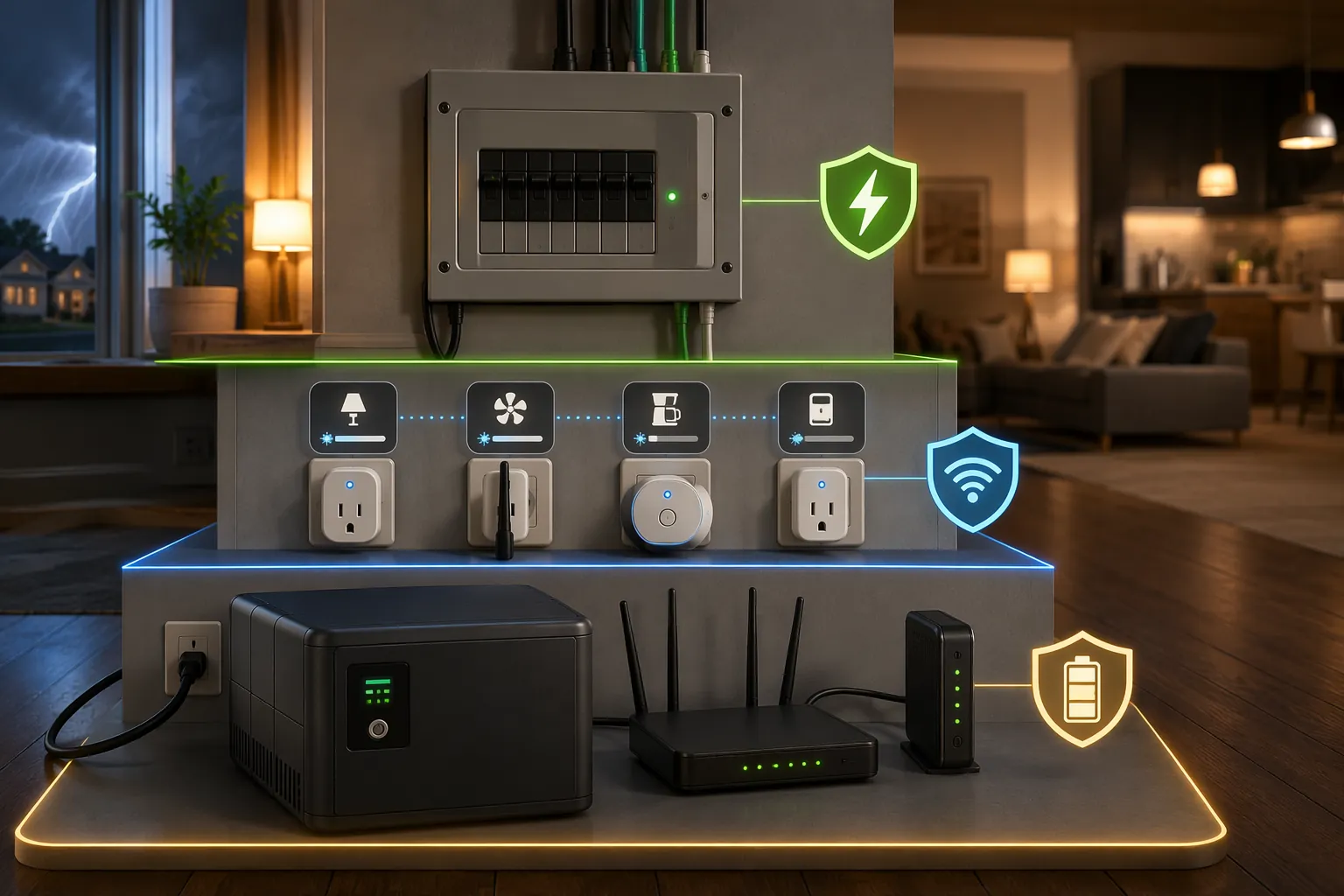
The copyable build recipe
| Layer | What to install or configure | What it prevents |
|---|---|---|
| Network and hub power | UPS for modem/ONT, router, switch, access point, hub, and any server or broker the hub depends on | Hub booting before the network, automations failing because MQTT or storage is unavailable, remote access disappearing immediately |
| Endpoint power behavior | Smart plugs and relays with known or configurable restore state; delayed restart where high-load appliances are involved | Lights turning on at 2 a.m., plugs staying off after a freezer outage, multiple loads restarting at the same instant |
| Surge protection | Whole-home surge protector at the service panel, plus point-of-use protection where appropriate | Damage from the voltage event that can arrive when power is restored, rather than from the dark period itself |
| Recovery order | Router/network first → file server or MQTT broker → smart home hub → endpoint devices and appliance loads | Devices searching for dead coordinators, integrations timing out, mesh networks filling with bad retries during boot |
That table is the whole shape of the project. The rest is deciding which boxes belong in each layer and making sure every important plug has a predictable answer to one question: after power comes back, what state will you be in?
Keep the control plane alive first
Start with the boring gear: modem or ONT, router, switch, access points, hub, and whatever your automations depend on. If Home Assistant runs on a mini PC and talks to an MQTT broker, that broker is part of the control plane. If Z-Wave JS or Zigbee2MQTT is on the same machine, that machine is part of the control plane. If your hub is Hubitat or SmartThings, the hub and the network path it needs belong on protected power.
For a Home Assistant server-style setup, the CyberPower CP1500AVRLCD is a sensible class of UPS because it can cover more than a small router load. For a network-backbone-only setup, a smaller unit such as the CyberPower CP350SLG fits the modem/router/switch role better than buying a huge battery and then filling it with devices that should not be on backup power in the first place.[1]
Do not put refrigerators, sump pumps, space heaters, dehumidifiers, or other high-inrush appliance loads on the same UPS that protects the controller. The UPS is there to keep the brain and network calm through a short interruption, or to let them shut down cleanly during a longer one. It is not the appliance-restart strategy.
Battery chemistry matters after the purchase. Lead-acid UPS batteries commonly need replacement after 2–5 years, while lithium-ion UPS models can last up to 10 years.[1] A five-year-old UPS that has never had its battery tested is a decoration with outlets. Put battery-test and replacement dates somewhere visible: a label on the UPS, a calendar reminder, or a maintenance note in your smart-home dashboard.
A clean UPS layout
- UPS A: modem or ONT, router, core switch, primary access point.
- UPS B, if needed: Home Assistant server, NAS or file server, MQTT broker, Z-Wave/Zigbee coordinator host.
- No UPS: high-wattage appliances, heaters, pumps, compressors, laser printers, and anything that can pull a large startup load.
- Optional but useful: a UPS data connection to the server so it can shut down cleanly before the battery is exhausted.
The network UPS should usually outlast the server UPS. If the router dies while Home Assistant is still running, cloud integrations, phone access, Wi-Fi devices, and some add-ons fail in strange ways. If the server shuts down cleanly while the network remains alive, the home is at least reachable and the controller can come back into a stable network later.
Buy smart plugs for restore behavior, not only protocol
Smart plug restore behavior is where otherwise careful outage plans quietly fail. A plug that was perfect for an automation can still be a bad outage device if it always returns off, always returns on, or forgets its state after a power cut. This is especially ugly for freezers, recirculation pumps, aquarium gear, dehumidifiers, holiday lighting, and anything in a bedroom.
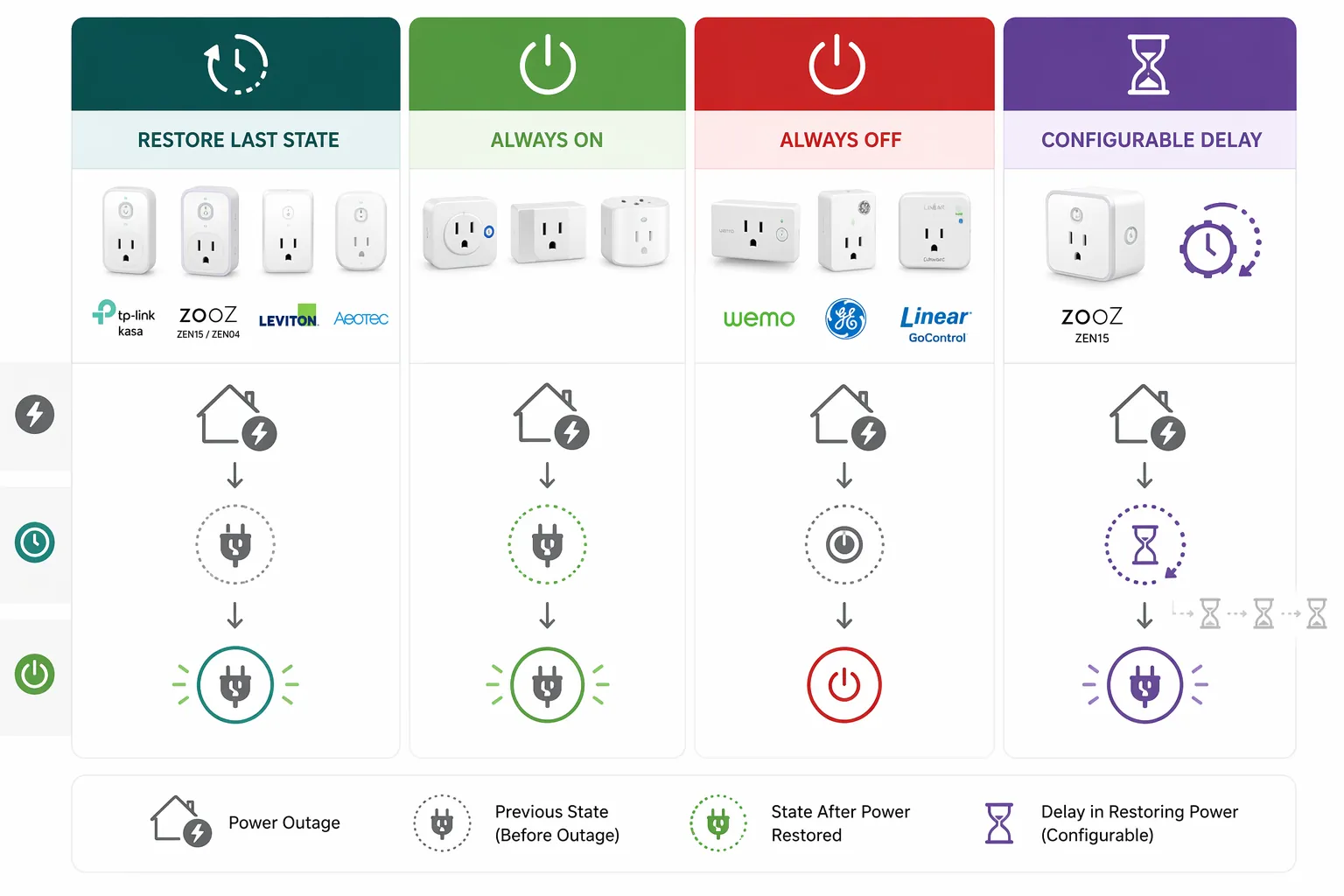
For Z-Wave plug loads, Zooz is the cleanest documented answer in this set because the restore state is an exposed parameter rather than a guess. Zooz ZEN15 uses Parameter 21 for power-outage state: 0 restores the last state, 1 turns on, and 2 stays off.[2] Zooz ZEN04 exposes the same three choices through Parameter 4: 0 restores last state, 1 turns on, and 2 stays off.[3]
The ZEN15 also has the rare feature that makes appliance recovery less clumsy: Parameter 35 sets a turn-on delay after power outage from 0 to 65535 seconds.[2] That is the difference between “everything starts when the grid returns” and “the freezer waits until the router, hub, and other loads have stopped stampeding.” It does not make an overloaded circuit safe, and it does not replace proper electrical planning, but it gives the smart-home layer a way to avoid needless simultaneous restarts.
| Device or brand group | Reported or documented behavior after power returns | How to use that information |
|---|---|---|
| Zooz ZEN15 | Configurable: restore last state, always on, or always off through Parameter 21; delayed turn-on through Parameter 35.[2] | Best fit here for critical plug loads where you want both known restore behavior and staggered restart. |
| Zooz ZEN04 | Configurable: restore last state, always on, or always off through Parameter 4.[3] | Good fit for smaller plug loads where configurable restore state matters. |
| TP-Link Kasa plugs | Reported to restore previous state; commonly used by people migrating away from Wemo in community discussions.[4] | Reasonable for noncritical Wi-Fi loads if your current model and firmware confirm the same behavior. |
| Wemo | Reported community pain point: defaults to off and cannot be changed.[4] | Avoid for loads that must resume automatically unless you have tested your exact model and accept the behavior. |
| GE, Linear/GoControl, Schlage, Sylvania Smart+ | Reported in the SmartThings community FAQ as defaulting to off after outage.[4] | Treat as dated model-specific information, not a promise about every current product. |
| Leviton, Neo Coolcam, IKEA Tradfri, Aeotec Smart Switch 5 | Reported as restoring previous state in the SmartThings community FAQ.[4] | Useful shortlist, but verify current documentation and test the exact plug before assigning it a critical load. |
| Philips Hue bulbs | Reported to return on by design after power restoration, a safety-oriented behavior that can become a nighttime nuisance.[4] | Do not assume bulb state will stay dark after a brief overnight outage. |
| Matter/Thread devices | Real-world Home Assistant issue reports describe devices becoming unavailable after power outage or power cycle, sometimes requiring manual re-pairing.[5] | As of mid-2026, avoid making Matter/Thread the only path for critical outage recovery devices unless you have tested your own hardware. |
The older brand rows need a hard caveat. The SmartThings community FAQ spans reports from 2017 through 2024, and plugs sold under the same broad brand can change across hardware revisions, firmware, radio generation, and regional model numbers.[4] Use that history to know what to test, not as permission to skip testing.
Zigbee is also more mixed than the label suggests. Power Failure Recovery exists in the Zigbee world, but many third-party plugs do not expose or implement it consistently. IKEA Tradfri devices are notable because configurable restore behavior is reported, while many random OEM or commodity plugs should be treated as unknown until proven otherwise.[4]
Matter deserves a narrower judgment. The problem is not “Matter is bad forever.” The useful statement is that, as of mid-2026, Home Assistant’s tracked real-world reports include Matter devices becoming unavailable after power outage or power cycle, with some users needing manual re-pairing.[5] That makes Matter/Thread a weak choice for the devices you expect to recover unattended today. Future SDK, border-router, or device firmware updates may change that; your outage plan should be built around what your deployed devices do now.
Set every important plug to an intentional state
Once the hardware is chosen, configure it before the next storm season, utility repair, or accidental breaker trip. The correct setting depends on the load, not on a universal preference.
| Load | Preferred restore behavior | Reason |
|---|---|---|
| Freezer, refrigerator monitor, aquarium circulation, condensate pump, network-adjacent support gear | Usually restore last state or always on, depending on whether the device should ever be off | The failure mode of staying off is worse than the nuisance of resuming. |
| Space heater, iron, hot plate, unknown appliance, anything unattended with heat | Always off | A safe manual restart is better than an automatic heat source returning unexpectedly. |
| Dehumidifier, freezer, pump, compressor-style load | Restore or always on, but delayed where supported | The load may need to resume, but not at the exact instant every other device restarts. |
| Bedroom lamps, decorative lights, nonessential plugs | Restore last state or always off | Avoid surprise lights during overnight restoration. |
| Router, switch, hub, server | Not controlled by smart plugs unless there is a deliberate remote power-cycle design | A smart plug that depends on the hub can strand the device that controls it. |
For Home Assistant, Z-Wave parameters are typically changed through the Z-Wave JS device configuration screen or the Z-Wave JS UI if you use it. For Hubitat, use a driver that exposes the relevant Zooz advanced settings. For SmartThings, use the appropriate Zooz Edge driver or device settings path for that model. The point is not the menu location; the point is that the setting must live on the device, not only in an automation that may not run while the hub is still booting.
After changing a restore setting, test it with a boring, controlled power cut. Turn the plug on, remove power at the outlet or power strip, wait, restore power, and record what actually happens. Then repeat from the off state. If a plug has delayed restoration, confirm the delay survives a real power removal. A spreadsheet with “model, firmware, load, restore setting, tested date” is not glamorous, but it is better than rediscovering plug behavior at 2 a.m.
Add surge protection where the outage actually hurts equipment
A UPS handles runtime. It does not make the whole electrical system gentle when utility power returns. Whole-home surge protection belongs in the recipe because the restoration voltage event is a major equipment-killer during outage cycles, not the quiet blackout itself.[6]
The practical version is simple: have a qualified electrician install a whole-home surge protector at the panel, then keep point-of-use surge protection for sensitive racks, TVs, office gear, and network equipment. Do not confuse a cheap power strip with a panel-level surge strategy. Also do not treat surge protection as a reason to skip UPS sizing or plug restore testing; it solves a different failure.
Use a tiered recovery sequence
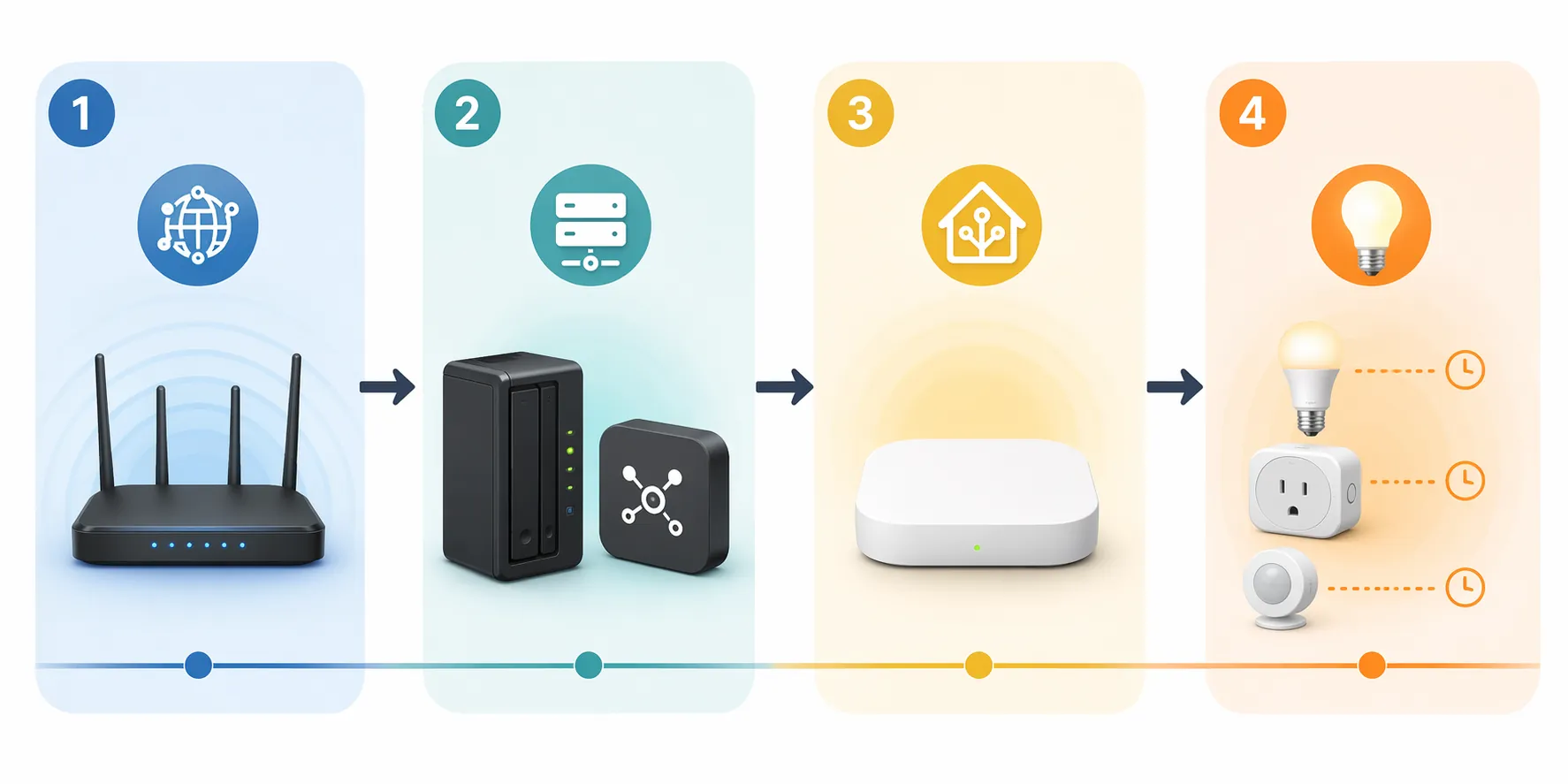
The order matters because every layer depends on the one before it. A hub that boots before DNS, Wi-Fi, and the broker are ready can throw errors that look like device failures. Endpoint devices that wake before the coordinator is stable may reconnect slowly or require manual attention. High-load plugs that all restore immediately can trip a circuit or force another outage inside the house.
| Recovery tier | Bring back first | What to wait for before moving on |
|---|---|---|
| 1 | Modem or ONT, router, core switch, primary access point | LAN is reachable, Wi-Fi is broadcasting, DHCP and DNS are working. |
| 2 | File server, NAS, MQTT broker, add-on host, database host | Storage is mounted cleanly, broker accepts connections, required services are running. |
| 3 | Home Assistant, Hubitat, SmartThings hub, Z-Wave/Zigbee coordinator host | Hub interface loads, integrations initialize, local radios or coordinators appear healthy. |
| 4 | Endpoint devices, appliance plugs, lighting groups, nonessential loads | Devices rejoin in batches; high-load devices use configured delays where available. |
In a small setup, this may be mostly passive: the network stays up on UPS, the hub rides through a short outage, and only endpoint plugs experience a power loss. In a larger setup, make the order explicit. Put network gear on the longest-lasting battery. Let servers shut down cleanly if the outage runs long. Make sure the broker and storage are available before the controller starts depending on them. Use ZEN15 delayed turn-on for appliance loads that should not join the first wave.[2]
Avoid the tempting smart plug under the router unless you have a carefully designed out-of-band way to turn it back on. A Wi-Fi plug controlled by the hub is a bad recovery tool for the Wi-Fi or hub that controls it. If you need remote power cycling for network equipment, that design has to be independent enough to survive the same failure it is supposed to fix.
A short outage drill before you trust the setup
Testing does not need to be theatrical. Pick a time when nobody is depending on the house, then simulate the smallest realistic failure first: unplug one smart plug, restore it, and watch the state. Then test a lighting circuit. Then test the network UPS by removing wall power from the UPS, not by shutting devices down one by one. If you run a server, confirm it either rides through the interruption or shuts down cleanly.
- Confirm the router and switch stay online during a short outage.
- Confirm the hub does not boot into a dead network.
- Confirm MQTT, storage, and add-ons are available before automations need them.
- Confirm each critical plug restores to the intended state from both on and off.
- Confirm appliance loads do not all restart at the same moment.
- Confirm Matter/Thread devices you rely on actually reconnect after a full power cycle in your own home.
If you want an explicit outage signal, Zooz documents power-outage monitoring approaches using devices such as the ZAC38 or ZSE50, which can be used as part of a notification or restoration workflow.[7] Keep that role separate from restore-state control: knowing the outage happened is useful, but it does not decide whether the freezer plug, bedroom lamp, or pump comes back safely.
The same layered approach applies to other home-safety automations. Leak detectors, shutoff valves, and pump alerts need power, network, device-state assumptions, and a failure plan too; the companion recipe on 10 smart leak detector automation ideas is a good next place to apply the same thinking.
A resilient smart home is the one that still has a working control plane when the lights come back, known endpoint behavior instead of brand folklore, surge protection for the ugly restoration event, and a recovery order that gives radios, brokers, and hubs time to become useful before every device starts asking for them.
References
- Preparing Your Smarthome for Outages — HomeTechHacker
- ZEN15 Power Switch Advanced Settings — Zooz Support Center
- ZEN04 Smart Plug Advanced Settings — Zooz Support Center
- FAQ: How Outlets/SmartPlugs behave after a Power Outage (Brand differences) — SmartThings Community
- Matter devices become unavailable after power outage or power cycle — GitHub home-assistant/core issue #161886
- Surviving a Smart Home Power Outage — Americas Generators
- How Can I Monitor for Power Outages? (Zooz ZAC38/ZSE50) — Zooz Support Center