
What Happens to Your Smart Home in a Substation Fire Outage
A substation fire can leave your smart home without power for 48 hours or more, with surge risks when the lights come back. This guide maps which devices survive, which fail, and the steps you should take before, during, and after an extended blackout.
A substation fire power outage is a mean test for a smart home because it attacks three assumptions at once: the outage may last longer than your UPS, the affected area may grow after the fire starts, and the most dangerous moment for electronics may be when power comes back.
The San Francisco outage tied to a PG&E substation fire is the case worth keeping in mind. The fire began on a Saturday, some customers saw partial restoration after roughly six hours, and full restoration did not arrive until Tuesday, about 66 hours later.[1] The footprint also changed: reporting on the incident described a circuit breaker failure and PG&E de-energizing additional grid sections for firefighter safety, widening the outage from about 40,000 customers to about 130,000.[2]
That is not the same planning problem as a two-hour storm blink. If your house is already dark, the useful question is not whether a device is “smart.” It is whether it has power, whether it can still be controlled locally, whether its batteries are independent of your network, and how it behaves when the grid slams back to life.
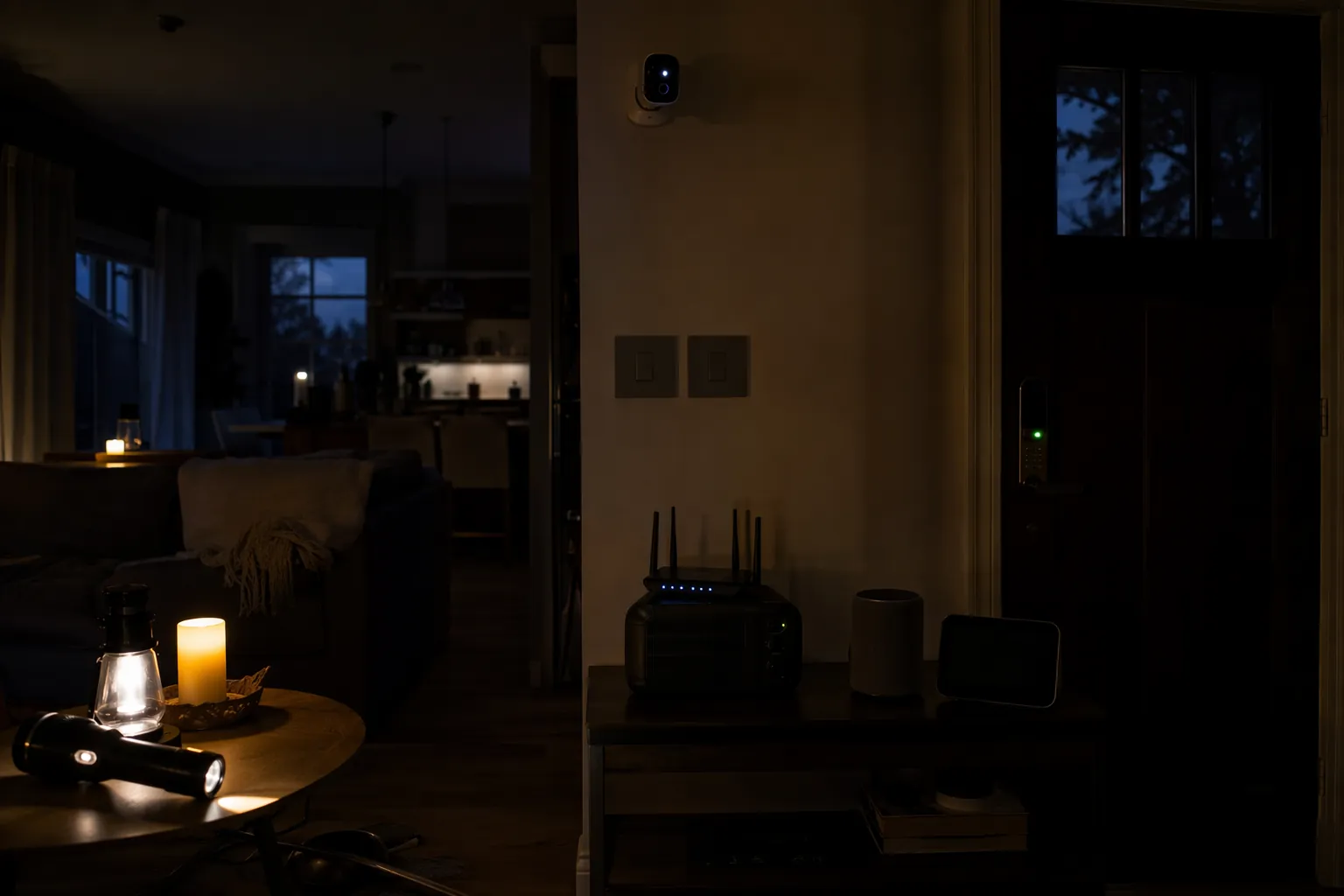
If the power is out now, triage the house by load and control path
Start with the devices that protect access, communication, and food. The smart speaker in the kitchen can lose the argument. The modem, router, a phone charger, a door lock with a weak battery, and any camera or sensor you actually need tonight are higher on the list.
- Leave battery-powered locks alone unless you need to change batteries. Test the thumb turn, keypad, key cylinder, or local unlock method before you need it in the dark.
- If your router, modem, ONT, or Ethernet switch is on a UPS, decide whether internet access is worth the battery drain. During a multi-day outage, an always-on router may be less useful than scheduled Wi-Fi windows.
- Unplug expensive sensitive gear that is not needed: smart displays, desktop PCs, AV receivers, hubs without UPS protection, and nonessential chargers.
- Do not repeatedly flip breakers or smart switches just to “see if it came back.” Powered switches, bridges, and plugs cannot do anything useful without a live circuit, and repeated power cycling is not gentle on electronics.
- If you are using a generator or power station, feed only the loads you selected. A house full of idle smart devices is still a load.
For a broader blackout shopping and wiring plan, use a general smart-home blackout backup recipe. In a substation-fire outage, the first job is narrower: stop wasting stored power on devices that cannot help you during the next 48 to 72 hours.
What survives, what goes dumb, and what only looks alive
Smart-home failures split along two lines: power source and control path. A device can have battery power and still lose remote features. A device can be electrically alive on backup power and still fail if the cloud service, router, or hub it depends on is unreachable. Stacey on IoT’s outage guidance makes that cloud-dependency problem plain: when devices depend on remote services, an otherwise powered house can still lose automations and app control if internet access drops.[3]
Smart locks are the easiest place to see the split. Many residential smart locks run on internal batteries, so the dead grid does not automatically lock you out. Local operation can continue through the keypad, key, thumb turn, Bluetooth, or other local method, while Wi-Fi bridge features, remote app control, and cloud automations may disappear. KeyPlusys describes typical smart-lock battery life as 6 to 12 months and recommends keeping spare batteries available.[4] The important part during an outage is not the marketing protocol on the box; it is whether the lock itself has fresh batteries and a local way to open.
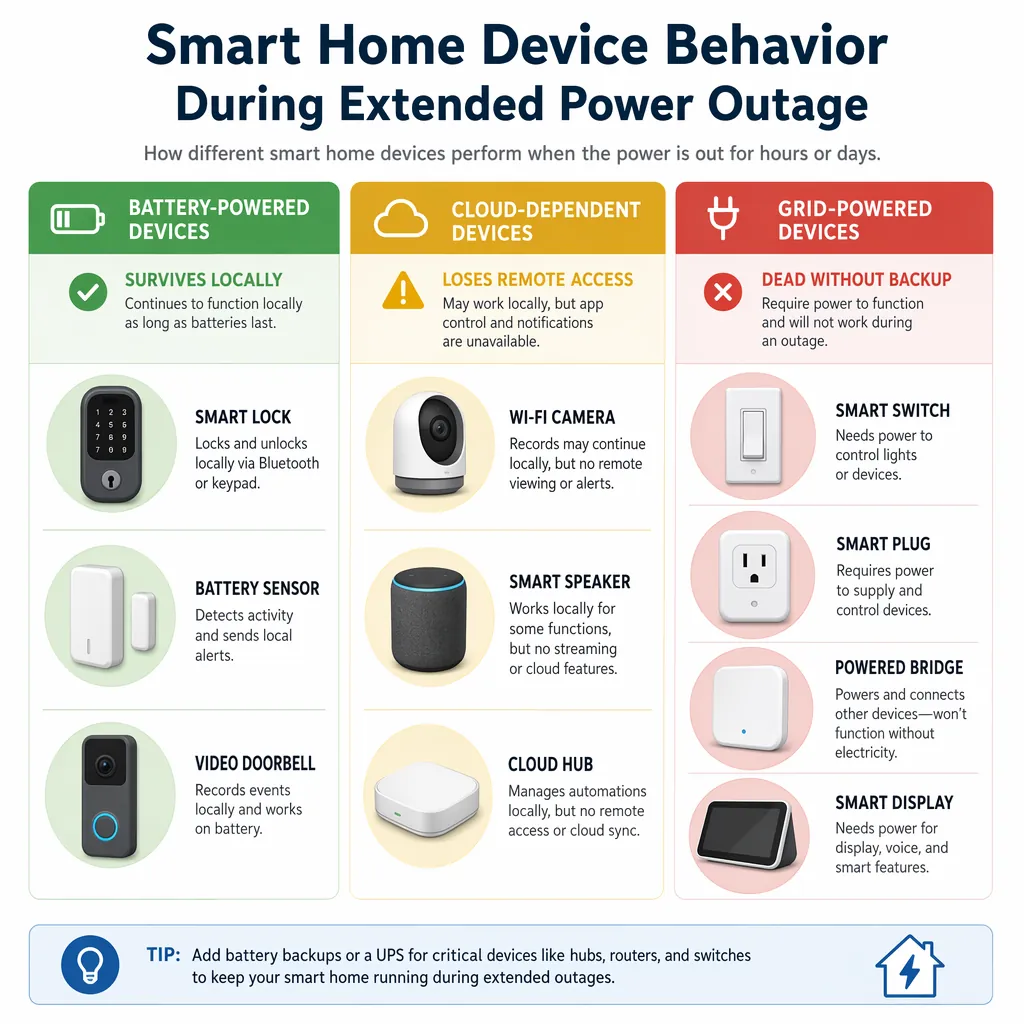
| Device class | Likely behavior during a substation-fire outage | What to do |
|---|---|---|
| Battery smart locks | Usually keep local locking and unlocking if their own batteries are good. Remote unlock, status checks, and automations may fail when the hub, bridge, Wi-Fi, or internet is down. | Use the local method first. Replace weak batteries before they become the emergency. |
| Keypads, contact sensors, motion sensors, leak sensors | Battery devices may keep reporting only if their hub or mesh is powered. Without the hub, they may simply wait. | Do not assume the app is a live view. Check the physical device or hub status after restoration. |
| Wi-Fi cameras and video doorbells | Hardwired units die with the circuit. Battery units may record locally only if designed for it, but live view and alerts often depend on Wi-Fi and cloud access. | Put only critical cameras on backup power. Expect cloud alerts to be unreliable if internet is down. |
| Smart speakers and displays | Usually dead without outlet power. Even on backup power, voice control may be poor or useless without internet. | Treat them as convenience devices, not control infrastructure. |
| Wi-Fi smart plugs | Dead when the outlet is dead. Some return to their last state after power returns; others default off or need app recovery. | Use them for noncritical loads unless you have tested restart behavior. |
| Zigbee and Z-Wave switches | Line-powered switches go dark when the circuit is dead. Battery remotes may still be alive but have nothing powered to control. | After restoration, test one circuit at a time instead of mashing scenes. |
| Zigbee, Z-Wave, Thread, and Matter bridges or hubs | Dead without backup power. If backed up, local automations may continue only for devices that also have power and do not require cloud services. | Put the hub on the same UPS or power station as the network stack if local control matters. |
| Cloud automations | Can fail even if some devices still have power, because the automation lives outside the house or needs internet round trips. | Duplicate critical routines locally where your platform supports it. |
| Thread and Matter devices | Protocol support does not override the power problem. A Thread border router, hub, or Wi-Fi network still needs electricity. | Check which device acts as the border router and whether it is backed up. |
General device-behavior guides describe the same broad split: battery-powered devices may survive locally, while line-powered devices and cloud-dependent controls fail at different points in the chain.[5] That is why two neighbors with “the same” smart home can have very different outages. One person backed up the modem, router, hub, and lock bridge. Another backed up only the router and wondered why the Zigbee lights never answered.
There is also a restoration warning hiding in the device map. AppMyHome documents one account of a Z-Wave switch dying after PG&E PSPS power restoration.[6] That is not proof that Z-Wave switches commonly fail after outages, and it should not be read as a failure-rate claim. It is still the right kind of warning: line-powered smart controls are small electronics connected to branch circuits, and homeowners often protect the TV while leaving every smart switch to take whatever the restored circuit delivers.
A UPS that saves Wi-Fi for two hours does not solve a 66-hour outage
The uncomfortable math is simple. If your modem, router, and small Ethernet switch draw 25 watts together, and your UPS test gives you about two hours of runtime, that setup buys you a short communications window. It does not buy you a weekend. It definitely does not cover the San Francisco-style restoration timeline.
Do not plan from the label on the UPS box. Plan from the wattage you are actually carrying and the runtime you have personally tested. Battery age, temperature, inverter efficiency, and the extra little boxes people forget to count all change the result. The ONT in the garage, the mesh node upstairs, the PoE switch feeding cameras, and the hub in the closet are separate loads even if the app makes them feel like one system.
A useful backup plan is tiered. EcoFlow’s smart-home backup guidance uses tiering and load shedding rather than treating every device as equally important.[7] That is the right filter for a substation fire outage.
| Priority | Loads that may earn backup power | Loads to shed first |
|---|---|---|
| Access and communication | Phone charging, modem or ONT, router, one hub needed for locks or local automations | Smart displays, voice assistants, decorative lighting |
| Safety monitoring | A few critical cameras, leak sensors through a powered hub, alarm panel if applicable | Nonessential indoor cameras, extra mesh nodes, unused bridges |
| Food and medical needs | Refrigerator cycles, medical-device charging, freezer monitoring | Convenience plugs, entertainment equipment |
| Comfort and automation | Only what your battery or generator can support after the first three groups | Scenes that turn on many lamps, idle smart speakers, always-on accent lighting |
The table is not a moral ranking. It is a battery ranking. If a device cannot help with access, communication, safety, food, or a medical need, it should have to justify its watts during an extended outage.
Protect the restoration phase, not only the blackout phase
Most people buy backup gear for the dark part. The restoration part deserves its own plan. Whole-home Type 2 surge protection belongs near the top of the list because it protects circuits when utility power returns, not just one power strip behind a desk. HomeTechHacker’s outage-prep guidance points to Type 2 whole-home surge protection and gives a typical cost range of $200 to $400.[8] That price will vary by panel, electrician, permit, and local code, but the category is right: protect the panel before you worry about every individual gadget.
Surge strips still have a place for AV racks, desktop computers, network shelves, and chargers. They are not a substitute for panel-level protection, and they do not make a fragile restart sequence harmless. TechTimes’ 2026 outage-safety coverage calls surge damage one of the underappreciated risks when power comes back after an outage.[9]
My practical rule is to wait five minutes after grid power appears stable before reconnecting sensitive smart-home gear that you unplugged. That five-minute window is a precautionary best practice based on surge-risk logic, not a utility-issued guarantee. Lights turning on once does not prove the voltage has settled, and a refrigerator compressor kicking back on across the house is not the signal to bring every hub, bridge, display, and charger online at once.
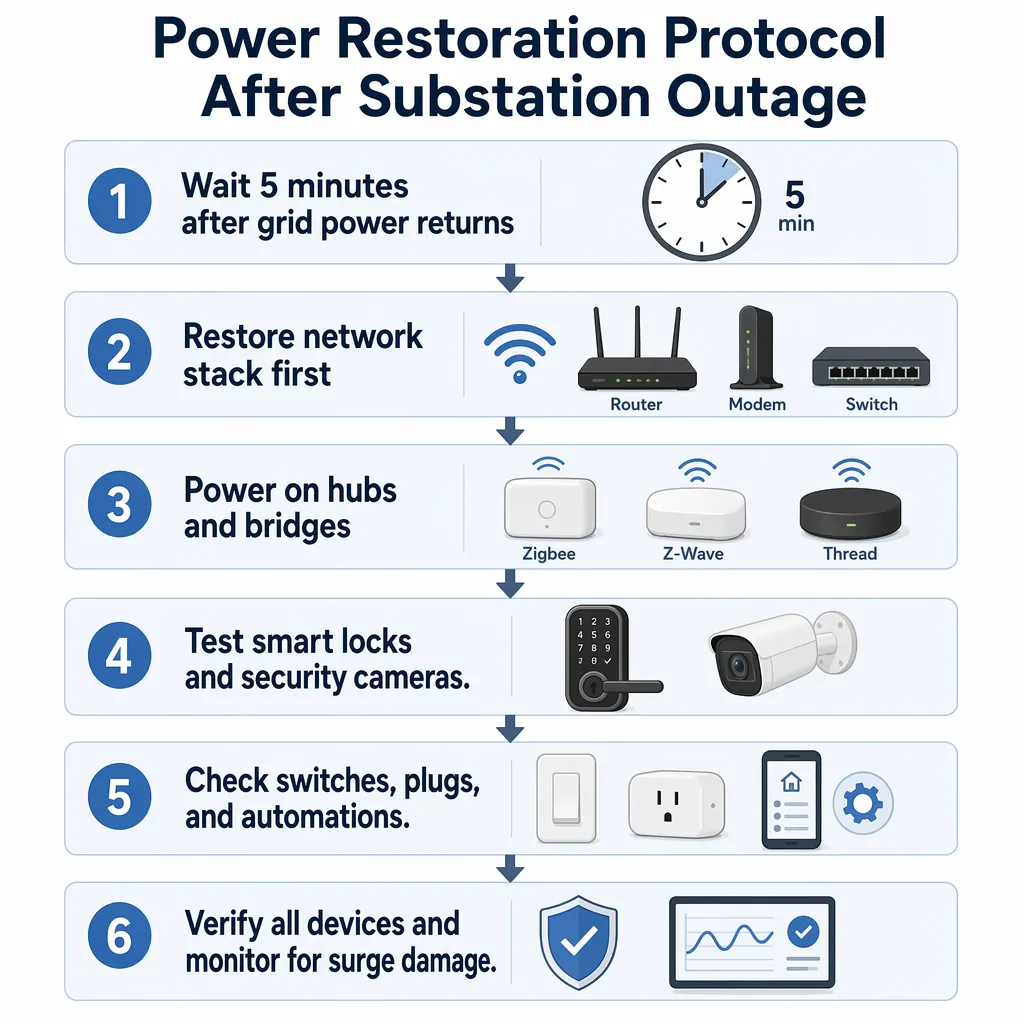
Bring the smart home back in a controlled order
When the grid returns, resist the happy reflex to turn everything on. A controlled restart makes failures easier to find and reduces the chance that a marginal device, bad power supply, or corrupted hub boot turns into a house-wide mystery.
- Confirm the house is stable. Look for flickering lights, repeated breaker trips, burning smells, buzzing power supplies, or devices cycling on and off. If anything looks unsafe, stop and treat it as an electrical problem, not a smart-home problem.
- Wait before reconnecting sensitive gear. The point is to avoid putting every delicate load on the circuit during the first unstable moments.
- Start the network stack first. Bring up the modem or ONT, router, main switch, and only the mesh nodes you actually use. Wait until the router is fully online before blaming devices.
- Power hubs and bridges next. Zigbee, Z-Wave, Thread border routers, Matter controllers, alarm bridges, and lock bridges should boot after the network they depend on. If you run local automations, check that the hub clock and network connection are sane.
- Test access devices. Lock and unlock each smart lock locally first, then through the app if the network is back. If a lock is slow, unresponsive, or acting oddly after restoration, move to a focused smart-lock troubleshooting guide instead of factory-resetting it in a hallway.
- Test cameras and sensors. Verify that live view, local recording, cloud clips, notifications, and sensor history are actually working. A camera LED is not the same as a usable recording path.
- Test switches and plugs one room at a time. Watch for devices that are dead, stuck in the wrong default state, unusually warm, or missing from the hub.
- Run automations manually before trusting schedules. Sunset lighting, lock routines, water-shutoff rules, and camera modes may have missed states while the hub was offline.
If you use Matter locks or Thread devices, remember that the protocol does not remove the dependency chain. The lock, phone, controller, Thread border router, Wi-Fi network, and internet service all have separate outage behaviors. The Matter smart-lock protocol explainer is useful protocol background, but the restart test still has to happen in your own house.
Prep for the next substation outage
The best prep is boring because boring is repeatable in a dark hallway. Label the breaker that feeds the network shelf. Put the modem, router, main switch, and critical hub on the same backup plan. Write the wattage of each always-on box on painter’s tape and stick it to the shelf. Keep spare lock batteries where someone else can find them. Screenshot or print the local-control steps for locks and garage access before the cloud is gone.
Then test restart behavior on a normal day. Flip a noncritical smart plug off and back on. Power-cycle a hub after exporting its backup. Confirm which lights return on, which return off, and which remember their last state. Make sure the refrigerator, freezer monitor, network gear, and access devices are not competing with decorative automations for the same small battery.
Generator users get one extra caution: voice-first smart homes can become awkward around engine noise. Jackery’s outage guidance describes portable-generator noise in the 60 to 75 dB range, enough to interfere with Alexa or Google Home commands.[10] During an outage, buttons, keypads, local dashboards, and labeled plugs beat yelling at a speaker.
After everything is back, do one verification loop before calling the smart home recovered: lock status, camera recording, sensor reporting, hub automations, switch defaults, UPS recharge status, and any device that smells hot, feels hot, or vanished from the network. A substation fire outage changes the safety plan because duration defeats ordinary UPS assumptions, de-energization can widen the outage without much warning, and restoration can be rough on the electronics you forgot were wired into every wall.
References
- PG&E substation fire, lengthy repairs caused massive San Francisco power outage, KCRA
- San Francisco blackout: What we know about PG&E, The San Francisco Standard, December 22, 2025
- Why power outages cause smart device havoc and how to mitigate this situation, Stacey on IoT
- What Happens to Smart Locks When the Power Goes Out?, KeyPlusys
- What Happens to Your Smart Devices During a Power Outage, EVVR
- What Happens When Your Smart Home Loses Power?, AppMyHome
- Home Backup Power Smart Home Guide, EcoFlow
- Preparing Your Smarthome for Outages, HomeTechHacker
- Power Outage Safety: Surge Protection, Smart Ways to Prevent Electronics Damage, TechTimes, January 6, 2026
- Keep Your Smart Home Alive During an Electricity Outage, Jackery