
How to Prepare Your Smart Home for a Heat Warning in Spain
Spain's AEMET heat warnings (yellow, orange, red) map directly to three escalating smart-home response levels. This guide walks through setting up AEMET-based temperature thresholds, persiana schedules, AC rules, and free-cooling logic so your home responds before the heat arrives.
When AEMET issues a heat warning in Spain, your smart home should not wait until the living room already feels like an oven. The useful response is staged: yellow prepares the flat, orange actively manages heat, and red protects people, equipment, and the electricity bill. That color logic fits Spain well because AEMET warnings already use yellow, orange, and red levels, while the Ministry of Health heat alerts are a separate public-health system that should not be confused with AEMET’s meteorological warnings.[1]
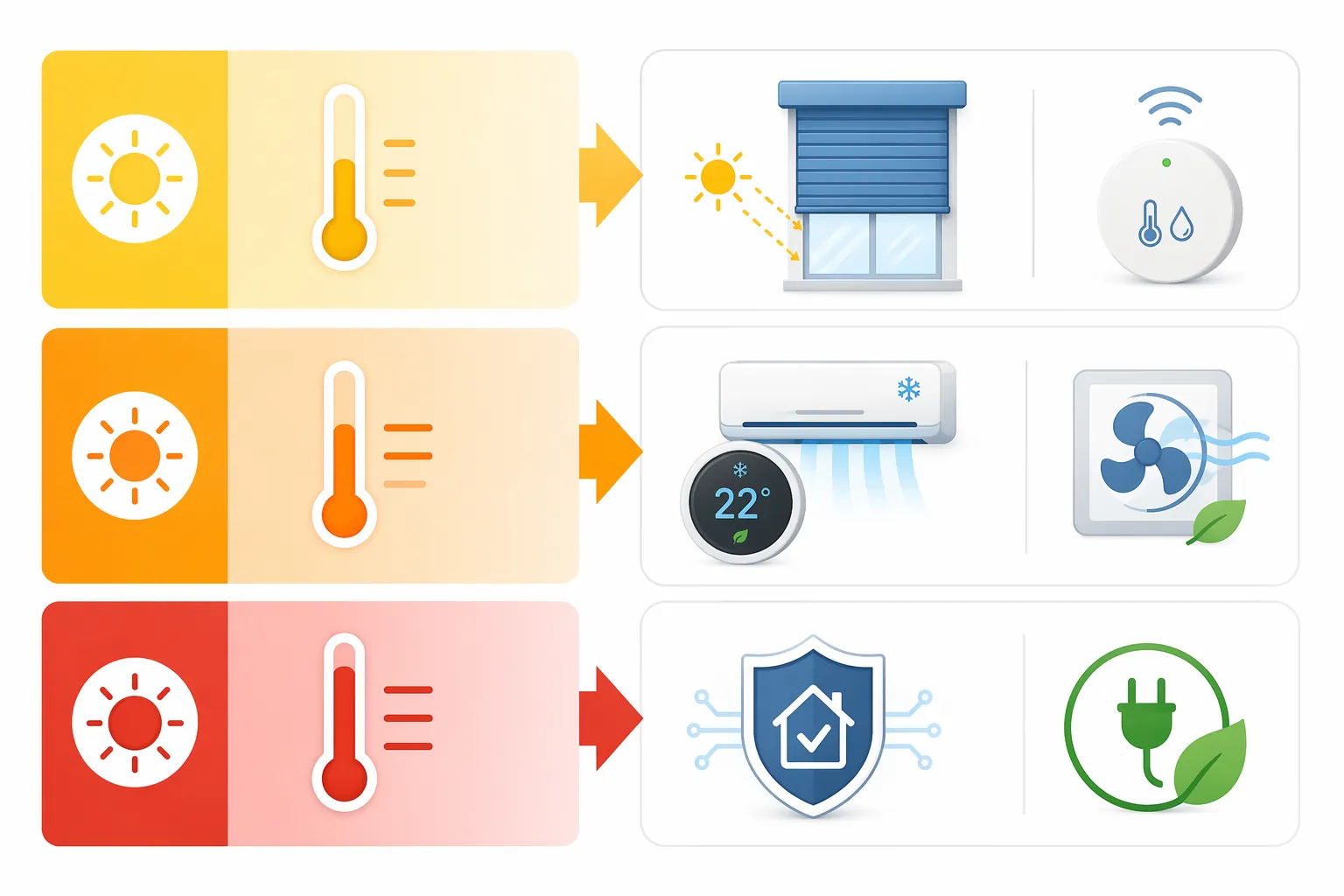
| AEMET warning color | Smart-home response | What the home should do |
|---|---|---|
| Yellow | Preparation and shading | Close or tilt persianas before direct sun reaches each façade, pre-cool only if the home is already warm, and send a reminder if windows or balcony doors are open. |
| Orange | Active heat control | Run coordinated cooling rules: AC at a restrained setpoint, fans only where useful, solar gain blocked, and free cooling only when outside air is genuinely cooler. |
| Red | Protection and conservative operation | Protect routers, hubs, batteries, and smart plugs from heat; reduce non-essential loads; avoid aggressive automation that could strand the home in a bad state. |
There is one correction to make before touching YAML: Home Assistant’s AEMET OpenData integration is useful, free, and exposes weather data such as temperature, humidity, rain probability, and storm probability, but it does not currently expose AEMET’s categorical yellow/orange/red warning level as a ready-made entity.[2] The recipe below therefore creates a local heatwave-mode sensor from temperature thresholds. Treat it as your configured proxy, not as an official AEMET alert feed.
If you only need a simpler non-Spain-specific setup, the generic heat-advisory automation for Home Assistant is enough. For Spain, the important extra work is local: choosing the right AEMET meteosalud threshold, coordinating persianas by sun exposure, and making red-alert behavior boringly safe.
Start with your local threshold, not a national heatwave number
Spain has too much climate variety for one heat-warning temperature to be sensible. AEMET’s heat-health warning geography is divided into 182 meteosalud zones, and reported warning thresholds range from 23.9°C on the Asturian coast to 40.4°C in the Córdoba countryside.[1][3] Both numbers can be valid in their own places. A flat in Gijón and a cortijo outside Córdoba should not arm the same heatwave automation at the same outdoor temperature.
That is the step that prevents the expensive version of smart-home automation: AC starting too early in a hot inland zone, persianas staying open too long on a milder coast, or a second home quietly baking because the threshold was copied from someone else’s YAML.
- Find the AEMET meteosalud zone for the municipality where the home is located. Do this for the property, not for the nearest large city if the home is inland, coastal, elevated, or in a valley.
- Record the local temperature thresholds you want to use for yellow, orange, and red response. If you only have one official local threshold available, use it to arm “heatwave mode” and keep orange/red as conservative internal escalation levels based on your own indoor and outdoor readings.
- Create Home Assistant helpers for those thresholds so you can adjust them from the UI without editing automations during a heat event.
- Test the automation with temporary lower values before the next warning. A threshold you have never watched fire is still a guess.
Use degrees Celsius throughout. Spanish weather services, AC displays, and most Home Assistant weather entities will already be in Celsius if the home is configured for Spain.
Build one heatwave-mode condition that the rest of the home obeys
The clean pattern is to avoid scattering temperature tests through every automation. Create one binary sensor for “heatwave mode,” and, if you want three response levels, one template sensor that returns normal, yellow, orange, or red. Everything else—persianas, AC, fans, free cooling, device protection—checks those entities.
The entity names below are placeholders. Replace the AEMET temperature entity with the temperature or forecasted-temperature entity you actually have. If your setup only exposes current outdoor temperature, the sensor will react later than an official forecast warning; compensate by making the persiana rules time-and-sun based instead of waiting for peak temperature.
input_number:
  heat_yellow_threshold:
    name: Local yellow heat threshold
    min: 20
    max: 45
    step: 0.1
    unit_of_measurement: "°C"

  heat_orange_threshold:
    name: Local orange heat threshold
    min: 20
    max: 45
    step: 0.1
    unit_of_measurement: "°C"

  heat_red_threshold:
    name: Local red heat threshold
    min: 20
    max: 45
    step: 0.1
    unit_of_measurement: "°C"

template:
  - binary_sensor:
      - name: Heatwave Mode
        unique_id: heatwave_mode_local_threshold
        state: >
          {{ states('sensor.aemet_outdoor_temperature') | float(0)
             >= states('input_number.heat_yellow_threshold') | float(99) }}

  - sensor:
      - name: Heat Response Level
        unique_id: heat_response_level_local_threshold
        state: >
          {% set temp = states('sensor.aemet_outdoor_temperature') | float(0) %}
          {% set yellow = states('input_number.heat_yellow_threshold') | float(99) %}
          {% set orange = states('input_number.heat_orange_threshold') | float(99) %}
          {% set red = states('input_number.heat_red_threshold') | float(99) %}
          {% if temp >= red %}
            red
          {% elif temp >= orange %}
            orange
          {% elif temp >= yellow %}
            yellow
          {% else %}
            normal
          {% endif %}
Power users who want help turning the logic into their own entity names can use an AI drafting workflow such as a Gemini Gem as a Home Assistant automation coach. Keep that role limited to drafting and review; do not give any assistant direct control over the home.
Yellow response: make shade arrive before the sun does

Persianas are the first automation to get right because they work before the indoor temperature rises. Manufacturer-sponsored estimates from Somfy describe automated exterior solar protection keeping rooms roughly 4°C to 7°C cooler when it closes before sun reaches the glass, but those figures should be treated as directional claims, not guaranteed savings for every Spanish flat.[4] Orientation, glass, insulation, wind, balcony depth, and whether someone reopens a shutter all matter.
The familiar Spanish “cave strategy”—closing shutters and windows early, then reopening when the outside air becomes useful—also shows up in expat and social-media accounts, including claims of interiors staying dramatically cooler than outside. Those stories match a real habit, but they are anecdotes rather than measured building-performance evidence.[5]
For automation, the practical version is simple: group covers by façade, then close the exposed side before direct sun. East shutters need attention in the morning, south-facing glass through the middle of the day, west-facing glass in the late afternoon. Do not wait for the room sensor to complain; by then the glass and floor have already stored heat.
automation:
  - alias: Heat yellow - close east persianas before morning sun
    mode: single
    trigger:
      - platform: sun
        event: sunrise
        offset: "00:30:00"
    condition:
      - condition: state
        entity_id: binary_sensor.heatwave_mode
        state: "on"
    action:
      - service: cover.set_cover_position
        target:
          entity_id:
            - cover.living_room_east_persiana
            - cover.bedroom_east_persiana
        data:
          position: 25
      - service: notify.mobile_app_phone
        data:
          message: "Heatwave mode is on: east persianas lowered before morning sun."

  - alias: Heat yellow - close west persianas before afternoon sun
    mode: single
    trigger:
      - platform: time
        at: "14:30:00"
    condition:
      - condition: state
        entity_id: binary_sensor.heatwave_mode
        state: "on"
    action:
      - service: cover.set_cover_position
        target:
          entity_id:
            - cover.office_west_persiana
            - cover.living_room_west_persiana
        data:
          position: 20
Those times are examples, not Spanish climate law. A west-facing window in Seville, a high balcony in Madrid, and a shaded ground-floor window in Bilbao do not need the same schedule. Adjust by watching when direct light actually hits the glass, then move the automation earlier by a safe margin.
Orange response: cool the rooms people use, without chasing 21°C
At orange level, the home should stop behaving as if shading alone will carry the day. The AC can help, but the automation should prevent the usual heatwave mistake: someone sets 21°C in a hot room, the compressor runs hard, and the bill arrives after the weather has moved on.
Spain’s 27°C air-conditioning limit is a rule used for public and commercial buildings, not a legal thermostat setting for private homes. It is still a useful reference point: during a heat event, a private-home setpoint around 25°C is often a more sensible automation target than an aggressive 21°C command, especially when shutters and fans are already reducing heat gain.[6]
automation:
  - alias: Heat orange - restrained AC cooling in occupied rooms
    mode: restart
    trigger:
      - platform: state
        entity_id: sensor.heat_response_level
        to: "orange"
      - platform: numeric_state
        entity_id: sensor.living_room_temperature
        above: 26.5
    condition:
      - condition: template
        value_template: "{{ states('sensor.heat_response_level') in ['orange', 'red'] }}"
      - condition: state
        entity_id: binary_sensor.living_room_occupied
        state: "on"
      - condition: numeric_state
        entity_id: sensor.living_room_temperature
        above: 26.5
    action:
      - service: climate.set_temperature
        target:
          entity_id: climate.living_room_ac
        data:
          temperature: 25
          hvac_mode: cool
      - service: fan.turn_on
        target:
          entity_id: fan.living_room_ceiling
      - service: notify.mobile_app_phone
        data:
          message: "Orange heat response: living room cooling set to 25°C with fan support."
A good orange rule also needs a stopping condition. If the room has reached the target range, if nobody is home, or if a door sensor says the terrace is open, the AC should not keep pushing. This is where one shared heat-response sensor helps: the AC rule can be stricter at orange and more conservative at red, while the shutter rules continue doing their quieter work.
automation:
  - alias: Heat orange - pause AC when terrace door is open
    mode: restart
    trigger:
      - platform: state
        entity_id: binary_sensor.terrace_door
        to: "on"
        for: "00:02:00"
    condition:
      - condition: template
        value_template: "{{ states('sensor.heat_response_level') in ['orange', 'red'] }}"
    action:
      - service: climate.turn_off
        target:
          entity_id: climate.living_room_ac
      - service: notify.mobile_app_phone
        data:
          message: "AC paused because the terrace door has been open for two minutes during heat response."
Free cooling: only open the home when the outside air earns it
Free cooling is the pleasant part of a Spanish heat routine when it works: shutters up, windows open, fans moving cooler night or early-morning air through the home. The failure mode is just as familiar: opening too early because the sun has gone down while the street, façade, and balcony are still radiating heat.
Make the automation compare indoor and outdoor air. A small margin is useful so the home does not open for a meaningless difference. The example below requires the outside temperature to be at least 1.5°C cooler than the inside temperature. Change that margin to match your sensors and tolerance; it is a control preference, not an AEMET threshold.
template:
  - binary_sensor:
      - name: Free Cooling Available
        unique_id: free_cooling_available_heatwave
        state: >
          {% set indoor = states('sensor.hall_temperature') | float(99) %}
          {% set outdoor = states('sensor.aemet_outdoor_temperature') | float(99) %}
          {{ outdoor + 1.5 < indoor }}

automation:
  - alias: Heatwave free cooling - notify when outside air helps
    mode: single
    trigger:
      - platform: state
        entity_id: binary_sensor.free_cooling_available
        to: "on"
    condition:
      - condition: state
        entity_id: binary_sensor.heatwave_mode
        state: "on"
      - condition: sun
        after: sunset
    action:
      - service: notify.mobile_app_phone
        data:
          message: "Outside air is cooler than inside. Open safe windows and raise selected persianas for free cooling."

  - alias: Heatwave free cooling - stop when outside air no longer helps
    mode: single
    trigger:
      - platform: state
        entity_id: binary_sensor.free_cooling_available
        to: "off"
    condition:
      - condition: state
        entity_id: binary_sensor.heatwave_mode
        state: "on"
    action:
      - service: notify.mobile_app_phone
        data:
          message: "Free cooling is no longer useful. Close windows and return persianas to heat-protection positions."
Automated window actuators deserve extra caution. If rain, security, pets, or street access are concerns, send a notification instead of opening anything. The automation can still tell the household when the moment is right without taking a physical risk.
Red response: protect the boring equipment that keeps the home reachable
Red-level automation should become more conservative, not more heroic. The priority is to keep the home reachable, keep essential cooling available, and avoid letting small devices cook quietly on shelves and windowsills. Typical indoor smart-home devices are often rated around 0°C to 40°C, while smart plugs under load may have lower limits; users should check their own datasheets rather than relying on a generic range.[7]
Placement matters. A hub, router, camera bridge, or battery sensor sitting beside sunlit glass can experience a hotter microclimate than the room sensor reports. If the hub locks up, the clever heatwave automation becomes a set of good intentions.
- Move the Home Assistant host, router, Zigbee coordinator, and battery chargers away from windows and enclosed sunlit cabinets.
- Use smart plugs to cut non-essential loads such as decorative lighting, AV gear, or standby equipment during red response.
- Do not cut power to the router, Home Assistant host, fridge, medical devices, security equipment, or the AC circuit needed to keep the property safe.
- Send a remote notification when red response begins, especially for second homes or rentals between stays.
automation:
  - alias: Heat red - protect devices and reduce non-essential loads
    mode: single
    trigger:
      - platform: state
        entity_id: sensor.heat_response_level
        to: "red"
    action:
      - service: switch.turn_off
        target:
          entity_id:
            - switch.tv_standby_plug
            - switch.decorative_lights_plug
            - switch.office_monitor_plug
      - service: cover.set_cover_position
        target:
          entity_id:
            - cover.living_room_west_persiana
            - cover.office_west_persiana
        data:
          position: 10
      - service: notify.mobile_app_phone
        data:
          message: "Red heat response active: non-essential plugs off, exposed persianas lowered, check hub/router temperatures if reachable."
If you already use energy-monitoring plugs, the red-response list is a good place to apply the same discipline used in smart-plug energy automation recipes: label what is safe to shut down, exclude anything essential, and avoid automations that depend on memory during a stressful day.
Heat can also disguise itself as a network problem. A router or coordinator that becomes unstable in the afternoon may look like flaky Wi-Fi, Zigbee dropouts, or random Home Assistant delays. If the home starts failing only during hot periods, use the same investigation pattern as a normal smart-home network troubleshooting session, but add temperature and sun exposure to the suspect list.
Make the three levels coordinate instead of competing
The easiest way to make heat automations annoying is to let each device improvise. The shutter closes because of sun, the AC starts because of room temperature, the fan turns on because of occupancy, and nobody has decided which action wins when a balcony door is open.
| Situation | Good default decision |
|---|---|
| Heatwave mode is off | Run normal comfort and energy routines. |
| Yellow level is active | Prioritize shading and reminders; avoid heavy cooling unless indoor temperature is already high. |
| Orange level is active | Allow AC in occupied rooms, keep persianas in heat-blocking positions, and pause cooling when doors/windows are open. |
| Red level is active | Keep essential cooling available, reduce non-essential loads, protect network equipment, and avoid risky actuator behavior. |
| Outdoor air is cooler than indoor air after sunset | Notify or run free-cooling ventilation if the home can do it safely. |
| Outdoor air stops helping | Close windows, lower exposed persianas again, and return to heat-protection mode. |
This coordination is more important than adding another sensor. A renter returning at 21:00, a second-home owner checking from another country, or a household member worried about the electricity bill all benefit from the same thing: predictable behavior with clear notifications.
What to verify before the next AEMET warning
Do the verification on an ordinary warm day. Waiting for an orange or red warning to discover that a cover entity is reversed is a poor test plan.
- Temporarily lower the yellow threshold and confirm that binary_sensor.heatwave_mode turns on.
- Confirm that sensor.heat_response_level moves through yellow, orange, and red when you temporarily adjust the helper values.
- Run each persiana automation manually and check that the correct façade moves to the intended position.
- Open the terrace or balcony door and make sure the AC pause rule actually stops cooling.
- Compare indoor and outdoor temperature sensors in the evening and confirm that the free-cooling notification only appears when outside air is cooler by your chosen margin.
- Trigger the red response with temporary thresholds and verify that only non-essential plugs switch off.
- Move hubs, routers, coordinators, and chargers away from direct sun before the first serious warning, not after a lockup.
The honest version of this setup is also the useful one. It does not pretend Home Assistant is reading AEMET’s official warning color when the integration is not exposing that category. It uses local thresholds, tied to the correct meteosalud zone, to drive a heatwave mode that Spanish homes can act on quickly: shade first, cool carefully, ventilate only when the air helps, and protect the equipment that keeps the automation alive.
References
- What Spain's Different Heat Alerts Mean and How to Act in Each Case — The Local Spain — 2026-06-24
- AEMET OpenData — Home Assistant
- Heat-health warning thresholds in Spain — Science Media Centre Spain / Global Heat Health Information Network
- Automated sun protection can keep your home cool — Somfy
- Spanish ‘cave strategy’ for keeping homes cool during heatwaves — AS USA
- Real Decreto-ley 14/2022 — Boletín Oficial del Estado — 2022-08-01
- Smart home device operating temperature guidance — Repenic