
Smart Home Cooling Tips to Survive a Heat Wave Without AC
Three tested smart home automation recipes that use common devices like smart plugs and temperature sensors to keep your home livable during extreme heat without running an air conditioner.
If the house is already hot tonight and you do not have AC to lean on, the useful question is not “how do smart homes save energy?” It is simpler: which device should turn on before the room becomes miserable, which window should be shaded before the sun hits it, and when is outside air finally cool enough to pull through the house?
These three smart home cooling tips for a heat wave without AC are meant to run as small, stackable automations. None needs professional installation. The first one is the tonight recipe: a smart plug, a fan, and a temperature sensor. The second depends on smart blinds or shades, so the hardware bar is higher. The third is the most satisfying when the weather cooperates, because it uses cooler night air to reset the house before tomorrow.
| Automation | Required devices | Setup time | Best fit | Trigger | Cooling benefit to expect |
|---|---|---|---|---|---|
| Temperature-triggered fan | Smart plug, box fan or pedestal fan, indoor temperature sensor | 10-20 minutes | Home Assistant, SmartThings, Alexa, Google Home | Turn fan on around 82°F when the room is occupied or during an evening time window | Improves perceived comfort; fan airflow can make a room feel about 3-4°F cooler, while not lowering actual air temperature |
| Orientation-aware shade schedule | Smart blinds or shades; Lutron Caséta Smart Hub or Thread border router depending on hardware | 20-30 minutes after devices are paired | Lutron, SmartWings Matter-over-Thread, Home Assistant, Apple Home, Google Home | Close west-facing shades before direct afternoon sun; use sun position if your platform supports it | Reduces solar heat gain, especially on west-facing glass; reported up to 77% blocked heat gain in the cited smart-blind guidance |
| Night free-cooling ventilation | Indoor temperature sensor, outdoor temperature source or sensor, smart plug, box fan | 20-30 minutes | Home Assistant first; simpler timer-and-temperature routines possible elsewhere | After 9 PM, run exhaust fan only when outdoor temperature is at least 1.5°C cooler than indoor temperature | Can lower next-day peak indoor temperature when nights cool down; one field deployment observed a 2-3°C reduction |
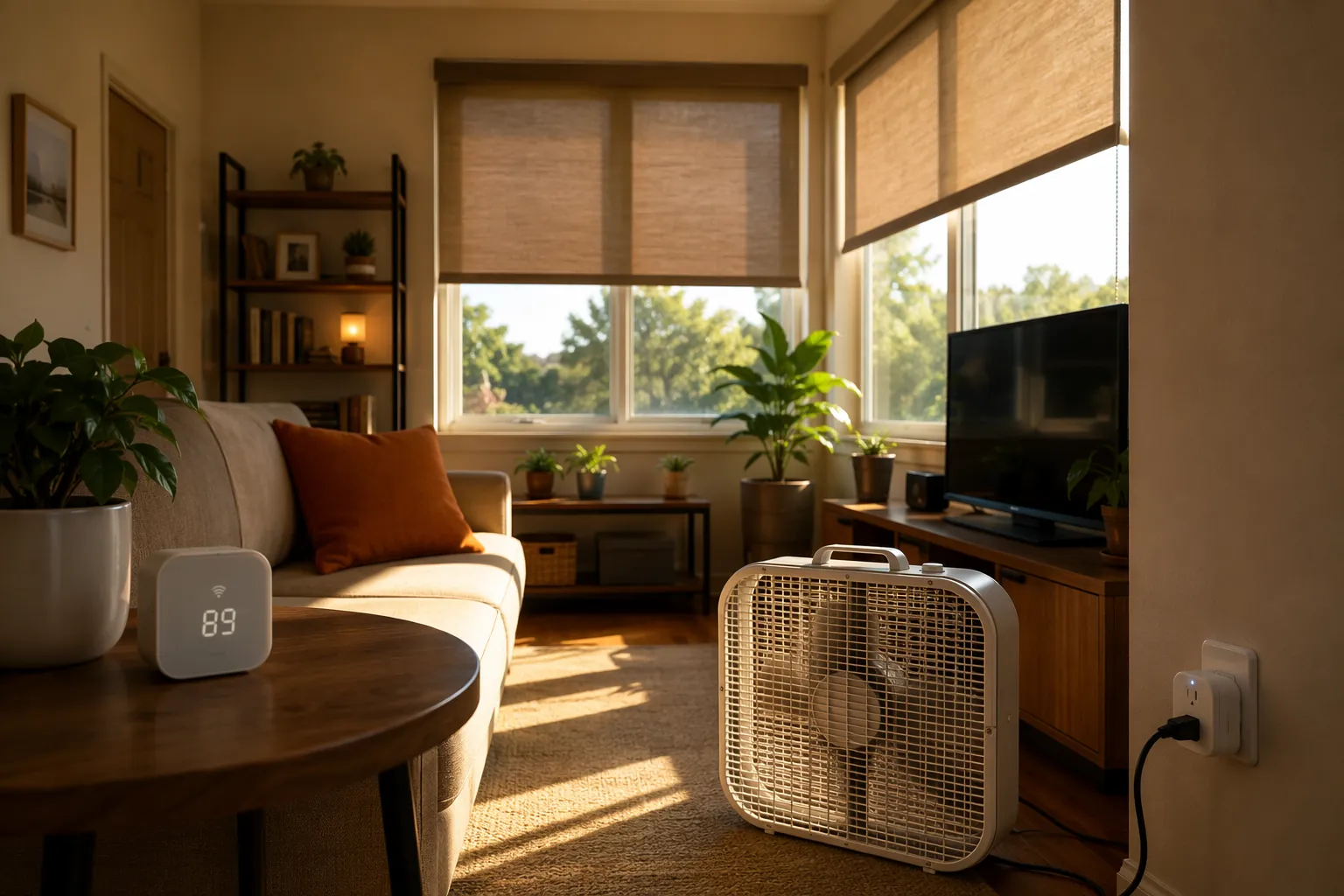
Recipe 1: Turn the fan on before the room becomes a complaint
Start here if you only have one smart plug and one temperature sensor. Shelly’s heat-wave cooling guide describes the basic pattern: pair a smart relay or plug with a temperature reading, then switch a fan when the room crosses a chosen threshold; its example centers on an 82°F trigger for smart cooling during extreme heat.[1] That is a good practical threshold because it is high enough to avoid pointless cycling on a warm afternoon, but low enough that the fan starts before the room feels abandoned.
The fan is not cooling the room the way an air conditioner would. It is cooling the person in the airflow. CNET’s consumer smart-home cooling guidance describes the wind-chill effect as making a room feel about 3-4°F cooler without actually lowering the air temperature.[2] That distinction matters for the automation: running a fan in an empty room is mostly just running a motor in a hot room.
- Devices: smart plug rated for the fan load, box fan or pedestal fan with a physical on/off switch, indoor temperature sensor.
- Trigger: indoor temperature rises above 82°F.
- Guardrail: only run during occupied hours, or only when a motion sensor has recently seen activity.
- Stop condition: turn off below about 80°F, or when the room is unoccupied for a set period.
- Physical setup: put the fan where air actually crosses the body, not pointed at a hallway because the plug was convenient.
For Alexa or Google Home, this can be a plain routine: when the room temperature sensor reads above 82°F, turn on the fan plug; optionally limit it to 5 PM through midnight. SmartThings can do the same with a condition block. Home Assistant gives you cleaner control over the two things that make the routine less annoying: hysteresis and occupancy.
alias: Heat wave - living room fan
mode: single
trigger:
  - platform: numeric_state
    entity_id: sensor.living_room_temperature
    above: 82
condition:
  - condition: time
    after: "16:00:00"
    before: "23:59:00"
  - condition: state
    entity_id: binary_sensor.living_room_occupied
    state: "on"
action:
  - service: switch.turn_on
    target:
      entity_id: switch.box_fan_plug
Then add a separate off automation so the fan is not snapping on and off at exactly 82°F:
alias: Heat wave - living room fan off
mode: single
trigger:
  - platform: numeric_state
    entity_id: sensor.living_room_temperature
    below: 80
  - platform: state
    entity_id: binary_sensor.living_room_occupied
    to: "off"
    for: "00:20:00"
action:
  - service: switch.turn_off
    target:
      entity_id: switch.box_fan_plug
If you do not have an occupancy sensor, use a time window instead. It is less elegant, but it is still better than discovering at 9:40 p.m. that the fan has been off for two hours because nobody wanted to open an app. If you want more plug automation patterns after this, NestGrid’s Home Assistant smart plug recipes are the natural next stop.
Recipe 2: Close the right shades before the afternoon sun gets a vote
This recipe is not as universally deployable as the fan. Smart blinds are ecosystem hardware. Lutron Caséta shades need the Lutron Caséta Smart Hub, and Matter-over-Thread shades such as SmartWings setups depend on a Thread border router or compatible controller; current smart-shade buying guidance still treats those hubs and controllers as part of the real hardware landscape, not as optional trivia.[3]
If you already have the shades, automate them by window orientation instead of making one whole-house “close everything at noon” scene. The punishing window in many homes is the west-facing one, because it gets hit later in the day after the room and exterior wall have already warmed up. Veritais’ smart thermostat and smart blinds heat-wave guide describes orientation-aware shade control and cites up to 77% blocked solar heat gain for west-facing windows during peak afternoon hours.[4]
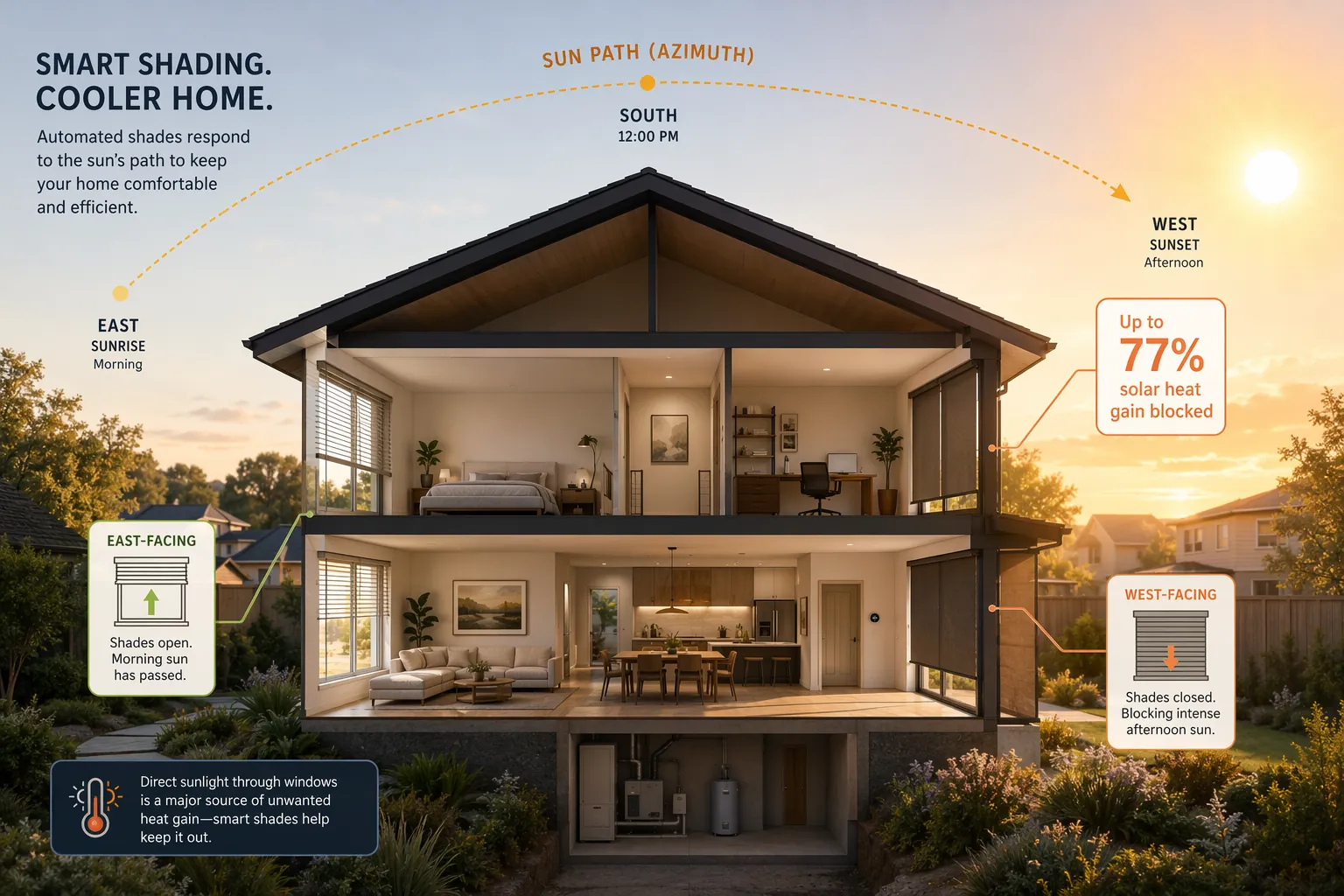
The copyable version is simple: label each shade by orientation, then give west and southwest glass an earlier and stricter heat-wave schedule than north-facing or shaded windows. If your platform exposes sun azimuth, use it. If it does not, use a seasonal time window and adjust after one hot afternoon.
| Window orientation | Heat-wave shade logic | Why it gets different treatment |
|---|---|---|
| East-facing | Close in the morning if the room overheats early; reopen after direct sun passes | Morning gain can matter in bedrooms and kitchens, but it usually does not coincide with the day’s hottest indoor period |
| South-facing | Partially close during midday if direct sun reaches the glass | Useful where overhangs or trees do not already block high summer sun |
| West-facing | Close before peak afternoon sun and keep closed into early evening | Late-day solar gain lands when the house is already warm |
| North-facing or fully shaded | Leave alone unless glare or room temperature proves otherwise | Closing every shade can make the house darker without much heat benefit |
In Home Assistant, the sun condition can be explicit. The exact azimuth values depend on the house and window direction, so treat this as a template to tune after checking when sunlight actually lands on the glass.
alias: Heat wave - west shades afternoon
mode: single
trigger:
  - platform: time_pattern
    minutes: "/10"
condition:
  - condition: numeric_state
    entity_id: sensor.outdoor_temperature
    above: 85
  - condition: numeric_state
    entity_id: sun.sun
    attribute: azimuth
    above: 220
  - condition: numeric_state
    entity_id: sun.sun
    attribute: azimuth
    below: 300
action:
  - service: cover.close_cover
    target:
      entity_id:
        - cover.west_living_room_shade
        - cover.west_bedroom_shade
In Lutron, Apple Home, Google Home, or Alexa, you may not get the same azimuth control directly. The boring replacement is still useful: make a “Heat Wave West Shades” routine that closes west-facing shades at a fixed afternoon time, then reopens them after direct sun is off the glass or when the room is in use and glare is no longer the problem. The automation does not need to be clever everywhere; it needs to be correct for the few windows that are cooking the room.
Recipe 3: Use cooler night air only when it is actually cooler
Night ventilation is where smart home logic earns its keep. Opening windows at night is not automatically cooling. If outdoor air is still warmer than indoor air, you are just importing heat with good intentions. The trigger needs to compare the two temperatures, not follow the clock alone.
Maison et Domotique’s July 2026 Home Assistant heat-wave deployment used a night free-cooling routine that starts after 9 PM when outdoor temperature is at least 1.5°C below indoor temperature, checks every 10 minutes, and uses hysteresis to avoid rapid on/off cycling. In that field-tested setup, the author reported reducing the next day’s peak indoor temperature by 2-3°C, or about 3.6-5.4°F, without AC runtime.[5] That is a real observed outcome, not a universal promise; climate, insulation, thermal mass, window placement, and overnight lows decide how well it travels.
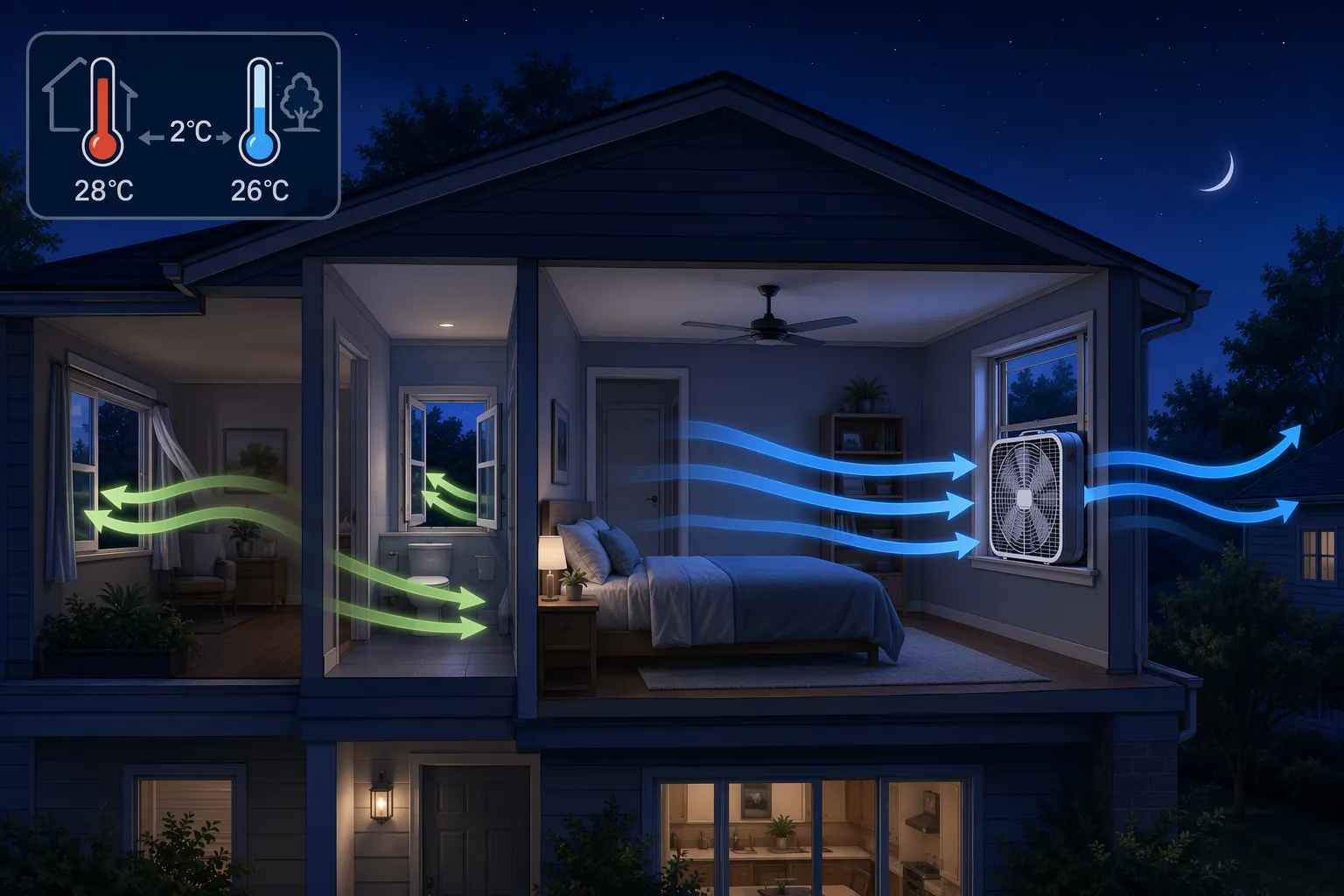
The fan placement matters as much as the trigger. Efficiency Vermont’s passive cooling guidance recommends using a box fan in a window to exhaust warm air, creating negative pressure that draws cooler air in through other open windows; it also names night-flush ventilation and window coverings among the most effective passive cooling strategies, citing IIT Building Science research.[6] In practice, that means one fan blowing outward in a window, with another window open on the cooler or shaded side of the home if possible.
- Put the box fan in exhaust mode, blowing out of the warm room or upper floor.
- Open one or more intake windows elsewhere, ideally where outdoor air is cooler.
- Start only after 9 PM and only when outdoor temperature is at least 1.5°C below indoor temperature.
- Check every 10 minutes rather than continuously reacting to tiny sensor changes.
- Stop before outdoor air warms back up, before rain or unsafe air quality, or when windows need to be closed for security.
Here is the Home Assistant version with the important pieces exposed. It assumes you already have an indoor temperature sensor, an outdoor temperature sensor or weather integration, and a smart plug controlling the exhaust fan.
alias: Heat wave - night free cooling fan on
mode: single
trigger:
  - platform: time_pattern
    minutes: "/10"
condition:
  - condition: time
    after: "21:00:00"
    before: "06:30:00"
  - condition: template
    value_template: >
      {{ states('sensor.indoor_temperature_c') | float(0) -
         states('sensor.outdoor_temperature_c') | float(0) >= 1.5 }}
action:
  - service: switch.turn_on
    target:
      entity_id: switch.window_exhaust_fan
The off automation should use a smaller temperature gap so the fan does not chatter when the two sensors hover near the threshold:
alias: Heat wave - night free cooling fan off
mode: single
trigger:
  - platform: time_pattern
    minutes: "/10"
  - platform: time
    at: "06:30:00"
condition: []
action:
  - choose:
      - conditions:
          - condition: template
            value_template: >
              {{ states('sensor.indoor_temperature_c') | float(0) -
                 states('sensor.outdoor_temperature_c') | float(0) < 0.7 }}
        sequence:
          - service: switch.turn_off
            target:
              entity_id: switch.window_exhaust_fan
      - conditions:
          - condition: time
            after: "06:29:00"
        sequence:
          - service: switch.turn_off
            target:
              entity_id: switch.window_exhaust_fan
Alexa and Google Home users can build a simpler version if their temperature devices are visible to routines: after 9 PM, turn on the fan plug when the outdoor reading is lower than the indoor reading, then turn it off at a fixed morning time. That loses the clean 1.5°C delta and hysteresis unless your platform supports them, but it still keeps the most important rule: do not ventilate just because the clock says night.
How to stack the automations over one hot day
The three recipes work best when they are assigned to different parts of the heat cycle. The fan helps people during occupied heat. The shades reduce heat gain before it becomes room temperature. Night free-cooling tries to dump stored heat when the outdoor temperature finally drops.
| Moment | Automation to run | What it is doing |
|---|---|---|
| Morning | East or south shade schedule if those windows get direct sun | Prevents early solar gain in rooms that overheat before noon |
| Afternoon | West-facing shade schedule | Blocks the late-day sun that often makes evening rooms miserable |
| Occupied evening | Temperature-triggered fan | Improves perceived comfort for people in the room |
| After 9 PM | Night free-cooling ventilation | Exhausts warm indoor air only when outdoor air is cooler |
| Early morning | Turn off exhaust fan and close up as needed | Avoids pulling warming air back into the house |
There is no need to drag thermostat features into this setup unless you also have AC. Google Nest’s Airwave feature, for example, is about using the fan after compressor cooling to take advantage of residual cold in the coils; Google describes the feature qualitatively, not as a precise no-AC savings tool.[7] For a no-AC heat-wave setup, a plain plug-controlled fan and temperature logic are more relevant.
The fastest useful build is Recipe 1. If you have smart shades, Recipe 2 can keep tomorrow’s room from starting as hot. If your nights actually cool down, Recipe 3 is the one that changes the next day’s starting point. Together they can make a heat wave more livable without AC, but the result is bounded by the house you have: local overnight temperature, insulation, window orientation, shade hardware, and whether the fan is moving air across people or just making noise in an empty room.
References
- Smart Cooling in a Heatwave — Shelly USA
- 10 Smart Home Tricks That Keep Your House Cool Without Spiking Your Energy Bill — CNET
- The 4 Best Smart Window Shades, Blinds, and Curtains of 2026 — Wirecutter/NYT, 2026
- The Ultimate Heatwave Hack: Optimising Your Smart Thermostat and Smart Blinds — Veritais
- Heatwave and home automation: turn Home Assistant into a heat shield — Maison et Domotique, July 2026
- 9 tips to keep your house cool without air conditioning — Efficiency Vermont
- Learn about Airwave and how to change settings — Google Nest Help