
Set Up DeepSeek V4 as a Home Assistant Assist Agent
Version-pinned recipe for wiring DeepSeek V4 into Home Assistant as the Assist conversation agent using the maintained HACS DeepSeek Conversation component — the path that still works now that the legacy deepseek-chat/deepseek-reasoner IDs are retired. Covers Flash-vs-Pro pricing, tool-call setup, copyable automation YAML, and thinking-mode troubleshooting.
Current as of 2026-08-01: for setting up DeepSeek V4 as a Home Assistant smart-home assistant through the cloud API, the model-ID correction comes first. Do not use deepseek-chat or deepseek-reasoner in a new Home Assistant setup. DeepSeek retired those legacy IDs on 2026-07-24; during the transition they mapped to V4 Flash thinking and non-thinking modes, but the current API names are deepseek-v4-flash and deepseek-v4-pro. DeepSeek also posted the V4-Flash-0731 public beta on 2026-07-31, with the same calling method and updated agent benchmark claims. [1]
| Setup item | Known-good value as of 2026-08-01 | Status |
|---|---|---|
| Integration path | HACS DeepSeek Conversation component: leofleischmann/Homeassistant-Deepseek-Integration | Maintained community path, not first-party DeepSeek support |
| Home Assistant requirement | Home Assistant 2026.1+ for this maintained component | Component requirement |
| API base URL | https://api.deepseek.com | DeepSeek cloud API |
| Default model | deepseek-v4-flash | Use first |
| Upgrade model | deepseek-v4-pro | Use only where your own Assist tasks show a quality gap |
| Retired IDs to remove | deepseek-chat, deepseek-reasoner | Retired 2026-07-24 |
| Verification level for this recipe | Docs-verified from official docs and component READMEs; not a hub-tested NestGrid run | Re-check before labeling your own install Confirmed |
This is the cloud-API recipe. It is separate from NestGrid’s local llama.cpp DeepSeek V4 Flash setup, the real-world cost watch, and the benchmark-trust note. Those help with local deployment, bills, and agentic claims. This page is for the person already holding a DeepSeek API key and trying to make Home Assistant Assist use V4 tonight.
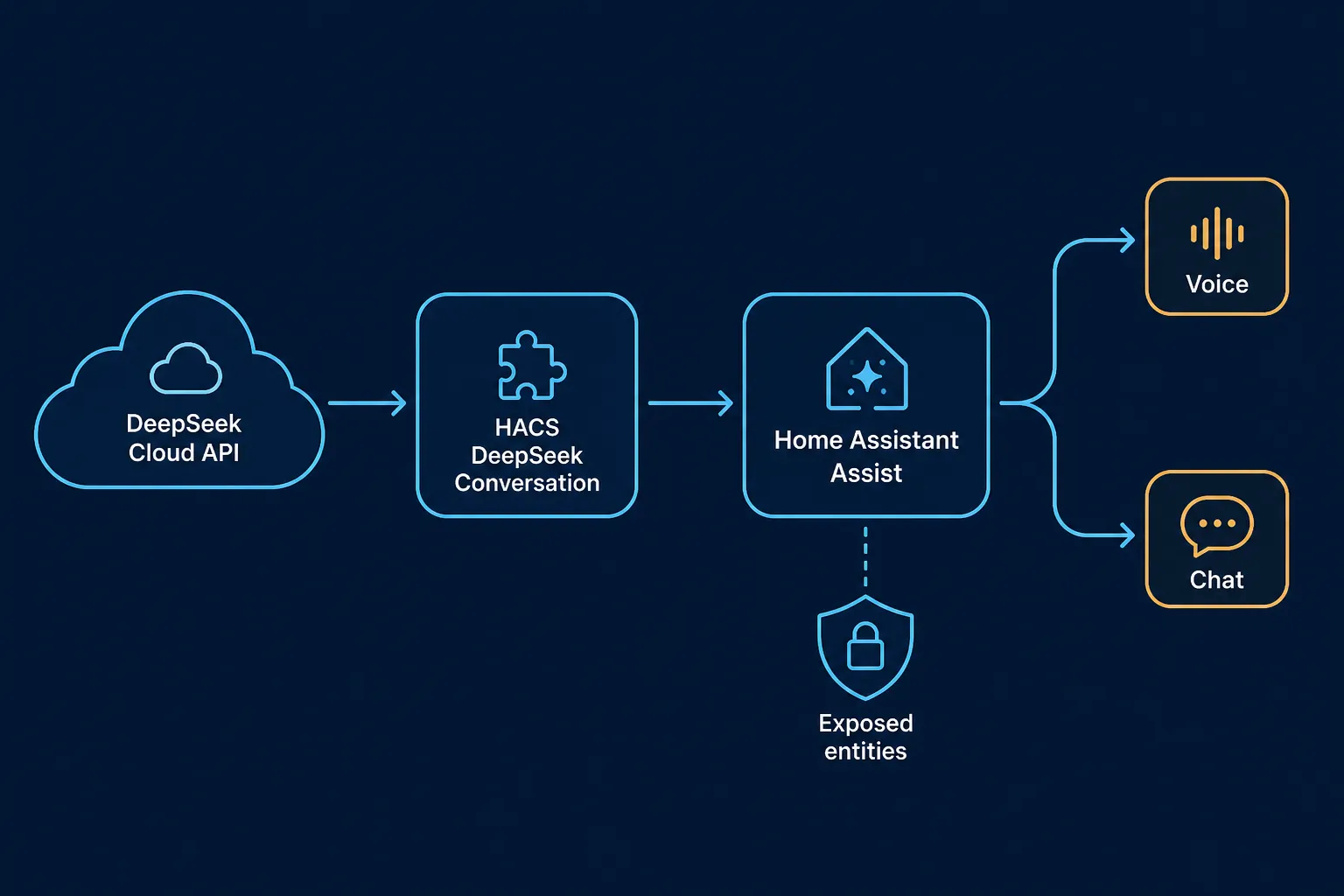
Use the maintained HACS component
DeepSeek’s API is OpenAI-compatible at https://api.deepseek.com, and its docs list deepseek-v4-flash and deepseek-v4-pro as current model IDs. [2] That does not make Home Assistant’s OpenAI integration the right default. For Assist, the maintained path in this recipe is the HACS DeepSeek Conversation component, which documents Home Assistant 2026.1+ support, configurable DeepSeek base URL, V4 Flash and V4 Pro selection, streaming, reasoning controls, a bounded tool loop, token-usage sensors, and an AI Task entity. [3]
The distinction matters because Home Assistant Assist is not just sending a chat message. Once you let the conversation agent control devices, the component has to pass tool calls, tool results, and follow-up model messages cleanly across turns. A stale compatibility trick can look fine during a single “hello” test and then fail when the model tries to call a Home Assistant service, receives a tool result, and needs to continue the same conversation.
Install and configure the DeepSeek Conversation component
Start from the component requirement, not from an old forum screenshot: Home Assistant 2026.1 or newer. If your production instance is older, stop there and decide whether the upgrade is acceptable before adding an AI control layer.
- In HACS, add the custom repository
leofleischmann/Homeassistant-Deepseek-Integrationif it is not already available. - Install the DeepSeek Conversation integration from HACS.
- Restart Home Assistant if HACS or Home Assistant asks for it. Do not skip the restart and then debug a missing config flow.
- Go to Settings → Devices & services → Add integration, then add DeepSeek Conversation.
- Paste your DeepSeek API key, set the base URL to
https://api.deepseek.com, and choosedeepseek-v4-flashas the first model.
The known-good configuration values are short enough to keep beside the integration:
DeepSeek API base URL: https://api.deepseek.com
Default Assist model: deepseek-v4-flash
Pro override model: deepseek-v4-pro
Legacy IDs to remove: deepseek-chat, deepseek-reasoner
Home Assistant requirement for this component: 2026.1+
Reasoning: enabled only if the latency/quality tradeoff makes sense for your pipeline
Tool loop: keep bounded; component supports a 1-20 iteration range
Leave the model on Flash until you have a real reason to change it. Switching to Pro before the first tool-call test makes later debugging worse: when a command fails, you will not know whether you are looking at model behavior, entity exposure, tool-loop configuration, or a more expensive model doing exactly the same wrong thing.
Assign DeepSeek as the Assist conversation agent
After the integration exists, move to the Assist pipeline. In Home Assistant, open the voice assistant settings, select the pipeline you actually use for chat or voice, and set the conversation agent to the DeepSeek Conversation agent created by the HACS component. If you maintain separate pipelines for wall tablets, phones, and speakers, change one pipeline first. A single controlled pipeline is easier to rollback than a whole-house swap.
For the first pipeline, use a boring test phrase: “What lights can you control?” or “Turn on the desk lamp.” Avoid a multi-room scene, a conditional request, or a lock command for the first run. The first test should answer only one question: can Assist hand a request to DeepSeek, can DeepSeek call the Home Assistant tool, and does Home Assistant apply the result to the intended entity?
Expose fewer entities than you think you need
DeepSeek should not see your whole entity registry just because the integration can talk to Assist. Use Home Assistant’s exposed-entity controls for Assist and expose only the devices you intend the model to reason over. Start with a small set: a few lights, one media player, one climate entity, or a harmless script. Add locks, garage doors, alarms, and high-consequence automations only after the boring entities behave correctly.
| Entity group | First-pass exposure | Reason |
|---|---|---|
| Lights and switches | Good first test group | Easy to verify and easy to undo |
| Climate | Expose after light tests pass | Commands can have comfort and energy consequences |
| Scripts and scenes | Expose named, narrow scripts only | A vague script name makes model mistakes harder to spot |
| Locks, garage doors, alarms | Keep hidden at first | The cost of a wrong action is higher |
| Sensors | Expose only useful state sensors | Too many sensors create noisy context without improving control |
Name cleanup is part of setup. “Kitchen counter lights” is better than an entity name that only made sense when you paired the device three years ago. If the model chooses the wrong entity, fix the exposure list and aliases before blaming the model.
Confirm tool calls before trusting voice
A passing chat reply is not the same as a passing smart-home action. Run three tests and look at what changed in Home Assistant, not just what the assistant said.
- State read: ask “Is the hallway light on?” The answer should match the entity state.
- Simple write: ask “Turn on the hallway light.” The entity should change, and the reply should not claim control over unrelated devices.
- Small reasoning step: ask “If the hallway light is off, turn it on; otherwise leave it alone.” This checks whether the agent can read state, decide, and call the right tool without inventing a second action.
Keep the tool loop bounded. The maintained component documents a configurable 1–20 iteration tool loop. [3] A higher ceiling can help with legitimate multi-step requests, but it also gives a confused agent more chances to wander through exposed tools. For a first Assist pipeline, a modest limit is a safer default than “let it keep trying.”
Use the AI Task entity for structured automation output
Assist is for conversation and device control. Automations often need something stricter: a short classification, a notification body, or a JSON-shaped result that another action can consume. Home Assistant’s AI Task integration was introduced in Home Assistant 2025.7 and provides ai_task.generate_data for plain or structured generation. [4] The maintained DeepSeek component registers an AI Task entity, so use that entity where YAML needs a generated result rather than trying to fake a chat conversation inside an automation. [3]
This example is intentionally harmless: it asks DeepSeek to turn existing Home Assistant state into a notification payload. Replace the entity ID with the AI Task entity registered by your DeepSeek integration.
alias: DeepSeek evening status note
mode: single
triggers:
  - trigger: time
    at: "21:30:00"
actions:
  - action: ai_task.generate_data
    data:
      entity_id: ai_task.deepseek_conversation
      task_name: evening_status_note
      instructions: >
        Write a concise smart-home status note for a homeowner.
        Use only these supplied states:
        - Front door: {{ states('lock.front_door') }}
        - Hallway light: {{ states('light.hallway') }}
        - Living room temperature: {{ states('sensor.living_room_temperature') }}
        Return a calm message and an urgency label.
      structure:
        message:
          selector:
            text:
        urgency:
          selector:
            select:
              options:
                - low
                - normal
                - high
    response_variable: deepseek_note
  - action: notify.mobile_app_phone
    data:
      title: "Home status"
      message: "{{ deepseek_note.data.message }}"
The structure block is the point. If the next automation action expects an urgency value, make the model return one of the allowed values instead of a paragraph that a template has to scrape. Keep generated text downstream of real Home Assistant state; do not ask the model to infer whether a door is locked when the lock entity already knows.
If you need model-specific behavior for a single job, prefer an explicit override in the AI task or component settings if your installed version exposes one. The default Assist agent can stay on Flash while a narrow automation uses Pro for a harder writing or classification task.
Thinking-mode failures that look like Home Assistant failures
DeepSeek V4’s thinking mode is useful for agentic work, but it changes the debugging shape. DeepSeek’s thinking-mode guide says thinking is enabled by default with effort set to high; while thinking is active, temperature, top_p, presence penalty, and frequency penalty are ignored. [5] If a voice command feels slow or over-deliberate, lowering temperature is the wrong first fix. Adjust reasoning behavior or effort in the component instead.
The more important failure is multi-turn tool handling. DeepSeek’s guide states that reasoning_content must be passed back after tool calls in thinking mode; otherwise the API returns a 400 error. [5] That is exactly the sort of problem that gets misdiagnosed as “Home Assistant voice is flaky” when the real issue is the integration layer not round-tripping the model’s thinking content across a tool call.
| Symptom | Likely place to check | Fix to try first |
|---|---|---|
| Assistant replies in chat but cannot complete a device action | Tool-call path and exposed entities | Run a single light on/off test and check the exposed-entity list |
| 400 error after a tool result in thinking mode | reasoning_content round-trip | Update the maintained component before changing instructions |
| Temperature changes do nothing | Thinking mode | Change reasoning settings; sampling parameters are ignored while thinking |
| Voice command takes too long | Reasoning effort and tool-loop ceiling | Use Flash, reduce reasoning effort, and keep the tool loop bounded |
| Model controls the wrong device | Entity names, aliases, and exposure | Fix Home Assistant naming before switching to Pro |
This is the main reason not to build the default setup around the OpenAI integration plus an environment-variable base-URL override. That workaround may be reported in community threads, and Docker users and HAOS users have different ways of injecting environment variables, but it is not the recipe to hand to someone who wants Assist tool calls to keep working across model updates. Use the component that is maintaining DeepSeek-specific conversation behavior.
Flash first, Pro only when it earns the bill
Once the setup works, then choose the model. DeepSeek’s official pricing page lists both V4 Flash and V4 Pro with tool calls, JSON output, a 1M-token context window, and a 384K maximum output. It lists V4 Flash at $0.14 per 1M input cache-miss tokens, $0.0028 per 1M input cache-hit tokens, and $0.28 per 1M output tokens; V4 Pro is listed at $0.435, $0.003625, and $0.87 for the same categories. [6]
| Model | Input cache miss | Input cache hit | Output | Default role in this setup |
|---|---|---|---|---|
| deepseek-v4-flash | $0.14 / 1M tokens | $0.0028 / 1M tokens | $0.28 / 1M tokens | Default Assist model |
| deepseek-v4-pro | $0.435 / 1M tokens | $0.003625 / 1M tokens | $0.87 / 1M tokens | Deliberate override for tasks where quality visibly improves |
The output-token difference is roughly three times. That does not make Pro “bad”; it makes Pro a model you should ask to justify itself. If Flash turns on the right light, summarizes the right state, and generates the right structured notification, Pro is just a more expensive way to do the same housework. If Pro consistently fixes a specific failure — for example, a multi-condition automation explanation or a messy natural-language request that Flash mishandles — then keep Pro for that job and leave the general Assist pipeline on Flash.
The public-beta benchmark story supports interest in Flash, not blind trust in a living-room pipeline. DeepSeek’s change log labels V4-Flash-0731 as a public beta, and the model card reports Terminal Bench 2.1 at 82.7, Toolathlon-Verified at 70.3, and AutomationBench Public at 25.1, measured at maximum reasoning effort. [1][7] Those numbers are relevant because Assist is an agentic use case with tools. They still do not prove that your microphone, wake word, exposed entities, tool-loop limit, and chosen reasoning effort will feel fast or reliable.
For a broader comparison against other hosted LLM paths, use NestGrid’s Claude Home Assistant setup guide or the Claude vs. ChatGPT smart-home automation comparison. Do not copy their integration paths into this recipe; the useful comparison is task fit and maintenance burden, not pretending every model plugs into Assist the same way.
The known-good note to keep beside this integration
As of 2026-08-01, the clean setup is: Home Assistant 2026.1+, HACS DeepSeek Conversation component, base URL https://api.deepseek.com, model deepseek-v4-flash first, DeepSeek assigned as the Assist conversation agent, and only the intended Home Assistant entities exposed. Use the registered AI Task entity when automation YAML needs structured generation. Keep deepseek-v4-pro as a deliberate override, not the default.
Leave deepseek-chat and deepseek-reasoner out of new configs. Avoid making the OpenAI integration or an environment-variable workaround your default path for DeepSeek Assist. Before you mark your own setup Confirmed, re-check three things that age quickly: the DeepSeek model IDs, the pricing page, and the HACS component’s Home Assistant requirement.
References
- DeepSeek API Change Log, DeepSeek API Docs, 2026-07-31.
- Your First API Call, DeepSeek API Docs.
- Homeassistant-Deepseek-Integration, GitHub.
- AI task, Home Assistant.
- Thinking Mode, DeepSeek API Docs.
- Models & Pricing, DeepSeek API Docs.
- DeepSeek-V4-Flash-0731, Hugging Face.