

The best energy-saving smart home thermostat is not automatically the newest one, the prettiest one, or the one with the loudest savings claim. It is the one your HVAC system can power reliably, your heat source can tolerate, your rooms can actually benefit from, your household will let automate, and your utility will reward. A mismatch at the wall plate can erase the savings before the app ever opens.

That is why the buying process should start in a dull place: behind the old thermostat. Product comparisons matter later. First, the house has to be able to use the features that produce the savings.
Start With HVAC Compatibility
A thermostat is only a switchboard. If it cannot safely control the equipment already in the house, its learning schedule, sensors, and utility rewards are beside the point. Before comparing brands, identify the HVAC type: conventional furnace and central AC, heat pump, dual-fuel system, boiler, millivolt system, line-voltage electric heat, multi-stage equipment, humidifier, dehumidifier, or ventilator.
Compatibility pages usually ask for wire labels, not wire colors. The labels on the old thermostat base matter more than whether the blue wire looks like it should be common. If the old thermostat has labels such as R, Rc, Rh, W, Y, G, O/B, AUX, E, or C, take a clear photo before disconnecting anything. That photo can prevent a long afternoon of guessing.
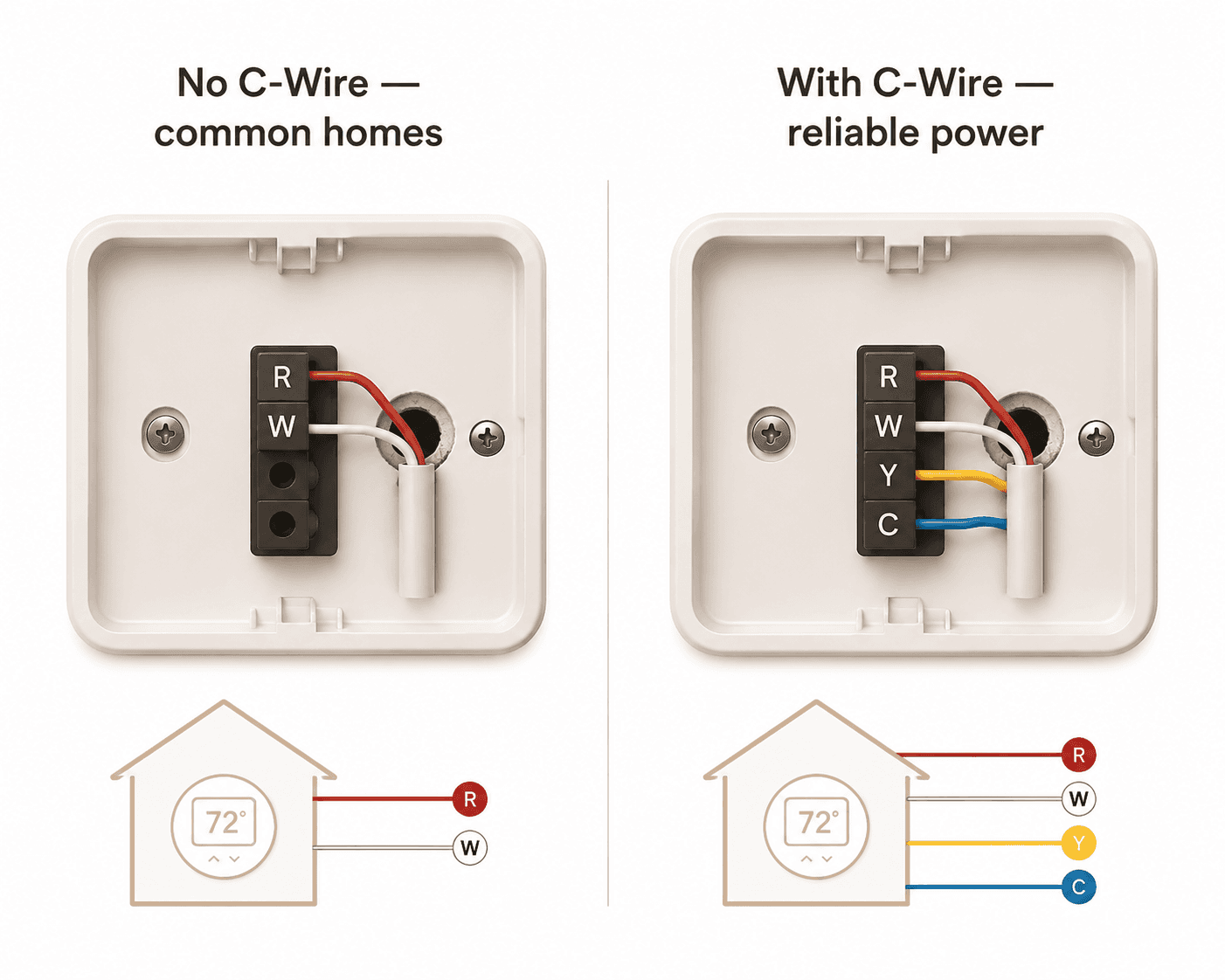
The C-wire is the first serious filter. Roughly half of U.S. homes are estimated to lack a C-wire, and Consumer Reports treats wiring compatibility as a central installation concern rather than a minor footnote.[1][2] A smart thermostat needs steady low-voltage power for Wi-Fi, displays, sensors, relays, and background software. Without a common wire, some models rely on power stealing, an adapter, a power extender kit, batteries, or a different wiring path through the HVAC control board.
The practical decision is simple:
- If the wall has a usable C-wire, most mainstream smart thermostats remain in play.
- If there is no C-wire but an unused conductor is tucked behind the wall plate, it may be possible to connect that spare wire at the HVAC control board.
- If there is no spare conductor, look for a model with a documented adapter, power extender kit, or verified no-C-wire support.
- If the system is line-voltage, millivolt, proprietary communicating equipment, or unusually old, do not assume a common smart thermostat will work.
This is where a cheap thermostat can become expensive. A low purchase price does not help if the final installation requires a service call, a new wire run, or a replacement model. For a deeper compatibility pass, use a dedicated smart thermostat HVAC compatibility guide before ordering.
Heat Pumps Need a Different Kind of Restraint
Heat pump homes deserve special caution. Aggressive temperature setbacks can trigger inefficient recovery behavior or auxiliary heat, which can cancel the savings that looked obvious on paper. Consumer Reports and Wirecutter both flag heat pump setup as an area where thermostat behavior and configuration matter.[2][3]
For a heat pump, the best thermostat is not the one that promises the deepest overnight setback. It is the one that correctly supports heat pump staging, auxiliary heat lockout or balance settings where available, and a recovery strategy that does not force the system into expensive backup heat. If a model’s compatibility checker does not clearly handle O/B reversing valve wiring, AUX, E, or dual-fuel logic, keep looking.
Choose the Control Pattern Before the Brand
Once compatibility is settled, the savings question moves from wiring to behavior. A thermostat saves energy by reducing unnecessary runtime without making the house so uncomfortable that someone overrides it every day. That sounds obvious, but it is the difference between a device that quietly lowers bills and one that becomes another household argument.
ENERGY STAR says certified smart thermostats are independently verified to save, on average, about 8% on heating and cooling energy use.[4] That figure is a better baseline than a manufacturer’s best-case marketing percentage because it comes from field data and certification requirements. It is still an average, not a promise to every home.
The stronger case for smart thermostats over old programmable models is not that homeowners were missing a more complicated schedule screen. It is that automation reduces the failure point. The ACEEE/Cadmus field study found programmable thermostats saving only about 5% on gas heating, while smart thermostats saved 12.5% to 16.1%, with the difference tied to the high human override rate of programmable schedules.[5]
| Household pattern | Control style to favor | Why it matters for savings |
|---|---|---|
| Regular weekday departures and returns | A simple schedule with smart recovery | The thermostat can reduce runtime predictably without guessing who is home. |
| Irregular work hours or frequent short trips | Geofencing or occupancy-aware automation | The thermostat can respond when the house is actually empty instead of following a stale schedule. |
| Multiple people with different routines | Room sensors plus occupancy modes | Savings depend on conditioning occupied rooms, not averaging an empty hallway. |
| Heat pump home | Conservative automation with heat pump-aware recovery | Deep setbacks can backfire if they trigger expensive recovery behavior. |
| Household that often overrides settings | Learning or adaptive scheduling | Automation can reduce the number of manual changes that defeat a programmed schedule. |
Room Sensors Help Only When They Change Runtime
Room sensors are easy to oversell. They can make a house feel much better, especially when the main thermostat sits in a hallway that is warmer or cooler than the rooms people actually use. Wirecutter and Bob Vila testing found that sensors can reduce temperature variance across rooms by about 3°F to 5°F.[3][6]
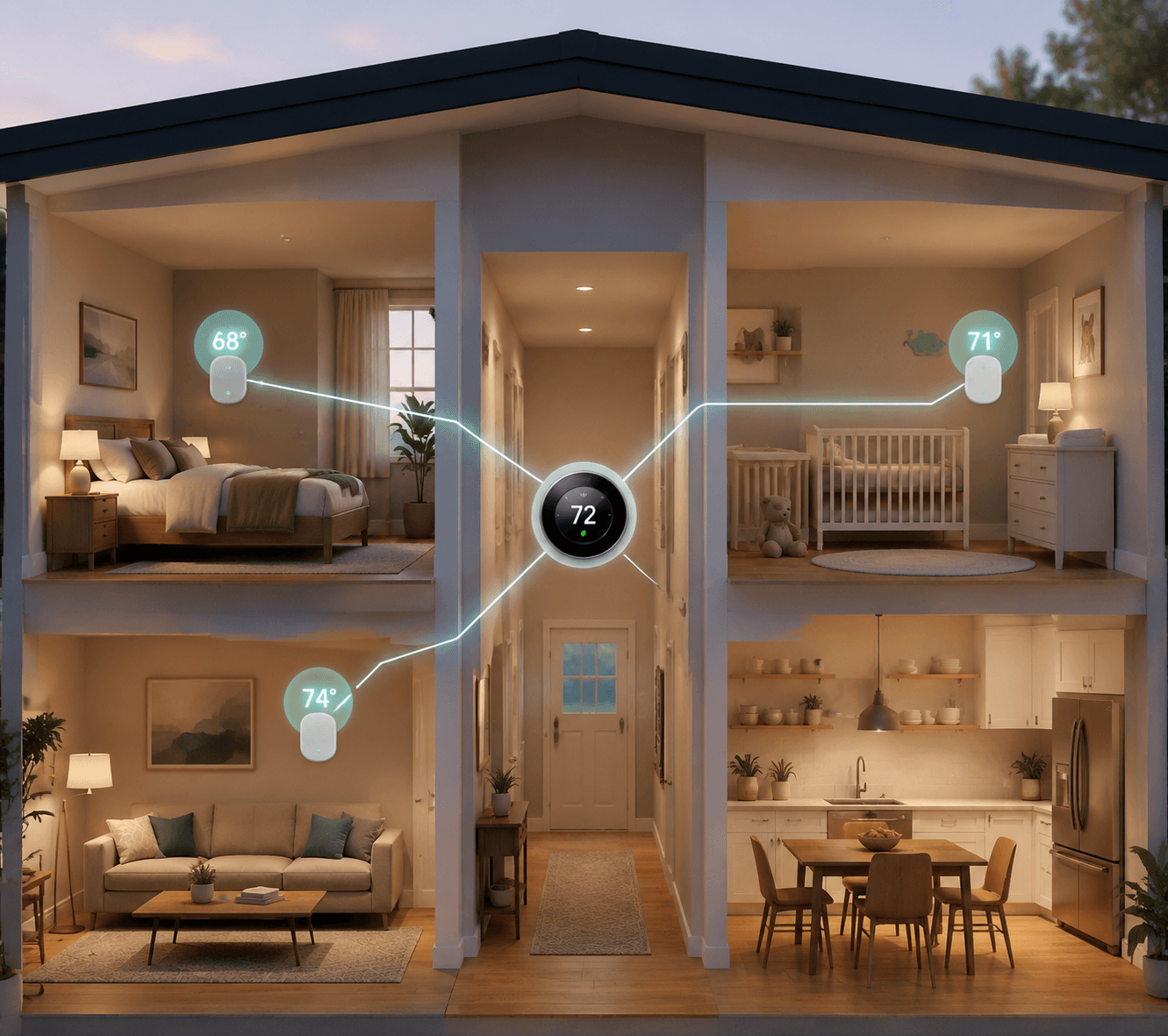
That does not automatically mean lower bills. A sensor that tells the thermostat the nursery is colder may cause the furnace to run longer, which may be the right comfort decision but not an energy-saving one. Sensors start helping with savings when the thermostat uses occupancy or room-priority modes to avoid conditioning unused spaces, or when they prevent the household from setting the entire home colder or hotter just to fix one room.
Buy sensors when there is a real room problem: bedrooms that drift, a home office far from the thermostat, a nursery that needs tighter control, or a split-level house where the hallway reading is misleading. Skip the premium sensor bundle if everyone lives in the same open-plan zone and the thermostat already sits where people spend time. The remote sensor savings guide is useful here because it separates comfort value from actual energy reduction.
Geofencing Is Useful When Phones Match the Household
Geofencing can be excellent in the right home. If the last person leaves, the thermostat relaxes the setpoint. If someone is on the way back, it starts recovery before the house feels stale. That is a real savings mechanism for households with unpredictable schedules.
It is less useful when phones are not reliable stand-ins for occupancy. Children without phones, shift workers, guests, a retired household member, or someone who disables location permissions can all confuse the system. In those homes, a plain schedule with limited manual adjustments may save more than a theoretically smarter setup that keeps guessing wrong.
Learning Schedules Are Not Magic
Learning thermostats watch manual changes and try to build a schedule. That can help when the household has a pattern but does not want to program it. It can also learn bad habits. If someone bumps the heat every evening because one room is drafty, the thermostat may preserve the expensive workaround instead of solving the room problem.
A manual schedule is not inferior when the routine is simple. The danger is neglect. The ACEEE/Cadmus comparison is a reminder that many programmable thermostats underperform because people override or abandon them, not because schedules are inherently weak.[5] If the household will set a schedule once and never revisit it after a job change, school change, or seasonal shift, adaptive automation earns its keep.
Add Demand-Response Money After the Core Fit Is Right
Demand-response programs are one of the clearest advantages a smart thermostat has over a programmable one. During certain high-demand periods, the utility can make modest temporary temperature adjustments, usually with notice and an override option. In return, participating households may receive bill credits or seasonal rewards. Program documents from utilities including Eversource, National Grid, and Southern California Edison show that annual credits commonly land in the $20 to $50 range, depending on location and program rules.[7][8][9]
That money should be treated as an added layer, not the main reason to buy an incompatible thermostat. A demand-response credit will not rescue a model that needs a C-wire the house lacks, mishandles a heat pump, or annoys the household into opting out. But when two compatible models are otherwise close, utility eligibility can decide the better savings choice.
Check the utility’s exact eligible-device list before buying. Some programs accept only certain brands or models, and enrollment may need to happen through the utility marketplace rather than after a retail purchase. The site’s demand-response earnings breakdown can help compare the size of those credits against the thermostat’s real price.
Do Not Ignore Platform Fit
Platform compatibility will not show up directly on the heating bill, but it affects whether the thermostat keeps being used well. A household that already relies on Apple Home, Google Home, Amazon Alexa, Samsung SmartThings, or another platform should not buy a thermostat that turns every adjustment into a separate app errand.
Matter support is worth checking because it reduces the risk of being trapped in one ecosystem as the rest of the smart home changes. It is not a savings feature by itself. It is a friction reducer. Less friction means residents are more likely to keep automations enabled, maintain sensible schedules, and notice when something is wrong.
Voice assistant support is less important than control reliability. The useful question is not whether the thermostat can answer a command from the couch. It is whether the household can adjust away mode, vacation mode, sensor priority, and schedules without making one person the permanent settings manager. For ecosystem-specific tradeoffs, compare models in the smart thermostat ecosystem guide.
Price the Installation, Not Just the Box
The shelf price is only one part of the cost. A sub-$60 thermostat can be a strong buy if the wiring is simple, the utility rebate applies, and the household does not need room sensors. It can be a poor buy if it requires professional wiring work or lacks support for the HVAC system. CLIQ’s 2026 analysis notes entry models around $58 and utility rebates commonly ranging from $50 to $200, which can bring some effective out-of-pocket costs close to zero.[1]
The federal tax credit is no longer part of the 2026 math. It expired on December 31, 2025, so current buyers should focus on utility rebates, instant marketplace discounts, demand-response credits, and avoided installation costs.[1]
| Cost item | Why it changes the savings calculation |
|---|---|
| Thermostat purchase price | A premium model needs enough additional savings, comfort value, or utility credit to justify the gap. |
| C-wire adapter or power extender kit | A required accessory can erase the advantage of a cheaper model. |
| Professional installation | Worth paying for complex systems, but it lengthens payback. |
| Room sensors | Valuable for uneven rooms, but they save energy only when they change control behavior. |
| Utility rebate | Can make a basic ENERGY STAR-certified model the best financial choice. |
| Demand-response credit | Adds recurring value when the model and utility program match. |
Dollar savings estimates should be handled carefully. ENERGY STAR’s 8% savings figure is the steadier number to carry into the decision.[4] CLIQ translates that percentage into roughly $155 to $237 per year at 2026 energy costs, but that translation depends on current bill levels and the source is vendor-published, even though it cites outside energy data.[1] A household with low HVAC use will not see the same payback as a large, drafty home in a high-cost region.
A Practical Ranking Method
Do not start by ranking famous brands. Start by eliminating models that cannot do the job in the house.
- Remove any thermostat that is not compatible with the HVAC system, wiring, voltage, heat pump setup, or accessory equipment.
- Among the remaining models, favor ENERGY STAR-certified options because their savings claims are field-verified against certification requirements.
- Match automation to the household: schedule for predictable routines, geofencing for irregular absence, learning behavior for people who will not maintain schedules, and conservative recovery for heat pumps.
- Add room sensors only when the thermostat location misrepresents lived-in rooms or when occupancy-based control will actually be used.
- Check utility rebate and demand-response eligibility before purchase, not after installation.
- Use platform compatibility as a tie-breaker when it will make the thermostat easier for the whole household to live with.
- Compare total cost after rebates, adapters, sensors, and installation instead of comparing shelf prices.
For one home, that may point to an inexpensive certified thermostat bought through a utility marketplace. For another, it may justify a higher-priced model with better room sensors and heat pump controls. For a third, it may mean delaying the purchase until a C-wire solution is clear. The maximum-savings thermostat is the one that survives these filters, not the one with the broadest reputation.
A useful final check is blunt: will this thermostat reduce unnecessary HVAC runtime without causing the people in the house to fight it? If the answer depends on a feature no one will enable, a rebate that does not apply, or a wiring condition that is not present, choose a different model.
References
- Smart Thermostat Savings: 2026 Guide, CLIQ For Home, https://www.cliqforhome.com
- Thermostat Buying Guide, Consumer Reports, https://www.consumerreports.org/appliances/thermostats/buying-guide/
- The Best Smart Thermostat, Wirecutter, https://www.nytimes.com/wirecutter/reviews/the-best-thermostat/
- Smart Thermostats, ENERGY STAR, https://www.energystar.gov/products/smart_thermostats
- ACEEE/Cadmus field study comparing programmable and smart thermostat savings, ACEEE / Cadmus, https://www.aceee.org
- The Best Smart Thermostats, Bob Vila, https://www.bobvila.com
- ConnectedSolutions, Eversource, https://www.eversource.com
- ConnectedSolutions, National Grid, https://www.nationalgridus.com
- Smart Energy Program, Southern California Edison, https://www.sce.com
Data Updates
Know about updated rebate programs, changed subscription prices, or new ENERGY STAR certifications? Submit a note below to help keep this content current. For formal data corrections, use the contact page.
Comments
Join the discussion with an anonymous comment.