
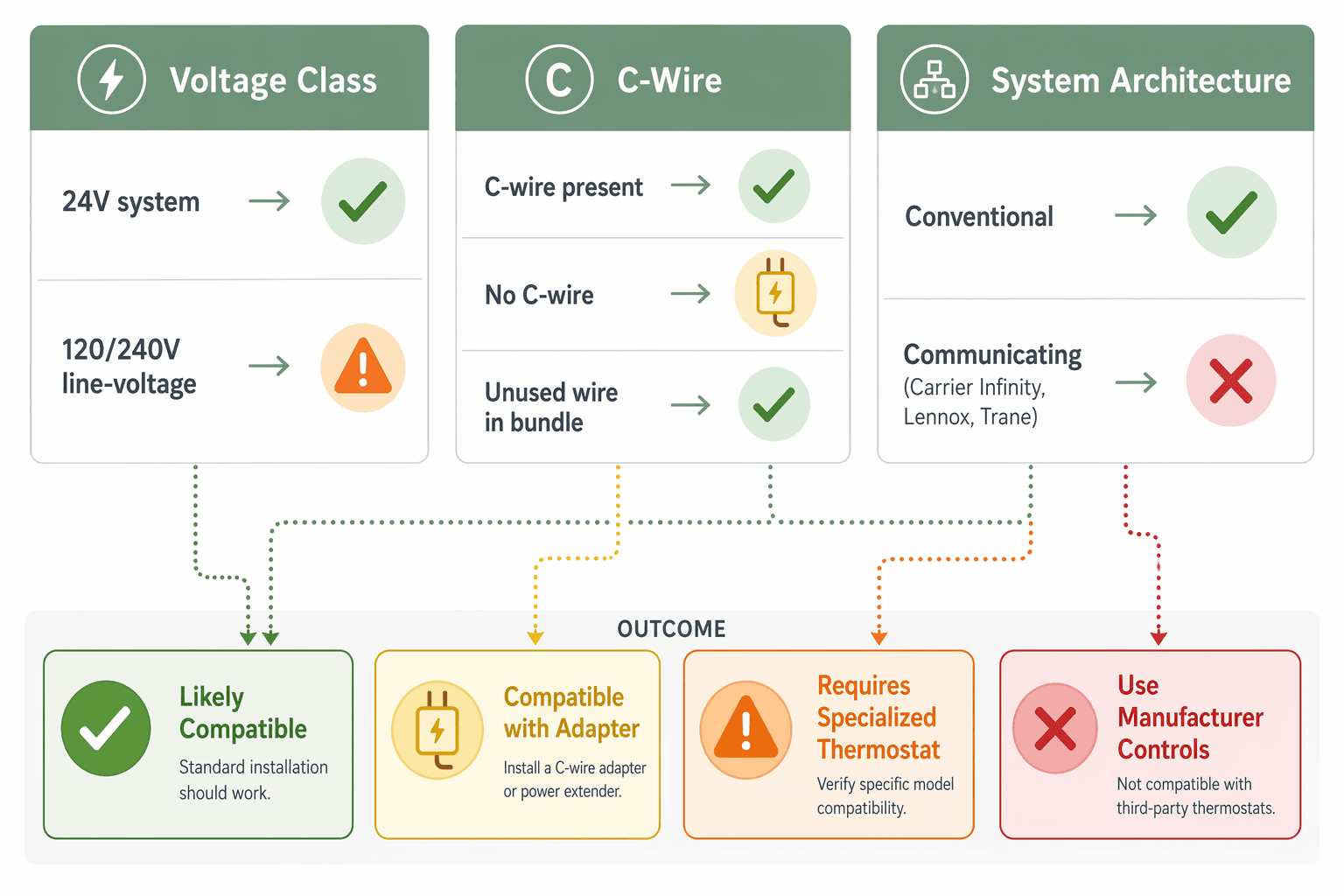
A smart home thermostat will work with many central HVAC systems, but only after three checks line up: the system uses 24V low-voltage control, the thermostat has reliable power through a C-wire or approved adapter, and the HVAC equipment is not a proprietary communicating system that depends on its own manufacturer control. Most standard Nest, Ecobee, and Honeywell-style thermostats are built around conventional 24V central heating and cooling, especially when a C-wire is present. Electric baseboard heat, many mini-splits, and Carrier Infinity, Lennox iComfort, or Trane ComfortLink-style systems change the answer before the box is even opened.[1]
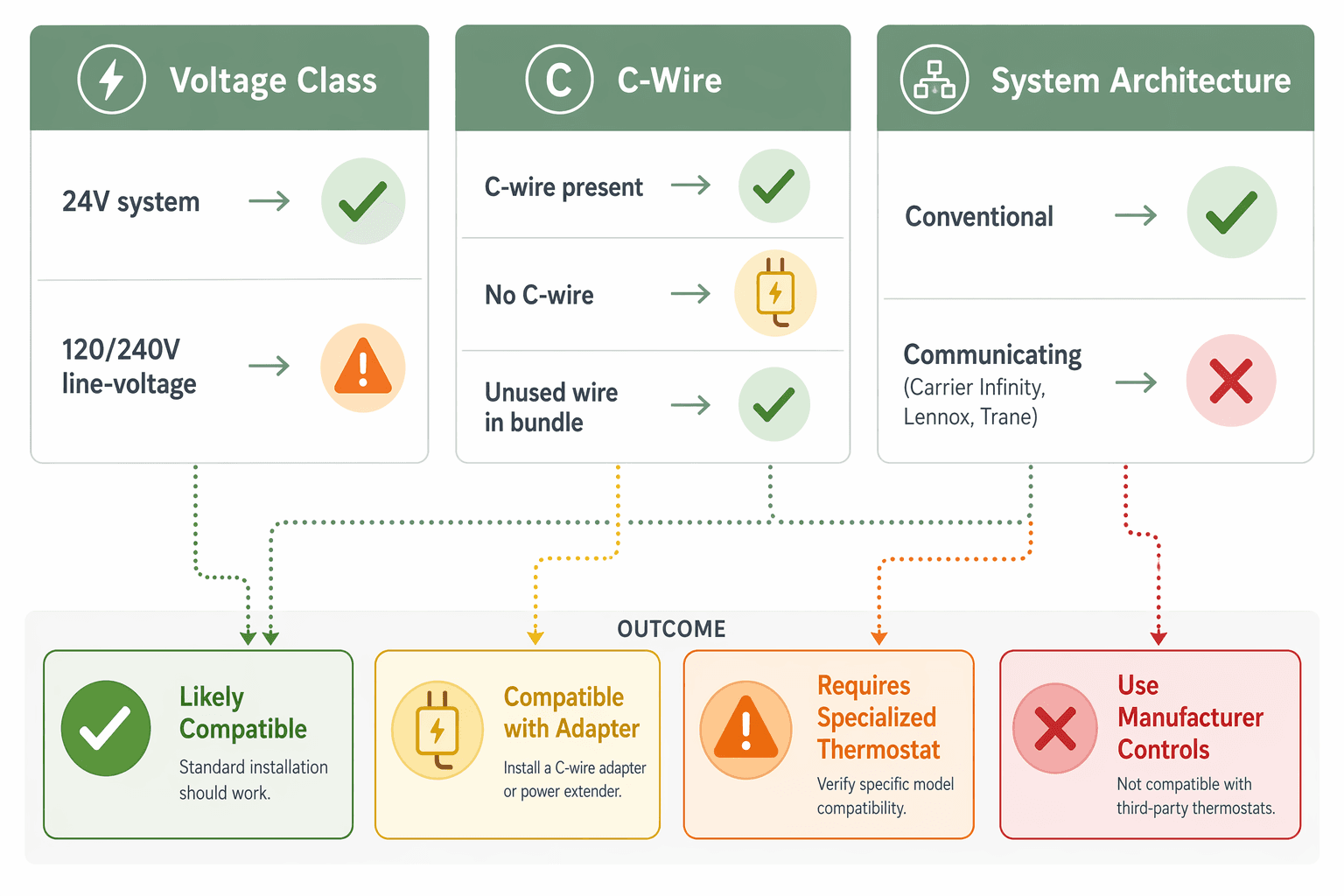
The quick compatibility matrix
| What you find | Likely result | What to do before buying |
|---|---|---|
| 24V conventional system, R/C/W/Y/G-style terminals, C-wire connected | Likely compatible | Run the Ecobee, Google Nest, or Honeywell compatibility checker using your actual terminal labels, then choose a model that supports your heat/cool stages. |
| 24V conventional system, no C-wire connected, unused extra wire in the cable bundle | Often compatible after connecting a C-wire | Photograph the thermostat wiring, then confirm whether the unused conductor can be landed on C at the equipment control board. |
| 24V conventional system, no usable C-wire | Possibly compatible with adapter | Check whether the thermostat supports a Power Extender Kit, Nest Power Connector, or add-a-wire device for your equipment. |
| Thick wires, 120V/240V labels, electric baseboard, fan-forced wall heater, or radiant line-voltage heat | Requires specialized thermostat | Do not connect a standard smart thermostat. Look at line-voltage products such as Mysa-type thermostats. |
| Carrier Infinity, Lennox iComfort, Trane ComfortLink, or other proprietary communicating control | Usually should stay with manufacturer-specific controls | Confirm with the equipment manufacturer or dealer before replacing it; a third-party thermostat may remove variable-speed, diagnostic, or humidity functions. |
| Ductless mini-split with handheld remote or wall controller, no standard R/C/W/Y/G thermostat terminals | Requires specialized controller | Use a manufacturer controller, IR-based smart controller, or native Wi-Fi/Matter option if your model supports it. |
| Heat pump terminals with O/B, AUX/E, or multi-stage labels | Compatible only if the thermostat supports the exact heat-pump configuration | Verify O/B reversing-valve setup and auxiliary or emergency heat support before purchase. |
That table does more useful work than a generic “compatible with most homes” badge. A thermostat can light up and still control the wrong thing. It can run a heat pump in the wrong mode, skip second-stage heat, or turn a sophisticated variable-speed system into a blunt on/off appliance. The point is not to make installation feel scary; it is to catch the few conditions where a good thermostat is the wrong thermostat.
Start at the old thermostat, before you shop
Pulling the old thermostat cover is usually more informative than reading another product page. Do not disconnect anything yet. Turn off HVAC power if you need to loosen the thermostat from the wall, then take clear photos from straight on and from an angle so the terminal letters and wire colors are visible. The photo is your map back home if a wire slips, and it is also what compatibility tools and support teams will ask for.
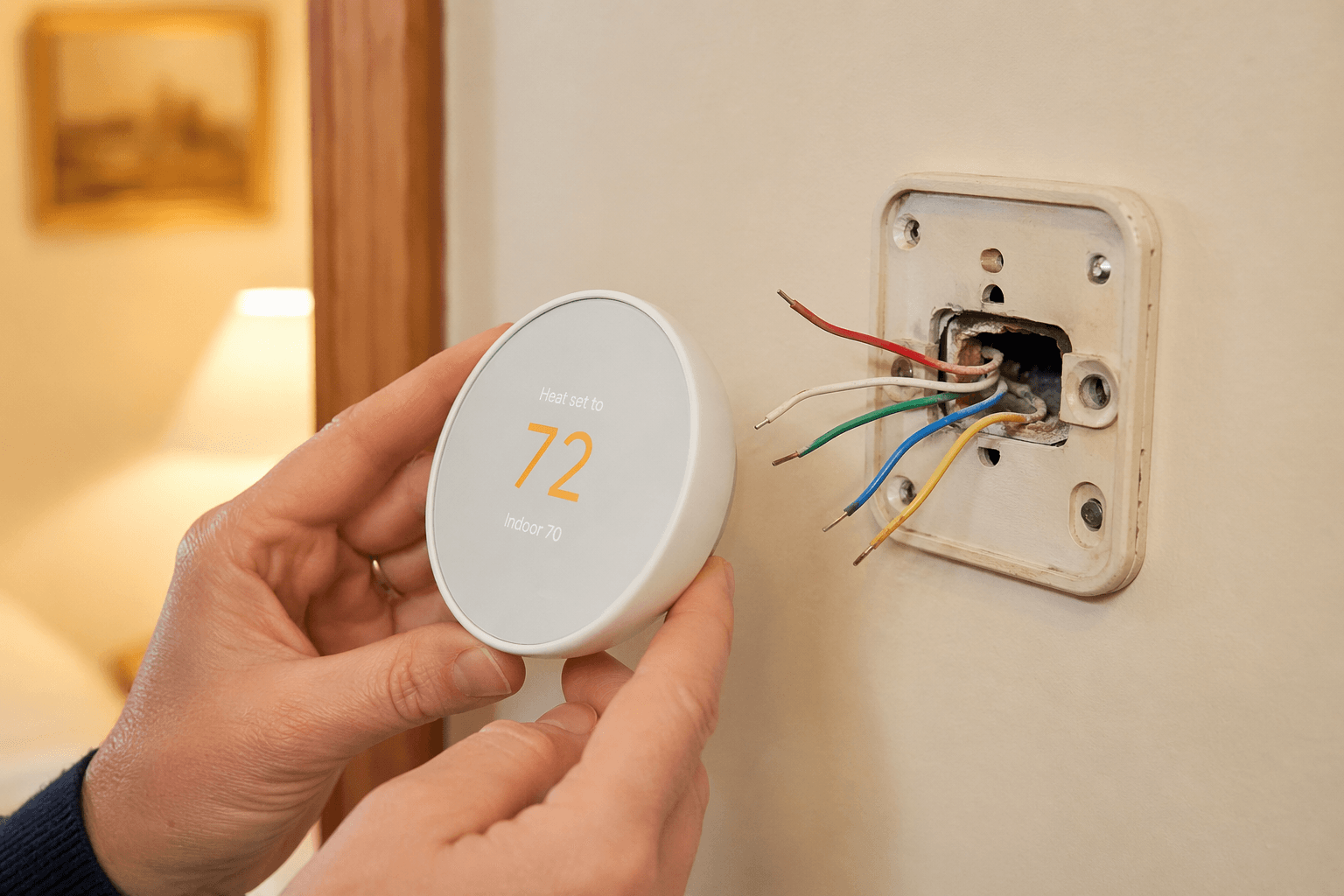
Look for terminal labels, not just wire colors. A blue wire is often used for C, but color is not a promise. A white wire may be W on one system and something else on another. The labels on the old baseplate—R, Rc, Rh, C, W, W2, Y, Y2, G, O/B, AUX, E—tell you what the current control is doing.
- Take photos before removing any wire.
- Write down every connected terminal label.
- Look behind the wall plate for unused wires tucked into the cable jacket.
- Check whether the thermostat cable is small low-voltage wire or heavier line-voltage wiring.
- Find the furnace, air handler, or heat-pump control board if you need to verify where the other end of the wire lands.
Once you have those photos, use the official Ecobee, Google Nest, or Honeywell compatibility checker for the exact model you are considering. Do not answer based on what you think the system has. Answer based on the terminals that are actually connected.
Check 1: voltage class is the hard stop
The first split is low voltage versus line voltage. Standard smart thermostats from the major central-HVAC brands are designed for 24V control circuits, the kind commonly used by furnaces, central air conditioners, heat pumps, and air handlers. They are not meant to be wired directly into 120V or 240V electric heating circuits. Electric baseboard, some in-wall fan heaters, and some radiant systems need line-voltage thermostats instead; connecting a standard smart thermostat to line voltage can destroy the thermostat or trip breakers.[1]
The warning signs are usually visible. Line-voltage thermostats often have thicker wires, wire nuts inside the box, and voltage markings such as 120V, 208V, or 240V. They may be mounted in a standard electrical box rather than a small thermostat opening. If the thermostat directly switches power to electric baseboard heaters, stop shopping for the usual Nest/Ecobee/Honeywell central-HVAC models and look for a purpose-built line-voltage smart thermostat.
A line-voltage home is not barred from smart control; it is just on a different product path. Mysa-type thermostats are built for electric baseboard and similar line-voltage heating applications, while a central-HVAC smart thermostat is built to send low-voltage calls for heat, cooling, fan, or reversing-valve operation.[1] If you are matching thermostat choices by heating type, a separate home-type thermostat guide is more useful than a generic smart thermostat ranking.
Check 2: the C-wire is about reliable power, not a luxury feature
A smart thermostat needs continuous power because it is not just a switch. It runs a display, Wi-Fi radio, sensors, processor, and sometimes remote room-sensor communication. The C-wire, or common wire, completes the 24V power circuit so the thermostat is not trying to sip power through heating or cooling circuits that were never designed as a charger.
The C-wire is one of the most common compatibility obstacles, especially in systems installed before around 2010. Older thermostats often did not need continuous power, so the installer may have left C disconnected even when an unused conductor was available in the wall cable.[1] That is why “no wire on C” at the thermostat is not the end of the inspection. It may only mean nobody needed it before.
The best version of this problem is an unused wire tucked behind the old wall plate. If the same conductor exists at the furnace or air-handler control board, it may be possible to connect it to the C terminal there and use it as a true common wire. This is often cleaner than adding an adapter because the thermostat gets the power path it was designed to use.
Adapters help when there is no spare conductor. Ecobee ships a Power Extender Kit with compatible models, and Google Nest offers a separate Nest Power Connector at about $25. Add-a-wire devices are another common workaround. These products can solve many C-wire gaps, but they are not universal across every furnace control board or equipment arrangement, so the thermostat maker’s compatibility tool and installation guide still matter.[1][2]
This is where brand comparisons get practical. The difference between an Ecobee kit in the box and a separate Nest accessory is not just a shopping-cart detail; it affects what you need to install at the equipment cabinet and whether your control board has the terminals the adapter expects. If you are already narrowing between those two ecosystems, an Ecobee-versus-Nest compatibility comparison is worth reading after you know your wire count.
Check 3: conventional wiring and communicating systems are not the same thing
A conventional thermostat sends separate low-voltage calls: heat, cool, fan, second-stage heat, second-stage cooling, reversing valve, auxiliary heat. A communicating thermostat talks digitally with matched equipment. That difference is easy to miss because both may sit in the same hallway and both may have low-voltage wiring behind them.
Carrier Infinity, Lennox iComfort, and Trane ComfortLink II-style systems are the names that should make a buyer slow down. These systems can use proprietary communication for variable-speed modulation, fault diagnostics, humidity control, and other integrated functions. Replacing that control with a third-party thermostat may make the equipment run, but it can also remove the very features that made the system expensive in the first place.[1]
The trap is that “it powered on” feels like success. Power only proves that the thermostat found voltage. It does not prove that the blower is modulating correctly, that the outdoor unit is staging as designed, that dehumidification logic still works, or that fault codes will show where the technician expects to see them. For a communicating system, the safer default is to keep the manufacturer control unless the equipment documentation or a qualified dealer confirms a supported non-communicating setup.
Heat pumps: pay attention to O/B before the first cold night
Heat pumps add a compatibility check that plain furnace-and-AC systems do not have: the reversing valve. The O/B terminal controls whether the heat pump is in heating or cooling mode, and the thermostat has to be configured for the way that equipment energizes the valve. A misconfigured heat-pump thermostat can make the system operate in reverse.[1]
Before buying, confirm that the thermostat supports heat pumps, not just “heating and cooling.” Then look for AUX, E, W2, or similar labels if the system has auxiliary or emergency heat. The important question is not whether the thermostat has a pretty heat-pump icon in the app; it is whether it supports the terminals and logic your heat pump actually uses.
Multi-stage systems need more than basic on/off control
If the old thermostat uses W2, Y2, AUX, or other second-stage terminals, do not replace it with a model that only handles single-stage heating and cooling. Multi-stage compatibility affects comfort, noise, runtime, and backup heat behavior. A thermostat that can call only first stage may still make conditioned air come out of the vents, but it may not be controlling the system the way the equipment was designed to run.
This is also where model selection matters after compatibility is confirmed. Some thermostats support more stages, accessories, or sensor configurations than others. Once your voltage, power, and architecture checks are clear, a 2026 smart thermostat buyer guide or a Sensi-versus-Nest-versus-Ecobee comparison can help sort features without guessing at the wiring.
Mini-splits and ductless systems are a separate lane
Most ductless mini-splits do not wire directly into a standard central-HVAC smart thermostat. Many are controlled by a handheld remote, a manufacturer wall controller, or a proprietary communication method. In those cases, the common smart-home workaround is an IR-based controller such as Sensibo or Cielo Breez, or a manufacturer-specific smart controller.[1]
This category is changing quickly in 2026, with some newer systems offering native Wi-Fi, app control, or broader smart-home integration. Still, the pre-purchase rule is the same: do not assume a wall thermostat form factor means standard R/C/W/Y/G compatibility. Check the mini-split model’s control options first, then choose either the manufacturer path or a controller designed for ductless equipment.
Where savings fit in
Smart schedules, occupancy sensing, remote control, and energy reports can be useful, and broader smart thermostat ROI discussions usually start there. Consumer Reports treats the value question as dependent on home behavior, equipment, and use patterns rather than a guaranteed outcome for every house.[3] That is the right order: savings matter after the thermostat can control the HVAC system correctly.
Skipping the compatibility work can turn the savings project into a return or service call. Returns may involve 15–20% restocking fees plus shipping, and power-stealing designs can damage some modern HVAC equipment.[4] Even when nothing is damaged, losing second-stage operation or proprietary modulation is a poor trade for a nicer app.
A clean go/no-go process
Use this sequence before purchase, not after the wall plate is already off:
- Photograph the existing thermostat wiring before loosening anything.
- Confirm voltage class. If it is line voltage, shop for a line-voltage smart thermostat, not a standard central-HVAC model.
- Check for a connected C-wire or an unused conductor that can become one.
- If there is no C-wire path, verify the exact adapter supported by the thermostat and your equipment.
- Identify whether the system is conventional or proprietary communicating.
- For heat pumps and multi-stage systems, match every active terminal and stage to the thermostat’s supported configurations.
- Run the official compatibility checker from the thermostat maker using your actual terminal labels.
If you already installed a thermostat and now have short cycling, no heat, cooling during a heat call, missing auxiliary heat, or repeated power warnings, stop changing random app settings and go back to the photos and terminals. Troubleshooting is much easier when you know whether the problem is power, heat-pump configuration, staging, or a system architecture mismatch.
Smart thermostat compatibility is not a yes/no feature printed on the box. It is the result of three checks: voltage class, C-wire power, and system architecture. Get those right, then choose the smart features you want. Ignore one of them, and a smart home thermostat can become a return, a truck roll, or a downgrade to equipment that was working properly before.
References
- Smart Thermostat Compatibility Across HVAC Systems and Brands, CompareHVACCompanies
- My Guide Makes DIY Smart Thermostat Installation Easy, CNET
- Are Smart Thermostats Worth It?, Consumer Reports
- The 4 Best Smart Thermostats of 2026, Wirecutter
Data Updates
Know about updated rebate programs, changed subscription prices, or new ENERGY STAR certifications? Submit a note below to help keep this content current. For formal data corrections, use the contact page.
Comments
Join the discussion with an anonymous comment.