
Home Automation Hub Protocols Explained: Matter, Thread, Zigbee, and Z-Wave
Understand the differences between Matter, Thread, Zigbee, and Z-Wave and learn which protocol combinations your smart home hub needs to support to avoid compatibility pitfalls and future-proof your setup.
Last updated
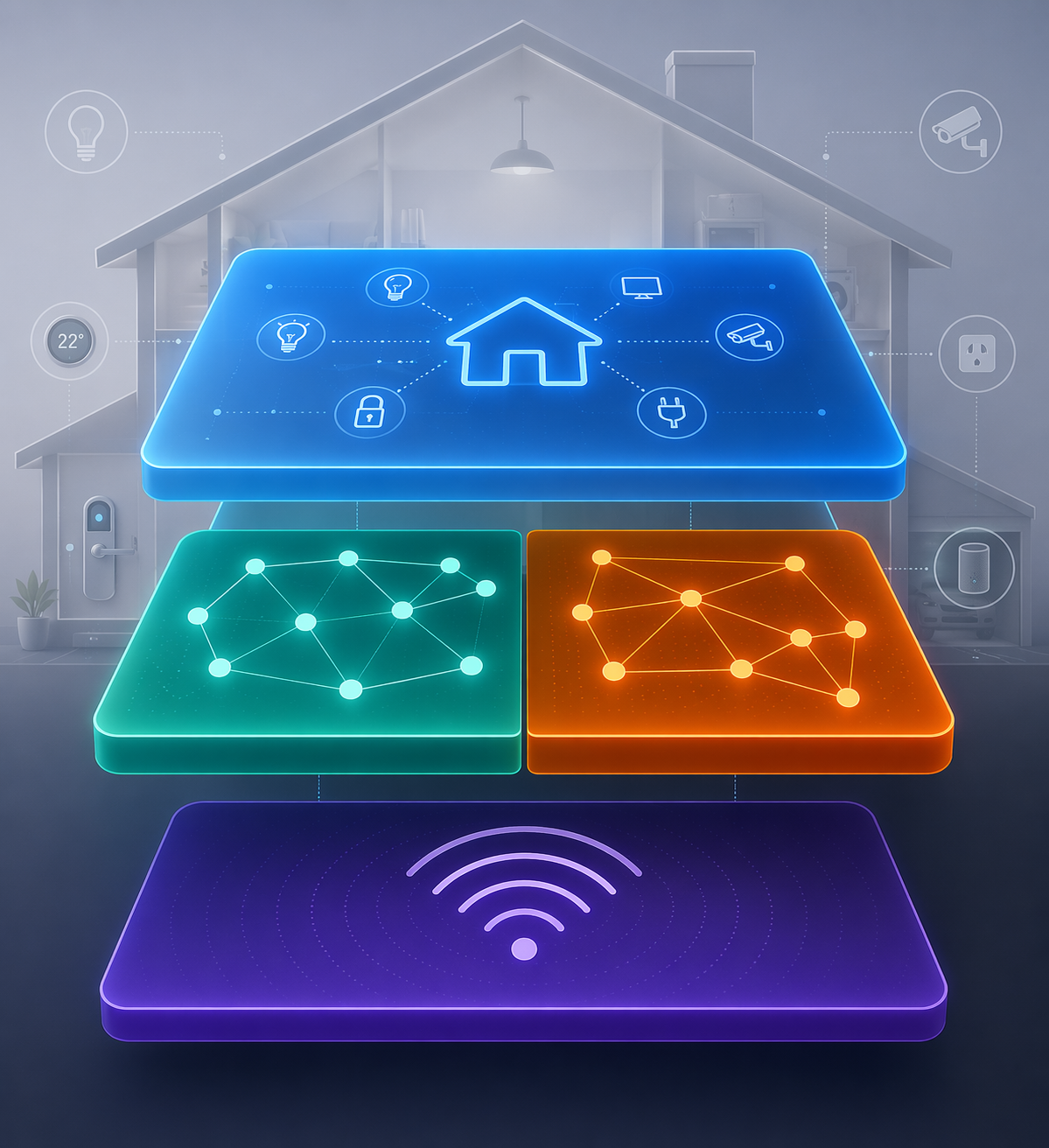
The fastest way to buy the wrong home automation hub is to treat Matter, Thread, Zigbee, and Z-Wave as four rival badges on a box. They are not four versions of the same thing. Matter is the language a device speaks to controllers and apps. Thread and Zigbee are low-power mesh radios that carry device traffic. Z-Wave is its own sub-GHz network, still especially relevant for locks and security sensors.
That difference sounds technical until it costs money. A hub can support Matter and still fail to connect a Thread device if it does not include a Thread Border Router. A hub can support Matter and Zigbee and still leave a Z-Wave lock stranded. In 2026, the clean single-box answer under $200 is still missing: the common buyer-facing hubs each leave out at least one of Matter, Thread, Zigbee, or Z-Wave.[1][2][3]
Matter comes first because it causes the most confusion
Matter is often marketed as if it replaces the older protocol mess. It does not. It sits above the network connection and gives devices a shared application layer, so a compatible light, plug, lock, or sensor can be understood by different ecosystems more consistently. ZDNET describes Matter as the application or software layer that can run over Thread, Wi-Fi, or Ethernet, rather than as a radio technology of its own.[1]
That is why a “Matter compatible” label is useful but incomplete. It tells you something about how the device communicates at the application level. It does not tell you whether the hub has the radio path the device needs. A Matter-over-Wi-Fi plug and a Matter-over-Thread sensor may both carry the Matter logo, but the Thread sensor still needs a Thread mesh and a Thread Border Router to reach the rest of the home.
Matter also keeps changing. Matter 1.5, released in November 2025, added camera and energy-management support, which matters for buyers comparing newer hubs against older or less transparent ones.[2] But version labels are not as tidy as comparison charts make them look. Echo Hub and Aeotec SmartThings Hub v3 are cited with Matter 1.5, Aqara Hub M3 with Matter 1.4, and Home Assistant Core with Matter 1.3 certification, while Apple does not publish a Matter version for HomePod mini.[3][4]
For a Home Assistant buyer, the same word can hide several meanings: controller, bridge, radio hardware, or software integration. If that is the route you are considering, it is worth separating those jobs before buying hardware; this site’s guide to the three meanings of a Home Assistant Matter hub is the more precise next stop.
Thread and Zigbee both mesh, but they do not create the same buying path
Thread and Zigbee are closer relatives than Matter and Thread. Both are low-power mesh networks, which means powered devices can help relay traffic across the home instead of forcing every sensor to shout directly back to one central box. That is the part that makes small battery sensors and far-corner plugs practical.
Thread is the newer path most closely associated with Matter-over-Thread devices. It is designed for low power use and self-healing mesh behavior, and The Gadgeteer reports battery sensors lasting “two years on a coin cell.”[3] That does not mean every Thread device will hit that figure in every home, but it explains why Thread is attractive for small sensors that should disappear into the background after setup.
The non-negotiable piece is the Thread Border Router. A Thread device cannot simply talk to any Matter controller by magic. The Thread mesh needs a Border Router to connect it to the home network. The cited sources list HomePod mini, Echo 4th Gen and newer Echo devices, Nest Hub 2nd gen, and Aqara Hub M3 as examples with Thread Border Router capability.[3]
Zigbee is less fashionable on new packaging, but dismissing it is a good way to strand perfectly useful gear. Zigbee 3.0 is a mature, inexpensive mesh radio that already powers many smart plugs, bulbs, and sensors in U.S. homes, with devices widely available at lower price points than Thread devices.[3][4] If your house already has Zigbee bulbs or contact sensors, a hub without Zigbee support does not become better just because its Matter row looks modern.
| If your device says | What to check on the hub | Why it matters |
|---|---|---|
| Matter over Thread | Matter controller plus Thread Border Router | Matter handles the language; Thread still needs a border router |
| Matter over Wi-Fi | Matter controller | The device uses the home Wi-Fi network rather than a Thread mesh |
| Zigbee 3.0 | Zigbee radio or a compatible bridge | Matter support alone does not connect native Zigbee devices |
| Z-Wave or Z-Wave Plus | Z-Wave radio | Z-Wave is a separate sub-GHz network, not a Matter or Thread feature |
Z-Wave is the separate requirement people usually notice too late
Z-Wave does not ride on Thread, Zigbee, or Wi-Fi. It operates around 900 MHz, a sub-GHz range that avoids the crowded 2.4 GHz space used by Wi-Fi, Zigbee, Thread, Bluetooth, and a long list of household electronics.[3][5] In dense housing, that separation is not trivia. It is one reason Z-Wave remains a serious option for door locks, contact sensors, motion sensors, and other security-adjacent devices where missed communication is more than an annoyance.
The catch is simple: if Z-Wave matters to your home, the hub must actually include Z-Wave. Echo Hub and Aqara Hub M3 do not. HomePod mini does not. Matter support does not fill that gap. For a deeper technical pass on the radio, pairing, and hub requirement, use the dedicated Z-Wave explainer.
This is where the usual “future-proof” advice gets mushy. A future-looking hub that cannot talk to the lock you already own is not future-proof for your household. If Z-Wave locks or sensors are central to your setup, start with Z-Wave support and then decide how you want to add Matter, Thread, or Zigbee around it. Readers already committed to that route can compare options in the Best Z-Wave Hub in 2026 guide.
The current hub choices prove the point
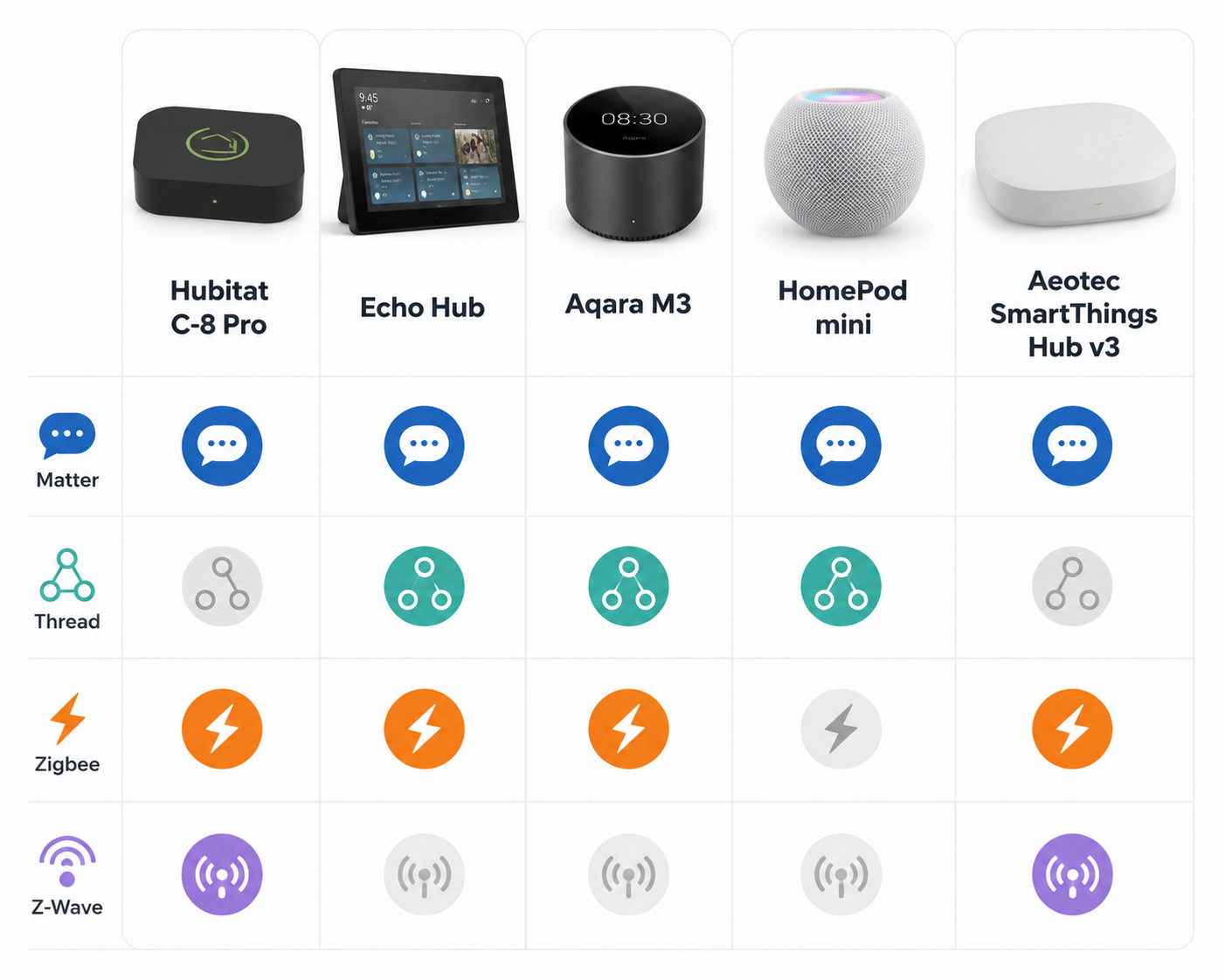
Protocol confusion gets easier to see when the hubs are placed side by side. The useful question is not “which hub has the most logos?” It is “which layer is missing, and do my devices need that layer?”
| Hub | What it covers | The important missing piece |
|---|---|---|
| Hubitat C-8 Pro | Zigbee 3.0, Z-Wave 800, Matter | No Thread Border Router |
| Echo Hub | Zigbee, Thread, Matter | No Z-Wave |
| Aqara Hub M3 | Zigbee, Thread, Matter 1.4 | No Z-Wave |
| HomePod mini | Thread, Matter; Zigbee only through bridges | No Z-Wave, and Apple does not publish a Matter version |
| Aeotec SmartThings Hub v3 | Zigbee, Z-Wave, Matter | Out of production; pricing has climbed to $170–$220 |
Hubitat C-8 Pro is the obvious example of why a smart home spec sheet needs a second read. It gives you Zigbee 3.0, Z-Wave 800, and Matter, which is a strong combination for households with older Zigbee gear and Z-Wave locks or sensors. But it does not provide a Thread Border Router, so it is not the tidy answer for someone filling a cart with new Matter-over-Thread devices.[3][5]
Echo Hub and Aqara Hub M3 land on the other side. They cover Zigbee, Thread, and Matter, which is attractive for buyers leaning into newer Matter-over-Thread devices while still wanting Zigbee support. Their missing piece is Z-Wave.[3][4] If the home has Z-Wave locks or security sensors, that absence is not a footnote.
HomePod mini is more limited as a whole-home protocol hub. It brings Thread and Matter into an Apple-centered home, but Zigbee depends on bridges and Z-Wave is absent. Apple also does not publish a Matter version for HomePod mini, which makes version-by-version comparisons less clean than they look in shopping tables.[3][4]
Aeotec SmartThings Hub v3 is the awkward exception people keep rediscovering because it combines Zigbee, Z-Wave, and Matter. The problem is availability and price: it is out of production, and current pricing sits around $170–$220.[3][4] That pushes it out of the simple “just buy the mainstream cheap hub” category, especially when price data can shift.
If you want a broader hub-by-device matching method, the companion guide to protocol compatibility in 2026 is the better place to compare your actual device list. If you are still choosing a whole platform rather than a protocol mix, start with how to choose a smart home system instead.
How to choose without chasing every logo
Start with the devices you already own or plan to buy next, not with the longest protocol list. A new buyer with mostly Matter-over-Thread sensors and plugs needs a Matter controller plus a Thread Border Router. A household with Zigbee bulbs, plugs, and contact sensors still needs Zigbee support or a bridge that can bring those devices into the chosen system. A household built around locks and security sensors should treat Z-Wave as a deliberate requirement.
- Mostly new Matter-over-Thread devices: choose a hub or controller setup with Matter plus a Thread Border Router.
- Existing Zigbee bulbs, plugs, or sensors: keep Zigbee in the plan, either inside the hub or through a bridge.
- Z-Wave locks or security sensors: require Z-Wave support instead of assuming Matter will cover them.
- Mixed Matter, Thread, Zigbee, and Z-Wave under $200: expect a compromise, a bridge, or a more advanced setup.
Home Assistant can solve some of these mixed-protocol problems, especially when you are willing to choose separate radios and maintain a more flexible controller. That does not make it the automatic answer for every household. Home Assistant Yellow production ended in October 2025, remaining stock varies, and Home Assistant Green at $159 is the currently available entry point among the sources cited here.[3] If you are comparing that route with a packaged hub, the practical question is whether the extra flexibility reduces confusion in your home or simply moves the work onto you.
The honest 2026 answer is narrow. If you need all four layers in one inexpensive mainstream box, the clean option is not there yet. Choose the missing protocol you can live without, accept bridges where they make sense, or move toward a more advanced controller setup. Compatibility is not a contest to collect the most logos; it is matching the hub’s layers to the devices your household actually expects to use.
References
- After testing Thread, Zigbee, and Matter, ZDNET
- Matter vs. Thread vs. Zigbee - Ultimate Review [2026], eufy US
- 5 Best Smart Home Hubs in 2026, The Gadgeteer
- Best smart home hubs: Our top 4 picks, The Ambient
- Best Smart Home Hub to Buy in 2026, Gabellioni
Known issues with this device / protocol
Spec-version history
For active regressions on this protocol, see Update Watch.
No linked Update Watch entries yet.