
The smart home security bill usually does not arrive as one honest number. It arrives in layers: a few dollars per camera for cloud storage, another paid tier for person or package detection, then a larger monthly charge if you want professional monitoring. The box on the shelf may still look like a one-time purchase. The system in daily use often is not.
The cleanest way to see the trap is to stop looking at the starter kit price and price the house you actually plan to protect. Gearbrain’s 2026 camera buying guide gives a simple example: three cameras at $10 per month each come to $360 per year for storage alone, before any separate monitoring plan is added.[1] For a renter watching a front door, a parking spot, and a back window, that is not an exotic setup. It is a normal setup with a recurring bill attached.
SafeHome’s 2026 U.S. survey makes the annoyance look less like a niche complaint. Among U.S. security camera users, 32% rely solely on cloud storage, 49% prefer a hybrid of cloud and local storage, and 6% canceled or downgraded a paid subscription in the past year; among renters, that cancellation or downgrade figure rose to 8%.[2] The survey covered 2,435 U.S. adults in January and February 2026 with a ±2 percentage point margin of error, so it should not be stretched into a global claim. It is still enough to show that subscription fatigue has moved from comment-section grumbling into ordinary household behavior.[2]
The Three Charges Hiding Behind One Security System
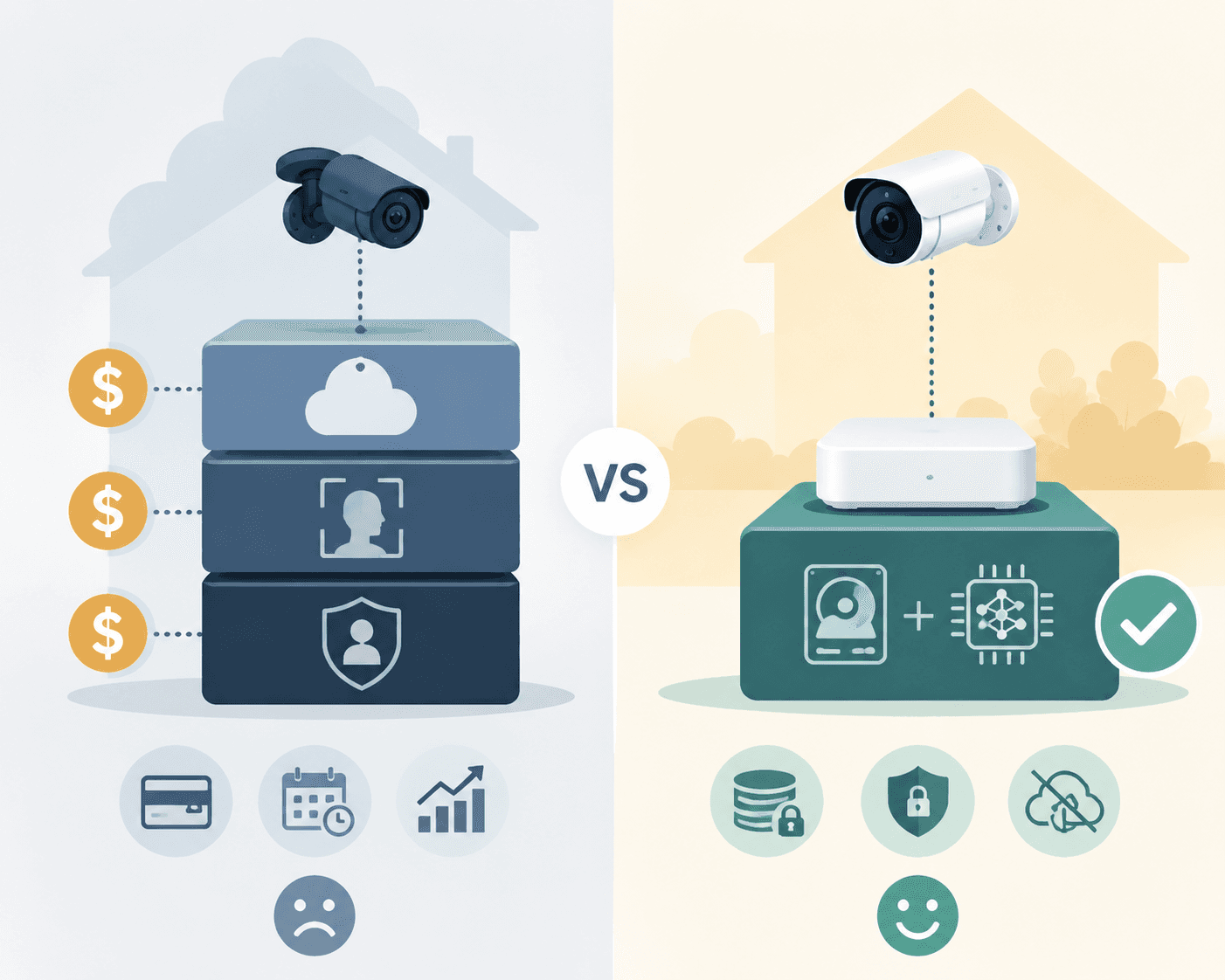
Most buyers notice the hardware first because that is the number printed in large type. The recurring cost is usually split across features, which makes it easier to underestimate. A camera may record video, but useful retention may require cloud storage. A sensor may trigger an alert, but richer automation may sit behind a plan. A hub may work as a siren, but dispatch and cellular backup may require monitoring.
- Cloud storage: commonly framed as clip history, event history, or video retention, often priced per camera or per account.
- AI detection: person, package, vehicle, pet, or familiar-face alerts may be processed locally on some systems but gated by a paid plan on others.
- Professional monitoring: the monthly fee that can bring emergency dispatch, cellular backup, and human review when an alarm trips.
Those charges are not morally equivalent. Paying for cloud backup can be sensible if theft, fire, or a smashed camera would otherwise erase the only useful evidence. Paying for monitoring can be the difference between a siren sounding in an empty house and someone actually calling for help. The problem is the quiet reclassification of basic usefulness into paid extras: a camera that cannot retain meaningful clips unless the plan is active, or “smart” detection that becomes smart only after the trial ends.
Do the Three-Year Math Before You Buy
A smart home security system should be priced like an appliance you maintain, not a gadget you unbox. Three years is a useful window because it is long enough for subscriptions to overtake bargain hardware, but short enough to match how many renters, families, and device ecosystems actually change.
| Cost line | What to check before checkout |
|---|---|
| Hardware | Starter kit price, extra cameras, extra sensors, keypad, siren, hub, chime, mounting hardware |
| Storage | Whether video is stored locally, in the cloud, per camera, or per account |
| AI alerts | Whether person, package, vehicle, or pet detection works on-device without a paid plan |
| Monitoring | Monthly price, contract length, cellular backup, dispatch rules, cancellation terms |
| Cancellation outcome | Whether cameras, sensors, local clips, automations, and alerts remain useful after the plan ends |
The calculation is straightforward. First, write down the hardware you will actually install, not the smallest kit in the ad. A doorbell plus two outdoor cameras is already a different system from a single entry camera. Add the sensors you will want after the first week: contact sensors for side doors, a motion sensor for the garage, a keypad near the back entrance, maybe a second indoor camera for a pet or elderly parent.
Second, price video retention for that exact camera count. If storage is per camera, multiply the monthly fee by the number of cameras and then by 36 months. If storage is per account, check the camera limit and retention window. A low per-camera price can look harmless until the third device joins the account; an account plan can look generous until it excludes the features you bought the camera for.
Third, separate detection from recording. A camera that records locally but only recognizes people through a cloud plan is not the same as a camera with on-device person detection. If your main reason for buying the camera is to ignore tree shadows and catch actual visitors, then the detection layer is not a luxury feature. It is part of the operating cost.
Fourth, decide whether monitoring changes the outcome in your house. If someone is usually home, neighbors respond quickly, and your main concern is package theft, a loud siren plus reliable local recording may be enough. If the home is often empty, a family member has medical or mobility concerns, or you travel frequently, monitoring and cellular backup can be worth a monthly fee. The point is to name the job before accepting the subscription, not to reject every plan on sight.
Finally, simulate cancellation. Ask what works on day one after the plan ends. Do you still get motion alerts? Do you still get person detection? Can you still view local recordings? Does the siren still trigger? Can automations still run? This is where a “no subscription required” claim needs careful reading, because it may mean only that the device turns on without a subscription, not that the useful parts survive without one.
What Local Storage Actually Solves
Local storage is not automatically better in every way. It can be lost if the recorder is stolen, damaged, or badly configured. It also puts more responsibility on the owner to check storage health, replace drives or cards, and make sure footage is actually being retained. But it solves one very specific problem: your camera can keep a record without asking a cloud subscription for permission.
That matters most after the trial period ends. A camera with an SD card slot, NVR support, or a local base station gives the household a fallback. If the cloud plan gets too expensive, the system does not become a live-view-only device. If a renter moves and pauses monitoring for a few months, the equipment can still serve a smaller apartment or temporary setup.
SafeHome’s home automation security guide points to several models built around local or no-forced-cloud storage: Eufy’s ExpertSecure E10 is described with up to 16TB of local storage, Reolink is identified with local NVR storage and no forced cloud plan, and TP-Link Tapo is described as offering no-subscription models with SD card storage and on-device AI detection.[3] Those are editorial-review claims, so product pages should still be checked before purchase, especially because storage limits and feature gating can change by model and firmware.
Lorex also belongs in the same practical category because many of its systems are built around NVR-style local recording, while select Arlo setups can use local storage through a compatible base station. PCMag’s 2026 smart home security comparisons and CNET’s 2026 expert-tested coverage both treat brand-by-brand differences as central to the buying decision, which is the right framing here: the important question is not whether a brand sounds subscription-friendly in an ad, but which exact model keeps recording and detecting when the plan is gone.[4][5]
The Hybrid Route: Local First, Monitoring Only Where It Helps
The best value for many homes is not a pure no-subscription setup. It is local storage as the baseline, with a small paid layer only where the household can explain the benefit. That usually means cameras keep their own clips, detection happens on-device when possible, and monitoring is month-to-month rather than locked into a long contract.
Abode is a useful example of this middle path. SafeHome’s guide describes Abode’s Standard plan at $8 per month, with no contract, CUE automation, and cellular backup.[3] That is different from paying a large recurring fee just to make cameras useful. It is a targeted subscription for backup and service continuity, and it leaves the buyer with a clearer decision: is cellular backup and automation support worth that monthly amount in this home?
For a small apartment, the answer may be no. A door camera with local clips, a contact sensor, and a loud siren may cover the realistic risk. For a detached home that sits empty during work trips, the answer may be yes. A plan that reaches someone when the alarm trips can be worth paying for, especially if the system still records locally and remains usable after cancellation.
A Buying Filter That Catches Subscription Lock-In
When comparing smart home security systems, start with the features that survive without a plan. Brand reputation helps, but the spec sheet and support pages matter more. The phrases to look for are plain: SD card slot, NVR compatibility, local storage, on-device AI, no contract, month-to-month monitoring, and local recording retained without subscription.
- Reject vague storage language. “Video history available” is not the same as local retention without a paid plan.
- Check detection location. If person or package alerts require cloud processing, include that plan in the three-year cost.
- Count cameras before pricing plans. A per-camera subscription can turn a cheap starter kit into an expensive household system.
- Read cancellation terms. A system that loses recording, detection, and automation after cancellation is not truly independent.
- Prefer contract-free monitoring. If monitoring is valuable, month-to-month service keeps the fee tied to current need.
A camera-only buyer can save money before the cart is built by comparing cloud retention and local storage in a focused guide to smart security camera subscriptions. Someone choosing between DIY alerts and paid dispatch should look separately at DIY versus professional smart home security, because monitoring is one of the few fees that can change the emergency outcome rather than just unlock a feature.
Renters Should Be Even More Suspicious of “Starter” Pricing
Renters are especially exposed to subscription creep because they often start small and change layouts more often. A single indoor camera becomes a doorbell substitute. Then a parking camera joins. Then a sensor is added after a neighbor’s package disappears. SafeHome’s survey finding that 8% of renters canceled or downgraded a paid subscription in the past year fits that pattern: the system expands, the bill follows, and the household eventually trims it back.[2]
Portability should therefore count as a security feature. A renter-friendly system should avoid hard contracts, keep recordings local where possible, and allow devices to be reused after a move. If a subscription is attached to an address, a base station, or a monitoring contract that does not fit the next lease, the low hardware price can become a moving penalty. For a renter-focused checklist, see smart home security systems for renters, but the basic rule is simple enough: do not buy a system whose useful life depends on a subscription you may not want at your next address.
When Paying the Fee Is the Better Choice
There are homes where a subscription is not a trap. A household caring for an older relative may value professional monitoring because someone outside the home is accountable when an alarm event occurs. A homeowner who travels often may want cellular backup because broadband and power failures are exactly when a security system should not go quiet. A family dealing with repeated trespassing may want off-site cloud copies so evidence survives if a camera or recorder is stolen.
The difference is that those buyers can point to the protection they are buying. They are not paying because a camera was designed to become less useful after a trial. They are paying because human monitoring, cellular backup, or cloud redundancy solves a known problem. That is a much healthier subscription than a fee required to make the basic purchase behave like the box implied.
The Rule That Holds Up After Installation
Buy the system that remains useful after you cancel. Local storage should be the baseline, on-device detection should be preferred when the feature matters, and monitoring should be month-to-month unless there is a clear reason to commit. If a plan adds cloud backup, dispatch, or cellular resilience that your household actually needs, pay for it. If cancellation collapses recording, detection, and everyday alerts, the cheap hardware was never the real price.
References
- Smart Security Camera Buying Guide 2026, Gearbrain, 2026.
- Home Security Industry Annual, SafeHome.org, 2026.
- Best Home Automation Security Systems, SafeHome.org.
- The Best Smart Home Security Systems, PCMag, 2026.
- Best Home Security System, CNET, 2026.
Policy Updates & Reader Notes
Privacy policies, monitoring plan prices, and security disclosures change frequently. Report new data retention terms, updated plan pricing, or new vulnerability disclosures below. For formal editorial corrections, use the contact page.
Comments
Join the discussion with an anonymous comment.