
How to Set Up Tornado Safety Automations for Your Smart Home
Copyable, platform-specific recipes to flash red lights, broadcast voice warnings, lock doors, and pre-charge backup batteries the second a tornado warning is issued — all running locally on Home Assistant, Hubitat, or SmartThings without cloud dependency.
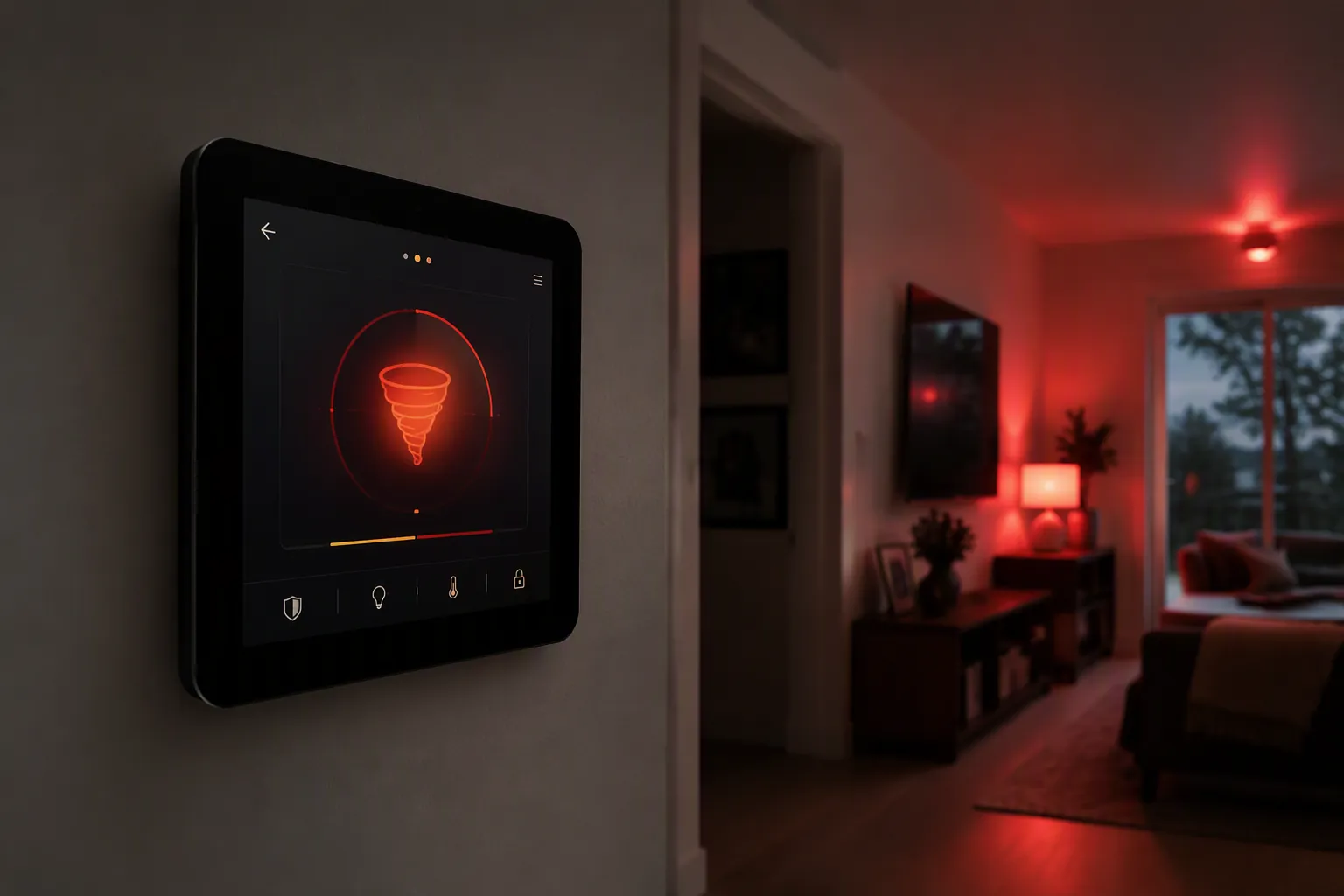
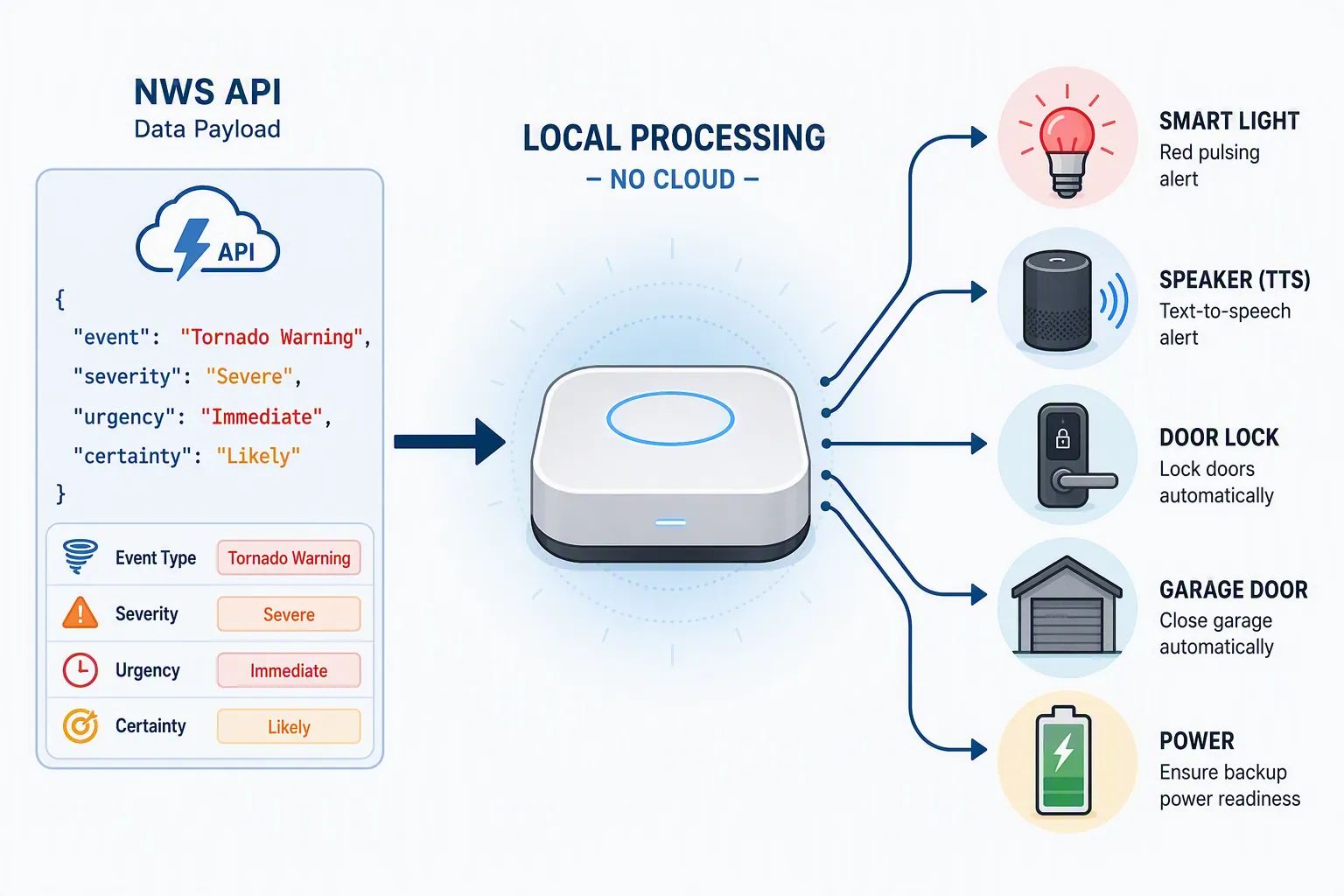
The useful smart-home moment is the one before anyone is standing in the hallway wondering whether the siren is close enough to matter. For tornado safety, the automation should wake the house, light the path, secure obvious openings, and then get out of the way. It should not fire for every scary weather phrase. The trigger here is narrow on purpose: an NWS alert whose event type is Tornado Warning and whose urgency is Immediate, with severity and certainty checked before the house starts flashing red. The NWS API exposes active alert fields including event type, severity, urgency, and certainty, which makes that distinction machine-readable instead of vibes-based [1].
This is how to use a smart home for tornado safety without turning the house into weather theater: treat the automation as a supplement to sheltering guidance, not a substitute for it. Ready.gov and NOAA/NWS guidance still put people in a basement, storm shelter, or small interior room on the lowest level; the automation’s job is to buy seconds, reduce confusion, and make that movement harder to miss [2][3].
| When the trigger is valid | What the house should do | Safety boundary |
|---|---|---|
| NWS event equals Tornado Warning; urgency equals Immediate; severity/certainty pass your filter | Flash hallway, bedroom, basement, and shelter-path lights red | Do not use watches or broad severe-weather alerts for this action |
| Same warning trigger | Broadcast a short voice warning on local speakers where possible | Do not depend on a cloud speaker as the only wake-up path |
| Same warning trigger | Lock selected exterior doors | Skip or modify this if someone may be outside, arriving home, or using that door as the route to shelter |
| Same warning trigger plus garage obstruction sensor is clear | Close the garage door | Never bypass photo eyes, tilt sensors, or obstruction checks |
| Platform and battery system support a verifiable storm-charge mode | Pre-charge backup power | Treat vendor storm modes as paths to test, not proof that your whole recipe works |
Start with the alert payload, not the siren sound
A tornado watch, a severe thunderstorm warning, and a tornado warning should not produce the same household behavior. A watch can justify a phone notification, a dashboard badge, or battery readiness. A tornado warning with immediate urgency is the one that deserves lights, speakers, locks, and garage logic.
The safe trigger expression is deliberately boring:
event == "Tornado Warning"
AND urgency == "Immediate"
AND severity IN ["Severe", "Extreme"]
AND certainty IN ["Observed", "Likely"]
That last pair of filters is not decoration. It is how you avoid waking the household for ambiguous or lower-grade alerts while still letting a true tornado warning override normal quiet-hours behavior. The exact values exposed to your hub depend on the integration you use, so the first test is not whether the bulb turns red. The first test is whether your hub can show the raw alert attributes you intend to trust.
Platform coverage and dependency status
| Platform | Best alert path in this recipe | Local-control status | Use it for |
|---|---|---|---|
| Home Assistant | nws_alerts custom component for alert sensors, plus the native NWS integration for weather context [4][5] | Strongest path when lights, locks, sirens, and speakers are on local integrations such as Zigbee, Z-Wave, Matter-over-LAN, or local TTS | Primary recipe |
| Hubitat | NOAA Weather Alerts app with severity filtering, mode restrictions, and tornado-warning override behavior [6] | Credible local-ish path for actions once the alert device/app has state; verify every device driver and speaker path | Second recipe |
| SmartThings | SmartWeather and IFTTT-style tornado-warning approaches documented by community users [7] | Cloud-touched; useful for households already in SmartThings, but not the cleanest fit for a no-cloud safety automation | Caveated fallback |
My bias is visible here: for tornado actions, I would rather trust a Home Assistant box or a Hubitat hub sitting in the house than a cloud chain that has to stay healthy while the weather is already bad. That does not make every local recipe safe, and it does not make every cloud recipe useless. It just means the dependency map belongs in the recipe, not in the footnotes.
Home Assistant recipe: NWS warning to local lights, speech, locks, and garage
Home Assistant gets the most complete treatment because it gives you the cleanest separation between the alert trigger and the household actions. Use the native NWS integration for ordinary weather context, then use the nws_alerts custom component or equivalent alert sensor to expose active NWS alert attributes to automations [4][5]. If you are still building the notification layer, start with this companion severe-weather notification recipe before adding locks and garage movement.
The entity names below are placeholders. Replace them after confirming the real alert entity and attributes in Developer Tools. If your NWS alert integration exposes one binary sensor per event title, you may not need the template sensor at all; keep the severity, urgency, and certainty conditions somewhere in the chain.
template:
  - binary_sensor:
      - name: "NWS Tornado Warning Immediate"
        unique_id: nws_tornado_warning_immediate
        state: >
          {% set alerts = state_attr('sensor.nws_alerts', 'alerts') or [] %}
          {% set ns = namespace(hit=false) %}
          {% for a in alerts %}
            {% set event = a.get('event', '') if a is mapping else a.event | default('') %}
            {% set urgency = a.get('urgency', '') if a is mapping else a.urgency | default('') %}
            {% set severity = a.get('severity', '') if a is mapping else a.severity | default('') %}
            {% set certainty = a.get('certainty', '') if a is mapping else a.certainty | default('') %}
            {% if event == 'Tornado Warning'
                  and urgency == 'Immediate'
                  and severity in ['Severe', 'Extreme']
                  and certainty in ['Observed', 'Likely'] %}
              {% set ns.hit = true %}
            {% endif %}
          {% endfor %}
          {{ ns.hit }}
        attributes:
          source_entity: sensor.nws_alerts
          rule: "Tornado Warning + Immediate + Severe/Extreme + Observed/Likely"
Now bind that binary sensor to the actions. The important part is not the red color value; it is the order. Wake and guide people first. Then secure openings that do not create a new hazard. Then request backup-power behavior if you have already tested it.
alias: Tornado Warning - Shelter Actions
mode: single
trigger:
  - platform: state
    entity_id: binary_sensor.nws_tornado_warning_immediate
    to: "on"
action:
  - alias: "Flash critical path lights red"
    repeat:
      count: 8
      sequence:
        - service: light.turn_on
          target:
            entity_id:
              - light.primary_bedroom
              - light.hallway
              - light.basement_stairs
              - light.shelter_area
          data:
            brightness_pct: 100
            rgb_color: [255, 0, 0]
        - delay:
            seconds: 1
        - service: light.turn_off
          target:
            entity_id:
              - light.primary_bedroom
              - light.hallway
              - light.basement_stairs
              - light.shelter_area
        - delay:
            seconds: 1

  - alias: "Leave shelter-path lights on red"
    service: light.turn_on
    target:
      entity_id:
        - light.hallway
        - light.basement_stairs
        - light.shelter_area
    data:
      brightness_pct: 100
      rgb_color: [255, 0, 0]

  - alias: "Local voice warning"
    service: tts.speak
    target:
      entity_id: tts.piper
    data:
      media_player_entity_id:
        - media_player.hallway_speaker
        - media_player.bedroom_speaker
      message: "Tornado warning issued for this area. Move to the shelter location now."

  - alias: "Lock selected exterior doors"
    service: lock.lock
    target:
      entity_id:
        - lock.front_door
        - lock.back_door

  - alias: "Close garage only if obstruction sensor is clear"
    if:
      - condition: state
        entity_id: binary_sensor.garage_obstruction
        state: "off"
      - condition: state
        entity_id: cover.garage_door
        state: "open"
    then:
      - service: cover.close_cover
        target:
          entity_id: cover.garage_door

  - alias: "Optional tested backup-power storm mode"
    if:
      - condition: state
        entity_id: input_boolean.enable_storm_precharge
        state: "on"
    then:
      - service: switch.turn_on
        target:
          entity_id: switch.backup_battery_storm_charge
For the light group, prefer bulbs and switches controlled through local radios. Zigbee and Z-Wave lights paired directly to Home Assistant are boring in the correct way: once the alert has arrived, the command path does not need a cloud account to decide whether the hallway turns red. If your lights are Wi-Fi devices that require a vendor cloud, document that dependency in the automation notes.
For speech, local TTS matters more than voice-assistant polish. A Home Assistant voice warning through a local TTS engine and local media player is a different risk profile from a Google or Alexa routine that has to traverse cloud services. If the cloud speaker is all you have, use it, but do not let it be the only wake-up path.
Garage control deserves the least romance. Closing a garage door before high wind arrives can be useful, but an automation that moves a heavy door without proving the opening is clear is not a safety automation. Keep the obstruction sensor condition. If your controller cannot expose that state reliably, send a loud reminder instead of closing the door.
If you need help adapting the YAML to your real entity names, the Home Assistant YAML coach is useful after you have captured the actual alert attributes. If this is your first serious Home Assistant automation, practice on lower-consequence devices first; these smart-plug recipes are a gentler place to learn the syntax.
Hubitat recipe: severity filtering, quiet hours, and tornado override
Hubitat’s NOAA Weather Alerts path is attractive because it already thinks in household-rule terms: severity filtering, mode-based restrictions, and the ability to ignore restrictions for specific events such as tornado warnings [6]. That last feature is the difference between a neat alert toy and something that can wake bedrooms at 2 a.m. without also shouting about every less urgent advisory.
- Install and configure the NOAA Weather Alerts app for your location.
- Set severity filtering to the alert levels you are willing to automate. For this recipe, do not let a watch share the same action path as a tornado warning.
- Use mode restrictions for routine weather announcements if you want, but allow Tornado Warning to override sleep, night, or quiet modes.
- Create a Rule Machine rule that fires only when the alert text or alert device state indicates Tornado Warning and the app-provided severity/urgency filter has passed.
- Bind the rule to local Zigbee/Z-Wave lights, locks, sirens, and supported speakers. Check each device driver before calling the result local.
Hubitat Rule Machine pattern

Trigger:
  NOAA Weather Alerts device indicates Tornado Warning

Required conditions:
  Alert severity filter passes
  Event is Tornado Warning
  Night/quiet restrictions are ignored for this event

Actions:
  Set shelter-path bulbs to red, 100%
  Flash bedroom and hallway bulbs for several cycles
  Speak: "Tornado warning issued for this area. Move to the shelter location now."
  Lock selected exterior doors
  If garage obstruction sensor is clear, close garage door
  Optional: set hub mode to Shelter
The practical Hubitat split I like is daytime speech to shared speakers and nighttime speech to bedrooms. The research thread for the Hubitat app describes users configuring TTS differently by time of day and speaker location, which is exactly the kind of household-specific routing this automation needs [6].
Do not assume every Hubitat-connected speaker is local just because the hub is local. Sonos, Echo, Google, and other speaker paths can have different dependencies. The hub may make the rule decision locally while the spoken warning still leaves the house. That is not a reason to avoid speech; it is a reason to pair it with local lights and, if appropriate, a local siren.
SmartThings recipe: useful if you already live there, weaker for no-cloud safety
SmartThings can participate in a tornado safety setup, but I would not present it as the cleanest zero-cloud recipe. Community discussions document SmartWeather app and IFTTT-style approaches for tornado-warning triggers [7]. Those paths can be useful for notifications, lights, or redundant alerts, but they are not the same as a local automation stack that receives an alert and then controls local devices without another round trip.
| SmartThings path | Reason to use it | Caveat |
|---|---|---|
| SmartWeather-style trigger | You already use SmartThings and want a weather-event-based routine | Verify whether the trigger exposes event type, urgency, severity, and certainty clearly enough for the Tornado Warning filter |
| IFTTT applet to lights or notifications | Easy mental model; good as a redundant visual cue | Cloud-dependent and vulnerable to latency or changed IFTTT capabilities |
| SmartThings routine triggered by a virtual switch from another system | Lets Home Assistant or Hubitat own the NWS trigger while SmartThings handles devices it already controls | The bridge becomes another dependency to document and test |
The old Philips Hue weather-alert idea is still intuitive. Josh Centers described using IFTTT with Philips Hue to turn lights red when wind speed exceeded 60 mph, which proved the value of whole-home visual alerts years before most people were thinking about local automations [8]. I would treat that as historical calibration, not a current tornado-warning recipe. It was published in 2017, relied on IFTTT behavior that has changed, and the warning condition was wind speed rather than the NWS tornado-warning payload [8].
If SmartThings is your only hub today, build a conservative version: warning notification, red lights, and voice announcement if available. Do not let it auto-close the garage or lock critical doors until you have proved the trigger specificity and the device path under bad-network conditions.
Backup power: pre-charge if the system supports it, but verify the claim
Battery pre-charge is a good storm pattern when it is real. EcoFlow’s 2026 tornado preparedness guide says the DELTA Pro Ultra X with Smart Home Panel 3 includes a Storm Guard Mode that auto-detects incoming severe weather, charges the battery to full capacity before the storm, and provides a sub-20 ms grid-to-battery switchover [9]. That is a vendor claim from a commercial battery company, not an independent reliability finding. Use it as a feature to verify in your own system, not as evidence that your alert-to-battery chain has been tested.
For Home Assistant or Hubitat, the safer pattern is to separate two ideas: storm pre-charge and tornado-warning shelter actions. A watch or broader severe-weather forecast may be appropriate for charging batteries early. A tornado warning is often too late to begin a long charging cycle, but it can still switch the house into a protected load profile if your inverter and critical circuits support that. For deeper load-shedding logic, use the grid-emergency auto-shedding recipe as the companion pattern.
alias: Severe Weather Battery Pre-Charge - Separate From Tornado Warning
mode: single
trigger:
  - platform: state
    entity_id: binary_sensor.nws_severe_weather_watch_or_forecast_risk
    to: "on"
condition:
  - condition: state
    entity_id: input_boolean.enable_storm_precharge
    state: "on"
action:
  - service: switch.turn_on
    target:
      entity_id: switch.backup_battery_storm_charge
  - service: notify.household
    data:
      message: "Backup battery storm pre-charge requested. Verify battery status before severe weather arrives."
That separate pre-charge automation may fire before the tornado-warning recipe ever runs. Good. Batteries need preparation time. People need the warning recipe to be immediate.
Shelter-mode actions worth copying carefully
A Lake Martin Storm Shelters case from October 2025 describes an Alabama family whose smart storm shelter synced to NOAA alerts, then automatically locked, adjusted airflow, and notified household members within seconds of a tornado warning [10]. That is a single vendor-published case, not a frequency claim. The useful lesson is the action pattern: alert, access control, airflow, notification. Do not copy the gloss; copy the dependency discipline.
- If your shelter has a smart lock, decide whether the warning should lock it, unlock it, or simply confirm its state. A shelter door is not the same as a front door.
- If your shelter has powered ventilation, the automation should confirm airflow status without assuming power will remain stable.
- If household members sleep behind closed doors, route the voice warning to those rooms, not only to the kitchen speaker.
- If someone in the home has hearing loss, pair speech with lights, vibration, bed shakers, or other local alerting hardware you have tested.
Failure modes to test before storm season
A tornado automation can be beautifully written and still fail in ordinary ways. The internet may drop before the alert arrives. The NWS API path may not be reachable from your hub. A cloud speaker may stay silent. A bulb may be on a wall switch someone turned off. A garage obstruction sensor may be misread. The test plan should be as specific as the trigger.
| Test | What to prove | Acceptable result |
|---|---|---|
| Simulated warning trigger | Template or alert sensor changes state only for Tornado Warning + Immediate | No action for watch, advisory, or unrelated severe-weather event |
| Local light control | Critical path lights flash and remain visible | Works with internet disconnected after the hub already has the trigger |
| Voice warning | Bedrooms and occupied areas hear the message | Local TTS works, or cloud TTS is documented as non-primary |
| Door locks | Only intended doors lock | No one is trapped outside the shelter route |
| Garage door | Door closes only when obstruction state is clear | Automation refuses to move the door when the sensor is blocked or unknown |
| Battery behavior | Pre-charge or storm mode starts when expected | Battery state is visible locally or its cloud dependency is documented |
| Power loss | Hub, network gear, radios, and alert devices stay alive long enough | UPS or battery support covers the devices your recipe depends on |
Run the test with a helper in the rooms that matter. Stand where someone will actually be at night: bedroom, hallway, basement stairs, shelter entrance. If the alert is loud in the office and invisible in the hallway, the automation is not commissioned.
Then document the ugly parts. Write down which devices are local, which ones need internet, which ones need vendor cloud services, and which ones are only redundant conveniences. Keep that note near the hub configuration, not in your memory.
The best tornado smart-home automation is not the loudest one. It is the one that fires on the right NWS warning, locally, before the household hears the siren.
References
- NWS API documentation — National Weather Service
- Tornadoes — Ready.gov, June 2026
- Tornado Safety — NOAA/NWS
- finity69x2/nws_alerts — GitHub
- National Weather Service (NWS) — Home Assistant
- Release: NOAA Weather Alerts — Hubitat Community
- Tornado Warning — SmartThings Community
- Using Philips Hue Lights as a Hurricane and Tornado Alert — TidBITS, 2017
- How to Prepare Your Home for a Tornado — EcoFlow, 2026
- Smart Storm Shelters: Technology + Future Safety — Lake Martin Storm Shelters, October 2025