
Set up an indoor air monitor for Portland wildfire smoke
Portland wildfire season leaves AirNow's regional outdoor reading blind to what is actually inside a home. This copyable recipe sets up an AirGradient ONE indoor PM2.5 monitor in Home Assistant and wires smoke-response automations — alerts, purifier boost, and HVAC recirculation — with thresholds tied to EPA AQI bands and OSU Extension guidance.
For Portland wildfire smoke, an indoor air quality monitor belongs in the room where people actually breathe, not as a replacement for AirNow but as the missing indoor half of the picture. Regional outdoor AQI can tell you that smoke has arrived. It cannot tell you whether the bedroom stayed clean after you shut the windows, whether the purifier was left on low, or whether the HVAC fan is moving filtered air instead of helping smoke creep through a leaky return.
Portland has already had a smoke event where the outdoor number was plainly dangerous: Oregon DEQ preliminary, unvalidated data put Portland’s AQI at 477 on Sept. 13, 2020, after a previous record of 157 in 2017.[6] That record explains why AirNow still matters; it just does not answer the room-level question.
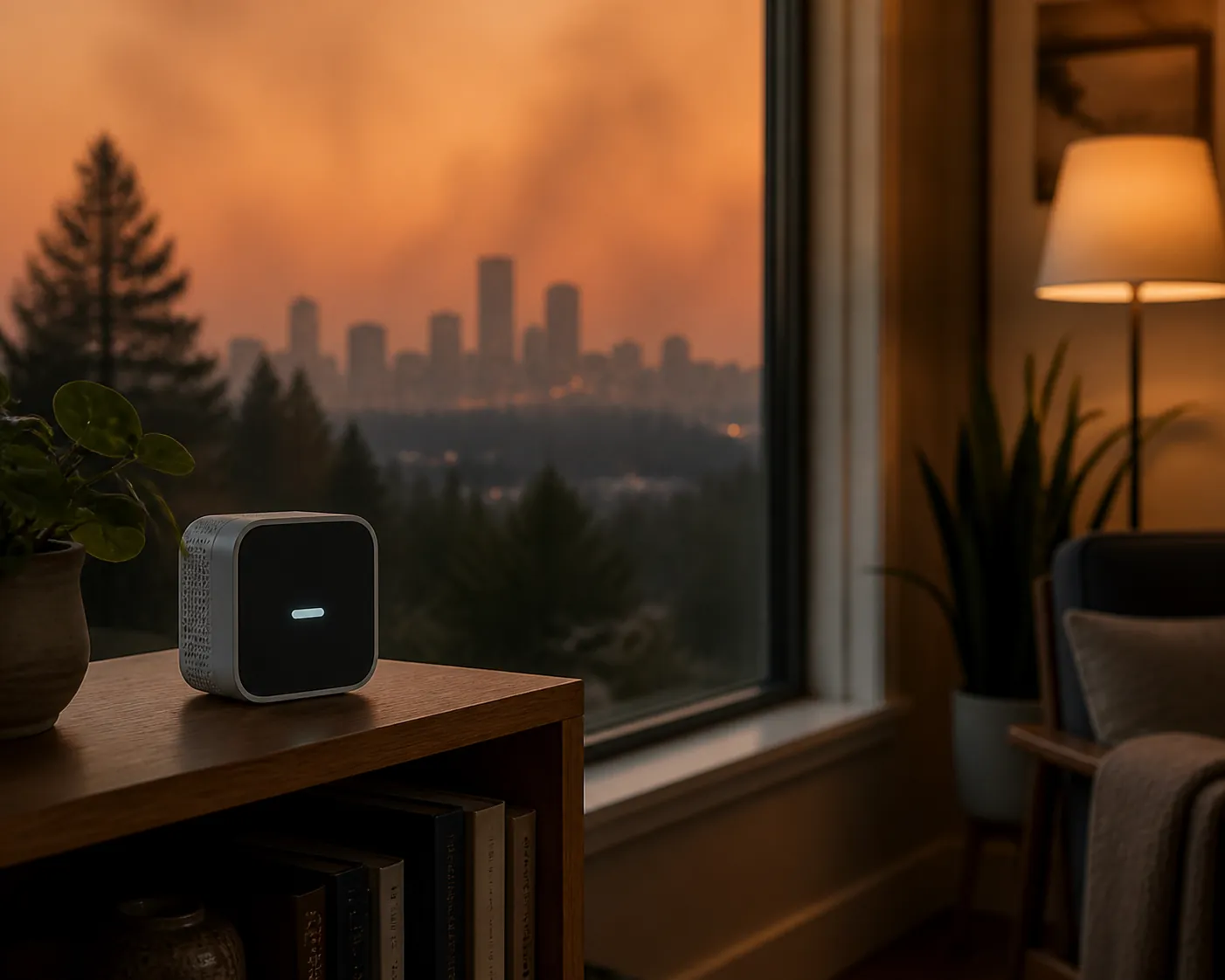
The reason to automate this is not gadget neatness. Crowdsourced, peer-reviewed indoor sensor data found that indoor PM2.5 nearly tripled on fire days, and that homes behaved very differently once people started closing up, sealing, and filtering: the study reported infiltration ratios falling from 0.42 on non-fire days to 0.23 on fire days, with post-2000 homes infiltrating significantly less than older ones.[1] That is the useful, uncomfortable fact: two houses on the same smoky block can expose their occupants to different air.
So this recipe starts indoors. The monitor watches indoor PM2.5. Home Assistant classifies the reading into operating bands. Automations then do the boring physical work: notify the household, boost the purifier, run filtered recirculation if the HVAC setup supports it, and close or stop controlled outdoor-air intake. The thresholds borrow from EPA AQI breakpoints and Oregon State University Extension smoke guidance, but they are deliberately treated as control bands, not as lab-grade exposure measurements.[2]
Recipe status and parts
| Field | Setup used in this recipe |
|---|---|
| Category slug | recipes |
| Platform | Home Assistant |
| Reference monitor | AirGradient ONE |
| Primary sensor | Indoor PM2.5 |
| Automation targets | Mobile alert, air purifier, HVAC fan/recirculation, controlled outdoor-air intake |
| Skill level | Intermediate |
| Status, dated Aug. 4, 2026 | Implementation-ready Home Assistant recipe; entity IDs, HVAC services, and intake controls must be verified on each home before arming smoke mode |
AirGradient ONE is the reference device here because it has a native Home Assistant path and does not require cloud dependence for the basic local setup described by the vendor.[3] The same device is also Wirecutter’s 2026 top pick for a home air quality monitor, which is useful corroboration, though it still does not turn the sensor into a regulatory instrument.[4]

The AirGradient feature list only matters as far as it serves the recipe. The ONE exposes particulate measurements including PM1, PM2.5, and PM10, plus CO2, TVOC, and NOx readings.[3] For smoke mode, keep your attention on PM2.5. CO2 may still be useful when a sealed-up room gets stale, but it should not decide whether wildfire smoke controls are active.
If you are still choosing hardware, use this recipe after checking the site’s broader smart air quality monitor compatibility guide. This article assumes you already want the Home Assistant route and need a repeatable smoke response.
Place the monitor where the clean-room plan lives
Put the AirGradient ONE in the room you would actually protect during a smoke event: often a bedroom, nursery, home office, or the room where an older family member spends most of the day. OSU Extension recommends creating at least one cleaner-air room, using properly sized portable air cleaners, upgrading HVAC filtration where possible, and running air cleaners continuously on high during smoke events.[2]
Avoid the easy bad placements. Do not put the monitor beside a cracked window, directly in a purifier’s clean-air jet, over a stove, or next to a bathroom door where humidity spikes can muddy optical particle readings. A shelf at breathing height, several feet from the purifier outlet and away from direct cooking aerosols, gives the automation a better chance of responding to the room rather than to a local plume.
If your house is split between a clean room and a smokier living area, choose one room for this first automation. A single monitor cannot describe the whole home. The first win is a trustworthy trend in the protected room, not a dashboard that pretends one number represents every leaky corner.
The smoke-mode flow
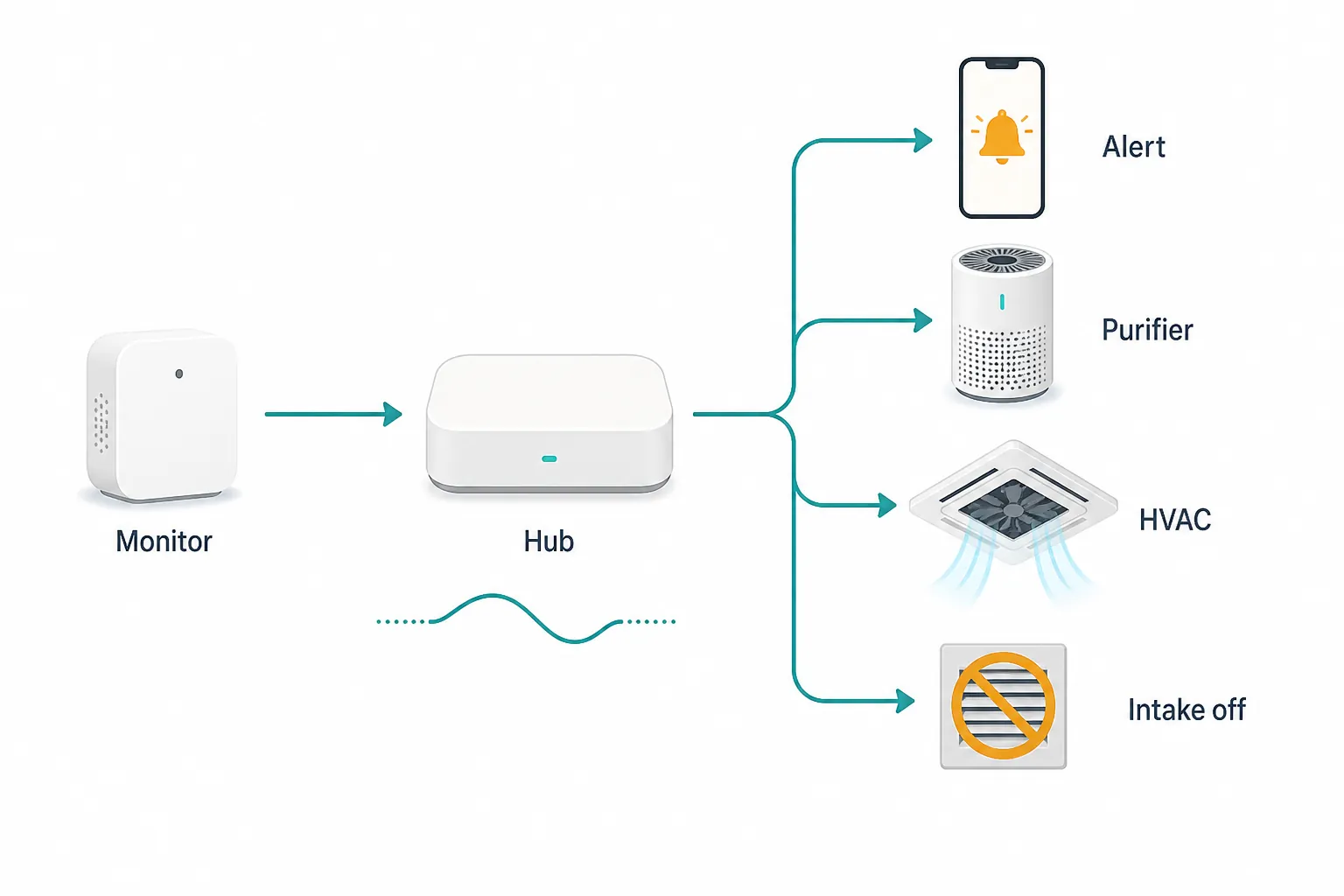
| Stage | Home Assistant job | Physical result |
|---|---|---|
| Watch | Read indoor PM2.5 from AirGradient ONE | The protected room becomes the control point |
| Classify | Map PM2.5 into smoke bands with delay and hysteresis | One short spike does not flip the house into or out of smoke mode |
| Alert | Send a mobile notification when the room crosses a sustained band | Someone closes windows, checks filters, and confirms the plan |
| Filter | Boost purifier fan speed | Clean-room particle removal increases |
| Recirculate | Run HVAC fan or recirculation only if the system supports filtered recirculation | More room air passes through the filter without intentionally bringing in outdoor smoke |
| Block intake | Turn off controlled ERV/HRV or outdoor-air damper where safe and supported | Mechanical outdoor-air intake does not keep feeding the smoke problem |
The controlled-intake row is intentionally conditional. Many Portland homes do not have a smart outdoor-air damper, and some ventilation or makeup-air systems should not simply be disabled without understanding the equipment. If Home Assistant only controls your purifier, automate the purifier. If it also controls a thermostat fan, automate recirculation. If it truly controls a ventilation intake, add that after verifying the device’s safe operating limits.
Use PM2.5 bands as operating bands, not exact measurements
The table below is meant for Home Assistant control logic. It is not a medical exposure assessment and not a claim that a low-cost optical sensor equals a regulatory monitor.
| Indoor PM2.5 control band | Automation state | What Home Assistant should do |
|---|---|---|
| Below 20 µg/m³ for 30 minutes | Recover | Allow purifier to step down; keep watching |
| 25 to 35.4 µg/m³ for 10 minutes | Smoke watch | Send alert; set purifier to medium or high depending on room use |
| 35.5 to 55.4 µg/m³ for 10 minutes | Smoke mode | Run purifier high; run supported HVAC recirculation; close controlled intake |
| 55.5 µg/m³ or higher for 5 minutes | Heavy smoke | Keep purifier high; escalate alert; confirm clean-room sealing and filtration |
The 25 µg/m³ and 55.5 µg/m³ breakpoints line up with common AQI-category thresholds used for fine-particle smoke response, while OSU Extension’s indoor-smoke guidance emphasizes continuous air cleaner use, stronger filtration such as MERV 13 where the HVAC system can handle it, and a cleaner-air room rather than a whole-house fantasy.[2]
The recovery line is deliberately lower than the entry line. That gap is hysteresis. Without it, a purifier can turn on at 25, clean the room down to 24.8, turn itself off, drift back to 25.2, and repeat all afternoon. Smoke mode should feel boring once it is running.
There is another reason not to make these thresholds too precious. Berkeley Lab reported that low-cost optical monitors overreported PM2.5 by roughly 1.6 to 2.4 times compared with regulatory monitors during wildfire smoke, while still tracking relative changes well enough to be useful.[5] That finding changes the automation design: use sustained readings, relative change, and a lower exit threshold; do not treat one displayed number as if it came from a calibrated regulatory station.
If you already use NestGrid’s PM2.5 purifier automation pattern or the heatwave thermostat-and-purifier recipe, the same pattern applies here: enter decisively, exit slowly, and make the fan do physical work instead of twitching at every decimal change.
Add the AirGradient ONE to Home Assistant
Follow AirGradient’s current Home Assistant instructions for your ONE and confirm that the PM2.5 entity appears in Home Assistant before writing automations. The vendor states that AirGradient works locally with Home Assistant and presents the ONE as Works With Home Assistant certified; keep that as a device-integration claim, not as an accuracy claim.[3]
- Power the AirGradient ONE in the selected clean room and let it report normally.
- In Home Assistant, add or confirm the AirGradient integration following the current vendor instructions.
- Find the PM2.5 entity. Rename it clearly, for example
sensor.clean_room_pm25. - Create a dashboard card that shows the current PM2.5 value and a short history graph.
- Before smoke season, run the purifier manually and confirm that the PM2.5 trend falls when the room is closed.
That last check matters more than the dashboard aesthetics. A monitor that can see a purifier actually reduce room particles is useful. A monitor beautifully graphed in the wrong room is a decoration.
Create helpers for baseline and arming
In Home Assistant, create one number helper for a rough clean-room baseline and one toggle for arming the automations. The baseline is not a calibration. It gives the automation a way to notice a room getting worse relative to its own recent normal.
| Helper | Suggested entity | Purpose |
|---|---|---|
| Number | input_number.clean_room_pm25_baseline | Stores a typical clean-room PM2.5 value from a low-smoke period |
| Toggle | input_boolean.smoke_mode_armed | Lets you disable smoke automations during testing or maintenance |
Set the baseline after a few ordinary, non-cooking, low-smoke hours with the windows closed or in the normal configuration you use in that room. A hypothetical clean room that usually sits around 6 µg/m³ should not wait until a dramatic absolute number before it reacts to a fast smoke intrusion. Relative movement is the early warning; the AQI-linked bands are the escalation structure.
Template the band so automations read one clean state
You can put every threshold inside every automation, but that becomes brittle. A template sensor makes the logic visible. Adjust the entity names before copying.
template:
  - sensor:
      - name: "Clean Room PM2.5 Smoke Band"
        unique_id: clean_room_pm25_smoke_band
        state: >
          {% set pm = states('sensor.clean_room_pm25') | float(0) %}
          {% set baseline = states('input_number.clean_room_pm25_baseline') | float(5) %}
          {% set ratio = pm / baseline if baseline > 0 else 1 %}

          {% if pm >= 55.5 %}
            heavy
          {% elif pm >= 35.5 %}
            smoke
          {% elif pm >= 25 or ratio >= 2 %}
            watch
          {% else %}
            normal
          {% endif %}
        attributes:
          pm25: "{{ states('sensor.clean_room_pm25') }}"
          baseline: "{{ states('input_number.clean_room_pm25_baseline') }}"
          ratio_to_baseline: >
            {% set pm = states('sensor.clean_room_pm25') | float(0) %}
            {% set baseline = states('input_number.clean_room_pm25_baseline') | float(5) %}
            {{ (pm / baseline) | round(2) if baseline > 0 else 0 }}
The ratio line is the guard against waiting too long in a very clean room. It is also why you should not set the baseline during cooking, candle use, dusting, or an already smoky evening. Use it as a trend anchor, not a scientific correction factor.
Automation 1: send the alert after the reading persists
The first automation should bother a human only after the condition persists. The message should also say what to do, because the person receiving it may be carrying groceries, working on a call, or trying to get a child down for a nap.
alias: Smoke mode - clean room alert
mode: single
trigger:
  - platform: state
    entity_id: sensor.clean_room_pm25_smoke_band
    to: "watch"
    for: "00:10:00"
  - platform: state
    entity_id: sensor.clean_room_pm25_smoke_band
    to: "smoke"
    for: "00:10:00"
  - platform: state
    entity_id: sensor.clean_room_pm25_smoke_band
    to: "heavy"
    for: "00:05:00"
condition:
  - condition: state
    entity_id: input_boolean.smoke_mode_armed
    state: "on"
action:
  - service: notify.mobile_app_your_phone
    data:
      title: "Clean room smoke mode"
      message: >
        Indoor PM2.5 is {{ states('sensor.clean_room_pm25') }} µg/m³
        in the clean room. Close windows, confirm purifier is on high,
        and check HVAC recirculation/intake settings.
A notification that only says “PM2.5 high” pushes the real work back onto someone’s memory. A useful alert names the room, the number, and the next physical checks.
Automation 2: boost the purifier, then step down slowly
Use the services for your own purifier integration. The example below assumes a fan entity with percentage control. Some purifiers expose preset modes instead, such as sleep, auto, or turbo.
alias: Smoke mode - purifier control
mode: restart
trigger:
  - platform: state
    entity_id: sensor.clean_room_pm25_smoke_band
    to: "watch"
    for: "00:10:00"
  - platform: state
    entity_id: sensor.clean_room_pm25_smoke_band
    to: "smoke"
    for: "00:10:00"
  - platform: state
    entity_id: sensor.clean_room_pm25_smoke_band
    to: "heavy"
    for: "00:05:00"
  - platform: numeric_state
    entity_id: sensor.clean_room_pm25
    below: 20
    for: "00:30:00"
condition:
  - condition: state
    entity_id: input_boolean.smoke_mode_armed
    state: "on"
action:
  - choose:
      - conditions:
          - condition: state
            entity_id: sensor.clean_room_pm25_smoke_band
            state: "heavy"
        sequence:
          - service: fan.set_percentage
            target:
              entity_id: fan.clean_room_purifier
            data:
              percentage: 100
      - conditions:
          - condition: state
            entity_id: sensor.clean_room_pm25_smoke_band
            state: "smoke"
        sequence:
          - service: fan.set_percentage
            target:
              entity_id: fan.clean_room_purifier
            data:
              percentage: 100
      - conditions:
          - condition: state
            entity_id: sensor.clean_room_pm25_smoke_band
            state: "watch"
        sequence:
          - service: fan.set_percentage
            target:
              entity_id: fan.clean_room_purifier
            data:
              percentage: 70
      - conditions:
          - condition: numeric_state
            entity_id: sensor.clean_room_pm25
            below: 20
        sequence:
          - service: fan.set_percentage
            target:
              entity_id: fan.clean_room_purifier
            data:
              percentage: 35
OSU Extension notes that portable HEPA air cleaners can reduce indoor particle concentrations during smoke events, and cites reductions up to about 45%.[2] The automation does not create that reduction by itself. It only keeps the air cleaner from being left on an optimistic low setting while smoke is pushing through the envelope.
Automation 3: run filtered recirculation if your HVAC can do it
For central HVAC, the useful smoke move is filtered recirculation, not fresh-air ventilation. OSU Extension recommends using a high-efficiency HVAC filter, such as MERV 13, if the system can accommodate it.[2] The “if” is not decorative: a restrictive filter in an incompatible system can cause airflow problems.
Thermostat integrations vary. Some expose a fan mode service. Some do not. Some systems also include an economizer, ERV, HRV, or outdoor-air damper that must be handled separately. The HVAC automation below is a pattern, not a universal service map.
alias: Smoke mode - HVAC filtered recirculation
mode: restart
trigger:
  - platform: state
    entity_id: sensor.clean_room_pm25_smoke_band
    to: "smoke"
    for: "00:10:00"
  - platform: state
    entity_id: sensor.clean_room_pm25_smoke_band
    to: "heavy"
    for: "00:05:00"
  - platform: numeric_state
    entity_id: sensor.clean_room_pm25
    below: 20
    for: "00:30:00"
condition:
  - condition: state
    entity_id: input_boolean.smoke_mode_armed
    state: "on"
action:
  - choose:
      - conditions:
          - condition: numeric_state
            entity_id: sensor.clean_room_pm25
            below: 20
        sequence:
          - service: climate.set_fan_mode
            target:
              entity_id: climate.home
            data:
              fan_mode: "auto"
      - conditions:
          - condition: or
            conditions:
              - condition: state
                entity_id: sensor.clean_room_pm25_smoke_band
                state: "smoke"
              - condition: state
                entity_id: sensor.clean_room_pm25_smoke_band
                state: "heavy"
        sequence:
          - service: climate.set_fan_mode
            target:
              entity_id: climate.home
            data:
              fan_mode: "on"
If your HVAC strategy is still fuzzy, pair this with the site’s wildfire smoke purifier-versus-AC recipe. The short version for this automation: do not ask the HVAC to bring in outdoor air during smoke, and do not assume fan circulation helps unless the return air is actually passing through a suitable filter.
Automation 4: close or stop controlled outdoor-air intake
Only add this if Home Assistant controls a real intake device: an ERV, HRV, whole-house fan, economizer damper, or motorized outdoor-air damper. If there is no controlled intake, skip the automation and put “close windows and exterior vents where appropriate” in the alert text instead.
alias: Smoke mode - outdoor intake off
mode: restart
trigger:
  - platform: state
    entity_id: sensor.clean_room_pm25_smoke_band
    to: "smoke"
    for: "00:10:00"
  - platform: state
    entity_id: sensor.clean_room_pm25_smoke_band
    to: "heavy"
    for: "00:05:00"
  - platform: numeric_state
    entity_id: sensor.clean_room_pm25
    below: 20
    for: "00:30:00"
condition:
  - condition: state
    entity_id: input_boolean.smoke_mode_armed
    state: "on"
action:
  - choose:
      - conditions:
          - condition: numeric_state
            entity_id: sensor.clean_room_pm25
            below: 20
        sequence:
          - service: switch.turn_on
            target:
              entity_id: switch.erv_or_outdoor_air_intake
      - conditions:
          - condition: or
            conditions:
              - condition: state
                entity_id: sensor.clean_room_pm25_smoke_band
                state: "smoke"
              - condition: state
                entity_id: sensor.clean_room_pm25_smoke_band
                state: "heavy"
        sequence:
          - service: switch.turn_off
            target:
              entity_id: switch.erv_or_outdoor_air_intake
Do not use a copied automation to defeat a safety requirement. Combustion appliances, makeup air, humidity control, and local code all matter. The safe version of this recipe is the one that matches the equipment you have, not the one with the most switches in Home Assistant.
Test it before the sky turns orange
A smoke-mode automation that has never been tested is just a wish with YAML attached. Test the chain on a normal day with the purifier present, the HVAC in a known mode, and the intake device identified.
- Confirm the PM2.5 entity updates in Home Assistant while the AirGradient ONE is in the clean room.
- Temporarily lower the watch threshold in the template or Developer Tools so the alert fires.
- Check that the purifier changes speed and that its physical display agrees with the Home Assistant state.
- Check the HVAC fan mode at the thermostat or air handler, not only in the dashboard.
- If an intake is automated, verify the actual damper, ERV, HRV, or switch state.
- Restore the real thresholds and leave
input_boolean.smoke_mode_armedon only after the test passes.
During the first real smoke event, watch the trend rather than refreshing one number. If PM2.5 rises after the purifier boosts, the room may not be sealed well enough, the purifier may be undersized, the filter may be loaded, or the monitor may be in a bad location. The graph is useful because it shows whether the physical plan is working.
What this setup can and cannot tell you
It can tell you whether indoor PM2.5 in the monitored room is rising, falling, or holding steady. It can make purifier speed and recirculation less dependent on whoever remembered to check the app. It can also catch the annoying failure modes: the purifier left on low, the window someone cracked for cooling, or an HVAC fan schedule that stopped moving air through the filter.
It cannot certify personal exposure, measure every room, or make a leaky house clean by graphing it. Berkeley Lab’s wildfire-smoke monitor work is the right attitude to carry into Home Assistant: low-cost sensors can be useful trend devices even when their absolute readings differ from regulatory monitors.[5]
If the household needs a plain-language interpretation layer for colors and bands, use NestGrid’s air quality alert meaning guide. If the question is whether a smoke detector is enough for wildfire season, the answer belongs in the separate smoke detector versus PM2.5 monitor guide, not in this automation.
This setup is useful when it stays humble: one local PM2.5 monitor, one protected room, delayed triggers, hysteresis, and physical filtration that actually turns on. That is enough to make a Portland smoke response repeatable without pretending the monitor itself cleans the air.
References
- Wildfire smoke impacts on indoor air quality assessed using crowdsourced data in California, PNAS, 2021
- Protecting Indoor Air from Wildfire Smoke, Oregon State University Extension Service, April 2023
- AirGradient for Home Assistant, AirGradient
- The Best Home Air Quality Monitor, Wirecutter
- Low-cost home air quality monitors prove useful for wildfire smoke, Berkeley Lab, Aug. 18, 2020
- Portland-area AQI records during September 2020 wildfire smoke, Oregon DEQ blog, preliminary/unvalidated data