
Which Heat-Wave Cooling Automations Actually Work?
Not sure which smart-home cooling automations actually hold up when a heat dome hits? These tiered recipes — free-air night flushing, sun-tracking shade schedules, presence-gated fans, and AC-only-in-occupied-rooms rules — come as copyable YAML with hub, firmware, verification date, and a Confirmed/Workaround/Investigating status attached to each one.
If the heat dome is already overhead, start with the automations that change timing before they change hardware: close shades before sun hits the glass, open the house only when outdoor air is cooler than indoor air, run fans only where people are actually sitting, and let AC run only in occupied rooms with windows confirmed shut. That is the useful answer for heat-wave-tested smart-home cooling: the device matters less than the condition chain.
There is one hard guardrail before any recipe: a plain fan is not a heat-wave rescue device once temperatures climb well above roughly 90°F. At that point, fan routines stop being the center of the plan and the smart home should shift toward shade, insulation behavior, and disciplined AC control instead of pretending more airflow is cooling the room itself. CNET makes that boundary explicit in its smart-home heat advice, and it is the line this article uses throughout. [1]

Use status labels before you copy anything
The recipes below use Home Assistant YAML because it exposes the cause-and-effect chain cleanly. Apple Home, SmartThings, and Hubitat users can reproduce the same logic with native automations where their apps allow temperature, contact, presence, and time conditions. The status label is deliberately placed before each recipe so you know whether you are copying a lab-confirmed NestGrid recipe, a practical workaround, or a source-derived automation still awaiting NestGrid reproduction.
| Status | Meaning in this article |
|---|---|
| Confirmed | Reproduced on NestGrid’s own hub stack with the listed firmware/app version and verification date. |
| Workaround | Usable pattern with a known limitation, usually because the hub is controlling a plug, IR blaster, scene, or helper instead of a clean native cooling device. |
| Investigating | Source-derived or time-sensitive logic translated for NestGrid readers, but not yet reproduced on NestGrid’s own hubs. |
Several of the strongest source recipes come from maison-et-domotique’s July 2026 Home Assistant heat-wave guide. Its examples are useful because they contain real logic, not vague “summer comfort” scenes: outdoor-versus-indoor comparison, sun azimuth ranges for shutters, and AC rules gated by presence and window sensors. They also arrive in Celsius with French entity names, so the versions below translate thresholds into Fahrenheit and rename entities for an English-language Home Assistant setup. Until NestGrid reruns them on its own hubs, those translated recipes remain Investigating. [2]
The July 2026 heat context explains why readers are searching now, but it should not carry the weight of the article. The Wikipedia entry for the 2026 North American heat wave says the event began on June 28, placed about 180 million people under major or extreme heat risk, included New York City’s first 100°F reading since 2012, and pushed PJM close to its 165 GW demand record; treat those figures as time-sensitive. [3]
Recipe 1: Night flushing when outside air is truly cooler
| Field | NestGrid recipe metadata |
|---|---|
| Status | Investigating |
| Primary hub | Home Assistant |
| Protocol notes | Works with any reliable indoor and outdoor temperature sensors; optional motorized vents/windows; contact sensors strongly recommended. |
| Firmware/app version | Not NestGrid-lab verified as of 2026-07-31; record your Home Assistant Core version and sensor firmware before testing. |
| Verification date | 2026-07-31 threshold translation; NestGrid hub reproduction pending. |
| Source basis | Translated from a Celsius Home Assistant pattern using outdoor air about 1.5°C below indoor air, equivalent to about 2.7°F. |
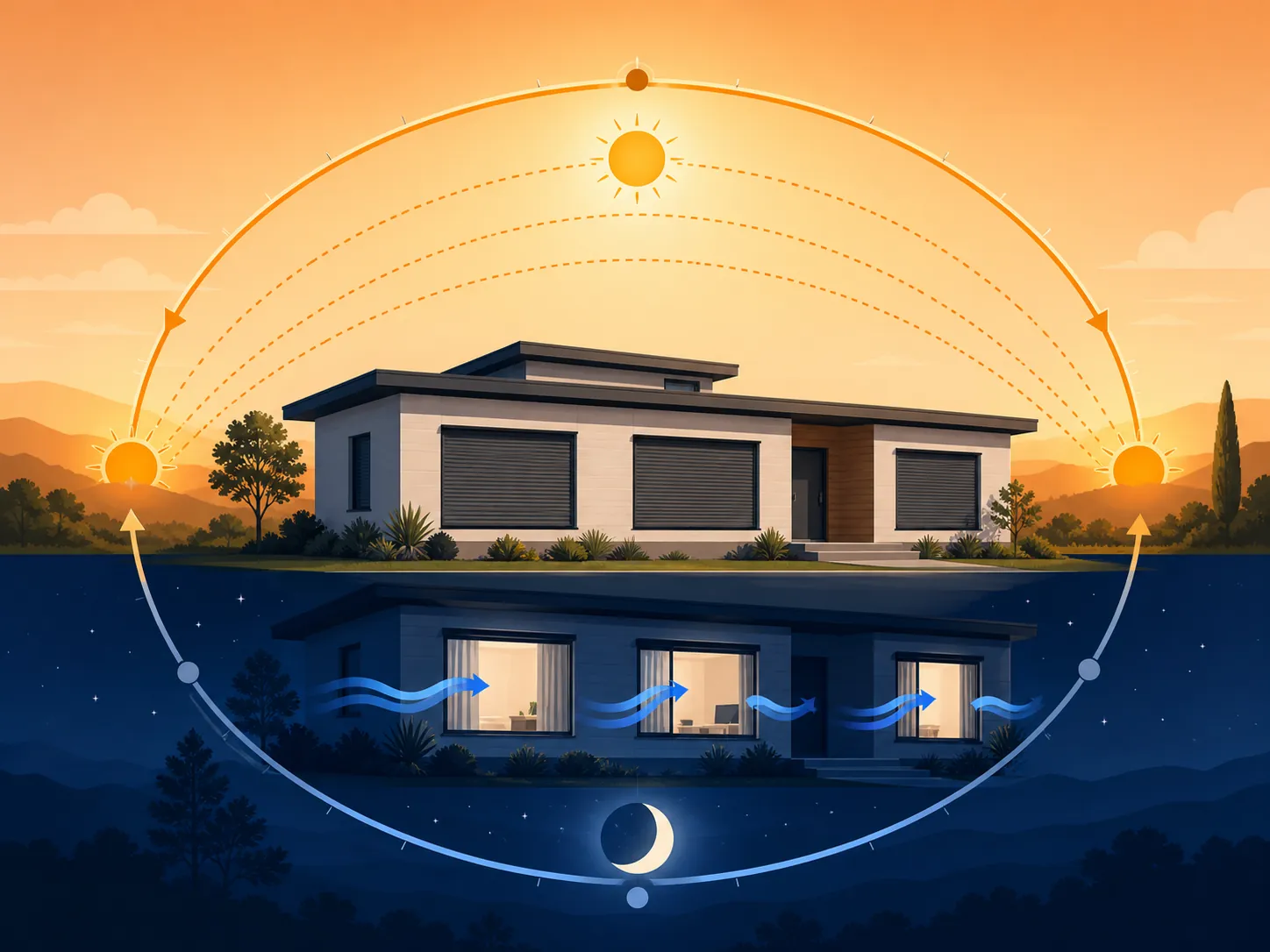
Night flushing is the first automation to set up because it uses the one thing a heat wave still gives you on some nights: a short window when outdoor air falls below indoor air. The source pattern opens when outdoor temperature is about 1.5°C cooler than indoor temperature and the indoor room is at least 24°C, which converts to about 2.7°F cooler outside and about 75°F indoors. It then reverses in the morning. [2]
Do not aim an outdoor sensor at afternoon sun and expect this to behave. Put the outdoor reading in shaded, ventilated air, away from brick, condenser exhaust, dryer vents, and sunlit railing. If the sensor cooks in direct sun until 8 p.m., the house may miss the useful cooling window entirely.
alias: Heat wave - open for night flush
mode: single
trigger:
  - platform: template
    value_template: >
      {{
        states('sensor.outdoor_temperature_f') | float(999)
        <= (states('sensor.living_room_temperature_f') | float(0) - 2.7)
        and states('sensor.living_room_temperature_f') | float(0) >= 75
      }}
    for: "00:10:00"
condition:
  - condition: state
    entity_id: input_boolean.heatwave_mode
    state: "on"
  - condition: time
    after: "19:00:00"
    before: "06:30:00"
action:
  - service: notify.mobile_app_primary_phone
    data:
      title: "Night flush window is open"
      message: "Outside is at least 2.7°F cooler than the living room. Open safe windows or vents now."
  # Optional: only use this if you have motorized windows or vents.
  # - service: cover.open_cover
  #   target:
  #     entity_id: cover.safe_night_vent_windows
That first automation should usually notify before it actuates. Most homes do not have motorized windows, and the safe nighttime opening is a human decision: which upstairs window has a lock stop, which ground-floor window stays shut, whether smoke or outdoor air quality makes opening a bad idea. The contact sensors still matter even when a person opens the window, because they tell the rest of the cooling logic what actually happened.
alias: Heat wave - close morning vents before reheating
mode: single
trigger:
  - platform: time
    at: "06:30:00"
  - platform: template
    value_template: >
      {{
        states('sensor.outdoor_temperature_f') | float(0)
        >= states('sensor.living_room_temperature_f') | float(999)
      }}
    for: "00:05:00"
condition:
  - condition: state
    entity_id: input_boolean.heatwave_mode
    state: "on"
action:
  - service: notify.mobile_app_primary_phone
    data:
      title: "Close the house"
      message: "Outdoor air is no longer cooler. Close windows before the room reheats."
  # Optional: only use this if you have motorized windows or vents.
  # - service: cover.close_cover
  #   target:
  #     entity_id: cover.safe_night_vent_windows
The second automation is not housekeeping; it is the whole point. Leaving windows open after outdoor air catches up turns the night-flush routine into a morning heat intake. The five-minute hold keeps one bad sensor update from slamming the house shut, but it is short enough that the room does not drift through the best part of the morning.
How to verify it worked
- Check the automation trace the next morning. The open automation should trigger only after outdoor temperature is at least 2.7°F below the indoor reading for 10 minutes.
- Compare the contact sensors with the notification time. If nobody opened the window, the room did not receive a night flush; it only received a reminder.
- Look for oscillation around the threshold. If the same automation fires repeatedly, increase the hold time or require a wider temperature gap.
- If the outdoor sensor reads suspiciously high at sunset, relocate it before changing the automation. Bad placement is more common than bad YAML.
Recipe 2: Sun-tracking shades by azimuth, not vibes
| Field | NestGrid recipe metadata |
|---|---|
| Status | Investigating |
| Primary hub | Home Assistant |
| Protocol notes | Works with cover entities for roller shades, shutters, or blinds; position semantics vary by integration. |
| Firmware/app version | Not NestGrid-lab verified as of 2026-07-31; record shade motor firmware, hub bridge firmware, and Home Assistant Core version before testing. |
| Verification date | 2026-07-31 azimuth translation; NestGrid hub reproduction pending. |
| Source basis | Translated from a sun.sun azimuth shutter schedule using east 60–130°, south 140–220°, and west 230–310° ranges. |
Fixed “close at noon” shade routines are late for east glass and early for west glass. The better trigger is the sun’s azimuth: where the sun is along the horizon relative to the house. Maison-et-domotique’s pattern uses approximate azimuth bands of 60–130° for east-facing shutters, 140–220° for south-facing shutters, and 230–310° for west-facing shutters, with the routine enabled only during heat-wave conditions such as outdoor temperature at or above 30°C/86°F or living-room temperature at or above 26°C/79°F. It also uses intermediate shutter positions around 70–80% closed so the room keeps some daylight while blocking radiation. [2]
In Home Assistant cover entities, 0 usually means closed and 100 means open. So “80% closed” often becomes a position near 20. Confirm your integration before you copy positions; some bridges invert or round shade levels.
alias: Heat wave - shade glass before direct sun
mode: restart
trigger:
  - platform: time_pattern
    minutes: "/10"
condition:
  - condition: template
    value_template: >
      {{
        states('sensor.outdoor_temperature_f') | float(0) >= 86
        or states('sensor.living_room_temperature_f') | float(0) >= 79
      }}
  - condition: state
    entity_id: input_boolean.heatwave_mode
    state: "on"
  - condition: numeric_state
    entity_id: sun.sun
    attribute: elevation
    above: 0
action:
  - choose:
      - conditions:
          - condition: numeric_state
            entity_id: sun.sun
            attribute: azimuth
            above: 60
            below: 130
        sequence:
          - service: cover.set_cover_position
            target:
              entity_id:
                - cover.east_bedroom_shade
                - cover.east_kitchen_shade
            data:
              position: 25
      - conditions:
          - condition: numeric_state
            entity_id: sun.sun
            attribute: azimuth
            above: 140
            below: 220
        sequence:
          - service: cover.set_cover_position
            target:
              entity_id:
                - cover.south_living_room_shade
            data:
              position: 20
      - conditions:
          - condition: numeric_state
            entity_id: sun.sun
            attribute: azimuth
            above: 230
            below: 310
        sequence:
          - service: cover.set_cover_position
            target:
              entity_id:
                - cover.west_office_shade
                - cover.west_bedroom_shade
            data:
              position: 20
The time-pattern trigger is intentional. A pure numeric-state trigger may miss the desired shade position after a Home Assistant restart or after a shade bridge comes back online. Checking every 10 minutes is a little less elegant and a lot more forgiving.
alias: Heat wave - reopen shades after direct sun passes
mode: restart
trigger:
  - platform: time_pattern
    minutes: "/15"
condition:
  - condition: state
    entity_id: input_boolean.heatwave_mode
    state: "on"
action:
  - choose:
      - conditions:
          - condition: template
            value_template: >
              {{ not (60 < state_attr('sun.sun', 'azimuth') | float(0) < 130) }}
        sequence:
          - service: cover.set_cover_position
            target:
              entity_id:
                - cover.east_bedroom_shade
                - cover.east_kitchen_shade
            data:
              position: 70
      - conditions:
          - condition: template
            value_template: >
              {{ not (140 < state_attr('sun.sun', 'azimuth') | float(0) < 220) }}
        sequence:
          - service: cover.set_cover_position
            target:
              entity_id:
                - cover.south_living_room_shade
            data:
              position: 60
      - conditions:
          - condition: template
            value_template: >
              {{ not (230 < state_attr('sun.sun', 'azimuth') | float(0) < 310) }}
        sequence:
          - service: cover.set_cover_position
            target:
              entity_id:
                - cover.west_office_shade
                - cover.west_bedroom_shade
            data:
              position: 60
That reopen routine is deliberately conservative. During a heat wave, reopening to 60 or 70 is not the same as throwing the shades wide. It restores enough daylight for the room to stop feeling sealed while avoiding a late-afternoon mistake on glass that still faces warm surroundings.
What to adjust first
- Walk the house once in the morning and once late afternoon. If sun is striking glass before the automation runs, widen that façade’s azimuth range.
- If rooms become cave-like, change the target position from 20 to 25 or 30 before disabling the routine.
- If a shade bridge reports inverted positions, correct the position values, not the heat-wave logic.
- If someone sleeps days or works in a camera-lit office, split that room into its own override. Heat-wave automation still has to respect the room.
Recipe 3: Presence-gated fans for rooms people are actually using
| Field | NestGrid recipe metadata |
|---|---|
| Status | Workaround |
| Primary hub | Home Assistant |
| Protocol notes | Fan can be a native fan entity or a smart plug controlling a safe plug-in fan; never use a smart plug with a fan that exceeds the plug rating or requires unsafe restart behavior. |
| Firmware/app version | Not NestGrid-lab verified as of 2026-07-31; record plug firmware, presence sensor firmware, and Home Assistant Core version before testing. |
| Verification date | 2026-07-31 pattern adaptation; NestGrid hub reproduction pending. |
| Source basis | Adapted from a presence-and-temperature heat-wave fan pattern that favors mmWave presence because people often sit still in hot rooms. |
The useful fan automation is not “turn on at 79°F.” It is “turn on at 79°F when someone is still in the room, and turn off after the room is empty.” LinknLink’s Home Assistant heat-wave guide uses that presence-gated pattern and specifically notes that mmWave presence is preferable because people in hot rooms often sit still long enough for simpler motion sensors to time out. Its suggested night threshold is above about 26°C/79°F, with fan shutoff roughly 10–15 minutes after vacancy. [4]
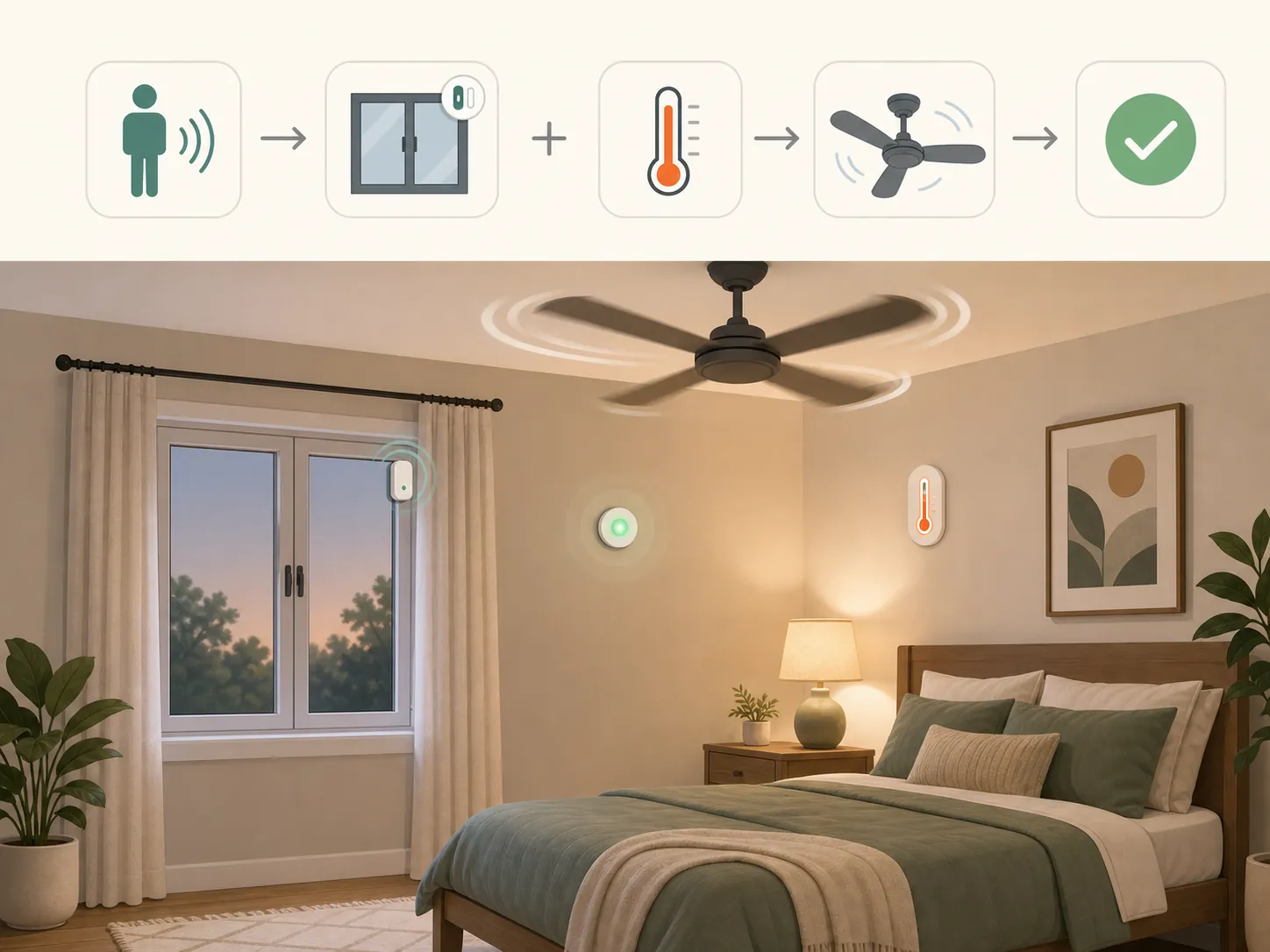
alias: Heat wave - bedroom fan only with presence
mode: restart
trigger:
  - platform: numeric_state
    entity_id: sensor.bedroom_temperature_f
    above: 79
  - platform: state
    entity_id: binary_sensor.bedroom_presence
    to: "on"
condition:
  - condition: state
    entity_id: input_boolean.heatwave_mode
    state: "on"
  - condition: time
    after: "21:00:00"
    before: "07:00:00"
  - condition: numeric_state
    entity_id: sensor.bedroom_temperature_f
    above: 79
  - condition: state
    entity_id: binary_sensor.bedroom_presence
    state: "on"
action:
  - service: switch.turn_on
    target:
      entity_id: switch.bedroom_fan_plug
alias: Heat wave - bedroom fan off after vacancy or cooldown
mode: restart
trigger:
- platform: state
entity_id: binary_sensor.bedroom_presence
to: "off"
for: "00:15:00"
- platform: numeric_state
entity_id: sensor.bedroom_temperature_f
below: 77
for: "00:10:00"
action:
- service: switch.turn_off
target:
entity_id: switch.bedroom_fan_plugA fan routine needs a more careful safety check than it usually gets. If the fan has a mechanical knob and restarts cleanly when power returns, a smart plug may be fine if the electrical rating is appropriate. If the fan has soft-touch controls, an oscillation motor that behaves badly after power loss, or a plug rating mismatch, use a native fan controller or skip automation. For beginner plug-based examples outside heat-wave use, NestGrid’s smart-plug fan recipes are the safer starting point.
This is also where the 90°F fan boundary belongs: in the room-level logic, not buried in a disclaimer. If the room is well above that range and the person is vulnerable, the automation should not keep escalating fan runtime. It should notify, hand off to AC logic if available, or tell someone the room has crossed the fan-useful line.
Recipe 4: AC only when the room is occupied and windows are shut
| Field | NestGrid recipe metadata |
|---|---|
| Status | Investigating |
| Primary hub | Home Assistant |
| Protocol notes | Works with a climate entity, room temperature sensor, presence sensor, and a grouped window/door contact sensor for the cooling zone. |
| Firmware/app version | Not NestGrid-lab verified as of 2026-07-31; record thermostat/AC controller firmware, contact sensor firmware, and Home Assistant Core version before testing. |
| Verification date | 2026-07-31 threshold translation; NestGrid hub reproduction pending. |
| Source basis | Translated from a Home Assistant rule using room temperature above about 27°C/81°F, presence, and closed windows before AC operation. |
AC automation is where sloppy conditions become expensive or miserable. The source pattern requires the room to be hot, presence to be true, and windows to be closed before starting cooling; maison-et-domotique describes this style of rule with about 10 window sensors in the home and a temperature trigger around 27°C/81°F. [2]
Group the windows for the cooling zone first. In Home Assistant, a binary-sensor group is commonly “on” if any member is open and “off” when all are closed. Name it plainly, because this is the entity you will be checking at midnight when the AC refused to start.
alias: Heat wave - cool occupied room with windows shut
mode: restart
trigger:
  - platform: numeric_state
    entity_id: sensor.living_room_temperature_f
    above: 81
    for: "00:10:00"
  - platform: state
    entity_id: binary_sensor.living_room_presence
    to: "on"
condition:
  - condition: state
    entity_id: input_boolean.heatwave_mode
    state: "on"
  - condition: numeric_state
    entity_id: sensor.living_room_temperature_f
    above: 81
  - condition: state
    entity_id: binary_sensor.living_room_presence
    state: "on"
  - condition: state
    entity_id: binary_sensor.living_room_windows
    state: "off"
action:
  - service: climate.set_hvac_mode
    target:
      entity_id: climate.living_room_ac
    data:
      hvac_mode: cool
  - service: climate.set_temperature
    target:
      entity_id: climate.living_room_ac
    data:
      temperature: "{{ states('input_number.living_room_cooling_setpoint_f') | float }}"
alias: Heat wave - stop cooling on open window or vacancy
mode: restart
trigger:
- platform: state
entity_id: binary_sensor.living_room_windows
to: "on"
for: "00:02:00"
id: window_open
- platform: state
entity_id: binary_sensor.living_room_presence
to: "off"
for: "00:20:00"
id: vacant
action:
- choose:
- conditions:
- condition: trigger
id: window_open
sequence:
- service: climate.set_hvac_mode
target:
entity_id: climate.living_room_ac
data:
hvac_mode: "off"
- service: notify.mobile_app_primary_phone
data:
title: "AC paused"
message: "A living-room window has been open for 2 minutes. AC is off until the window closes."
- conditions:
- condition: trigger
id: vacant
sequence:
- service: climate.set_hvac_mode
target:
entity_id: climate.living_room_ac
data:
hvac_mode: "off"The two-minute window delay is there because contact sensors bounce, people crack a door for a moment, and automations that instantly shut down AC become nuisances. The 20-minute vacancy delay is there because presence sensors can briefly miss a quiet person. If the room is used by an infant, an older adult, pets, or anyone with heat sensitivity, do not use vacancy shutoff as a blind rule; use a notification, a higher setpoint, or a separate safety override.
The setpoint is an input helper rather than a hard-coded number because the correct value depends on the room, equipment, utility situation, and household safety. This article is not claiming a verified savings percentage. The bill-spike avoidance comes from refusing to cool an empty room with an open window, not from a magic thermostat number.
The failures to look for first
- AC never starts: check whether one contact sensor is stuck open in the grouped window entity.
- AC starts and stops too often: add a longer “for” duration to the temperature trigger or widen the difference between on and off thresholds.
- AC runs while a window is open: confirm the contact sensor device class, group behavior, and whether the window belongs to the correct cooling-zone group.
- Room still overheats before AC starts: revisit the shade and morning-close routines before lowering the cooling threshold. The heat may already be inside.
When the AC is dumb but controllable
| Field | NestGrid recipe metadata |
|---|---|
| Status | Workaround |
| Primary hubs | Home Assistant, Apple Home, SmartThings, Hubitat depending on controller support. |
| Protocol notes | IR controllers can expose a dumb AC as a climate device or scene target; Matter-over-Thread support depends on the specific controller and hub. |
| Firmware/app version | Freshness check required; device availability and pairing behavior may have changed since the cited 2025 review. |
| Verification date | 2026-07-31 controller bridge; NestGrid device reproduction pending. |
| Source basis | IR AC controller class and Matter-over-Thread caveats from HomeKit News’ Taruie review. |
If the AC has an infrared remote but no smart integration, an IR controller can bridge it into automations. HomeKit News places Taruie in the same practical class as Sensibo, Tado, Broadlink, and SwitchBot Hub: devices that learn or store IR codes so a dumb AC can be controlled by a smart-home platform. Its Taruie review also gives the caveats that matter during setup, including Matter over Thread pairing quirks, battery operation, on-device IR codes, and a weak roughly 25 cm IR range in the reviewed unit. The review was published on August 18, 2025 and described Taiwan pre-order availability, so treat availability and setup details as time-sensitive before using it as buying advice. [5]
This is why IR control belongs after the logic, not before it. An IR blaster can press the AC button for you; it does not know whether the west window is open unless the hub automation knows. Keep the same conditions from Recipe 4 and swap only the action: call a climate entity, fire a scene, or send the IR command your controller exposes.
alias: Heat wave - IR AC scene with safety conditions
mode: single
trigger:
  - platform: numeric_state
    entity_id: sensor.bedroom_temperature_f
    above: 81
    for: "00:10:00"
condition:
  - condition: state
    entity_id: input_boolean.heatwave_mode
    state: "on"
  - condition: state
    entity_id: binary_sensor.bedroom_presence
    state: "on"
  - condition: state
    entity_id: binary_sensor.bedroom_windows
    state: "off"
action:
  # Replace this with your IR controller's exposed climate service or scene.
  - service: scene.turn_on
    target:
      entity_id: scene.bedroom_ac_cool_mode
For Matter setups, keep the controller/device distinction straight. A Matter device is not useful unless your chosen ecosystem has a controller that can commission and automate it, and Thread devices also need the right Thread border-router path. NestGrid’s Matter controller vs. device explainer is the background piece to check before assuming a Matter label means the AC bridge will appear everywhere.
Porting the recipes to Apple Home, SmartThings, and Hubitat
Home Assistant gets the YAML because it can express the full chain: templates, sun azimuth, grouped contact sensors, helper setpoints, and trace history. In Apple Home, SmartThings, or Hubitat, recreate the condition order rather than the syntax. The important sequence is the same: heat-wave mode first, then reliable temperature, then time or sun exposure, then presence, then window state, then the cooling action.
| Logic | Home Assistant | Apple Home / SmartThings / Hubitat translation |
|---|---|---|
| Night flush | Template compares outdoor temperature to indoor temperature minus 2.7°F. | Use an advanced automation, virtual switch, rule machine, or helper if the app cannot compare two sensor values directly. |
| Sun-tracking shades | sun.sun azimuth gates east, south, and west cover positions. | Use time blocks by façade if azimuth is unavailable, but label that as less precise. |
| Presence fan | Temperature plus mmWave presence turns fan plug on; vacancy delay turns it off. | Use occupancy as the main condition; prefer true presence sensors over simple motion for seated rooms. |
| AC safety | Climate action runs only when window group is closed and room is occupied. | Build one rule to start cooling and a separate rule to stop or notify when a window opens. |
For heat alerts that arrive before the house is hot, the same event-driven pattern used in NestGrid’s weather-alert automations can flip input_boolean.heatwave_mode on before the sun has done its damage. If utility or regional grid strain is part of the problem, pair cooling rules with a separate load-shedding plan rather than hiding everything in one enormous automation; NestGrid’s grid-emergency auto-shedding recipe is the cleaner place for that logic.
The practical boundary
The recipes that hold up best in a heat wave act before the room becomes miserable. They close glass before direct sun lands on it. They open the house only when outdoor air is measurably cooler than indoor air. They refuse to run active cooling under bad conditions, especially open windows and empty rooms.
Once the house is heat-soaked and temperatures are beyond the point where plain fans meaningfully help, the correct automation is not another fan scene. It is shade discipline, insulation behavior, AC control with verified safety limits, and a status label honest enough to tell you what NestGrid has confirmed, what is only a workaround, and what still needs investigation.
References
- 10 Smart Home Tricks That Keep Your House Cool Without Spiking Your Energy Bill, CNET.
- Heatwave and home automation: turn Home Assistant into a heat shield, maison-et-domotique, July 1, 2026.
- 2026 North American heat wave, Wikipedia.
- Home Assistant Heatwave Automation Guide | Presence and IR Control, LinknLink.
- Taruie Smart AC Controller w/ Matter over Thread (review), HomeKit News, August 18, 2025.