
Survival Mode Automations for Heat Wave Blackouts
During a heat wave power outage, a smart home that lacks backup-power automation can become a liability—devices drain UPS batteries and default to unsafe states. This article provides three tiers of copyable automations for Home Assistant, Hubitat, and SmartThings, from basic UPS detection to full survival mode with automatic load shedding.
A heat-wave blackout is a bad time to discover that the smart home is very good at wasting the battery keeping it alive. The router stays up, the hub stays up, the UPS starts beeping, and then a handful of decorative plugs, bridges, displays, and bulbs quietly eat the runtime that should have gone to cooling, network access, and alerts. Most power outage smart home tips for a heat wave stop at “put the hub on a UPS.” That is the easy part. The useful part is teaching the house to recognize that grid power is gone, enter a smaller operating mode, and recover without waking every load at once.
There is a real reason to build this before the next warning hits your weather app. Climate Central’s 2024 analysis found 60% more heat-season power outages during 2014–2023 than during 2000–2009.[1] In July 2026, PJM’s footprint was under emergency-order attention amid a forecast record demand of 166 GW, which matters if you live in that mid-Atlantic and Northeast grid region, though it should not be treated as a national template.[2] DOE’s reliability work points in the same uncomfortable direction: higher grid stress and reliability risk are no longer edge-case planning topics.[3]
The recipe below is tiered on purpose. Stop at the first tier if you only need alerts. Build the second tier if heat is the actual threat. Add the third tier only if you have multiple UPS units or enough monitored loads to make automatic shedding worth the complexity.
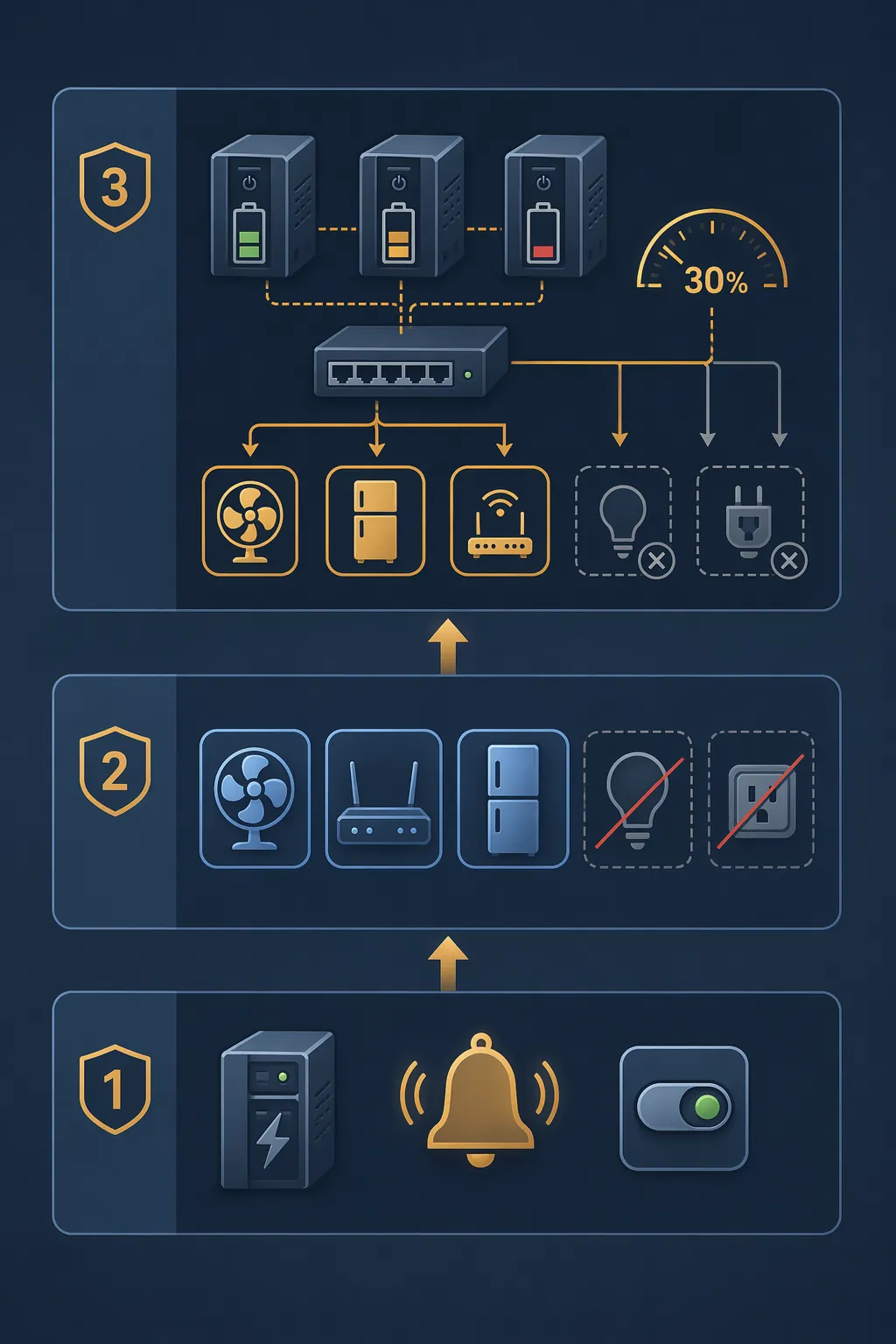
| Tier | What It Does | Best For | Do Not Skip |
|---|---|---|---|
| 1. Outage detection | Turns one helper or virtual switch on when backup power starts, sends alerts, and logs the event. | Any Home Assistant, Hubitat, or SmartThings home with a UPS or reliable power signal. | Testing the exact entity or device state your platform exposes. |
| 2. Survival mode | Turns off nonessential loads, preserves network and hub runtime, keeps cooling-priority devices available, and suppresses bad restore states. | Heat-wave outages where minutes of UPS runtime matter. | A manual override for the household. |
| 3. Load shedding | Uses UPS battery, load, or runtime thresholds to shut down more devices as capacity drops. | Homes with monitored UPS units, multiple hubs, network racks, NAS boxes, or workstation loads. | Recovery logic after power returns. |
If you only want the simpler Home Assistant version, start with these basic Home Assistant power outage automations. This version goes further: it treats a blackout during a heat wave as a survival-mode problem across Home Assistant, Hubitat, and SmartThings.
Before You Automate: Verify the Boring Hardware
The automation cannot save a host that never comes back. One very ordinary failure is a mini PC, NUC, or small server that stays off after the UPS drains because its firmware is set to remain off after power loss. James Ridgway documented this exact resilience gap while checking an Intel NUC and its “After Power Failure” BIOS setting.[4] Treat that as a warning sign, not a universal fix: Intel NUC generations, Raspberry Pi boards, x86 mini PCs, old desktops, and NAS appliances do not all behave the same way.
- On a NUC or x86 mini PC, check BIOS or UEFI for an “After Power Failure,” “Restore AC Power Loss,” or similarly named setting.
- On a Raspberry Pi, test the whole power path: UPS output, USB power adapter, storage, and whether Home Assistant actually starts cleanly after an unplug/replug cycle.
- On a NAS or network rack, decide whether automatic restart is desirable. A NAS that comes back during unstable utility power may need a delayed boot or manual check.
- On every platform, run one controlled test while you are home: pull grid power from the UPS input, not from the hub itself, and watch the entities change.
That last point matters because outage detection is platform- and device-specific. Home Assistant users commonly use Network UPS Tools, UPS integrations, power meters, smart plugs, contact sensors on transfer equipment, or indirect signals such as a charger losing mains power; community discussions show the tradeoff is usually between reliability, latency, and whether the sensing device itself remains powered.[5] For a heat-wave automation, prefer a signal that remains available when the grid is gone.
Tier 1: Make One Reliable Outage State
Start with one truth source inside the smart home: “the house is on backup power.” Do not scatter that logic across twenty automations. Create one helper, virtual switch, or mode flag, then let everything else subscribe to it.
Home Assistant: UPS or NUT Detection
Network UPS Tools is a clean pattern when your UPS supports it and the Home Assistant host can see the UPS state. A public Home Assistant outage automation repository by danielrosehill uses a NUT-based approach, but it should be treated as a minimal reference pattern rather than production-proof infrastructure; the repository is small and should be verified against your own entities before you trust it.[6]
input_boolean:
  grid_outage:
    name: Grid outage
    icon: mdi:transmission-tower-off

  heat_wave_survival_mode:
    name: Heat wave survival mode
    icon: mdi:weather-sunny-alert

automation:
  - alias: "Outage - set grid outage from UPS"
    id: outage_set_grid_outage_from_ups
    mode: single
    trigger:
      - platform: state
        entity_id: binary_sensor.ups_on_battery
        to: "on"
        for: "00:00:15"
    action:
      - service: input_boolean.turn_on
        target:
          entity_id: input_boolean.grid_outage
      - service: notify.mobile_app_your_phone
        data:
          title: "Power outage detected"
          message: "UPS is on battery. Survival automations are now allowed to run."

  - alias: "Outage - clear grid outage after stable power"
    id: outage_clear_grid_outage_after_stable_power
    mode: restart
    trigger:
      - platform: state
        entity_id: binary_sensor.ups_on_battery
        to: "off"
        for: "00:05:00"
    action:
      - service: input_boolean.turn_off
        target:
          entity_id:
            - input_boolean.grid_outage
            - input_boolean.heat_wave_survival_mode
      - service: notify.mobile_app_your_phone
        data:
          title: "Grid power appears stable"
          message: "Outage helper cleared after 5 minutes off battery."
Change binary_sensor.ups_on_battery to the entity your UPS integration exposes. Some NUT setups expose a status sensor such as OL for online and OB for on battery instead of a binary sensor. Do not copy the entity name and assume the automation works; pull the UPS plug, watch Developer Tools, and confirm the state transition.
Hubitat: Virtual Switch as the Shared Outage Flag
Hubitat’s cleanest beginner pattern is a virtual switch named something obvious, such as Grid Outage. Whether the trigger comes from a supported UPS driver, a power-monitoring plug that reports loss of mains before the hub loses network, or another local signal, keep the rest of the rules pointed at the virtual switch.
- Create a virtual switch: Grid Outage.
- Create a Rule Machine rule: when UPS on-battery or your chosen power-loss signal becomes true, turn Grid Outage on.
- Create a second rule: when utility power has been stable for several minutes, turn Grid Outage off.
- Send a Hubitat notification when either transition happens.
SmartThings: Use a Routine Trigger You Can Actually Trust
SmartThings is more constrained because the available trigger depends heavily on device integration and whether the cloud path is still reachable. If your UPS, energy monitor, or power-loss sensor exposes a supported state, create a virtual switch or mode named Grid Outage and use Routines to turn it on and off. If the only signal depends on internet connectivity that disappears with the outage, do not use it as the foundation for survival mode. In that case, keep SmartThings to manual “outage mode” controls and alerts, and let a local UPS-backed hub handle automatic decisions.
Tier 2: Survival Mode Is a Smaller House, Not a Panic Scene
Survival mode should not turn the home into a theatrical red-alert dashboard. It should make the power budget smaller. During a heat wave, that usually means preserving the network path, the automation brain, phone charging, selected fans if they are on appropriate backup power, refrigeration if your backup system is sized for it, and enough sensors to know whether the house is getting dangerous. It also means shutting down devices that are comfortable, decorative, or actively harmful when the UPS is draining.
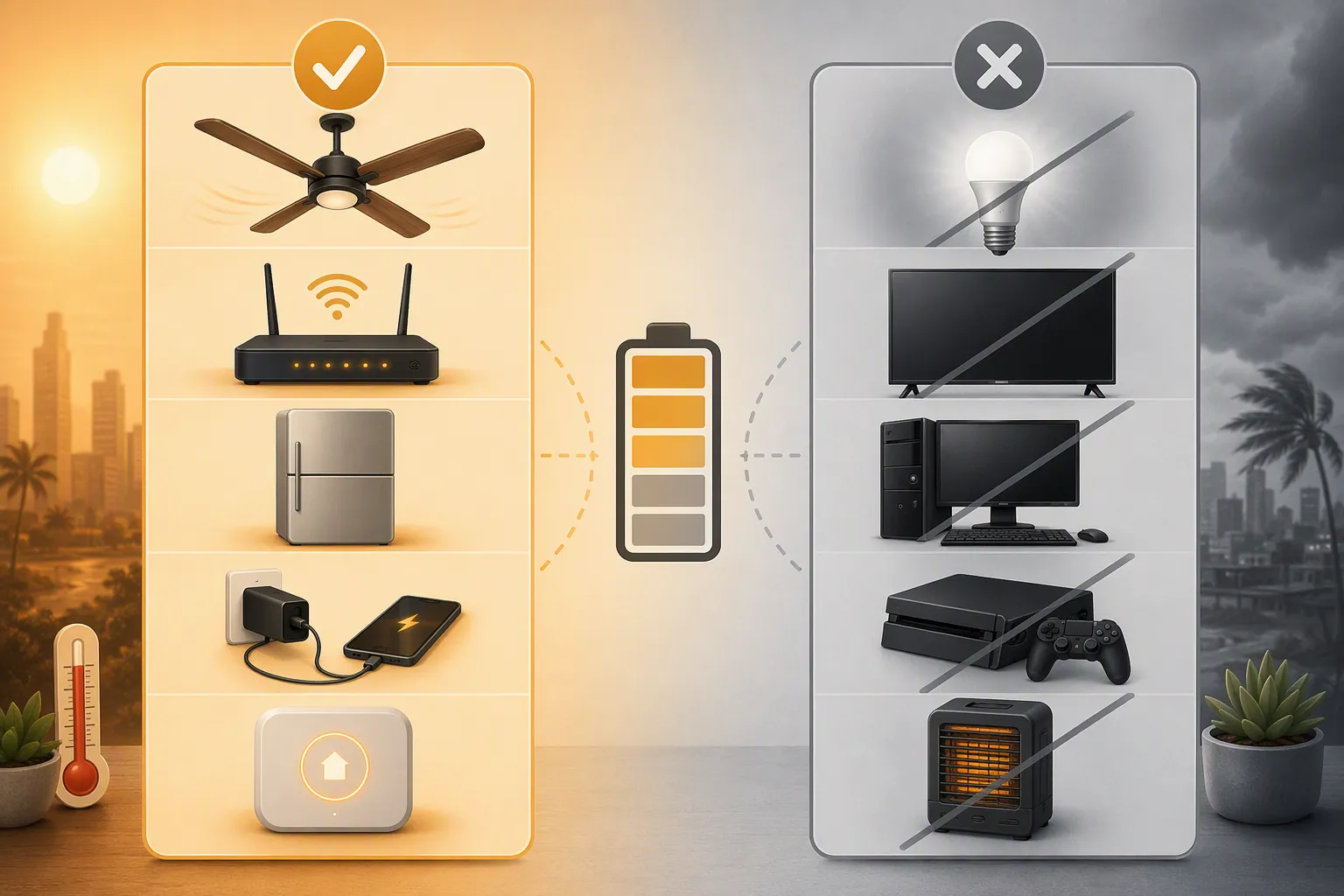
| Keep Available | Usually Shed | Check Manually |
|---|---|---|
| Router, modem, primary mesh node | TVs, game consoles, desktop PCs | Refrigerator or freezer, unless connected to a properly sized backup circuit |
| Home Assistant, Hubitat, or SmartThings hub | Decorative smart lighting and LED strips | Portable fans, because startup load and UPS capacity matter |
| Phone charging point | Voice assistants and smart displays | Security cameras, if they dominate UPS load |
| Temperature and leak sensors that remain reachable | Printers, speakers, chargers, nonessential bridges | Locks and alarms, because restore behavior differs by device |
Cooling deserves special treatment. A manufacturer-published RELiON guidance page says energy use can increase by 6–8% per degree below 78°F, which is useful as a directional reminder that aggressive cooling targets are expensive during heat events, though it is not independent peer-reviewed efficiency research.[7] In a blackout, the automation should not try to maintain normal comfort. It should preserve runtime, keep air moving where possible, and give the household information early enough to make human decisions.
Home Assistant Survival Mode YAML
This example assumes the outage helper already works. It also assumes you have grouped devices by what should shut down first. Replace the entity IDs with your own groups; the grouping is the important part.
group:
  outage_nonessential_switches:
    name: Outage nonessential switches
    entities:
      - switch.tv_power
      - switch.gaming_console
      - switch.desk_charger
      - switch.smart_display_kitchen

  outage_nonessential_lights:
    name: Outage nonessential lights
    entities:
      - light.living_room_lamps
      - light.led_strip
      - light.office_lights

  outage_keep_online:
    name: Outage keep online
    entities:
      - switch.network_rack
      - switch.home_assistant_host
      - switch.phone_charger

automation:
  - alias: "Heat outage - enter survival mode"
    id: heat_outage_enter_survival_mode
    mode: single
    trigger:
      - platform: state
        entity_id: input_boolean.grid_outage
        to: "on"
        for: "00:01:00"
    condition:
      - condition: numeric_state
        entity_id: weather.home
        attribute: temperature
        above: 85
    action:
      - service: input_boolean.turn_on
        target:
          entity_id: input_boolean.heat_wave_survival_mode
      - service: switch.turn_off
        target:
          entity_id: group.outage_nonessential_switches
      - service: light.turn_off
        target:
          entity_id: group.outage_nonessential_lights
      - service: switch.turn_on
        target:
          entity_id: group.outage_keep_online
      - service: climate.set_temperature
        target:
          entity_id: climate.main_floor
        data:
          temperature: 78
      - service: notify.mobile_app_your_phone
        data:
          title: "Heat-wave survival mode is active"
          message: "Nonessential loads are off. Network and hub power are being preserved. Check indoor temperature and UPS runtime."

  - alias: "Heat outage - manual survival mode"
    id: heat_outage_manual_survival_mode
    mode: single
    trigger:
      - platform: state
        entity_id: input_boolean.heat_wave_survival_mode
        to: "on"
    condition:
      - condition: state
        entity_id: input_boolean.grid_outage
        state: "off"
    action:
      - service: switch.turn_off
        target:
          entity_id: group.outage_nonessential_switches
      - service: light.turn_off
        target:
          entity_id: group.outage_nonessential_lights
      - service: notify.mobile_app_your_phone
        data:
          title: "Manual survival mode enabled"
          message: "Nonessential smart-home loads have been turned off manually."
The temperature condition is intentionally plain. You can swap it for a heat alert sensor, an outdoor temperature sensor, a weather integration, or a manually controlled Heat Wave helper. The automation’s job is not to prove a meteorological category. It is to avoid dumping battery into low-value loads when heat makes runtime valuable.
Be careful with the thermostat line. If the HVAC is not on backup power, changing the setpoint may do nothing. If you have a whole-home battery, generator, or backed-up mini-split, set the survival value to something you have actually measured. If your thermostat depends on cloud connectivity, assume it may not respond during the exact outage you care about.
Suppress Bad Restore States
The ugly part of smart lighting is not always the outage. It is the return. A forum discussion about smart-home outage behavior notes Hue/Zigbee bulbs returning to 100% brightness after power restoration.[8] That does not mean every Zigbee bulb in every firmware state will do it, but it is common enough to deserve a test on your actual bulbs, especially in bedrooms and nurseries.
automation:
  - alias: "Outage recovery - keep risky lights off"
    id: outage_recovery_keep_risky_lights_off
    mode: single
    trigger:
      - platform: state
        entity_id: input_boolean.grid_outage
        from: "on"
        to: "off"
    action:
      - delay: "00:00:30"
      - service: light.turn_off
        target:
          entity_id:
            - light.bedroom_ceiling
            - light.kids_room_lamp
            - light.led_strip
      - service: notify.mobile_app_your_phone
        data:
          title: "Outage recovery check"
          message: "Power returned. Risky restore-state lights were forced off after 30 seconds."
Where your bulbs support a power-on behavior setting, configure that in the device or bridge first. Automation should be the second layer, not the only guardrail. Also test smart plugs that control fans, heaters, pumps, and chargers. A plug that restores to “on” may be convenient on a lamp and unacceptable on a high-draw appliance.
Hubitat Survival Mode
In Hubitat, make survival mode another virtual switch rather than a pile of unrelated rules. Then use Rule Machine, Basic Rules, or Mode Manager depending on how much control you need.
| Hubitat Object | Suggested Name | Purpose |
|---|---|---|
| Virtual switch | Grid Outage | Shared outage state from Tier 1. |
| Virtual switch | Heat Survival Mode | Manual or automatic survival trigger. |
| Group | Outage Nonessential | Switches and lights that should shut off immediately. |
| Rule Machine rule | Enter Heat Survival Mode | If Grid Outage turns on and temperature or manual heat condition is true, turn on Heat Survival Mode. |
| Rule Machine rule | Survival Load Reduction | When Heat Survival Mode turns on, shut off the nonessential group and send notification. |
| Rule Machine rule | Recovery Guard | When Grid Outage turns off after a delay, force known bad restore-state lights off. |
Hubitat’s advantage is local execution when the hub and radios are powered. Its weak point is the same as everyone else’s: the devices still need power, and the rule only knows what the device or driver reports. If a Zigbee mesh collapses because repeaters are unpowered, a command may not reach a bulb or plug. Put critical Zigbee repeaters on the same survival-power plan or avoid depending on them for the first shutdown wave.
SmartThings Survival Mode
For SmartThings, build the same shape with fewer assumptions. Create a virtual switch named Heat Survival Mode. Create one Routine that turns it on when Grid Outage turns on and your chosen heat condition is present. Create separate Routines that react to Heat Survival Mode by turning off nonessential switches, turning off selected lights, and notifying household phones.
- Use SmartThings for device actions that still work reliably in your home when internet service is degraded.
- Keep the manual virtual switch visible on a dashboard so someone can enter survival mode without hunting through automations.
- Avoid making SmartThings the only outage detector if the trigger depends on a cloud service that fails with your modem.
- Put restore-state cleanup in its own Routine so you can test it without simulating a full blackout.
Tier 3: Load Shedding When the UPS Starts Losing
Advanced outage automation is not “turn off more stuff because it feels serious.” It is threshold-based. If the network UPS is healthy, keep communications alive. If it drops below a defined capacity, shed camera recorders or secondary access points. If the office UPS is carrying a desktop, shut it down before it steals runtime from the router. If the hub UPS is almost done, send the last useful alert before the house goes quiet.
The 30% threshold below is a recipe value, not a universal law. Use it as the first conservative line where comfort devices and secondary infrastructure lose their claim on battery. If your UPS runtime is short, shed earlier. If you have a large home battery, the same logic can run against state of charge, backed-up circuit load, or estimated runtime instead of a small UPS percentage.
input_boolean:
  outage_stage_1_shed:
    name: Outage stage 1 load shed
  outage_stage_2_shed:
    name: Outage stage 2 load shed

group:
  outage_stage_1_loads:
    name: Outage stage 1 loads
    entities:
      - switch.office_monitor
      - switch.secondary_mesh_node
      - switch.camera_nvr

  outage_stage_2_loads:
    name: Outage stage 2 loads
    entities:
      - switch.nas
      - switch.extra_poe_switch
      - switch.garage_bridge

automation:
  - alias: "Outage load shed - network UPS below 30 percent"
    id: outage_load_shed_network_ups_below_30
    mode: single
    trigger:
      - platform: numeric_state
        entity_id: sensor.network_ups_battery_charge
        below: 30
    condition:
      - condition: state
        entity_id: input_boolean.grid_outage
        state: "on"
    action:
      - service: input_boolean.turn_on
        target:
          entity_id: input_boolean.outage_stage_1_shed
      - service: switch.turn_off
        target:
          entity_id: group.outage_stage_1_loads
      - service: notify.mobile_app_your_phone
        data:
          title: "Load shedding started"
          message: "Network UPS is below 30%. Secondary loads are off."

  - alias: "Outage load shed - estimated runtime below 10 minutes"
    id: outage_load_shed_runtime_below_10
    mode: single
    trigger:
      - platform: numeric_state
        entity_id: sensor.network_ups_runtime_minutes
        below: 10
    condition:
      - condition: state
        entity_id: input_boolean.grid_outage
        state: "on"
    action:
      - service: input_boolean.turn_on
        target:
          entity_id: input_boolean.outage_stage_2_shed
      - service: switch.turn_off
        target:
          entity_id: group.outage_stage_2_loads
      - service: notify.mobile_app_your_phone
        data:
          title: "Critical UPS runtime"
          message: "Estimated network UPS runtime is below 10 minutes. Stage 2 loads are off."

  - alias: "Outage load shed - office UPS protects network"
    id: outage_load_shed_office_ups_protects_network
    mode: single
    trigger:
      - platform: numeric_state
        entity_id: sensor.office_ups_load
        above: 60
        for: "00:02:00"
    condition:
      - condition: state
        entity_id: input_boolean.grid_outage
        state: "on"
    action:
      - service: switch.turn_off
        target:
          entity_id:
            - switch.desk_power_strip
            - switch.usb_charger_bank
      - service: notify.mobile_app_your_phone
        data:
          title: "Office load reduced"
          message: "Office UPS load stayed above 60% during outage. Desk loads were turned off."
A few entity names in that block are deliberately generic because UPS integrations expose different sensors. Some report battery charge, some report runtime, some report load percentage, and some report only online/on-battery status. Use the most direct measurement you have. If you have no battery percentage or runtime entity, you can still use timed shedding: after 10 minutes on battery, turn off secondary devices; after 20 minutes, turn off anything not needed for alerts.
Multi-UPS Coordination
Multi-UPS homes need priority, not symmetry. The network UPS usually matters most because it carries modem, router, primary access point, and sometimes the hub. The hub UPS matters because it keeps the automation brain alive. An office or media UPS is usually expendable unless someone in the household depends on it for medical, accessibility, or work reasons. Name the UPS units by job, not by brand, so the logic stays readable at 2 a.m.
| UPS Role | Protect First | Shed First | Useful Sensor |
|---|---|---|---|
| Network UPS | Modem, router, primary access point | Secondary mesh nodes, NVR, extra PoE switch | Battery charge or estimated runtime |
| Hub UPS | Home Assistant host, Hubitat hub, bridge needed for shutdown commands | Displays, voice assistants, nonessential bridges | On-battery state and battery charge |
| Office UPS | Laptop charger if needed for communications | Desktop PC, monitors, speakers, desk accessories | Load percentage |
| Battery-backed circuit | Cooling-priority loads and refrigeration if sized for it | Convenience outlets and entertainment loads | State of charge and circuit load |
automation:
  - alias: "Outage coordinator - preserve network over office"
    id: outage_coordinator_preserve_network_over_office
    mode: single
    trigger:
      - platform: numeric_state
        entity_id: sensor.network_ups_battery_charge
        below: 40
    condition:
      - condition: state
        entity_id: input_boolean.grid_outage
        state: "on"
      - condition: numeric_state
        entity_id: sensor.office_ups_load
        above: 20
    action:
      - service: switch.turn_off
        target:
          entity_id:
            - switch.office_desktop
            - switch.office_monitor
            - switch.office_speakers
      - service: notify.mobile_app_your_phone
        data:
          title: "Network runtime protected"
          message: "Network UPS is below 40%. Office loads were shed because they are still drawing power."

  - alias: "Outage coordinator - hub final alert"
    id: outage_coordinator_hub_final_alert
    mode: single
    trigger:
      - platform: numeric_state
        entity_id: sensor.hub_ups_battery_charge
        below: 20
    condition:
      - condition: state
        entity_id: input_boolean.grid_outage
        state: "on"
    action:
      - service: notify.mobile_app_your_phone
        data:
          title: "Hub UPS low"
          message: "Automation hub UPS is below 20%. Further smart-home commands may stop soon. Switch to manual checks."
Notice what the final alert admits: the smart home may stop being smart. That is not a failure of the recipe. It is graceful degradation. The system did its useful work early, while it still had radios, storage, and network.
Hubitat and SmartThings Load Shedding
Hubitat can do threshold shedding if the UPS or power monitor exposes battery, runtime, or load attributes to the hub. Use separate virtual switches for Stage 1 Load Shed and Stage 2 Load Shed, then let Rule Machine turn those switches on from UPS thresholds. The reason to use switches rather than burying everything in one rule is recovery: you can see which stage fired, test it manually, and reset it deliberately.
SmartThings can do the same only where the device capabilities are exposed to Routines. If you cannot trigger from battery percentage, use elapsed-time routines from the outage virtual switch, or keep shedding manual. A manual load-shed button is less elegant than a threshold rule, but it is better than pretending a cloud routine will make a local decision after the network path has already died.
Recovery: Power Returning Is Its Own Event
Do not make “grid power returned” the same thing as “restore the house.” Utility power can flicker, UPS units can recharge slowly, Zigbee meshes can take time to rebuild, and devices can wake in the wrong state. Recovery should be staged.
automation:
  - alias: "Outage recovery - staged restore"
    id: outage_recovery_staged_restore
    mode: restart
    trigger:
      - platform: state
        entity_id: input_boolean.grid_outage
        from: "on"
        to: "off"
    action:
      - delay: "00:05:00"
      - service: switch.turn_on
        target:
          entity_id:
            - switch.primary_mesh_node
            - switch.phone_charger
      - delay: "00:02:00"
      - service: switch.turn_on
        target:
          entity_id:
            - switch.secondary_mesh_node
      - service: light.turn_off
        target:
          entity_id:
            - light.bedroom_ceiling
            - light.office_lights
            - light.led_strip
      - service: input_boolean.turn_off
        target:
          entity_id:
            - input_boolean.outage_stage_1_shed
            - input_boolean.outage_stage_2_shed
      - service: notify.mobile_app_your_phone
        data:
          title: "Recovery sequence complete"
          message: "Network devices restored in stages. Known risky lights were forced off."
For Hubitat, mirror that with a recovery rule that waits several minutes after Grid Outage turns off, restores network-related switches first, then forces known bad lights off. For SmartThings, keep recovery conservative: a delayed Routine that turns off risky lights and notifies the household is often safer than trying to restore every device to its previous condition.
The Test That Matters
Run the test while the weather is boring. Put a phone on cellular, start a note, then pull utility power from the UPS input. Watch for four things: the outage flag changes, the survival loads shut down, the alerts arrive, and the devices that should remain available actually remain reachable. Then restore power and watch for the messier part: bulbs, plugs, hubs, bridges, and mini PCs waking up.
- If the hub never comes back after the UPS drains, fix firmware or host power behavior before refining automations.
- If the router dies before the hub can notify you, move network gear onto the protected side or reduce network UPS load.
- If bulbs return at full brightness, set device-level power-on behavior where available and keep the recovery cleanup automation.
- If a smart plug wakes a load that should stay off, change the plug’s restore setting or replace it with one that exposes safer behavior.
- If SmartThings routines miss events during a network outage, downgrade that platform’s role to manual survival-mode control or noncritical device cleanup.
The finished system does not need to be elaborate. A reliable outage helper, one survival-mode switch, and a tested recovery guard are already better than a smart home that assumes every device will fail politely. Add threshold-based load shedding when your UPS data is good enough to support it. Verify restore behavior before the next heat dome, not when the UPS is already beeping in the dark.
References
- Heat Season Power Outages, Climate Central, 2024
- PJM emergency order heat wave 2026, ElectricChoice
- Department of Energy Releases Report Evaluating U.S. Grid Reliability and Security, U.S. Department of Energy
- Surviving a Power Cut: Home Automation Resilience, James Ridgway
- Home Assistant community discussion on power outage detection methods, Home Assistant Community
- Home-Assistant-Power-Outage-Automation, GitHub
- 7 Energy Conservation Tips for Heat Waves, RELiON Battery
- Smart home power outage solutions and automation tips, Aqara Forum