
Smart thermostat cooling schedule for a 115°F heat wave
At 115°F the standard setback-and-recover schedule forces an impossible afternoon catch-up during the hottest, most expensive hours. This copyable Nest and ecobee recipe — pre-cool below the occupied setpoint before on-peak, hold a steady low-to-mid 80s target, cap away setbacks at 2–4°F — gives you exact app entries and realistic expectations.
The failure usually starts before anyone touches the thermostat. The house drifts up while you are gone, the afternoon sun loads the walls and attic, and then at 4:30 p.m. the thermostat gets asked to pull an 86°F hallway back to 76°F while it is 115°F outside. That is not a smart-thermostat problem. It is a timing problem.
For a 115°F desert heat wave, the useful schedule is not “set it to 78 and let the thermostat learn.” It is: cool the house before the peak window, stop asking for a deep afternoon recovery, and keep away setbacks small enough that the AC is not digging out of a thermal hole.

APS describes the basic pre-cooling pattern as cooling a few degrees lower for several hours before the on-peak period, then raising the setpoint during on-peak hours; its residential summer on-peak example is 4–7 p.m. on weekdays, but your own rate plan controls the exact window. [1] For Phoenix-style 110°F+ days, Grand Canyon Home Services recommends capping the away setback at 2–4°F rather than using broad national setback advice. [2]
| Time block | Copyable setting | What to enter | Why it is there |
|---|---|---|---|
| Overnight | Sleep / occupied night | 79–81°F if safe for your household | Keeps the structure from starting the day already overheated. |
| Morning occupied | Home / Comfort | 80–82°F | A realistic starting point before outdoor heat peaks. |
| Pre-cool before on-peak | Pre-cool | 76–79°F for several hours before your on-peak window | APS recommends cooling a few degrees lower before on-peak, then raising the setpoint during on-peak. [1] |
| On-peak / worst afternoon heat | Afternoon Hold | 82–85°F | Prevents the thermostat from chasing a low setpoint when the house and outdoor air are hottest. |
| Evening after on-peak | Evening Comfort | 80–82°F, or lower only if the system is actually catching up | Recovery belongs after the peak window and after outdoor heat starts easing. |
| Away during a 110–115°F day | Away / Eco | Only 2–4°F above the occupied heat-wave target | Desert-specific setback cap for 110°F+ days; avoid a 7–10°F recovery hole. [2] |
A clean example for an APS-style 4–7 p.m. peak window would be: Sleep 80°F overnight, Home 81°F in the morning, Pre-cool 77–78°F from late morning through midafternoon, Afternoon Hold 84°F from 4–7 p.m., then Evening Comfort 81–82°F after 7 p.m. If your utility peak starts at 2 p.m., the pre-cool cannot start at 1:30 and still do much; slide it into the morning.
The away number matters as much as the pre-cool number. If your heat-wave occupied target is 82°F, an away setting of 84–86°F is already a setback. Letting the house float to 90°F and expecting a comfortable kitchen by dinner is the schedule that fails first.
Why the normal setback schedule breaks at 115°F
National thermostat advice is usually written for a much calmer recovery. Trane summarizes the familiar 78°F occupied baseline and says cooling costs may drop by up to 3% for each degree set above 72°F. [5] That can be useful in ordinary summer weather. It does not mean a Phoenix-area house that reached the upper 80s indoors should be expected to claw back to 72°F during the hottest part of a 115°F afternoon.
The often-quoted “20-degree rule” should be treated as a rule of thumb, not a courtroom test. American Standard presents roughly 20°F as a common expectation for how much cooler an AC can make indoor air than outdoor conditions, while Energo describes a roughly 20–25°F heat-wave range and explains why systems may run continuously when outdoor heat overwhelms normal capacity. [3][4] People argue about whether that number is being used correctly for coil temperature split or whole-home indoor-outdoor difference, so it should not be used as a hard diagnosis. Still, it is a useful warning: at 115°F outside, an indoor temperature in the low-to-mid 80s may already be a serious load for a residential system.
That is why the schedule above does not try to win the afternoon. It uses the morning and early afternoon to store some comfort in the house, then asks the AC to hold a moderate target when the equipment is under the most stress. Under time-of-use or demand pricing, that can reduce how much cooling you buy during expensive hours. Under a flat rate, it may mainly shift load and improve comfort rather than guarantee a lower bill.
If you are dealing with less extreme heat, the site’s general heat-wave thermostat recipe and Nest and ecobee heat-wave settings are better starting points. This 115°F schedule is the correction for the day when those gentler 78/82/85°F patterns stop recovering.
Enter it in Nest
App-path verification note, Aug. 3, 2026: the Nest instructions below are based on Google’s current Help pages for temperature schedules, temperature modes, and Early-On. Google says Nest schedules in the Home app use temperature presets such as Comfort, Eco, and Sleep, and its temperature-mode documentation explains the Heat, Cool, Heat • Cool, Off, and Eco modes. [6][7]
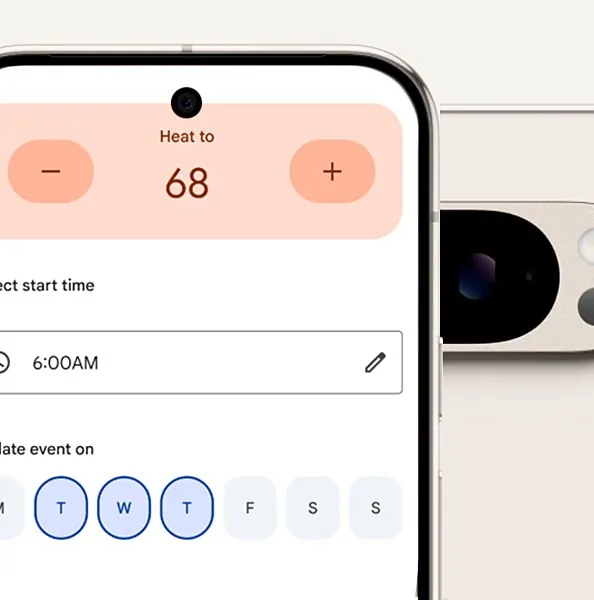
- Open the Google Home app, choose your Nest thermostat, and go to the temperature schedule area.
- Make sure the thermostat is in Cool mode, not Heat • Cool, for this heat-wave schedule unless you have a specific reason to use a range.
- Set or create presets that match the table: Sleep around 80°F, Comfort/Home around 81–82°F, Pre-cool around 76–79°F, Afternoon Hold around 82–85°F, and Eco/Away only 2–4°F above the occupied heat-wave target.
- Place the Pre-cool preset several hours before your utility on-peak window.
- Place the Afternoon Hold preset across the on-peak window and the worst outdoor heat.
- Put the Evening Comfort preset after on-peak, not at the moment you walk in the door if that moment is still inside the peak window.
For an APS-style weekday window, that means the Nest schedule might show Pre-cool at 11 a.m. or noon, Afternoon Hold at 4 p.m., and Evening Comfort at 7 p.m. If your rate plan peaks from 2–8 p.m., the same logic becomes Pre-cool in the morning, Afternoon Hold at 2 p.m., and Evening Comfort after 8 p.m.
Be careful with Early-On. Google says Early-On can start heating or cooling before the scheduled time so the home reaches the target by that time; it can start up to 5 hours early, may use more energy, and includes Max Duration and off controls. [8] In a 115°F heat wave, that can be helpful if Early-On starts the pre-cool early enough. It can be irritating if it silently turns a modest schedule entry into a much longer run than you intended.
If Nest begins cooling earlier than expected, check Early-On before assuming the thermostat is broken. For this recipe, the safer beginner setting is usually either Early-On off or Early-On limited with Max Duration, then a deliberately early pre-cool block that you can see on the schedule.
Enter it in ecobee
App-path verification note, Aug. 3, 2026: ecobee menus can vary by thermostat generation and app version. The operational behavior below is supported by Stacey on IoT’s article quoting ecobee support: ecobee schedules are built from Comfort Settings such as Home, Away, and Sleep, and Smart Recovery starts earlier and runs longer when the gap between the current temperature and the next scheduled setpoint is larger. [9] Ecobee’s own Smart Recovery support article should be checked directly in the live help center or app before relying on a changed menu path.
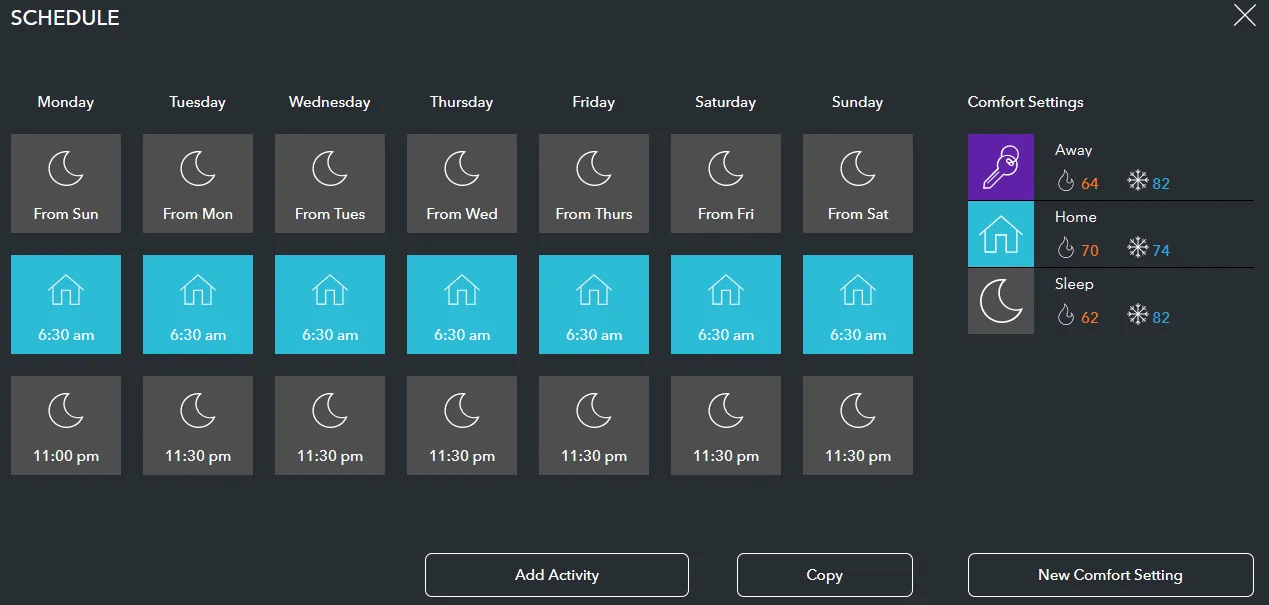
- Open the ecobee app and choose the thermostat.
- Go to Comfort Settings and set Sleep, Home, Away, and any custom heat-wave comfort setting you use.
- Set Sleep near 80°F if that is safe for your household.
- Set Home around 81–82°F for ordinary occupied heat-wave hours.
- Set Away no more than 2–4°F above the occupied target during 110–115°F days.
- Create or use a Pre-cool comfort setting around 76–79°F, then schedule it several hours before on-peak.
- Create or use an Afternoon Hold comfort setting around 82–85°F, then schedule it across the on-peak window.
Smart Recovery is the ecobee setting to watch. A big scheduled jump from 86°F to 76°F gives Smart Recovery a large gap to solve, so it may start cooling earlier and longer. That is not necessarily bad, but it hides the real schedule from you. A smaller gap — for example, 84°F afternoon hold to 81°F evening comfort — is easier to understand and less likely to turn into a surprise multi-hour recovery run.
If the ecobee seems to run before the time you entered, do not keep lowering the setpoint in response. First check whether Smart Recovery is enabled, then look at the next scheduled comfort setting. In this recipe, the pre-cool should be intentional and visible, not an accidental result of a too-large evening recovery target.
What success looks like when it is 115°F
Success may look boring: the AC runs for long stretches, the indoor temperature sits in the low-to-mid 80s during the worst hours, and the thermostat does not spend the afternoon demanding 75°F from a house that has already soaked up heat. At 115°F, that is a better sign than a schedule that looks efficient on paper and collapses by dinner.
Do not use 72°F as the chase target for a healthy residential system in these conditions. If the home is already 85–86°F inside and the compressor has been running continuously, lowering the setpoint to 72°F does not make the AC colder. It mostly tells the system never to stop. Energo warns that continuous operation during heat-wave stress can contribute to problems such as coil freeze, especially when other issues are present. [4]
There are households where mid-80s indoors is not safe enough: older adults, infants, people with heat-sensitive medical conditions, and anyone without a cooler room to retreat to. For that situation, use the site’s health and safety ceiling guidance for smart thermostat heat waves rather than treating this schedule as permission to tolerate unsafe indoor heat.
When the schedule cannot fix it
A better schedule cannot overcome poor airflow, a clogged filter, an iced coil, low refrigerant, damaged ductwork, or a system that is undersized for the house. If airflow from the registers is weak, the filter is dirty, the indoor coil is icing, the outdoor unit is short-cycling, or the temperature keeps rising even after you stop asking for a deep recovery, the problem has moved beyond thermostat programming.
For related utility-event logic, the Texas grid-emergency thermostat recipe uses the same basic idea: move cooling earlier, reduce demand during the critical window, and avoid a brutal recovery. The difference here is the 115°F desert constraint. The smart move is not a cleverer afternoon recovery. It is avoiding that recovery demand in the first place.
References
- Pre-cooling for a lower summer bill, APS
- The Right Thermostat Settings for a Phoenix Summer, Grand Canyon Home Services
- Debunking Air Conditioning Myths, American Standard Air
- Why Your AC Can't Keep Up in a Heat Wave, Energo
- Should You Really Set Your Thermostat to 78 in the Summer?, Trane
- Temperature schedules for the Nest thermostat, Google Nest Help
- Nest thermostat temperature modes, Google Nest Help
- Learn about Early-On, Google Nest Help
- Why your smart thermostat might run before its programmed times, Stacey on IoT