
Heatwave Smart Thermostat Settings That Actually Work
During a heatwave, normal energy-saving thermostat behaviors can backfire, making your home hotter and running your AC longer. This recipe gives you the exact setpoints and per-brand steps (Nest, ecobee, Honeywell) that keep your house stable on extreme heat days.
For heatwave cooling, start with a steadier smart thermostat schedule: 76–80°F when people are home, 82–86°F when the house is empty, and only a mild sleep increase if everyone can tolerate it. If anyone in the home is an infant, an older adult, medically vulnerable, or unable to cool down easily, do not chase energy-saving setpoints; use the safer, cooler setting for that person first. Heat illness risk matters more than a cleaner schedule. [1]
| Situation | Enter this during a heatwave | What changes from a normal summer schedule |
|---|---|---|
| Occupied / home | 76–80°F, with 78°F as the common starting point | Do not treat 78°F as a rule. Move lower for health, humidity, upstairs bedrooms, or poor airflow. |
| Away for part of the day | 82–86°F | Use a smaller setback than usual. Avoid letting the house drift into the high 80s if you need it comfortable by evening. |
| Sleep | 80–82°F only if health and comfort allow | Many homes need a lower overnight number because bedrooms retain heat, especially upstairs. |
| Eco / cool-to ceiling | Low-to-mid 80s for most heatwave days | Keep eco modes from creating a huge late-day recovery job. Nest Eco cooling presets can be set within a 76–90°F range, so choose deliberately instead of accepting an aggressive ceiling. [2] |
| Recovery before you return | Start cooling before peak indoor heat, not after the house is already hot | Let adaptive recovery work early, but keep the target realistic. |
The most common heatwave mistake is using a normal “save while away” routine as if the house will recover in an hour. In mild weather, that may be fine. In a hot spell, an 85–88°F indoor drift can leave the AC trying to pull heat out of walls, furniture, attic-adjacent rooms, and sun-loaded bedrooms at exactly the worst part of the day.
Why deep setbacks backfire when the heat will not break
A higher cooling setpoint can save energy for a straightforward reason: the AC has less heat to remove, and a smaller indoor-outdoor temperature difference reduces the cooling load on the home. That is why raising the thermostat a little can reduce runtime in ordinary summer conditions. [1]
The heatwave problem starts when the setback is too large. The thermostat may say 85°F while you are away, but the house is not just holding air at 85°F. Interior surfaces absorb heat. Upstairs rooms run ahead of the hallway thermostat. West-facing rooms pick up late sun. By the time the schedule asks for 76–78°F again, the AC is not doing a quick temperature correction; it is doing a long recovery.
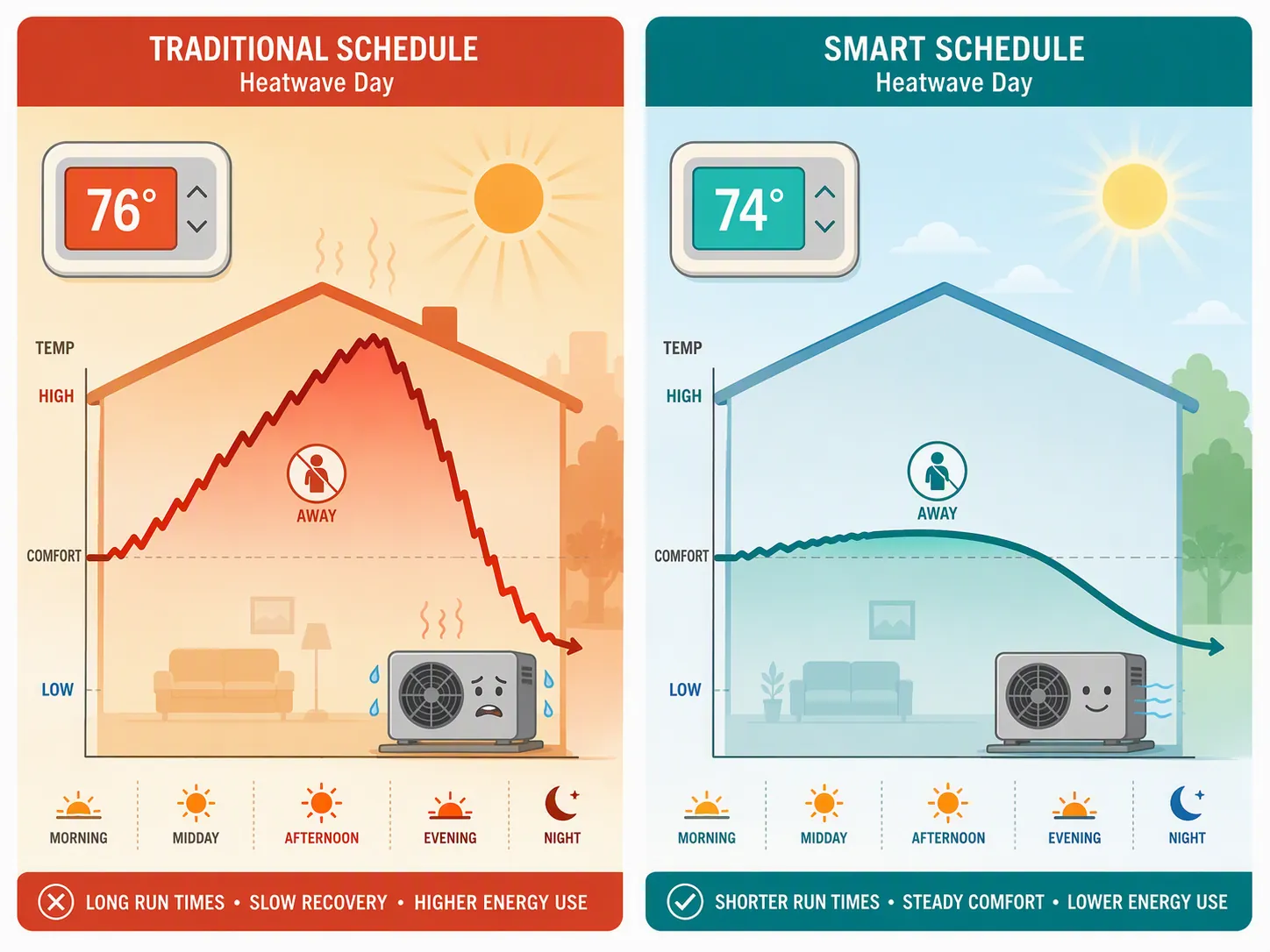
That is when the thermostat starts to look broken. It calls for cooling for hours. The hallway may move a degree while the nursery, office, or upstairs bedroom barely improves. The outdoor unit may be running continuously, not because the smart thermostat has failed, but because the schedule gave the system a recovery job it cannot finish quickly under extreme conditions. HVAC guidance for heatwaves commonly warns against aggressive setbacks for this reason. [3]
Adaptive recovery can make this more confusing. If a Nest begins cooling well before the scheduled comfort period, that is not automatically a defect. Google says Nest Early-On can start heating or cooling up to five hours early so the home reaches the scheduled temperature on time. [4] During a heatwave, early starts are often the thermostat admitting reality: waiting until 5 p.m. to chase 76°F is too late.
This is also why the old argument over “78°F” is less useful than people want it to be. Treat 78°F as a reasonable first entry for many occupied homes, not as a current government command or a comfort guarantee. If your upstairs is still 82°F at bedtime, the useful move is not to debate the table; it is to reduce the swing, start recovery earlier, and lower the occupied target if the people in the house need it.
The heatwave schedule to copy
For most single-zone homes that are already struggling with afternoon recovery, use this pattern for the next extreme-heat day:
- Morning occupied period: 76–80°F. Start at 78°F, then lower it if humidity, health needs, or upstairs rooms require it.
- Away period: 82–86°F. If you normally let the home rise to 88–90°F, pull that ceiling down for the heatwave.
- Pre-return recovery: begin before the hottest indoor period. Let adaptive recovery start early, or schedule the comfort target earlier than your arrival if your thermostat does not recover automatically.
- Evening occupied period: 76–80°F. If the system cannot reach the target by bedtime, the away setback was probably too deep.
- Sleep period: 80–82°F only if acceptable. Use a lower number for nurseries, medical needs, poor airflow, or upper-floor bedrooms.
If the home has excellent insulation, strong zoning, or an oversized system that recovers easily, you may be able to use a wider setback. That is not the house this recipe is trying to rescue. This is for the common case: the AC runs for hours after work, the bedrooms lag, and the thermostat app insists it is “cooling” while everyone is still uncomfortable.
Nest: keep Eco from setting up an evening recovery fight
For Nest, the heatwave adjustment is mostly about Eco Temperatures, Eco when away, and Early-On. Google’s documentation says Nest can automatically switch to Eco Temperatures when it senses everyone is away, and cooling Eco presets can be adjusted within a 76–90°F range. [2] During a heatwave, the important part is not whether Eco is on; it is whether the Eco cooling ceiling is moderate enough for your AC to recover from.
- Open the Nest or Google Home app and find your thermostat’s Eco Temperature settings.
- Set the cooling Eco temperature around 82–86°F for heatwave days, not at the most aggressive high end.
- If the house is still too warm by evening, lower the Eco ceiling by 1–2°F the next day before blaming the equipment.
- Keep your occupied cooling target in the 76–80°F range, with 78°F as the first try.
- Leave Early-On available if you want the home comfortable at a scheduled time; a cooling start hours early can be normal behavior, not a sign that the thermostat ignored you. [4]
Nest feature names and availability vary by model, especially across older Learning Thermostats, the standard Nest Thermostat, and newer generations. If your menus do not match the app path you expect, check the Nest thermostat model differences before assuming a feature is missing or broken.
Ecobee: soften comfort settings and eco+ during the hot spell
On ecobee, translate the same recipe into Comfort Settings first. Do not start with every savings feature. Start with the temperatures the house must actually hold.
| Ecobee setting area | Heatwave entry |
|---|---|
| Home comfort setting | 76–80°F |
| Away comfort setting | 82–86°F |
| Sleep comfort setting | 80–82°F only if safe and comfortable |
| eco+ behavior | Reduce or pause aggressive savings behavior if it pushes the home too warm before evening recovery |
| Sensors / followed rooms | Prioritize occupied bedrooms or living areas if the hallway thermostat is comfortable but people are not |
If eco+ is allowed to make comfort-saving adjustments while the home is already struggling, soften it for the heatwave. The goal is not to turn ecobee into a manual thermostat forever. It is to prevent a savings mode from adding one more degree of indoor drift when the AC is already facing a long recovery.
Ecobee’s remote sensors can be useful when the thermostat is in a hallway and the problem room is upstairs or sun-facing. If one room is consistently the complaint, a sensor strategy may help more than another argument over the main setpoint. For that narrower issue, see the smart thermostat remote sensor comparison.
Honeywell Home: fix the afternoon gap in the schedule
For Honeywell Home and Resideo-style schedules, the heatwave fix is usually less mysterious: edit the time blocks. A deep “away” temperature that works in June can be the reason the house is still hot at 9 p.m. in August.
- Open the schedule for the next heatwave day.
- Set the home period to 76–80°F.
- Set the away period to 82–86°F instead of a large jump into the upper 80s.
- Move the recovery period earlier if the home has been missing the evening target.
- For sleep, use 80–82°F only if the actual bedrooms stay safe and comfortable.
Do not judge the change by whether the AC runs less dramatically at 5 p.m. A better heatwave schedule may start cooling earlier and run in longer, smoother cycles. The practical test is whether occupied rooms are closer to target when people need them, without the system spending the whole evening trying to undo an oversized setback.
What to expect after changing the settings
The house may feel less dramatic. That is a good sign. Instead of getting hot, then roaring back toward comfort, it should drift less during the day and recover earlier. Your app may show more cooling before you arrive home, especially if adaptive recovery is trying to hit a scheduled setpoint on time.
Savings claims deserve a cooler head than thermostat ads usually invite. Honeywell Home reported 17% average cooling savings in a December 2024 scheduling study discussed by Green Builder Media and Resideo. [5] ENERGY STAR says certified smart thermostats save users about 8% on heating and cooling bills, around $50 per year, and its certification criteria include at least a 10% cooling runtime reduction. [6] Those are useful context numbers, not a promise that a heatwave setback will save money in your specific house.
If you want broader automation ideas for normal weather, use smart home automations that save money. If you are comparing platforms rather than fixing today’s schedule, the smart thermostat comparison and smart thermostat ecosystem guide are better places to go next.
For the heatwave in front of you, the useful move is narrower: keep occupied cooling moderate, cap away and Eco temperatures in the low-to-mid 80s, and let recovery begin before the house has stored a full afternoon of heat.
References
- Why 78 degrees isn’t the right thermostat setting for everyone during a heat wave — The Conversation
- Learn about Eco Temperatures, Eco when away & how to change settings — Google Nest Help
- Smart Thermostat Settings During Heat Waves — Meyer & Depew
- Learn about Early-On — Google Nest Help
- I’m an Energy Engineer and This Is How I Set My Thermostat to Optimize Comfort and Energy Efficiency — Green Builder Media / Resideo, December 2024
- Smart Thermostat FAQ — ENERGY STAR