
If you already run Home Assistant and Matter devices, the first question is not whether TypeScript is prettier than Python. It is whether the lights, sensors, plugs, locks, and buttons you already paired still work after the backend swap. For a standard Home Assistant Matter setup, Matter Server 9.0 is designed as a drop-in migration: existing devices do not need to be recommissioned, and the server data migrates automatically on first boot after the upgrade.[1]
That is the part that matters at breakfast. No walking around with QR codes. No removing devices from fabrics just to add them back. No rebuilding automations because a device came back as something new. Home Assistant has replaced the old Python-based Matter server with a matter.js-based server, but ordinary users should mostly experience that replacement as continuity first, then new visibility.
There are two groups that should read the word “drop-in” more carefully. If you run a custom Matter server configuration rather than the normal add-on path, or if you have scripts or tooling that touched the old Python API directly, the migration may not be invisible. The devices should not need to be paired again, but your surrounding glue may need inspection.
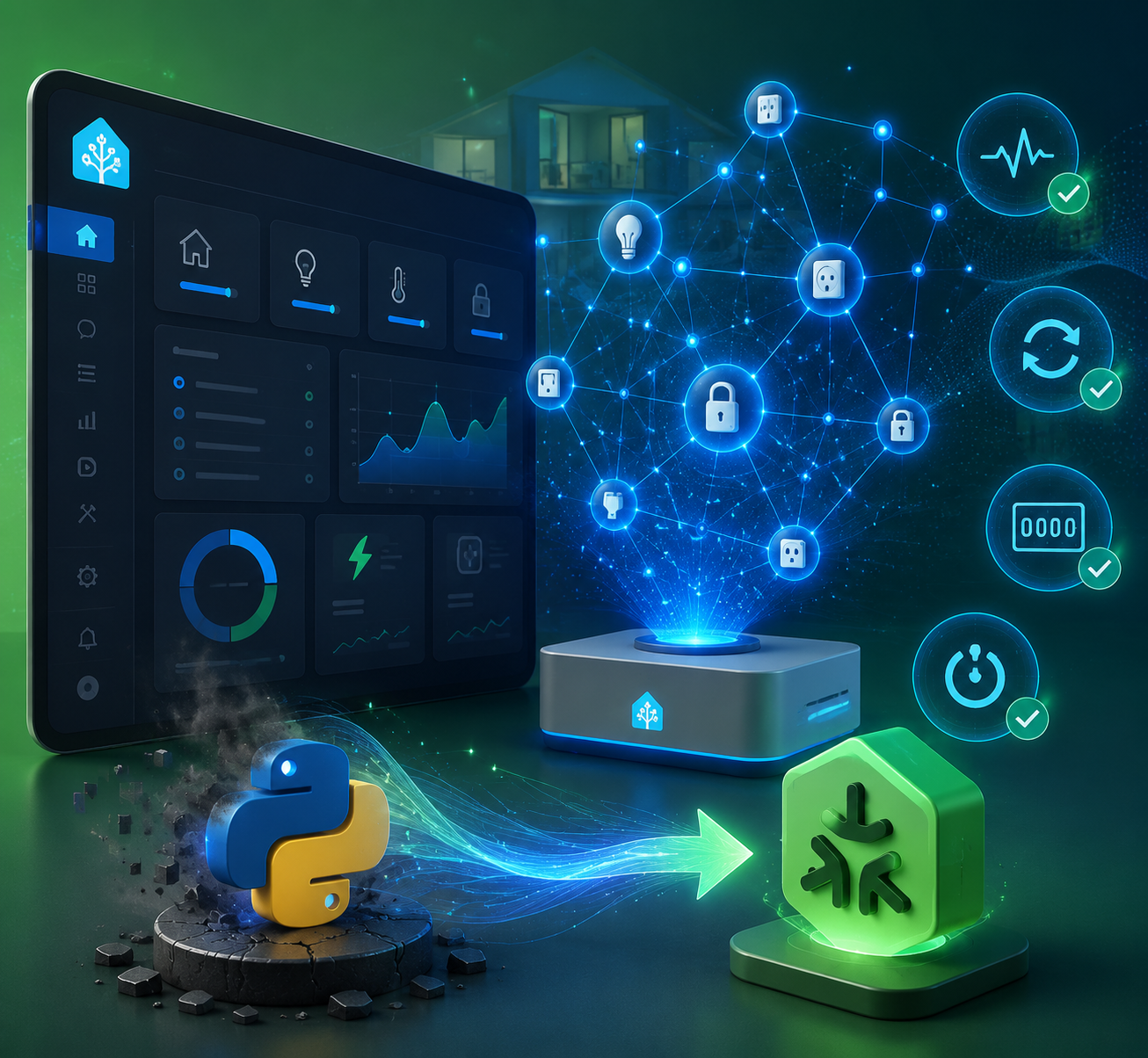
What changes on first boot
The upgrade path is deliberately uneventful for the normal Home Assistant user. On first boot, Matter Server 9.0 migrates the existing data, keeps already commissioned devices in place, and brings the installation onto the new matter.js backend.[1] The practical expectation is that existing Matter devices remain part of the same Home Assistant system rather than becoming a new setup project.
After that first boot, the interesting changes are not in the pairing ritual but in the tools you get when something behaves badly. Matter Server 9.0 adds a Thread network view, exposes more diagnostic entities through Home Assistant 2026.7, improves commissioning security, and brings supporting performance and standards updates. That is a useful order of importance: visibility first, security second, standards progress third.
For anyone who is not yet at the point of having Matter devices paired in Home Assistant, the upgrade itself is less relevant than the prerequisites. The basic controller, border router, and device-role concepts are covered in the Home Assistant Matter setup guide. If the words controller, hub, bridge, and border router are getting blurred together, the Matter hub meanings explainer is the better detour before touching an upgrade.
The Thread map is the first real payoff
The new Thread visualization is the feature that changes how a Home Assistant user investigates a bad mesh. Matter Server 9.0 can show a graphical Thread network map with LQI color coding: green for usable links, orange for medium quality, red for weak links, and gray when there is no signal.[2] As of June 2026, an independent review reported that no other Matter controller from Amazon, Google, or Apple offered this kind of Thread mesh visibility.[2]
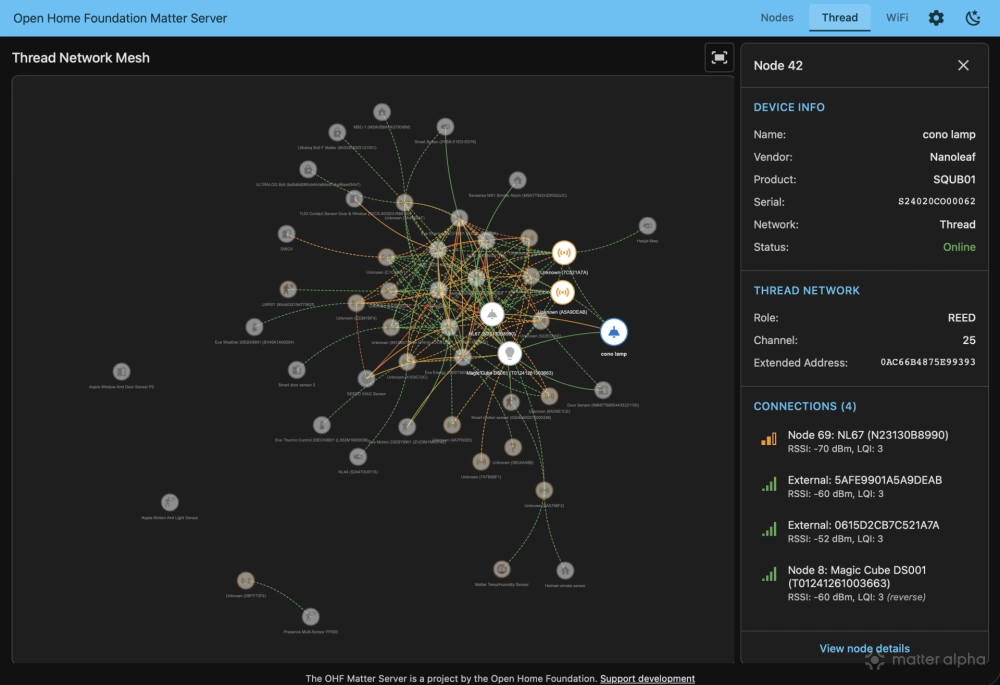
That sounds like a dashboard feature until you have a Thread device that only fails twice a week. Without a map, the usual routine is to restart the border router, move a smart plug, blame Wi-Fi, wait for the mesh to “heal,” and then hope the same device does not vanish again. A color-coded topology view does not magically fix a weak route, but it gives you something concrete to inspect before you start swapping hardware.
The useful shift is from symptom to location. A red or orange link can point attention toward device placement, router density, radio interference, or a particular segment of the mesh. A gray relationship tells a different story from a weak one. For a household system, that distinction matters because the next action is different: you may move a routing device, add a Thread router, investigate a border router, or stop blaming the end device.
It is still a first-generation view. The research available so far does not prove how reliably the map behaves across every Thread topology or every border router brand. It is better to treat it as a new inspection instrument than as a final verdict on the health of a mesh. Even with that caution, it is the rare smart-home feature that removes some of the guesswork rather than adding another abstraction layer.
Diagnostic entities make Matter failures less opaque
Home Assistant 2026.7 exposes new Matter diagnostic entities including Reboot Count, Uptime, Boot Reason, Hardware Faults, Radio Faults, and Network Faults.[3] These are not glamorous entities, but they are the sort of things that turn “this device is flaky” into a more useful question: is it rebooting, losing radio contact, reporting a network problem, or staying up while something else fails around it?
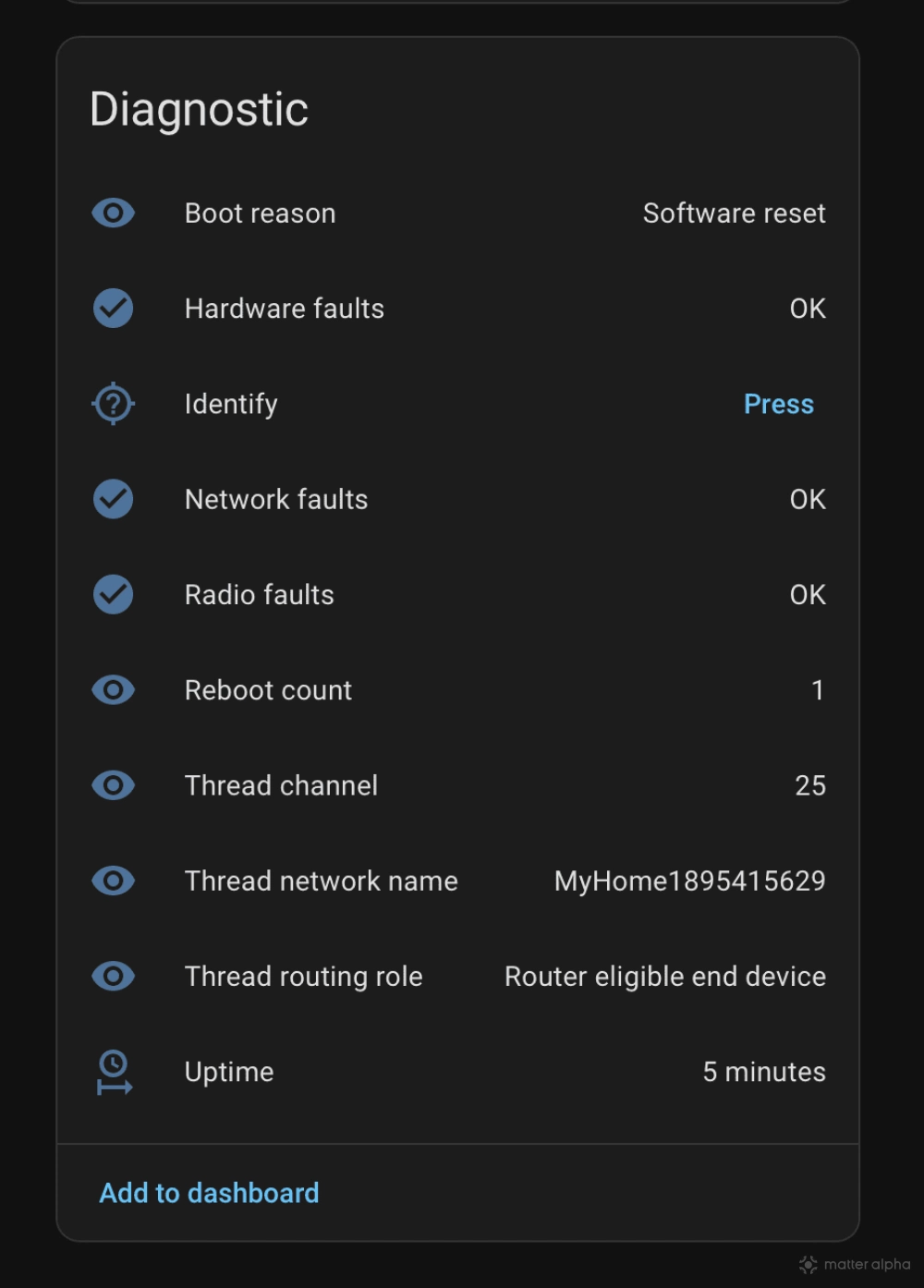
Reboot Count and Uptime are especially valuable because they separate controller-side trouble from device-side instability. If a sensor has a rising reboot count, the conversation changes. You are no longer only looking at Home Assistant logs or Thread routes; you are looking at the device’s own behavior. Boot Reason can narrow that further when the device reports why it came back.
The fault entities are a different kind of visibility. Hardware Faults, Radio Faults, and Network Faults create a place in Home Assistant where device-reported problems can surface as entities rather than being buried in assumptions. That makes them useful for dashboards, automations, and troubleshooting notes, but also for deciding when not to over-debug. A reported hardware fault is not the same problem as a weak Thread route.
This is the strongest day-one argument for the new backend. The migration is not just a codebase preference; it exposes operational signals that Matter users did not previously have in the same practical form. If your Home Assistant installation has become part of the house rather than a lab bench, that matters more than a neater release diagram.
Security gets stricter during commissioning
Matter Server 9.0 adds certificate revocation checking during commissioning. If a device is uncertified or in a development-stage state, Home Assistant can block it from joining unless the user explicitly confirms the choice.[1] That is the right default for a household controller, because commissioning is one of the few moments when a device is being admitted into the trust fabric.
The surprise will mostly land on people testing unusual hardware, pre-release firmware, or development boards. A stricter prompt is not the same as a broken setup, but it changes the expectation from “scan and proceed” to “scan, inspect, and confirm if you really mean it.” For normal certified retail devices, this should read as background protection rather than a new daily workflow.
Performance and standards support are real, but less immediate
The official upgrade notes also point to faster startup times, faster device reconnection after controller restarts, and improved OTA update distribution.[1] Those are welcome, especially for anyone who has watched Matter devices take their time returning after a restart, but they are harder to judge from release notes alone. The useful test is whether your devices recover more predictably after Home Assistant, the add-on, or the host reboots.
Matter Server 9.0 also moves Home Assistant into Matter 1.5.1 compliance, with device-category progress including cameras, doorbells, and closures in the broader standard context.[4] That does not mean every camera or doorbell you want will suddenly behave perfectly in Home Assistant. Standards support, device firmware, certification, controller implementation, and useful Home Assistant entity modeling all have to meet in the same place before a category feels mature.
Thread 1.4 border router support belongs in the same bucket: important for the shape of the ecosystem, not automatically a cure for the awkward mixed-border-router homes people already have.[4] It is good to see Home Assistant moving with the standard. It is still sensible to verify your actual border router situation before assuming the mesh will behave differently just because the server side advanced.
Matter 1.6 features such as NFC commissioning and Joint Fabric are best treated as roadmap value, not current household value. The matter.js codebase is where that active development is happening, but the specification being available and the ecosystem making it painless are not the same milestone.[1] Joint Fabric, in particular, could eventually reduce multi-admin friction, but it should not be used as a reason to upgrade today unless you are comfortable waiting for the rest of the ecosystem to catch up.
The catch: memory requirements roughly double
The trade-off is not hidden in some philosophical debate about programming languages. Matter Server 9.0 roughly doubles RAM requirements compared with the old Python Matter server, and 4 GB is recommended on Raspberry Pi hardware.[2] That is a meaningful line for Home Assistant users because a lot of reliable households still run on small boards that were bought when the automation load was lighter.
A Raspberry Pi 4 with 4 GB or more has a very different margin from a Raspberry Pi 3 or an early 2 GB Pi 4 that is already running Home Assistant, add-ons, recorder workload, dashboards, backups, and perhaps a few integrations that were never as light as expected. The upgrade may still work on a constrained system, but “works” and “has enough headroom for the next restart at 7 a.m.” are not identical standards.
Before upgrading a low-RAM Raspberry Pi, check current memory use, swap behavior, add-on load, and whether the host already struggles during backups or restarts. If the system is close to the edge, the better plan may be to move Home Assistant to hardware with more memory before making Matter more central to the house. The Matter hub hardware guide is the more relevant reading path if the upgrade has turned into a hardware decision.
Who should upgrade without drama, and who should pause
For a standard Home Assistant Matter user on hardware with comfortable memory headroom, Matter Server 9.0 is a reasonable upgrade to take. Existing devices should remain commissioned, the first boot handles migration, and the immediate benefits are practical: a Thread map, diagnostic entities, stricter commissioning checks, and better recovery behavior.
| Setup | Practical read |
|---|---|
| Standard Home Assistant Matter add-on, 4 GB+ Raspberry Pi or stronger hardware | Likely the intended path: upgrade, let first boot migrate, then inspect the new Matter and Thread visibility. |
| Raspberry Pi 3 or 2 GB Raspberry Pi 4 already under load | Pause first. Memory headroom is the deciding factor, not enthusiasm for the new backend. |
| Custom Matter server deployment | Check configuration assumptions before treating the migration as invisible. |
| Scripts or tools using the old Python Matter API | Expect adjustment work around the integration points even if devices stay paired. |
| Testing uncertified or development-stage Matter devices | Expect commissioning prompts or blocks unless you explicitly confirm the risk. |
If devices misbehave after the upgrade, avoid starting with deletion and recommissioning unless there is a specific reason. Check the add-on state, Home Assistant logs, the new diagnostic entities, and the Thread visualization first. The Matter troubleshooting checklist is the better next step for general device issues, while Matter hub not working is the narrower path when the problem seems tied to a bridge or hub role.
The clean judgment is that Matter Server 9.0 earns its disruption budget for most users because it preserves existing pairings while adding tools that help explain failures. The exception is not philosophical; it is physical. If your Home Assistant box has too little memory, the best Matter upgrade may be a hardware upgrade first.
References
- The Matter upgrade you've been waiting for, Home Assistant, June 23, 2026.
- Home Assistant's New Matter Server Is a Game-Changer, matter-smarthome.de.
- Home Assistant 2026.7 Arrives July 1: Intent-Based Automations, Matter Server Overhaul, TechTimes, June 29, 2026.
- The Matter Standard in 2026: A Status Review, matter-smarthome.de.
Updates & Corrections
Protocol specifications and platform features change rapidly — especially with Matter version evolution. Report version changes, certification count updates, or platform policy changes that have occurred since the last editorial review.
Comments
Join the discussion with an anonymous comment.