
The 45% Stat – and What It Actually Covers
You have probably seen the number: roughly 45% of US households now use connected home technology. It sounds like the smart home has arrived. But that number counts a single smart plug as "connected home tech" — the same as a whole-house automation system with sensors, triggers, and energy rules. The gap between owning a device and having a working automation system is the real story.
Where the Brain Lives (and What Happens When the Internet Goes Out)
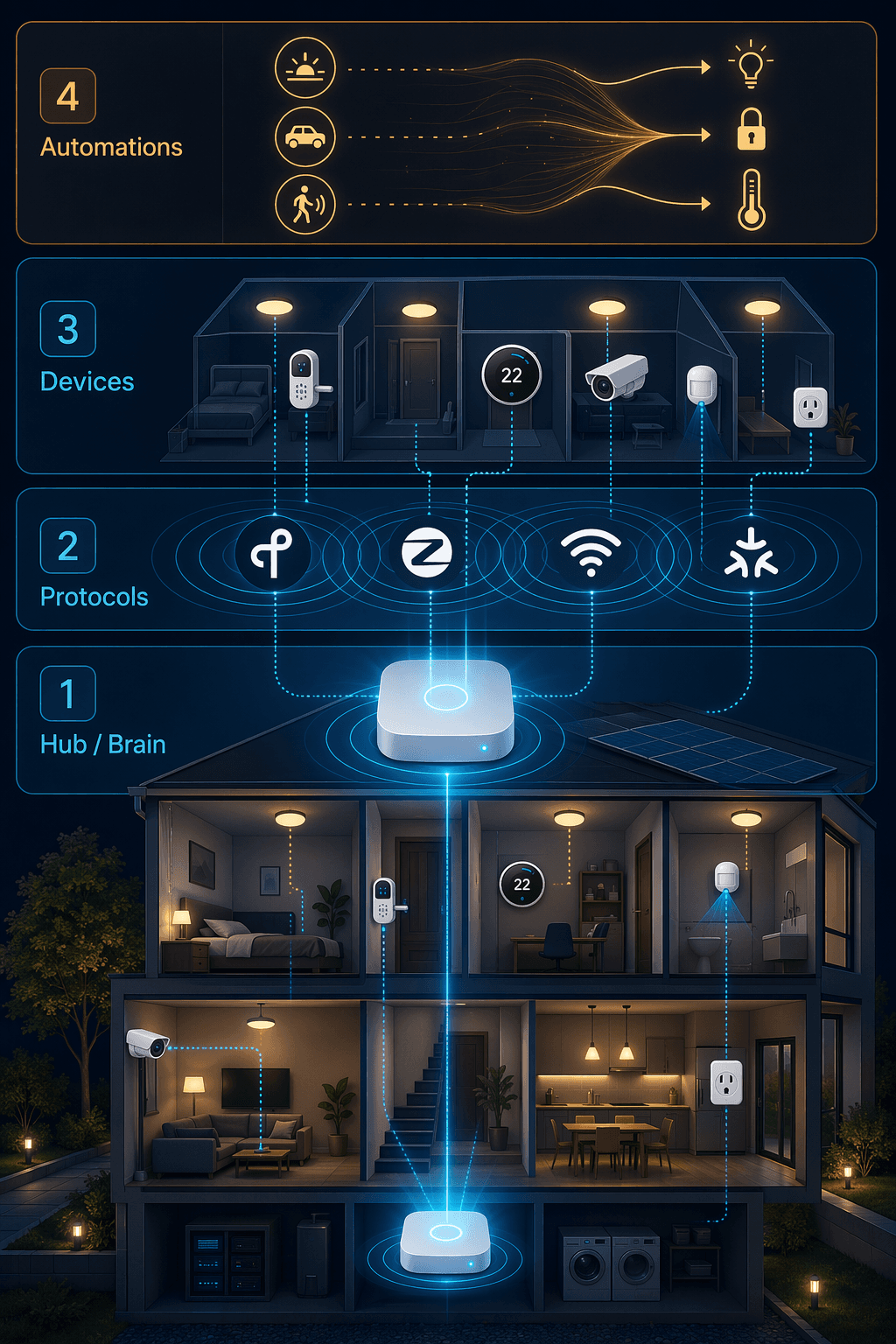
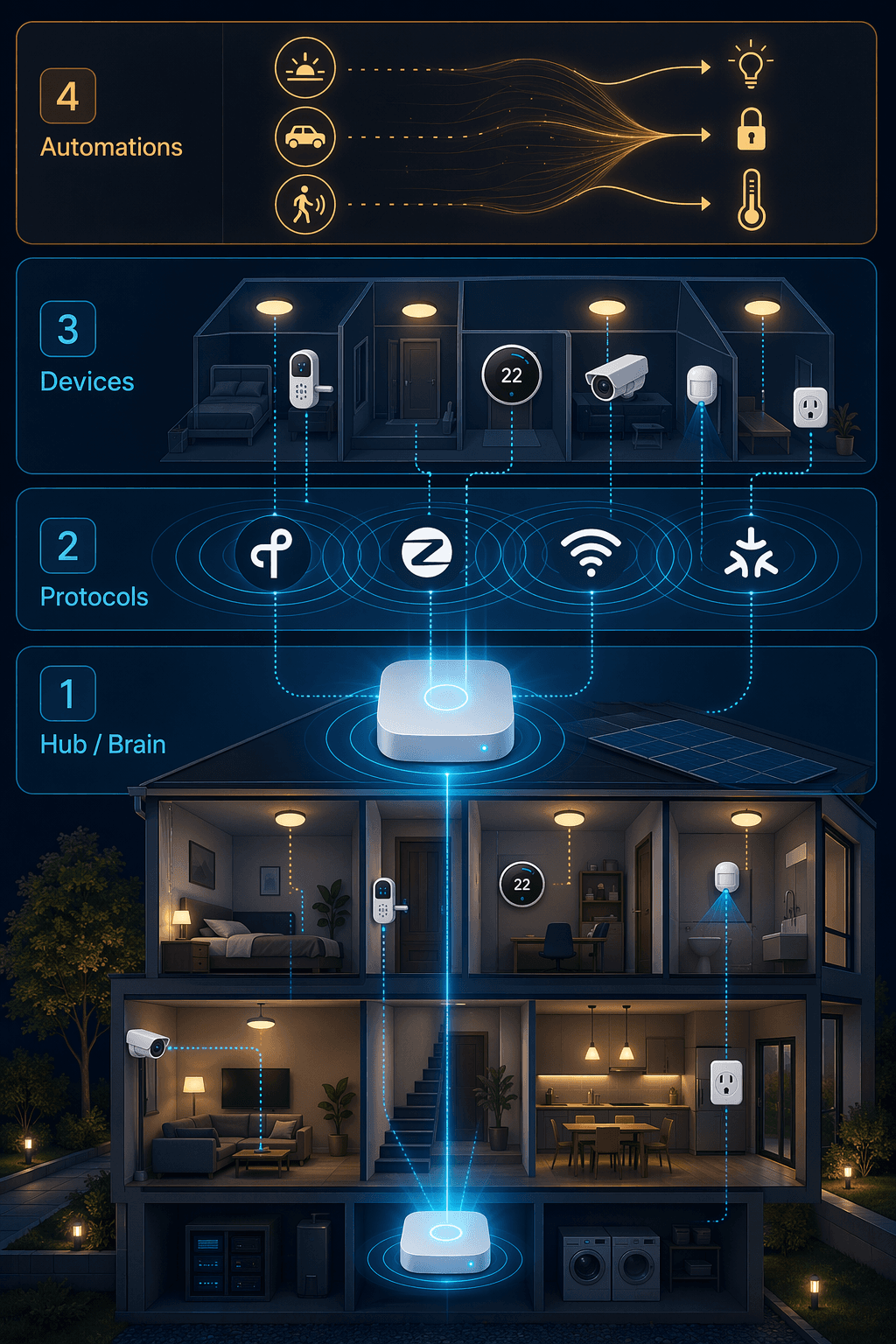
Every automation system has a brain. Where that brain lives — in your house or in a distant server — determines everything about cost, reliability, and freedom. There are four categories:
- Local-first DIY: Home Assistant and Hubitat run on hardware you own. No cloud dependency. Over 3,000 integrations. Entry cost $95 to $130 plus dongles and time.
- Cloud voice ecosystems: Alexa, Google Home, Apple Home — the brain is in the cloud. Easy setup, huge catalogs, but automations depend on internet.
- Security-first platforms: Vivint, Ring, SimpliSafe — focused on monitoring. Limited third‑party device integration.
- Professional whole-home: Control4, Crestron, Savant — a dealer‑installed server. High cost, high reliability, no tinkering.
If you build your automation on a cloud hub like Amazon Echo or Google Nest Mini, here is what happens when your internet drops: nothing. The word "turn off the lights" is just a word. Stored routines stop executing. Schedules hold their last state or do nothing.
I have seen this happen. It is not a hypothetical.
Home Assistant, on the other hand, runs all logic locally. Internet goes out, the lights still follow the motion sensor, the thermostat still adjusts at sunset. That difference alone is why I recommend local‑first to anyone who wants a system they can depend on — not a system they manage around.
The Real Cost of Entry (and the Hidden Ones)
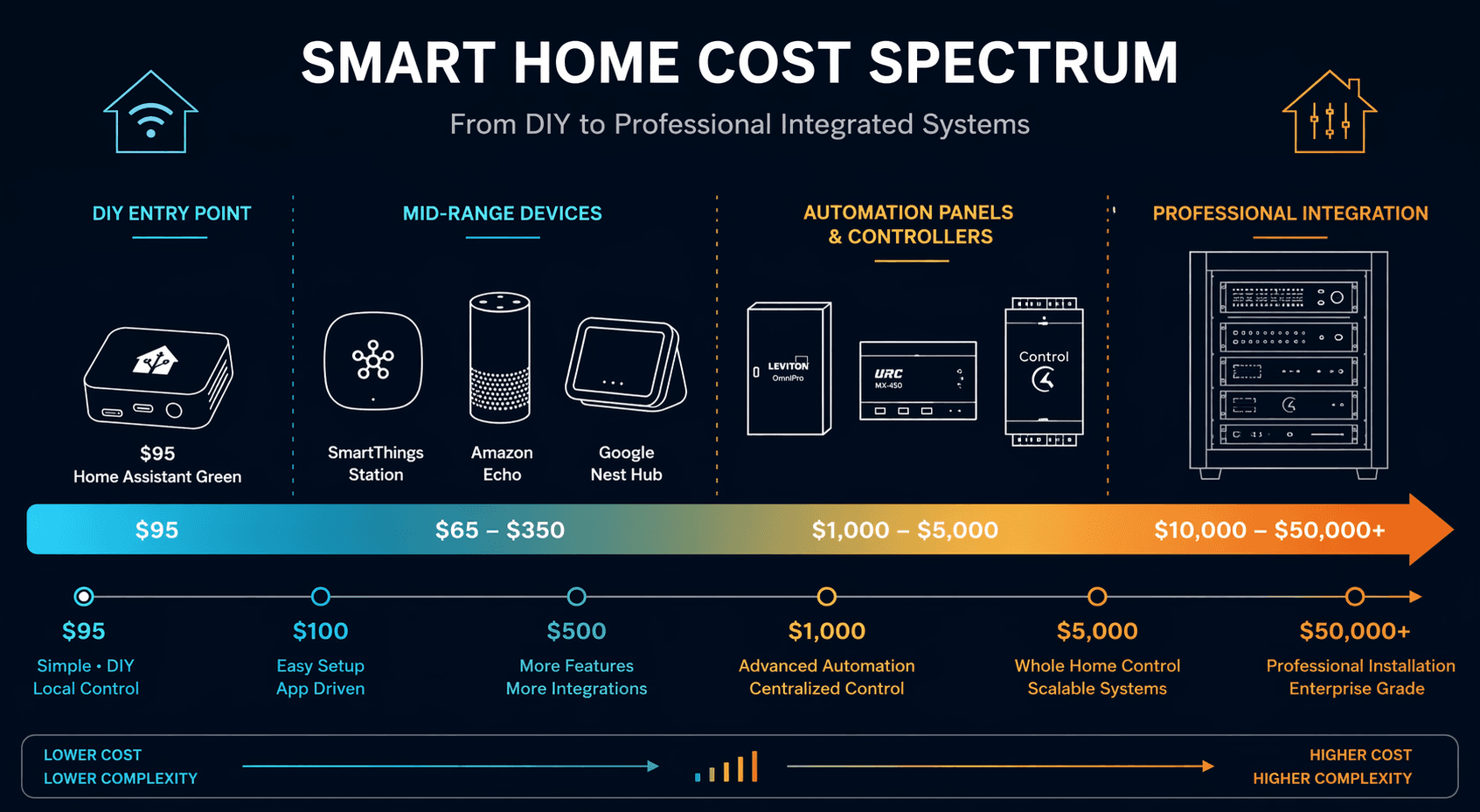
The Home Assistant Green price is a real example of how even straightforward numbers need context. TVS (2026) reports $95, ZDNET (2025) says $159. Both are correct for their dates; the $159 may include a later bundle. The real entry cost for a capable setup is more like $150–$200 after you add a Zigbee dongle and a microSD card. That is still cheaper than a single professional service visit.
| System type | Entry cost | Cloud dependency | Matter support (realistic) | Ease of use |
|---|---|---|---|---|
| Home Assistant / Hubitat | $95–$159 | No | Partial, needs dongle | Low – requires tinkering |
| Alexa / Google Home | $22–$29 | Yes (full) | Yes – but inconsistent | High |
| Samsung SmartThings | $65 | Partial | Yes – good | Medium |
| Control4 / Crestron / Savant | $5,000–$50,000+ | Optional | Minimal | Low – dealer only |
At $65, the SmartThings Station adds Thread and Matter radios in a polished app — better for casual users who still want local processing on some devices. The Echo Dot at $22 and Nest Mini at $29 are the cheapest entry points, but you trade all local processing for voice convenience. At $99, the HomePod mini brings Apple Home's strong privacy posture but locks you into HomeKit‑only devices. At $5,000–$10,000, Control4 installs a dealer‑configured system that "just works" — but every change costs a service call. At $50,000+, Crestron or Savant can automate a mansion with cinematic precision and a dedicated programmer. Each step up in price buys convenience or scale, not necessarily better automation.
Which System Fits You?
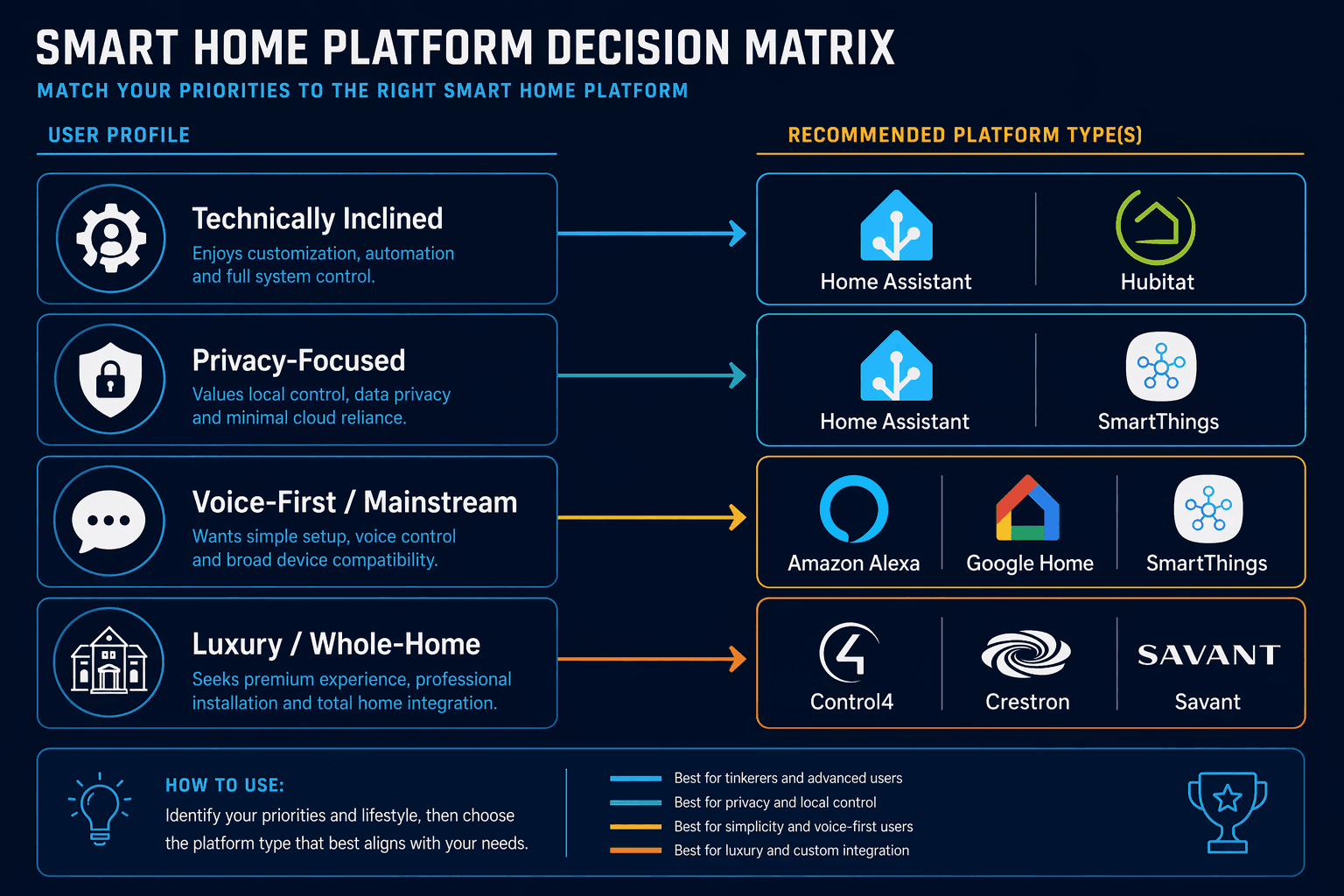
| Profile | Decision criteria | Recommended platforms |
|---|---|---|
| Privacy‑first DIYer | Are you willing to edit YAML files? Is local control non‑negotiable? | Home Assistant, Hubitat |
| Voice‑first homeowner | Do you want the widest device catalog? Is losing automations during outages acceptable? | Amazon Alexa, Google Home, Apple Home (if invested) |
| Security‑minded renter | Do you need professional monitoring? Is a monthly fee acceptable? | SimpliSafe, Ring, Abode (with plan) |
| Luxury whole‑home owner | Do you want zero tinkering and a dealer who handles everything? Budget $10k+? | Control4, Crestron, Savant |
If you are not sure, start with the cheapest local‑first option that still meets your must‑haves. For a deeper dive into the hubs themselves, see our best controller comparison.
Matter, Thread, and the Exit Strategy
Matter and Thread are supposed to make everything interoperable. In practice, Matter 1.4 still has gaps — some devices that claim Matter support do not actually work with all controllers. Thread border routers are not standard across brands. The platform you choose today should have an exit strategy: can you move devices to another system later? Home Assistant and Hubitat are future‑proof because they are software that can adopt any new protocol. Cloud ecosystems are the opposite — your devices become paperweights if you decide to leave. Professional systems are the most locked in; you cannot swap a Control4 light switch for a Zigbee one without dealer involvement.
No Perfect System, But a Clear Path Forward
There is no universal winner. The best smart home automation system depends on your tolerance for tinkering, your need for reliability, and your budget. The decision matrix gives you a framework, not a verdict.
If you can spare a weekend, go local‑first. If you never want to touch a config file, hire a pro. If you want the broadest device support and accept the cloud risk, pick an ecosystem. The trap is buying into a system that does not match your actual willingness to maintain it.
The house‑cross‑section image at the top of this article shows all the layers — brain, protocols, devices, automation logic. Choose the layer you want to own, and build from there.
Implementation Notes
Share platform-specific tips, report that a recipe no longer works after a platform update, or contribute variations for different device combinations.
Comments
Join the discussion with an anonymous comment.