
Retrofit vs Full Replacement: The Two Paths to a Smart Lock in 2026
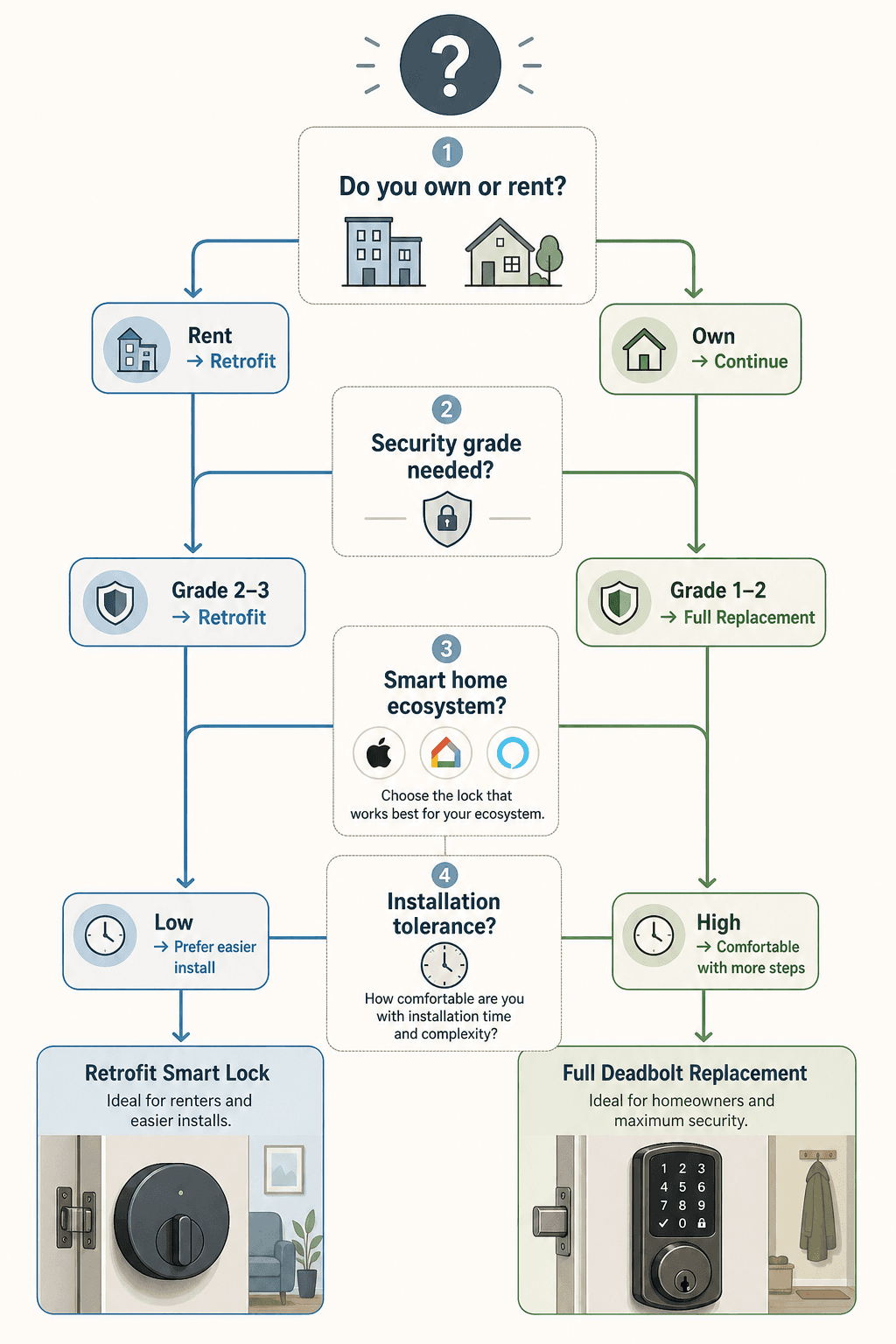
Every smart lock buyer in 2026 faces the same fork in the road: do you keep your existing deadbolt and install a retrofit module on the inside, or do you replace the entire lockset with a new deadbolt that includes smart electronics? The answer depends on four factors: whether you own or rent, how much security you need, which smart home platform you use, and how comfortable you are with a screwdriver.
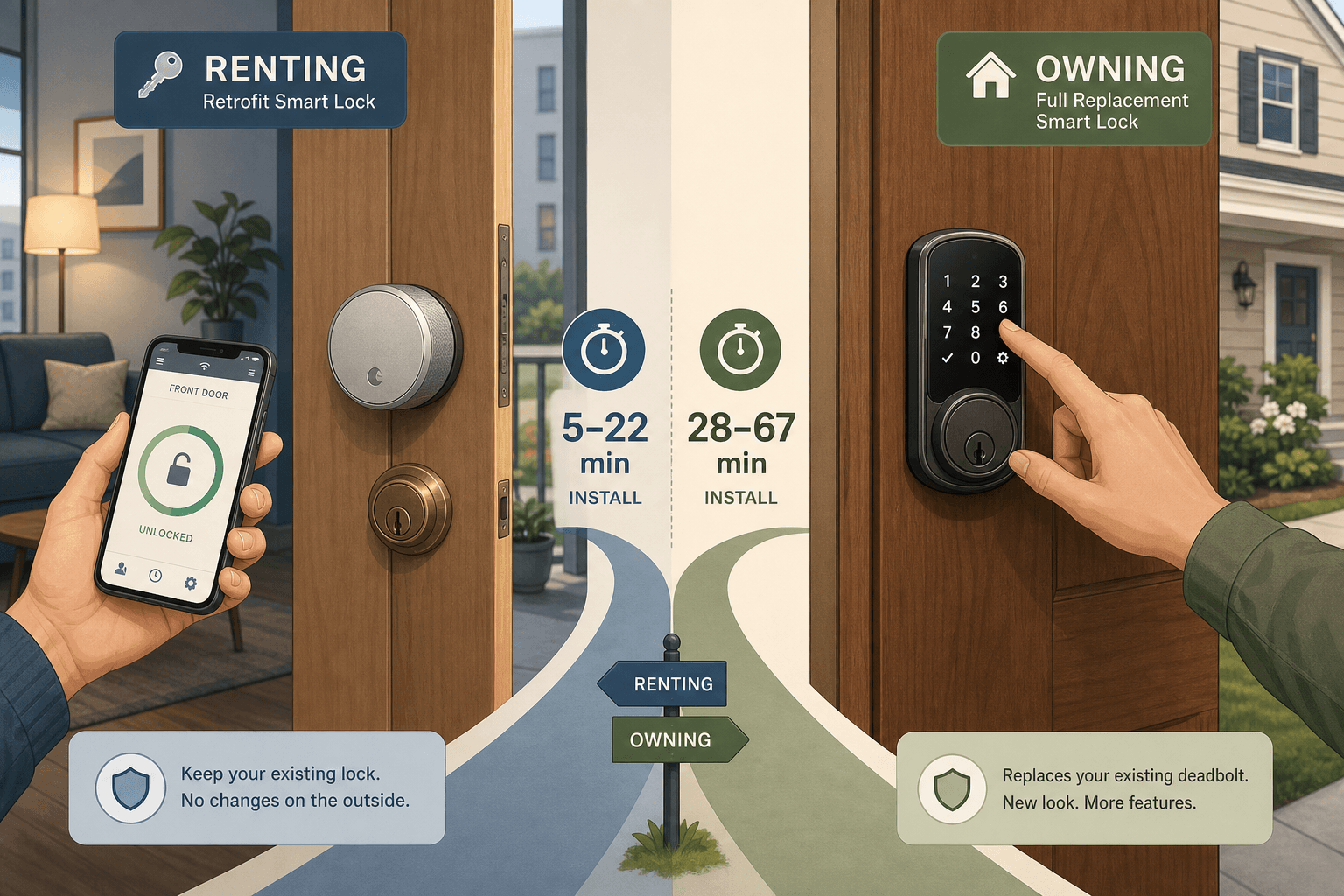
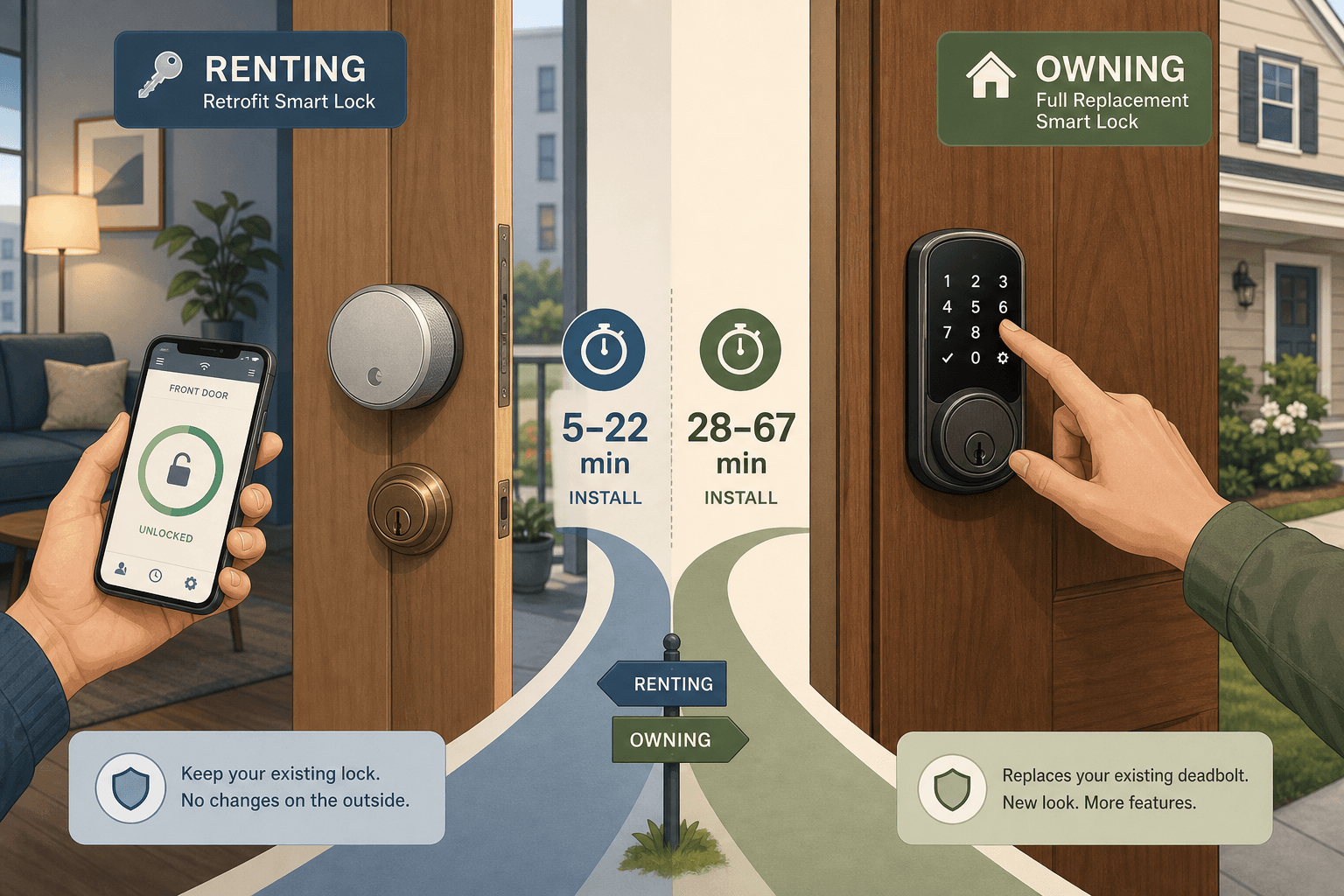
Retrofit locks — like the August Wi‑Fi Smart Lock, Level Lock Pro, Yale Approach, SwitchBot Lock Pro, and Wyze Lock — attach to your existing deadbolt’s interior thumb turn. They typically install in 5 to 22 minutes, leave the exterior of your door unchanged, and can be removed without leaving any trace. That makes them the natural choice for renters, apartment dwellers, and anyone who can’t modify the door permanently.
Full replacement locks — such as the Yale Assure Lock 2, Schlage Encode Plus, Schlage Arrive, Aqara U100/U200, and Kwikset Halo Touch — replace the entire deadbolt assembly. They take 28 to 67 minutes to install, change the look of your door on both sides, and deliver the highest physical security ratings (ANSI Grade 1 or 2). Homeowners who prioritize maximum strength and built-in keypads or fingerprint readers tend to choose this route.
Side-by-Side Comparison: Retrofit vs Replacement at a Glance
| Dimension | Retrofit Locks | Full Replacement Locks |
|---|---|---|
| Price range | $70 – $249 | $129 – $350 |
| Typical install time | 5 – 22 minutes | 28 – 67 minutes |
| ANSI / BHMA security grade | Inherits existing deadbolt (typically Grade 2–3) | Grade 1–2 (verified by manufacturer) |
| Battery life | 3–12 months (varies with Wi‑Fi use) | 6–12+ months (Wi‑Fi models shorter) |
| Key backup | Uses original key in existing deadbolt | Includes physical key override or keypad code |
| Matter support available | Yes: August 4th Gen, Yale Approach, SwitchBot Lock Pro | Yes: Yale Assure Lock 2, Aqara U200 |
| Fingerprint option | Rare (Level Lock Pro has no exterior change) | Common on keypads (Aqara U100, Kwikset Halo Touch) |
| Exterior appearance change | None — original deadbolt remains visible | Full new lockset changes look of both sides |
| Removal difficulty | Trivial — reverse the install in minutes | No easier than installing; leaves screw holes |
| Best audience | Renters, apartment dwellers, preservationists | Homeowners, security‑focused buyers |
Installation times come from SmartLockMFG’s 3‑month test of 10 brands, where August Wi‑Fi took 22 minutes and the Level Lock+ (a replacement model) took 67 minutes. Battery life figures are ranges from that same test plus Wirecutter’s long‑term testing: Schlage and Level last 12+ months, while Wi‑Fi‑dependent models like August manage 4–5 months. If you’re still undecided after scanning the table, the rest of this guide walks through each category in detail.
Retrofit Smart Locks: Best Picks for Renters and Apartment Dwellers
Retrofit locks are the no‑drill, no‑permission‑needed route to smart access. They mount over your existing thumb turn, communicate with your phone via Bluetooth or Wi‑Fi, and let you keep your landlord’s key. The trade‑off: the physical security of your door remains whatever it was before — usually a basic Grade 2 or 3 deadbolt. If your existing lock is flimsy, a retrofit won’t fix that.
August Wi‑Fi Smart Lock (4th Gen) — Best Overall Retrofit
August’s 4th‑generation Wi‑Fi Smart Lock is the benchmark retrofit. SafeHome.org gives it a SecureScore of 9.4/10. It installs in about 5 minutes, works with your existing deadbolt and keys, and now supports Matter over Wi‑Fi for cross‑platform integration. The 4th Gen is priced around $146–$199, but battery life is the weakest point: August’s Wi‑Fi connection drains it to about 3–5 months, versus 6–12 months on Bluetooth‑only models. The lock includes DoorSense for open/closed status and 128‑bit AES encryption.
For detailed specs and a full review, visit the August Smart Lock Pro (3rd Gen) — Device Profile. (The 3rd Gen remains widely available and comparable, though the 4th Gen adds Matter.)
Level Lock Pro — Stealth Option
The Level Lock Pro is a retrofit that hides entirely inside the door. From the outside, your existing deadbolt and keys stay put — no visible smart hardware at all. CNET praises it as “the best invisible lock.” It supports Matter and Apple Home Key. At $350 it’s the priciest retrofit, but for renters who want no visible modification, it’s unmatched. Install takes about 15–20 minutes. Battery life is rated at 6–12 months depending on usage.
Yale Approach Lock with Wi‑Fi + Keypad — Best for DoorSense
Yale’s Approach Lock is a retrofit that adds a keypad to the equation — something most retrofits lack. It works with your existing deadbolt, includes DoorSense for door position, and installs in about 10 minutes according to Wirecutter. The price is around $160. Battery life runs 6–8 months. It supports Matter and works with Alexa, Google Home, and Apple Home. The keypad means you can give codes to guests without sharing a key.
SwitchBot Lock Pro — Ultra‑Fast 5‑Minute Install
The SwitchBot Lock Pro uses 3M adhesive or screws to attach to your thumb turn — no tools needed if you use the adhesive. SmartEye Solutions recommends it for renters because it installs in 5 minutes and leaves zero evidence. Battery life is reported at 6–9 months. It supports Matter (with hub) and works with Alexa, Google Home, and IFTTT. Price is around $100–$130.
Wyze Lock — Best Budget Retrofit
Wyze Lock comes in at about $70–$79, making it the cheapest smart lock that’s actually reliable. It installs in about 15 minutes, uses a gyroscope for door‑ajar detection, and has a claimed battery life of 6 months. It lacks Matter support and works only with the Wyze app, but for a single‑renter on a tight budget, it covers the basics: keyless entry, schedule locks, and activity logs.
Full Replacement Smart Locks: Top Choices for Homeowners
Full replacement locks swap out your entire deadbolt assembly. That means you get a brand‑new lock core with a verified security grade (most are ANSI Grade 1 or 2), plus integrated keypads, fingerprint readers, or both. The downside: installation takes 30 to 70 minutes, you’ll leave screw holes in the door, and the exterior appearance changes. This is the path for homeowners and landlords who own the property and want maximum physical security.
Yale Assure Lock 2 — Best Overall Replacement
CNET named the Yale Assure Lock 2 its best overall smart lock of 2026. It has an ANSI Grade 2 rating, an all‑metal housing, and a push‑button keypad. The Wi‑Fi version costs around $240 and supports Matter. Battery life is 9–12 months according to CNET, though SmartLockMFG’s test measured 6–7 months. Installation takes about 45 minutes. It works with Alexa, Google Home, Apple Home, and SmartThings.
Schlage Encode Plus and Schlage Arrive — Best Security Ratings
Schlage dominates the security‑grade charts. The Schlage Encode Plus has ANSI Grade 1 and BHMA AAA certification — the highest residential security rating. The newer Schlage Arrive includes “rubber keys” (flexible key blades) and comes with 3‑inch security screws to reinforce the strike plate. Wirecutter’s top pick is the Schlage Arrive. Price is around $329 for the Encode Plus and approximately $300 for the Arrive. Installation time: about 38 minutes per SmartLockMFG. Battery life: 12+ months. Both support Matter (depending on model) and work with all major platforms.
Aqara U100 and U200 — Best for Apple Home and Fingerprint
Aqara’s U100 was praised by Wirecutter for having the fastest fingerprint reader they tested, plus Apple Home Key support and Matter. It costs around $180–$200. The newer U200 adds Matter over Thread and a sleek design; SmartLockMFG found installation took 35 minutes. Both have ANSI Grade 2 (est.). They also support Zigbee for local control via an Aqara hub. Battery life: around 6–8 months.
Kwikset Halo Touch — Fingerprint on a Budget
The Kwikset Halo Touch ($180) integrates a fingerprint reader directly into the deadbolt’s exterior touchscreen. It’s ANSI Grade 2 and includes Kwikset’s SmartKey re‑keying system, so you can re‑key the lock yourself without removing it. SmartLockMFG reports battery life at 8–10 months. Installation is moderate — about 30 minutes. It works with Alexa and Google Home, but not Apple Home unless paired with a Matter hub.
Choosing the Right Ecosystem: Apple Home, Google Home, Alexa, and SmartThings
Your smart home platform determines which lock features work — and whether you need an extra hub. In 2026, Matter support has expanded to both retrofit and replacement categories, making cross‑platform use easier, but not all locks support every platform equally.
- Apple Home / HomeKit: For the best Apple experience, choose locks with native Home Key support. The Aqara U100 and U200 offer the fastest fingerprint plus Home Key via NFC. The Schlage Encode Plus and Level Lock Pro also support Home Key. If you have a Matter‑compatible hub, many Wi‑Fi locks can be bridged into HomeKit, but performance may vary.
- Google Home: Google’s ecosystem works well with Matter locks. The Yale Assure Lock 2 (Wi‑Fi) and August 4th Gen are Google‑friendly. The Schlage Encode Plus also integrates directly. For a budget option, the Wyze Lock only works with its own app, not Google Home directly.
- Amazon Alexa: Almost every smart lock listed here works with Alexa via a skill or Matter. The August 4th Gen and Schlage Encode Plus are top picks for voice control. Alexa can lock/unlock by voice (with a PIN code for security).
- Samsung SmartThings: Works best with Matter or Zigbee locks. The Yale Assure Lock 2 (Z‑Wave variant) integrates natively; the Aqara U100 via an Aqara hub works through SmartThings’ Matter bridge.
- Matter: Locks that support Matter (over Wi‑Fi or Thread) can be used with any Matter‑compatible platform. As of June 2026, August 4th Gen, Yale Assure Lock 2, Aqara U200, and Level Lock Pro all support Matter. Note: Matter locks still require a controller (smart speaker or hub) for remote access.
Budget Breakdown: From $70 to $350 – What You Get at Each Tier
The price of a smart lock does not follow a simple “more money = more security” curve. Here’s what each price tier typically delivers, along with the trade‑offs for renters and homeowners.
| Price Tier | Representative Locks | Security Grade | Battery Life (range) | Key Features | Best For |
|---|---|---|---|---|---|
| $70 – $100 | Wyze Lock | Inherits Grade 2–3 | 6 months | App control, schedule, gyroscope door alert | Budget‑conscious renters, single‑unit users |
| $100 – $180 | SwitchBot Lock Pro, Wyze Lock Bolt, Yale Approach, August Wi‑Fi 4th Gen (sale) | Inherits Grade 2–3 | 3–9 months (varies with Wi‑Fi) | Matter on some models, keypad option (Yale Approach), voice assistant | Renters who want basic smart integration without lock replacement |
| $180 – $250 | August Wi‑Fi 4th Gen (MSRP), Yale Assure Lock 2 (Wi‑Fi), Aqara U100, Kwikset Halo Touch | Grade 2 (replacement), inherited (retrofit) | 4–12 months | Matter, fingerprint (Aqara/Kwikset), Apple Home Key, DoorSense | Homeowners and security‑minded renters who want verified grade |
| $250 – $350 | Schlage Encode Plus, Schlage Arrive, Level Lock Pro, Aqara U200 (with extras) | Grade 1–2 (replacement), inherited (retrofit) | 6–12+ months | Highest ANSI grade, Matter, Home Key, advanced encryption, premium finish | Homeowners prioritizing maximum security and premium design |
The most notable gap is at the $180–$250 sweet spot, where you can get either a high‑quality retrofit (August) or a Grade 2 full replacement (Yale Assure 2). Renters should lean toward the retrofit options here; owners should consider the replacement unless they plan to move within a year.
2026 Wildcards: Aliro, UWB Hands‑Free, and Video Smart Locks
Three emerging technologies could reshape the smart lock landscape in the next 12–18 months. If you’re planning to buy a lock that will remain relevant for several years, these developments are worth knowing about — even if the products aren’t on shelves yet.
Aliro Standard: Interoperable Digital Keys
Aliro is an open specification from the Connectivity Standards Alliance (CSA) — the same body behind Matter. Published in February 2026, Aliro 1.0 defines a common way for digital keys to work across different brands and platforms, akin to “Matter for door locks.” It uses NFC for tap‑to‑unlock (even with a dead phone battery), BLE for initial setup, and UWB for precise hands‑free opening that resists relay attacks. Apple, Google, Samsung, Allegion (Schlage), and Assa Abloy (Yale) have all signed on.
At CES 2026, Aqara, SwitchBot, and Xthings announced the first Aliro‑compatible locks. However, as of June 2026, none of these are widely shipping. If cross‑brand digital key sharing (e.g., unlocking an Aqara lock with your Apple wallet) matters to you, Aliro‑certified locks should be on your radar for late 2026 or 2027.
UWB Proximity Locks
Ultra‑Wideband (UWB) allows a lock to detect your precise distance and angle as you approach, unlocking automatically when you’re within a few feet — no app or key required. The Aqara U400 (announced but not yet shipping) and the Schlage Sense Pro (in development) use this technology. UWB can also prevent relay attacks because the lock measures actual proximity. Expect these to arrive in the premium tier ($300+) in late 2026 or 2027.
Video Smart Lock Hybrids
A new category combines a smart lock with a built‑in camera and doorbell, eliminating the separate video doorbell device. The Eufy E330 is one example — it includes a 2K camera, two‑way audio, and a fingerprint reader on the same unit. These hybrids simplify your door setup, but they also concentrate all critical functions into one device, creating a single point of failure. Video locks tend to be priced around $250–$350 and are available from a few brands in 2026.
Frequently Asked Questions
- Can I install a smart lock without drilling? Yes — retrofit locks mount over your existing thumb turn with no drilling required. Models like the August 4th Gen and SwitchBot Lock Pro use either screw clamps or adhesive pads and can be installed in 5–15 minutes with a screwdriver (or even no tools for SwitchBot’s adhesive).
- Do retrofit locks work with my existing deadbolt? They are designed to fit standard US deadbolts with 2‑3/8″ or 2‑3/4″ backsets. Most brands include adapter plates to fit common thumb turn shapes. Check the compatibility list on the manufacturer’s website before buying.
- Are retrofit smart locks as secure as full replacements? No. A retrofit uses the existing deadbolt’s lock cylinder, which is usually Grade 2 or 3. Full replacements with ANSI Grade 1 or 2 certification are physically stronger and more resistant to brute‑force attacks. However, the largest security risk is a forgotten door, not a broken lock — and both types solve that with auto‑lock and activity logs.
- How long do smart lock batteries really last? Real‑world testing from SmartLockMFG shows ranges: Schlage and Level locks can exceed 12 months; models that rely on Wi‑Fi (like August, Ultraloq) last 3–5 months; Bluetooth‑only retrofits average 6–9 months. Battery life drops in cold climates, with frequent unlock cycles, and when Wi‑Fi signal is weak. Most locks give you low‑battery warnings at least 2–4 weeks before failure.
- Do I need a hub for Matter locks? Matter over Wi‑Fi locks (e.g., August 4th Gen, Yale Assure Lock 2 Wi‑Fi) can connect directly to a Matter‑compatible smart speaker or hub you may already own. Matter over Thread locks (e.g., Aqara U200) require a Thread border router, which many modern smart speakers include. If you don’t have a Matter controller, you can still use the lock’s native app and Bluetooth. A hub is only required for remote access and cross‑platform automations.
- Can I keep my landlord’s key with a smart lock? Yes, with retrofit locks. Since you keep the original cylinder, your landlord’s key still works. You can also set temporary codes or schedules for yourself, and remove the smart lock when you move out without leaving a trace.
Reader Feedback
Share your purchase experience, flag outdated picks, or ask clarifying questions about the checklist items.
Comments
Join the discussion with an anonymous comment.