
What iPhone 18 Pro Dark Cherry Means for HomeKit Compatibility
Does the iPhone 18 Pro's Thread radio and iOS 27 make your home hub obsolete? We break down the expected release date, the new Dark Cherry color, and which HomeKit features still need a HomePod or Apple TV.
Last updated
The quick answer before you choose a color
For anyone searching “iPhone 18 Pro release date Dark Cherry color HomeKit compatibility,” the three answers are not equally important. The iPhone 18 Pro launch is currently projected around Apple’s September pattern: a Sept. 9 keynote, Sept. 11 pre-orders at 5 a.m. PT / 8 a.m. ET, Sept. 18 availability, and a Sept. 14 public release for iOS 27. Those are projections, not Apple-confirmed dates. [1]
Dark Cherry is also still a reported finish, not a shipping promise. The color has been described as a deep wine-red tied to Pantone 6076, alongside Light Blue, Dark Gray, and Silver, with separate reporting and leaked SIM-tray images corroborating the same general direction. Apple could still change or drop a finish before final production. [2][3][4]
The HomeKit answer is more consequential: the color has no effect on Apple Home performance, and the expected Thread radio in the iPhone 18 Pro does not make a HomePod mini, HomePod 2nd gen, or Apple TV 4K obsolete for a serious Apple Home setup. It can help with direct Matter pairing and local in-range control where accessories support it. It does not replace the always-home role of a dedicated hub.
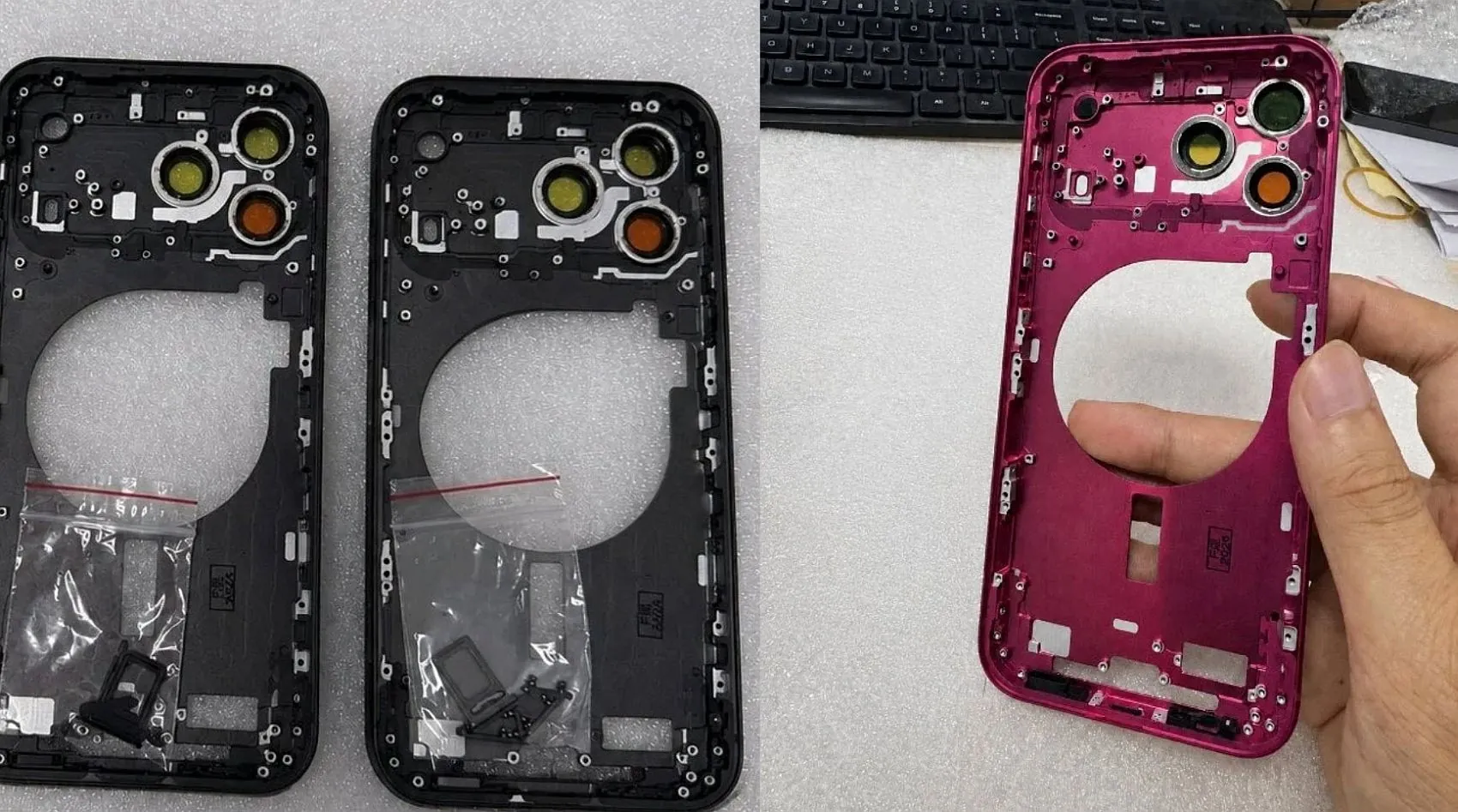
What the iPhone 18 Pro is expected to add to Apple Home
The smart-home part starts with Thread. Apple added a Thread radio to the iPhone 15 Pro in 2023, and iOS 18 later enabled direct control of Matter-over-Thread devices from iPhone 15 Pro and later without a separate hub in that limited local-control scenario. [5][6]
Apple has not published an iPhone 18 Pro spec sheet as of July 27, 2026, so the Thread radio should still be treated as expected rather than confirmed. The expectation is reasonable because the Thread path began with iPhone 15 Pro and continued through newer iPhone hardware, but “reasonable” is not the same as “announced.”
iOS 27 is the other half of the story. The Home-facing feature set reported from WWDC 2026 and beta-era coverage includes Thread 1.4 support, faster Matter pairing, 4K HomeKit Secure Video, Apple Intelligence camera summaries, natural-language video search, an energy monitoring tab for Matter-capable plugs and devices, and remote Apple TV software updates. Those features are still subject to change before the expected September public release. [7][8]
That list sounds bigger than the actual hub change. Faster pairing is not the same as full-time home management. A camera summary is not the same as replacing HomeKit Secure Video infrastructure. A Thread 1.4 phone is still a phone: it leaves the house, runs on battery, belongs to one user, and is not sitting on the network waiting to run automations for everyone else.
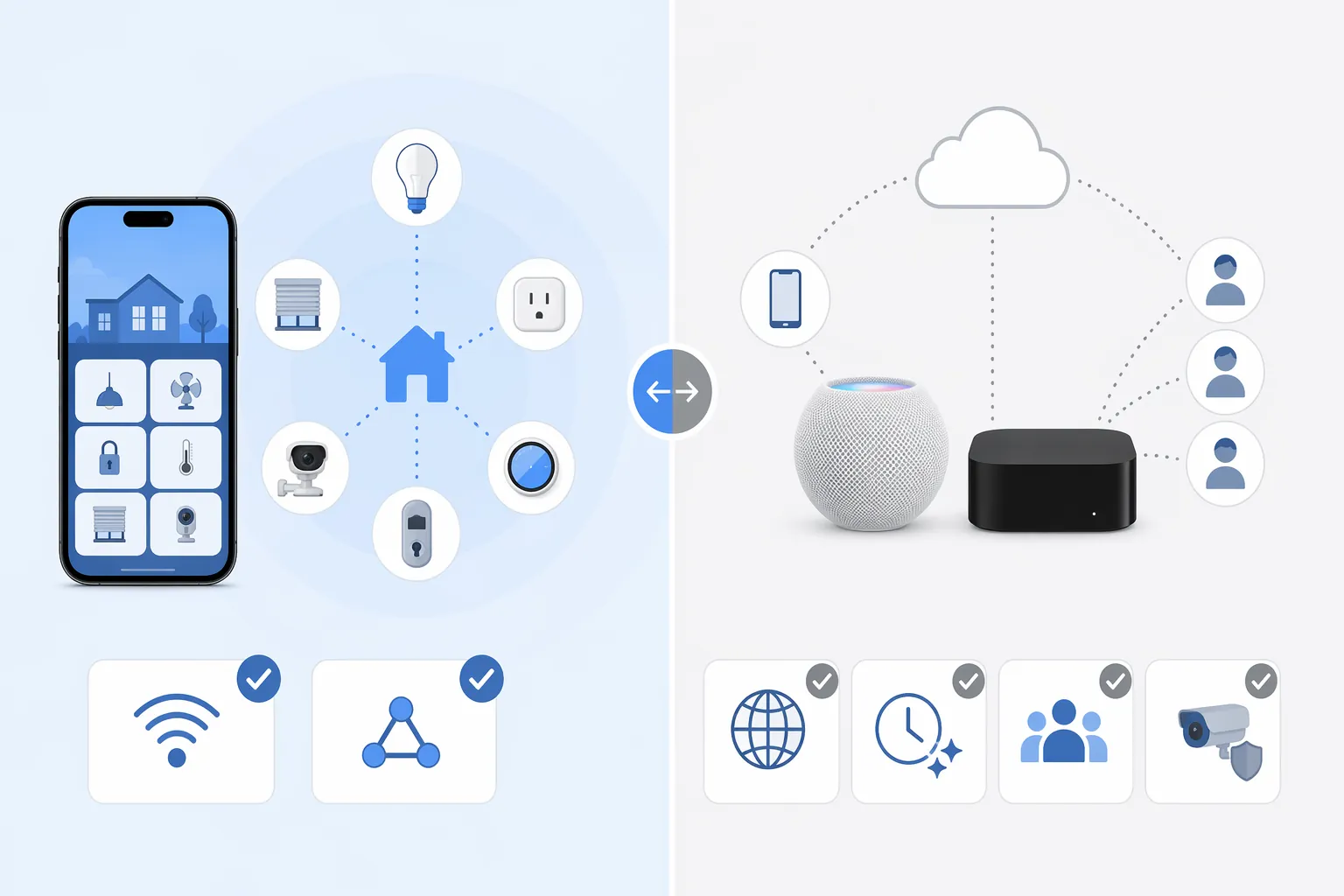
Phone control and home hub control are different jobs
The useful distinction is not “has Thread” versus “doesn’t have Thread.” It is whether the device is acting as a nearby controller or as the home’s resident hub. Apple’s Matter setup guidance covers pairing Matter accessories into Apple Home, while Apple’s home hub guidance still points to a HomePod or Apple TV for controlling accessories while away from home, sharing control, and running automations. [9][10]
| Apple Home task | What the iPhone 18 Pro may do by itself | When a home hub still matters |
|---|---|---|
| Pair a supported Matter accessory nearby | Expected to help with faster Matter pairing on iOS 27, including Thread accessories that support iPhone-direct setup. | A hub may still be needed if the accessory, firmware, or setup flow requires a Thread border router. |
| Control a nearby Matter-over-Thread light, plug, or switch | Possible for supported devices while the phone is in range. | Needed if you want control to keep working when the phone leaves or another user needs reliable access. |
| Control devices away from home | No, not as a dependable resident controller. | Required for remote access through Apple Home. [10] |
| Run automations | No, not as a replacement for a resident hub. | Required for automations that should run whether or not the owner’s iPhone is home. [10] |
| Share the home with other users | The phone can be one user’s controller. | Required for multi-user Apple Home behavior. [10] |
| Use HomeKit Secure Video, including 4K HKSV features | The phone can view and manage, depending on account and camera support. | A dedicated home hub remains part of the full HKSV setup. [10] |
This is where “works with iPhone” gets dangerously vague. A light turning on while you stand in the room is one kind of compatibility. A lock responding while you are at work, an automation running after sunset, a partner seeing the same home, and a camera recording securely are different requirements. The iPhone 18 Pro is expected to improve the first category. It does not remove the hub requirement from the second.
The uncomfortable accessory caveat: Thread accessory does not always mean iPhone-direct accessory
A mains-powered Thread accessory, such as a bulb, plug, or switch, is the cleaner case. Apple’s support material for the “Thread Border Router Required” alert distinguishes those from battery-powered Thread accessories and says mains-powered devices work immediately, while battery-powered Thread accessories such as locks and sensors need manufacturer firmware updates before pairing directly with iPhone. [11]
That caveat matters more than the product page language usually admits. A Thread lock can still be a Thread lock and still not be ready for direct iPhone pairing on day one. A sensor can support Matter and Thread and still need the maker to ship the right firmware before the iPhone-direct path behaves the way the new Apple hardware suggests it should.
If you are buying the iPhone 18 Pro partly to simplify an Apple Home setup, check accessories by behavior, not by logo. Ask whether that exact model supports direct Matter-over-Thread pairing from iPhone, whether battery-powered devices have received the required firmware, and whether the feature you care about is local control or full Apple Home service.
What iOS 27 changes, and what it merely makes nicer
Thread 1.4 is the iOS 27 change to watch if your home already has Thread accessories. The reported benefits include better mesh stability, multi-ecosystem credential sharing, and faster pairing, all of which are welcome in the exact homes where multiple platforms and border routers have made setup harder than it should be. [8]
But a protocol upgrade can also be a messy transition window. If iOS 27 arrives and Thread devices start dropping, hubs become flaky, or accessories show as unavailable after the update, the better move is not to erase the home or retire the hub immediately. Start with update status, hub assignment, accessory firmware, and Thread border-router behavior. We keep a separate update-watch guide for that exact situation: How to Fix HomeKit Devices Not Working After iOS 27 Update.
The camera features are also easy to overread. 4K HomeKit Secure Video, Apple Intelligence camera summaries, and natural-language video search make Apple Home cameras more useful if the final iOS 27 release keeps them in the shape currently reported. [7][8] They do not turn the iPhone 18 Pro into the thing that records and serves the home’s secure video when nobody is standing near the camera.
Energy monitoring is similar. A dedicated energy view for Matter-capable plugs and devices could make Apple Home feel less like a collection of tiles and more like a home system. [8] The data still depends on accessories that expose the right information, and the home still benefits from a hub that remains online when the phone is not around.
So, can the iPhone 18 Pro replace your HomePod or Apple TV?
For a very small setup, the iPhone 18 Pro may reduce how often you need to think about a hub. If you only want to pair and locally control a few supported Matter-over-Thread accessories while you are home, the expected Thread radio and iOS 27 pairing improvements are meaningful.
For the Apple Home most people actually want—remote access, automations, shared users, cameras, and a home that continues to behave when the owner leaves—the hub stays. A HomePod mini in a hallway or an Apple TV 4K under the television is less exciting than a Dark Cherry iPhone, but it is doing a different job.
If you are comparing 2026 iPhone options and want the same HomeKit question applied to Apple’s rumored foldable model, see How the Foldable iPhone Changes HomeKit in 2026.
Buy the iPhone 18 Pro for the phone, iOS 27, the camera system, and Dark Cherry if that deep red finish is the one you want. Do not buy it expecting to retire your HomePod mini, HomePod 2nd gen, or Apple TV 4K if your Apple Home setup depends on remote control, automations, multi-user sharing, or HomeKit Secure Video.
References
- iPhone 18 Pro Release Date: Apple's 15-Year Event Timeline Points To One September Date — Forbes, July 22, 2026
- iPhone 18 Pro colors revealed: Exclusive look at Apple’s 2026 models — Macworld, April 17, 2026
- Four iPhone 18 Pro Colors Revealed — MacRumors, April 17, 2026
- iPhone 18 Pro SIM Tray Leak Corroborates Dark Cherry Color — MacRumors, June 30, 2026
- Apple snuck Thread into its new iPhones — The Verge, September 14, 2023
- iOS 18 lets you control Matter smart home devices without a hub — The Verge, September 18, 2024
- iOS 27 Home app features — MacRumors
- iOS 27 Apple Home Thread 1.4/4K/energy — MatterAlpha
- Matter pairing — Apple Support
- Home hub setup — Apple Support
- Thread Border Router Required alert — Apple Support
Corroborating context
For protocol background on why this failure happens, see Compatibility & Protocols.
Not currently linked to a known regression. Background on the underlying protocol lives in Compatibility & Protocols.