
iPhone 18 Pro Max HomeKit Risks After Manufacturing Problems
Thread devices showing No Response only on iPhone 18 Pro Max; Matter commissioning failures isolated to new phone
Last updated
If an early iPhone 18 Pro Max lands on your desk and your Home app starts acting strange, the useful question is not “did Foxconn ruin my smart home?” It is narrower: do the failures follow that one phone after you compare it against the rest of your Apple Home setup?
Status: plausible risk, unconfirmed defect, testing required inside the return window. The current evidence supports extra caution with launch-window units, especially if your home depends on Thread bulbs, Matter-over-Thread sensors, or HomeKit Secure Video cameras. It does not support a claim that the iPhone 18 Pro Max has a confirmed Thread defect.
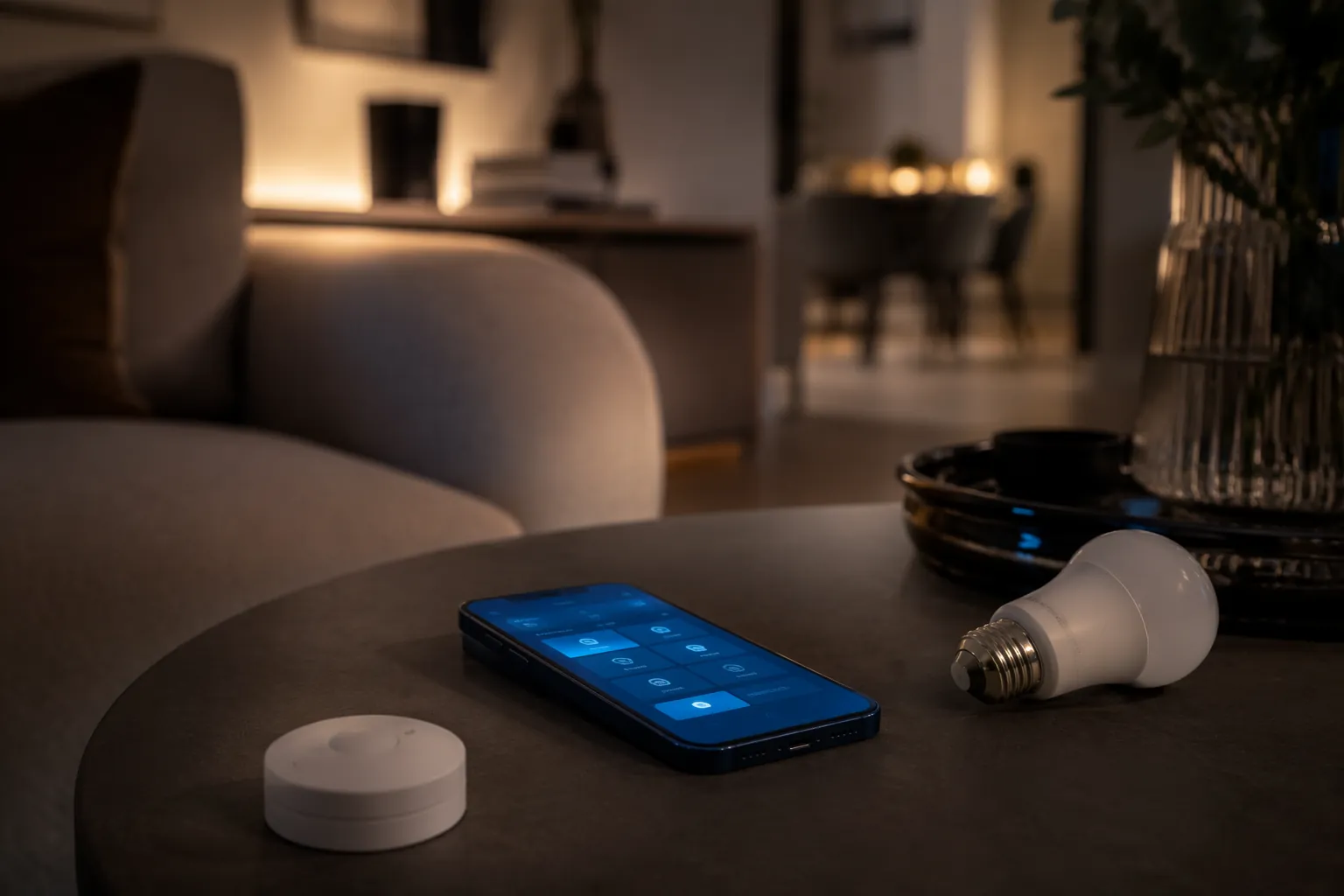
The pattern that would make the phone suspect
A bad Home app experience is not enough. Apple Home can look broken when the actual problem is a hub handoff, a Thread border-router conflict, a Matter pairing failure, an iCloud sync delay, or an iOS release bug. The phone becomes the leading suspect only when the failure stays local to that phone.
That means looking for symptoms like these: Thread devices show “No Response” only when viewed or controlled from the new iPhone 18 Pro Max; the same devices still respond from a HomePod, Apple TV, another iPhone, or another household member’s device; Matter commissioning is delayed or fails only from the new phone; or the Home app on the new phone drops connection while the hub layer keeps controlling the home normally.
The opposite pattern points away from the phone. If a HomePod mini, Apple TV, and every iPhone in the house see the same accessories as unavailable, you are probably looking at the Apple Home layer or the Thread mesh, not a defective handset. If one camera has a naming issue everywhere, that is not evidence of a bad radio. If Matter pairing is unreliable on every device after an iOS update, start with software before you start packing the phone for return.
| Symptom | What it suggests | What to compare before blaming the phone |
|---|---|---|
| Thread bulbs or sensors show “No Response” only on the iPhone 18 Pro Max | Phone-local issue is plausible | Control the same devices from HomePod, Apple TV, and another iPhone |
| Matter-over-Thread commissioning fails only from the new phone | Phone-local Thread, Bluetooth, Wi-Fi, or iOS commissioning path needs isolation | Try the same accessory setup from another supported Apple device without rebuilding the whole home |
| All Apple Home devices show the same broken state | Hub, iCloud, network, or iOS issue is more likely | Check active home hubs and known iOS 27 regressions |
| Camera labels, tiles, or Home app UI look wrong but accessories still respond | Software/UI bug is more likely than radio hardware | Test actual control and streaming from multiple devices |
| Problems appear after a hub swap or after a Thread border router takes over | Thread architecture issue is more likely | Stabilize the hub layer before judging the phone |
What the Foxconn reports do—and do not—prove
The manufacturing concern starts with Zhengzhou, not with HomeKit. Reports on July 22–23, 2026 said Foxconn was struggling to recruit enough workers for iPhone 18 Pro production, even after raising hourly wages to ¥27 and offering bonuses up to ¥7,500. [1]
That matters because the same launch cycle was reported to have entered mass production ahead of Apple’s expected September iPhone window. [2] A strained staffing ramp during early production is a reasonable reason to test an expensive launch unit carefully. It is not, by itself, proof that a radio component is bad, that quality control failed, or that HomeKit users should skip the phone.
The weak version of the claim is the one worth keeping: if early production is under pressure, and if the phone also introduces new radio-related silicon, launch units deserve more scrutiny than a mature mid-cycle device. The strong version—Foxconn staffing problems caused iPhone 18 Pro Max HomeKit issues—is not supported by the available reporting.
Why Thread is the part to watch
The rumored hardware context is what makes this more than generic launch anxiety. MacRumors’ July 2026 roundups describe an N2 chip handling Wi-Fi 7, Bluetooth 6, and Thread radio, along with Apple’s C2 modem reaching the Pro lineup. [3][4] Apple has not confirmed final iPhone 18 Pro Max specifications, so this has to stay in the risk-assessment column. Still, Thread is the right area to test because it is the radio layer most likely to look invisible until something fails.
The C2 modem should not be treated as the direct cause of local HomeKit trouble. Cellular modem behavior is not the same thing as Thread mesh behavior. But the broader point is that this generation is expected to change several connectivity pieces at once. When a new phone is the only new variable in a previously stable smart home, you do not need a conspiracy theory; you need a comparison test.
The iPhone’s role also needs to be grounded. Apple enabled direct Thread control for smart home devices with iOS 18, but that does not turn the phone into a full replacement for a proper Apple Home hub. [5] If you are expecting the iPhone 18 Pro Max to take over the job of a HomePod or Apple TV, start with what the iPhone can and cannot do as a smart home hub before you diagnose the handset.
The confound: iOS 27 can make a good phone look guilty
Launch phones arrive with launch software, and that is where many smart-home investigations get sloppy. Early iOS 27 beta HomeKit reports in July 2026 included camera name display problems and unreliable Matter pairing. [6] Those reports do not prove the public iOS 27 release will have the same scope or severity. They do mean that a bad Home app session on day one is not automatically a hardware story.
This is where the return window can work against you. Waiting for “the next update” may be sensible for a known software regression, but it is a poor plan when you have a short period to exchange a possibly abnormal unit. The fix is not to panic-return the phone. The fix is to sort symptoms into phone-local, hub-wide, and software-wide buckets before the calendar closes.
If the symptoms match known iOS behavior—camera tile labels wrong across devices, Matter setup unreliable from more than one controller, Home app state lagging everywhere—use the iOS path first. The companion walkthrough is here: How to Fix HomeKit Devices Not Working After iOS 27 Update. If the failure only follows the iPhone 18 Pro Max, keep going.
Do not let a hub problem wear a phone costume
Thread homes already have enough moving parts to frame the wrong suspect. Matter-over-Thread devices depend on border routers, Apple Home hubs, network state, accessory firmware, and the commissioning device. A phone can be involved in setup and control without being the root cause.
User reports around Thread and Matter often describe collapses after hub takeovers or border-router changes rather than a single handset failure. [7][8] That is why the first serious comparison is not “old phone versus new phone” in isolation. It is “new phone versus the hub layer that actually keeps the home online.”
If the active Home hub changes at the same time you set up the iPhone 18 Pro Max, freeze the diagnosis until you know whether the hub changed the behavior. The more useful hub-focused exit is Tested: iPhone 18 Pro Won’t Fix Your HomeKit Hub Problem. Do that work before you accuse the phone’s Thread radio.
The 14-day validation protocol
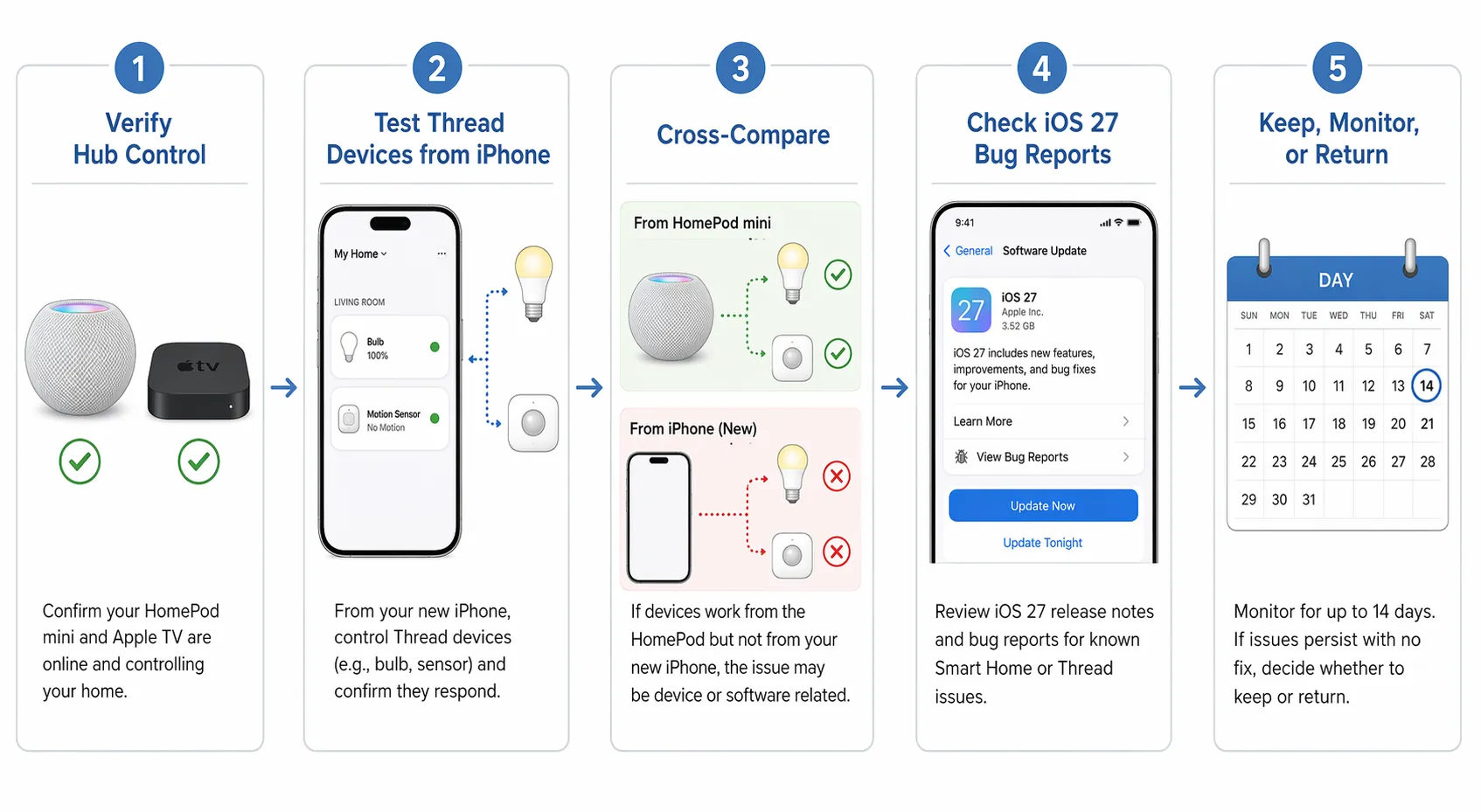
Treat the return window as a test plan, not as a reminder to worry. The goal is to change as little as possible in the home while you compare the new phone against known-good controllers.
Before setup: capture a clean baseline
Before transferring your daily use to the iPhone 18 Pro Max, open the Home app on your current phone and check the devices you care about most: Thread lights, Matter sensors, door locks, thermostats, and cameras. You do not need a lab notebook. You need enough proof to know whether the home was stable before the new phone joined it.
- Note which Apple Home hub is active: HomePod, HomePod mini, or Apple TV.
- Control the same few Thread accessories from your current iPhone and from a hub-based path such as Siri on HomePod.
- Open one or two HomeKit Secure Video cameras and confirm whether live view, thumbnails, and names are normal.
- Avoid removing accessories, resetting hubs, or rebuilding rooms before the new phone is tested.
Day 1: add the phone, but do not rebuild the home
Set up the iPhone 18 Pro Max normally, sign in with the same Apple Account, and let iCloud Home data settle. Then test control without changing accessory assignments. The mistake here is trying to “fix” the home immediately. Every reset removes evidence.
Start with simple commands. Turn a Thread light on and off from the new iPhone. Open a sensor tile. View a camera. Then do the same from another Apple device. If both paths behave the same, the new phone is not yet singled out. If the new phone is slow or wrong while the old path is normal, write that down with the accessory name and the controller used.
Days 2–4: compare Thread response from several positions
Thread range and mesh routing can make one room look cursed. Test the new iPhone near the hub, near a Thread accessory, and in the spot where you normally use it. The point is not to create a perfect RF survey. The point is to see whether the same accessory is consistently worse only from the iPhone 18 Pro Max while other controllers continue to work.
- If the new iPhone fails beside the accessory while another iPhone succeeds from the same place, the phone-local case gets stronger.
- If both phones fail in the same room, suspect mesh coverage, hub routing, or Wi-Fi conditions before hardware.
- If the HomePod or Apple TV can still control the device instantly while the new phone cannot, keep the comparison focused on the phone.
Days 3–7: test Matter commissioning without risking the whole home
Matter setup is where a weak or buggy commissioning path often shows itself, but do not delete working production devices just to run a test. Use a spare accessory if you have one, or wait until you have a device you can safely reset. Commission it from the iPhone 18 Pro Max, then compare with another supported Apple device if the first attempt fails.
A single failed pairing attempt is not enough. Matter pairing can fail for ordinary reasons: stale codes, accessory firmware, network state, or a hub that is not ready. The pattern that matters is repeated failure from the new phone while the same accessory joins cleanly from another controller under the same home and network conditions.
Days 5–10: separate iOS 27 behavior from handset behavior
At this point, check software before you escalate hardware. Install available iOS updates if you are comfortable doing so during the return period. Compare the behavior against another device on the same major iOS version if possible. If every iOS 27 device in the house has the same Home app issue, the phone is probably just the newest place you noticed the bug.
If only the iPhone 18 Pro Max misbehaves after updates and after hub checks, the case shifts. Do not erase the phone yet unless support asks you to. Save screenshots or short screen recordings showing the same accessory working from another controller while failing on the new phone. That evidence is more useful than a vague “HomeKit is broken” complaint.
Days 10–14: make the return-window decision
By the final days, stop adding variables. Do not replace the router, rebuild the home, reset every HomePod, and install beta software all in the same evening. Make the decision from the cleanest comparison you have.
| Your observed pattern | Return-window judgment |
|---|---|
| The same HomeKit or Matter problem appears across HomePod, Apple TV, old iPhone, and iPhone 18 Pro Max | Keep the phone; troubleshoot Apple Home, hubs, network, or iOS 27 |
| The issue matches known iOS 27 behavior and is not limited to the new phone | Keep or monitor; treat it as a software regression unless new evidence appears |
| Symptoms are intermittent, affect only some locations, and do not consistently follow one controller | Monitor; stabilize the Thread mesh and hub layer before returning hardware |
| Thread devices and Matter commissioning repeatedly fail only from the iPhone 18 Pro Max while the same home works from other controllers | Consider exchange or return before the window closes |
| You can reproduce the phone-local failure in front of support or in a store | Escalate with evidence and request hardware evaluation or exchange |
What evidence to keep if you escalate
Support teams can work with repeatable comparisons. They cannot do much with a general theory about Foxconn staffing or new silicon. Keep the claim small and observable: “This Eve or Nanoleaf Thread device responds from HomePod and another iPhone, but shows No Response from this iPhone 18 Pro Max under the same conditions.”
- Record the accessory name and type: Thread bulb, Matter sensor, camera, lock, or bridge.
- Record which controller worked and which failed: iPhone 18 Pro Max, older iPhone, HomePod, Apple TV, or another household member’s device.
- Keep screenshots of “No Response” states only when another controller can show the same accessory working.
- Note whether the issue appeared before or after an iOS update, hub change, accessory firmware update, or router change.
- Avoid factory-resetting every accessory before you have a reproducible comparison.
That is also the cleanest way to talk about manufacturing risk. The Foxconn reports justify caution with early units. The rumored N2 and C2 changes explain why the radio stack deserves attention. Neither replaces the work of proving that one handset behaves differently from the rest of the home.
The practical keep, monitor, or return call
Keep the iPhone 18 Pro Max if the failures reproduce across the wider Apple Home layer, match known iOS 27 behavior, or follow a hub change rather than the phone. A launch-window software mess is annoying, but it is not the same as a defective handset.
Monitor if the symptoms are intermittent and not cleanly phone-local. Thread homes can wobble when border routers, hubs, and Matter devices negotiate state, and a new phone may be blamed simply because it was the most visible change.
Consider return or exchange if Thread responsiveness, Matter commissioning, or Home app connectivity failures consistently follow only the iPhone 18 Pro Max after the isolation protocol. That is the pattern worth acting on before the return deadline, even while the manufacturing-to-HomeKit link remains unconfirmed.
References
- Apple faces an unexpected problem with the iPhone 18 Pro launch — news.am, July 2026
- iPhone 18 Pro reportedly enters mass production ahead of September launch — 9to5Mac, July 22, 2026
- iPhone 18 Pro Launching in Two Months With These 10 New Features — MacRumors, July 2, 2026
- iPhone 18 Pro Launching in Two Months With These 12 New Features — MacRumors, July 21, 2026
- Apple enables Thread control for smart home devices in iOS 18 — AppleInsider, September 18, 2024
- iOS 27 beta HomeKit bug reports — r/HomeKit, Reddit, July 2026
- Why Matter Still Sucks in 2026! — Terry White
- Thread is killing me — MacRumors Forums
Corroborating context
For protocol background on why this failure happens, see Compatibility & Protocols.
Not currently linked to a known regression. Background on the underlying protocol lives in Compatibility & Protocols.