
Is Apple TV+ Down Right Now? How to Tell and Fix It
Apple TV+ not working, unable to stream or sign in
Last updated
Start with the one-minute split
If Apple TV+ will not play right now, the first job is not to reinstall the app, reboot the router, or change your Apple ID password. The first job is to find the failing layer. A server-side Apple services problem and a stale local app session can show you almost the same screen, but they should get completely different treatment.
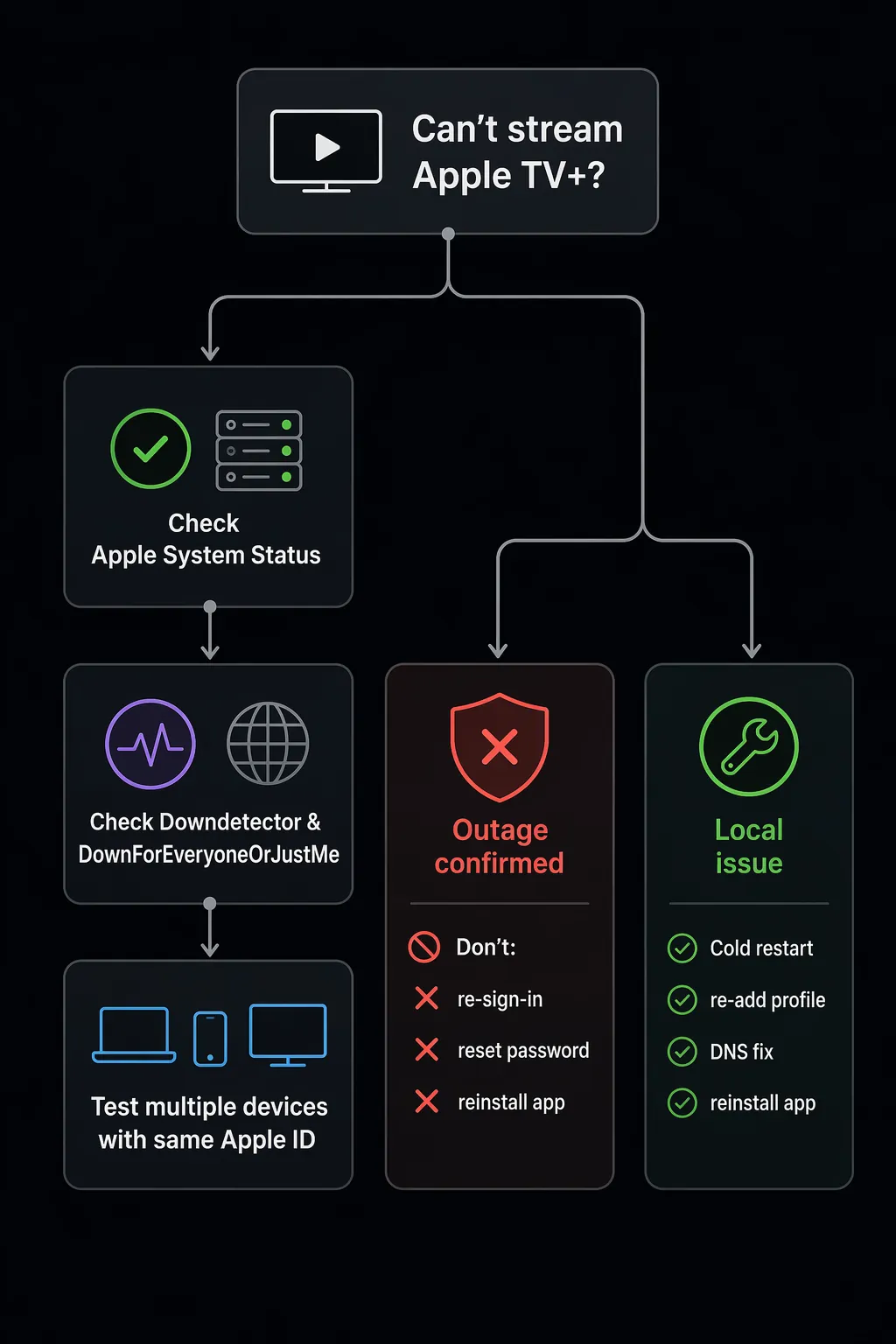
For anyone searching “apple tv plus down right now fix,” use this order before touching settings:
| Check | What to do | What it tells you |
|---|---|---|
| 1. Apple System Status | Open Apple’s System Status page and look for Apple TV+, Apple TV app, Apple Account, App Store, or related media services. | If Apple shows an active issue, treat it as an outage branch. |
| 2. If Apple’s page will not load | Check Downdetector and DownForEveryoneOrJustMe. | If both show a spike or failed reachability, do not wait on Apple’s page alone. |
| 3. Test the same Apple ID on another device | Try Apple TV+ on your phone, browser, tablet, Mac, Apple TV box, or another TV if one is nearby. | Same account failing across devices points upstream; one device failing points local. |
This is not overcautious. On Jul. 26–27, 2026, a roughly three-hour Apple services incident affected Apple TV, Apple Music, and other Apple services, with third-party reports saying the issue was fixed at about 2:04 AM ET on Jul. 27; StatusGator reported that Apple’s own status acknowledgement lagged by 46 minutes. Apple’s labeling and third-party outage labels did not fully match, which is normal enough in real incidents that it is not worth arguing from the couch. It is worth noticing, though, because it means the official page is important but not the only signal to check. [1][2]
Downdetector’s current Apple TV+ report mix also explains why the first useful fixes are account-aware rather than router-heavy: 52% of reports are categorized as login problems, compared with 25% for the app and 20% for video streaming. That does not prove your login is the problem, but it does make repeated Wi-Fi fiddling a poor first move when the symptom is sign-in failure, “Content Unavailable,” or a screen that keeps sending you back to activation. [3]
A previous multi-service pattern is useful too. During the Jan. 20, 2026 outage, coverage described simultaneous sign-in failures across iPhone, iPad, Mac, and Apple TV. When the same Apple ID fails in the Apple TV app on several device types at once, that is not how a single bad HDMI cable, one corrupted TV app, or one flaky Wi-Fi connection usually behaves. [4]
If the signs point to an outage, stop fixing
When Apple System Status, Downdetector, DownForEveryoneOrJustMe, and your own multi-device test all point the same way, the useful action is restraint. During an outage, local repairs usually add noise. They do not bring the service back faster, and some of them create extra cleanup after Apple’s side recovers.
- Do not keep signing in over and over. If authentication is failing upstream, repeated attempts can run into rate limits and make it harder to tell when the service has recovered.
- Do not change your Apple ID password unless Apple is actually prompting for account security reasons. A password reset during a service failure can turn one streaming problem into a house-wide account handoff problem.
- Do not delete the Apple TV app out of impatience. On some smart TVs, reinstalling also means reactivating, pairing, or digging through app-store menus you did not need to touch.
- Do not reboot the router unless other internet services are also failing. If Netflix, YouTube, web browsing, and other devices are fine, your router has not earned the blame yet.
- Check back after the reported resolution window, or when outage trackers return to normal. Then relaunch the app and try one clean sign-in.
Apple’s status page deserves first respect because it is the service owner’s page. It is still allowed to be delayed, temporarily unavailable, regionally awkward, or affected by the same broader incident you are trying to diagnose. Third-party trackers are not proof by themselves; they are corroborating signals. The point is not to crown one source. The point is to avoid doing local surgery while the patient is somewhere else.
If it looks local, fix the most likely layer first
Move to local fixes when the outage checks are quiet, other Apple services are working, and the failure stays attached to one device, one TV, or one app install. The order matters. Start with the least destructive fix that clears a bad session. Save delete-and-reinstall for later.
Cold restart: unplug power for 30 seconds
A cold restart is not the same thing as selecting Restart from a menu. Power has to leave the device. For an Apple TV box, smart TV, Roku, Fire TV Stick, or streaming box, turn it off, unplug it from power, wait 30 seconds, plug it back in, and then open Apple TV+ again.
This clears app state, network sessions, and tokens that a soft restart can leave behind. Digital Trends reported roughly 90% success from a System Restart during single-unit testing on tvOS 17.4, which is useful as an anecdote, not a universal success rate. The practical version is still simple: remove power, wait, and come back clean. [5]
Only restart the modem and router if the rest of the house is also acting wrong. If several smart-home devices are recovering after an internet or power interruption, use a dependency order — modem, router, hubs, then end devices — rather than randomly yanking cords. NestGrid’s internet-outage recovery guide covers that broader household sequence.
Apple TV hardware: remove and re-add the user profile
Use this when Apple TV+ opens but keeps looping through sign-in, says “Content Unavailable,” or behaves as if your subscription cannot be verified even after a restart. On Apple TV hardware, the fix is often the profile, not the app.
- Open Settings.
- Go to Profiles and Accounts.
- Remove the affected profile.
- Restart the Apple TV.
- Add the user back as the default profile.
This is the branch to try before a password reset when the same password works elsewhere. iDownloadBlog’s troubleshooting roundup points to removing and re-adding the profile as a fix for “Apple TV app isn’t available right now” style failures, matching the account-token behavior that survives ordinary restarts. [6]
Samsung TV says “Network Unavailable”: check DNS and time
A Samsung TV can have internet access and still fail only against Apple’s servers. In an Apple Support Community thread about the Apple TV “Network Unavailable” error, the documented fix path involved moving away from automatic or Google DNS to ISP-provided DNS and verifying that the TV’s time was synchronized, with the likely failure happening around the secure connection to Apple’s servers. [7]
- Open the TV network settings and look for DNS configuration.
- If DNS is manually set to Google DNS, switch back to automatic or ISP-provided DNS.
- If automatic DNS is failing, try Cloudflare DNS at 1.1.1.1 as a controlled test.
- Check the TV’s date and time settings. A wrong clock can break secure service handshakes even while general internet tests look fine.
- Power-cycle the TV after changing DNS or time settings.
This is not a universal Samsung cure. It is a good match when the error text is network-specific, other apps work, and Apple TV+ fails in a way that looks like the TV cannot establish trust with Apple’s service.
Reset the Apple TV app before you delete everything
On smart TVs and streaming devices, Apple’s official support path includes resetting the Apple TV app from inside the app’s settings. That restores the app to factory settings and clears account and app data that may survive ordinary relaunches. [8]
- Open the Apple TV app.
- Go to Settings inside the app.
- Choose Reset, if available on your device.
- Close and reopen the app.
- Sign in once, carefully, with the Apple ID that owns the subscription or channel access.
If your device does not expose Apple’s in-app Reset option, then delete and reinstall is the next clean step. It is more annoying, but at least by this point you have already ruled out the two things that make reinstalling wasteful: an active outage and a profile/session problem that a lighter reset could have cleared.
Short platform notes
These are not full manuals for every screen in the house. They are the places to look once you have picked the right branch.
- Apple TV box: prioritize cold restart, then remove and re-add the affected profile. If all Apple services fail across devices, go back to outage checks.
- Samsung TV: for “Network Unavailable,” check DNS and time sync. For 2019 Samsung QLED 8K/4K TVs, Samsung says firmware version 1065.0 or above is required for the Apple TV+ app to function. [9]
- Roku: restart the Roku first. If Apple’s in-app reset is unavailable or fails, remove the Apple TV channel, restart the Roku, then add the channel again.
- Fire TV: force stop the Apple TV app, clear cache if the option is available, restart the Fire TV, then reinstall only if the app still fails.
- LG TV: update the TV software, restart the TV from power, then reinstall the Apple TV app if reset is not available.
- Browser: try a private window or another browser before changing account settings. If the same Apple ID fails in browser and on a separate device, suspect the account/service layer.
When to stop and escalate
Stop local troubleshooting when the symptom changes from app failure to account uncertainty. If Apple TV+ still will not play after the outage checks are normal, a cold restart is done, the profile has been refreshed where applicable, DNS/time are sane, and the app has been reset or reinstalled, the next question is entitlement: whether the Apple ID on that screen is the one with the subscription, family sharing access, channel purchase, or bundle access.
At that point, use Apple’s account and billing support rather than continuing device work. More restarts will not prove subscription access. More password changes will not repair a TV app install. The useful troubleshooting has already done its job: it has narrowed the failure to the layer that can still answer.
References
- PSA: Apple TV, Apple Music, and more are currently down for some users [Update: Fixed] — 9to5Mac, 2026-07-26
- Apple TV+ status report — StatusGator
- Apple TV+ down? Current problems and outages — Downdetector
- App Store and Apple TV Experiencing Outage — MacRumors, 2026-01-20
- Apple TV Not Working? 12 Common Problems and Expert-Verified Fixes (2026) — Digital Trends
- How to fix 'Apple TV app isn't available right now' (10 tips) — iDownloadBlog
- AppleTV network unavailable — Apple Support Community
- If you can't watch or stream movies, TV shows, or sports in the Apple TV app — Apple Support
- Apple TV app is not working on my Samsung TV or projector — Samsung Support
Corroborating context
For protocol background on why this failure happens, see Compatibility & Protocols.
Not currently linked to a known regression. Background on the underlying protocol lives in Compatibility & Protocols.