
I bought a smart switch, opened the box, and found no neutral wire. The switch is still sitting in a drawer. That mistake cost me not just the price of the switch, but an hour of frustration, a trip back to the store, and a lot of muttered questions about why nobody warns you about this. If you are shopping for a smart light switch right now, knowing whether your home has a neutral wire is the single most important compatibility check you can do. Do it before you buy.
Why neutral matters
Most smart switches need constant power to keep their Wi‑Fi, Zigbee, or Thread radio on, even when the light is off. That always‑on power comes from the neutral wire. As PCWorld explains, most smart controls “depend on a neutral wire to supply constant power to the radio.” Without it, the switch steals power through the load – the bulb – and that creates flicker and ghosting. The problem is common enough that no‑neutral switches often require a bypass capacitor to fix it.
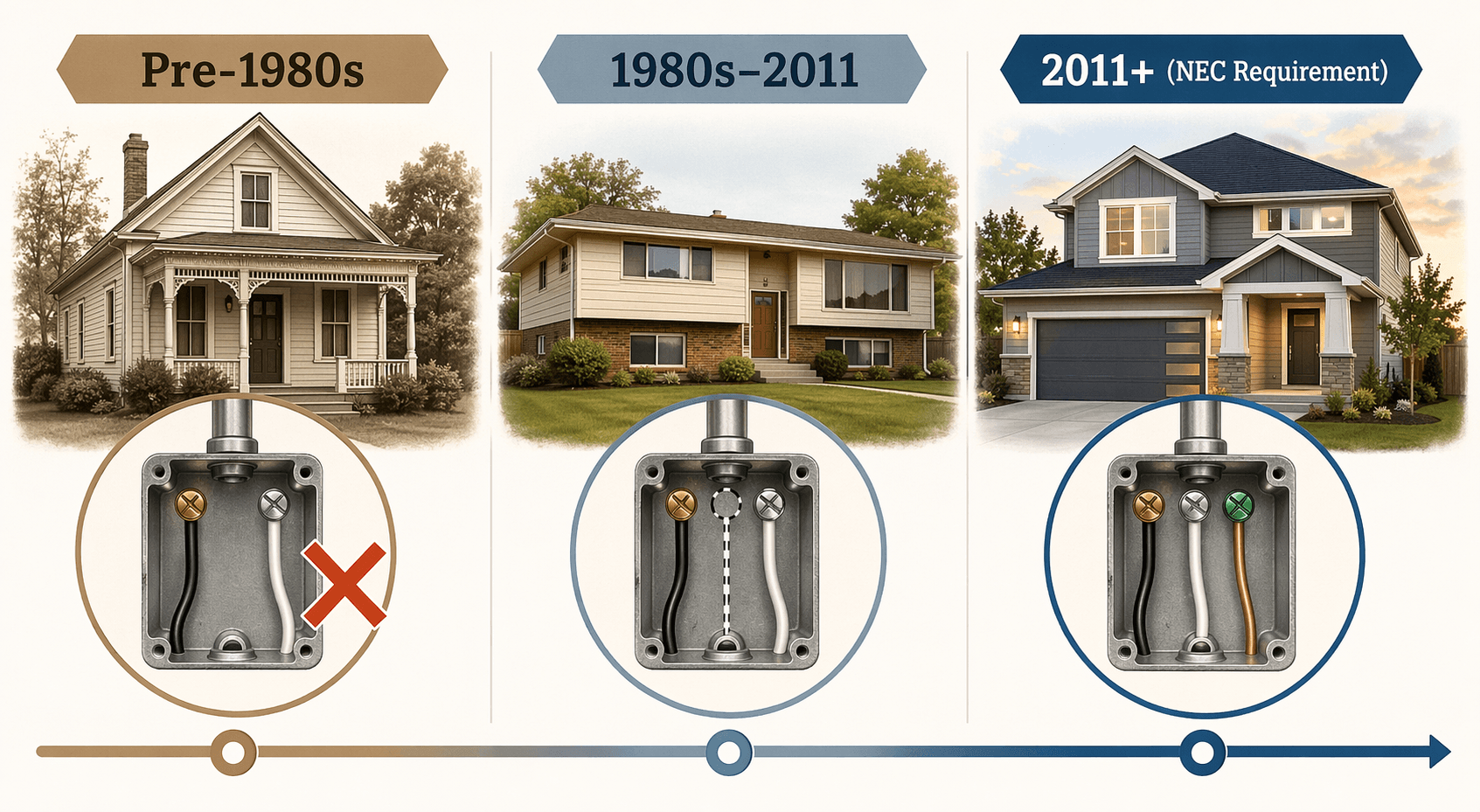
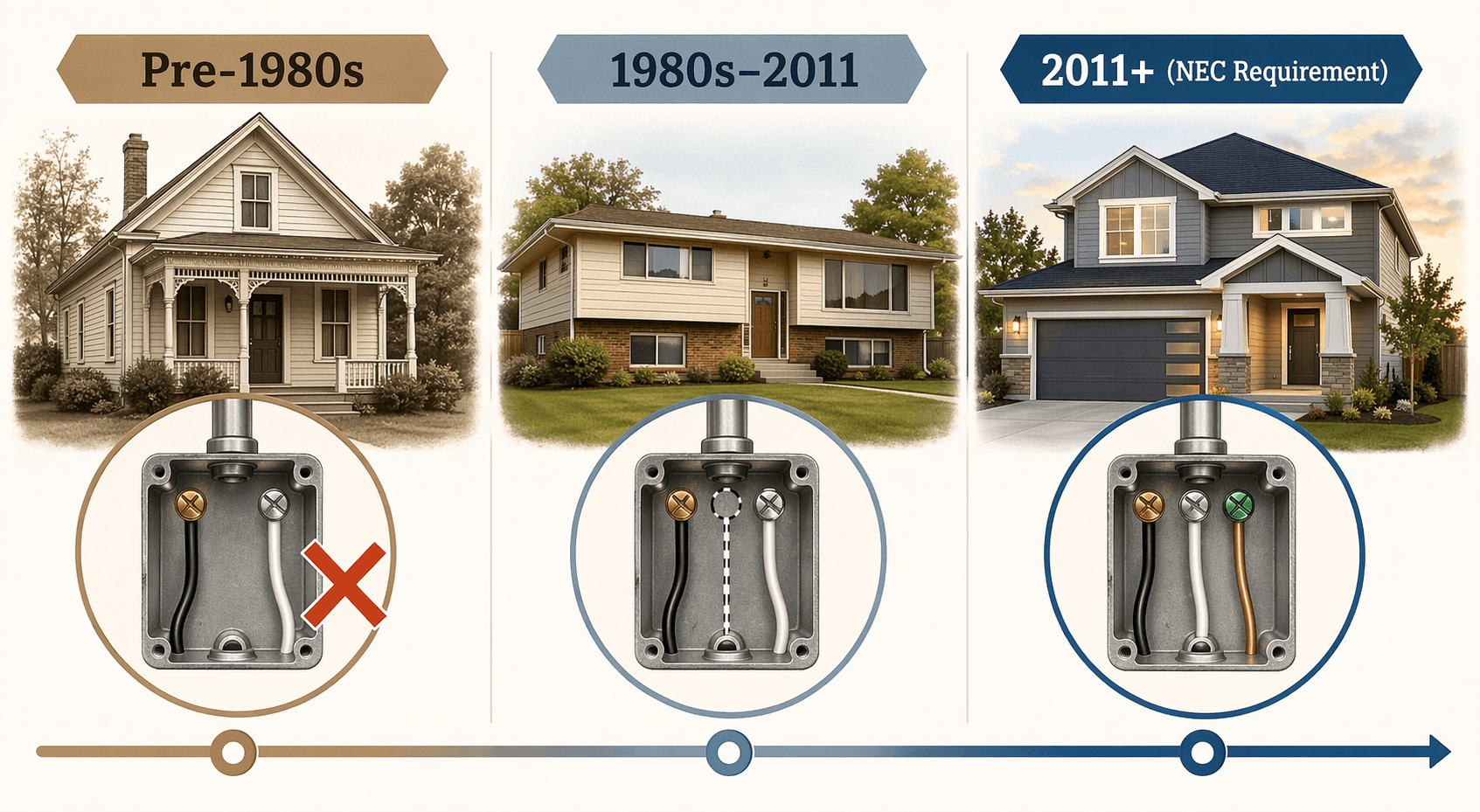
How many switches require a neutral? Nearly all the well‑reviewed ones. The TP‑Link Kasa KS225 Matter Smart Wi‑Fi Dimmer – Wirecutter’s top pick at $19–$21 – requires a neutral. The Tapo S505D, Leviton Z‑Wave 800 dimmer, and Enbrighten Zigbee dimmer all need one too. Matter‑compatible switches almost universally assume you have a neutral wire in the box. The National Electrical Code has required neutrals since 2011, but older homes often don’t have them.
Check for a neutral wire – safely
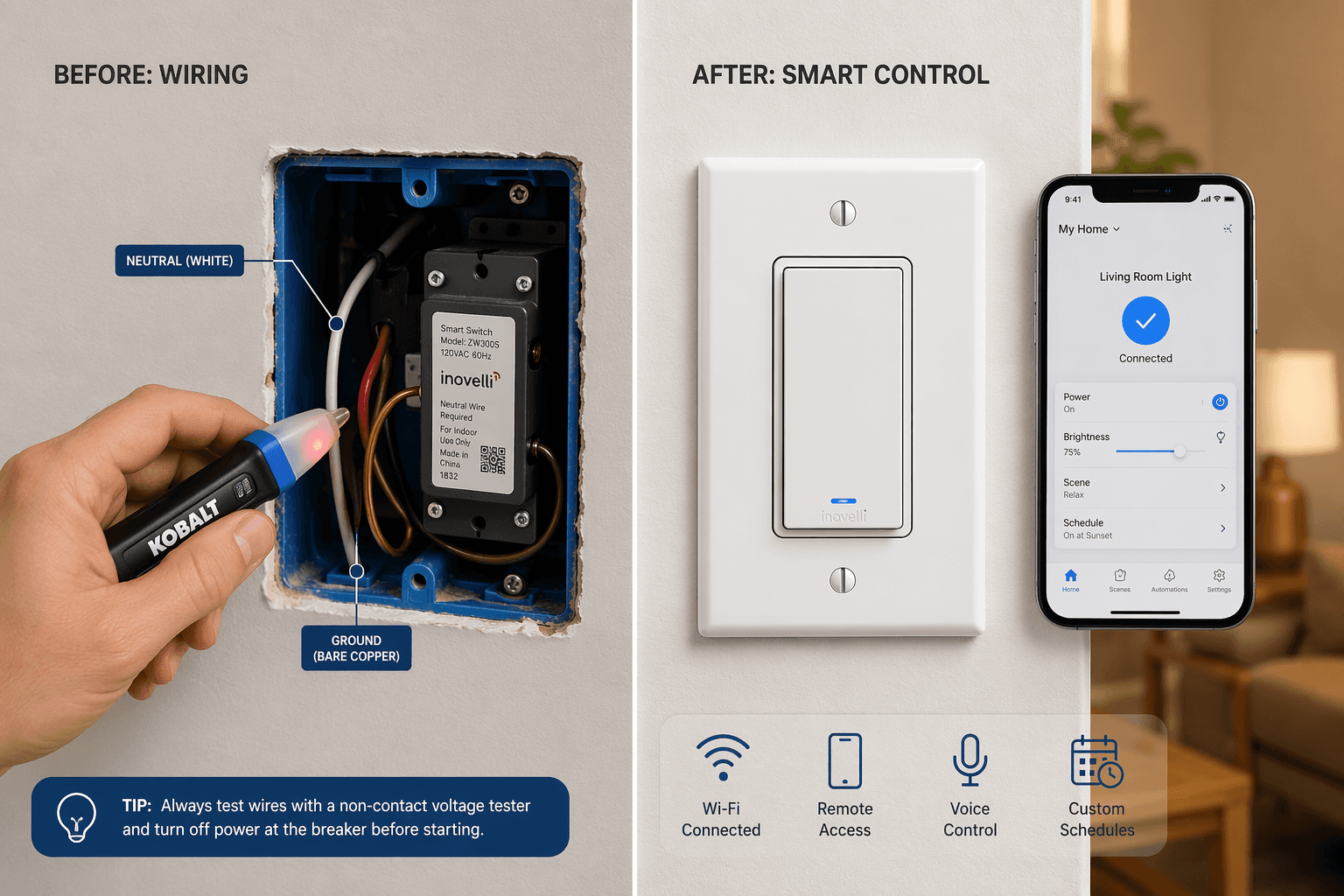
The safe, DIY way to check for a neutral wire takes about five minutes. Tom’s Guide gives the clearest instruction: “safely open a switch box and look for a white wire coming from the gang box.” Here is the correct order:
- Turn off the circuit breaker for that room. Confirm power is off by flipping the switch and checking the light does not turn on.
- Use a non‑contact voltage tester on the screw terminals of the switch. No chirp means the circuit is dead.
- Remove the switch plate and unscrew the switch. Pull it out gently to expose the wire connections.
- Look for a white wire (or bundle of white wires) capped together in the back of the box. That is the neutral bundle.
Sonoff echoes the same advice for its ZBMINIL2 no‑neutral module: “Before buying, open the switch plate and confirm you have a neutral bundle (typically multiple white/blue wires capped together).” That white bundle may not be there – and if it is not, you have to decide what to do next.
Your home’s age is a hint, not a guarantee
The rough timeline is useful as a first guess. Tom’s Guide puts the boundary around 1990: homes built after 1990 most likely have neutral wires; homes built before 1980 most likely do not. The 1980s are a transitional decade. Wirecutter adds that neutrals have been standard since the 1980s and required by the NEC since 2011. But the timeline is only a hint.
The common “switch loop” wiring in older homes routes the neutral directly to the light fixture, skipping the switch box entirely. So you can have a 1975 house without neutrals, and also a 1988 house without them if the electrician used switch loops. SmartHomeScene explains that this is “the main reason older homes lack a neutral at the switch.” The only way to know for sure is to open the box.
If you have a neutral: the shortlist
Found a white bundle in the box? Congratulations – you have the widest choice. The neutral‑required market is mature, competitive, and increasingly Matter‑enabled. Here are three solid picks with different strengths:
- TP‑Link Kasa KS225 Matter Smart Wi‑Fi Dimmer (~$19–$21) – Wirecutter’s top pick. Supports Matter, so it works with Alexa, Apple Home, and Google Home. Requires neutral.
- Tapo S505D (~$18) – Wi‑Fi dimmer, neutral required, reliable and simple. Works with Alexa and Google Home via the Tapo app.
- Leviton Z‑Wave 800 Dimmer (~$30–$35) – Best for Z‑Wave mesh networks. Requires neutral, provides energy monitoring (if you pair it with a Z‑Wave hub that supports it).
Each of these switches will behave exactly as advertised: no flicker, no ghosting, full energy‑monitoring capability (if the model supports it), and the ability to act as a Zigbee or Z‑Wave repeater. For a more detailed comparison across all current models, see our Smart Light Switch Comparison & Buyer's Guide.
No neutral? What you give up
If your box has no neutral wire, you are not out of luck – but the no‑neutral alternatives come with strings attached that many buyers only discover after installation. I don't buy the “just buy a no‑neutral switch” advice without understanding what you give up. Here are the main no‑neutral options currently available:
| Model | Bridge/Hub Needed | Price (approx) | Key Limitation |
|---|---|---|---|
| Leviton Decora Smart DN6HD | Yes – $14 Wi‑Fi bridge (supports up to 25 devices) | $30 | Bridge required; no Matter |
| Lutron Caséta / Diva | Yes – Lutron Smart Hub (~$80) | $55+ | Proprietary hub, no Matter yet |
| GE Cync Dimmer (3‑wire) | No hub (Wi‑Fi direct) | $25 | No‑neutral version available; may flicker with LED |
| Aqara H2 No‑Neutral | Requires Aqara Hub (Zigbee) | $35 | 5W minimum load; no energy monitoring without neutral |
| Sonoff ZBMINIL2 | Requires Zigbee hub | $15 (module) | 6A relay, end‑device only |
Now the trade‑offs – and I want to be clear about each one, because they are rarely mentioned in the same paragraph as the product name.
The Leviton DN6HD is Wirecutter’s no‑neutral pick, but its $14 bridge is an extra piece of hardware that occupies a wall outlet and needs its own Wi‑Fi connection. It also currently lacks Matter support.
Flicker and ghosting are real. SmartHomeScene explains that no‑neutral switches “draw a small trickle of current through the light bulb,” which can cause LED bulbs to flicker or glow faintly when off. Many manufacturers require a bypass capacitor to fix it – an extra component you must install in the fixture’s junction box.
Minimum load requirements are another hidden gotcha. The Aqara H2, when wired without neutral, needs at least 5 watts of load. If you have a single 3W LED bulb, it may not turn off fully – or may never turn on. The same source notes that the Aqara H2’s energy‑monitoring feature “does not work” in no‑neutral mode. That's a feature you'll only find you're missing after purchase.
Finally, no‑neutral switches are always end devices on a Zigbee or Z‑Wave network. They cannot route traffic to other devices, so they do not strengthen the mesh. SmartHomeScene puts it plainly: “No‑neutral Zigbee/Z‑Wave switches operate as end devices only and cannot route traffic.” If you are building a large smart home with many devices, every switch that lacks neutral is one less repeater in your mesh.
If you already installed a no‑neutral switch and are dealing with flicker or ghosting, our Smart Light Switch Troubleshooting guide covers the fixes in detail.
Should you add a neutral wire?
For some homes, the smartest move is to hire a licensed electrician to pull a neutral wire to the switch box. This makes sense when:
- You plan to install smart switches in multiple locations – the cost of one electrician visit scales well.
- You want full features: energy monitoring, zero flicker, and mesh routing.
- Your attic or basement is accessible, making it a quick job for a pro.
Sonoff’s advice is pragmatic: “If your switch box lacks a neutral wire, options include using a no‑neutral smart switch, hiring an electrician to pull a neutral, or installing the module at the fixture.” The fixture‑mounted route (installing the module behind the light) is a more advanced DIY project – see our How to Install a Smart Light Switch guide for the full wiring walkthrough.
Check your switch box for a neutral wire. If yes, buy any neutral‑required switch and enjoy full features. If no, decide: accept the trade‑offs of a no‑neutral switch (flicker risk, possible energy‑monitoring loss, extra bridge costs) or hire an electrician to add a neutral. Either way, you now know what you are getting into. That drawer full of incompatible switches – that is where this guide saves you.
Community Tips
Share platform-specific variations, steps that have changed after app updates, or tips that helped your installation succeed.
Comments
Join the discussion with an anonymous comment.