
The weakest thunderstorm plan in a connected house is also the most common one: an expensive TV, router, game console, desktop computer, and smart hub all sitting behind one outlet strip that says “surge protected” on the package. That strip may still have a job. It is not the device that should be asked to protect the whole house.
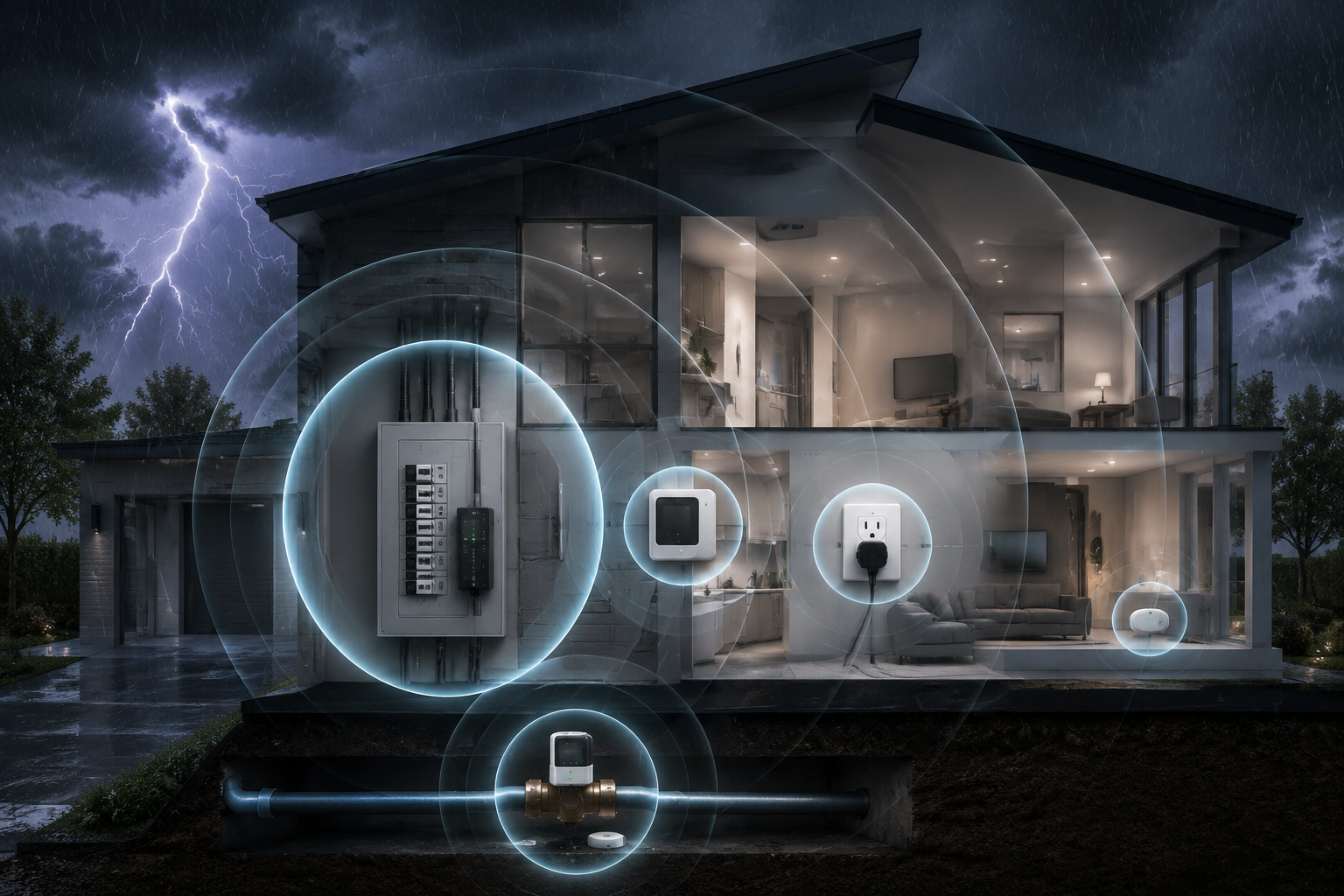
The smart home devices for thunderstorm safety that matter most are the ones placed where damage actually travels: at the electrical service, inside the panel, along branch circuits, at sensitive outlets, and on the water line if an electrical failure turns into a plumbing loss. Lightning-related homeowners insurance claims reached $1.65 billion in 2025, up 59% from the prior year, and the average claim cost rose 42.8% to $26,616; in Texas, the average was $60,382 per claim.[1]
Those numbers do not mean every storm is a catastrophe. They do mean the old advice — “plug it into a surge protector” — is too small for a house full of electronics, HVAC boards, smart appliances, network gear, chargers, and control modules. The newer electrical code baseline points in the same direction: the 2020 National Electrical Code added a requirement for whole-home surge protection in new dwelling units, a standard that affects new construction and certain major electrical work rather than making older homes automatically noncompliant.[2]
Start At The Panel, Not Behind The TV
A lightning-induced surge does not politely wait until it reaches the entertainment center. It can enter through utility power, move through the service equipment, and spread across branch circuits before a point-of-use strip ever has a chance to clamp anything. That is why the first layer is a whole-home surge protective device, usually a Type 1 or Type 2 SPD installed at or near the main electrical panel.
A Type 1 SPD is installed on the line side of the service disconnect or at the service entrance, depending on the equipment and local rules. A Type 2 SPD is installed on the load side, commonly at the main panel. Both are panel-level devices, not plug-in strips. Their job is to divert excess voltage toward ground before it can travel deeper into the house wiring. That placement is the difference: the device is guarding the distribution point, not one outlet.
This is electrician work. The device itself is often described in the $100–$400 range, but that figure does not include labor, panel space, permitting where required, or any corrections needed in an older panel before the installation is safe.[2] If the quote looks higher than the device price, that does not automatically mean something is wrong; it may mean the electrician is pricing the actual job rather than the box on the shelf.
The quiet detail worth asking about is end-of-life behavior. Many SPDs use metal oxide varistors, or MOVs, that absorb surge energy and degrade with repeated events. After enough hits, a unit may no longer provide the same protection. Some devices have indicator lights; some higher-end systems may provide remote status or alerts. Either way, the homeowner needs to know what “still protected” looks like after a summer of storms. A dark indicator light after a major storm is not cosmetic. It is a service call.
| Layer | Device Type | Where It Sits | What It Can Do | What It Cannot Do |
|---|---|---|---|---|
| 1 | Whole-home Type 1 or Type 2 SPD | Service entrance or main electrical panel | Diverts surge energy before it spreads through branch circuits | Guarantee protection from a direct lightning strike |
| 2 | Smart electrical monitor | Panel, receptacle, or utility-linked monitoring point depending on product | Detects abnormal electrical signatures, arcing patterns, or circuit behavior | Replace a properly installed SPD |
| 3 | Point-of-use surge protector | Outlet serving electronics or appliances | Adds local protection for sensitive gear | Protect the whole house by itself |
| 4 | Smart leak sensor and auto-shutoff valve | Main water line and leak-prone rooms | Limits water damage if a storm-related electrical problem leads to a plumbing failure | Prevent the electrical surge that started the chain |
The Electrical Monitor Is A Warning Layer, Not A Surge Device
Once panel surge protection is in place, smart monitoring becomes more useful because it is no longer being asked to do the wrong job. A monitor watches behavior. It does not absorb surge energy. It can tell you that something electrical looks abnormal, but it is not the same as a surge protective device with a path to ground.
Products in this category vary. Some smart energy monitors focus on load disaggregation and appliance-level energy use. Others are built around electrical fire prevention and abnormal waveform detection. Whisker Labs says its Ting sensor analyzes 30 million electrical signals per second and claims its technology helps prevent 4 out of 5 electrical fires.[3] That is a manufacturer claim, not the same thing as an independent guarantee, but it explains the useful role of the device: catching dangerous electrical signatures that a homeowner would never see from a hallway.
That warning layer matters after thunderstorms because the obvious failure is not always the only failure. A router may reboot. A garage-door opener may lose its settings. An HVAC control board may start acting erratically instead of dying cleanly. The monitor’s value is not that it proves lightning damage; it is that it can surface electrical trouble early enough for an electrician or utility investigation before the next symptom becomes smoke, nuisance tripping, or a dead appliance.
This is also where smart-home visibility earns its keep. A dashboard is not protection by itself. A timely alert that points to arcing, voltage irregularity, or an abnormal pattern can change who you call and how fast you call them. The handoff is simple: the SPD takes the surge hit if it can; the monitor watches for electrical behavior that still should not be ignored.
Outlet Surge Protectors Still Belong In The Plan
Demoting the surge strip is not the same as throwing it away. Point-of-use protectors still make sense for computers, networking equipment, TVs, gaming systems, audio gear, and desks full of chargers. They are the local layer, useful for sensitive electronics and smaller transient events that reach the outlet.
The mistake is treating a plug-in protector as the first and only layer. It sits too late in the path. If a surge has already traveled through the panel and branch wiring, the strip is working with whatever energy remains at that receptacle. Some strips also lose protective capacity over time, and many homeowners keep using them long after the protective components have degraded because the outlets still provide power.
For a smart home, the priority outlets are not always the most visible ones. Protect the network core first: modem, router, mesh gateway, network switch, smart-home hub, and any bridge that keeps locks, leak sensors, thermostats, or cameras online. Then protect workstations and entertainment systems. If a storm knocks out a TV, that is annoying. If it knocks out the network and the leak shutoff system cannot report status, the house becomes harder to read right when you most need information.
A good outlet plan also includes replacement discipline. If a strip has a protection indicator, look at it after major storms. If it took a visible hit, smells burned, feels hot, or has damaged outlets, remove it from service. Power still flowing through a strip does not prove surge protection is still available.
Add A Water Shutoff Layer Because Electrical Damage Does Not Always Stay Electrical
The storm loss that surprises people is the one that starts as an electrical problem and ends as water on the floor. A surge-damaged appliance, failed control board, frozen or interrupted equipment cycle, or pump problem can create a second chain of damage. That is why the fourth layer is not another surge protector. It is water detection and automatic shutoff.
There are two broad device types here. Spot leak sensors sit under sinks, behind toilets, near water heaters, beside washing machines, near sump equipment, or under HVAC condensate lines. They are inexpensive and easy to place, but they only know about water where you put them. Main-line systems such as Moen Flo and Phyn Plus monitor water flow and can close a valve on the main supply when they detect a serious leak pattern. Those main-line valves are more powerful, but they usually require professional plumbing installation.
The installation point matters as much as the app. A shutoff valve installed on the main water line can stop incoming water for the whole house. A sensor behind the washing machine can only tell you about that location. The strongest setup pairs both: a main-line valve for whole-house control and spot sensors in the places where a small amount of water needs to be caught quickly.
If you are building this layer from scratch, start with the home’s actual weak points rather than buying sensors by room count. Water heater pan, washing machine, dishwasher, refrigerator ice maker, basement mechanical area, sump pit, and under-sink cabinets are usually more important than a perfectly even distribution. For a broader room-by-room setup, the site’s storm and flood preparedness system guide is the more complete planning path.
For buyers comparing devices, the useful distinction is not “smart” versus “not smart.” It is spot detection versus flow monitoring versus automatic shutoff. A simple flood puck may be enough under a sink. A whole-home valve makes more sense when the consequence of being away for a weekend is thousands of gallons of water. The smart flood sensor buyer guide breaks that choice out by device category.
Automation is where the water layer becomes more than an alarm. A leak sensor can notify the phone, turn on lights, announce through speakers, and trigger a valve closure if the system supports it. A main-line valve can shut water off when abnormal flow appears and nobody responds. Those automations should be tested before storm season, not discovered during a thunderstorm. The site’s leak detector automation ideas are useful once the hardware is chosen.
How The Four Layers Hand Off To Each Other
The layers work because they are not all trying to solve the same problem. The panel SPD is sacrificial electrical protection. The monitor is visibility and early warning. The outlet protector is localized backup for sensitive electronics. The leak system handles a different loss path after the storm has already stressed the house.
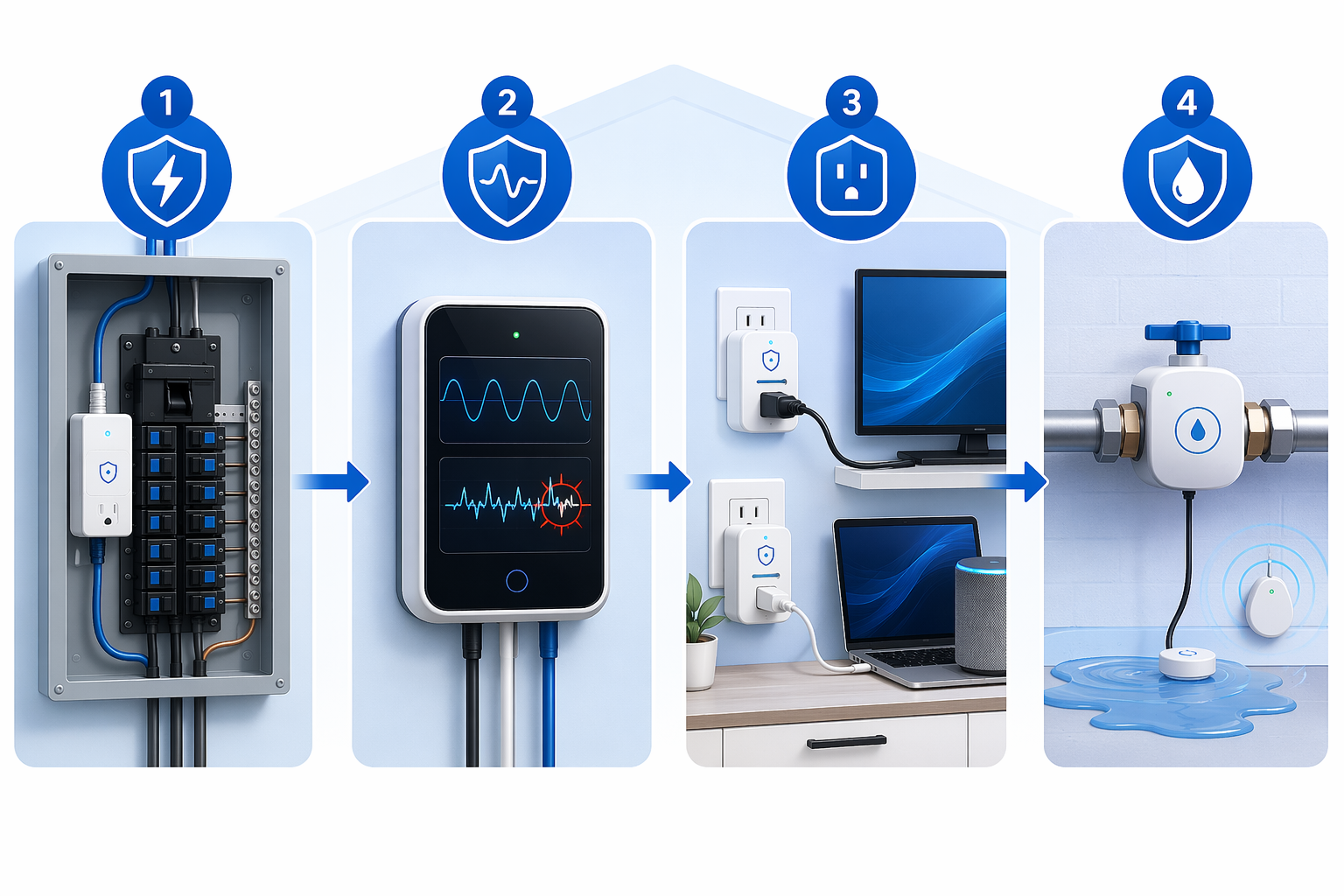
A practical sequence looks like this: an electrician installs a Type 1 or Type 2 SPD at the service equipment or main panel. The homeowner adds electrical monitoring so abnormal behavior is not invisible. Sensitive devices stay on quality point-of-use protectors. A plumber installs a main-line water shutoff valve if the homeowner wants whole-house water control, and spot sensors fill in the most leak-prone areas.
That order also keeps expectations clean. If the monitor sends an alert after a storm, do not assume the SPD failed; it may have reduced one kind of risk while another electrical issue still needs attention. If a surge strip dies, do not assume the panel device was unnecessary; the strip may have been handling what remained at that outlet. If the water valve closes after a storm, do not treat it as a nuisance until someone checks the appliance, fixture, or pipe that caused the flow event.
This is where homeowners in older houses should be especially careful. Existing homes may not have the newer panel-level protection required in new construction under NEC 2020, and they may also have panels with limited space, older grounding conditions, or previous DIY work that complicates installation.[2] The right first call is not to a gadget aisle. It is to a licensed electrician who can look at the panel, grounding, service equipment, and local code requirements.
What To Skip Or Treat As Secondary
Thunderstorm preparedness can sprawl quickly into batteries, radios, cameras, sump pumps, generators, and emergency kits. Those can matter, especially for longer outages, but they are not the core answer to protecting connected infrastructure from lightning-induced electrical damage. If your main worry is staying online and powered through a multiday outage, the site’s hurricane preparedness device guide is a better next read.
For this job, prioritize devices that sit on the damage path. A battery camera watching the driveway does not protect the HVAC board. A smart speaker announcing a weather alert does not protect the router. A weather station may tell you a storm is close, but it does not change what happens inside the panel when voltage spikes. Useful devices are not always the flashiest ones.
There is also a regional reality to keep in view without turning the purchase decision into a weather lecture. U.S. lightning strikes increased about 20% in 2025 and reached an eight-year high, according to reporting that cited Vaisala and National Lightning Detection Network data.[4] That supports taking surge protection seriously, especially in thunderstorm-prone regions, but it does not change the basic house-level sequence: panel first, monitoring second, outlet protection third, water shutoff where the plumbing risk justifies it.
Renters, Condos, And Homes Where You Cannot Touch The Panel
If you rent or live in a condo where panel work is controlled by a landlord, association, or building manager, the full four-layer plan may not be yours to install. You can still use quality point-of-use surge protectors, place leak sensors where allowed, keep network gear on protected outlets, and ask management whether the building has service-level surge protection. For a condo, the answer may involve shared electrical equipment rather than only the breaker panel inside the unit.
The important thing is not to mistake renter-friendly for complete. Plug-in devices can reduce some risk at the outlet and give you alerts, but they cannot retrofit the building’s service equipment. If you own the home and can hire the trades, panel-level protection is the layer worth solving instead of endlessly replacing fried strips.
The Realistic Standard
No consumer smart home system can promise survival from a direct lightning strike. Any product language that implies lightning can simply be stopped should be read with suspicion. The better standard is damage reduction: divert what can be diverted at the panel, watch for dangerous electrical behavior, protect sensitive electronics locally, and shut off water quickly if the storm turns into a plumbing problem.
That is the difference between a house full of gadgets and a house with a defensive system. The devices are useful because each one has a clear failure point to cover, a limit you can understand, and a person responsible for installation or follow-up when something changes.
References
- Triple-I: Lightning Caused $1.65 Billion in US Homeowners Claim Payouts in 2025; Average Cost Per Claim Surges Nearly 43%, BusinessWire, 2026-06-18
- NEC 2020 Whole-Home Surge Protection, DITEK
- Whisker Labs Ting, Whisker Labs
- Lightning strikes in US increased 20% in 2025, reaching 8-year high, Fox Weather